Yes, in almost every enterprise deployment: SD-WAN handles how traffic moves, not what traffic is allowed to do, so a dedicated firewall layer is still the thing standing between your network and an attacker. The confusion comes from the fact that most SD-WAN platforms now ship with some firewall function built in — the real question isn’t whether you need a firewall, it’s whether the one you already have is doing enough.
Quick Take
SD-WAN and firewalls solve different problems: SD-WAN picks the best path for a packet, a firewall decides whether that packet should be allowed at all. Enterprises are turning to SD-WAN because it lets them route traffic over cheaper broadband and LTE links instead of expensive private circuits, but that same shift pushes more traffic straight out to the internet from each branch instead of funneling it through a data center firewall. Most SD-WAN appliances now bundle a basic stateful firewall, and a growing number bundle a full next-generation firewall (NGFW). Whether that’s sufficient depends on how much of your traffic goes direct-to-internet, how sensitive that traffic is, and whether you’re willing to manage security policy separately at every site.
What a Firewall Actually Does That SD-WAN Doesn’t
Think of it like a cloud-based architecture for routing: SD-WAN sits above the physical hardware and decides which path — MPLS, broadband, 4G/5G — a given piece of traffic should take, based on real-time link quality, application type, and policy. It’s a traffic cop, not a bouncer. It optimizes throughput and reliability across multiple transports, and it’s very good at that job.
A firewall does something categorically different. It inspects the actual content and context of a connection and enforces rules about what’s allowed in and out — blocking by IP, port, application signature, or behavior. A firewall enforces rules governing the security of incoming and outgoing traffic, while SD-WAN manages and optimizes how that traffic gets routed — the two are complementary, not interchangeable. A network can have flawless SD-WAN routing and still be wide open to an attacker who gets past the perimeter, because routing efficiency has nothing to do with access control.
Why This Distinction Matters More With SD-WAN, Not Less
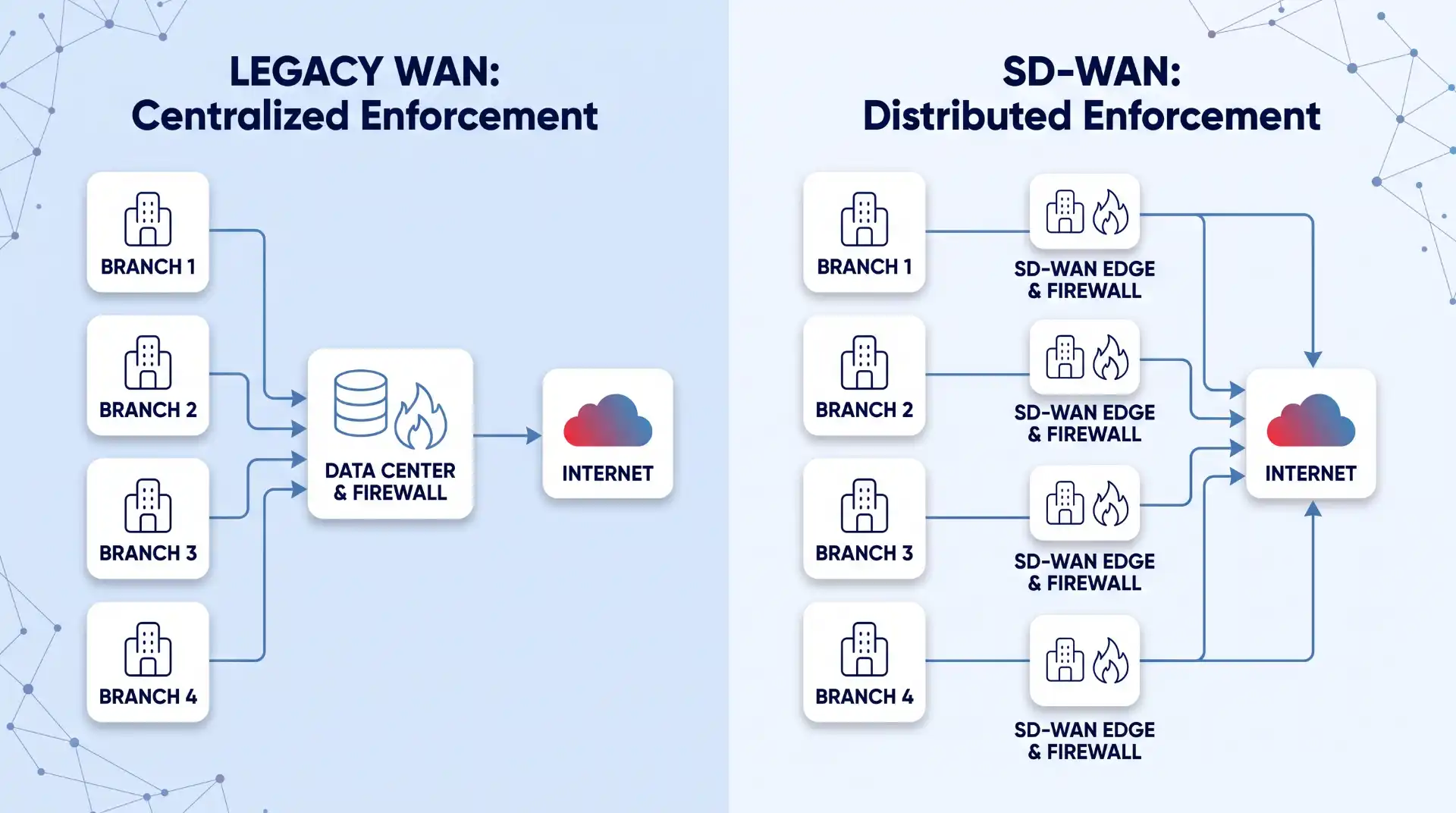
Traditional WAN architecture backhauled branch traffic to a central data center, where it passed through one well-maintained firewall stack before touching the internet. SD-WAN’s whole value proposition is breaking that pattern: branches connect directly to the internet and to cloud applications like Microsoft 365 or Salesforce, skipping the backhaul entirely. That’s a real performance win, but it also means every branch is now a potential entry point instead of just the data center. If an attacker compromises one branch, that branch can become a stepping stone to move laterally into the rest of the organization undetected. The more distributed your internet breakout points, the more places you need consistent security enforcement — not fewer.
What Comes Built In — and Where It Falls Short
Almost every SD-WAN product on the market today ships with some form of embedded firewall. The gap between vendors is in which kind.
| Firewall type | What it checks | Where it typically shows up | Good enough for… |
|---|---|---|---|
| Basic stateful firewall | Source/destination IP, port, connection state | Bundled free in most SD-WAN edge devices | Low-risk branches with mostly internal traffic |
| Zone-based firewall (ZBFW) | Traffic between defined network zones/segments | Mid-tier SD-WAN platforms | Segmenting guest Wi-Fi, IoT, and corporate traffic |
| Next-generation firewall (NGFW) | Application identity, users, intrusion signatures, SSL/TLS-encrypted content | Higher-end appliances, often licensed separately | Direct-internet-breakout branches handling sensitive data |
| Cloud-delivered firewall (FWaaS) | Same as NGFW, enforced at a cloud point of presence instead of on-box | SASE/SSE platforms | Distributed workforces, remote users, no per-branch hardware |
The failure mode here isn’t subtle once you’ve seen it: a company buys an SD-WAN box, sees “firewall” on the spec sheet, and assumes they’re covered. A basic stateful firewall will stop obviously malformed or unauthorized connections, but it has no idea what’s inside an encrypted session, can’t tell a legitimate SaaS login from a credential-stuffing attempt, and won’t catch malware riding inside HTTPS traffic. With SSL-encrypted traffic now the majority of all internet traffic, being unable to decrypt and inspect it is a real gap, not a theoretical one — most malware today travels over HTTPS specifically because it knows most branch firewalls aren’t inspecting inside it.
Common Misconceptions
“My SD-WAN vendor includes a firewall, so I’m covered”
Included doesn’t mean adequate. Vendors differ enormously in what their “included” firewall actually inspects, and licensing tiers matter — some platforms ship a stateful firewall for free and gate NGFW features like intrusion prevention or SSL inspection behind a separate subscription. Read the spec sheet for the specific features you need (application awareness, IPS, SSL inspection), not just the word “firewall.”
“SD-WAN is inherently less secure than traditional WAN”
Not true — it’s differently secure. A well-configured SD-WAN deployment with an appropriately scaled firewall layer can be more secure than a legacy WAN, because centralized policy management makes it easier to push consistent rules to every site at once. The risk isn’t SD-WAN itself; it’s deploying it without adjusting your security architecture to match the new traffic patterns it creates.
“Once I have both, I’m automatically protected”
This is the most common mistake in practice: an organization deploys SD-WAN and a capable firewall, but the two aren’t actually calibrated against each other. Firewall policies get copied over from the old WAN without accounting for new direct-internet paths, or security zones don’t map cleanly onto the new SD-WAN topology. You end up with all the right pieces sitting on the network, still leaving traffic uninspected because nothing is actually enforcing policy on the paths that changed. This is worth a deliberate review, not an assumption, every time SD-WAN topology changes at a site.
Where a Basic Built-In Firewall Genuinely Isn’t Enough
There are specific conditions under which the bundled firewall is a real liability rather than a minor gap:
- Direct internet breakout with sensitive data. If a branch handles payment data, health records, or other regulated information and connects straight to the internet, stateful inspection alone won’t satisfy most compliance frameworks — you need application-layer visibility and logging.
- High-value targets with low security staffing. Small branch offices are often the softest target precisely because nobody is watching the firewall logs. A basic firewall generates minimal alerting; an NGFW or cloud-delivered option typically centralizes that visibility.
- Heavy SaaS and cloud application use. Basic firewalls filter by IP and port, which is nearly useless against modern SaaS traffic that all rides over HTTPS on standard ports. You need application-aware inspection to tell a sanctioned SaaS session from an unsanctioned one.
- Remote and hybrid workforces bypassing the branch entirely. A firewall bolted onto SD-WAN hardware at a branch does nothing for a remote employee connecting straight from a coffee shop — that traffic needs its own enforcement point.
Where a basic bundled firewall genuinely is enough: small branches with low-risk traffic, internal-only applications, and no direct handling of sensitive data — the classic case being a retail location whose SD-WAN box mainly routes point-of-sale traffic back to a well-protected data center.
The 2026 Answer: SASE and Firewall-as-a-Service
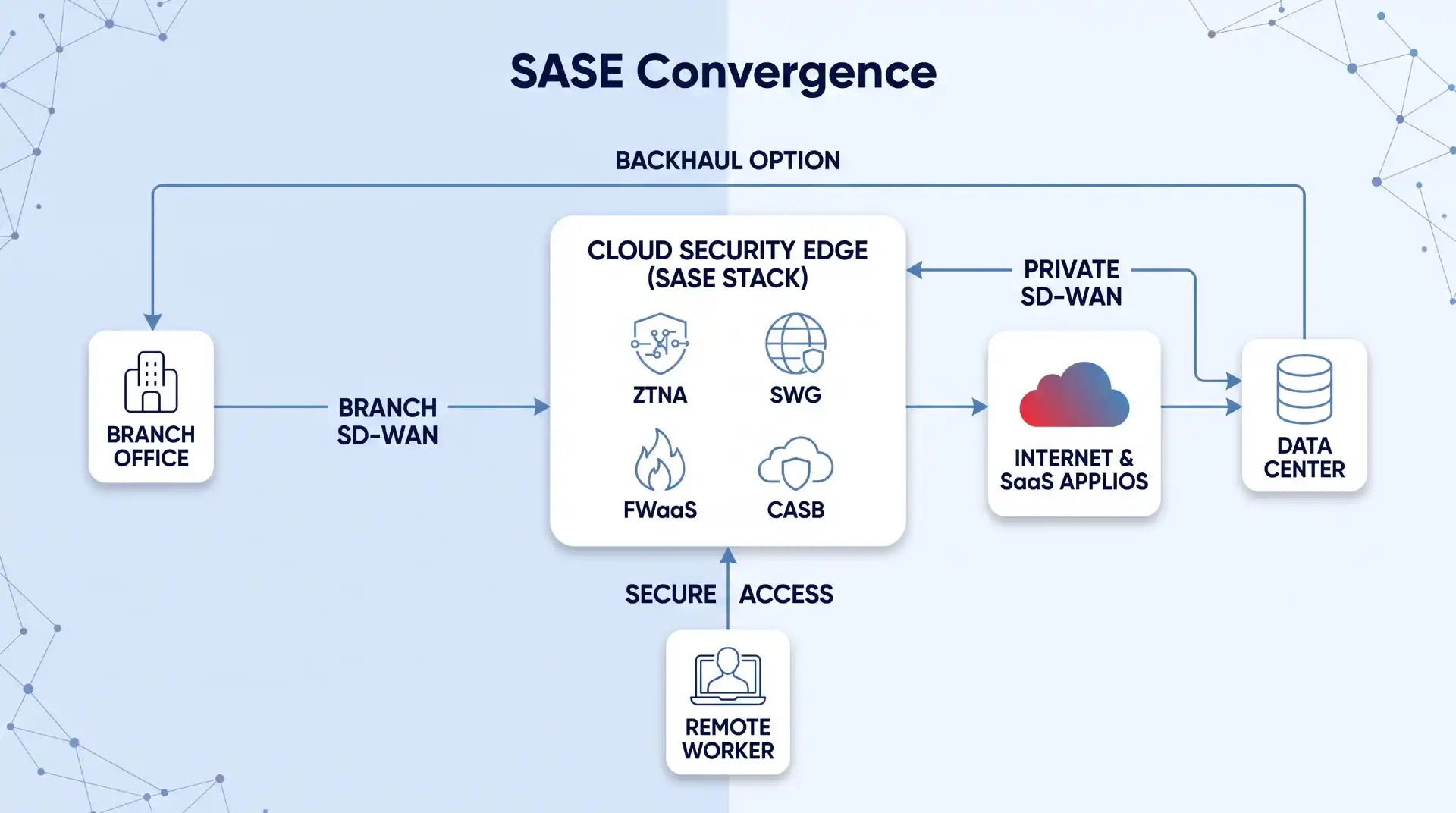
The industry’s response to this exact gap has a name now. Secure Access Service Edge (SASE) converges SD-WAN with cloud-delivered security functions — including zero trust network access, secure web gateway, and firewall-as-a-service (FWaaS) — into a single managed platform, rather than leaving networking and security as separately bolted-together products. Instead of relying on a box at each branch to inspect everything locally, traffic gets steered to a nearby cloud enforcement point that applies consistent policy regardless of where the user or branch physically sits.
This isn’t a niche trend anymore. Gartner projects that 60% of SD-WAN deployments will have moved to SASE architecture by 2026, and vendors including Fortinet have pushed further by merging routing and security into a single control plane, where the SD-WAN layer manages path selection while an embedded firewall inspects sessions in real time on the same device. For a fleet of small branches without dedicated IT staff, this convergence is often the more realistic path to real security than trying to run and patch separate hardware firewalls at every site — the trade-off is a monthly per-site cost and reliance on a third party’s cloud infrastructure, which won’t suit every organization’s risk tolerance or budget.
That said, SASE isn’t automatically the right call for everyone. Organizations with heavy on-premises infrastructure, strict data-residency requirements, or existing investment in hardware NGFWs may get more value from an integrated SD-WAN-plus-NGFW appliance — a single unified platform combining next-generation firewall protection with SD-WAN traffic steering — than from moving enforcement into someone else’s cloud.
How to Decide What You Actually Need
Work through this in order, and don’t skip ahead to a product decision before finishing it:
- Map where traffic actually breaks out to the internet. Every site with direct breakout is a site that needs its own enforcement, not just the data center’s.
- Classify the sensitivity of what each site handles. A warehouse scanning inventory barcodes has a different risk profile than a regional office processing customer payment data.
- Decide how much you can realistically manage per site. If you don’t have staff to maintain firewall rules at twenty branch locations, a cloud-managed FWaaS/SASE model removes that burden; a fleet of independently managed hardware firewalls will only be as secure as your weakest-maintained site.
- Check what your current SD-WAN license actually includes. Confirm whether SSL inspection, IPS, and application control are included or gated behind an add-on tier before assuming coverage exists.
- Ask your provider directly how the migration affects your firewall setup. Before cutting over, get specifics on how existing rules map to the new SD-WAN topology — this is the step most commonly skipped.
Run this exercise as part of your broader cybersecurity decision-making process rather than treating it as a one-off SD-WAN project task, since the same trade-offs (staffing, budget, risk tolerance) drive most of your other security purchasing decisions too.
Key Takeaways
- SD-WAN optimizes how traffic travels; a firewall decides what traffic is allowed. They’re complementary functions, and neither substitutes for the other.
- Most SD-WAN products ship with a built-in firewall, but “included” ranges from basic stateful inspection to a full NGFW — check which one you actually have.
- Direct internet breakout at each branch is SD-WAN’s biggest security trade-off: it improves performance but multiplies the number of places that need enforcement.
- The most common real-world failure isn’t missing hardware — it’s a firewall and SD-WAN that were never calibrated to work together after a migration.
- SASE and FWaaS are the 2026-era answer for organizations that can’t staff and patch firewall hardware at every branch, but they come with recurring cost and a shift of enforcement to a third party’s cloud.
FAQ
Does every SD-WAN come with a firewall built in?
Nearly all mainstream SD-WAN products include at least a basic stateful firewall by default. Whether more advanced features — SSL inspection, intrusion prevention, application control — are included or sold as an add-on varies significantly by vendor and licensing tier, so it’s worth confirming rather than assuming.
Can I keep my existing hardware firewall when I move to SD-WAN?
In most cases, yes — many organizations run SD-WAN edge devices alongside a separate, more capable firewall rather than relying solely on what’s bundled. This is common where the SD-WAN box handles routing and only basic filtering, while a dedicated NGFW handles deeper inspection at sites that need it.
Is SASE the same thing as SD-WAN security?
No. SD-WAN security typically refers to whatever firewall function is embedded in the SD-WAN device itself. SASE is a broader architecture that converges SD-WAN with cloud-delivered security services — including firewall-as-a-service — into one managed platform, shifting where and how enforcement happens rather than just what’s bundled on-box.
Does adding proper firewall protection to SD-WAN significantly increase cost?
It usually does, though the increase depends heavily on architecture. Upgrading to NGFW licensing on existing hardware is typically the smallest incremental cost; moving to a SASE/FWaaS model introduces an ongoing per-site or per-user subscription instead of a one-time hardware cost, which can be more or less expensive depending on how many sites you’re securing and over what timeframe.
