Restaurant technology improves the dining experience most when it removes friction from ordering, payment, kitchen coordination, and routine operational work. The strongest systems do not simply replace people; they help staff spend less time on repetitive tasks and more time keeping service accurate, timely, and personal.
That balance matters because diners do not want the same level of automation in every setting. Ordering and payment convenience ranks highly with restaurant customers, but full-service diners can still value direct interaction with employees. The useful question is therefore not whether restaurants should automate everything. It is where technology can make the experience easier without removing the parts of hospitality that customers still want.
Quick Take
Technology delivers the highest return when it removes mechanical friction—such as bill-splitting delays, ticket re-entry, and inventory tracking—rather than attempting to replace human hospitality. Point-of-sale systems, kitchen displays, and mobile ordering succeed by coordinating the restaurant’s actual kitchen and service capacity, not by substituting software for operational fundamentals.
Where Restaurant Technology Helps Most
Restaurant technology now reaches far beyond the cash register. A modern setup can connect ordering, payments, kitchen work, inventory, customer records, reservations, equipment, and employee administration. The restaurant’s point-of-sale system, or POS, often sits near the center because it records orders and payments and can exchange information with other systems.
The table below shows the main job of each technology covered in this article. Some improvements are visible to customers, while others work in the background to prevent delays and confusion.
| Technology | Main friction it addresses | Primary effect |
|---|---|---|
| Digital and self-service ordering | Queues and slow order entry | Guest and staff |
| Tableside ordering and payment | Trips between tables and fixed terminals | Guest and staff |
| Online ordering | Phone orders and disconnected off-premises channels | Guest and operations |
| Kitchen display systems | Separate tickets and order queues | Kitchen operations |
| AI and voice ordering | Repetitive routine interactions | Guest and staff |
| Automated food preparation | Repetitive kitchen tasks | Kitchen operations |
| Inventory and forecasting | Stock shortages and waste | Operations |
| Loyalty and CRM | Disconnected repeat-customer information | Guest relationships |
| Reservation and table management | Waitlist and seating uncertainty | Guest and staff |
| Connected equipment | Late discovery of equipment problems | Kitchen operations |
| Workforce automation | Scheduling and administrative work | Staff and operations |
The categories overlap in practice. A digital order may pass through the POS, appear on a kitchen display, update inventory data, add loyalty points, and eventually appear in sales reports. That connection between systems often matters more than having the largest number of separate tools.
Digital and Self-Service Ordering Reduce Ordering Friction
Ordering is one of the most obvious places where technology can remove waiting. A self-service kiosk, QR menu, touchscreen, or mobile ordering interface lets customers browse available items, choose options, and send an order without depending entirely on a traditional counter interaction.
Customer interest is strongest when the technology makes an existing task easier. National Restaurant Association research found that convenience-focused options such as app-based ordering and digital payment appeal strongly to many diners, although preferences differ by age and restaurant type.
A smaller restaurant can start with practical restaurant automation options such as self-service ordering, tabletop devices, or POS analytics instead of jumping straight to robotics.
The important part is choice. A kiosk can keep a quick-service line moving, but a customer who has an allergy question, needs accessibility help, or simply prefers speaking to someone should still have a clear route to staff. Automation works better when it removes an unnecessary wait instead of creating a new barrier.
Tableside Ordering and Payment Cut Service Handoffs
In a traditional full-service workflow, a server may write down an order, walk to a terminal, enter it, return later with the bill, and then make another trip to process payment. Tableside systems shorten that chain.
With a handheld POS device, the server can enter the order while standing at the table. Some restaurants instead let guests use a tablet or smartphone. The information can then move directly into the restaurant’s order system and kitchen rather than waiting for someone to re-enter it at a fixed terminal. Tableside ordering can send orders directly to the POS and kitchen, while pay-at-table systems let guests complete payment from their seats.
At the more specialized end, smart table technology can put digital payment, restaurant apps, and entertainment functions directly into the table surface.
That does not mean every table should become a screen. In restaurants where conversation with a server is part of the experience, handheld technology can support the employee rather than remove them. The device handles order entry and payment while the server continues to explain dishes, answer questions, and respond to requests.
Online Ordering Connects Off-Premises Customers to the Restaurant
For a takeout or delivery customer, the restaurant experience often begins on a phone rather than at the front door. Online ordering lets that customer see the menu, customize an order, pay, and select pickup or delivery without making a phone call.
For off-premises customers, intuitive ordering and payment technology is one of the factors associated with repeat business, alongside speedy service, customer service, value offers, and loyalty programs.
The operational difference comes after the customer taps the order button. If an employee must copy every online order into another system, the restaurant still has a manual handoff where delays and entry mistakes can occur. Connected systems can instead bring digital orders into the same workflow used for other orders.
Beware “tablet hell” at the host stand. Many operators adopt third-party delivery marketplaces (DoorDash, Uber Eats, Grubhub) by lining up separate merchant tablets on the counter. Manually re-keying those tickets into the POS burns front-of-house labor, introduces modifier errors, and causes timing mismatches with the kitchen. Direct API middleware or native POS delivery aggregation solves this by feeding off-premises tickets directly into the central kitchen queue.
This becomes especially important when a restaurant accepts orders from its own website as well as third-party delivery platforms. The goal is not simply to offer more channels. It is to keep those channels from creating several separate queues that staff have to reconcile manually.
Kitchen Display Systems Keep Orders Moving Through the Kitchen
A fast digital menu does not help much if the kitchen loses track of the order afterward. A kitchen display system, usually shortened to KDS, uses digital screens to organize incoming orders and show kitchen staff what needs to be prepared.
A connected KDS can combine orders arriving from the dining room, website, kiosk, or delivery channel and route items to the correct preparation area. Current restaurant systems use KDS tools to organize incoming orders and route items through kitchen workflows.
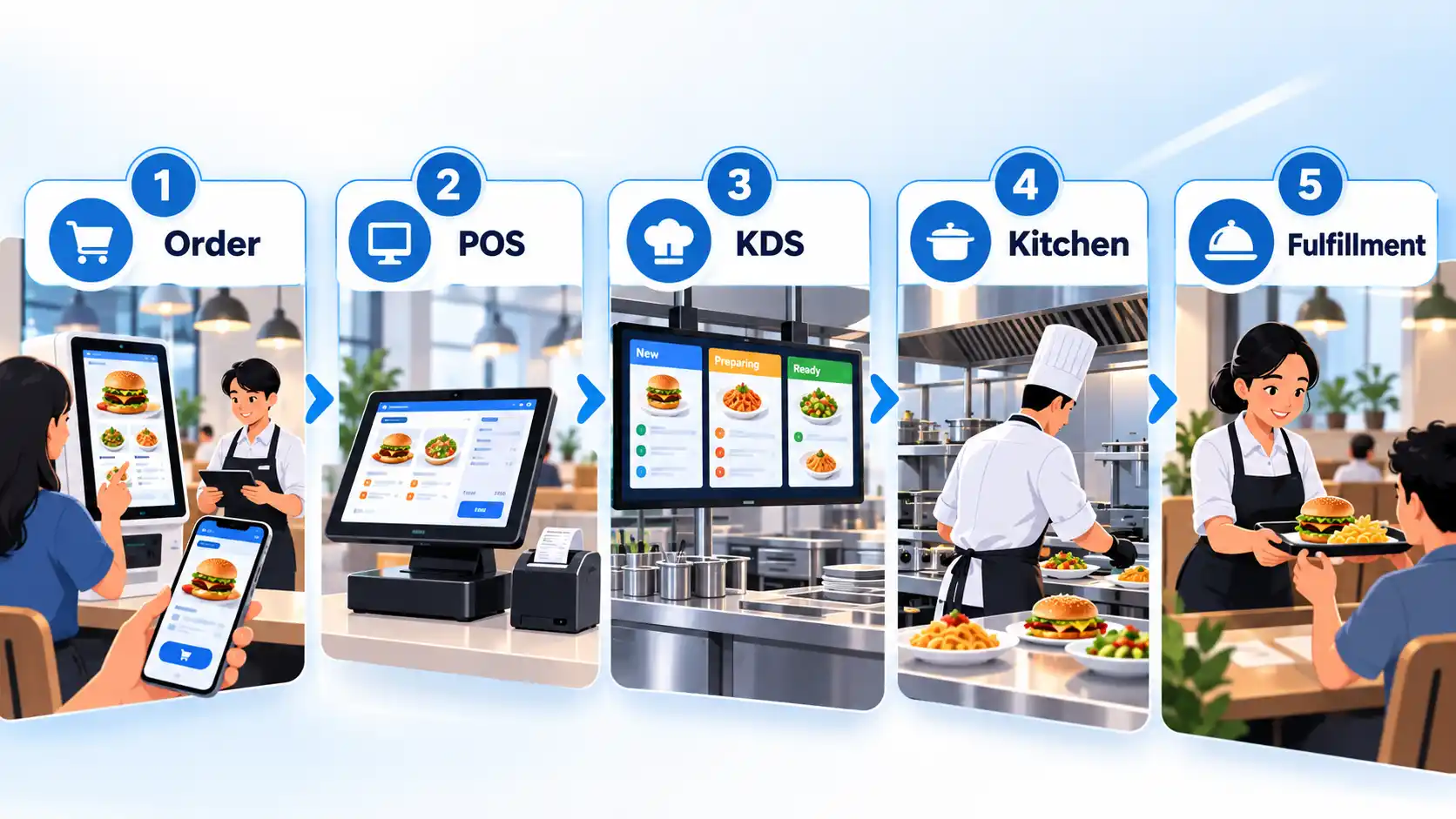
During a busy period, dine-in checks, delivery orders, and kiosk orders may reach the kitchen at almost the same time. Without a shared workflow, staff may have to monitor different printers, tablets, or screens. A KDS can give those orders a common production path and update their status as work progresses.
It still cannot create kitchen capacity that does not exist. If ten orders reach a preparation station that can handle only five at once, the display can organize the queue but not eliminate the bottleneck. The operational process behind the screen still matters.
AI and Voice Ordering Automate Routine Interactions
Artificial intelligence can take over some repetitive restaurant interactions, but its useful role is narrower than the idea of a fully autonomous restaurant. Voice systems, for example, can interpret spoken orders in settings such as phone ordering or drive-through service, while AI assistants can help staff work with operational data.
Ordering, AI, and data analytics are being used to streamline operations, manage costs, and improve customer experience as restaurant operators invest in technology-driven efficiency.
For customers, the advantage is often speed on simple, routine requests. The weakness appears when the request is unusual. An accent, background noise, a complex customization, an allergy question, or an incorrectly interpreted item can require human correction. A good automation path therefore needs an easy way to hand the interaction to an employee rather than trapping the customer inside the automated system.
Automated Food Preparation Handles Repetitive Kitchen Work
Automation can also move from software into the physical kitchen. Equipment can automate tightly defined tasks such as dispensing, portioning, frying, grilling, or other repeated preparation steps.
The attraction is consistency. When the same task must be performed hundreds of times, a machine can repeat a programmed process without depending on memory for each cycle. That can make automation more relevant in high-volume environments where the menu and preparation steps are standardized.
Robotics for food preparation and service remains developing technology for most restaurant operators, so it should not be treated as routine infrastructure on the same level as ordering, payment, or kitchen-management systems.
Flexible kitchens present a harder problem. A chef can react to an unusual request, ingredient change, or dish that does not look right. Automated equipment is strongest when the task is predictable enough to define clearly. For many restaurants, improving ordering, kitchen routing, inventory, or scheduling may solve a more immediate problem than installing robots.
Inventory and Forecasting Tools Help Prevent Shortages and Waste
A customer usually notices inventory technology only when it fails. They choose an item, place the order, and then learn that a key ingredient has run out. Better stock information can reduce that type of surprise.
Inventory software can track ingredients, quantities, purchases, recipes, waste, and sales-related usage. More connected systems can compare purchasing and inventory records with POS sales, giving managers a clearer picture of what is being used. Restaurant platforms can connect POS operations with inventory, kitchen, ordering, delivery, and loyalty functions.
Forecasting adds another layer by using past and current information to estimate likely demand. That estimate can help with purchasing and preparation decisions, but it is not a guarantee. A sudden event, weather change, local disruption, or inaccurate stock count can make a forecast wrong.
The practical value is therefore not that software can predict every order. It is that managers can make purchasing and preparation decisions with more current information than a disconnected spreadsheet or occasional manual count alone may provide.
Loyalty and CRM Systems Connect Repeat Visits
A restaurant may recognize a regular customer in person, but that becomes harder when orders happen through different employees, locations, websites, and apps. Customer relationship management software, usually called CRM, organizes customer information so separate interactions can be connected.
Depending on the system and information collected, a restaurant may be able to connect purchases with loyalty activity, visit frequency, or order history. Loyalty tools can then award points, discounts, or other rewards for repeat business. For off-premises dining, loyalty programs are among the factors associated with repeat business.
The useful part is continuity, not simply collecting more data. A customer should not need to create a new identity or lose rewards whenever they switch from in-store ordering to a restaurant’s digital channel if the systems are designed to work together.
Restaurants also need to be selective about personalization. An order history can support a relevant reward, but more customer data does not automatically produce a better experience. The benefit comes from using appropriate information for a clear customer purpose rather than treating every recorded detail as something that must be used for marketing.
Reservation and Table Management Reduce Waiting and Uncertainty
For a full-service restaurant, one of the hardest moments to manage is the gap between a customer arriving and a table becoming available. Reservation and table-management software can combine advance bookings, walk-in waitlists, seating assignments, table status, and guest information in one operating view.
That gives hosts more information than a list of names and times. Modern systems can help staff see which tables are occupied, which are becoming available, and how reservations and walk-ins are affecting the dining room. Restaurant table-management tools can coordinate bookings, waitlists, seating, and table status.
For customers, better information can reduce uncertainty. A digital waitlist or reservation system may confirm that a booking exists or communicate where someone stands in the queue. For staff, a shared table view can reduce the need to pass the same status verbally between hosts, servers, and managers.
No software can create an empty table when the restaurant is full. The improvement is better coordination and communication around the capacity that actually exists.
Connected Equipment Helps Kitchens Detect Problems Earlier
A refrigerator, oven, dishwasher, or grill can affect the customer experience even though diners may never see it. When essential equipment develops a problem, service can slow down, menu items can become unavailable, or the kitchen may need to change how it operates.
The Internet of Things, or IoT, describes physical devices that can send or receive data through a network. In a restaurant, connected equipment can report operating information so staff or management systems can monitor conditions and receive alerts.
AWS describes a connected-restaurant architecture in which thermostats, robots, dishwashers, refrigerators, ovens, and grills can feed near-real-time equipment and inventory monitoring. Its example architecture also supports machine-learning-based predictive maintenance.
Monitoring should not be confused with a guarantee that failures will always be predicted. Sensors can expose conditions the system is designed to measure, but equipment can still fail unexpectedly or produce bad data. The useful improvement is earlier visibility into some problems, giving staff a better chance to respond before the issue spreads through service.
Workforce Automation Supports the People Delivering the Service
Restaurant automation is not only about what customers touch. Managers also spend time building schedules, collecting availability, responding to shift changes, tracking hours, and moving information between payroll and operational systems.
Scheduling software can centralize availability and shift communication, while time-tracking systems record working hours. When these tools connect with restaurant sales and labor information, managers can compare staffing with actual demand instead of managing each source separately. Restaurant workforce platforms can combine scheduling with POS labor and sales information.
The customer does not directly see a scheduling screen, but the effect can still reach the dining room. Reducing repetitive administrative work can leave managers with more time for staffing problems, training, service quality, and the unexpected issues that occur during a shift.
Software is not a substitute for enough employees, good training, or effective management. The useful role of workforce automation is to support the people delivering the service, not to assume that every human responsibility can be converted into a software task.
What Restaurant Technology Cannot Fix
The biggest mistake is treating technology as a repair for every restaurant problem. Automating a confusing process can make the same confusion happen faster. Before adding another system, it often helps to simplify the underlying business process so automation removes work instead of digitizing unnecessary steps.
Integration matters for the same reason. If staff must copy information between an ordering tablet, POS, kitchen screen, loyalty system, and spreadsheet, the restaurant may have added technology without actually removing much manual work. A smaller set of connected tools can sometimes be more useful than a larger collection of isolated systems.
Hardware infrastructure and network resilience present another operational reality. When internet connectivity drops during a Friday dinner rush, cloud-based ordering, payment terminals, and kitchen displays can halt unless the restaurant’s network includes automatic 4G or 5G cellular failover and the core POS supports local offline card-processing mode. Relying entirely on cloud responsiveness without localized network redundancy turns an ISP outage into an operational shutdown.
Customer preference is another limit. In full-service restaurants, direct interaction with employees remains important to many diners even when they are comfortable using technology for specific tasks. Research on restaurant technology found that many full-service customers still value employee engagement while also showing interest in conveniences such as tableside ordering and payment.
That creates a useful boundary: automate the wait, duplicate entry, repetitive administration, and routine coordination before automating the human interaction that customers came to the restaurant to receive. A quick-service counter, drive-through, fine-dining room, and delivery-only kitchen will not need the same balance.
Bottom Line: Automate Friction, Not Hospitality
The most useful restaurant technology solves a specific point of friction. If customers wait too long to order, digital or tableside ordering may help. If orders become confused after they enter the system, kitchen routing matters more. If ingredients run out unexpectedly, inventory visibility deserves attention. If managers spend hours moving routine information between systems, operational automation may be the better investment.
The decision should therefore start with the problem, not the technology. Current restaurant-industry research points toward greater use of digital ordering, payments, loyalty, automation, AI, and data tools, while also emphasizing technology that frees staff to focus on the customer experience. The strongest restaurant technology strategy is usually the one customers notice as less waiting, fewer mistakes, clearer information, and smoother service while people remain available when human judgment or hospitality matters.

💬 Comments