You do not technically need a VPN for BitTorrent to work. A VPN becomes useful when you want to keep your normal public IP address away from other torrent peers and encrypt covered traffic between your device and the VPN server.
That protection has limits. A VPN does not make torrenting legal, make you completely anonymous, check every downloaded file for malware, or guarantee faster downloads. Understanding those boundaries is more useful than treating a VPN as a general-purpose safety switch.
Quick Take
- BitTorrent works without a VPN, but other peers may communicate directly with your normal public IP address.
- A correctly routed VPN can replace that peer-facing address with the VPN server’s IP and encrypt traffic between your device and the VPN server.
- The VPN does not remove copyright rules, malicious-file risk, account tracking, or every way activity can be linked back to you.
Do You Need a VPN for Torrenting?
A VPN is optional for the BitTorrent protocol itself. BitTorrent can download and upload files through direct connections between participating devices without first sending that traffic through a VPN.
BitTorrent differs from a simple one-server download because downloaders can also upload pieces to one another. Your torrent client therefore communicates with other participating clients instead of receiving everything from one central source.
If that normal network exposure is acceptable for your use case, a VPN is not technically required. If you would rather put a separate network endpoint between your torrent client and the other peers, a correctly configured VPN provides that additional privacy layer.
That distinction matters because “needed” can mean two different things. A VPN is not needed to make BitTorrent function. It may be worth using when reducing direct exposure of your ordinary public IP address is one of your privacy goals.
What Torrenting Exposes Without a VPN
When your torrent client exchanges data directly with other peers, those connections need network addresses so the participating devices know where to send data. In ordinary direct torrenting, that can expose the public IP address your connection is using to other participants communicating with your client.
A peer is another BitTorrent client taking part in the transfer. A group of peers exchanging pieces of the same torrent is commonly called a swarm. Peers may be discovered through a tracker or through the Distributed Hash Table (DHT), a decentralized system that helps clients locate peers. For trackerless torrents, the DHT stores peer contact information that clients can query.
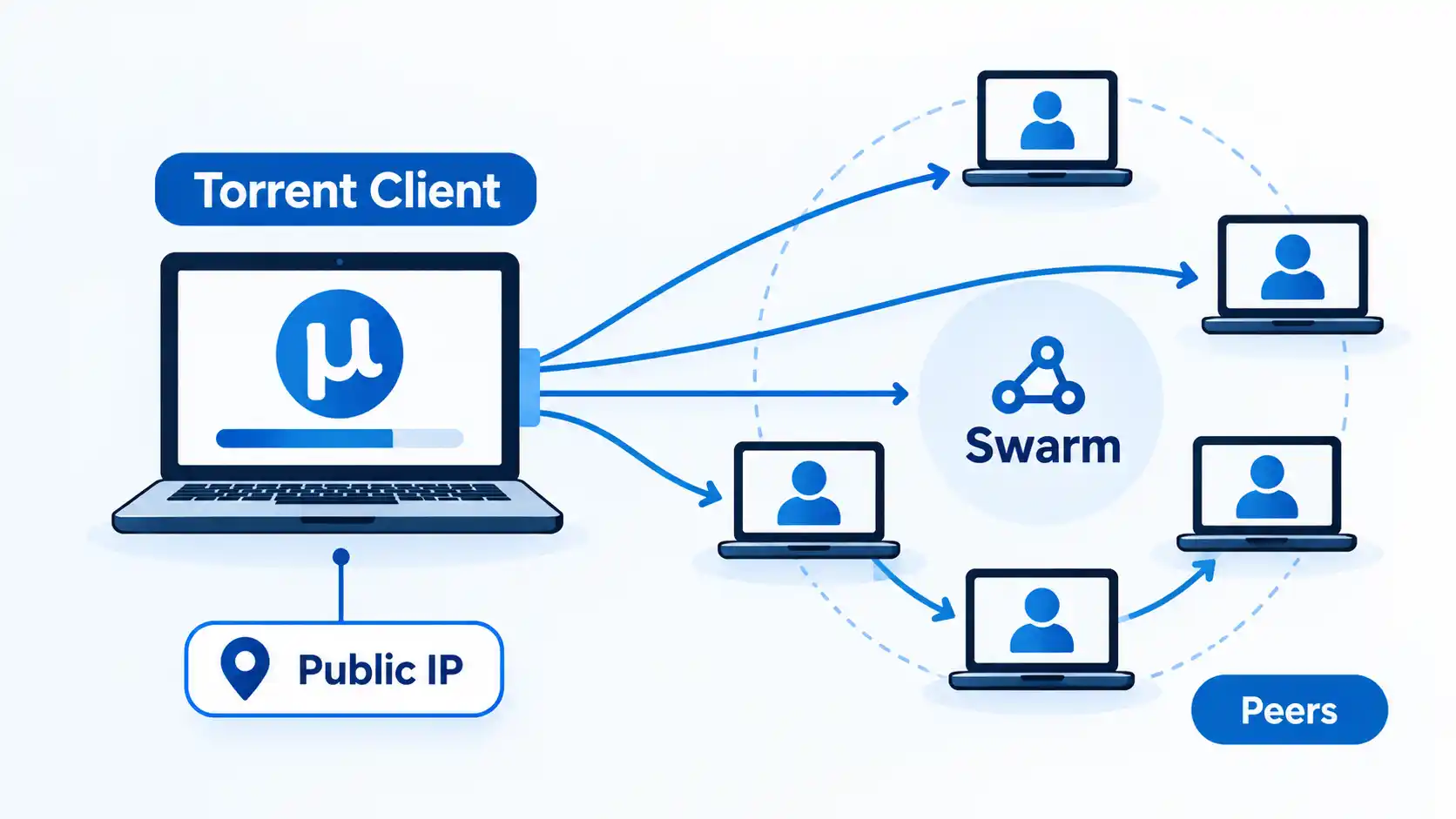
Seeing a public IP address is not the same as gaining access to someone’s passwords, personal files, or exact home address. An IP address is network-routing information. It can reveal information about the network being used and may support an approximate location estimate, but it should not be treated as a direct key to the device.
Your internet service provider (ISP) is in a different position from another torrent peer because it carries the connection from your normal internet service. Without a VPN tunnel covering the torrent traffic, that traffic does not first travel through a separate encrypted VPN path before reaching the wider internet.
What a VPN Changes for Torrenting
A virtual private network, or VPN, adds an intermediary server to the route. Covered traffic travels through an encrypted tunnel from your device to the VPN server, and the VPN server then communicates with the wider internet on your behalf.
For torrent traffic that is actually routed through that tunnel, the peer-facing address changes. Proton, for example, documents that traffic sent through its P2P VPN service makes other people sharing the same files see the VPN server’s IP instead of the user’s normal IP.
The same routing distinction matters beyond torrenting. If you want more detail about what a VPN can and cannot hide, the broader issue is which traffic enters the VPN tunnel, where that tunnel ends, and which party you trust after traffic reaches the VPN provider.
A VPN therefore changes whom you have to trust rather than eliminating trust altogether. VPN apps generally do not make users entirely anonymous, and traffic routed through a VPN gives the provider a privileged position over that connection. Accounts, cookies, browser identifiers, and information you submit to services can still connect activity to you.
The practical differences are easier to scan side by side:
| Feature | Without a VPN | With a VPN |
|---|---|---|
| IP seen by connected torrent peers | Normally the public IP used by your internet connection | Normally the VPN server’s public IP when the torrent traffic is correctly routed through it |
| Path from your device to the VPN endpoint | No VPN tunnel | Covered traffic travels through the VPN’s encrypted tunnel |
| Main network trust point | Your normal network and ISP carry the connection directly | You also rely on the VPN provider and its implementation |
| If VPN protection fails | Not applicable | Traffic may stop or fall back to the normal connection, depending on the VPN and device configuration |
The table describes network routing, not overall safety. A torrent can travel through a functioning VPN and still contain an unwanted or malicious file, involve copyrighted material you do not have permission to share, or be associated with you through information outside the VPN connection.
What a VPN Does Not Protect You From
The most important limitation is that network privacy and overall safety are different problems. A VPN changes the path your internet traffic takes. It does not automatically solve every risk connected with the activity using that path.
A VPN does not make you completely anonymous. Websites, services, accounts, browser identifiers, cookies, payment records, and information you voluntarily provide can still identify or distinguish you. The VPN provider itself also becomes part of the trust chain.
A VPN does not make a downloaded file safe. Encrypting the network route to a VPN server does not inspect every program, archive, document, or media file you download. Malware protection, careful source selection, software updates, and operating-system security remain separate concerns.
A VPN does not change copyright permission. BitTorrent is a file-distribution protocol and can be used for authorized transfers, but routing a transfer through a VPN does not grant permission to copy or share a protected work. In the United States, uploading or downloading copyrighted works without the copyright owner’s authority can infringe reproduction or distribution rights. Copyright rules and exceptions vary by jurisdiction, so local law still matters.
A VPN changes network routing and IP exposure. It does not turn an unauthorized download into an authorized one, so use BitTorrent only for files you are permitted to obtain or share.
A VPN does not guarantee faster torrenting. The VPN adds another server and additional processing to the route. Performance depends on the underlying internet connection, VPN server capacity, distance, congestion, protocol, routing, device limits, and the peers available for the torrent. Sometimes a different route may perform well, but speed improvement should not be treated as a standard VPN benefit.
What to Look for in a VPN for Torrenting
If you decide the extra network-privacy layer is useful, start with whether the VPN actually supports peer-to-peer (P2P) traffic. Do not assume that every service or subscription includes it.
Proton currently makes P2P support a paid feature. Its apps also identify servers optimized for P2P, while its current product information says paid users can torrent through its supported server network. That provider-specific example shows why it is worth checking the service’s current P2P rules instead of assuming all VPN plans work the same way. If you want to compare torrenting VPNs, focus on the capabilities that affect your use rather than choosing from marketing claims alone.
A useful VPN for this purpose should also have clear behavior when the tunnel fails. A kill switch or another fail-closed control is intended to stop protected traffic from quietly falling back to the normal internet route after a disconnect. That feature matters most when your reason for using the VPN is to prevent the ordinary public IP from becoming the fallback address.
Privacy practices deserve separate attention. Price alone does not prove that a service is more private or secure. Some VPN apps have been found to omit expected encryption or share information with third parties, so researching the provider, its permissions, encryption, and data-sharing practices matters more than trusting a privacy claim at face value.
The same principle applies when comparing free and paid VPN limits. A free tier can differ from a paid plan in data allowances, servers, devices, speed, or P2P support. Paying can remove useful restrictions, but payment itself is not proof of better privacy.
Finally, allow for performance overhead. A VPN cannot create extra capacity in your home connection, and routing traffic through an additional server can add latency or reduce throughput. If performance becomes a problem, diagnose VPN slowdown by comparing the same connection with the VPN off and on, then changing one factor at a time instead of assuming that torrenting itself is the cause.
Before Torrenting, Check These VPN Settings
Having a VPN application installed is not enough. The torrent traffic has to use the protected route, and the setup should behave predictably if that route disappears.
- Confirm that P2P traffic is permitted. Check the provider’s current plan and server rules because services can restrict torrenting by subscription, server type, platform, or other service-specific conditions.
- Check the kill switch or fail-closed setting. If keeping torrent traffic off the normal connection matters to you, confirm what happens when the VPN disconnects rather than assuming the app always blocks fallback traffic.
- Check which network interface your torrent client uses. Clients that support interface binding can be restricted to the VPN’s network interface, adding another control over which route carries torrent traffic.
- Recheck the configuration after major changes. Changing VPN software, protocols, adapters, operating-system networking, or client settings can alter which interface or route is being used.
A kill switch does not prevent the VPN from disconnecting. It controls what happens to covered traffic after the protected route is unavailable. The difference between fail-open and fail-closed behavior is covered in more depth in the guide to VPN disconnects and kill-switch behavior.
Some torrent clients add another option. qBittorrent, for example, provides a Network interface setting under its advanced options. Its project documentation describes selecting the VPN adapter so qBittorrent only transfers data when that interface is available. The exact interface name varies by VPN and operating system, so you should identify the correct adapter rather than copy an interface name from another person’s setup.
If you use qBittorrent on Windows and need this stronger routing restriction, the project’s VPN interface-binding instructions show how to identify the VPN adapter, select it under Tools > Options > Advanced > Network Interface, apply the change, and restart qBittorrent. The documented stop condition is straightforward: qBittorrent should transfer data only while that VPN interface is active. If transfers do not resume while the VPN is connected, restart qBittorrent and recheck that you selected the correct adapter.
Bottom Line: When a VPN Is Worth Using for Torrenting
Use a VPN for torrenting when your actual goal is to keep your normal public IP away from torrent peers and route the traffic through an encrypted connection to a VPN server. In that situation, choose a trustworthy service that permits P2P traffic and make sure your torrent client is really using the protected route.
Do not buy or enable a VPN because you expect it to solve a different problem. It cannot decide whether a file is malicious, grant copyright permission, make you completely anonymous, or guarantee higher download speeds.
The useful decision rule is simple: if peer-facing IP privacy is important to you, a properly configured P2P-compatible VPN can be worthwhile. If your main concern is malware, legality, or complete anonymity, address those issues directly instead of expecting the VPN tunnel to solve them.

💬 Comments