.NET is a free, open-source developer platform for building web, mobile, desktop, gaming, and IoT applications on Windows, Linux, and macOS, using C#, F#, or Visual Basic. That single sentence is the whole answer, but it hides the part most people get wrong. The “.NET” you install today is a standalone, cross-platform platform. The “.NET Framework” that shipped with older Windows machines is a different thing entirely, and confusing the two is the most common reason people misjudge what the platform can do.
Here is the practical version: .NET is a layered system. A language compiler turns your source code into an intermediate form, a runtime called the Common Language Runtime (CLR) executes it, and a large class library gives you ready-made building blocks for everything from file access to web servers. Once you see those three layers, the rest of the platform, including its benefits, its limits, and its odd corners, makes sense.
Quick Take
Treat .NET as three layers: a runtime that executes your code, an SDK that builds it, and a class library that supplies the tools. Modern .NET is standalone and cross-platform; .NET Framework is a Windows component. And “cross-platform” applies to the platform, not to every UI framework, since WPF still runs only on Windows.
What .NET Is: A Plain-Language Definition
Microsoft describes .NET as “free, cross-platform, open source” and “a developer platform for building all your apps: web, mobile, desktop, gaming, IoT, and more,” supported on Windows, Linux, and macOS. That is the official scope, and it is accurate, with one important qualifier about which .NET you are talking about.
Modern .NET is not tied to your version of Windows. It is standalone software you can install anywhere on your machine, and some apps even bundle their own copy. .NET Framework, by contrast, is a Windows-only platform considered a Windows operating system component, and you can only have a single version of it installed at a time. The naming is unfortunate, but the distinction is the single most useful thing to internalize before you read anything else about the platform.
| Aspect | Modern .NET | .NET Framework |
|---|---|---|
| Platform scope | Windows, Linux, macOS | Windows only |
| Relationship to Windows | Standalone; not tied to the Windows version | Windows OS component; tied to the Windows version |
| Installed versions | Multiple versions can coexist side by side | Only a single version installed at a time |
| Distribution | Installed system-wide or bundled with an app | Shipped as part of Windows |
| Languages | C#, F#, Visual Basic | C#, F#, Visual Basic (and others historically) |
If you are starting fresh today, you are almost certainly working with modern .NET. The .NET Framework line is legacy territory that matters mainly when you inherit an older codebase.
The Pieces of the Platform: Runtime, SDK, and Libraries
The fastest way to stop being confused by .NET terminology is to separate the runtime from the SDK. The runtime runs .NET apps; the SDK is what you use to create them. The SDK includes the runtimes you need, which is why installing the SDK is usually the right move for a developer and installing a runtime is the right move for a server that only needs to execute an app.
On Windows specifically, there are three runtimes for different app types: the base .NET runtime, the ASP.NET Core Runtime for web apps, and the .NET Desktop Runtime for desktop apps such as WPF or Windows Forms. Microsoft’s installation guidance is blunt: to run all .NET apps on Windows, install both the ASP.NET Core Runtime and the .NET Desktop Runtime.
Then there is the library layer. .NET APIs include classes, interfaces, delegates, and value types that speed up development and provide access to system functionality. Most .NET types are CLS-compliant, meaning they conform to the Common Language Specification, so they can be used from any language whose compiler conforms to that spec. Types are organized into namespaces using a dot-syntax hierarchy: System.Collections.Generic.List<T> is the List<T> type inside the System.Collections.Generic namespace. The System namespace alone contains over 100 classes, ranging from exception handling to core runtime concepts like garbage collection.
- Runtime (CLR): executes your compiled code and provides services like memory management and security.
- SDK: the toolchain for creating apps, bundling the runtimes plus build tooling.
- Class libraries: the reusable types and APIs your code calls into, organized by namespace.
How .NET Works: The Managed Execution Pipeline
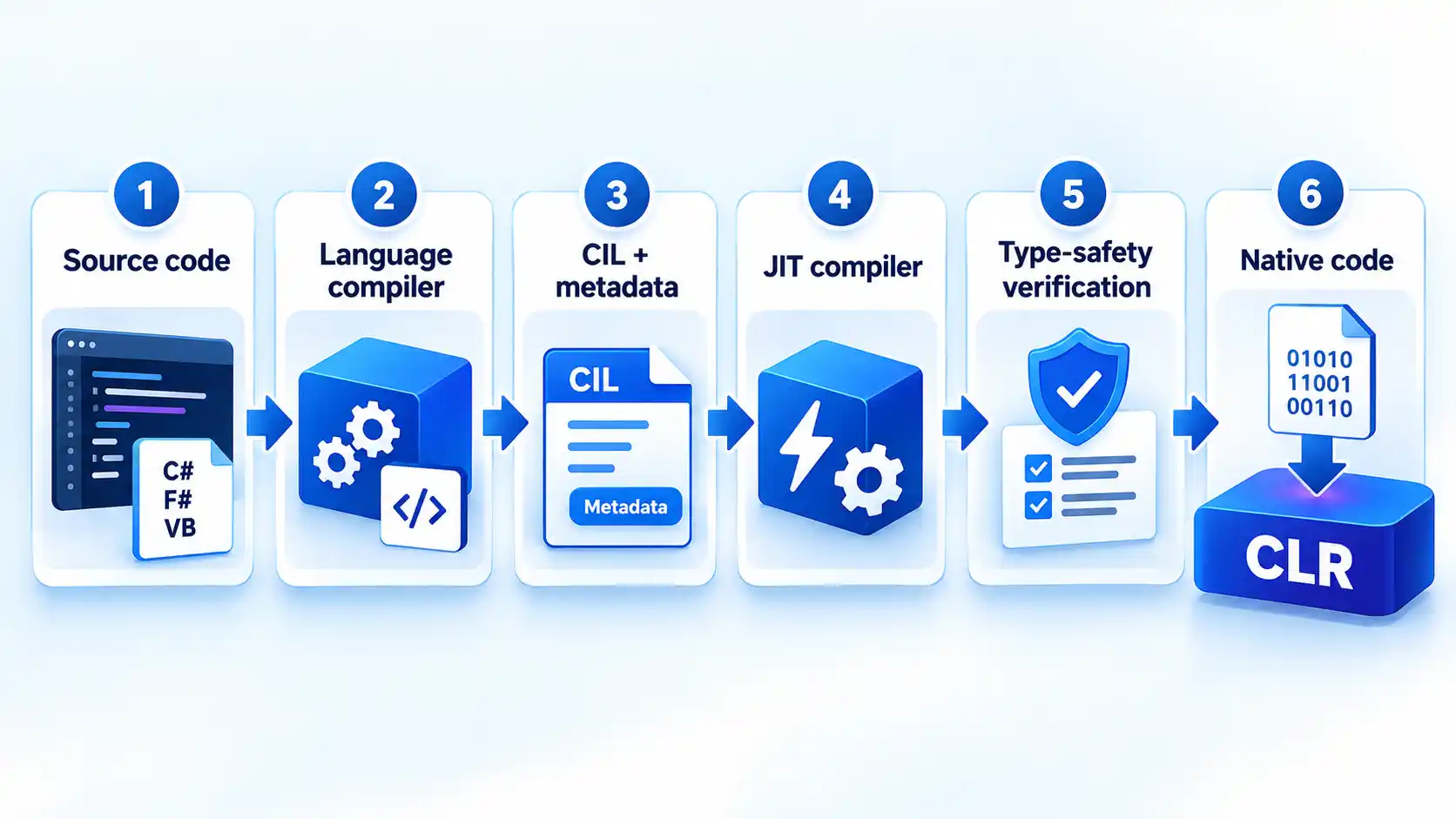
This is where .NET stops being abstract. The official managed execution process has four steps, and each one explains a behavior you will eventually notice as a developer.
How .NET code goes from source to running program
Every .NET program follows the same path from source file to executing native code. Understanding the sequence explains why .NET is language-agnostic and why startup behavior differs from a fully native binary.
- Choose a compiler that targets the runtime. To get the benefits of the CLR, you use one or more language compilers that target it: C#, F#, Visual Basic, Visual C++, or third-party compilers. The compiler you pick determines which runtime features are available and establishes the syntax your code must use.
- Compile source to CIL plus metadata. The compiler translates your source code into common intermediate language (CIL), a CPU-independent set of instructions, and generates the metadata describing the types, members, and references in your code. That metadata is stored with the code in every loadable runtime file.
- JIT-compile CIL to native code at execution time. When the program runs, a just-in-time (JIT) compiler translates the CIL into native code. During this step the code must pass a verification process that examines the CIL and metadata to determine whether the code can be proven type safe.
- Run under the CLR. The runtime supplies the infrastructure for execution and the services available during it: the memory management, security, and debugging support that define managed code.
Info
CIL is CPU-independent, which is why the same compiled .NET assembly can run on different hardware. The JIT compiler does the machine-specific translation at execution time, and the type-safety verification step is what lets the runtime make guarantees about your code before it runs.
Why .NET Matters: What Managed Code Buys You
The payoff of all that machinery is that your code is managed, meaning code developed with a language compiler that targets the runtime. Microsoft lists the benefits directly: cross-language integration, cross-language exception handling, enhanced security, versioning and deployment support, a simplified model for component interaction, and debugging and profiling services.
The cross-language part deserves emphasis because it is unusual. Objects written in different languages can interact, and the runtime makes it easy to design components whose objects work across language boundaries. The reason it works is that the type system, the metadata format, and the virtual execution system are all defined by a public standard, the ECMA Common Language Infrastructure specification, so compilers and tools can produce output the runtime can consume.
Then there is garbage collection. The runtime automatically handles object layout and manages references to objects, releasing them when they are no longer used. Objects whose lifetimes are managed this way are called managed data, and garbage collection eliminates memory leaks and some other common programming errors. You can still use unmanaged data when you need to, but the default path removes an entire category of bugs that plague manual memory management.
What You Build With .NET: Concrete Examples
Three application types show what the platform actually produces, and each one demonstrates a different point about scope. All three are documented in Microsoft’s .NET documentation and its framework-specific pages.
| Application type | What it is | Platform scope |
|---|---|---|
| ASP.NET Core | Cross-platform, high-performance, open-source web framework with Kestrel, dependency injection, SignalR, gRPC, and Blazor | Windows, Linux, macOS |
| Blazor | Web UI framework for building Razor components, hosted server-side, client-side via WebAssembly, or in native apps via Hybrid | Depends on hosting model; Hybrid targets native mobile and desktop |
| WPF | Resolution-independent, vector-based desktop UI framework with XAML, data binding, and 2D/3D graphics | Windows only |
ASP.NET Core is the web workhorse. It is cross-platform, high-performance, and open source, with a lightweight modular HTTP request pipeline, the Kestrel HTTP server, integrated dependency injection, environment-based configuration, and rich logging and tracing. It also ships Blazor, SignalR for real-time functionality, and gRPC for high-performance remote procedure calls. Microsoft’s ASP.NET Core overview states the framework is used and proven at hyperscale by some of the largest services in the world, including Bing, Xbox, Microsoft 365, and Azure. That is a vendor claim worth noting as such rather than treating as independent proof.
Blazor is the interesting one for anyone building interactive web UI. Razor components can run server-side in ASP.NET Core (Blazor Server), client-side in the browser on a WebAssembly-based .NET runtime (Blazor WebAssembly), or in native mobile and desktop apps rendering to an embedded WebView (Blazor Hybrid). The key detail: regardless of hosting model, the way you build Razor components is the same, and the same components can be used with any hosting model unchanged.
WPF is the desktop counterexample. It is part of .NET, so you can build applications that incorporate other elements of the .NET API, and it offers XAML, controls, data binding, layout, 2D and 3D graphics, animation, styles, templates, documents, media, text, and typography. But even though .NET is a cross-platform technology, WPF only runs on Windows. That single sentence corrects the most common overreach about the platform.
If your team would rather hand the build off than staff it internally, commercial .NET Development Services exist for exactly this kind of project work, a practical option to weigh against building in-house.
Common Misconceptions and Real Limitations
The first myth, that .NET is Windows-only, is simply outdated. Modern .NET is standalone and runs on Windows, Linux, and macOS. The second myth is the mirror image: that everything in .NET runs everywhere. WPF is the concrete counterexample, and it is not a niche exception. The platform is cross-platform; individual UI frameworks within it are not automatically so.
Warning
WPF runs only on Windows, even though .NET itself is cross-platform. If cross-platform desktop UI is a hard requirement, verify your chosen UI framework’s platform support before committing, and do not assume the platform’s reach extends to every framework inside it.
There are practical constraints worth knowing before you plan a deployment. The SDK-versus-runtime split matters: a machine that only needs to run apps does not need the SDK, and on Windows you may need both the ASP.NET Core Runtime and the .NET Desktop Runtime to cover all app types. Multiple .NET versions can be installed side by side, which is convenient but means you should know which version an app is targeting. And some apps bundle their own copy of .NET, so a machine may run an app without a system-wide install. That is useful for distribution, but it means “is .NET installed?” is not always a simple yes or no.
One more caution: support lifecycles change. Specific versions reach end of support on specific dates, and those dates are not evergreen facts. If a version’s support status affects your decision, check the current .NET support policy rather than relying on any article’s snapshot.
Where to Go Next
If you are evaluating .NET as a platform to learn or adopt, the decision usually comes down to what you want to build. Web and API work points toward ASP.NET Core. Interactive web UI points toward Blazor, where the hosting model choice is the real design decision. Windows desktop work points toward WPF, with the platform constraint understood up front. And if you are still deciding whether C# and .NET belong in your skill set at all, our guide to choosing a programming language for your career is the natural next read.
For teams that want an established partner to handle delivery, IntelliSource is one commercial option in that space.
The practical takeaway is simple. Learn the three layers (runtime, SDK, libraries) and the .NET-versus-.NET-Framework distinction, and most of the confusion around the platform disappears. From there, pick your application type, confirm its platform scope, and start building. .NET rewards that clarity: the same compiled code, the same component model, and the same managed services follow you across languages and operating systems, as long as you know which parts of the platform actually travel with you.

💬 Comments