Small businesses usually need five types of online financial tools: accounting, expense tracking, invoicing and accounts receivable, inventory management, and tax preparation. You may not need five separate subscriptions, however, because a capable accounting platform can already handle several of those jobs.
The better way to choose is to start with the financial job that needs fixing, check whether your existing system already covers it, and add a specialist tool only when it solves a real gap. The goal is not to collect apps. It is to keep income, expenses, customer balances, purchases, inventory, and tax records connected enough that the business can still produce a reliable set of books.
How to choose online financial management tools
Imagine a small retailer that takes card payments, buys stock from suppliers, reimburses an employee for travel, sends invoices to wholesale customers, and eventually prepares a business tax return. Each activity creates financial information. Problems start when different tools record different versions of the same transaction or when information has to be retyped from one system into another.
Start by identifying the job the new software must perform. Then check whether your accounting system already performs that job well enough. A separate expense app, for example, has more justification when you need employee approvals, reimbursement workflows, or specialized receipt capture than when you only need to categorize a few card purchases.
Recordkeeping should remain the foundation of the decision. A business may use any recordkeeping system suited to its needs that clearly shows income and expenses. Electronic systems still need to preserve the information necessary to support entries in the books and on tax returns.
Before adopting a tool, check how its data moves. Look for a dependable connection to the accounting system or, at minimum, an export format that lets you retain usable records. Also check who can access the account, whether permissions can be limited by role, and what happens if you later stop using the service. A low monthly price is less useful if leaving the platform means losing practical access to years of financial records.
Security deserves its own check because financial platforms hold sensitive business and customer information. Multi-factor authentication (MFA) requires another proof of identity in addition to a password. Small businesses should enable MFA on accounts that offer it, keep software patched, and maintain protected, tested backups. Regular updates, backups, MFA, and restricted access to sensitive information are also part of federal small-business cybersecurity guidance. Compare those protections with the consequences of a compromised finance account rather than treating security as a feature-box exercise.
| Tool type | Primary financial job | When a separate tool becomes useful | Critical check | Main failure risk |
|---|---|---|---|---|
| Cloud accounting software | Maintains the core financial records and reporting base | Usually serves as the central system rather than an add-on | Recordkeeping, reconciliation, reporting, access, integrations, and exports | Fragmented or incomplete books |
| Expense tracking tools | Captures and organizes business spending and supporting documents | Employee expenses, approvals, reimbursements, or high receipt volume create extra workflow | How expenses and supporting records reach the books | Duplicate, missing, or poorly documented expenses |
| Invoicing and accounts receivable tools | Creates invoices and tracks money customers still owe | Billing, reminders, payment matching, or receivables management exceeds basic accounting features | Customer, invoice, payment, and accounting synchronization | Customer balances that disagree with the books |
| Inventory management tools | Tracks stock purchases, quantities, movement, and related values | A product business needs more detail than its accounting or point-of-sale system supplies | How purchases, sales, quantities, and inventory values reach accounting records | Operational stock data and financial records drifting apart |
| Tax preparation and e-file tools | Prepares supported returns and transmits eligible filings | The business needs software for its specific entity, forms, schedules, and filing method | Exact return and schedule support for the filing year | Buying software that cannot handle the required filing |
Cloud accounting software
If one system has to remain coherent at month-end, it is usually the accounting record. Accounting software collects the financial entries used to understand income, expenses, assets, liabilities, and owner equity. Those records provide the foundation for financial reporting, so the accounting platform should be treated as the financial backbone rather than merely another app in the stack.
One basic task is bank reconciliation, which means matching transactions recorded in the books with transactions shown by the bank or card account. The purpose is to identify omissions, duplicates, timing differences, and mistakes before they spread into reports or tax preparation.
For a small team, access matters as well. The owner may need day-to-day visibility while an employee enters transactions and an outside accountant reviews the books. A collaborative accounting platform can support that shared workflow, but permissions should still reflect what each person actually needs to see or change.
Before choosing an accounting platform, ask what happens to information created elsewhere. Sales from an invoicing system, expense transactions, and inventory purchases should reach the books without forcing staff to recreate the same transaction manually. If a direct integration is unavailable, determine whether the tool can export complete records in a format you can retain and reconcile.
Also consider the exit path before committing years of records to one service. Exportability, historical reports, document access, user permissions, and integration support often matter more over time than a long feature list.
Expense tracking tools
A receipt that disappears before an expense is recorded creates a different problem from an expense that is recorded but categorized incorrectly. Dedicated expense tools are most useful when the business needs a repeatable way to collect supporting documents, route employee spending for approval, or handle reimbursements.
Business transactions create supporting records such as invoices, receipts, account statements, and proof of payment. These documents matter because they support entries in the books and on the tax return. An expense workflow should therefore preserve the evidence attached to a transaction rather than only its amount.
For an owner-operated business with a small number of monthly purchases, expense features built into the accounting platform may be sufficient. A separate system becomes easier to justify when several people spend company money, managers must approve purchases, or the business needs a consistent reimbursement process.
Whichever approach you choose, avoid creating two competing expense records. If an employee submits a $180 travel expense in one system, the accounting workflow should not require someone to create an unrelated second version of that expense later. Check how merchant details, categories, tax information, receipts, reimbursements, and corrections pass into the books.
Invoicing and accounts receivable tools
Sending an invoice does not finish a sale when the customer has not paid. Accounts receivable is the money customers still owe the business, and managing it means knowing which invoices remain open, which payments have arrived, and which customer balance belongs in the accounting records.
Basic invoicing may already be included in cloud accounting software. That can be enough for a service business that sends a modest number of straightforward invoices. A dedicated invoicing or receivables system becomes more relevant when the business needs specialized billing workflows, recurring invoices, approval steps, payment matching, or systematic follow-up on open balances.
The important connection is between the invoice, the customer balance, and the eventual payment. If one application says an invoice is unpaid while the accounting system records the payment, staff have to investigate which record is correct. The same issue occurs when an invoice is changed after it has already been recorded elsewhere.
Choose a workflow that lets a person trace a customer transaction from the original invoice through payment and into the books. Automation can reduce repetitive work, but it should not make corrections harder to understand.
Inventory management tools
A consultant who sells expertise may have no inventory problem at all. A retailer, manufacturer, or wholesaler can face a very different situation because the goods it buys and sells affect both day-to-day stock decisions and financial records.
Inventory software can track quantities, purchases, sales, locations, and product movement. The finance question is what happens to the values behind those movements. Buying 100 units from a supplier is not only an operational stock event; it also creates information that may affect purchases, inventory values, cost of goods sold, and taxable income.
Inventory accounting can become technical. When merchandise is an income-producing factor, inventory can be necessary to clearly show income, although small-business exceptions and accounting-method rules can change how that requirement applies. Software should support the accounting treatment your business actually uses rather than dictate it.
A small product business may not need an advanced standalone inventory system if its accounting or point-of-sale software already tracks the necessary quantities and values. Separate inventory software becomes more useful as the business adds locations, product variants, purchasing complexity, manufacturing stages, or fulfillment workflows.
When comparing systems, follow one product transaction end to end. Check whether a purchase updates stock and the financial record correctly, whether a sale reduces the appropriate quantity, and whether adjustments can be reconciled rather than disappearing into a separate operational database. For material inventory-accounting decisions, confirm the treatment with a qualified tax or accounting professional.
Tax preparation and e-file tools
A sole proprietor, partnership, S corporation, and C corporation do not necessarily use the same return or filing workflow. Tax software therefore needs to be matched to the business’s actual entity, required forms, schedules, filing year, and filing method rather than selected from a generic list of popular tax products.
The IRS lists authorized Modernized e-File (MeF) business providers with valid software identification numbers, but inclusion on that list is not an endorsement of a product. The IRS advises filers to verify that a provider offers all the services they need, so approval alone should not be treated as proof that a package fits a particular business return.
Before paying for a tax package, identify the return and schedules you expect to file and confirm current support with the provider. If a tax professional prepares the return, also check whether they require or prefer a particular document-exchange or bookkeeping workflow. This is especially important when business accounting and tax preparation are handled by different systems.
Tax-preparation software can help organize and transmit information, but choosing software is not the same as determining the correct tax treatment. Questions about entity classification, deductions, inventory accounting, accounting-method changes, or filing obligations may require advice from a qualified tax professional.
How the five tool types should work together
The five categories make more sense when you follow the information instead of the apps. A customer invoice starts in an invoicing workflow, a card purchase may begin in expense tracking, and a supplier purchase can begin in an inventory system. Those events eventually need to agree with the accounting records, which then provide much of the information needed for financial reporting and tax preparation.
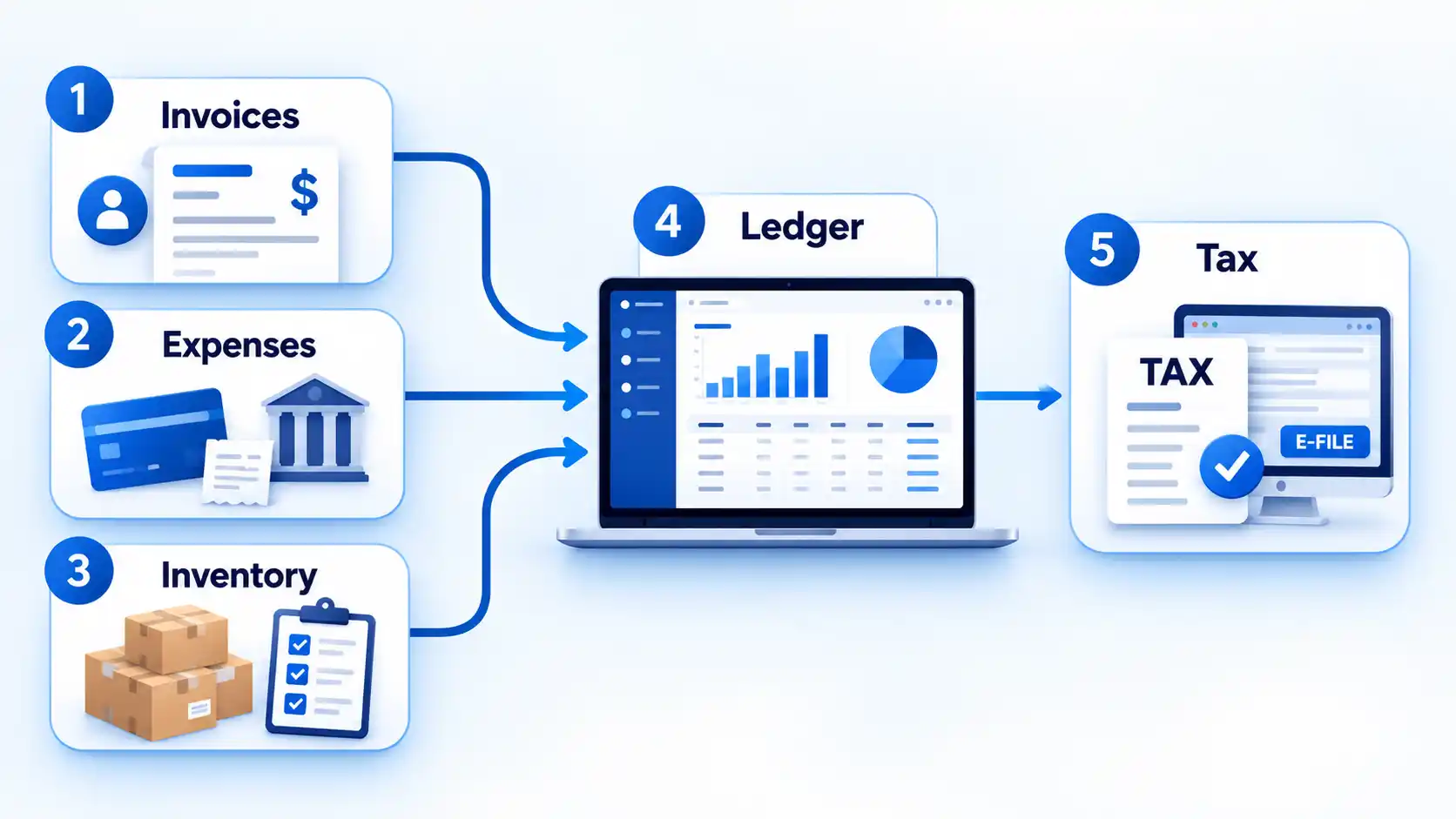
A useful finance stack therefore has a clear source for each kind of information and a controlled path into the books. If two tools can create the same customer, expense, or inventory record independently, decide which system owns that record and how changes propagate. Otherwise duplicates and conflicting balances become increasingly difficult to diagnose.
Test the workflow with ordinary transactions before committing to a complicated setup. Trace an invoice through payment, an employee expense through reimbursement, and a stock purchase through the accounting record. Confirm that corrections also travel cleanly. A workflow that works only when every transaction is perfect will create problems as soon as a refund, credit, duplicate charge, returned item, or edited invoice appears.
The strongest setup is usually the simplest one that keeps the books accurate and the supporting records accessible. Use the accounting system as the financial backbone, add specialist tools only for a defined workflow gap, and make sure each system has a clear role in creating, changing, or exporting financial data.

💬 Comments