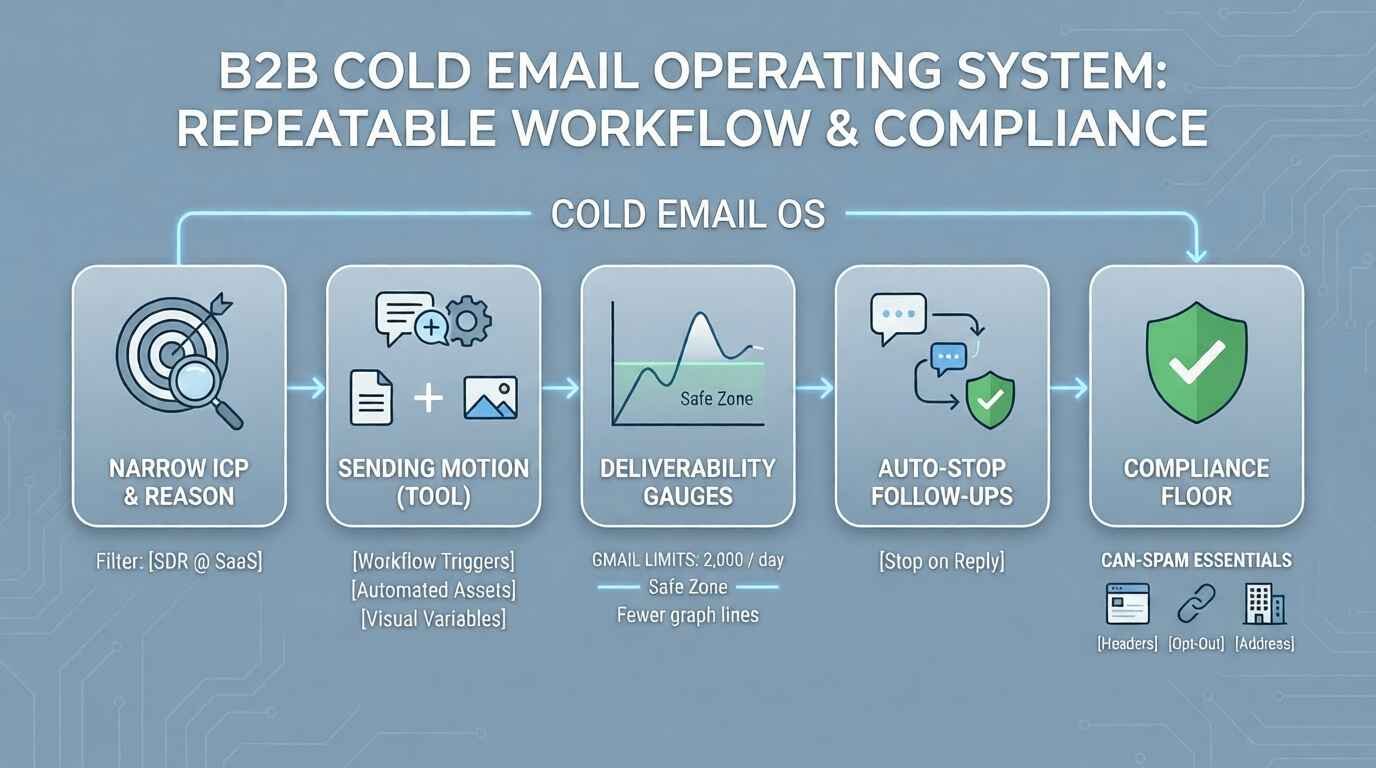
Cold email still works in B2B when you treat it like an operating system: clear targeting, conservative sending, real follow-ups, and compliance-by-default.
This guide updates the “5 tips” approach into a repeatable workflow you can hand to SDRs, founders, or growth teams and actually run weekly.
Quick take (30 seconds)
- If you want to run cold outreach from Gmail with a simple setup and strong follow-up mechanics, GMass is built around automated sequences and threaded replies.
- If you want a sales engagement workflow with trigger-based follow-ups and multi-touch tasks, Mailshake is designed around automated follow-ups that stop when a recipient takes an action (like replying).
- If your differentiation is personalization (especially visuals), lemlist supports variable-based custom images pulled from a CSV (public image URLs ending in.png/.jpeg).
Dominant search intent (what readers want)
Most searchers here want a practical playbook to improve open rates and reply rates without getting their domain flagged, their inbox rate-limited, or their team stuck doing manual follow-ups.
That means your “win condition” isn’t clever copy—it’s a system that controls volume, follow-up logic, and compliance while staying personal enough to earn replies.
Tool comparison (structured)
| Tool | Best for | Follow-up behavior (documented) | Personalization angle (documented) | Key constraint / gotcha |
|---|---|---|---|---|
| GMass automated follow-ups in Gmail | Teams sending from Gmail who want quick sequencing without leaving the inbox | Automated follow-ups can continue until a reply/click/open depending on your stop settings; supports “threaded replies” so follow-ups can appear in the same thread. | Positioned around making mass emails feel closer to 1:1 via personalization + threading. | Gmail still enforces sending limits; plan pacing and volumes accordingly. |
| Mailshake follow-ups | Sales engagement sequences with automation and triggers | You can add automatic follow-ups; they can stop sending when the recipient takes an action you specify (such as replying); supports trigger-based follow-ups (e.g., link clicks). | Workflow includes templates + automation so reps spend time on personalization rather than remembering to follow up. | Still requires good targeting and deliverability hygiene; automation can amplify mistakes. |
| lemlist variable-based custom images | Outreach that wins on “this was made for me” personalization | Not a follow-up spec page; use it when your sequence strategy depends on standout personalization assets. | Supports personalized images using CSV variables mapped to public image URLs ending in.jpeg or.png (and recommends keeping images under 1200px). | Broken/non-public URLs or wrong file endings can break images; you must QA your CSV + hosting. |
The 2026 cold email workflow (step-by-step)
Step 1) Define a narrow ICP and “reason to email”
Write your targeting in one sentence: “We help [role] at [company type] do [outcome] without [pain].” Then build a list that fits that sentence—don’t try to fix weak targeting with more follow-ups.
Step 2) Pick your sending motion (and tool) based on operations, not hype
- If your team lives in Gmail: pick a Gmail-native motion (for example, GMass) so sending + replies stay in the same place.
- If you want automation + triggers: pick a sales engagement platform designed for automated follow-ups (for example, Mailshake).
- If you win on personalization assets: build a “visual personalization” motion (for example, lemlist custom images via CSV variables).
Step 3) Engineer deliverability constraints into your plan (limits & pacing)
Before you write copy, decide your daily volume and ramp schedule so you don’t trigger provider limits mid-campaign.
In Google Workspace Gmail, Google documents daily sending and recipient limits and notes that users who exceed limits can be blocked from sending for up to 24 hours.
- Google Workspace Gmail lists a “maximum messages per day” (for example, 2,000 per user) and separate recipient-based quotas (including recipients per message and total recipients per day).
- Limits can change without notice and are applied over a rolling 24-hour period, so avoid “end of day” mental math.
Step 4) Write a simple email that earns the right to a follow-up
Strong cold emails are usually short, specific, and easy to answer. Avoid cramming in every feature—opt for one problem, one credible reason you picked them, and one low-friction CTA.
If you want templates your team can reuse, see Cold email templates for B2B.
Step 5) Build follow-ups that stop automatically (and don’t annoy people)
The goal of follow-ups is not “persistence” as a personality trait—it’s respectful re-surfacing with new information or a simpler ask.
- GMass positions its auto follow-ups as sequences that can continue until a reply/click/open depending on your stop conditions, and it supports threaded replies so follow-ups can appear like a normal conversation thread.
- Mailshake documents that you can add automatic follow-ups and have them stop sending when a recipient takes an action you specify (such as replying).
Step 6) Use “personalization that scales” (without faking it)
Personalization is not just FirstName. It’s a relevant detail that proves you chose the prospect for a reason (a hiring signal, a product motion, a technical footprint, a recent initiative).
If visual personalization fits your market, lemlist documents a workflow for inserting personalized images via CSV variables that map to public image URLs ending in.png/.jpeg.
Compliance floor (CAN-SPAM essentials)
If you send commercial email in the U.S., CAN-SPAM is the baseline you build on—not an optional checkbox.
- The FTC states CAN-SPAM covers all commercial messages (not just bulk email) and makes no exception for B2B email.
- The FTC’s guidance lists requirements including truthful header information, non-deceptive subject lines, identifying the message as an ad, including a valid physical postal address, providing a clear opt-out mechanism, and honoring opt-out requests within 10 business days.
- The FTC notes penalties can be up to $53,088 per violating email, so it’s worth operationalizing compliance in every template.
For your internal policy page, add a CAN-SPAM compliance checklist for cold outreach.
Implementation checklist (copy/paste for your team)
- ICP written in one sentence; list built only from that ICP.
- Daily volume and ramp schedule defined (and aligned to provider limits).
- One offer, one CTA, one follow-up reason per step.
- Stop conditions set (stop on reply at minimum).
- Unsubscribe/opt-out handling and physical address included when required.
- Tracking + review cadence: weekly subject line test, monthly offer test.
Decision tree: which tool should you start with?
- If you’re sending from Gmail and want follow-ups that behave like normal replies, start with GMass and its threaded follow-up approach.
- If you want trigger-based follow-ups (e.g., send based on a click) and broader engagement workflows, start with Mailshake.
- If your market responds to “proof you looked,” start with lemlist-style image personalization and QA your asset pipeline first.
Troubleshooting (real failure scenarios)
Problem: Gmail blocks sending mid-campaign
- Likely cause: you hit a sending or recipient limit; Google notes sending can be blocked for up to 24 hours after exceeding a limit.
- Fix: reduce daily volume, stagger sends, and monitor rolling 24-hour totals (not calendar days).
Problem: Follow-ups keep going after someone replies
- Fix: set explicit stop conditions (stop on reply) and verify the behavior in your platform (GMass and Mailshake both document stop logic in their follow-up features).
Problem: Personalized images don’t render
- Likely cause: image URL isn’t public or doesn’t end in.png/.jpeg; lemlist documents these prerequisites.
- Fix: open every URL in a browser before launch; keep image dimensions reasonable (lemlist recommends under 1200px).
FAQ
How many cold emails can I send per day from Google Workspace Gmail?
Google Workspace Admin Help publishes specific daily sending and recipient limits (and notes limits can change and are applied over a rolling 24-hour period), so check the current values before you set quotas. See Google’s documented Gmail sending limits.
Does CAN-SPAM apply to B2B cold email?
Yes—FTC guidance says CAN-SPAM covers all commercial messages and makes no exception for business-to-business email.
What must I include in a compliant commercial email (U.S.)?
The FTC lists requirements including truthful headers, accurate subject lines, identification as an ad, a valid physical postal address, and a clear opt-out mechanism you honor within 10 business days.
Should my follow-ups be new emails or replies in the same thread?
Threaded follow-ups can feel more conversational; GMass documents a “threaded replies” approach where automated follow-ups can appear in the same thread as prior emails.
Can follow-ups stop automatically when someone replies?
Mailshake documents that follow-ups can stop sending when your recipient takes an action you specify (such as replying).
What’s the simplest “advanced personalization” I can scale?
If visuals fit your audience, lemlist documents using CSV variables to insert personalized images from public URLs ending in.png/.jpeg.
Recommended external documentation
- Follow the FTC’s CAN-SPAM compliance guide when you build templates and opt-out handling.
- Use Google’s Workspace Gmail sending limits documentation to set daily quotas and avoid sending lockouts.
