Remote teams share knowledge more reliably when important answers are captured in a trusted shared location, communicated in the right format, and kept current enough for other people to find and reuse. The goal is not to document every conversation. It is to prevent useful knowledge from disappearing when a meeting ends, a chat scrolls away, or the person with the answer is unavailable.
A simple way to think about the process is: capture useful knowledge, give it an agreed home, make it easy to find, reuse it in real work, and update it when circumstances change.
Why Knowledge Sharing Breaks Down in Remote Teams
Imagine that one employee knows how to solve a recurring customer problem. A colleague needs the same answer a few hours later, but the first employee is offline. If the solution exists only in that person’s memory or in an old chat thread, the second employee may have to wait, ask somebody else, or solve the problem again.
Remote work makes this kind of gap easier to notice because people cannot always rely on overheard conversations, nearby colleagues, or informal desk-side questions. Research on remote knowledge sharing also describes physical separation as a barrier to unplanned knowledge exchange, which makes deliberate communication and shared digital resources more important.
One 2025 qualitative study drew on seven semi-structured interviews with members of one remote research team. It found that technological tools were used alongside mentoring and collaboration, while trust-building through social interaction was identified as important to knowledge sharing. The researchers also cautioned that relying on technology alone may not produce good results. Because the sample was small and organization-specific, those findings should inform practical choices rather than be treated as a universal rule for every remote company.
Fragmentation creates another problem. A decision may be in chat, an updated procedure in a document, a different version in someone’s personal notes, and the reason behind the change only in a meeting recording. Even when all of those tools work correctly, the team can still struggle because nobody knows which version to trust.
The first improvement, therefore, is not adding another app. It is deciding where important knowledge belongs and what should happen after useful information appears in conversation or daily work.
Create One Trusted Home for Team Knowledge
Suppose three employees save slightly different versions of the same onboarding instructions. All three documents may look legitimate, but the next person has no easy way to know which one is current. A better arrangement gives that subject one agreed authoritative home.
This is often called a single source of truth: one location or record that the team treats as the current version for a particular process, policy, decision, or reference topic. It does not mean forcing every kind of information into one application. A company may still use chat for discussion, project software for tasks, and cloud storage for files. What matters is that people know where the final version of each kind of knowledge belongs.
For example, a customer-support team might discuss a new problem in chat, solve it in a video call, and then put the tested resolution in its support knowledge base. The chat explains how the conversation developed, but the knowledge-base entry becomes the place employees check the next time the problem appears.
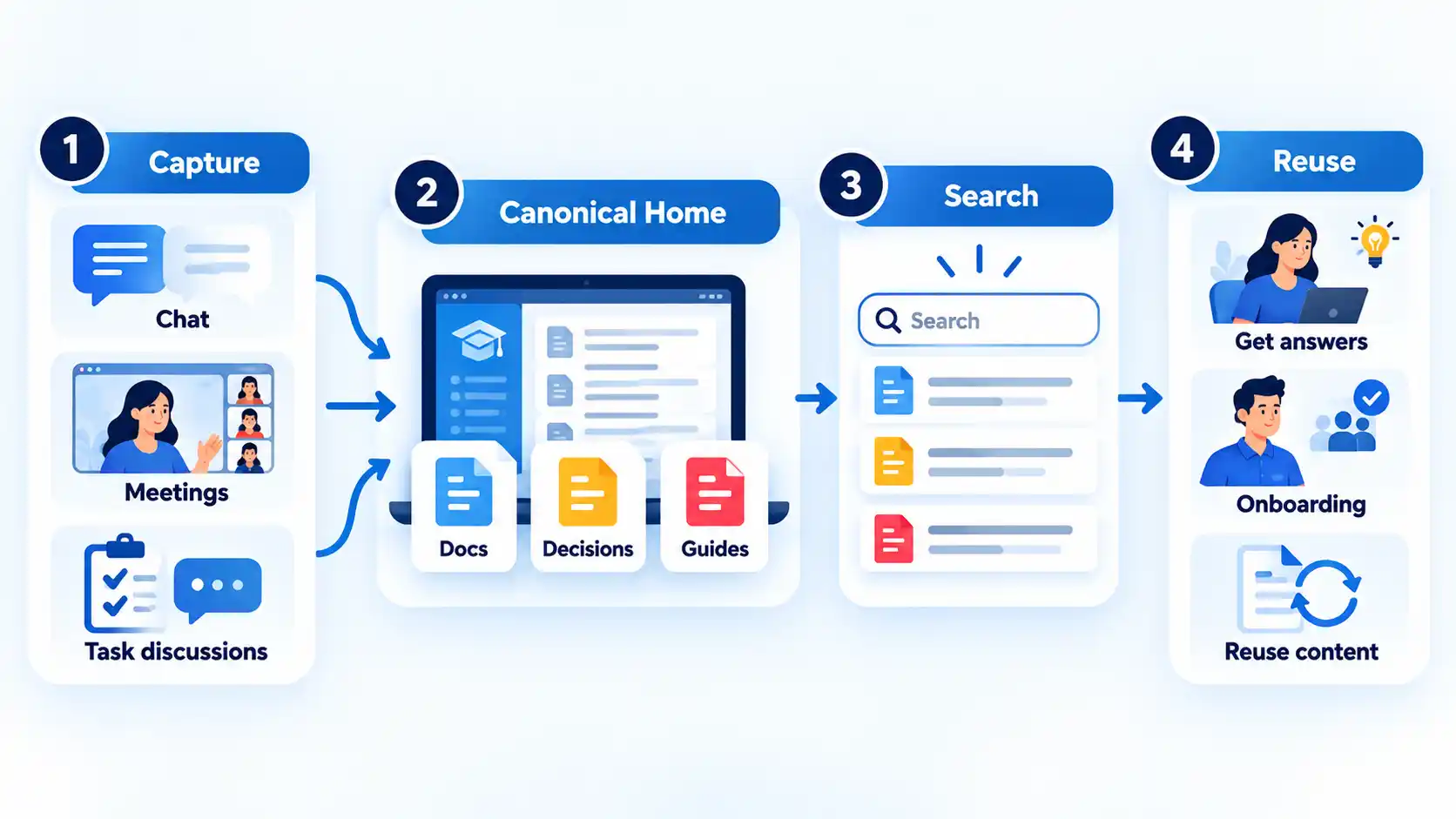
The same principle should guide the broader remote-work tool stack. Communication, tasks, files, and knowledge storage should have clear roles so employees are not repeatedly asking where information belongs.
A structured internal knowledge base can provide that durable home for procedures, onboarding material, recurring answers, decision records, and other information people need to revisit.
Whichever system you use, assign ownership where it matters. A frequently used process should have someone responsible for correcting it when the process changes. Without ownership, an apparently organized knowledge base can gradually become a collection of documents that nobody trusts.
Capture Decisions and Work as They Happen
Teams often postpone documentation because they imagine it as a separate project. In practice, much of the most useful knowledge already appears during normal work. The easier approach is to capture the parts that somebody is likely to need again.
Useful examples include:
- the final decision and the reason behind it;
- a repeatable procedure;
- the confirmed solution to a recurring problem;
- important handoff information;
- an exception to the normal process;
- answers that repeatedly appear during onboarding; and
- a lesson that changes how similar work should be handled next time.
Consider a hypothetical troubleshooting call. After several attempts, the team discovers that one configuration setting causes a recurring problem. Keeping the answer only in the recording means the next employee may have to watch a long call or repeat the investigation. A short record of the symptom, confirmed cause, fix, and any important exception is much easier to reuse.
Decision records deserve similar treatment. Recording only what the team chose can leave later employees confused about why another option was rejected. When the reason matters, preserve enough context for somebody who was not present to understand the choice without recreating the whole discussion.
Not every message deserves permanent storage. Routine greetings, temporary scheduling details, and one-off conversations can remain where they happened. Capture information when losing it would cause repeated work, inconsistent decisions, avoidable waiting, or unnecessary dependence on one person.
Choose Between Async and Live Sharing
Remote knowledge can move in two broad ways. Asynchronous communication means people do not have to participate at the same moment, as with a document, recorded update, email, or message that can be answered later. Live communication, also called synchronous communication, happens in real time through a meeting, call, or live conversation.
Neither mode is automatically better. The useful question is whether the information needs immediate back-and-forth or whether it will be more valuable as a durable record people can review on their own schedule. In distributed work, some work can move asynchronously while other situations still benefit from real-time interaction.
The table below shows a practical default. It is a starting point, not a rule that overrides urgency, confidentiality, or the needs of the people involved.
| Situation | Better starting point | Why |
|---|---|---|
| Routine status update | Asynchronous | People can review it when needed without scheduling everyone at the same time. |
| Repeatable procedure | Asynchronous | A durable written or recorded reference can be reused by more than one person. |
| Decision record | Asynchronous | The outcome and reasoning remain available after the original discussion ends. |
| Unclear or fast-changing problem | Live | Rapid questions and answers may expose missing context faster than a long message exchange. |
| Mentoring or demonstration | Live, with a durable follow-up where useful | The learner may need to observe judgment, ask questions, and receive immediate correction. |
| Sensitive or emotionally complex discussion | Live when appropriate | Tone, clarification, and immediate response may matter more than efficiency. |
Reducing meetings does not require turning every problem into written correspondence. A documentation-first model works best when the team also agrees where communication should go. GitLab’s remote-work handbook, for example, treats standardized documentation and fewer fragmented communication channels as important parts of asynchronous work.
The durable record still matters after many live discussions. If a meeting produces a new procedure or changes an important decision, somebody who was absent should not need another meeting to discover what changed.
A consistent distinction between synchronous and asynchronous communication also helps teams decide which conversations deserve immediate attention and which can wait without blocking the work.
Make Knowledge Easy to Find, Trust, and Reuse
Saving information is only the beginning. If employees cannot locate the right answer quickly, a large knowledge base may create almost as much friction as having no knowledge base at all.
Start with titles and language people are likely to search for. A document called “Operational Notes 2026” may be meaningful to its author but difficult for a new employee to find when searching for “refund approval process.” The title, headings, and opening description should name the problem or task clearly.
Organization should also be predictable. Related procedures should follow a recognizable structure, while duplicate copies should be reduced where possible. If the same instructions must be referenced from several places, linking back to the authoritative version is safer than maintaining several independent copies.
For development teams, structured documentation, project wikis, and communication-tool integration can help preserve organizational knowledge and support onboarding. The specific tools may differ in other workplaces, but the underlying task is the same: useful information must remain accessible after the original conversation or employee handoff.
Trust depends on freshness as well as organization. High-use instructions should make it possible to tell who owns them and whether they still reflect current practice. When an employee discovers a wrong answer, there should be an obvious way to correct the authoritative version rather than quietly creating another copy.
Repeated cases of hard-to-find company information often point to problems such as unclear naming, scattered storage, duplicate documents, weak search terms, or uncertainty about which version is current.
A useful test is simple: ask someone who did not create the material to find an important answer using the words they would naturally use. If they repeatedly need to ask where something is, the problem is not solved merely because the document exists.
Keep Tacit Knowledge Moving Through Mentoring and Collaboration
Some knowledge is easy to write down. A password-reset procedure, approval limit, or checklist can usually be expressed directly. Other knowledge depends heavily on experience: noticing that a customer’s unusual description points to a familiar problem, recognizing when an exception matters, or knowing which warning sign deserves closer attention.
This experience-based know-how is often called tacit knowledge. It is harder to transfer because part of it depends on judgment, observation, practice, and context rather than a simple set of instructions.
That is where mentoring, paired work, demonstrations, and collaborative problem-solving become useful. The 2025 study identified mentoring and collaboration as knowledge-retention practices and also linked trust and social interaction with knowledge sharing. Those findings came from seven semi-structured interviews in one remote team, so they should not be treated as proof that one mentoring model works for every company.
For example, imagine an experienced support worker helping a newer colleague assess an unusual case. A written article may explain the standard process, but the experienced worker can also show how they notice missing details, compare conflicting clues, and decide when to escalate. The team can later document any repeatable rule that emerges, while the live coaching handles judgment that cannot yet be reduced to a reliable checklist.
This does not make documentation less important. Written knowledge and human interaction solve different parts of the problem. Procedures help people repeat known work consistently; mentoring and collaboration help transfer experience, interpretation, and judgment that may be difficult to express in advance.
Check Whether Knowledge Sharing Is Actually Working
A knowledge-sharing system should reduce avoidable searching, waiting, and repeated explanation. You do not need an industry benchmark to notice when it is failing.
Look for recurring signals such as:
- the same basic questions appearing repeatedly;
- employees being unable to identify the current version of an important document;
- conflicting instructions in different locations;
- new employees depending on one particular person for routine answers;
- commonly used material remaining outdated after the real process changes;
- important decisions being remembered differently by different team members; and
- work stopping whenever the usual expert is unavailable.
These signals help identify different problems. Repeated questions may mean an answer was never captured or is difficult to find. Conflicting documents usually point to weak ownership or duplicate sources. Dependence on one expert may mean the team has not transferred enough of that person’s repeatable knowledge or provided enough opportunities for others to learn their judgment.
When you find a problem, correct the part of the flow that failed. Put an uncaptured answer into its proper home, improve an unclear title, remove or redirect a duplicate, update stale guidance, or create a better handoff between live learning and durable documentation.
The strongest final test is what happens when the usual expert is unavailable. If another qualified person can find trusted context, understand the important decision or procedure, and continue the work without rebuilding the answer from scratch, the team’s knowledge is doing useful work instead of simply being stored.

💬 Comments