Most office breaches start with an email that looks like it came from the boss, a browser tab left open on a compromised industry news site, or a login that only ever needed a password. The attacks that actually reach offices are few, well documented, and stubbornly ordinary, and that is the good news, because ordinary attacks have known defenses.
These are common categories rather than a ranked frequency list. No reliable public source ranks them by how often they hit offices, and any article that claims a definitive “top five” order is guessing. What matters more is that each family works differently, which means each one needs a different defense.
Quick Take
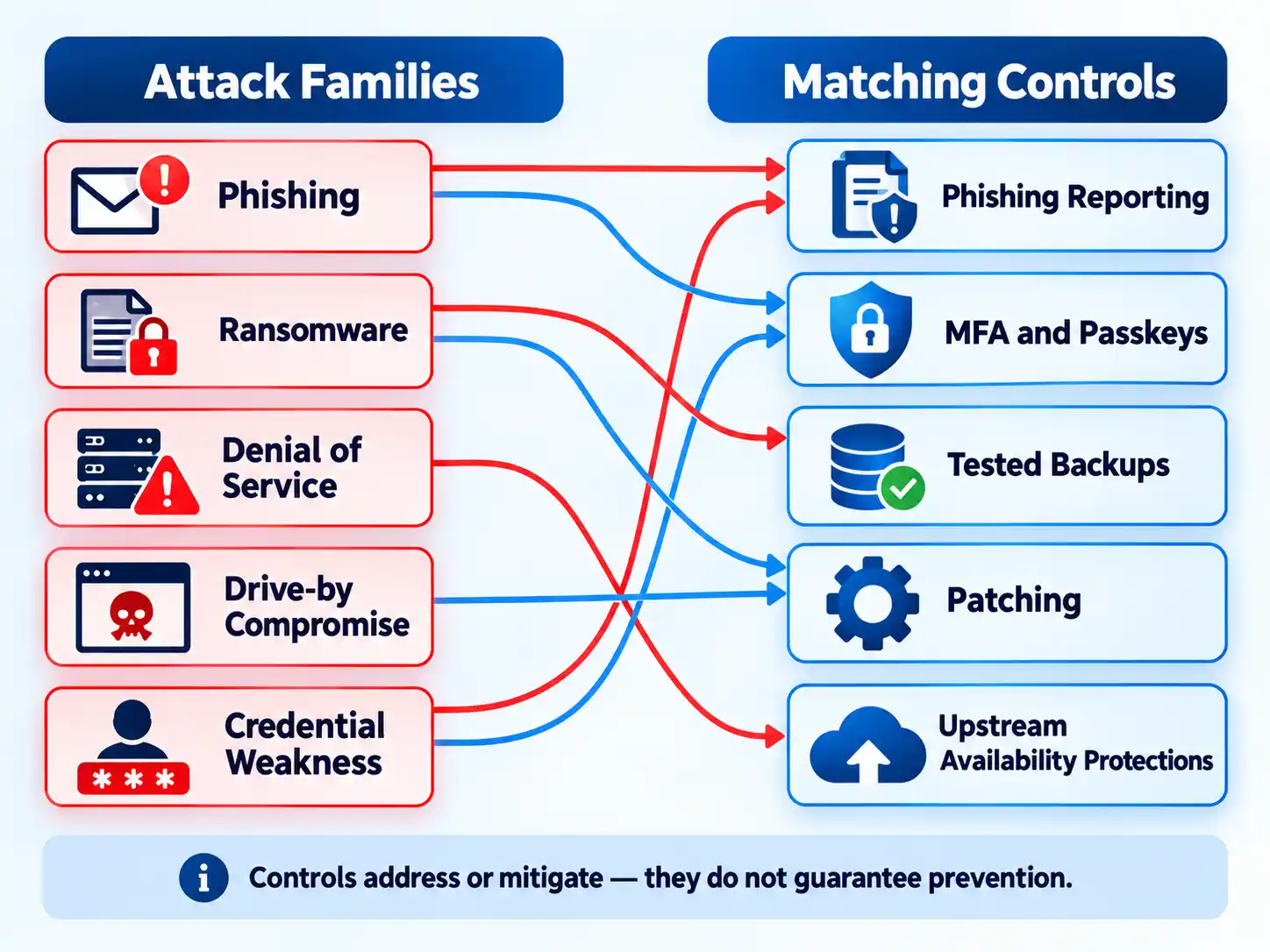
Offices lose data and downtime to a small set of documented attack types, and the single biggest mistake is treating them as interchangeable. Backups rescue you from ransomware but do nothing for a denial-of-service outage. Patching blocks drive-by exploits but won’t stop a convincing phishing email. Build one control per attack family, then test each control.
The Attack Families Offices Actually Face, and How Each One Works
Before the mechanics, the definitions. Each of these is a distinct category with its own delivery path and its own failure mode, and the mechanism is what tells you which defense applies.
- Phishing: criminals try to get people to open harmful links, emails, or attachments, or to hand over personal information. It arrives by email, text, social media direct message, or phone call, and is often dressed up to look like a trusted person or organization.
- Ransomware: malware designed to encrypt files on a device, rendering those files and the systems that depend on them unusable. Attackers then demand payment in exchange for decryption.
- Denial-of-service (DoS): legitimate users can’t reach systems, devices, or network resources because a malicious actor floods the target until it can’t respond or simply crashes.
- Drive-by compromise: an attacker gains access through a user visiting a website during ordinary browsing. The targeted version, where the site is one a specific community frequents, is a watering-hole attack: the attacker infects websites a targeted group visits often, aiming to infect a member’s computer when they show up.
- Credential and authentication weakness: the account layer itself becomes the way in, which is why authentication standards treat password-only logins as a design problem rather than a user failing.
Phishing: the delivery layer
Phishing is a con with a payload. The message is engineered to trigger a response (urgency, fear, curiosity, or authority) and the response is the attack. Common signs include urgent or emotionally charged language that threatens dire consequences for not acting immediately, requests to send personal or financial information, untrusted shortened URLs, and incorrect email addresses or links that mimic real ones.
One modern twist matters: poor grammar and misspellings used to be the giveaway, but with AI, some phishing messages now have perfect spelling and grammar. If grammar is your only filter, you’ll miss the well-built ones. Treat any unexpected request for credentials, payment, or a file download as suspicious until you verify it through a separate channel: a phone number or address you look up yourself, not one supplied in the message.
Ransomware: encryption plus extortion
Ransomware’s mechanism is blunt. Malware encrypts files, the files and the systems that rely on them become unusable, and the attacker demands payment for the decryption key. The damage isn’t only the locked files: it’s every workflow that depended on them, which in an office usually means invoicing, client records, and shared drives all at once.
Recovery is where the real leverage sits. CISA’s guidance is specific: maintain offline, encrypted backups of data and regularly test those backups, and regularly patch and update software and operating systems. The word “tested” carries the weight. An untested backup is a hope, not a recovery plan.
Denial-of-service: flooding the front door
A DoS attack doesn’t steal anything. It makes services unavailable (email, websites, online accounts, anything that depends on the affected computer or network) and that costs an organization both time and money while resources are inaccessible.
The common methods are worth knowing because they explain why the attack is hard to block at the target:
- Traffic flooding: the attacker sends many requests with fabricated return addresses, so the server is overwhelmed trying to authenticate requestors that don’t exist.
- Smurf attack: the attacker sends ICMP broadcast packets with a spoofed source address belonging to the target, and the resulting replies flood the target.
- SYN flood: connection requests are sent but never completed through the three-way handshake, leaving ports occupied and unavailable until legitimate users can’t connect.
There’s an indirect risk too: a network can suffer a DoS condition without being directly targeted, if its internet service provider or cloud provider is the one under attack.
Drive-by and watering-hole compromise: the browser as entry point
This is the attack most office workers never notice. The user visits a website during normal browsing, scripts execute automatically, and those scripts check the versions of the browser and its plugins looking for a vulnerable one. If they find it, exploit code is delivered, and successful exploitation gives the attacker code execution on the user’s system unless other protections are in place.
Delivery is varied: a legitimate site gets compromised and injected with malicious code, script files served from a publicly writable cloud storage bucket get modified, malicious ads are paid for and served through legitimate ad networks, user-controllable web interfaces are abused to insert scripts or iFrames, or browser push notifications are abused: clicking “allow” can grant a site permission to run JavaScript in the browser.
The watering-hole variant is the targeted version: the compromised site is one a specific community visits, such as a particular industry, government, or region, with the goal of compromising a specific user or set of users who share an interest. In many cases, this gives the attacker access to systems on the internal network rather than external systems sitting in a DMZ.
Credential weakness: the account as the weak link
Weak authentication isn’t a separate attack so much as a multiplier. Stolen or guessed credentials let an attacker walk in through the front door, and they pair naturally with phishing, which is often just a credential-harvesting exercise. NIST’s Digital Identity Guidelines (SP 800-63B) address authentication and lifecycle management directly, and a supplement, SP 800-63Bsup1, covers syncable authenticators including passkeys: a signal that the standards body treats password-only authentication as a problem to be engineered around, not a user behavior to be scolded.
Signs You’re Being Targeted
Detection in an office is mostly pattern recognition, and the patterns are unglamorous. Watch for these:
- A message pushing urgency or emotional stakes, especially one that threatens consequences for not responding immediately.
- Any request to send personal or financial information, or to log in through a link you didn’t expect.
- Shortened URLs from services you don’t recognize, or links and sender addresses that are subtly wrong.
- Unexpected file attachments, particularly ones that ask you to enable macros or scripting.
- Browser prompts asking you to allow notifications from a site you don’t remember visiting.
- Systems or shared drives that suddenly won’t open files, or files that have unfamiliar extensions.
- Services that go unreachable all at once (email, the company site, or the line-of-business app) with no internal change to explain it.
- Login alerts or password-reset emails you didn’t trigger.
One caveat on that list: phishing signs are not exhaustive, and the absence of a warning sign is not evidence of safety. If a message feels off, treat it as suspicious and verify independently.
Build a Layered Office Defense Baseline
The defenses below are ordered deliberately. Patching and scanning come first because they shrink the attack surface that drive-by exploits and ransomware both depend on; backups come next because they determine whether a ransomware event is an inconvenience or an existential problem; authentication hardening follows; then the human layer; then the plan for when something gets through anyway. This sequence works for an office with or without dedicated IT staff. If you have no in-house team, an IT help provider can run steps one and two, but you should still confirm the results yourself.
- Scan for vulnerabilities and patch, starting with internet-facing devices. Conduct regular vulnerability scanning to identify and address vulnerabilities, especially those on internet-facing devices, to limit the attack surface. Then regularly patch and update software and operating systems. Confirm that the patch level reported on your internet-facing devices matches what you intended to deploy.
- Stand up offline, encrypted backups and test them. Maintain offline, encrypted backups of data and regularly test your backups. A restore test on a sample of files is the only proof the backup works; schedule it rather than assuming it.
- Harden authentication beyond passwords. Move account logins toward multi-factor authentication and, where your systems support them, passkeys. NIST’s authentication guidance and its passkey supplement are the reference points for how these should be configured and managed over an account’s lifecycle.
- Give staff a reporting path and use it. If a message looks suspicious, don’t click links or attachments, report it, and delete it. Verify anything that might be real through a separate, known contact channel: the company website or a phone number you already have. Make sure the report button is easy to find and that reports get reviewed rather than ignored.
- Write and rehearse an incident response plan. Effective incident response is a complex undertaking that requires substantial planning and resources, and NIST’s incident handling guide provides guidelines for analyzing incident data and determining the appropriate response to each incident, independent of particular hardware, operating systems, protocols, or applications. Decide in advance who calls whom, and who contacts law enforcement.
Verify the result
- Your vulnerability scan output confirms internet-facing devices are at the current patch level, with no unexplained exceptions.
- A restore test from your offline encrypted backup has been completed and documented within your chosen interval.
- Every staff account that can reach email or shared files has a second authentication factor or a passkey.
- A test phishing report from a staff member reached a named reviewer and was actioned.
- Your incident response plan names who decides, who communicates, and who reports to authorities.
Warning
Watch for the operational failure modes that quietly undo a good plan: a backup that has never been restored, a patch that was scheduled but never confirmed on the internet-facing box, a second factor that only covers email and not the shared drive, and a phishing report button nobody monitors. Each of these looks like coverage on paper and behaves like a gap in practice.
When to Escalate and Report
Some events need outside involvement, and the reporting channels are specific.
For ransomware, victims in the U.S. should report to federal law enforcement via the FBI’s Internet Crime Complaint Center (IC3) or a Secret Service Field Office, and can request technical assistance or provide information to help others by contacting CISA. Don’t wait until recovery is complete to make that call.
For suspected phishing, the immediate action is to report and delete without clicking or replying: including any “unsubscribe” link. If you think the message might be real, look up the organization’s contact details from its verified website or reach the person through a channel you already trust.
For a denial-of-service condition, check whether your ISP or cloud provider is the one affected before assuming the problem is inside your network. That single check can save hours of misdirected troubleshooting.
Misconceptions Worth Retiring
| Myth | Reality |
|---|---|
| “We have backups, so ransomware is handled.” | Backups only help if they’re offline, encrypted, and regularly tested. An untested backup is an assumption, not a recovery control. |
| “Our staff would spot a phishing email from the bad grammar.” | AI means some phishing messages now have perfect grammar and spelling. The other signs (urgency, information requests, wrong addresses, shortened links) carry the weight now. |
| “We’d know if we were under a denial-of-service attack.” | Your network can suffer a DoS condition without being directly targeted, if your ISP or cloud provider is the one being flooded. |
| “We only visit reputable websites, so drive-by attacks aren’t our problem.” | Drive-by compromise often uses legitimate sites that were themselves compromised, plus malvertising served through legitimate ad networks. |
| “Strong passwords are enough.” | NIST’s authentication guidance and its passkey supplement exist precisely because password-only authentication is a known weak point worth engineering around. |
The Bottom Line
If you do nothing else this quarter: patch your internet-facing devices, prove that a backup restores, and put a second factor on every account that can reach email or shared files. Those three moves cover the mechanisms that cause the most damage, and they’re all things you can verify rather than assume. The offices that recover fastest aren’t the ones that predicted the attack: they’re the ones that had already tested the way back.

I have never seen anything like this