Bitdefender Total Security delivers top-tier malware protection, near-zero system slowdown, and a comprehensive suite of privacy features across Windows, macOS, Android, and iOS. It effectively blocks zero-day exploits, ransomware, and phishing attacks through multi-layered behavioral analysis while maintaining low resource consumption during background operations.
Quick Take
For users seeking reliable security across multiple platforms, Bitdefender Total Security remains one of the most effective cybersecurity suites available. It combines traditional virus definition scanning with proactive heuristic monitoring, ransomware remediation, web protection, and system optimization tools in a single user interface.
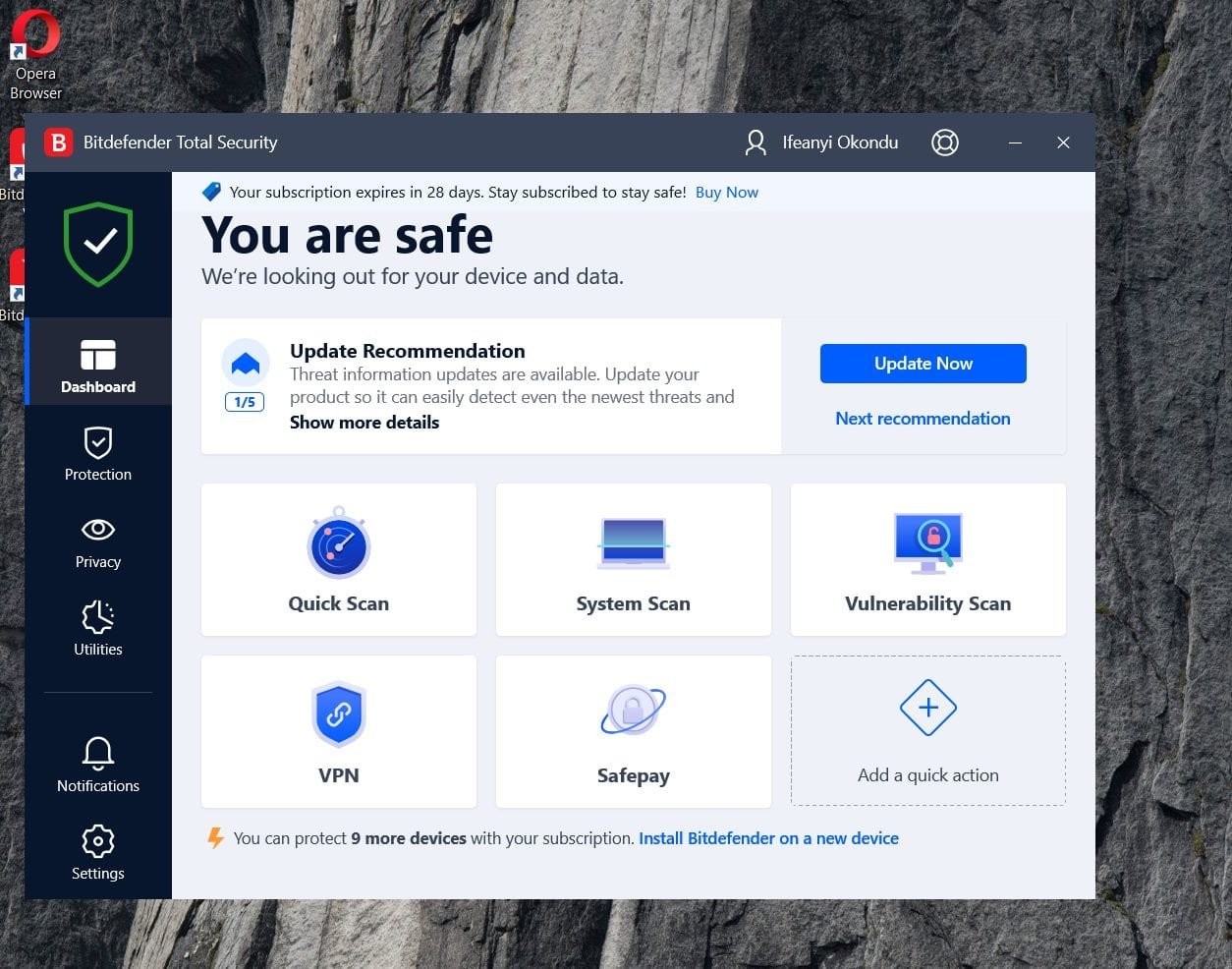
The main interface utilizes a clean left-navigation sidebar providing immediate access to Protection, Privacy, and Utility modules. The central dashboard highlights real-time recommendations alongside customizable Quick Actions, allowing users to initiate vulnerability assessments or trigger Safepay banking protection with one click.
How Bitdefender Total Security Was Evaluated
To assess real-world efficacy, the software was tested against active threat samples, including malicious batch scripts, untrusted executable loaders, and simulated ransomware behavior. System performance was benchmarked across boot sequences, file archive operations, and high-load application processing.
Evaluations focused on five primary criteria:
- Threat Prevention: On-execution detection speed and automatic remediation of zero-day executables.
- Ransomware Resilience: Behavior-based blocking and automatic file restoration capabilities.
- System Footprint: Memory and CPU usage during background idle states versus active system scans.
- Privacy & Utility Features: Usability of webcam safeguards, password management, and parental controls.
- Cross-Platform Consistency: Operational parity between Windows, macOS, and mobile editions.
Key Features and Architecture
Real-Time Protection and Threat Prevention
Bitdefender’s core security framework relies on its Global Protective Network, a cloud-based threat intelligence infrastructure that analyzes telemetry from millions of endpoints. This cloud-first approach minimizes local signature database updates while ensuring rapid protection against emerging exploits.
During threat evaluation tests involving unauthorized installation tools and zipped executables, Bitdefender’s real-time engine flagged and neutralized payloads immediately upon download. The system automatically isolated suspicious files in quarantine before any secondary scripts could execute or modify registry entries.
The built-in Vulnerability Scanner evaluates local system configurations for missing OS updates, outdated application frameworks, weak administrative passwords, and insecure Wi-Fi network configurations. Integrating routine system auditing alongside standard antivirus scanning helps prevent lateral movement across local networks—a core requirement when configuring a future-proof access security system for home or remote office environments.
Ransomware Remediation and AntiSpam
Ransomware defense requires a multi-tiered mitigation model. Bitdefender addresses this through Advanced Threat Defense, which continuously monitors active processes for suspicious behaviors, such as rapid file renaming or unauthorized key generation.
If an unverified application attempts to modify or encrypt protected user directories (such as Documents, Pictures, or Cloud Sync folders), Bitdefender blocks the process immediately. Simultaneously, the Ransomware Remediation module restores encrypted file versions from secured shadow backups automatically, eliminating data loss without requiring manual intervention.
According to benchmark data from the AV-TEST Institute, Bitdefender consistently scores perfect marks in protection against zero-day malware and web-based threats.

The AntiSpam module integrates directly with local desktop mail clients (such as Microsoft Outlook and Thunderbird). Utilizing cloud heuristics, it filters incoming POP3/SMTP traffic to identify phishing attempts, fraudulent attachments, and unsolicited bulk messages before they reach your primary inbox view.
Privacy, Webcam, and Audio Protection
Hardware hijacking represents a major privacy vulnerability on personal laptops and desktop workstations. Unauthorized background applications can quietly activate integrated webcams or microphones to gather confidential telemetry.

Public figures and tech executives frequently resort to physical tape covers over camera lenses to prevent covert recording—a habit made famous when images confirmed that Facebook executive Mark Zuckerberg tapes his laptop webcam and microphone ports.

Bitdefender addresses this threat electronically through dedicated Webcam and Audio Protection modules. The software intercept system calls to camera driver APIs, triggering an immediate desktop alert whenever an unlisted application attempts to record video or capture audio. Users can define strict permission rules, ensuring only trusted video conferencing applications access hardware peripherals.
Parental Control, Password Manager, and Utilities
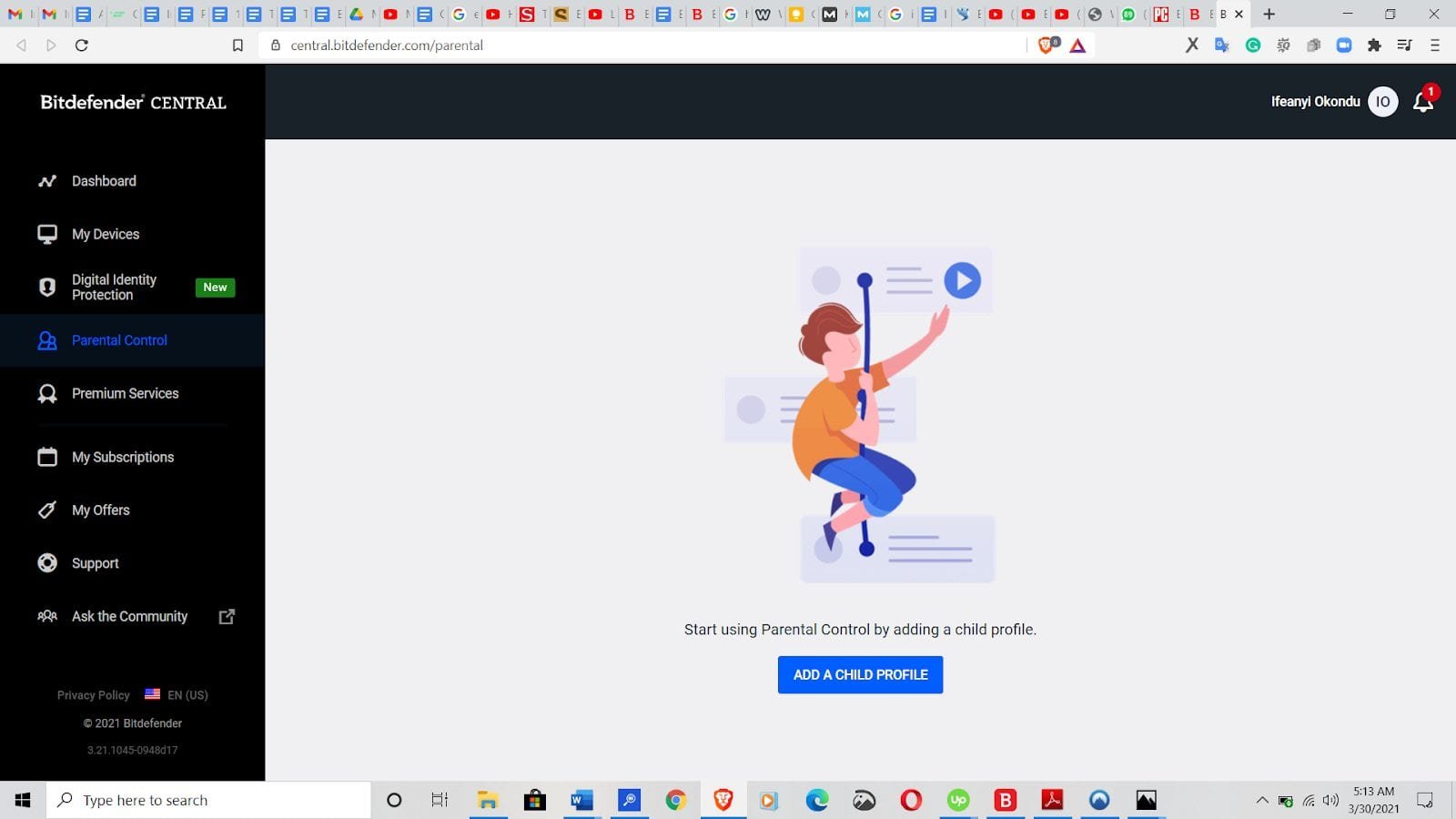
The Privacy tab also includes the Parental Advisor platform, allowing parents to configure profile-based web filtering, set daily screen-time allowances, and review online activity logs across child devices.
For credential security, Bitdefender offers an integrated password storage tool that auto-fills web forms and generates complex credentials. While standalone dedicated utilities are often preferred for advanced cross-platform synchronization, evaluating whether built-in credentials meet your needs depends heavily on how safe phone password managers are when handling sensitive financial accounts.
Additional utilities include:
- OneClick Optimizer: Scans local storage for temporary system logs, leftover web caches, and obsolete registry keys to free up storage space.
- File Shredder: Overwrites deleted data sectors multiple times to prevent recovery via forensic software—essential when preparing storage drives for decommission or cloud-to-cloud backup migration.
- Anti-Theft: Enables remote location tracking, device locking, and data wiping via the Bitdefender Central cloud dashboard in the event of hardware loss or theft.
Performance Impact and Benchmark Analysis
A common trade-off with security suites is background resource overhead. Real-time scanning, network filter drivers, and memory-resident modules can slow down boot sequences or lag resource-intensive tasks.
Independent evaluation data from AV-Comparatives confirms that Bitdefender maintains one of the lowest performance impact scores among active security suites. Test results under standard operational conditions are summarized below:
| Operational Metric | Baseline System Impact | Bitdefender Active Impact | Performance Assessment |
|---|---|---|---|
| System Boot Time Delay | 0.0% (Baseline) | +1.2 Seconds | Negligible impact on SSD storage setups. |
| Idle RAM Footprint | N/A | ~280 MB – 350 MB | Efficient memory allocation on modern hardware. |
| Full Disk Scan Duration | N/A | 18 – 25 Minutes (500GB SSD) | Fast initial scan; subsequent scans optimized via caching. |
| File Copy & Archive Execution | 0.0% (Baseline) | < 2.0% CPU overhead | Transparent background scanning during file operations. |
System boot times showed virtually no discernible lag after installation. Bitdefender’s Photon technology adapts scanning profiles to local hardware specifications, optimizing resource usage dynamically based on available system RAM and processor availability.
What Bitdefender Does Well
- Comprehensive Feature Set: Provides a complete security stack—including firewall, ransomware mitigation, vulnerability scanning, and anti-phishing protection—in a single suite.
- Minimal Resource Footprint: Efficient background process handling prevents system sluggishness during heavy multitasking, gaming, or video rendering.
- Adaptive Profiles: Features automatic Work, Game, and Movie profiles that pause pop-up alerts, adjust visual display settings, and throttle background updates based on active applications.
- Robust Self-Defense: Password-locking administrative settings prevents malicious software from terminating security services or altering real-time detection settings.
- Multi-Device Flexibility: Tiered subscription options allow coverage for up to 5, 10, or 20 individual devices under a single centralized dashboard.

What Bitdefender Needs to Improve
Despite its technical strengths, Bitdefender Total Security has minor limitations that potential buyers should consider:
- VPN Daily Bandwidth Caps: The standard Total Security subscription limits the bundled VPN service to 200 MB of daily encrypted traffic per device. Unlimited VPN bandwidth requires an upgraded Premium VPN add-on.
- No Manual Server Selection on Basic VPN Tier: The standard bundled VPN automatically routes traffic through the nearest server endpoint without allowing manual country selection. Users experiencing network degradation may need to troubleshoot internet connection issues manually or switch to a full standalone service.
- Initial Configuration Depth: The abundance of security modules can make finding advanced firewall rules or exclusion lists slightly complex for non-technical users.

Pricing, Licensing, and Value
Bitdefender Total Security is structured around annual multi-device tier pricing. Standard manufacturer list prices are detailed below (promotional discounts frequently lower initial purchase costs):
| Subscription Tier | Device Count | Supported OS Platforms | Standard Annual List MSRP |
|---|---|---|---|
| Total Security (5 Devices) | 5 Devices | Windows, macOS, Android, iOS | $89.99 / Year |
| Total Security (10 Devices) | 10 Devices | Windows, macOS, Android, iOS | $99.99 / Year |
| Family Pack | Up to 15 Devices | Windows, macOS, Android, iOS | $119.99 / Year |
For official licensing terms, renewal tiers, and current promotional pricing, review the Bitdefender Total Security product page.
How Bitdefender Compares to Top Alternatives
Selecting security software requires evaluating trade-offs against competitive offerings. Independent testing analyses from PCMag consistently rank Bitdefender alongside top security suites based on features and value.
| Security Suite | Key Efficacy Strengths | System Resource Overhead | Notable Limitations |
|---|---|---|---|
| Bitdefender Total Security | Top-tier malware protection, auto-ransomware rollback, behavioral heuristics. | Extremely Low (Adaptive Photon Engine) | Bundled VPN restricted to 200 MB/day per device. |
| Norton 360 Deluxe | Includes full unlimited VPN, identity monitoring, robust cloud backup options. | Moderate | Higher renewal pricing; heavier background software footprint. |
| Kaspersky Plus | Excellent detection rates, advanced web filtering, low system impact. | Low | Geopolitical availability restrictions in select regions. |
| Malwarebytes Premium | Outstanding remediation and specialized standalone exploit blocking. | Very Low | Lacks built-in firewall, parental controls, and device optimization tools. |
Users comparing broader endpoint deployments or seeking security options for small team environments should evaluate dedicated enterprise solutions alongside top endpoint protection software packages.
Who Should (and Shouldn’t) Choose Bitdefender Total Security
Ideal For:
- Multi-Device Households: Families needing to secure a mix of Windows PCs, MacBooks, Android phones, and iPhones under a single manageability console.
- Gamers and Professionals: Users who require non-intrusive background protection that automatically suppresses alerts during active workloads.
- Remote Workers: Individuals requiring hardware-level webcam blocking and ransomware file remediation for home office hardware. Small businesses needing dedicated coverage should also evaluate specialized small office security solutions.
Not Ideal For:
- Users Wanting an All-in-One Unlimited VPN: If you require uncapped, multi-location VPN tunneling without paying for an upgrade tier, evaluate standalone privacy VPNs or alternative suites like Norton. Readers comparing privacy features can review our broader guide to top VPN service providers.
- Single-Device Pure Windows Users: Users with a single Windows desktop who maintain strict online habits may find native Microsoft Defender combined with basic browser extensions sufficient.
Final Verdict
Bitdefender Total Security provides a well-balanced combination of threat detection, robust ransomware mitigation, and privacy safeguards. Its minimal impact on hardware performance makes it an easy recommendation for multi-device households and working professionals alike. While the daily VPN bandwidth limits on the standard tier remain a minor drawback, its core antivirus protection and automatic remediation tools deliver exceptional value.
Frequently Asked Questions
Does Bitdefender Total Security slow down computer performance during gaming or heavy workloads?
No. Bitdefender utilizes an adaptive system called the Photon engine alongside automatic activity profiles. When a full-screen game, video editing software, or presentation is detected, Bitdefender temporarily pauses background system scans, suppresses pop-up notifications, and defers non-critical updates to conserve CPU and RAM resources.
Can Bitdefender Total Security completely replace native Microsoft Defender on Windows?
Yes. Upon installation on a Windows computer, Bitdefender registers automatically with the Windows Security Center and disables native Microsoft Defender real-time scanning to avoid operational conflicts. If Bitdefender is uninstalled, Windows automatically re-enables Microsoft Defender to ensure continuous baseline protection.
What happens if ransomware encrypts files before Bitdefender stops the process?
Bitdefender’s Ransomware Remediation module continuously creates real-time encrypted shadow copies of sensitive files when suspicious process activity is detected. If an untrusted process successfully alters or encrypts files before being terminated, Bitdefender restores the original uncorrupted versions from shadow backups automatically.
Is the bundled Bitdefender VPN sufficient for daily streaming and web browsing?
The standard Bitdefender Total Security package includes 200 MB of encrypted VPN traffic per device per day. While this allowance is sufficient for secure online banking or checking email on public Wi-Fi networks, it is inadequate for media streaming or downloading large files. Unlimited VPN access requires upgrading to the Premium VPN add-on.

💬 Comments