To amplify your business operations, you need six essential software categories: cloud computing, business analytics, leadership platforms, human resources software, cybersecurity tools, and project management software. Together, these tools automate routine work, protect critical data, and help teams collaborate effectively.
Choosing the right technology can feel overwhelming for small business owners. Modern software applications eliminate manual tasks and provide real-time data for decision-making. However, buying tools without a clear strategy leads to wasted subscription fees. We evaluated the software categories every growing company needs based on affordability, ease of use, security, and scalability.
This guide covers the operational software stack — the tools you need to run day-to-day. If you’re earlier in the process and still building your business plan, see our guide to the top tech tools for smarter business planning for the analytics, research, and forecasting tools that belong in the plan itself.
Quick Take: Key Software Categories at a Glance
Here is a summary of the six essential software types every modern business needs:
- Cloud Computing: Best for secure data storage and real-time team collaboration from any location.
- Big Data & Business Analytics: Best for tracking customer trends, sales habits, and operational efficiency.
- Leadership Development Platforms: Best for training team managers, tracking leadership growth, and building core business skills.
- HR & Payroll Software: Best for automating payroll, onboarding new employees, and tracking benefits.
- Cybersecurity Solutions: Best for blocking network intrusions, preventing data theft, and staying compliant with privacy laws.
- Project Management Tools: Best for assigning daily tasks, setting project deadlines, and organizing team schedules.
1. Cloud Computing Platforms

Cloud computing allows businesses to access applications, file storage, and databases over the internet. Instead of purchasing expensive local servers, companies rent secure computing power from off-site data centers. According to NIST cloud computing standards, these services give companies on-demand access to shared computing resources without complex physical networks.
Using cloud services for remote work allows team members to log in safely from any location. Employees can collaborate on documents at the same time, share files instantly, and back up important records automatically. This eliminates data loss if a laptop breaks or suffers physical damage.
Who it is best for: Growing teams that need secure access to business files from multiple locations or home offices.
Real limitations: Cloud platforms depend entirely on a stable internet connection. Outages at major cloud providers can temporarily stop work across your organization.
Pricing expectation: Basic cloud storage plans start around $6 per user every month. Enterprise computing infrastructure scales based on active data usage.
2. Big Data and Business Analytics Tools
Business analytics software gathers customer interactions, sales numbers, and operational costs into one centralized dashboard. Instead of relying on guesswork, business owners can review visual charts to identify top-selling products and slow sales cycles.
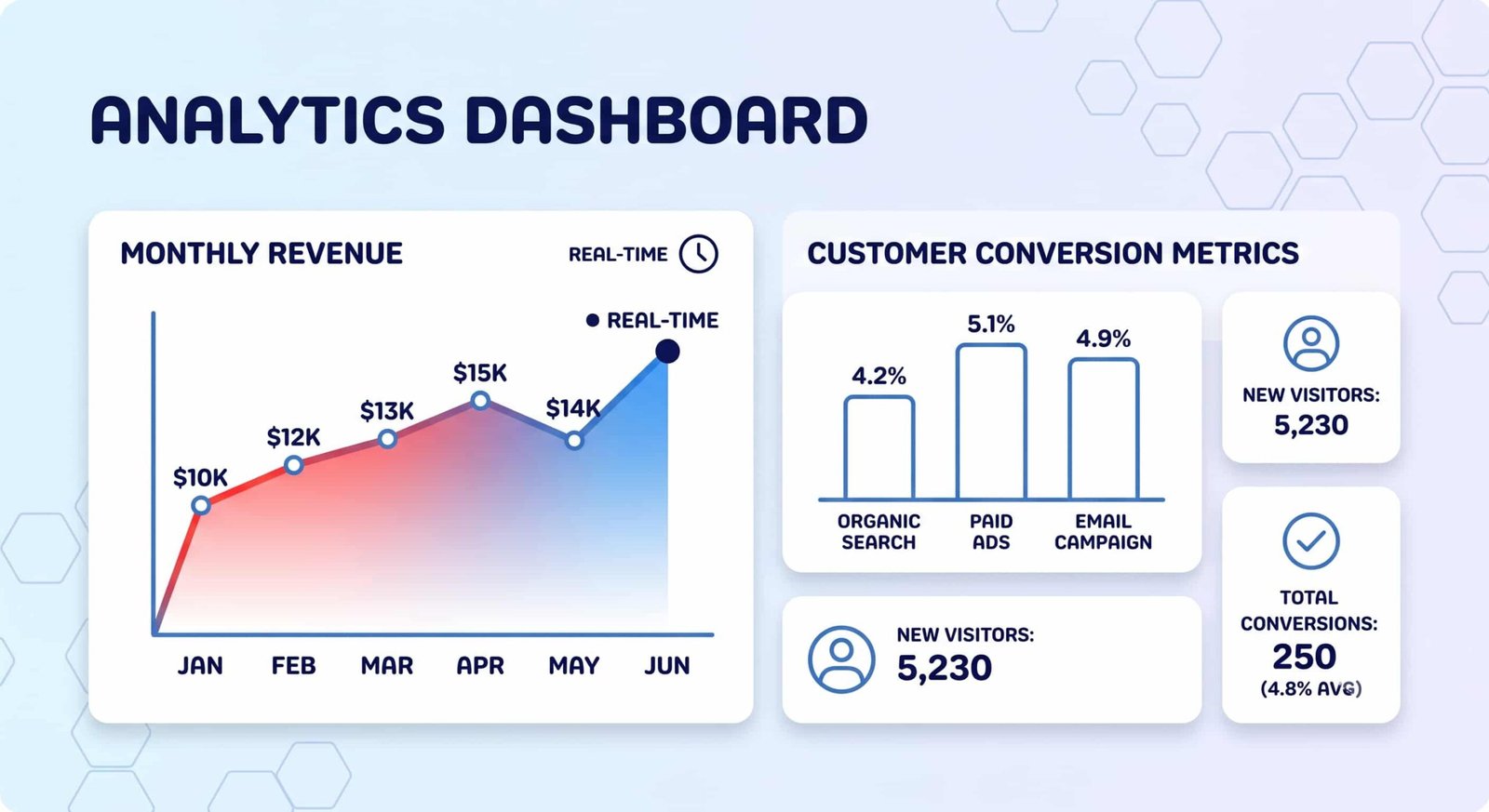
Modern analytics platforms remove data silos by connecting directly to your store, website, and accounting programs. The Gartner analytics market reviews show that current tools emphasize user-friendly dashboards and automated reporting over complex custom coding. You can also explore specialized business intelligence tools to refine your reporting strategy.
Who it is best for: Companies that collect customer data but struggle to spot sales trends or operational bottlenecks.
Real limitations: Analytics tools produce poor reports if your initial input data is inaccurate or incomplete. Staff members must spend time cleaning spreadsheet records before setup.
Pricing expectation: Simple dashboard tools offer free tiers for small teams. Comprehensive business intelligence suites range from $10 to $70 per user each month.
3. Leadership Development Platforms
Leadership development software provides structured digital courses, interactive scenarios, and performance evaluations for team managers. These platforms help rising managers develop strategic thinking, clear communication, and conflict management skills.
Programs like Harvard Business Publishing digital learning tools deliver professional development lessons directly to employee dashboards. Organizations can track course completion rates, assess leadership strengths, and plan career pathways. In addition to digital platforms, structured negotiation training helps managers close higher-value deals. You can review established leadership training frameworks to structure your internal training programs.
Who it is best for: Companies expanding their management teams and training mid-level supervisors for executive roles.
Real limitations: Digital modules cannot replace real-world management experience. Software training works best when combined with direct executive coaching.
Pricing expectation: Individual course platforms start at $15 per employee monthly. Custom enterprise learning suites usually charge annual license fees per active department.
4. HR Software and Payroll Systems
Human resource software automates administrative staff duties, including employee onboarding, paid time off requests, and health benefits administration. Modern systems handle payroll calculations and tax withholding automatically, which prevents manual math errors.
Industry research on human resource management system functions confirms that centralizing workforce records saves hours of administrative work each week. A modern HR platform centralizes employee data and simplifies benefits administration. For example, connecting payroll software with sales management systems reduces manual data entry errors during sales commission processing.
Who it is best for: Businesses hiring their first employees or struggling with manual payroll spreadsheets.
Real limitations: Moving employee records into a new HR system requires strict data verification to avoid tax filing errors.
Pricing expectation: Entry-level payroll software typically charges a base fee of $40 per month plus $6 per employee.
5. Cybersecurity Solutions

Cybersecurity software protects your company laptops, customer records, and network connections from malicious attacks. Standard security suites combine endpoint antivirus protection, network firewalls, and password management tools into one central portal.
Official CISA small business cyber guidance highlights that over 90% of cyberattacks start with malicious emails targeting workers. Layered security software blocks dangerous email attachments and flags suspicious login attempts before damage occurs. Review practical small business cybersecurity steps to build a comprehensive defense strategy.
Who it is best for: Every business storing customer contact details, financial transaction records, or proprietary company files online.
Real limitations: Security software cannot prevent every breach if employees share passwords or fall for phone impersonation scams.
Pricing expectation: Business endpoint protection averages $3 to $8 per device every month.
6. Project Management Tools
Project management software organizes complex workflows into clear tasks, assigned owners, and fixed target dates. Visual boards allow teams to track task progress from start to finish without long email threads.
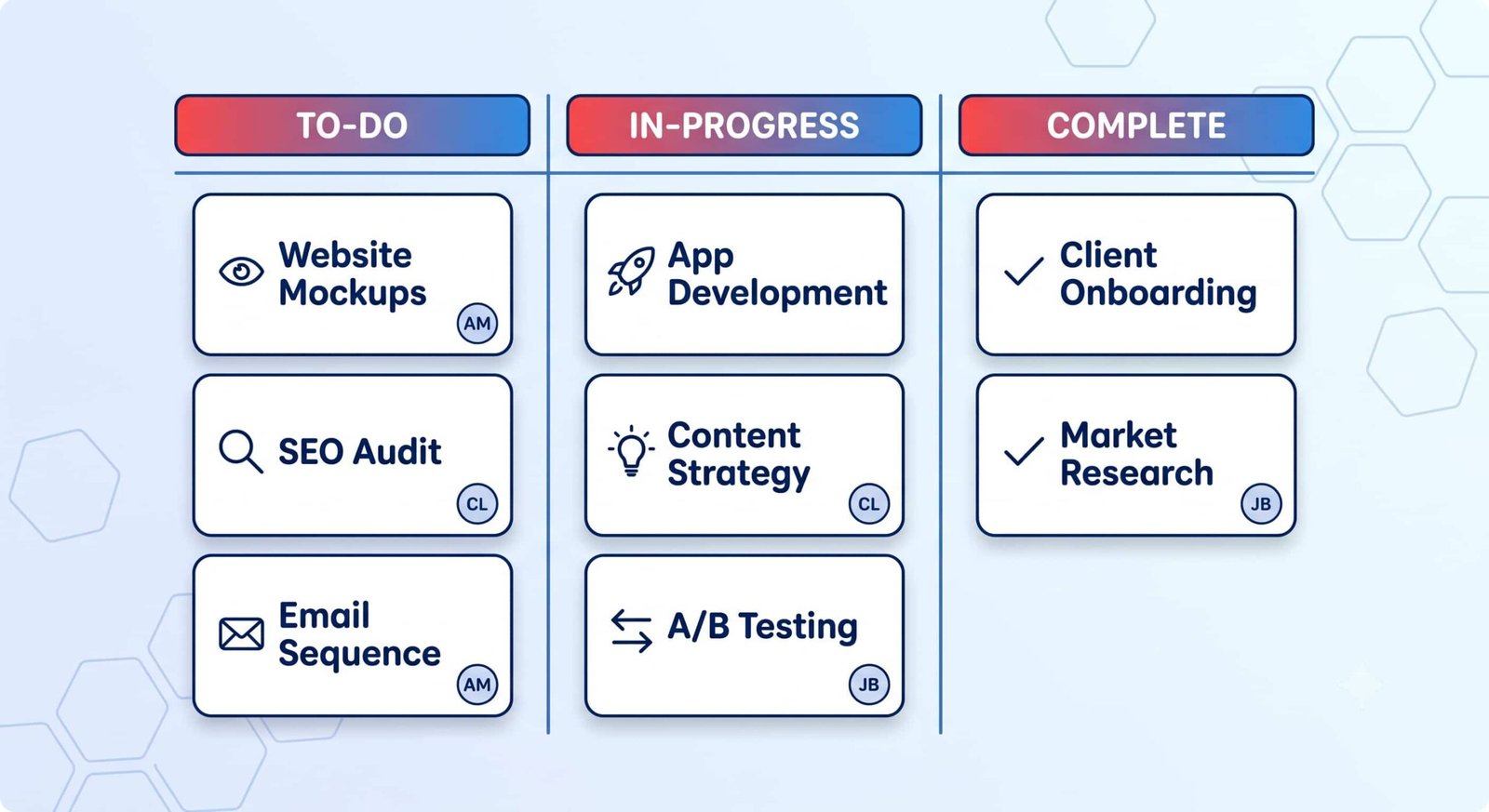
Recent Project Management Institute research demonstrates that missed deadlines affect 55% of complex projects lacking structured tracking systems. Project software provides automated notifications when deadlines approach, keeping projects on budget. Exploring agile project workflows helps teams choose between task lists, visual cards, or timeline schedules.
Who it is best for: Multi-person teams managing client deliverables, product launches, or tight project deadlines.
Real limitations: If team members forget to update their task statuses daily, project timelines quickly become inaccurate.
Pricing expectation: Basic task boards offer generous free plans. Advanced project suites cost between $5 and $15 per user each month.
How to Choose the Right Business Software Stack (Decision Framework)
Selecting the right software tools requires balancing your operational budget against current staff needs. Follow this three-step framework before buying any new software package:
- Identify Your Biggest Friction Point: Pinpoint the administrative task taking up the most employee hours each week. Start by purchasing software for that specific problem first.
- Test Free Plans and Demos: Sign up for free trials before signing annual software contracts. Verify that your staff finds the interface easy to navigate.
- Check Platform Integrations: Ensure new software connects with your existing email, accounting, and cloud storage systems. Integrated tools prevent repetitive manual data entry.
Key Takeaways
- Adopting cloud computing platforms secures company files while enabling remote work.
- Business analytics tools turn raw customer interactions into clear sales trends.
- Digital leadership software builds manager skills and supports long-term growth.
- Automated HR and payroll software reduces costly calculation errors and saves time.
- Layered cybersecurity software shields critical customer data from malicious attacks.
- Visual project management tools organize tasks and prevent missed project deadlines.
Frequently Asked Questions (FAQ)
How much should a small business budget for software every month?
Most small businesses spend between 3% and 7% of their total monthly revenue on essential business software. Prioritize foundational tools like payroll and cybersecurity before adding advanced analytics platforms.
Can small businesses run effectively on free software tiers alone?
Free tiers work well for sole proprietors or teams under three people. However, growing businesses usually need paid plans to access user administration controls, security compliance tools, and phone support.
How do I ensure my team actually uses new business software?
Introduce one new software tool at a time and appoint an internal program expert to lead training. Provide simple video tutorials and establish mandatory processes for recording daily work in the new system.

💬 Comments