Some free streaming services are legitimate and reasonably low-risk, but unfamiliar streaming sites can expose you to phishing, deceptive advertising, malicious downloads, notification spam, and unsafe apps. The biggest risk usually comes from what a page persuades you to click, install, allow, or enter, not simply from the fact that the stream is free.
Quick Take
- Free does not automatically mean unsafe. Licensed ad-supported streaming services are a different category from unfamiliar sites distributing unknown apps or questionable streams.
- A pop-up is not the same thing as a malware infection, but deceptive pop-ups can lead to phishing pages, fake updates, dangerous downloads, or fraudulent payment prompts.
- Installing an unknown streaming app or APK creates more risk than simply viewing a webpage because installed software can request permissions and run code on the device.
- Browser warnings, forced notification prompts, unexpected downloads, and demands to disable security tools are strong reasons to leave.
- If you already installed something, entered a password, or supplied payment information, the appropriate response depends on exactly what happened.
Are Free Streaming Sites Safe?
Some are. “Free” describes how a service charges you, not whether it is secure. A legitimate ad-supported streaming service can provide programming without a subscription because advertising funds the service. That is different from an unfamiliar site that sends you through several redirects, demands a browser extension, or tells you to install an unknown “HD player” before a video will start.
It helps to separate three situations. The first is a recognizable streaming service delivered through its normal website or an established app marketplace. The second is an unfamiliar browser-based streaming site that may rely on aggressive advertising, redirects, or questionable content sources. The third is an unofficial app, Android application package, or modified streaming device that asks you to install software from a source you cannot confidently verify.
An Android application package, usually called an APK, is a file format used to install Android apps. Sideloading means installing an app from outside the device’s usual app marketplace. Neither term means the software is automatically malicious, but software from an unfamiliar source deserves more scrutiny because installing it lets code run on the device.
The practical safety question is therefore not just “Is this streaming site free?” It is also: Does it push you to override a browser warning, install something, grant a permission, enter a password, provide payment details, or trust software from an unknown publisher?
Where the Risk Actually Comes From
Streaming-related security problems often develop through a chain of small interactions. A page itself might display little more than a player and advertisements. Risk increases when a click moves you into a different process.
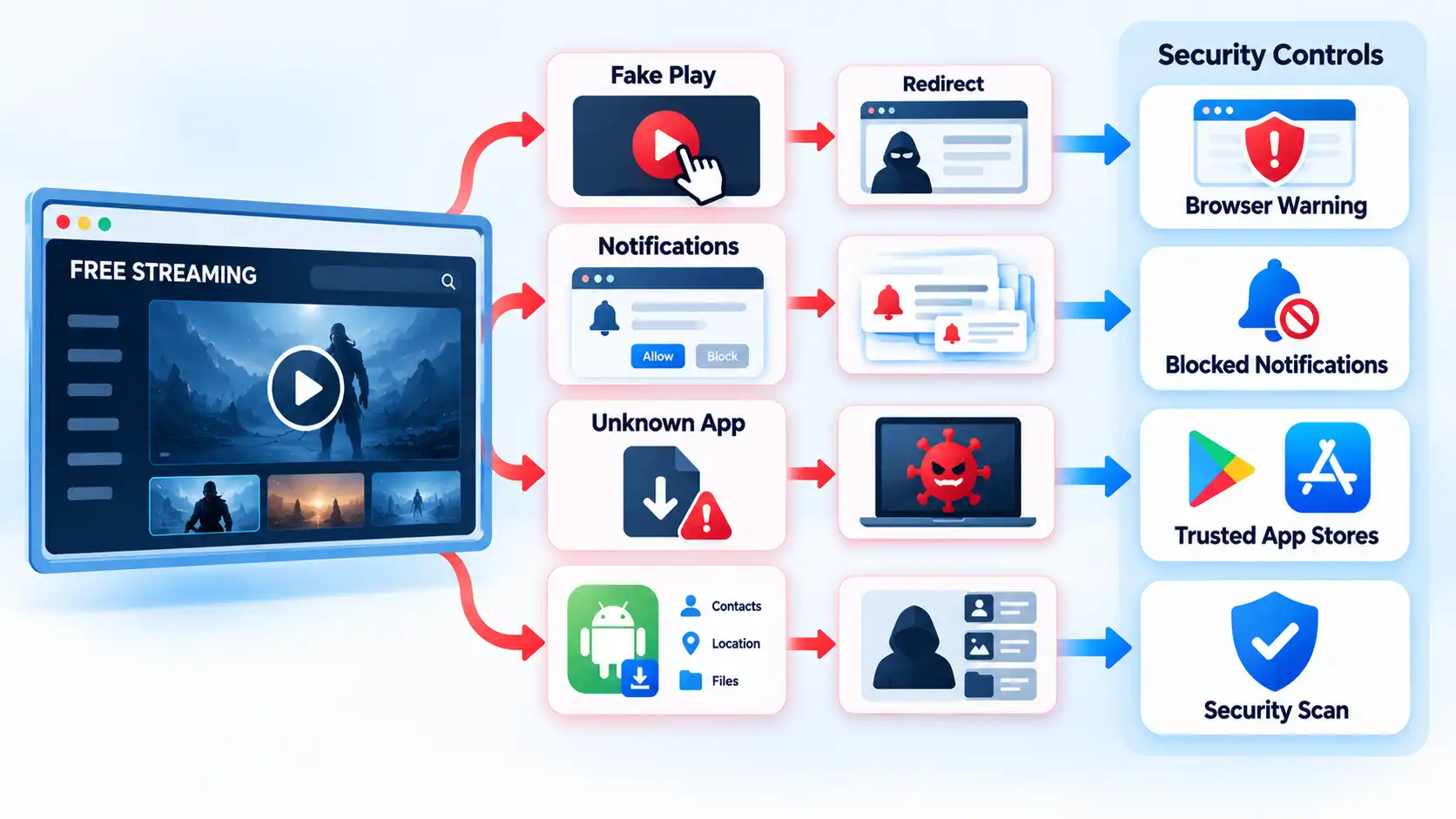
For example, what looks like a large Play button might actually be an advertisement. Clicking it can open another tab. The new page might then claim that your browser is outdated, that a codec is missing, that your device has a virus, or that you must complete an account check before watching. The next interaction may ask for a download, notification permission, password, or card details.
This is an example of social engineering: persuading someone to perform an action that benefits an attacker or scammer. A redirect simply moves the browser from one page to another. Redirects are used legitimately across the web, but an unexpected chain can also move users from a streaming page into phishing, scam, or malicious-download pages.
Malvertising is malicious or deceptive activity delivered through advertising channels. In practice, a user may encounter a fake system warning, a misleading download control, or an advertisement designed to resemble part of the streaming interface. That does not mean every advertisement is malicious. The risk is that deceptive advertising can blur the line between the video player and an unrelated action.
Modern browsers include defenses against some of these paths. Google Chrome’s Safe Browsing warnings can flag phishing, malware, unwanted software, malicious or intrusive advertising, and other unsafe pages. Firefox can warn about deceptive sites and block dangerous downloads. These controls reduce risk, but the absence of a warning does not prove that a page is trustworthy.
Pop-Ups, Redirects, and Fake Play Buttons
A pop-up is a browser window, tab, overlay, or alert that appears in addition to the page you intended to use. Pop-ups are not automatically dangerous. Banks, stores, and other legitimate sites sometimes use them for ordinary functions. The important question is what the pop-up tries to make you do.
Microsoft’s Edge guidance notes that pop-ups can use phishing tactics involving fake warnings, prizes, and free downloads. Google’s unwanted-software guidance lists persistent pop-ups, unfamiliar redirects, fake virus alerts, unwanted extensions, and changed browser settings among signs that unwanted software or malware may be present.
Warning
If a streaming page says your device is infected, demands an urgent browser update, or tells you to install a special player, do not use the button inside that warning. Leave the page and obtain any genuine update from the product’s official website or built-in update mechanism.
Google specifically advises users not to click suspicious update or download pop-ups and instead to obtain software from its official source. A webpage showing an alarming “virus detected” graphic should therefore not be treated as equivalent to a warning from your operating system or installed security software.
A redirect is also different from an infection. If clicking Play sends you to a gambling page, fake store, or unrelated site, the redirect itself does not prove malware was installed. It does show that the original page is generating or allowing unwanted navigation, and continuing to interact creates more opportunities for phishing, deceptive downloads, or permission prompts.
Why Notification Spam Can Continue After You Close the Site
Browser notifications are not ordinary pop-ups. They use a site permission that lets a website send notifications through the browser or operating system after you have left the page.
A suspicious streaming page may display a message such as “Click Allow to continue,” “Allow to prove you are not a robot,” or “Enable notifications to watch.” Granting that permission can result in advertisements, fake security warnings, or other unwanted messages appearing later.
Microsoft’s Edge notification documentation distinguishes website notifications from pop-ups and confirms that website notifications can still appear even after Edge is closed.
The practical check is the source of the message. A notification sent under a website permission is not the same thing as a warning generated by Windows Security, Android, or another installed security product. If a browser notification claims that a virus has been detected, avoid its “clean,” “scan,” or “renew” button and manage the site’s notification permission through the browser instead.
Fake Streaming Apps and APKs Are a Different Risk
Installing software changes the risk model because the app can execute code and ask the operating system for access to device features or personal data. A webpage is constrained by browser and operating-system security controls. An installed app can potentially do more, depending on the permissions it receives and the protections the platform enforces.
On Android, Google recommends obtaining apps from Google Play and warns that apps from unknown sources can put the device and personal information at risk. Google Play Protect checks apps from Google Play and other sources for potentially harmful behavior, can warn about harmful apps, and may disable or remove them. It can also request a code-level evaluation of some previously unscanned apps installed outside Google Play.
This does not mean every APK distributed outside Google Play is malware. Developers and organizations can legitimately distribute software outside the Play Store. The important questions are whether you can verify the publisher and download source, whether the requested permissions make sense for the app’s function, and whether the operating system raises a security warning.
A streaming app available only as a file on an anonymous download page deserves particular caution if it requests sensitive access unrelated to playing media. An entertainment app requesting powerful device privileges without a clear functional reason should prompt investigation rather than automatic approval.
Apple’s alternative app distribution model requires separate treatment. In supported regions, Apple allows qualifying apps to be installed through alternative marketplaces or web distribution. Apple says those apps undergo a baseline Notarisation review intended to check platform integrity and known security threats. Apple also states that alternative distribution does not receive all of the App Store’s broader review and support protections and can involve additional privacy, security, fraud, payment, and support risks. That controlled system is not equivalent to downloading an arbitrary APK from an unidentified file host.
What About Modified Streaming Boxes and “Free TV” Devices?
The risk is not limited to phones and computers. Internet-connected streaming devices can also contain malicious software or insecure modifications.
A residential proxy routes someone else’s internet traffic through a household or business internet connection so that the traffic appears to originate from that connection. In March 2026, the FBI warned that compromised internet-connected devices can be enrolled in residential proxy networks.
The FBI specifically warns about TV streaming devices that claim to provide free sports, television, and movies because compromised devices may contain malware or backdoors. It also advises using official, trusted app stores and warns that sideloading unofficial applications onto streaming sticks or Android TV boxes increases the chance of installing malicious software.
This does not mean every inexpensive Android TV box or third-party streaming device is infected. The higher-risk case is a device or application that has been compromised, maliciously modified, distributed through an untrusted channel, or sold with implausible promises of unrestricted premium programming.
How to Judge a Free Streaming Site Before You Interact
No single visual clue can certify a streaming website as safe. Instead, look at what the site asks you to do. The table below separates ordinary behavior from patterns that deserve more caution.
| Signal | Lower-risk interpretation | Higher-risk pattern or action |
|---|---|---|
| Advertising | Normal ads displayed around or during programming | Fake system warnings, forced redirects, misleading Play buttons, or advertisements designed to look like security tools |
| Account request | Ordinary signup with an identifiable provider | Card details supposedly required only to “verify” that free viewing can begin |
| Downloads | The stream plays in the browser or through an established app | A surprise EXE, APK, browser extension, codec, ZIP archive, or “HD player” is required |
| Notifications | Optional notifications with a clear purpose | The page says you must click Allow to continue, prove you are human, or start the video |
| Browser warning | No browser security warning appears | The browser flags phishing, malware, dangerous downloads, or deceptive content and the page tells you to bypass the warning |
| App source | Established app marketplace or clearly identifiable publisher | Unknown APK, anonymous file-sharing page, unverifiable marketplace, or preloaded modified streaming device |
These are warning signals, not a certification system. A polished site can still be malicious, and a plain-looking website is not automatically unsafe. HTTPS is also only one part of the picture. It encrypts the connection between your browser and the website, but it does not prove that the operator behind the encrypted connection is trustworthy.
What a VPN, Incognito Mode, HTTPS, and Ad Blocking Do Not Fix
Several useful privacy and browser tools are sometimes treated as if they make an untrusted streaming site safe. They do not.
A virtual private network, or VPN, encrypts traffic between your device and the VPN server and usually changes the public Internet Protocol address websites see. That can be useful for privacy on untrusted networks, but it does not inspect every file you download or stop you from giving a password to a phishing page. Understanding what a VPN actually protects helps separate connection privacy from malware and phishing protection.
Private or Incognito mode mainly changes what the browser stores locally after the session. It does not make you anonymous to every website or network, prevent malware installation, or establish that a stream is licensed.
HTTPS encrypts traffic between the browser and the site. A phishing site can also use HTTPS, so the padlock is not proof that the person operating the site is honest.
An ad blocker can reduce exposure to some advertising, overlays, and tracking scripts. It does not certify the underlying service, inspect an unknown APK, undo a granted notification permission, or guarantee that a deceptive download cannot reach you through another route.
If You Already Clicked, Installed Something, or Entered Details
The safest response depends on what actually happened. Clicking one unwanted tab requires a different response from installing software or entering a password on a fake login page.
I clicked a pop-up or was redirected, but I did not download or enter anything
Close the unwanted page and do not interact with fake virus, update, prize, or download prompts. A redirect by itself does not prove that malware was installed. If the browser begins behaving abnormally afterward, such as repeatedly opening tabs, changing its homepage, or redirecting searches, investigate for unwanted software rather than assuming the incident ended with the closed tab.
I clicked Allow and now I keep receiving strange notifications
Revoke notification permission for the site through the browser’s site-permission settings. Do not click notification messages claiming that your antivirus has expired or your device is infected. Website notifications are separate from ordinary pop-ups and can continue after the original page is closed.
I downloaded a file but did not open or install it
Do not run the file. Remove it if you did not intentionally obtain it from a trusted source, and do not disable browser or antivirus warnings to force it to open. Browsers such as Chrome and Firefox can block downloads they consider dangerous or deceptive, so an unexpected warning is a reason to stop rather than an obstacle to bypass.
I installed an unknown Android streaming app or APK
Remove the unfamiliar app, keep Google Play Protect enabled, install available Android and security updates, and review whether other suspicious apps or permissions remain. Google’s Android malware-removal guidance recommends enabling Play Protect, applying security updates, and removing problematic apps. If abnormal behavior continues afterward, treat it as a broader device-security issue rather than repeatedly reinstalling the app.
I installed unknown software on a Windows PC
Use Windows Security to scan the device. Microsoft documents Quick, Full, Custom, and Microsoft Defender Offline scans. Defender Offline restarts the PC and scans outside normal Windows operation, which can make it harder for persistent malware to hide or defend itself. If symptoms continue after reputable scanning and removal, consider qualified technical help rather than repeatedly disabling security controls.
I entered my password on a suspicious page
Go directly to the real service’s official website or app and change the compromised password. If you reused that password elsewhere, change it on those accounts as well and enable two-factor authentication where available. FTC scam-recovery guidance recommends replacing a password given to a scammer, updating reused passwords, and enabling two-factor authentication.
I entered my card or banking information
Contact the card issuer, bank, or payment provider immediately through its official app, website, or the verified number on your card. Review the account for activity you do not recognize and report suspicious transactions promptly. The FTC advises people who made a fraudulent card payment or experienced unauthorized card or bank activity to contact the relevant financial institution immediately and ask about reversing the transaction where applicable.
The Practical Safety Rule
Free streaming and safe streaming are not opposites. The more useful dividing line is whether you can identify the provider and whether the service behaves like ordinary media software instead of trying to push you through security warnings, forced permissions, unexpected downloads, or unverifiable apps.
If the browser starts warning you, a page demands an unknown player, or an app source cannot be verified, leaving is usually safer than trying to make the site trustworthy with more tools. When the goal is simply to avoid another subscription, free legal streaming services provide a cleaner starting point than an unfamiliar download or modified device.

💬 Comments