The best overall replacement for YouTube Vanced is ReVanced, which provides the identical layout, sponsor skipping, background audio, and Google account synchronization of the original app through on-device binary patching. For users seeking a lightweight client without Google account tracking or installation complexity, NewPipe serves as the premier privacy-first alternative, while SmartTube remains the undisputed standard for Android TV and Fire OS hardware.
When the original YouTube Vanced project ceased operations in early 2022 following formal legal pressure from Google, millions of Android users were left without their primary tool for ad-free video playback, background listening, and interface customization. In the years since, the Android modding landscape has undergone fundamental structural shifts. Sideloading pre-compiled, modified YouTube APKs from secondary download portals has become dangerous due to malware injection, while Google has deployed sophisticated server-side attestation checks that disrupt unauthorized playback. Finding a reliable, safe alternative requires understanding which projects have adapted to these modern security realities and which ones introduce unnecessary hazards to your hardware and Google account.
The Post-Vanced Ecosystem: Why Sideloading Changed After Google’s Attestation Updates
The original YouTube Vanced distribution model relied on hosting pre-patched installation files that bundled proprietary Google code alongside custom injection hooks. That structural design created both legal vulnerability and a single point of operational failure. Today, the ecosystem has fractured into distinct engineering philosophies: modular byte-code patchers, independent stream scrapers, and hardened mobile browsers.
The Demise of Pre-Compiled Modded APKs
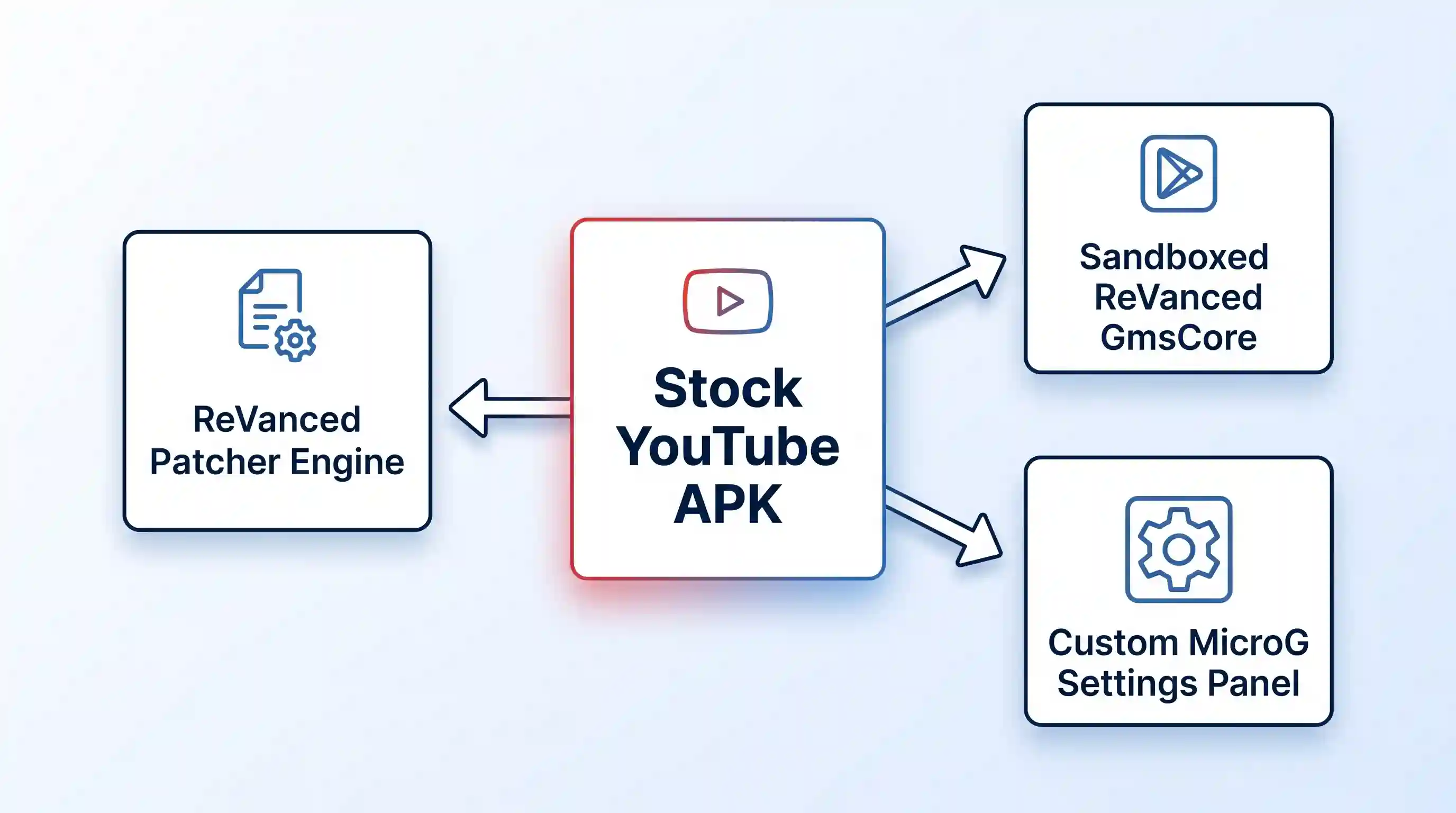
Modern Android security models make downloading pre-compiled modded APKs from search engine results a severe risk. Rogue web portals consistently clone the branding of deceased projects like Vanced, distributing altered application packages embedded with remote access trojans, credential stealers, and aggressive ad networks. Legitimate modern projects no longer distribute compiled YouTube binaries. Instead, they provide open-source build engines that alter legitimate, unmodified installation packages directly on the user device. Understanding how to navigate Android sideloading safety is now a mandatory baseline skill for any user seeking alternative media clients.
Understanding Server-Side Playback Halts and Buffering Loops
Beginning in early 2024 and continuing through 2026, Google altered the verification handshake between YouTube client applications and content delivery network media servers. When an unauthorized or unverified client requests a video stream, the delivery infrastructure allows the initial chunk buffer to load before abruptly terminating subsequent data streams. For users, this manifests as an endless spinning buffer at roughly the 30-to-60-second mark, accompanied by errors stating that the content is unavailable on the current application build.
Resolving these playback interruptions requires client parameter spoofing, where the alternative client disguises its streaming requests as incoming traffic from a native Android client or an embedded web player. Legacy tools that lack active maintenance cannot negotiate these cryptographic signatures, rendering them completely non-functional. Modern replacements must also interface with updated authentication frameworks like ReVanced GmsCore, replacing outdated MicroG forks that trigger account synchronization failures and severe battery drain when attempting to troubleshoot Google Play Store errors on uncertified devices.
Evaluation Criteria: How We Tested and Ranked Each Alternative
To establish a definitive ranking of working alternatives, we subjected candidates to a rigorous testing matrix across multiple hardware platforms, including flagship Android smartphones, budget handsets running Android Go, and dedicated Android TV streaming boxes. Each application was evaluated against five non-negotiable operational benchmarks:
- Security and Supply Chain Integrity: The application must be fully open-source or source-available, with reproducible builds hosted on transparent public repositories such as GitHub. No project distributing closed-source pre-patched proprietary binaries was considered.
- Playback Resilience: The client must demonstrate active countermeasures against Google server-side attestation checks, maintaining smooth 4K 60FPS video decoding without mid-stream buffering stalls.
- Feature Parity with Vanced: We evaluated support for baseline conveniences, including Picture-in-Picture (PiP), background audio playback when the screen is locked, swipe controls for volume and brightness, Return YouTube Dislike (RYD), and automated sponsored segment skipping via the SponsorBlock community database.
- Account Management and Synchronization: The tool must support subscription syncing, playlist curation, and watch history tracking without exposing personal account credentials to credential harvesting.
- Resource Overhead and Battery Impact: The application and its supporting background services must respect Android battery management standards without triggering aggressive background wake locks.
Top 5 YouTube Vanced Alternatives Evaluated
Each of the following five solutions represents a proven, dependable pathway for consuming online video without invasive commercial interruptions. Their underlying architectures, technical trade-offs, and ideal deployment contexts differ significantly.
1. ReVanced: The Direct Architectural Successor
ReVanced is the official community successor to the original Vanced project. Rather than hosting modified copyrighted applications, the project maintains an open-source build framework via the official ReVanced Manager repository. The manager downloads bytecode patches from community repositories and injects them directly into a clean, unmodified YouTube APK that the user supplies locally.
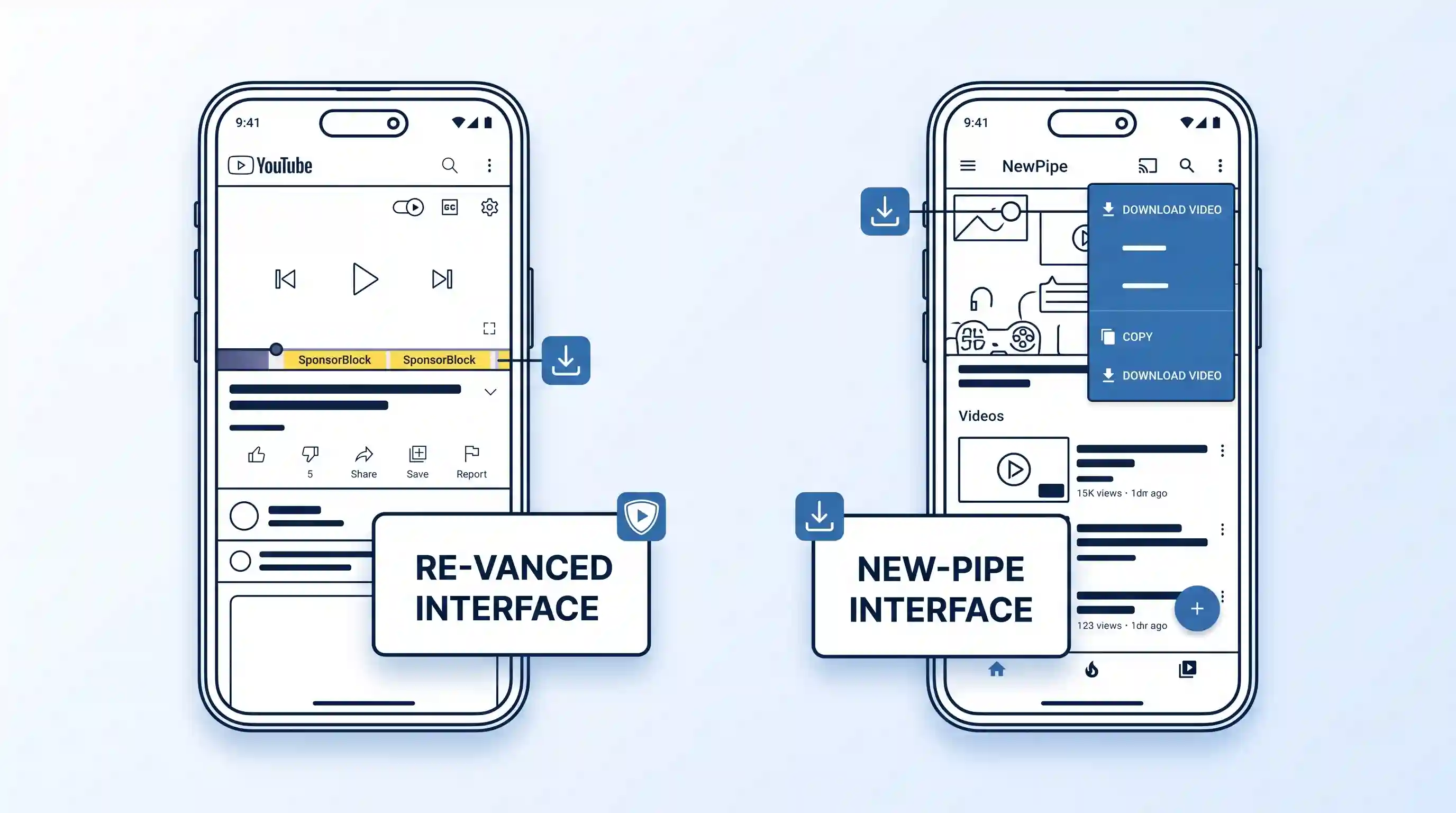
Because ReVanced operates directly on top of the authentic Google interface, it preserves every native navigation element, layout configuration, and algorithmically generated feed. Users gain access to extensive granular customization menus, including sponsor segment skipping, video dislike counters, custom codec overrides, and the ability to hide interface bloat such as YouTube Shorts, comment sections, and commercial banners.
- Best Suited For: Users seeking the exact look, feel, and algorithmic discovery of the official YouTube app alongside complete account synchronization.
- Key Advantages: Full integration with SponsorBlock and Return YouTube Dislike; complete Google account sync via ReVanced GmsCore; robust support for high-resolution video streams up to 4K 60FPS; customizable interface components.
- Operational Trade-offs: Setup requires manual compilation through the ReVanced Manager; base YouTube APK updates can temporarily break custom patches until developers publish revisions.
- Pricing: Free and open-source (FOSS).
2. NewPipe: The Lightweight, Privacy-First Stream Parser
For users who prioritize complete autonomy from Google tracking systems, NewPipe represents the gold standard. Maintained independently via the TeamNewPipe source repository, this lightweight client does not utilize Google Play Services, the proprietary YouTube API, or any Google account login mechanisms. Instead, NewPipe directly scrapes the public web endpoints of YouTube to parse and play media content locally.
Because NewPipe operates entirely outside account authentication networks, your subscriptions, playlists, and playback histories are stored inside an encrypted local SQLite database on your physical storage drive. The application natively includes a robust media downloader that allows direct extraction of video and audio files in various formats and bitrates without requiring external conversion utilities.
- Best Suited For: Privacy advocates, users on de-Googled custom Android ROMs, low-spec hardware configurations, and offline media archiving.
- Key Advantages: Zero Google account dependency; minimal RAM and battery consumption; integrated local video and audio download engine; native pop-up player and background playback; support for SoundCloud, PeerTube, and Bandcamp.
- Operational Trade-offs: No ability to post comments or vote on videos; subscriptions do not automatically sync across multiple devices; vulnerable to temporary playback breakage when YouTube restructures its frontend web code.
- Pricing: Free and open-source (GPLv3).
3. SmartTube: The Premier Android TV and Fire OS Interface
Standard mobile applications are virtually unusable on television interfaces because their touch-focused tap targets cannot be navigated using a directional D-pad remote. SmartTube, developed by Yuriy Lyskov and hosted on the SmartTube project repository, is engineered specifically for Android TV, Google TV, and Amazon Fire OS media streamers.
SmartTube delivers an interface optimized for 10-foot television viewing, complete with native remote navigation, voice search passthrough, and hardware-accelerated decoding. It bypasses conventional living-room advertisements while offering full SponsorBlock integration, automated resolution overrides up to 8K, HDR and 60FPS AV1 codec selection, and frame-rate matching to eliminate video judder on high-end display panels.
- Best Suited For: Smart televisions, streaming sticks, NVIDIA Shield consoles, and living-room home theater hardware.
- Key Advantages: Native television remote and D-pad optimization; comprehensive SponsorBlock configuration; support for high-efficiency AV1 and VP9 hardware decoding; multilingual audio track selection; zero mobile UI scaling bugs.
- Operational Trade-offs: Not functional on touch-only mobile phones or tablets; requires manual side-loading onto television hardware using local network transfer or ADB utilities.
- Pricing: Free and open-source (GPLv3).
4. Grayjay: The Multi-Platform Polycentric Video Aggregator
Developed under the technical backing of FUTO, Grayjay approaches content streaming through a polycentric aggregation model. Rather than serving strictly as a YouTube player, Grayjay functions as an extensible media browser that treats major video platforms as interchangeable source plugins. Through the Grayjay official desktop and mobile portal, users can install modular source extensions that combine subscriptions from YouTube, Twitch, Rumble, and PeerTube into a unified chronological dashboard.
Grayjay prioritizes user sovereignty by eliminating centralized server dependencies. All scraping logic, feed construction, and subscription lists execute entirely within a sandboxed local JavaScript runtime on your personal hardware. Grayjay also introduces direct peer-to-peer creator tipping mechanisms that bypass traditional corporate payment processors.
- Best Suited For: Users who consume video content across multiple competing video platforms and demand a unified, algorithm-free chronological subscription feed.
- Key Advantages: Multi-platform feed aggregation across YouTube, Twitch, and decentralized alternatives; unified local playlists; background media listening; direct creator support integration; clean client-side data architecture.
- Operational Trade-offs: Larger APK footprint than NewPipe; source-available software license rather than strict copyleft open-source; distinct navigation paradigm requiring an initial learning curve.
- Pricing: Free to download and evaluate indefinitely; optional one-time purchase license to support active FUTO engineering.
5. Firefox Mobile with uBlock Origin and Brave: The Zero-Maintenance Baseline
Not every user wants to compile APKs, configure sandboxed microG runtimes, or monitor GitHub release pages for hotfixes. For those seeking immediate ad-free playback without modifying application binaries, running YouTube inside a hardened mobile web browser provides a zero-maintenance alternative that Google cannot flag as an uncertified device installation.
By pairing Firefox for Android with the community standard uBlock Origin for Firefox Android extension, users can strip all tracking scripts, mid-roll interruptions, and promoted home-feed elements at the network layer. Brave for Android achieves a similar outcome out of the box through its native Shields engine. Both browsers support background audio playback through standard browser flags, allowing media streams to continue uninterrupted when switching between active tasks or locking your device display.
- Best Suited For: Non-technical users, corporate managed devices that restrict sideloading, and individuals who want zero maintenance.
- Key Advantages: Requires no APK sideloading or special permissions; zero risk of application tampering or malicious forks; immune to Google Play Protect removal; regular automated browser updates via standard app stores.
- Operational Trade-offs: Lacks native gesture controls for volume and brightness; mobile browser layouts provide slightly less fluid navigation than native applications; video quality may default to lower resolutions on metered mobile connections.
- Pricing: Free and open-source.
Feature and Hardware Compatibility Matrix
The following comparative matrix outlines the operational capabilities, account requirements, and hardware suitability across all evaluated alternatives.
| Application | Ideal Hardware Target | Google Account Sync | Background Audio & PiP | SponsorBlock Built-in | Offline Downloads | Software License |
|---|---|---|---|---|---|---|
| ReVanced | Android Phones & Tablets | Yes (via ReVanced GmsCore) | Yes | Yes | Via external helper hooks | Open-Source (GPLv3) |
| NewPipe | De-Googled & Low-Spec Android | No (Local Database Only) | Yes | Available in NewPipe x SponsorBlock fork | Yes (Native Audio/Video Extraction) | Open-Source (GPLv3) |
| SmartTube | Android TV, Fire OS & Shield | Yes (TV Device Code Auth) | Yes (Audio Passthrough) | Yes | No | Open-Source (GPLv3) |
| Grayjay | Cross-Platform Android & PC | Platform Specific via Plugins | Yes | Yes (Plugin Dependent) | Yes | Source-Available |
| Firefox + uBlock Origin | Any Smartphone / Tablet | Yes (Standard Web Session) | Yes (Browser Media Flag) | Via Web Add-ons | Limited (Third-party add-on required) | Open-Source (MPL 2.0) |
Step-by-Step Guide: How to Safely Build and Deploy ReVanced
Because ReVanced is the most complete direct replacement for the original Vanced experience, mastering its installation protocol is essential. Building the application locally on your device avoids tampered binaries and ensures your package aligns with modern Android application standards.
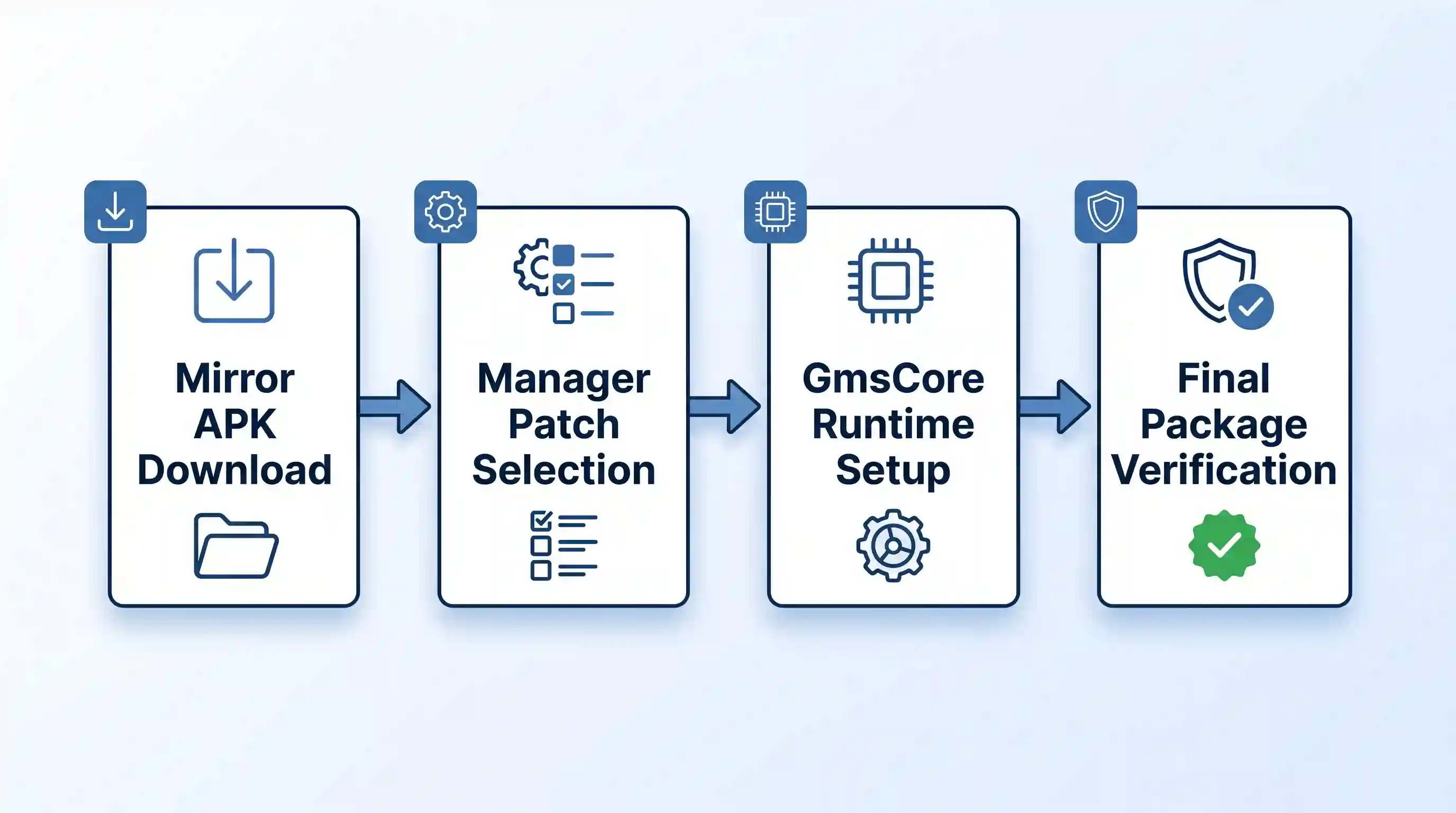
- Install ReVanced GmsCore: Modern ReVanced builds require an authentication service known as ReVanced GmsCore, maintained in coordination with the open-source microG GmsCore project. Download and install the latest stable GmsCore APK directly from the official ReVanced GitHub release repository. This service operates in an isolated sandbox, handling authentication tokens without granting unrestricted system-level permissions.
- Install the ReVanced Manager: Download the latest ReVanced Manager APK from the official project repository. Install the APK on your Android device and grant the manager permission to install unknown applications when prompted by Android system settings.
- Identify and Download the Target Base YouTube APK: Open the ReVanced Manager, navigate to the Patcher tab, and tap Select an application. Tap on YouTube to view the recommended base version number displayed in the application list. Note this specific version number, then navigate to a reputable mirror repository such as APKMirror. Search for the standard base YouTube release matching that exact version number and download the non-bundle, regular APK variant to your device storage. Do not install this base APK yet.
- Execute the Compilation Process: Return to the ReVanced Manager, tap Storage in the lower-right corner, and locate the downloaded stock YouTube APK file. Select the default recommended patch profile, which includes essential modifications such as client spoofing, ad blocking, background playback, and Return YouTube Dislike. Tap Patch in the lower-right corner and allow the manager to decompile, inject bytecode, and recompile the binary.
- Install and Whitelist the Finished Build: Once the patching routine completes, tap Install to deploy your custom package. To prevent premature playback buffering halts caused by aggressive Android power management terminating your authentication service, follow our battery optimization whitelisting tutorial to exempt both ReVanced and ReVanced GmsCore from system sleep restrictions.
Troubleshooting Playback Halts and Signature Mismatches
If you encounter the common 40-second buffering stall on a freshly compiled ReVanced build, open the application, navigate to Settings, tap ReVanced, and enter the Layout or Player submenu. Verify that the Spoof Player Parameter toggle is activated. This setting masks your client requests using native application signatures, bypassing Google’s strict server-side attestation barriers. Furthermore, if you encounter installation errors indicating an invalid package signature, ensure that you have not attempted to install the patched APK over an existing factory-installed YouTube app. ReVanced compiles under a custom package namespace to ensure it runs peacefully alongside stock software.
Security Realities and Account Safety Guidelines
When operating any third-party client that connects to Google services, maintaining strict account safety practices is critical. While ReVanced GmsCore uses official Google authentication APIs through a sandboxed translation layer, violating platform terms of service inherently carries operational risk.
To minimize personal liability and safeguard sensitive digital assets, consider establishing a dedicated secondary Google account for use within alternative video players. This isolates your primary Gmail, Google Drive, and Google Photos repositories from unexpected account flags or rate-limiting thresholds. For developers and power users building custom modifications, understanding how these tools interact with broader modular Android application frameworks offers valuable insight into application lifecycle management and sandbox isolation boundaries.
Key Takeaways for Choosing a Video Client
- ReVanced remains the closest direct successor to YouTube Vanced, offering complete feature parity and account synchronization at the cost of a slightly more involved, multi-step patching routine.
- NewPipe provides the best experience for offline media downloads and complete independence from Google account tracking, operating entirely on a local device database.
- SmartTube is the only viable alternative engineered specifically for leanback television interfaces, providing remote navigation and advanced AV1 hardware decoding on Android TV and Fire OS devices.
- Avoid Pre-Compiled APK Sites: Never download ready-to-run modified YouTube APKs from unvetted file distribution websites, as they frequently contain dangerous payloads and stolen credentials.
- Modern Fixes Require GmsCore: Legacy Vanced MicroG builds are fully deprecated. All functional 2026 builds require updated GmsCore libraries to overcome server-side buffering blocks.
Frequently Asked Questions
Can using a YouTube Vanced alternative cause my Google account to be terminated?
While utilizing third-party clients violates YouTube’s commercial Terms of Service, Google has historically addressed unauthorized clients through technical countermeasures and API rate limits rather than mass user account terminations. However, because client parameter spoofing interacts directly with Google authentication backends, we strongly advise security-conscious users to authenticate using a secondary, compartmentalized Google account rather than their primary identity profile.
Why does my video buffer endlessly after playing for 30 to 60 seconds?
Endless buffering at the 40-second mark indicates that Google’s content delivery servers have flagged your connection as an unverified client handshake. To correct this issue, open your client settings menu, locate the advanced parameter settings, and ensure that Spoof Player Parameter or Client Spoofing is explicitly enabled. In addition, verify that your background GmsCore authentication app is fully updated to the latest release.
Is it possible to run ReVanced or NewPipe on an Apple iPhone without jailbreaking?
ReVanced and NewPipe are compiled exclusively for the Android runtime environment and cannot be installed directly on Apple iOS devices. iPhone users seeking similar capabilities must explore alternative browser-based approaches, such as running the Orion mobile browser paired with desktop web extensions, or sideloading iOS-specific open-source projects like Yattee through sideloading managers such as AltStore or SideStore.
What is the technical difference between legacy MicroG and the new ReVanced GmsCore?
The original MicroG project was created as a complete open-source framework replacement for all Google Play Services on de-Googled devices. In contrast, ReVanced GmsCore is a specialized fork trimmed and optimized exclusively to handle Google account token exchanges for patched media applications. It resolves persistent background crashes, corrects notification routing, and prevents battery depletion issues that plagued outdated Vanced MicroG installations.

💬 Comments