A good CCTV installation in London starts by defining what each camera must actually show, then choosing its position, recording setup and access controls around that purpose. Privacy, planning, storage, network security and footage export should be considered before installation rather than fixed after the cameras are already mounted.
Start With What the CCTV Must Actually Do
Before comparing camera brands or megapixel counts, write down the job the system needs to perform. A camera intended to show whether somebody entered a car park has a different requirement from one intended to provide enough facial detail to recognise a person at a doorway.
The UK government’s police requirements for CCTV systems make this distinction practical: the required image quality should follow the surveillance task. Resolution matters, but so do scene width, camera angle, lighting, compression, frame rate and what is preserved in the recorded footage.
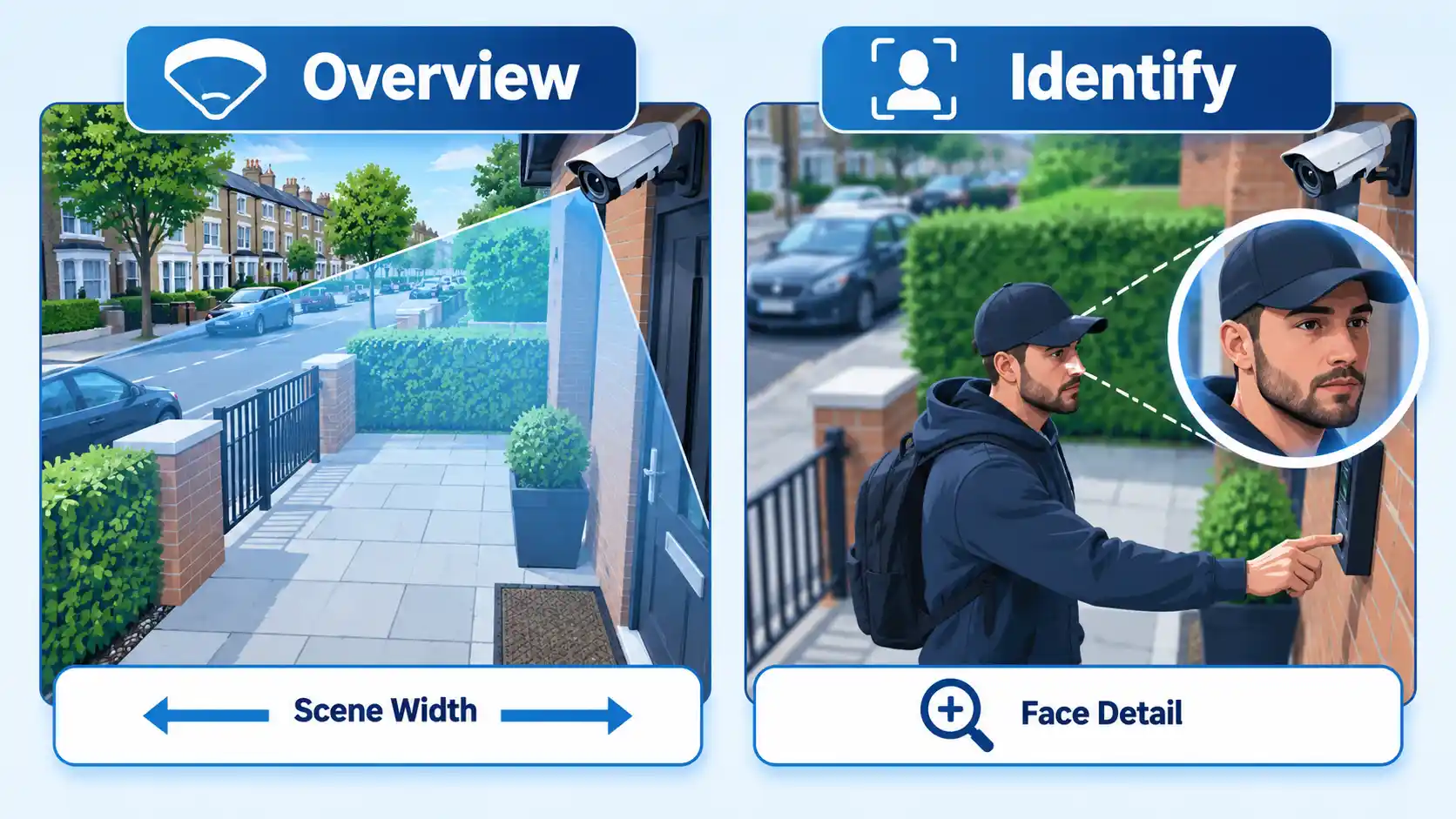
This is why a specification such as “four 4K cameras” says less than it appears to. A high-resolution camera aimed too widely, mounted at an unsuitable angle or overwhelmed by strong backlighting may still fail to capture the detail needed when an incident occurs.
For each camera position, decide what success looks like. That may mean recognising a person approaching a front door, observing activity around stock, covering a vehicle entrance or confirming movement in a side passage. The installer can then work backwards from that requirement.
Work Out Which Privacy Rules Apply
CCTV law is not reduced to a simple rule that recording people is always unlawful. The obligations depend on who operates the system, what the cameras capture, why the footage is collected and how it is handled.
Domestic CCTV that stays within your property
A private-home CCTV system used for household purposes and confined to the private domestic property is treated differently from a camera that records beyond that boundary. Even where cameras remain within the property, sensible design means avoiding unnecessary recording and protecting access to footage.
Cameras that capture streets, shared spaces or neighbouring property
If domestic CCTV captures people outside the boundary of the private property, such as a neighbour’s garden, a shared space or a public area, the government’s 2026 domestic CCTV guidance states that the UK GDPR and Data Protection Act 2018 apply. The guidance also tells householders to consider camera positioning, privacy filters, secure storage, restricted access and whether footage is being kept longer than necessary.
Business and organisational CCTV
The ICO’s surveillance guidance says an organisation should identify and document an appropriate lawful basis, define its purpose from the start, consider less intrusive alternatives and limit collection to what is necessary. A Data Protection Impact Assessment, usually shortened to DPIA, is required where the processing is likely to result in a high risk to individuals.
Businesses also normally need to make people aware that CCTV is operating, restrict access to recordings and use footage only for the intended purpose. GOV.UK provides a concise summary of these business CCTV responsibilities, including clearly visible notices and controls over who may view recordings.
Warning
Do not assume the same privacy rule applies to every installation. A camera covering only a private home, a domestic camera recording a public pavement and a business camera monitoring customers or staff can create different data-protection responsibilities.
There is also a current-law caveat. The Data (Use and Access) Act 2025 commencement guidance states that the majority of the Act’s Part 5 data-protection and privacy provisions came into force on 5 February 2026. The government also says the ICO is publishing and updating guidance to reflect the changes, and some current ICO surveillance pages remain marked as under review. Organisations making higher-risk compliance decisions should therefore check the current regulator guidance rather than relying on an older interpretation.
Position Cameras Without Collecting More Than You Need
A camera should cover the security problem, not everything that happens to be visible from the mounting point. This is particularly important in dense London streets, flats and mixed-use buildings where another home, communal hallway, pavement or garden may sit close to the intended area.
The ICO’s CCTV checklist advises organisations to avoid overlooking areas people would regard as private or to restrict the field of view or movement where necessary. A privacy mask can obscure an irrelevant part of the camera image so the surveillance remains focused on the intended area.
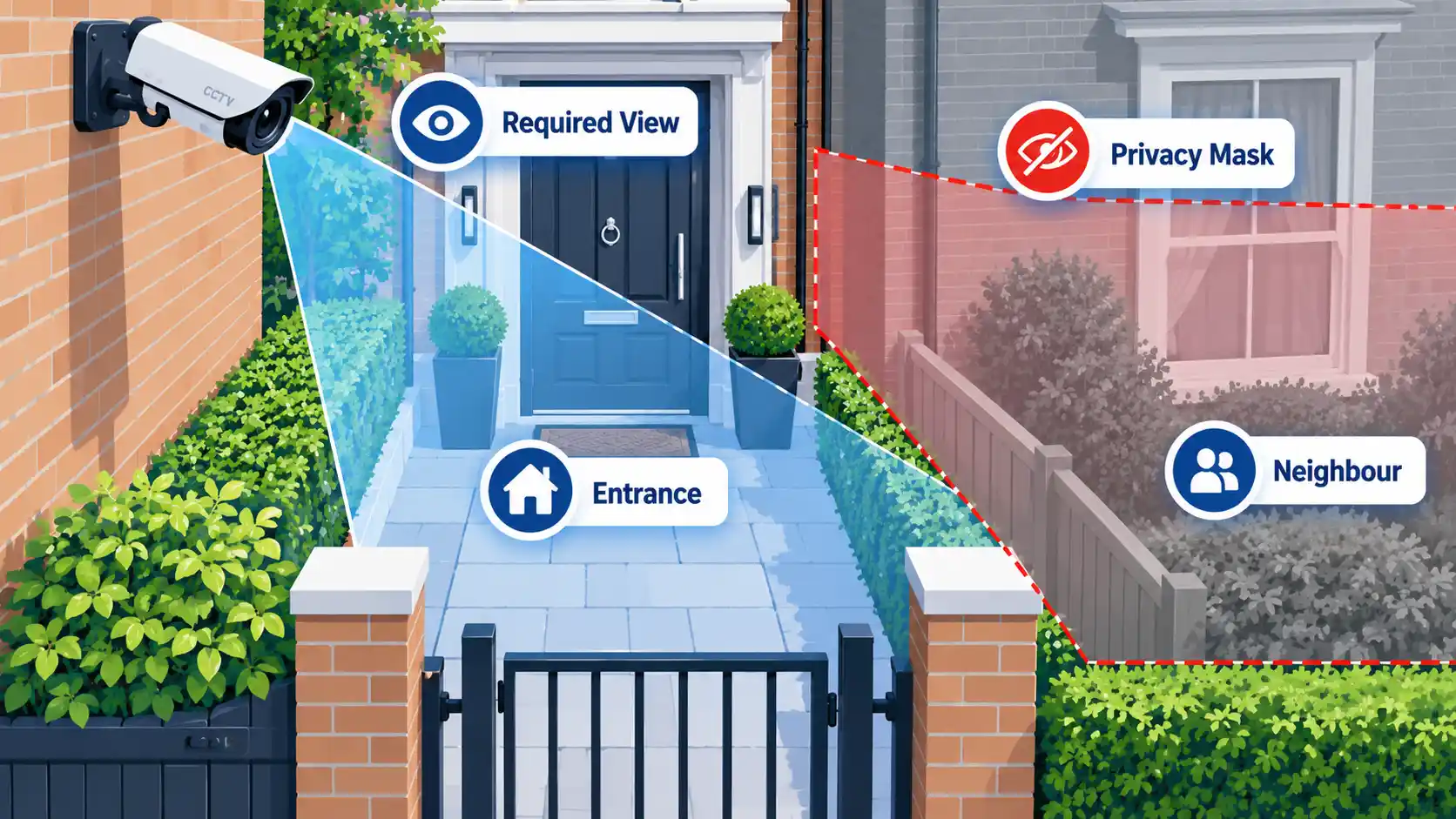
Physical positioning matters as much as software masking. A slightly different mounting point or a fixed camera with a deliberately limited view may solve the problem more cleanly than installing a camera with a very wide view and masking much of the image afterwards.
Check Planning, Property and Electrical Constraints
For a typical home in England, planning permission is not normally required to install a CCTV camera. That does not mean every London property can be treated the same way.
The Planning Portal CCTV guidance says people living in a listed building or conservation area should check with their local planning authority. The same page states that its guidance is introductory rather than a definitive source of legal information and that additional local rules may affect what permission is needed.
Property rights can create a separate issue from planning permission. If you are a leaseholder, tenant or resident in a managed block, check the lease, tenancy conditions and any applicable freeholder or housing-provider rules before mounting equipment on communal or externally controlled parts of the building. Do not assume permission is either required or unnecessary without checking the documents that govern the property.
Electrical work also deserves attention. The Planning Portal says that if a CCTV installation includes a new electrical circuit, that work is notifiable and should be checked by the relevant building control body or completed by a competent person.
Choose the System Around the Site, Not the Feature List
Camera view and image quality
The camera must produce useful recorded detail in the actual scene. Lens choice and scene width affect how much detail is available across the subject, while mounting height and viewing angle affect whether relevant faces or vehicle details are visible.
Do not judge the system only from a live image on the installer’s phone. The government’s police guidance warns that recorded video and images transmitted to a mobile phone can differ in quality from the live display, so the recorded footage itself should be checked.
Low light, glare and entrances
Daylight performance is not enough for a camera expected to protect a property overnight. Ask for the installed system to be checked in the lighting conditions in which it is expected to operate.
Entrances can also be difficult because a subject may stand between the camera and a bright exterior or window. Camera angle, exposure behaviour, supplementary lighting and field of view may all affect the result. A feature name on a product page is not a substitute for inspecting the recorded image.
Wired, IP and Wi-Fi connectivity
An Internet Protocol camera, usually called an IP camera, sends video over a data network. Some installations use Power over Ethernet (PoE), which can carry network data and electrical power over the same Ethernet connection. Others use Wi-Fi for data while still requiring a source of electrical power.
The choice between wired and wireless CCTV depends on the building, cable routes, reliability requirements, network coverage and what happens if connectivity fails. A hard-to-reach exterior camera on unreliable Wi-Fi can create a different maintenance problem from a PoE camera connected through structured cabling.
Local recorder versus cloud storage
A Network Video Recorder, or NVR, stores footage from network cameras. Cloud-connected systems may store some or all footage with an online provider. Neither arrangement is automatically better for every installation.
Local recording gives the owner direct control over local hardware and storage, but the recorder still needs protection against tampering and unauthorised access. Cloud recording reduces dependence on storage hardware at the premises, but introduces account security, internet availability, provider and possible subscription considerations.
Use the security objective to decide what matters most. The following table maps common requirements to practical specification checks.
| Requirement | What to specify or test |
|---|---|
| Recognise a person at an entrance | Scene width, lens, camera angle and recorded facial detail at the expected distance |
| Capture useful vehicle details | Distance, viewing angle, lighting, exposure and recorded detail under expected conditions |
| Cover an area at night | Actual recorded night footage, not only a daytime demonstration |
| Use remote viewing | Secure account setup, update support and the method used for remote access |
| Keep footage for a defined period | Recorder or cloud capacity based on the real recording settings and justified retention requirement |
| Supply footage after an incident | Accurate date and time, usable export method, playback requirements and practical export time |
Treat the CCTV System as Part of the Network
An internet-connected camera is also a networked device with access to potentially sensitive images. Remote viewing is useful, but it creates another access path that needs protection.
The UK’s National Cyber Security Centre recommends changing manufacturer default passwords, keeping smart cameras updated and disabling internet-based remote viewing where it is not needed. Its smart security-camera guidance also warns that Universal Plug and Play (UPnP) and port forwarding can expose devices and recommends considering whether those router features are actually required.
For internet-connected installations, IP camera and CCTV recorder security should therefore be part of commissioning rather than something left until a security incident occurs. Ask who controls authorised administrator access, whether default credentials have been changed, how updates are applied and whether remote-access configuration exposes the system directly through the router.
If footage or administrative access is hosted through an online platform, cloud application security also matters. Limit privileged access, protect the account that controls the service and avoid giving users more permissions than they need.
Decide How Footage Will Be Stored, Accessed and Deleted
Storage planning is not simply a question of buying the largest disk available. Decide how long footage genuinely needs to be retained, who may access it and how an incident can be located and exported without unnecessarily exposing unrelated recordings.
The 2026 domestic CCTV guidance says recordings should not be stored longer than necessary for protecting the property and that access should be kept to a minimum. Organisations should likewise set retention around a defined purpose rather than treating CCTV as an unlimited archive.
A CCTV footage retention period should therefore be justified rather than copied from a generic default. Higher resolution, more cameras, longer retention and more continuous recording generally increase storage requirements, so capacity should be calculated from the settings the installation will actually use.
Export is just as important. The government’s CCTV requirements for footage intended for police use say operators should know the system’s retention period and approximate export times, preserve relevant date and time information, and include necessary playback software where appropriate. The guidance also says video should be exported without additional quality loss.
Be Cautious With Audio Recording
A built-in microphone should not be treated as a harmless extra. Audio can capture conversations beyond the visual purpose of the camera and is generally more intrusive than video alone.
The ICO’s surveillance data-protection guidance says surveillance systems should not normally record conversations between members of the public. Audio capability should be switched off by default unless there is a clearly evidenced and justified need, with less intrusive alternatives considered first.
An installer should therefore not simply enable every feature because the hardware provides it. If audio is unnecessary for the stated purpose, leave it disabled.
What to Ask a CCTV Installer Before Accepting the Quote
A useful quote should explain more than the number of cameras and the total price. It should show how the proposed system addresses the site’s actual security requirements.
When evaluating CCTV installation London services, ask what the site survey will document, how each camera’s required view will be tested, who controls authorised administrator access and what commissioning records you receive at handover.
Questions worth asking include:
- What security requirement does each proposed camera address?
- What will each camera be expected to show at the relevant distance?
- How will the system be tested after dark?
- Where will power and data cables run?
- What happens to recording if the internet connection fails?
- How was the proposed storage capacity calculated?
- What retention period has been assumed, and why?
- Can privacy masking be applied where necessary?
- Is audio disabled unless there is a justified requirement?
- Who controls administrator, recorder and cloud accounts after handover?
- How are firmware and software updates handled?
- Can footage be exported in a form an authorised third party can open?
- What maintenance is expected after installation?
Industry standards can also provide useful context when evaluating installation practice. The National Security Inspectorate’s CCTV design, installation and maintenance material covers risk assessment, site survey, user requirements, system design, testing, commissioning, handover and maintenance, and references NCP 104 and BS EN 62676-4:2015. These are useful indicators of structured practice, but this does not mean every London CCTV installation is legally required to use an NSI-approved company.
Verify the System Before Sign-Off
Commissioning is the point at which the installed system should prove that it can perform the job defined at the beginning. Do not treat a live camera feed alone as proof.
Verify the result
- Replay recorded footage from every important camera rather than checking only the live view.
- Test cameras in the actual daytime and night-time conditions they are expected to handle.
- Confirm that the required faces, entrances, vehicles or areas contain the level of detail defined for the system.
- Check that the recorder’s date and time are accurate.
- Confirm the actual retention period and available storage rather than relying only on an estimate made before configuration.
- Export a sample recording and confirm that it can be opened and played successfully.
- Check privacy masks and camera fields of view for unnecessary capture of neighbouring or unrelated areas.
- Confirm that default passwords have been changed and that authorised administrator access is documented at handover.
- Verify that unnecessary audio recording and remote-access features are disabled.
- For organisational systems, confirm that required notices, access controls and documented data-handling procedures are in place.
If any of those checks fails, correct the problem before treating the installation as complete. Moving a camera, changing its field of view or adjusting recording settings is easier before handover than after the first incident reveals a gap.
Final Decision
Before committing to a CCTV installation in London, reduce the decision to three questions. Can the installed system reliably produce the recorded detail you actually need? Is its field of view and handling of personal data proportionate to that purpose? Can authorised users securely access, retain and export useful footage after handover?
If the answer to any of those is unclear, the specification is not finished yet. Choosing cameras comes after defining the job, the privacy boundary and the way the finished system will be operated.

💬 Comments