Start with who responds when the alarm triggers, then decide who installs it. The kit is the cheap, easy part of this purchase. The decision that shapes your long-term cost is the monitoring model, followed by the installation model. Get those two right and the options usually narrow to a handful of kits that fit your home, your lease, and the phone in your pocket.
Buy professional monitoring when you want someone else to own the alert in the middle of the night. Buy professional installation when you want someone else to own the setup and the holes in the wall. Skip both if you are expecting a one-off purchase with no recurring cost, or a system that makes a break-in impossible.
Quick Take
- Start with monitoring: choose professional monitoring if nobody in the household reliably answers a push alert, or if phones are silenced, travel is frequent, or the house is often empty. Choose self-monitoring if you will act on alerts and want to avoid a recurring fee, and accept that you are the dispatcher.
- Default path: a wireless starter kit you install yourself, once self-monitoring is a deliberate choice rather than a habit.
- Choose professional installation instead if you want a technician to mount, set up, and walk you through the system, or if the provider you want only sells installed systems.
- Watch the plan grid: remote arming, cellular backup, and other features can sit behind a subscription tier, so confirm the feature you want before comparing kit prices.
What You Are Actually Buying
A residential burglar alarm is a small network in a box. The base station is the brain: it connects wirelessly to every sensor, holds the siren, and bridges the kit to your internet connection. Door and window contact sensors report when an opening moves. Motion sensors cover rooms with several openings. A keypad or touchscreen panel arms and disarms the system, and a phone app does the same job remotely.
Most systems are sold as starter kits with additional sensors and components available individually, so the advertised box is a starting sensor count rather than a finished design for your house. That matters when you compare prices: the kit that looks cheaper at checkout can be the more expensive one once you have covered the openings you actually care about.
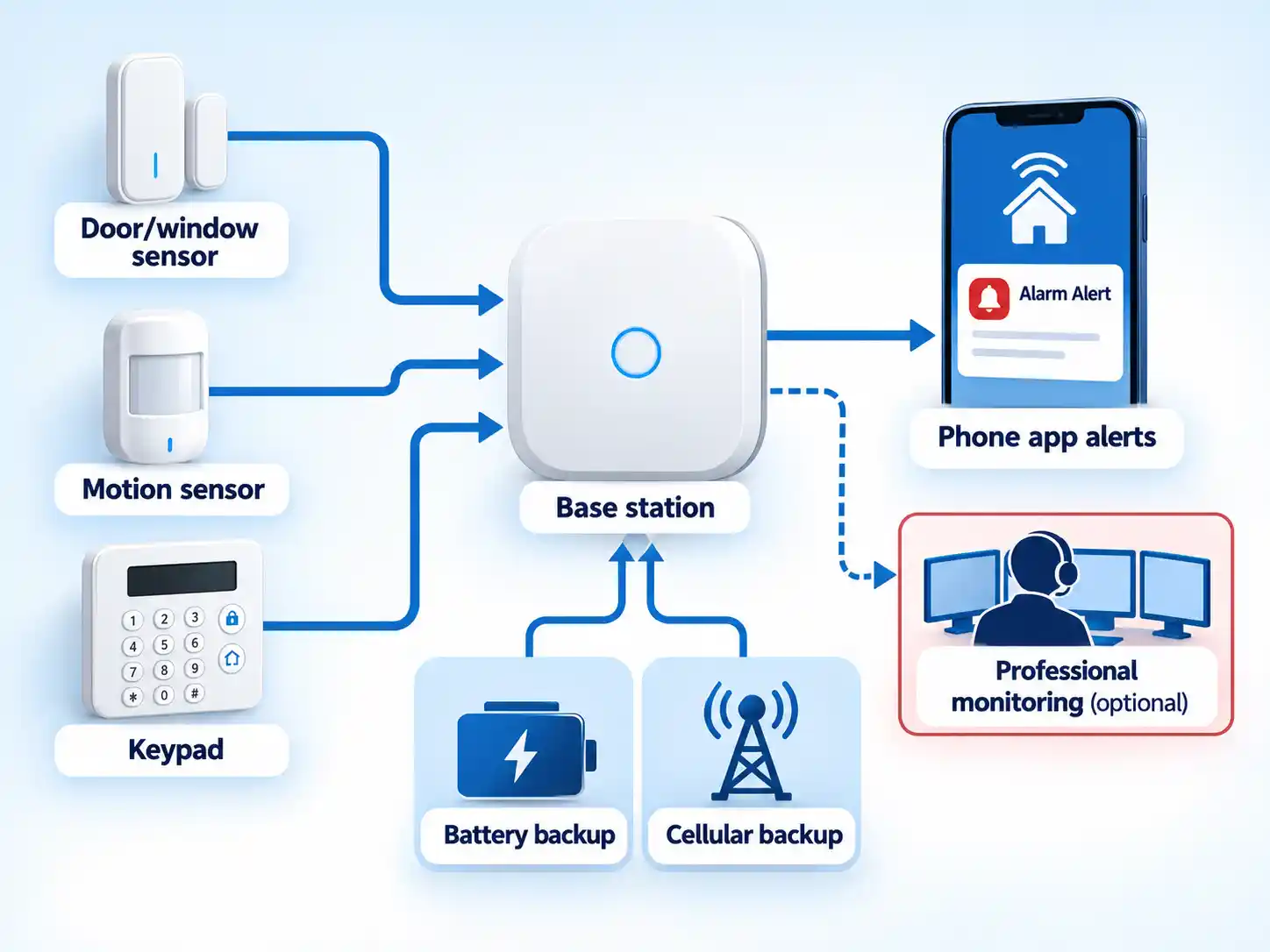
The signal path is simple: sensor triggers, hub receives, siren sounds, app alert fires. What happens next depends entirely on your monitoring choice. With a plan, a dispatch centre watches the same signals around the clock and can contact the authorities. Without one, the alert lands on your lock screen and the next move is yours.
Two backup features carry more weight than their spec-sheet billing suggests. Battery backup keeps the hub running through a power cut, and cellular backup keeps it connected when broadband drops. Cellular backup usually carries a monthly fee that is built into professional monitoring, so treat it as part of the plan decision rather than a separate accessory.
The Criteria That Shape the Shortlist
These criteria explain why two similar kits can produce different first-year costs. Monitoring and installation set the frame; cost, ecosystem fit, and verification narrow the shortlist.
- Monitoring model. Self-monitoring means the alert reaches your phone and stops there. Professional monitoring means a dispatch centre watches around the clock and escalates. Features such as remote arming, cellular backup, and dispatch itself can be gated behind a plan tier, so treat this as a compatibility question as much as a preference.
- Installation model. Wireless kits are designed for self-install, and some brands still require professional setup, including Alarm.com and Vivint. Decide whether you are doing the work before you fall for a kit that will not sell to you.
- Total cost. Hardware, extra sensors, installation labour, the monitoring tier you would actually pick, and any local alarm permit. The sticker price is one line in that list.
- Ecosystem fit. Some kits integrate with Alexa, Google Home, or Apple Home; others keep you inside their own app. If you already run a smart home, this constraint is real and it is decided before purchase. The same integration logic that makes people buy smart switches decides whether an alarm joins your setup or lives in its own app.
- Verification. Local permit rules, accreditation claims, and backup features. Run these as checks against a candidate once you have a shortlist.
Monitoring and Installation Are Two Separate Decisions
The industry sells monitoring and installation in the same conversation, which makes them feel like one choice. They are not. Self-installing a system and then paying for professional monitoring is a routine combination, and it is exactly what DIY-oriented brands such as SimpliSafe sell. Professional installation paired with self-monitoring is the combination to confirm before you shop, because not every provider will sell you the install without the monitoring plan attached.
| Decision | What you get | Best fit | Cost signal | Watch out |
|---|---|---|---|---|
| Self-monitoring | Push alerts to your phone; you decide whether to call anyone. | People who are reachable most of the time and want low recurring cost. | Often free, though some brands charge for app features. | Nobody else is watching. A missed alert is a missed alert. |
| Professional monitoring | A dispatch centre watches the system around the clock and alerts the authorities when needed. | Households that travel, sleep through alerts, or leave the house empty for long stretches. | Monthly or annual fee; a contract may be required. | Plan tiers gate features such as remote arming and cellular backup. |
| Self-installation | You mount the sensors, pair them in the app, and place the hub. | Renters, confident DIYers, anyone planning to expand the kit later. | No labour charge; you supply the time. | Some providers only sell professionally installed systems. |
| Professional installation | A technician installs and configures the system and walks you through it. | Buyers who do not want to troubleshoot mounting, pairing, or placement. | An installation fee on top of equipment and monitoring; ask for it itemised. | Installation and monitoring are separate line items, so ask for both in writing. |
| Sources: Consumer Reports home security systems buying guide; CNET home security systems review. Cost signals are descriptive, not quotes. | ||||
If you have landed on professional installation, ask every quote to break out equipment, labour, monitoring, and any permit fee as separate lines, and ask what the system does if you cancel the plan. Readers in north-east England who would rather hand the job to a local firm can start with alarm and CCTV installation in Gateshead rather than forcing a DIY-only kit into a requirement it was never designed for.
Total Cost: The Sticker Price Is the Down Payment
Checked October 28, 2026: Advertised starting prices are real, but they buy a small system. Budget kits that once sold for $100 or less now run between $100 and $180, while several starter kits still come in at $200 or less. Those prices may rise, and the advertised box is a starting sensor count; the components you add are sold separately.
| Cost component | What drives it | Dated example |
|---|---|---|
| Starter kit hardware | Sensor count and hub features included in the box. | SimpliSafe packages listed at $250 to $734; a 5-piece Arlo kit at $150 with discounts. |
| Additional sensors | How many doors, windows, and rooms you cover. | Sold as add-ons, since most systems are starter kits with the option to buy more components and sensors. |
| Professional monitoring | Plan tier and whether a contract is required. | SimpliSafe guard monitoring from about $30 a month; Arlo monitoring from $30 a month. |
| Cellular backup | Whether the plan includes it or it is an add-on. | Usually a monthly fee that is built into professional monitoring. |
| Alarm permit | Local rules for monitored systems. | Dallas charges $50 a year; Yonkers, N.Y. requires a permit with no resident fee. |
| Installation labour | Whether you install it or pay a technician. | Not part of a DIY kit price; providers such as Alarm.com and Vivint require professional setup or installation. |
| Sources: Consumer Reports home security systems buying guide; CNET home security systems review. All figures are dated examples, not current quotes or universal prices. | ||
The recurring commitment is the part that changes minds. A professional-monitoring subscription can cost substantially more than a basic self-monitoring tier over the life of the equipment. The same sensors on the same doors can carry very different ongoing commitments, which is why the hardware price and the real commitment are separate numbers.
Who Each Path Suits and Who Should Skip It
| Path | Choose it if | Skip it if | Example |
|---|---|---|---|
| Self-monitoring with self-install | You rent, you are comfortable in an app, and you will act on a push alert. | You want someone else responsible for the response, or your lease forbids adhesives and drilling. | SimpliSafe offers adhesive sensor options that suit renters. |
| Professional monitoring with self-install | You want to save on labour but want a dispatch centre watching around the clock. | You refuse recurring fees entirely. | SimpliSafe sells DIY hardware alongside both a self-monitoring tier and a guard-monitoring tier. |
| Professional monitoring with professional installation | You want a technician, a walkthrough, and a service relationship. | You are optimising for the lowest upfront and ongoing cost. | Alarm.com and Vivint require professional setup. |
| Ecosystem-first buying | You already run Alexa or Ring devices and want the alarm to join them. | You use Google Home, Apple Home, or a mix of platforms. | Ring Alarm 8-piece kit, 2nd gen: remote arming and professional monitoring need the top-tier subscription. |
| Budget starter buying | You want a low entry price and will add coverage over time. | You plan to add cameras and monitoring soon, where add-ons raise the total. | An Arlo 5-piece kit is a frequent discount entry point; several brands still sell starter kits cheaply. |
| Sources: CNET home security systems review; Consumer Reports buying guide. Examples are dated to those sources; they are not rankings. | |||
Two common mismatches account for many bad purchases. The first is a renter buying a kit that needs drilling, then discovering the lease says no. The second is a buyer who wants a technician choosing a DIY-first brand off a review roundup. Both are avoidable with one question asked before checkout.
Where These Systems Fall Short and What Changes the Verdict
Warning
An alarm reports an intrusion and can summon help. It does not stop anyone from entering, and no kit comes with a guarantee that your home will not be burgled. Treat it as detection and notification, and plan your security around that honest limit.
Dependencies are where expectations break. The hub needs power and an internet route; battery backup covers the first, and cellular backup covers the second, but only if your plan includes it. The app needs the vendor’s cloud. Advanced features need a specific subscription tier. And the sensors need to be somewhere they can reach the hub, which is a placement problem in thick-walled or spread-out houses.
Info
Where a system offers e911, the feature is designed to reach the dispatcher covering your home while you are away. Dialling 911 from your phone while out of town reaches the dispatcher where you are standing instead. Know which one you are relying on before an emergency.
Permits are a local issue with real consequences. Some municipalities require a permit for professionally monitored systems and charge an annual fee, while others charge residents nothing. Check with your local police department before the install date, and budget the fee and the paperwork as part of the job.
If third-party validation matters to you, Secured by Design describes itself as the official police security initiative and states that products recommended in its guidance meet its Police Preferred specification. You can look for the logo on packaging, ask the manufacturer whether a product is accredited, or search the scheme’s member and product listings. Treat it as a verification check on a candidate, and not as proof that one alarm outperforms another.
The verdict changes if: you need a technician to install it, you need round-the-clock dispatch, you refuse any recurring fee, your lease restricts mounting, or your smart-home setup depends on an integration the kit does not support. Any single one of those flips the shortlist faster than a spec sheet will.
Fit Troubleshooting
The app will not let me arm the system remotely
Remote arming is often tied to a plan tier rather than the hardware. Ring is the clearest example: remote arming and professional monitoring both require the top-tier subscription. Check the plan grid for the exact feature before assuming the kit is faulty.
My lease rules out drilling into frames
Prioritise kits that offer adhesive sensor mounting and confirm you can remove them without damaging paint or frames. If the lease is ambiguous about alarm equipment, resolve that question with your landlord before you buy rather than after.
I do not know whether my city requires an alarm permit
Call the police non-emergency line or check the department’s website before the install date. Rules and fees differ by municipality, and the examples in buying guides are illustrations rather than a national standard.
The system goes dark when the internet drops
Ask two questions: does the hub have battery backup, and does cellular backup come with your plan? Cellular backup commonly rides on a monitoring subscription, so a self-monitoring setup may have no fallback path at all.
It will not connect to my smart-home platform
Integration is brand-specific. SimpliSafe keeps you inside its own ecosystem with limited smart-home integration, and Ring is less useful outside Alexa and Ring devices. Confirm the specific integration on the manufacturer’s current compatibility page before you commit.
Before You Buy: Seven Checks in Order
Run these in sequence. Each one can eliminate a candidate, which is why the cheap checks come before the expensive commitment.
Prerequisites
- Your local police department’s alarm-permit page or non-emergency number, open and ready.
- The Secured by Design member and product search available, if accreditation affects your decision.
- Define what monitoring should do for you. Write down whether you want a phone alert you personally act on, or a dispatch centre that escalates when you do not answer. That single answer removes whole categories of kit, because the features you want may sit behind a plan tier while others work without one.
- Pick the installation route. If you are installing it yourself, confirm the kit ships with adhesive mounting options and app-based pairing. If you want a technician, confirm the provider installs in your area before comparing hardware prices.
- Count the openings and rooms you actually want covered. Walk the ground floor and count the doors and windows a person would have to cross, then add the rooms behind them. Most systems are starter kits with add-on sensors sold separately, so a ten-opening house is a different budget from a four-opening flat.
- Check your local alarm-permit rule. Confirm whether a permit is required for a monitored system and what it costs annually. Rules vary by municipality, so a figure quoted for another city tells you nothing about yours.
- Verify accreditation if it matters to your decision. Check the Secured by Design logo, ask the manufacturer whether the product is accredited, or search the scheme’s member and product listings. Note that accreditation confirms a specification, not a performance ranking.
- Calculate the committed cost. Add hardware, extra sensors, installation labour, the plan you would actually choose over your expected ownership period, and any permit fee. Compare that total across candidates rather than comparing kit prices.
- Confirm backup, subscription, and cancellation terms in writing. Ask whether the hub keeps running on battery, whether cellular backup requires a plan, which app features sit behind the top tier, and what happens to the equipment if you cancel.
Verify the result
- You can state your monitoring model in one sentence, and you know which features your chosen kit only delivers with a plan.
- Your sensor count matches the openings you walked, not the contents of the starter box.
- You know whether your municipality requires an alarm permit and what the annual fee is.
- You hold a committed cost total that includes hardware, service, labour, and permit costs.
- You know exactly which features stop working if the subscription lapses.
The Conditional Verdict
The final tie-breaker is the committed total attached to the feature you would actually use. Price the monitoring tier you need, the sensor count your ground floor requires, and the permit your city may charge, then compare those totals across candidates. A cheaper kit that gates remote arming or cellular backup behind a top tier can lose to a higher-priced kit whose plan already includes what you need.
If the totals are close, choose the simpler dependency: the kit whose app, backup, and cancellation terms you can explain without a call to support. Self-monitoring stays the lowest-commitment path when you are the response plan. If you are not, pay for the dispatch relationship and treat the hardware as the smaller line item.

Wireless cameras are less susceptible to physical damage by criminals. That’s why we like it.