IT automation becomes unsafe when it can make broad changes faster than a team can detect, contain, or reverse a mistake. Safer automation limits what a workflow may change, validates assumptions before execution, restricts privileges and concurrency, verifies the actual result, and has a defined stop or recovery path.
The goal is not to make every operational task autonomous. It is to make repeatable work predictable enough that the automation can act within clear boundaries and fail safely when those boundaries are crossed.
If you need the broader foundation first, IT automation covers the main workflow, runbook, and infrastructure automation patterns. Here, the focus is narrower: what tends to go wrong once automation has permission to change real systems.
What Makes IT Automation Unsafe?
Automation does not remove operational risk. It changes the speed, consistency, and scale at which actions occur. That is valuable when the instructions are correct, but it can amplify a bad assumption just as efficiently.
Google’s Site Reliability Engineering guidance describes automation as a force multiplier rather than a cure-all. Its discussion of production automation shows why scope matters: an action that is safe against one machine may become dangerous when repeated across a large fleet, especially when failures leave systems in inconsistent states. Google’s automation reliability guidance documents both the benefits and the failure-at-scale problem.
The blast radius of an automation is the amount of infrastructure, data, or service capacity that one bad execution can affect. A script that changes one test server has a small blast radius. A workflow that can modify every production server, account, or network rule has a much larger one.
A guardrail is a technical control that prevents, limits, pauses, or detects unsafe execution. Examples include input validation, least-privilege permissions, concurrency limits, approval gates, timeouts, health checks, and automatic stop conditions.
These controls matter because automation failures are rarely limited to obvious syntax errors. The harder cases include correct commands applied to the wrong targets, duplicate actions after retries, partial changes, stale assumptions, overloaded dependencies, and jobs that report success even though the intended system state was never reached.
The Most Common IT Automation Mistakes
1. Automating a Process You Do Not Understand
A process is not ready for automation merely because people perform it repeatedly. You first need to understand the correct starting state, expected result, exceptions, unsafe conditions, and decisions that experienced operators make along the way.
Consider employee provisioning. The happy path may look simple: create an account, assign groups, grant applications, and notify the manager. The real process may also contain contractors, returning employees, duplicate identities, suspended accounts, privileged roles, regional rules, and applications that fail independently.
If those cases exist only in the heads of experienced administrators, automation removes the judgment without removing the exception.
Before writing the workflow, document what a competent operator would check and when that operator would stop. A useful test is whether the team can explain the expected outcome and several realistic failure modes before the first automated run.
2. Giving Automation More Permission Than It Needs
Automation frequently needs machine credentials because it must act without someone manually signing in. That makes permission design part of reliability engineering, not just a security concern.
Least privilege means granting the identity only the permissions required for its task. A cleanup workflow that deletes one class of temporary resource should not normally run with unrestricted administrator authority across an entire environment.
NIST SP 800-53 treats access control, identification and authentication, audit, configuration management, monitoring, contingency planning, and related safeguards as parts of an organization-wide risk-management system. Its current revision also emphasizes that controls are selected and implemented according to the risks a system faces. NIST SP 800-53 Rev. 5 provides the broader control framework.
For automation, a practical pattern is to give workflows distinct machine identities instead of reusing a human administrator’s standing credentials. Scope those identities to the resources and actions the workflow genuinely needs, and make sensitive privileges temporary or approval-dependent where the platform supports it.
3. Skipping Input Validation and Preflight Checks
A value does not become safe merely because it came from another internal system. Configuration files, environment variables, API responses, queue messages, ticket fields, and operator-entered parameters can all contain unexpected or incomplete data.
For example, imagine a cleanup workflow that expects a project name but receives an empty value. If an empty value broadens the selection instead of matching nothing, a task intended for one project could suddenly operate across many.
Before changing anything, validate important assumptions. Confirm that the target exists, the requested action is allowed, required dependencies are healthy, the current state is compatible with the change, and numerical values stay inside acceptable bounds.
Google’s SRE guidance recommends safeguards such as timeouts and checks against current system conditions, and warns that even read operations can create outages when automation multiplies them across enough devices. It also recommends returning control to human operators when automation encounters unsafe conditions. Google’s operational-efficiency guidance describes these safeguards.
4. Treating a Dry Run as Proof
A dry run is valuable because it can reveal intended changes before production is modified. It is not proof that a live execution will behave identically.
Ansible illustrates the limitation clearly. Its check mode can simulate supported tasks without modifying remote systems, but modules that do not support check mode may report nothing, and conditional logic that depends on results from earlier tasks may not behave as it would during a normal run. Ansible’s check mode documentation explicitly describes it as a simulation.
Use dry-run capability as one layer of evidence. Combine it with syntax or policy validation, isolated testing, a representative staging environment where practical, a limited first production rollout, and post-run verification.
5. Making Automation Unsafe to Retry
Networks time out, APIs respond slowly, processes crash, and workers restart. A production workflow therefore needs a defined answer to a simple question: what happens if this step runs twice?
Idempotent behavior means repeated execution converges on the intended state instead of repeatedly creating new side effects. For example, “ensure this user belongs to group A” can be idempotent because a second run has nothing to change once the membership already exists. “Add another group membership record” may not be.
A common pattern is to read the current state, calculate the difference between that state and the desired one, change only the difference, then verify the result. Designing idempotent automation also requires thinking about timeouts where a remote service accepted the first request but the automation never received the confirmation.
Strict idempotency is not possible for every operation. Where it is not, use controls such as idempotency keys, duplicate detection, state reconciliation, locks, or explicit operator review before replaying an uncertain action.
6. Ignoring Concurrency, Rate, and Blast-Radius Limits
An individual execution can be correct while the combined workload is unsafe. This happens when too many copies run at the same time, when several workers modify the same state, or when automation overwhelms an API or dependency.
Imagine a maintenance job that safely restarts one application instance. If 300 instances execute the same restart against a shared database at once, the maintenance action can become an outage.
A concurrency limit caps how many operations may run simultaneously. A rate limit constrains how quickly requests are issued. A circuit breaker stops further activity when failures or unsafe conditions cross a threshold.
AWS Systems Manager Change Manager provides a concrete example of these controls: its documentation describes limiting how many resources or accounts can run a workflow simultaneously, setting permitted failure thresholds, monitoring progress, and triggering rollback where a runbook supports it. AWS Change Manager documentation shows how such execution boundaries can be implemented. AWS no longer opens Change Manager to new customers, so the service should be treated here as a control-model example rather than a general product recommendation.
7. Treating an Exit Code as Proof of Success
A workflow can finish without throwing an error and still leave the system in the wrong state.
A deployment command may return successfully while the new application cannot pass health checks. A configuration tool may write the expected file while the service fails to load it. A user-provisioning workflow may create an account but fail to apply the access needed for the employee’s role.
Execution success answers, “Did the automation engine finish?” Outcome verification answers the more important question: “Did the target system reach the intended state?”
Verify what users, monitoring systems, or independent APIs can observe. Depending on the task, that may include the final configuration, readiness status, resource state, error rate, expected permissions, or another measurable result.
NIST’s guidance on security-focused configuration management frames configuration work as maintaining and monitoring approved system configurations rather than simply applying changes. NIST SP 800-128 is older guidance, but this state-verification principle remains useful.
8. Shipping Without a Stop, Rollback, or Human-Escalation Path
Recovery should be designed before a workflow receives production authority.
Suppose a batch configuration job reaches its first ten servers and four fail. If the workflow has no defined failure threshold, it may continue making the same change everywhere else. A safer design can pause or abort expansion, preserve diagnostic information, and either roll back known-good targets or escalate to an operator.
Not every failed change should automatically roll back. Some systems are safer to roll forward with a corrected version, and some irreversible actions cannot be reversed at all. The important requirement is that the failure path is known before execution begins.
Approval should also be proportional to risk. GitHub Actions environments, for example, can require reviewers before protected deployment jobs proceed, restrict deployment branches or tags, and delay access to environment secrets until approval has occurred. GitHub’s deployment environment documentation shows these controls in practice.
The useful question is not whether every automation needs a human click. It is when human approval should remain in the loop because the action is unusual, difficult to reverse, weakly validated, or capable of causing a large blast radius.
The table below maps the major mistakes to the control that addresses each one and the signal that can confirm the control is working.
| Mistake | Likely failure | Preventive control | Verification signal |
|---|---|---|---|
| Excess privilege | Unintended systems or resources can be changed. | Dedicated identity and least-privilege permissions | Authorization and audit records show only expected access. |
| Weak input validation | The wrong target, range, or action is accepted. | Preflight validation and explicit bounds | Unsafe or malformed requests are rejected before mutation. |
| Unsafe retries | Duplicate or conflicting side effects occur. | Idempotency, reconciliation, or duplicate protection | A repeat run makes no unnecessary change once the target state exists. |
| Unbounded concurrency | Dependencies overload or workers conflict. | Locks, rate limits, concurrency limits, and stop thresholds | Active work remains inside defined execution limits. |
| No outcome verification | The workflow reports success while the service remains broken. | Independent post-run checks | The intended system state is directly confirmed. |
| No recovery path | A bad rollout continues or becomes difficult to contain. | Abort conditions, rollback or roll-forward plan, and escalation | Unsafe execution stops and the defined recovery action can be completed. |
How to Build Safer IT Automation Step by Step
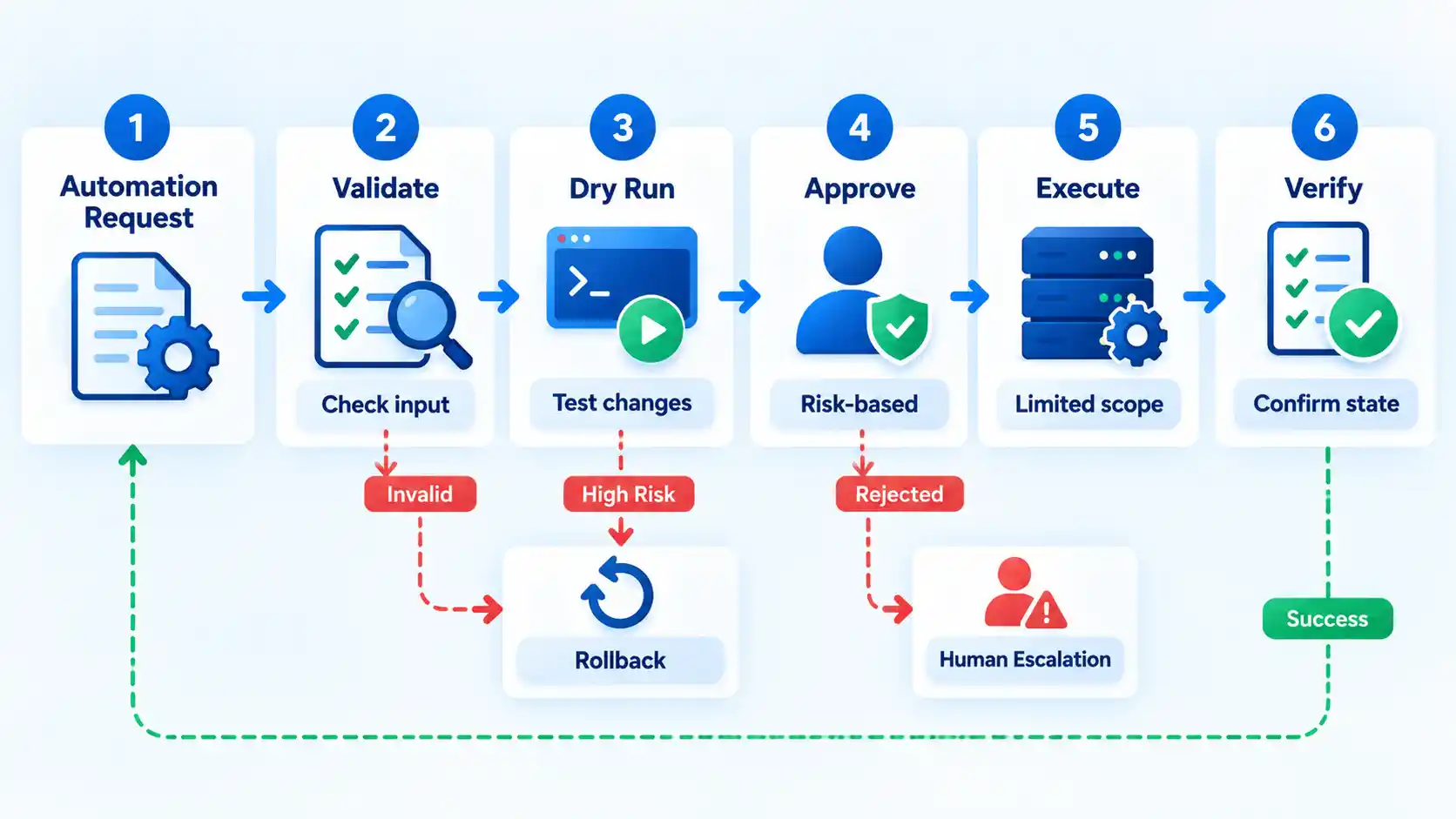
A safer workflow makes its assumptions and operating boundaries explicit before production execution. The following sequence applies whether you are building a script, runbook, configuration-management job, infrastructure workflow, or deployment automation.
- Define the desired state and blast radius. State what triggers the workflow, which targets it may touch, what it is allowed to change, what success looks like, what conditions are unsafe, and the maximum scope of one execution. “Restart unhealthy service instances in one staging cluster” is bounded more clearly than “fix unavailable services.”
- Validate before changing anything. Check required inputs, target identity, current state, dependencies, permissions, environmental restrictions, and numerical or resource limits. Reject ambiguous values instead of guessing what the operator intended.
- Restrict authority and add risk-based approval. Run the workflow under a dedicated identity with only the permissions it needs. Allow well-understood, reversible, tightly bounded tasks to run automatically when appropriate, while applying stronger approval or protection to high-impact and irreversible operations.
- Simulate and test within the tool’s limits. Use dry-run or preview modes where supported, then test against representative conditions. Treat simulation as evidence rather than certainty because external services, timing, production data, permissions, and state-dependent branches may behave differently during live execution.
- Execute progressively. Start with one target, one cohort, one region, or another deliberately small slice where the platform permits it. Limit concurrency and request rate, watch health signals, and define a threshold that stops expansion when failures rise.
- Verify the outcome independently. Do not stop at the workflow’s success status. Query the resulting configuration, service health, resource state, access state, or another independent signal that proves the desired result exists.
- Record the run and preserve the recovery path. Capture enough information to reconstruct what happened, including the run identifier, initiator, automation version, targets, important decisions, mutations, and outcome. Make sure the team already knows when to stop, roll back, roll forward, or escalate before the next execution begins.
Verify the result
- The automation touched only the intended targets and stayed within its defined blast radius.
- Independent state or health checks confirm the intended result rather than relying only on the job’s completion status.
- A repeat execution against an already-correct target produces no unnecessary duplicate effect, or the workflow explicitly handles non-idempotent actions.
- Logs identify the execution, targets, relevant changes, failures, and recovery actions clearly enough for another operator to investigate.
- The stop, rollback, roll-forward, or escalation path remains usable after the change.
A Pre-Run Safety Gate
Before a workflow receives production authority, review its operating assumptions. The purpose is not to create paperwork around every script. It is to catch the conditions that turn a routine automation into an incident.
- Is the desired end state explicit?
- Is the maximum target scope bounded?
- Are important inputs validated before any mutation occurs?
- Does the workflow use only the permissions it requires?
- What happens if the same action is retried?
- Can two executions conflict with one another?
- Could request volume or concurrency overload a dependency?
- Has the change been simulated or tested where the tooling supports it?
- What independent signal proves the result is correct?
- Which condition automatically stops further execution?
- Can the change be reversed or safely rolled forward?
- If it cannot be reversed, is stronger approval appropriate?
- Are the logs sufficient to reconstruct what the automation did?
- Who owns the workflow when it fails at an inconvenient time?
A workflow that cannot answer several of these questions may still be useful, but it should not silently inherit broad production authority until the missing controls are addressed.
Troubleshooting Unsafe Automation
Automation failures often appear only after a workflow meets production data, real scale, competing executions, or state that differs from the test environment. The symptoms below help narrow the failure mechanism instead of treating every incident as a generic scripting bug.
It passed testing but failed at production scale
Check target count, concurrency, API rate limits, dependency capacity, timeouts, production-only permissions, and data shapes that were absent from testing. A workflow that succeeds against ten systems may still overload a service when hundreds execute simultaneously. Reduce the rollout size, impose explicit execution limits, and compare production dependencies with the environment used during testing. These differences are central to why automation works in staging but fails in production.
A retry created duplicate or conflicting changes
Look for operations that create side effects without first checking current state. Also inspect client timeouts: the first request may have succeeded remotely even though the automation never received the response. Add state reconciliation, idempotency keys where the remote API supports them, duplicate detection, or a lock that prevents competing writers.
The job says success, but the service is broken
Separate execution status from outcome verification. Add a check that observes the system from outside the automation engine, such as service readiness, the applied configuration, resource status, expected permissions, or another measurable output. A successful command is only useful if the intended state follows.
Nobody can explain what the automation changed
Treat this as an observability and ownership problem. Record a run identifier, automation version, initiating identity, targets, important inputs, mutations, failures, and recovery actions. Keep the automation itself versioned so an operator can connect a production run to the exact logic that executed.
The Goal Is Bounded Automation, Not Maximum Automation
The safest automation is not necessarily the workflow with the least human involvement. It is the one whose authority, assumptions, failure modes, and recovery behavior are understood well enough that it can operate predictably.
Google’s SRE experience makes the trade-off clear: automation can improve consistency and response speed, but careless automation can also create failure at scale. Well-scoped automatic behavior can be safer than requiring a person to approve every routine action, while unusual, poorly validated, irreversible, or high-impact changes may justify stronger human control. The SRE automation discussion emphasizes both sides of that trade-off.
A mature automation therefore has boundaries. It knows what it may change, checks whether its assumptions still hold, limits how quickly it can act, proves whether the intended result occurred, and stops instead of improvising when conditions become unsafe. That is a better operational target than automating as much as possible.

💬 Comments