To get a publicly trusted code signing certificate, choose the appropriate certificate type and secure key-storage method, submit a request to a Certificate Authority (CA) or its authorized provider, complete identity or organization validation, provision the certificate to approved cryptographic hardware or a signing service, and verify a test signature before using it for releases.
The process has changed substantially from older workflows that treated a code signing certificate like an ordinary downloadable file. Current public-trust requirements make private-key protection part of enrollment, so your token, hardware security module (HSM), or qualifying signing service needs to be considered before issuance.
What a Code Signing Certificate Actually Proves
A code signing certificate connects a verified publisher identity to a cryptographic key used to sign software. In practical terms, if you sign an installer and someone later changes the signed content, signature verification can reveal that the signed data no longer matches what the publisher originally signed.
That is different from proving that the program is harmless. A valid signature does not guarantee that software is free of malware, programming errors, privacy problems, or unsafe behavior. The CA/Browser Forum Code Signing Baseline Requirements describe public code signing as a system for trusted signing, software-publisher identification, and protection of the signing process.
The certificate contains public information used when a signature is verified. The private key is the secret cryptographic key that creates the signature. Protecting that private key matters because unauthorized signing access could allow someone else to produce software carrying the legitimate publisher’s digital signature.
This guide focuses on publicly trusted, general-purpose code signing certificates. Internal enterprise Public Key Infrastructure (PKI), Apple notarization, mobile app-store signing, and specialized driver-submission programs can impose additional or different requirements.
Before You Apply: Choose the Right Certificate and Key Setup
Before ordering anything, decide who the certificate will identify and where the private signing key will be protected. Those two choices affect the validation process, enrollment workflow, and how you will sign software after issuance.
Prerequisites
- Know whether the certificate will identify an individual publisher or a legally registered organization.
- Have current identity, address, organization, and contact records that a CA can independently verify.
- Choose a compliant private-key provisioning method, such as an approved hardware token, HSM, cloud HSM, or qualifying signing service supported by the CA.
- Know which operating systems, signing tools, build systems, or release workflows must use the certificate so you can confirm compatibility before ordering.
OV/non-EV vs. EV code signing
Public code signing is commonly divided into non-EV certificates, often described by providers as Organization Validation (OV) or standard code signing, and Extended Validation (EV) certificates. The practical difference is the applicant and identity-validation model, not whether one certificate type makes the underlying software inherently safer.
Current Sectigo OV validation guidance states that OV certificates can be issued to verified individuals as well as qualifying organizations. Its EV validation guidance states that EV certificates are issued only to verified organizations and cannot be issued to individuals.
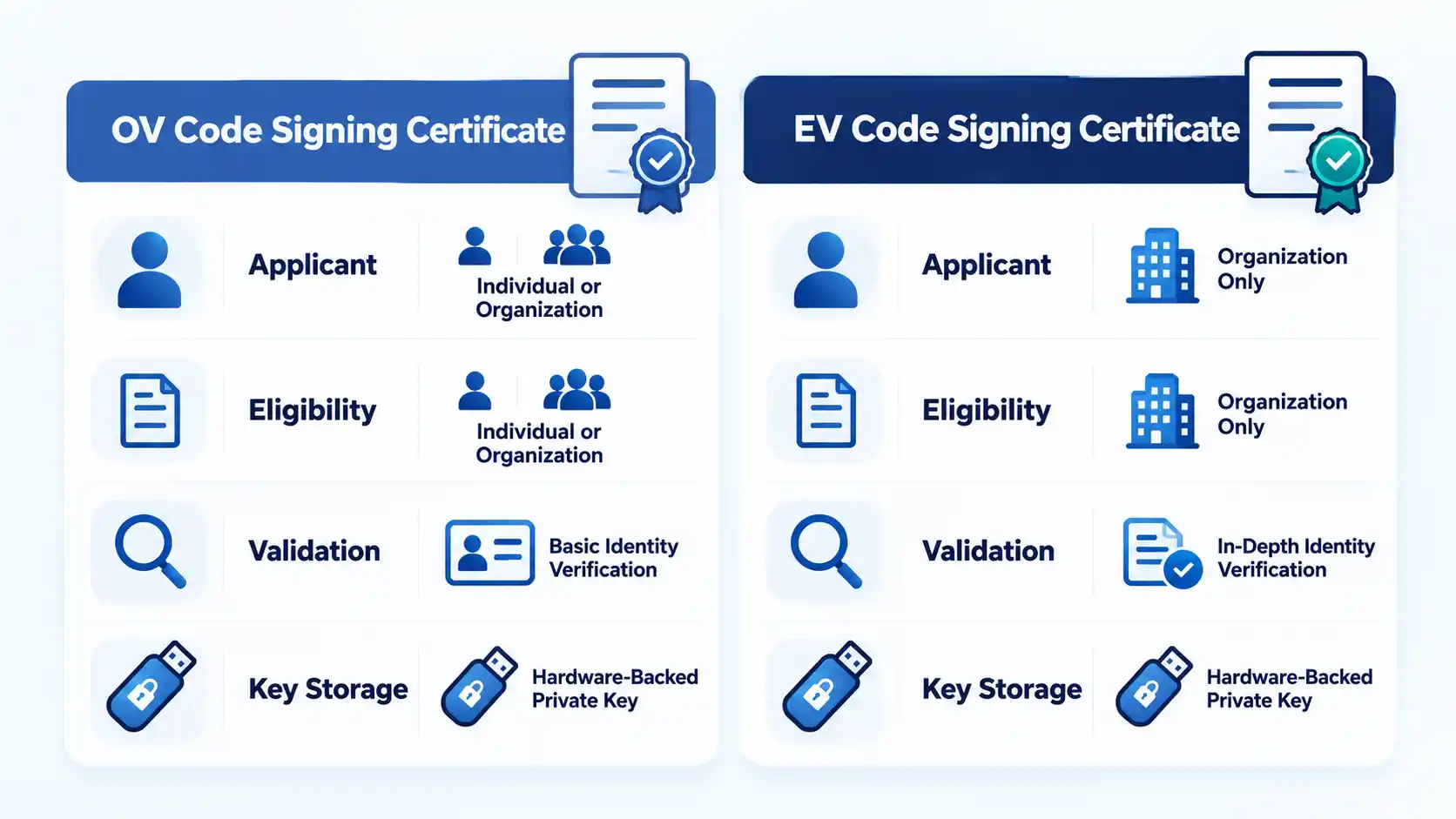
OV/non-EV and EV code signing compared
| Feature | OV/non-EV | EV |
|---|---|---|
| Eligible applicant | May include a verified individual or a qualifying organization, depending on the CA and product. | Qualifying verified organizations and other eligible legal entities; Sectigo’s current EV process does not issue EV certificates to individuals. |
| Validation focus | Publisher identity, physical presence or address, contact information, and request authorization. | Legal existence, operational presence, address, verified contact information, request authorization, and additional EV review. |
| Private-key protection | Current publicly trusted certificates require qualifying hardware-backed or signing-service protection. | Current publicly trusted certificates also require qualifying protected private-key storage. |
| Individual developer availability | Possible through CAs that offer individual non-EV code signing. | Not available to a natural person applying as an individual. |
| Practical reason to consider it | Use it when its applicant type and validation level meet the requirements of your software-distribution workflow. | Use it when an eligible organization specifically requires EV identity validation or a distribution workflow calls for it. |
Do not choose EV solely because a sales page presents it as a higher-tier product. Check the requirements of the operating system, software-distribution channel, customer, or signing workflow that matters to your release.
If you are comparing commercial reseller offerings, one marketplace lists several EV code signing certificate options with different brands and provisioning choices. A product-specific option from the same reseller is the Comodo EV Code Signing Certificate. These are commercial purchase destinations rather than evidence for the industry rules governing certificate issuance.
Decide where the private key will live
This is one of the most important differences between current enrollment and older code-signing tutorials. For a publicly trusted certificate, you should not treat the private key as an ordinary exportable file that can be generated on a workstation and copied between systems.
Under the CA/Browser Forum private-key protection requirements, CAs have been required since June 1, 2023 to ensure subscriber code-signing private keys are generated, stored, and used in qualifying cryptographic hardware. A compliant signing service can also be used when the subscriber’s private key remains protected in the required hardware-backed environment.
Your practical choices depend on the CA. For example, DigiCert documents four provisioning methods: a DigiCert-provided hardware token, a supported customer-owned token, a customer-controlled HSM, and DigiCert KeyLocker, its cloud-HSM option.
An HSM, or Hardware Security Module, is hardware designed to generate and use cryptographic keys without exposing the private key like a normal file. Cloud services can provide HSM-backed key protection too, but the service, configuration, and CA enrollment method still need to satisfy the applicable requirements.
Check the certificate validity period
Do not assume that a multi-year commercial plan means the CA will issue one certificate valid for that entire period. The CA/Browser Forum baseline requirements limit publicly trusted code signing certificates issued on or after March 1, 2026 to a maximum validity period of 460 days.
A CA can impose a slightly shorter operational maximum. For example, DigiCert uses a 459-day maximum for public Code Signing and EV Code Signing certificates issued from February 24, 2026. If a provider sells a longer subscription or service term, check how reissuance works during that term.
How to Get a Code Signing Certificate
The exact screens, documents, and hardware choices vary by CA, but the sequence below reflects the current public-trust workflow. Follow your chosen CA’s instructions when it specifies a particular token, HSM, identity-verification method, or enrollment procedure.
- Step 1: Identify the applicant and certificate type. Decide whether the certificate will identify you as an individual or identify an organization. If you are an individual developer, look for a CA that explicitly supports individual non-EV code signing. If you represent an organization, confirm whether non-EV validation satisfies your distribution requirements or whether you specifically need EV validation. Comparing OV and EV code signing certificates is most useful when eligibility and validation requirements are considered before price or marketing claims.
- Step 2: Choose the CA, provider, and provisioning method. Confirm that the issuing CA is accepted by the software platforms you need to support, then select an available method for protecting the private key. Depending on the CA, that may be a shipped hardware token, your own supported token, an HSM, or a qualifying cloud signing service. Check signing-tool compatibility, hardware requirements, shipping requirements, renewal and reissue procedures, and support documentation before ordering.
- Step 3: Prepare verifiable identity and organization information. Use the exact legal identity that reliable records support. An organization may need its registered legal name, jurisdiction, active registration information, physical business address, and independently verifiable contact information. Individual applicants should expect identity verification using acceptable government-issued identification and the process specified by the CA. Make sure the order information matches the underlying records before submitting it.
- Step 4: Generate or provision the signing key as instructed. Do not create an ordinary local software key merely because an older tutorial tells you to generate a Certificate Signing Request (CSR) first. A CSR is a request containing a public key and identifying information, but whether you create one yourself depends on the provisioning method. A CA-provided token can follow a different enrollment flow, while an HSM workflow may require you to generate the key inside the HSM and submit a CSR plus evidence that the key is properly protected. Follow the CA’s instructions for the exact hardware or service you selected.
- Step 5: Submit the certificate request. Complete the provider’s order or enrollment form, select the available validity and provisioning options, supply the required applicant information, accept the applicable subscriber agreement, and submit any CSR or hardware evidence required by that workflow. Before submitting, verify that names, addresses, contact details, and organization information are consistent across the order and authoritative records.
- Step 6: Complete CA validation. Respond to the identity, organization, and request-authorization checks required for your certificate. Current OV validation can include identity checks, legal-existence or physical-presence checks, a subscriber agreement, and authentication through independently verified contact information. EV validation adds stricter organization and authorization review. Monitor the order for requests for documents, identity verification, callbacks, or confirmation emails rather than assuming the process is automatic.
- Step 7: Receive or provision the issued certificate. What happens after approval depends on your storage method. A CA may provide a certificate on a hardware token, make it available for use with an existing supported token or HSM whose private key was generated there, or expose signing through a managed cloud service. The private key should remain protected by the approved cryptographic environment rather than being exported into an ordinary software keystore.
- Step 8: Sign, timestamp, and verify a test artifact. Before using the certificate in a production release, sign a harmless test build using the signing tool and workflow intended for production. Where the signing format supports timestamping, configure the CA’s supported timestamp service. The CA/Browser Forum requires a CA that issues code signing certificates to operate an RFC 3161-compliant Timestamp Authority and recommend timestamping to subscribers. Finally, use the target platform’s verification tools to confirm the signature, certificate chain, publisher identity, and timestamp behave as expected.
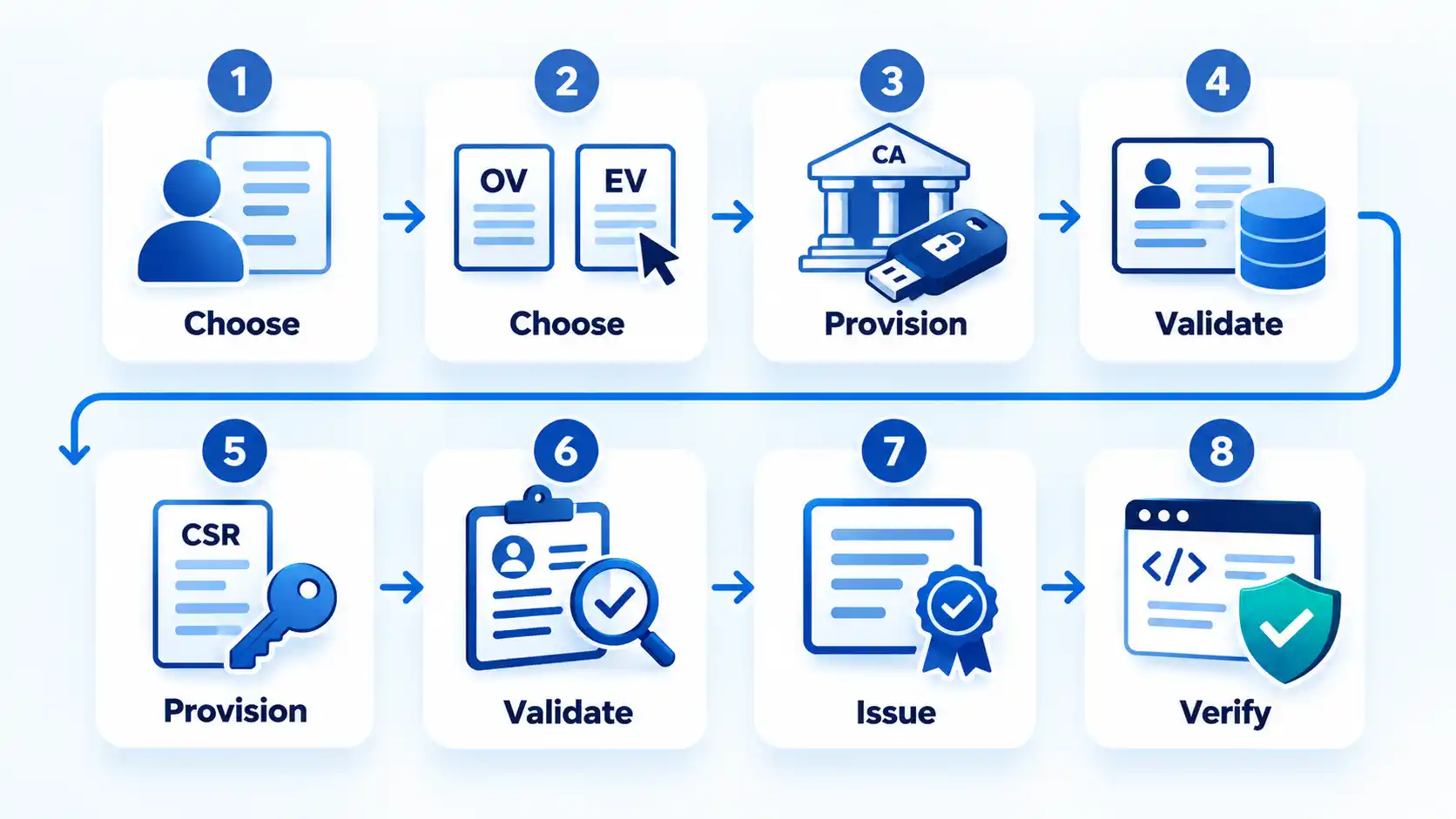
A CSR is therefore conditional rather than a universal third step. For example, DigiCert’s current request documentation distinguishes between provisioning methods, and its enrollment process changes according to the selected key-storage setup.
Why Code Signing Validation Gets Delayed
Validation does not have one guaranteed completion time. A straightforward application can move quickly, while mismatched records, missing verification, pending customer actions, or hardware-enrollment problems can keep an order waiting for additional work.
The legal name or address cannot be verified
Compare the order with the authoritative registration or identity records the CA is using. Current Sectigo guidance identifies incomplete, mismatched, or independently unverifiable information as common causes of delay. Use the exact legal name or registered trade name and a verifiable physical address, then provide additional evidence through the CA’s approved validation channel when requested.
The CA cannot verify the phone number or email address
A phone number or email typed into the order is not necessarily enough. Validation can require contact information established through a reliable independent source. If the CA cannot verify it, follow the provider’s process for supplying acceptable evidence rather than repeatedly submitting the same unverified contact information.
The callback, agreement, or identity check is still pending
Review the validation portal and order emails for outstanding actions. Subscriber agreements, identity verification, authorization callbacks, and confirmation messages can block issuance until the correct applicant or authorized representative completes them using the CA’s approved process.
The HSM or token workflow fails
Confirm that the device and configuration are supported by the CA and that the key was generated in the required cryptographic environment. If the workflow requires key attestation, a CSR, or other evidence of private-key protection, issuance can remain blocked until that evidence is accepted. Do not work around the problem by exporting the private key into an ordinary file.
The order is taking longer than the advertised estimate
Treat commercial issuance-time estimates as estimates rather than guarantees. Identity and organization records can require additional review or documentation, and physical hardware delivery can add time after validation. Code signing validation delays are easier to diagnose when you separate CA validation status, private-key provisioning, and physical delivery into distinct stages.
What to Check Before You Start Signing Releases
Issuance only tells you that the certificate has been approved and provisioned. Before connecting it to a production build system, verify that your actual signing workflow produces the identity and integrity signals you expect.
Verify the result
- The certificate shows the expected publisher or organization identity.
- The private key is usable only through the approved token, HSM, cloud HSM, or signing service you selected.
- A test artifact can be signed successfully with the same toolchain you intend to use for production.
- The target platform’s verification tool reports a valid signature and the expected certificate chain.
- Timestamping succeeds when your signing format and workflow use it.
- Your team knows the certificate expiration date and the CA’s renewal or reissue procedure before a release depends on it.
Once the certificate is operational, access control and key governance matter as much as enrollment. Limit who can authorize signatures, keep signing activity auditable, and secure and manage a code signing certificate so the protected publisher identity is not exposed through weak key handling.
For automated releases, code signing in CI/CD pipelines requires an additional design decision: the build system should be allowed to request authorized signatures without turning the protected private key into an exportable deployment secret.
Conclusion
Getting a code signing certificate now starts with identity and private-key architecture, not simply filling out a form and downloading a certificate. Choose the certificate type that matches the applicant and platform requirements, select compliant hardware-backed provisioning, submit information the CA can independently verify, complete the required validation, and test the finished signing workflow before relying on it for releases.
The two changes most likely to make older instructions fail are the hardware-backed private-key requirements that took effect in 2023 and the shorter certificate-validity ceiling that took effect in 2026. Check the current CA instructions whenever you enroll, renew, reissue, or change your key-storage method.

💬 Comments