Facebook does not present every possible person in one full public list. A familiar name can be buried among other accounts, changed after marriage, written in another script, or attached to a profile that reveals almost nothing.
That doubt creates a bigger problem than an empty result: it can make the wrong stranger look convincing. A careful search ends with one of two honest results—a possible match or an unresolved search—not false certainty.
Quick Take
- Begin with Facebook’s People results and add only details you know are accurate.
- Try legitimate name variations before moving to cross-platform username checks.
- Use public photos, profile details, and mutual context as clues—not proof.
- Confirm a match through several independent public signals before making contact.
- Stop when the next step would require deception, private access, scraping, or ignoring an opt-out.
What “hard to find” actually means
A profile may be hard to find because the name is common, the person uses a nickname or past surname, the account shows little public detail, or the search filters do not match what the profile displays. Results can also differ between accounts and screens, so a missing filter or result does not prove that the profile has disappeared.
A restricted profile may still expose a current photo, a username, limited About information, public comments, or connections that the account owner has chosen to leave visible. It may also expose none of those things. Work only with what is public, and do not interpret the absence of information as permission to seek it through another account.
Facebook’s older Graph Search syntax is no longer a dependable search method. Current searches should use the People results and whatever filters are actually visible in the reader’s interface, followed by ordinary public-web searches when necessary.
Set a legitimate purpose and a stopping rule
Before searching, write one sentence explaining why you need to find the person and what you would say if they asked. Reconnecting with a former classmate, locating a relative for family-history work, or finding the correct public professional profile can be reasonable. Curiosity alone does not justify escalating past someone’s visible privacy boundary.
Prepare the following:
- One or two accurate starting details, such as a full name, town, school, employer, public photo, or known username.
- A simple note recording each public URL, when you viewed it, and why it may or may not match.
- Access to an ordinary search engine and, when relevant, a reverse-image search service.
- A firm rule that login-gated content, fake accounts, borrowed sessions, contact-list uploads, and automated scraping are out of bounds.
Search from the least invasive clue to the most specific
Work through these steps in order. Each step should either narrow the candidates, expose a contradiction, or tell you that the public trail has ended.
- Search the name and add one reliable detail.Enter the person’s name, open the People results, and add one filter your version of Facebook makes available. A city, school, workplace, or mutual connection is useful only when you know it is current or historically relevant.Add one detail at a time. If you stack several assumptions together, one incorrect detail can remove the correct profile from the results without telling you which assumption caused it.Keep only candidates whose visible details agree with something you already know. If the list remains broad, change the search term instead of scrolling indefinitely.
- Try genuine name and username variations.Search a maiden or married surname, common nickname, middle initial, alternate spelling, accent variation, or transliteration when you have a reason to expect it. Do not generate speculative identities.If you know a public username, try it as a Facebook profile address and in a regular search engine. People sometimes reuse handles across public accounts, but unrelated people can also choose the same handle.A matching name or username creates a candidate. It does not confirm identity.
- Use public-web searches to find an indexed profile or public mention.Search an exact name together with a reliable context term, such as a school, city, employer, club, or event. A query such as
site:facebook.com "Maria Alvarez" Bakersfieldcan surface an indexed page that Facebook’s own result ordering did not show.Public alumni pages, event programs, professional profiles, or community pages may connect a name to a username or profile URL. Treat old documents as historical context rather than evidence of a current location, job, or relationship.Do not use leaked databases, paid people-search brokers, or login-gated material to fill gaps. - Cross-check public images and visible context.If you already possess a legitimately obtained public photograph, a reverse-image search may show whether the same image appears on another public page. Search the complete image rather than extracting biometric or facial details.A stock-image result, reused photograph, or different name is a warning that the candidate may be misidentified or inauthentic. It is not proof that the account is fake; record the contradiction and look for independent context.Visible mutual connections, public comments, tagged public photos, and profile details may add context. Use cautious language: they can suggest a location, workplace, school, or relationship, but they do not confirm it by themselves.
- Check public historical context without treating it as current fact.The Internet Archive’s Wayback Machine may contain an older public capture of a profile URL or related public page. A missing capture proves nothing, and an old capture may no longer describe the person accurately.Compare any archived detail with current public information. Never treat a former employer, surname, city, or photograph as current merely because it appears in an old capture.If the public history does not resolve the match, leave the uncertainty in place.
- Verify the candidate and decide whether to contact them.Look for several independent public signals that point to the same person—for example, a consistent photograph, compatible school or work history, a known public connection, and a username tied to another verified public page.Signals copied from one profile are not independent. A photo and biography repeated by the same account still represent one source, while writing style, perceived age, appearance, or friend ethnicity are too subjective to establish identity.If important details conflict, keep the result as an unconfirmed candidate or discard it. If the match is credible and contact is appropriate, send one transparent message explaining who you are and why you are reaching out. Respect silence or refusal.
Choose the route that matches the obstacle
| Route | Useful when | What it can provide | What it cannot prove | Stop when |
|---|---|---|---|---|
| Facebook People results | You know an accurate city, school, employer, or mutual connection | A smaller candidate list | That an omitted result does not exist | Additional filters rely on guesses |
| Name and username variations | The person may use another surname, spelling, script, or public handle | Alternative public profile candidates | That matching handles belong to one person | The only connection is a common name or handle |
| Public search-engine queries | Facebook’s results do not surface a known public page | Indexed profiles, event pages, or public documents | That an old result remains current | Results require private or leaked data |
| Public image and context checks | You already have a legitimately obtained public image or known connection | Corroborating or contradictory clues | Identity from appearance or one network clue | The next clue is visible only to friends |
| Public archives | A known public URL has changed or disappeared | Historical context, when a capture exists | Current facts or the reason a page changed | The archive has no relevant public capture |
Phone numbers and email addresses are not shortcuts
Do not upload another person’s phone number or email address to contact-discovery tools merely to test whether an account exists. Lookup behavior changes, consent is unclear, and any resulting suggestion can still be wrong. If the person has publicly listed contact information for the purpose you have in mind, use that channel directly and respectfully instead of treating it as an identity key.
Verify without turning clues into certainty
Verification is a comparison exercise, not a points system. Stronger confidence comes from several public signals that were obtained independently and agree without major contradictions. No fixed number converts a candidate into a confirmed identity.
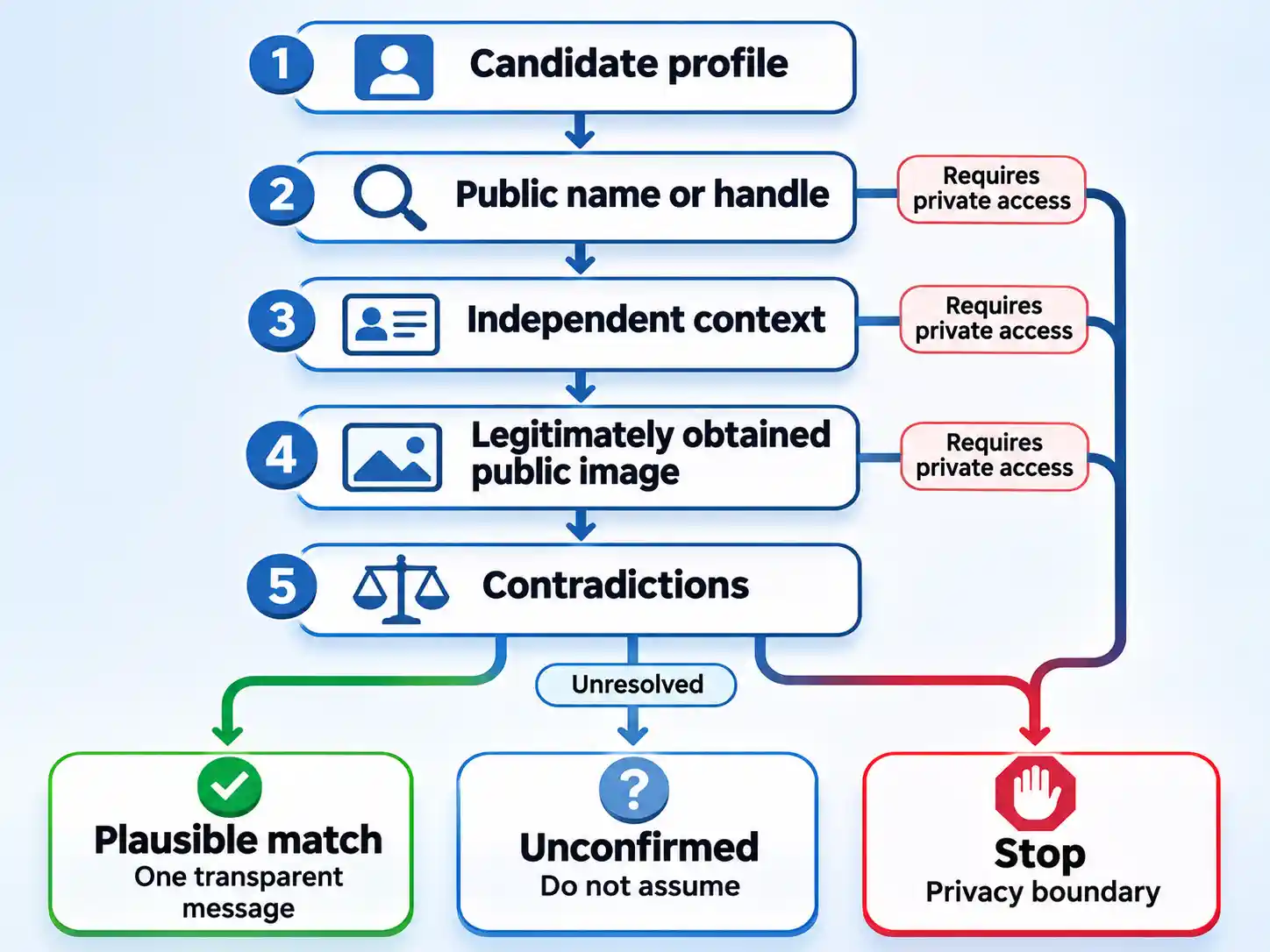
Verify the result
- The candidate agrees with more than one public detail you knew before opening the profile.
- At least one corroborating signal comes from an independent public page rather than being copied from the candidate profile.
- Material contradictions have been investigated or left unresolved rather than explained away.
- No conclusion relies on appearance, writing style, perceived age, language, ethnicity, or the makeup of a friend network.
- Every observation came from public access without deception, scraping, borrowed credentials, or contact-list uploads.
- You are prepared to send one transparent message and accept no response as the end of the search.
When the public trail goes cold
The public photograph returns no useful result
That is not evidence for or against the profile. Continue with known names, usernames, and contextual details. Do not move to facial-recognition services or extract biometric features.
The friend list and tagged material are hidden
Use only other details the account owner has left public. Do not create another account, ask someone to expose private content, or send a request merely to inspect the profile.
The name produces too many candidates
Replace one uncertain filter with one reliable context term, such as a known school, public employer, event, or username. If you do not have a reliable distinguishing detail, you do not yet have enough information to identify the person safely.
The Wayback Machine has no capture
Record that no relevant public snapshot was available and continue only with current public information. Do not treat the missing capture as evidence that the account is new, private, deleted, or suspicious.
The next step requires a login, fake account, or private data
Stop. The public search has reached its boundary. Keep only the minimal notes needed for your legitimate purpose and do not attempt to bypass the restriction.
Contact is a request, not a reward for searching
A plausible match does not create permission to investigate further. If contact is appropriate, send one short message stating who you are, how you know the person, and why you are reaching out. Do not reveal a catalogue of everything you found; that can feel invasive even when each item was public.
If the person blocks you, declines the request, removes the connection, or does not respond, stop. Do not switch accounts or channels to get around that choice. If you want to understand the visibility of your own activity first, read whether people can see when you search them on Facebook.
The strongest result is not the profile with the most collected information. It is a modest, explainable match built from public clues, checked for contradictions, and handled with enough restraint that the other person remains free to say no.

💬 Comments