Start with the accounts that can reset the rest, and the other security work gets easier to place.
Cybercriminals target companies of all sizes, and the work runs at volume. Nobody has to pick you out by hand: a convincing lookalike login page, a password reused from an old breach and an account with no second factor are enough for an attempt to succeed while it is being run against thousands of others. A solo operator’s admin inbox is the most valuable item on that list, because the address that receives a sponsorship enquiry can usually reset a dozen other logins. Whoever holds it holds everything behind it.
That is what account takeover means in practice. Someone else gains access to your account and then uses your own recovery paths to keep it. The sequence below is ordered around that reality. It reduces the risk; it does not remove it.
Quick Take
- Inventory first. Write down every account that can reset another login or move money: email, registrar, hosting, affiliate and payout dashboards, ad accounts, bank.
- One password per account. Put everything in a password manager and let it generate long, unique strings. Memorise the master passphrase and nothing else.
- Phishing-resistant sign-in on the money accounts. A passkey or hardware security key beats a texted code, and a second key stops the upgrade from locking you out.
- Verify payout changes out of band. No bank, routing or wallet change gets applied on the strength of an email alone.
- Practise the recovery. Test a backup restore, print your recovery codes, and keep a one-page plan where you can find it while panicking.
Why small accounts get taken over
Small does not mean invisible. Automated scans do not check headcount before they try a login, and small businesses often do not have the resources to defend against attacks that can stop an operation dead.
What an attacker wants is an account that converts quickly: the inbox that resets everything else, the registrar that controls a domain, the dashboard that holds routing numbers and a payout schedule. Small operators often run all three from the same laptop, which is why one stolen password can travel so far.
Most attempts are not personal. Phishing, stolen credentials, malware and spoofed email are cheap to run at volume, so an attacker does not need a reason to pick you. The same automated kit tries the same handful of tricks against every address it can reach.
Password-only defences have a single failure point: whoever holds the password is treated as you. The controls that change that outcome are the ones attached to the account itself — strong authentication, limited admin access, and a separate check before money moves.
Before you change any settings
Authentication changes are the easiest way to lock yourself out of your own business. Gather these first, then work through the procedure.
If you are starting from no written plan, the NIST Cybersecurity Framework 2.0 Small Business Quick-Start Guide is built for exactly that starting point, and the NIST Small Business Cybersecurity Corner collects further resources for the small business community.
- An account inventory. A plain spreadsheet is fine. List the login address, the recovery address, the current second factor and who else has access.
- A recovery phone and email you actually control. Not a former business partner’s number, not an address on a domain you are about to migrate.
- Two ways in before you remove one. Never delete a working factor until the replacement has signed you in successfully.
- Provider support routes, saved offline. Account recovery pages, support phone numbers and your account or customer ID, stored somewhere that does not depend on the account you are trying to recover.
- A current backup. Site files and database, dated, stored off the device you work on.
- A one-page incident response plan. Who you call, in what order, and where the recovery codes live. Write it before you need it and rehearse it periodically; a solo operator still needs the written part and a named person to call.
Secure your highest-value accounts in this order
The order matters because each step protects the one after it. Locking the inbox first means the later changes cannot be undone by whoever already holds your email.
- Secure the admin email account.Sign in from a device you trust, replace the password with a long unique one stored in your password manager, and turn on multifactor authentication before you touch anything else.
This address receives the password resets for almost every other account you own. An attacker holding it does not need to break into your registrar, your host or your payout dashboard. If the provider lists active sessions or connected apps, review that list while you are in there.
Sign in again from a second device, or after signing out everywhere, to confirm the new password and second factor both work. Do that before you close the tab.
- Give every account its own password.Install a reputable password manager, create an entry for each account on your inventory, and replace reused passwords with generated ones. Start with the accounts that can move money.
A strong password is long, and the longer the better; a passphrase of random words is easier to remember than a short jumble. Never reuse one and never share one by phone, text or email. A manager makes that practical because you memorise a single master passphrase — guard it the way you guard a bank PIN, and switch on MFA for the manager itself.
The manager’s security report should show no reused or weak entries among your business logins. Anything still flagged is an account that an old breach somewhere else can open.
- Turn on multifactor authentication from the top of the inventory down.Enable MFA on email, registrar, hosting, affiliate and payout dashboards, ad accounts and your bank. Any account holding customer data belongs on the list too.
Some second factor beats none at all, even the weakest kind, so start wherever each provider lets you. What matters next is maintenance, because gaps appear when someone changes phones, adds a new tool, or hands an account to a freelancer. Review the list on a schedule instead of trusting memory.
Check each account’s own security page. If the page shows MFA off, it is off.
- Upgrade the money accounts to a passkey or security key.On your highest-value accounts, register a passkey stored on a hardware security key if the provider supports it. Where only device passkeys are offered, add one and plan a second registered device.
Passkeys are FIDO credentials built to remove the shared secret: there is no code to type, so a lookalike login page has nothing useful to collect. That is what makes them phishing-resistant. Support still varies by provider, so confirm the feature exists before you depend on it.
Sign in once through the provider’s normal login page with the new method, then check that the account’s security settings list the passkey or key with a recent enrolment date.
- Add a backup before you remove the old factor.Register a second security key, or generate and print recovery codes, and store them somewhere a burglar would not check first. Only then remove SMS or emailed codes from accounts that now have passkeys.
This is the step people skip, and it is the one that turns a security upgrade into a lockout. A hardware key you already own can double as a recovery credential, and for anyone who cannot use phone biometrics it is often the more practical second factor.
Put the primary device in another room and sign in with the backup. Once that works, the old factor can go.
- Cut standing admin access.Split daily work from administration. Keep one account for reading email and browsing dashboards, and a separate admin identity for changing payout details, DNS records or user permissions.
Least privilege — giving an account the minimum access it needs for the job in front of it — is a high-impact goal in CISA’s voluntary Cross-Sector Cybersecurity Performance Goals, and it applies to a team of one as much as a team of fifty. A separate browser profile or device for admin sessions adds another layer; treat it as extra depth rather than a control you can lean on alone.
Where the platform supports separate roles, your everyday account should now fail when it tries to open payout settings or DNS records. If it still opens them, the split did not take.
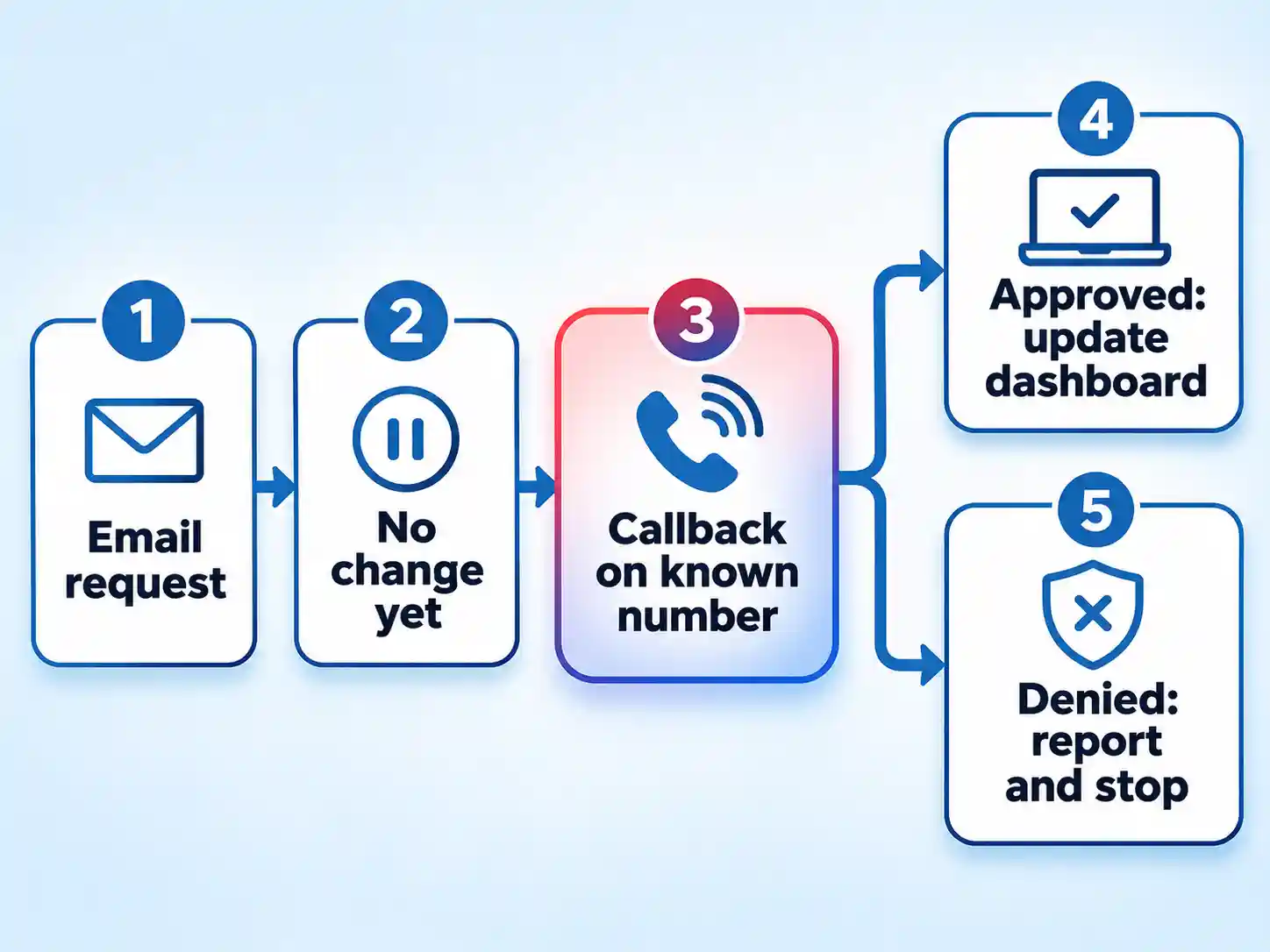
- Verify every payout and bank-detail change out of band.Treat any emailed request to change bank details, routing numbers, payout wallets or payment instructions as unverified, even when it appears to come from a partner you already work with.
Email is easy to spoof, so a message that looks like your partner tells you nothing about who actually sent it. Your defence is a callback to a number you held before the request arrived, never a number supplied inside the message. Verification is prudent practice rather than a measured anti-fraud system, so pair it with strong authentication on the dashboard itself.
The change should appear in the platform’s activity log only after your callback, and the destination details should match what you read back on the call.
- Update, back up, and write the plan.Turn on automatic updates for your operating system, browser and admin apps, keep a dated off-device backup of your site and customer data, and check the email authentication settings on your domain.
Updates, tested backups, email authentication and secure remote access are the baseline. Pair them with a written incident response plan, regular tabletop exercises and a known route for reporting what happened; CISA’s small-business resources cover phishing avoidance, passwords, MFA, software updates, backups and incident response planning. Device protection is its own layer; endpoint security for your business is worth reviewing alongside these account controls.
Restore one file from the backup and open it. A backup you have never restored is a hope, not a recovery plan.
Which sign-in method to use where
Not every account deserves the same strength. Spend your effort where an attacker gains the most.
| Sign-in method | Phishing resistance | Best used for | What to watch |
|---|---|---|---|
| Passkey on a hardware security key | Phishing-resistant by design | Admin email, registrar, bank, payout dashboards | You buy the hardware and you need two; keep one off-site |
| Synced passkey on phone or laptop | Phishing-resistant by design | Everyday high-value logins where no key is offered | Synced or password-backed passkeys stay exposed if the account syncing them is compromised, so protect that account first |
| Authenticator app code | Not phishing-resistant | Accounts with no passkey support | A convincing fake login page can relay the code in real time |
| SMS or emailed one-time code | Not phishing-resistant | Fallback only | Email compromise and phone-number hijacking undermine it, though it still beats no second factor at all |
| Password only | None | Nothing that holds money or customer data | One reused password turns someone else’s breach into yours |
Work down the table as far as each provider allows. A mixed setup with a security key on email and payout, an authenticator app on the ad dashboard, and SMS as a last-resort fallback is a realistic finish line for a one-person business.
Treat affiliate and payout dashboards like bank accounts
An affiliate dashboard is a financial account with a content page attached. It holds your bank routing details, your payout schedule, your partner list and often your traffic and conversion data. Changing the destination account is a short job for anyone who gets in.
The rule that closes most of that gap is simple: no payout change is applied on the strength of a message. Confirm it through a channel you already trusted before the request existed. Save the callback number in your inventory so you are not hunting for it under pressure.
Networks that pay creators follow the same logic. If you earn through the Linkscircle Affiliate Marketing Network, or through any other network, its payout settings page is an admin surface. Put it behind your strongest sign-in method, keep it on an account only you use, and never let a shared login reach it.
Write the callback script once so you do not improvise it: “I’m confirming a change to our payout details before I apply it. Can you confirm the last four digits and the account holder name you have on file?” A short call is cheaper than rerouting a payout.
Verify it works before you trust it
Verify the result
- You can sign in to the admin email from a second device with the new password and second factor.
- A backup security key or printed recovery code signs you in when the primary device is unavailable.
- Your password manager reports no reused passwords among business accounts.
- Your everyday account can no longer open payout settings, DNS records or user permissions.
- One file restored from backup opens correctly.
- The one-page plan names who to call, in what order, and where the recovery codes are kept.
- Every critical account appears on the inventory with its current second factor recorded.
If an account is compromised
Speed matters more than elegance here. Work through these in order and keep a written record of times and actions.
- Get back in from a clean device and change the password, then change it again on any account that shared it.
- End active sessions and revoke connected apps where the provider offers those controls.
- Pause or freeze payouts and ad spend where the provider supports it, and call your bank if bank details changed.
- Ask your registrar or host’s support team to confirm that no DNS or domain records changed, and to walk you through the current settings.
- Re-check forwarding rules, filter rules and recovery addresses on the inbox. Attackers often leave a quiet forwarding rule behind.
- Report the incident. Voluntary reporting to CISA helps other small operators, and spoofed email should go to IC3 or the FTC. Notify customers if your business is being impersonated.
- Bring in a qualified incident-response professional if customer data, payout control or domain control are involved. Notification duties vary by law and by the facts, so take legal advice before you write the customer email.
Escalate rather than improvise when a payout destination has already changed, when domain control is in question, when customer data may have been exposed, or when you cannot regain access through normal recovery. Those are the moments for provider support, a qualified security professional and, where money has moved, your bank and law enforcement.
When you get locked out
You lost the phone holding your passkey
Use the backup key or printed recovery codes you registered in step five. If you removed the old factor before testing the backup, contact the provider’s account recovery team immediately and be ready to prove ownership with business documents, domain records and billing history.
Your provider does not support passkeys
Leave an authenticator app and a strong unique password in place, and add a hardware key if the provider accepts FIDO tokens without passkeys. Check again periodically; support varies by platform and by provider, and it is expanding.
A login alert arrives and you cannot tell if it is real
Open the provider’s site by typing the address yourself, then check the security and session pages directly. Do not use the link in the alert. A false alarm costs a little time; a real one costs the account.
You cannot complete the recovery because the old email is gone
This is why the inventory matters. Recovery addresses should live on a domain you control and a mailbox you can still open. Rebuild that dependency first, then work backwards through the accounts it unlocks.
Do three things this week, then keep the rhythm
The first pass is deliberately small: put the admin email behind a passkey or security key with a backup registered, empty the password reuse out of your business logins, and write the payout callback number on paper somewhere a compromised inbox cannot reach it.
Then set the cadence, because settings drift. On a regular schedule, re-check the inventory, restore one file from the backup, and confirm the recovery codes are still where you left them. At a regular review, read the plan out loud — alone is fine — and name who you would call first, in what order, and what you would switch off before you made a single phone call.
None of this makes you unhackable. It does mean a stolen password stops being enough on its own, and that a bad hour no longer turns into a lost business. Once access is locked down, the natural next step is getting the money side just as disciplined — start with small business online financial management and apply the same verification habit to every account that touches a balance.

💬 Comments