Short answer: for some homes, yes — and for plenty of others, no. A robot vacuum earns its price when it quietly erases a chore you actually do every week and keeps doing it for years without drama. It loses that argument the moment you’re vacuuming the robot, untangling a mop pad, or paying a subscription to unlock features that should live on the device.
So instead of a ranking of shiny new models, this guide gives you a decision framework. You’ll see the five things that actually separate a good robot vacuum from an expensive floor puck, the real five-year cost, and the honest list of situations where your money is better spent on a good upright.
Quick Take
- Worth it if: you have hard floors or low-pile carpet, moderate clutter, and a recurring vacuuming habit you’d love to hand off.
- Best value tier: a LiDAR-navigating model with a self-emptying dock — skip the mop-washing flagship unless you mop weekly anyway.
- Biggest trap: cloud and app dependency. Some features need an account, a server, and a brand that stays in business.
- Golden rule: budget for the robot plus about 30–50% of its price again over five years in filters, brushes, bags, and a battery.
Robot Vacuums at a Glance
Robot vacuums aren’t one product category so much as three tiers wearing the same shape. The cheap end bumps around semi-randomly. The middle maps your home with LiDAR and empties itself into a dock. The top end washes and dries its own mop pads and refills its own water tank. Each tier up costs more to buy and more to maintain, and the jump from “empties itself” to “washes its own mop” is where the money really climbs.
Info
Prices and model names shift constantly. Treat every number in this guide as a planning figure and re-check the live listing before you buy. The mechanics below — navigation type, dock tier, consumable burn rate, battery life — are the durable part.
| Tier | Typical Price Band | What It Automates | Works Without Cloud? | Main Limitation |
|---|---|---|---|---|
| Budget / random-nav | Low | Basic vacuuming, manual emptying | Often yes | Bumps around, misses spots, no real map |
| Mid / LiDAR + self-empty | Mid | Mapped cleaning, auto-emptying dock | Sometimes | Dock bags are a recurring cost |
| Premium / mop-wash dock | High | Vacuum, mop, wash, dry, refill | Rarely | Dock maintenance, mold risk, app reliance |
| Subscription / feature-locked | Varies | Varies by plan | No | Features can vanish if you stop paying |
How These Robot Vacuums Were Evaluated
This isn’t a hands-on lab test of every 2026 model — that would be a ranking, and rankings go stale fast. Instead, the criteria here are the ones that decide whether a robot vacuum pays for itself in your home, regardless of which badge is on the box. Navigation method, dock automation tier, offline and local-control capability, consumable burn rate, battery replaceability, and data policy.
I leaned on independent testing methodology from outlets like Wirecutter and Consumer Reports for how these machines are judged, on real-owner complaints from communities like r/robotvacuums for the failure modes that don’t show up in spec sheets, and on manufacturer documentation for how navigation and docks actually work. Where a claim is anecdotal, it’s labeled as such.
The 5 Criteria That Actually Decide It
Forget the marketing. Five things separate a robot vacuum you’ll love from one you’ll resent, and they map cleanly onto the recommendation cards below.
Our Recommendations
LiDAR Navigation — The Single Best Upgrade
Best for: Anyone with more than one room and a normal amount of furniture.
If you only pay attention to one spec, make it this. LiDAR robots spin a small laser turret and build a real map of your floor, which means they clean in tidy rows instead of bouncing off the sofa like a pinball. They also work in the dark, which matters more than you’d think — camera-based robots that navigate by sight can struggle in a dim hallway or under a bed.
Camera and vSLAM systems can be perfectly good, and they’re often cheaper. The trade-off is low-light performance and the fact that a camera is, well, a camera pointed at your living room. Gyro-plus-random navigation is the budget option: it covers floor area eventually, but it wastes battery re-covering the same patch and never really knows where it is.
Important limitation: LiDAR adds cost, and a mapped home is also a stored map of your home — see the privacy section before you assume that’s harmless.
Self-Emptying Dock — The Automation That Pays Off
Best for: People who’d otherwise forget to empty the bin for a week.
The dock is where robot vacuums quietly became useful. A self-emptying base means the robot dumps its bin into a sealed bag every time it finishes, so you’re touching a bag every month or two instead of a dusty bin every day. That single change is what turns a novelty into an appliance you stop thinking about.
Above that sits the mop-washing dock, which rinses and dries the pad and refills the water tank. It’s lovely if you already mop weekly. It’s overkill if you don’t, and it adds a whole new maintenance chore: cleaning the dock itself. Dock automation tiers are the clearest way to compare models, because the dock is where most of the price difference lives.
Important limitation: Dock bags and cleaning solution are recurring costs, and a wet mop left sitting in a warm dock is a mold and smell risk if you don’t stay on top of it.
Offline & Local Control — The Feature Nobody Advertises
Best for: Anyone who wants the vacuum to keep working if the app or the company doesn’t.
Here’s the question that separates a durable purchase from a rental in disguise: can this robot run a basic clean without an internet connection and a cloud account? Some can. Many can’t, or they gate scheduling and mapping behind the app. That matters because a robot vacuum is a five-to-seven-year appliance, and apps and servers don’t always last that long.
Check before you buy whether the robot stores its map on-device, whether it can start a clean from a physical button, and whether the manufacturer has committed to local control. Independent consumer security audits like Mozilla’s Nothing Personal highlight which connected home devices respect local data boundaries and which treat your floor plan as corporate telemetry.
Important limitation: Even “local” robots often phone home for firmware and telemetry. Read the privacy policy, not just the feature list.
Consumables — The Cost That Never Stops
Best for: Budget-conscious buyers who want the real five-year number.
Filters, side brushes, main brushes, dock bags, and mop pads all wear out on a schedule, and the schedule is faster than you’d guess in a home with pets. A robot that’s cheap to buy and expensive to feed is a worse deal than the reverse. Before you commit, price a year of consumables for the specific model — it’s the most honest number in the whole purchase.
Important limitation: Third-party consumables are cheaper but can void warranties or fit poorly. Factor in genuine parts for the first year at least.
Battery & Repairability — The Five-Year Question
Best for: Anyone planning to keep the robot past its warranty.
Lithium-ion batteries lose capacity with every charge cycle, and a robot vacuum cycles constantly. Expect a noticeable drop in runtime after a few years, and expect to replace the battery at least once if you keep the machine long-term. Whether that’s a ten-minute job with a screwdriver or a service-center trip depends entirely on the model, so check before you buy. Battery engineering data on cycle life confirms why this is a real ownership cost, not a scare tactic.
Repairability is also trending in your favor. Right-to-repair rules in Europe are pushing manufacturers toward replaceable parts and published repair information, which should make the next few years of buying decisions a little friendlier.
Important limitation: Battery replacement cost can run a meaningful fraction of the original price, and some models make it deliberately awkward.
The Real 5-Year Cost
The sticker price is the smallest part of the story. Here’s a worksheet you can fill in with real numbers for any model you’re considering. The percentages are planning estimates, not quotes.
| Cost Line | Rough Share of Purchase Price | Notes |
|---|---|---|
| Purchase price | 100% | The number on the box |
| Consumables (5 yrs) | 15–30% | Filters, brushes, bags, pads — higher with pets |
| Battery replacement | 10–20% | Usually once, around year 3–5 |
| Subscription / cloud fees | 0–20% | Only if features are gated behind a plan |
| Your time saved | Priceless (or not) | Be honest about how much vacuuming you actually do |
Warning
If a robot’s core features require an ongoing subscription, treat that as a rental, not a purchase. Add the full subscription cost across five years before you compare it to a one-time-payment model.
Where Robot Vacuums Still Fail
These are the complaints that show up again and again in owner communities, and they’re worth knowing before you spend. Treat them as anecdotal but consistent.
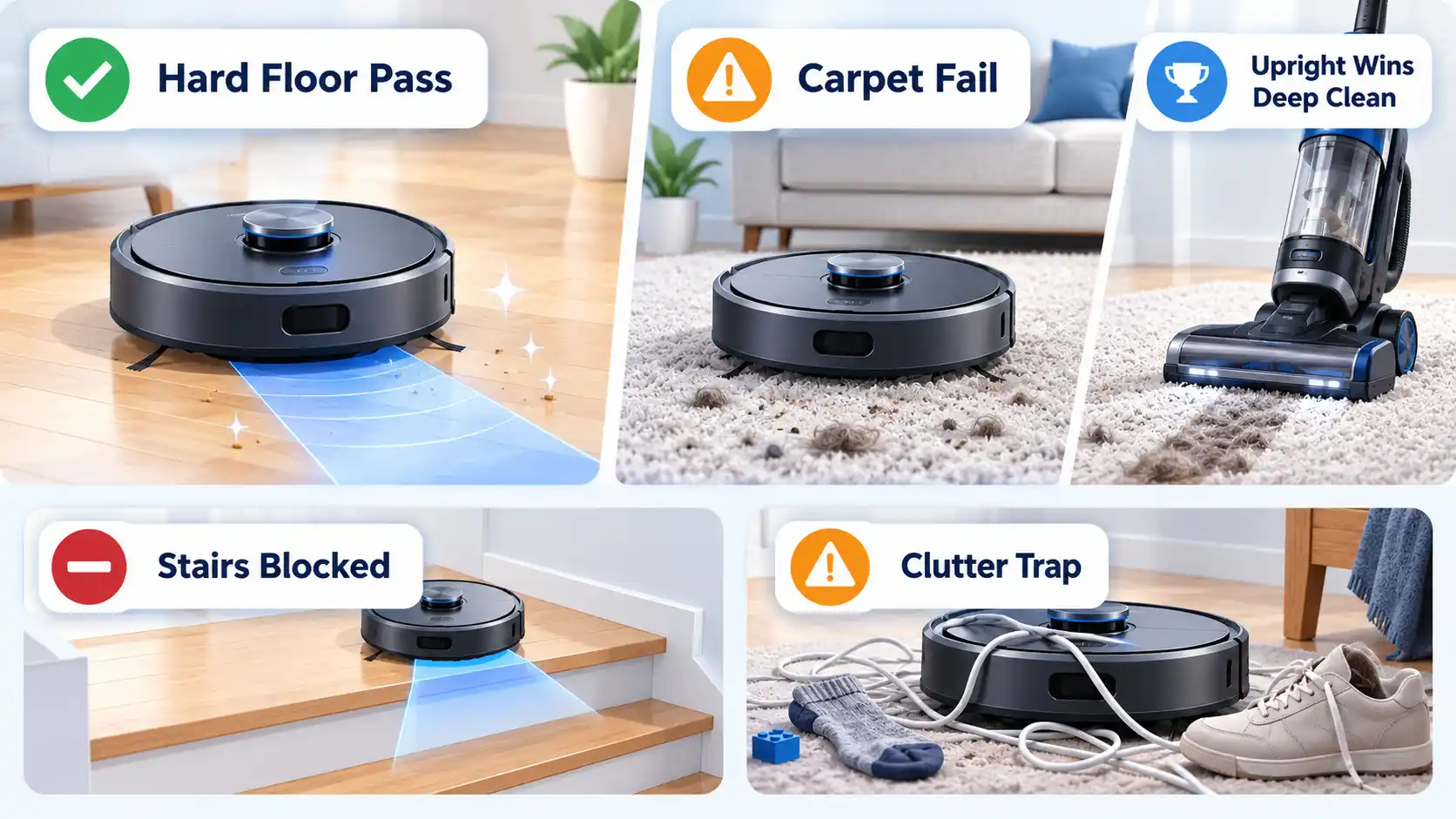
- High-pile carpet. Most robots handle low-pile and hard floors well. Deep shag defeats them — the brush bogs down and the robot gives up or misses the middle of the room.
- Clutter. Cables, socks, and pet toys are the enemy. A robot that spends its run tangled in a charging cable isn’t saving you time.
- Pet accidents. A robot that runs into a mess and then spreads it is a bad afternoon. Some models have sensors for this; many don’t.
- Dock mold and mop smell. A wet mop left in a warm dock grows things. If you buy a mop-washing model, plan to clean the dock regularly.
- App bugs. Firmware updates that break scheduling, maps that reset, and features that move behind a paywall are recurring gripes in owner forums.
The Dependency Risk Nobody Mentions
A robot vacuum is a small computer that lives in your home and knows its layout. That creates two risks worth weighing before you buy.
The first is brand support. iRobot, the company behind Roomba, has had well-documented financial trouble, and its public SEC financial filings tell a cautionary tale if you’re considering a Roomba and care about app support five years out. The proposed Amazon acquisition was called off in 2024 after regulatory pushback, which tells you the market is consolidating and nothing is guaranteed. A robot whose app stops working is a robot with a dead brain.
The second is privacy. A robot with a camera and a map of your home is holding personal data. Check the manufacturer’s data-retention policy, and look for independent privacy ratings before you let one map your bedroom. Official FTC regulatory guidance on marketing claims is a useful reminder that “eco-friendly” and “private by design” are marketing words until a policy backs them up.
Who It’s Worth It For / Who Should Skip
| Your Situation | Verdict | Why |
|---|---|---|
| Hard floors, moderate clutter, busy schedule | Worth it | This is the sweet spot — the robot removes a real recurring chore |
| Low-pile carpet throughout | Worth it | Handles it well, especially with a self-emptying dock |
| High-pile or shag carpet | Skip it | Robots bog down; a good upright does the job better |
| Multi-level home, one unit | Skip it (or buy two) | Carrying it between floors defeats the automation |
| Heavy clutter or pets that leave accidents | Skip it | Tangled cables and spread messes cost more time than they save |
| You want zero app or cloud dependency | Choose carefully | Only some models run fully offline — verify before buying |
Which Robot Vacuum Should You Choose?
Which Robot Vacuum Should You Choose?
The First-Time Buyer
Avoid this if: You have pets or high-pile carpet — the budget tier will disappoint.
Main trade-off: Random navigation covers less ground and needs more babysitting.
The Busy Household
Avoid this if: You can’t tolerate an app account and cloud connection.
Main trade-off: Dock bags and filters are a recurring cost.
The Mop Believer
Avoid this if: You won’t clean the dock — mold and smell will win.
Main trade-off: Highest purchase price and the most maintenance.
The Privacy-First Buyer
Avoid this if: You want the newest mop-washing features — they’re rarely fully local.
Main trade-off: Fewer models qualify, and they’re not always the cheapest.
The Pet Owner
Avoid this if: Your pet leaves accidents — no robot is fully safe from that.
Main trade-off: Consumables burn faster, so budget accordingly.
The Multi-Level Home
Avoid this if: You plan to carry one robot up and down stairs — you won’t.
Main trade-off: Doubling the cost to cover two floors.
The Verdict
A robot vacuum is worth it in 2026 if it removes a chore you actually do and its five-year cost — unit plus consumables plus battery — beats what your time is worth to you. It’s not worth it if you have high-pile carpet, heavy clutter, multiple floors with one unit, or a low tolerance for app and cloud dependency. The single best upgrade is LiDAR navigation with a self-emptying dock; the single biggest trap is a subscription that turns a purchase into a rental.
If you’re still weighing brands, our head-to-head brand comparisons will help you narrow the field. And if you’re curious how far these machines have come from the sci-fi version, the gap between robot fiction and reality is a fun place to land. Either way, buy for the mechanics and the total cost, not the marketing — that’s the decision that holds up long after the unboxing.

💬 Comments