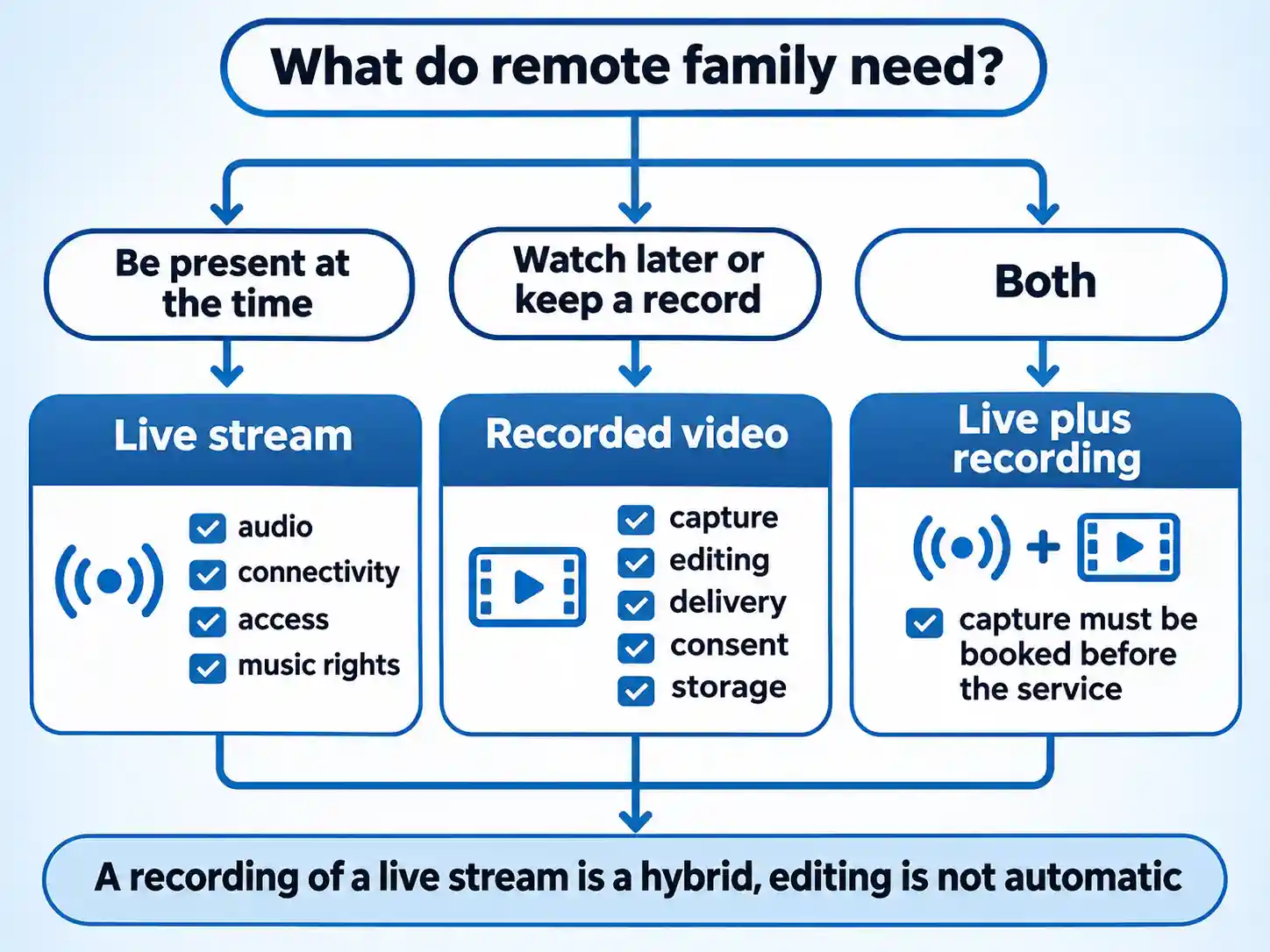
Choose a live stream when the point is that people are present at the same moment. Choose a recorded video when the point is that the eulogy is still audible, watchable and shareable months later. Families usually arrive at this question with one of those needs driving them, then discover the other halfway through planning.
The costliest misunderstanding is that a live stream leaves a keepsake behind automatically. It does not. Unless someone plans the capture, checks the audio and stores the file, the service goes out once and is gone.
Quick Take
- Live stream alone: fits when real-time presence matters most — overseas relatives, elderly or ill family members, anyone housebound.
- Recording alone: fits when people are working, in another time zone, or when the family wants a durable archive they can revisit.
- Both: the common answer when there is a real-time need and an archive need; capture has to be arranged before the service.
- Four checks before booking anything: music rights, audio capture, connection redundancy, and who can access the video.
What actually differs: a moment versus a file
Live streaming is a way of sending the service out while it happens. A camera and microphone feed an encoder, the encoder sends video across a network, and viewers watch in something close to real time. The defining feature is timing: everyone in the chapel and everyone online shares the same hour.
Recorded video is material captured for later viewing. It might be a plain, unedited capture, or a produced film with several cameras, clean audio and title cards. Those extras are scope items you agree in advance. A recording made of a live stream sits between the two: real-time distribution plus a saved file. It becomes an edited keepsake only if somebody edits it.
Two other things get confused with the format. The first is access: an unlisted YouTube link, an invitation-only portal and a password-protected page are different access models attached to similar video. The second is production tier: a phone on a tripod and a two-camera setup fed from the sound desk are different levels of production, not different formats. A family can stream privately from a phone, and a professionally filmed service can be shared on an open link.
Live stream and recorded video on the same seven criteria
Judged fairly, the two options split the criteria rather than one winning outright. Live wins on participation and loses on recoverability. Recording wins on preservation and loses on immediacy.
| Criterion | Live stream | Recorded video |
|---|---|---|
| Timing | One fixed moment. The start time is a hard deadline for every technical check. | Viewable at any point after capture, which handles work schedules and time zones. |
| Participation | Synchronous. Relatives share the service as it happens, and some setups allow messages or a guestbook. | None in the moment. Condolences arrive separately, often by phone or message thread. |
| Production control | What goes out is what viewers see. Switching sources mid-service adds risk. | Can be trimmed, captioned, reordered and colour-corrected before anyone sees it. |
| Reliability | A dropped connection is lost time that cannot be recovered for that viewer. | Capture problems can sometimes be repaired in the edit; distribution is less time-critical. |
| Privacy and access | Access is set by link or portal settings, then tested by whoever forwards the link. | The same access question, plus a file that can be copied and kept indefinitely. |
| Music and copyright | Rights need clearing before the service, and platform enforcement can interrupt a live broadcast. | Uploads can be scanned and claimed, with outcomes set by the rights holder and sometimes by country. |
| Preservation | Nothing is kept unless someone records the feed. | An archive exists, but file format, storage and who holds the master still need confirming. |
When a live stream alone fits
A live broadcast earns its cost when the emotional priority is shared presence. That usually means relatives who cannot travel: families spread across countries, older relatives for whom a long journey is unrealistic, people in hospital or receiving treatment, and anyone whose mobility makes a chapel visit hard. Watching at the same time as everyone else gives those relatives a place in the room, and it gives the family a sense that the service was witnessed fully.
The trade-off is planning pressure. Everything must be tested before the service starts, because there is no second take. A service at eleven in the morning in the UK can fall in the small hours for relatives on the west coast of North America and late in the evening for relatives in Australia, so tell each household the start time in its own local time.
A phone on a stand can work, and plenty of families use one. Treat it as a real technical plan rather than a hopeful one. The phone’s own microphone picks up room noise and distant readings, the battery drains under load, and the mobile signal in a stone chapel is not the signal you tested in the car park. A workable DIY stream needs a charged device, a stable network, a microphone close to the speakers, and a family member whose only job during the service is monitoring the feed.
When a recording fits
A recording suits a different set of circumstances. People have shifts, school runs and unreliable evenings. Some relatives will not watch live whatever you arrange, and a video waiting for them the next day is kinder than asking them to stay up until three in the morning. Recordings also serve families who want a record for the future: grandchildren who were too young to remember, and a way to revisit a eulogy that captured someone accurately.
Scope is where expectations go wrong. Ask directly who is filming, whether coverage is single or multi-camera, where the audio comes from, whether captions are included, how the finished file is delivered, how long it stays hosted and whether the family can download a copy. Editing, multi-camera work and colour grading are optional production features, and they should appear in the quote if you want them. Once you have the file, it is worth knowing how to save a video file for your family archive on more than one drive, so a single failed laptop does not take the service with it.
When to combine both
Many families need both, and the combination is straightforward once you decide it early. The capture has to be booked before the service, because a provider who arrives to run a live feed will not necessarily hand over a finished film afterwards.
There are two routes. Recording the live feed gives you the same single viewpoint the online audience saw, delivered with whatever audio the stream carried. Arranging separate coverage gives you a dedicated camera and recorder, often with better audio, at the cost of more people moving discreetly around the chapel. Either route needs the same five confirmations: audio source, music rights, consent from anyone speaking or reading, who can access the finished video, and where it is stored and for how long.
Music and copyright: the surprise families meet afterwards
Music is the part of funeral video most likely to cause a problem after the day itself. In the UK, permission is normally needed to play music in public, and that includes live performances and background music in videos and podcasts. A licence from PRS for Music is the usual route. PRS for Music’s guidance explains that exemptions, non-charging policies and a no-music choice can change what applies, and that music which is out of copyright or outside the repertoire it represents may fall outside its licence — though material outside its repertoire may still need permission from the rights holder. Arrangements differ between venues, so ask the venue what its music arrangements are and who is responsible for anything used online.
Platform enforcement adds a second layer. YouTube’s Content ID system scans uploaded videos against a database supplied by copyright owners. A match produces a claim, and the rights holder’s settings decide whether the video is blocked, monetised with ads, or tracked. Those decisions can vary by country, so a memorial video might play for the family in the UK and be restricted for cousins abroad. YouTube links to separate copyright guidance for live streams from the same help page, so treat an upload and a live broadcast as two different situations when you plan.
None of this means a memorial video will be blocked. It means the outcome is decided by whoever holds the rights, and you will not know their settings in advance. Making a video private changes who can watch it. It does not change who owns the song.
Audio first, camera second
Speech intelligibility is the criterion to plan around. A sharp high-resolution picture of a reader whose words you cannot follow has failed at the job, however impressive the resolution looks on a spec sheet. Quiet eulogies, a celebrant facing away from the microphone and a hymn sung by a nervous congregation are the moments families most want to hear again.
Ask the venue whether the lectern or lavalier microphone can feed a recorder through the sound desk. If it cannot, ask where a discreet wireless microphone could be placed near the readers, and who will check it during the service. A test recording in the same room, playing back through headphones, tells you more than any description of the equipment.
Connectivity in old buildings and open ground
Thick stone walls, leaded glass, basements and rural cemeteries all work against a live video feed. So do full chapels where hundreds of phones compete for the same cell tower.
One documented approach is to stop depending on a single connection. Peplink describes its SpeedFusion technology as bonding several network links into one tunnel, sending redundant packets across multiple channels to reduce the effect of packet loss, and moving traffic to a healthy link when one fails. Bonding and failover reduce the risk of a single link letting you down; they do not guarantee coverage at a particular venue. The useful question for any provider is simpler: do you bond connections or fail over between them, and have you tested at this venue? A site test on the same network at the same time of day is worth more than a coverage map.
Privacy, consent and dignity
An unlisted link is not private. Anyone holding the address can open it, and anyone watching can forward it. An invitation-only portal, a named-access list or a password-protected page each give you a different level of control, and none of them is risk-free.
Ask who can view, how long the video stays online, whether viewers can download it, and how the family gets a permanent copy. Consent matters too: readers, musicians, the celebrant and anyone visible on camera should know the service is being streamed or filmed, and children should be considered separately. A short conversation before the service prevents an awkward one afterwards.
Choosing by family situation
Relatives overseas who cannot travel
Plan around: the time difference and the invitation route. Tell each household the start time in their own zone and send the access details the day before.
Older or ill relatives at home
Plan around: one tap to watch, a familiar device, and a family member on call who can troubleshoot during the service.
Family members working or in clashing time zones
Plan around: when the file will be ready and how it is delivered, so nobody is chasing a link for weeks.
Families who want a lasting record
Plan around: storage. Keep a master file, a second copy on a separate drive, and a note of who holds both.
Privacy-sensitive families
Plan around: retention. Ask how long the video stays hosted and whether the family can take it down.
Families who need both
Plan around: the audio path. If the stream carries a sound-desk feed, confirm the recording captures the same feed.
Put the plan together in the right order
The sequence matters, because decisions made early lock in what is possible later. Music and audio are the two items that cannot be fixed once the service has begun.
- List who needs to watch, and when.Write names, locations and time zones. Mark each person as live-only, later-only, or either.This list decides the format for you. If everyone who matters can watch later, a recording is enough; if someone needs the service as it happens, plan for a live feed.
You should finish with a clear split between the people who need real-time access and the people who will watch afterwards.
- Choose the format and name who captures it.Decide between live, recorded, or both, then name the person or company responsible for each. A recording does not appear because a phone was in someone’s pocket.If you are using a provider, get the capture and the delivery method in writing. If you are doing it yourself, name the operator and a backup operator.
The plan is settled when one named person owns the camera and one named person owns the network.
- Settle the music question before the order of service is printed.Ask the venue what it already holds and what it expects for recorded or streamed music. Note which pieces are live performance, which are recordings, and which are playing in the background.Music cleared for a congregation is not automatically cleared for a video that stays online, and private access does not remove the permission question. Changing a hymn or dropping background music is often the simplest fix, and it is easiest before printing.
You should be able to say who is responsible for each piece of music and what happens if a platform claim appears later.
- Lock the audio plan.Confirm whether a sound-desk feed is available, where a discreet microphone can sit, and who monitors the levels during the service.Record a short, quiet test reading in the same room and listen back on headphones. Room echo and microphone distance show up immediately in that test.
The test is complete when speech is clear without raising the volume past halfway.
- Test the connection at the venue.Visit at the same time of day, on the same network, and run a live test rather than a speed check. Ask the provider whether it bonds connections or fails over between them.Chapel walls and rural cemeteries are the usual weak points, and a second network is the standard mitigation. Nothing guarantees coverage, so ask what happens mid-service if the feed drops.
A respectable answer names a fallback: a second network, a local recording that continues offline, or both.
- Set access, consent and storage.Decide who receives the link, whether a password or named list is needed, and how long the video stays available. Tell readers and musicians that the service is being shared.Ask how the family gets a permanent copy and where the master file lives. Two copies in two locations is a sensible baseline.
The arrangement is ready when you can state who can view it, for how long, and who holds the file after the link expires.
Questions to ask a provider before you book
The questions below apply to a local videographer and to a specialist provider alike. They are worth asking of a dedicated funeral streaming service as much as anyone else quoting for the work, and the answers are more useful than any sample reel.
What to confirm before you book
- Whether you can watch one complete recorded service, since short clips say little about audio across a long ceremony.
- Whether a site test at the venue is included, and when it happens relative to the service date.
- Where the audio comes from, and who monitors it live during the service.
- Whether the provider bonds connections or fails over between networks, and what happens if the feed drops mid-service.
- What is actually delivered afterwards: camera count, editing, captions, file format, download or streaming link.
- How long the video is hosted, whether access can be limited to named viewers, and whether a link can be revoked.
- Who owns the recording, where the master is stored, and how the family obtains a permanent copy.
Three questions that settle it
The format decision falls out of three questions, and none of them is technical.
- Who must be present while the service happens? If the answer includes people who cannot travel, a live stream is doing work that a recording cannot do.
- What archive does the family want? A single wide shot with clear audio is enough for many families; an edited film with several angles is a different purchase.
- How will access be controlled, and for how long? Decide the audience before you decide the platform, and decide what happens to the file after the link stops working.
If only the first question has a strong answer, plan a live stream and use a plan that includes a recording. If only the second does, a recorded video is sufficient. If both do, book the combined setup now and confirm audio, music, consent, access and storage in that order.
