The biggest cybersecurity risks today are AI-generated phishing, multi-extortion ransomware, cloud misconfigurations, and unpatched software vulnerabilities. You can prevent most digital attacks by turning on multi-factor authentication, applying software updates immediately, using a password manager, and isolating your sensitive backups.
Quick Take: The Most Critical Cyber Risks Today
Modern cyber attacks focus heavily on human error and identity theft rather than breaking technical encryption. Attackers use automated tools to find exposed passwords, weak network settings, and outdated programs across personal and business devices.
- AI Phishing and Imposter Scams: Attackers use artificial intelligence to write grammatically perfect emails and clone executive voices to steal money and credentials.
- Multi-Extortion Ransomware: Criminal groups lock your files and threaten to publish private customer or personal data online if you refuse to pay.
- Cloud and Credential Exposure: Misconfigured cloud permissions and reused passwords allow intruders to access corporate databases without needing complex malware.
- Immediate Defensive Priority: Turn on two-factor authentication on every account, update device firmware weekly, and isolate critical data backups from your primary network.
How We Evaluated and Ranked These Security Risks
We ranked these threats based on three practical factors: how often attackers exploit them, the financial or operational damage they cause, and how difficult they are for beginners to detect. Our analysis uses official incident data and defensive frameworks from the Cybersecurity and Infrastructure Security Agency (CISA), the Federal Trade Commission (FTC), and the National Institute of Standards and Technology (NIST).
The 9 Biggest Cybersecurity Risks
Understanding how attackers break into systems helps you build effective digital habits. Here is a breakdown of the nine most dangerous cyber threats today, along with literal steps to protect your devices and data.
1. AI-Enhanced Phishing and Social Engineering
Phishing is a deceptive attack where criminals impersonate trusted institutions, such as banks, employers, or tech support teams, to trick you into revealing passwords or sending money. Social engineering refers to psychological manipulation that persuades victims to bypass security procedures willingly.
Recent advances in artificial intelligence make phishing harder to spot. Attackers no longer rely on obvious typos or strange grammar. Instead, they generate personalized messages using information scraped from social media profiles. According to official FTC data on imposter scams, people reported losing over $3.5 billion to fraud and impersonation schemes in a single year.
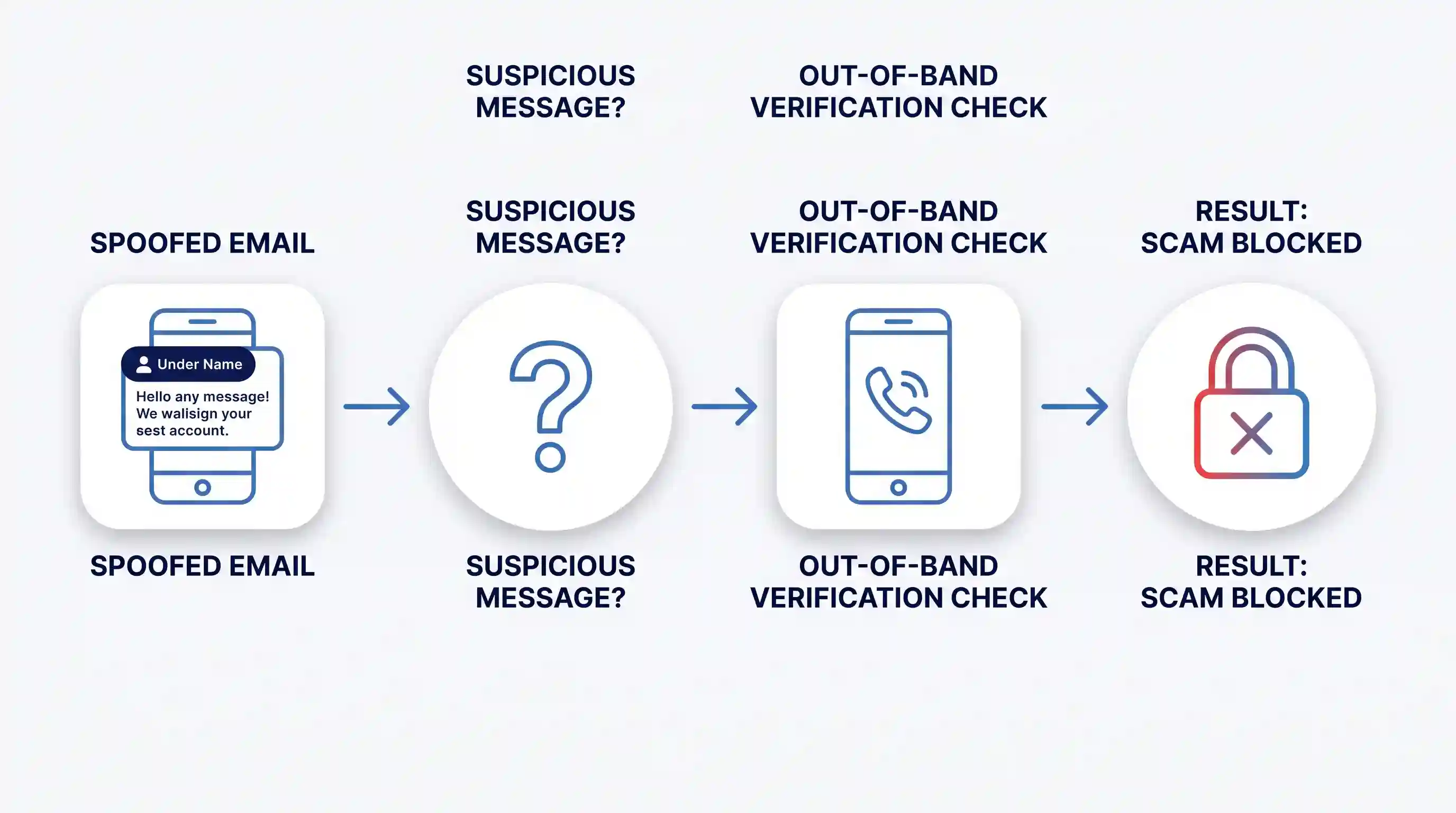
Criminals also use smishing (text message phishing) and vishing (voice phishing using cloned audio). The most common defensive failure is trusting the caller ID or the display name on an email. Attackers easily forge these header details.
To defend against advanced social engineering, follow the official CISA phishing defense guidance. Never click links inside unsolicited text messages or emails. When an urgent financial request arrives, verify the sender through a separate, known phone number before taking action.
2. Multi-Extortion Ransomware
Ransomware is malicious software that encrypts your files and locks your computer until you pay a ransom fee. In modern multi-extortion attacks, criminals steal a copy of your sensitive files before encrypting your system. If you restore your files from a backup, the attackers threaten to publish your private data on the public internet or notify your clients about the breach.
Ransomware groups target home users, schools, healthcare providers, and small businesses alike. They frequently gain initial entry through exposed remote desktop ports, phishing attachments, or unpatched network routers.
A major mistake organizations make is keeping their backup hard drives permanently connected to their main computer network. Modern ransomware actively seeks out connected network storage drives and encrypts the backups first. Relying solely on antivirus software will not stop an attack once an intruder gains administrative control.
The joint technical CISA StopRansomware technical guide recommends isolating infected machines immediately by disconnecting Wi-Fi and ethernet cables. Maintain offline, immutable data backups, and consult our secure cloud backup strategies to protect your personal and business records.
3. Cloud Misconfigurations and Insecure Access Controls
Cloud services host files, applications, and databases on remote servers managed by providers like Amazon, Microsoft, or Google. Cloud security operates on a shared responsibility model. The provider secures the physical data centers, but you are entirely responsible for configuring permissions, securing user accounts, and managing data access.
A cloud misconfiguration happens when an administrator accidentally leaves a cloud storage database open to the public without password protection. Attackers use automated scanners to locate these exposed storage containers within minutes of their creation.
Another frequent issue is over-privileged user accounts. When every team member receives full administrative rights to a cloud database, a single compromised password exposes the entire organization. You can review our multi-factor authentication setup guide to lock down administrative access across all cloud dashboards.
Follow the NIST Cybersecurity Framework 2.0 standards to protect cloud environments. Apply the principle of least privilege, meaning users only receive access to the exact files necessary for their daily work. Regularly review active user lists and revoke access immediately when employees leave your organization.
4. Unpatched Software Flaws and Zero-Day Exploits
Software flaws are programming errors in operating systems, web browsers, or applications that allow hackers to run unauthorized commands. When software developers discover a bug, they release a patch (a software update) to fix it. A zero-day exploit is an attack that targets a flaw before the developer has created or released a fix.
Many individuals and small businesses delay software updates because restarts interrupt their workday. Attackers monitor public vulnerability notices and reverse-engineer patches. They scan the internet for machines that have not yet applied the update, often launching automated attacks within hours of a patch release.
Manual updating fails as your device count grows. Implementing an automated vulnerability management platform allows businesses to discover vulnerable endpoints, prioritize severe flaws, and deploy security patches across their entire network automatically.
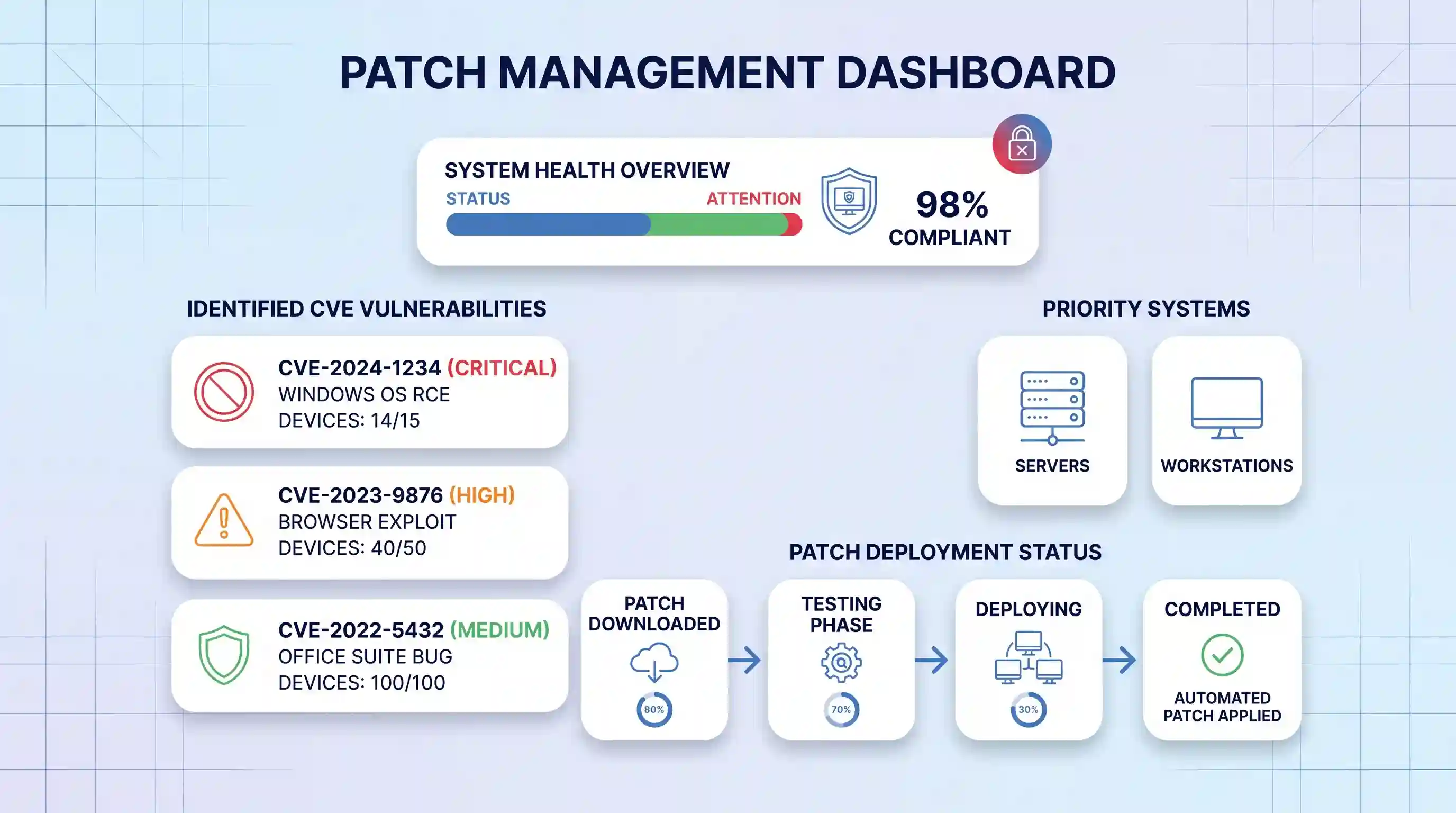
For personal devices, enable automatic updates across your operating systems and web browsers. Remove outdated applications that developers no longer actively maintain.
5. Stolen Credentials, Credential Stuffing, and Weak Passwords
Credential stuffing is an automated attack where cybercriminals take lists of leaked usernames and passwords from past data breaches and test them against thousands of other websites. Because many people reuse the same password across multiple services, a breach at an obscure shopping website can compromise an important email or banking account.
Simple passwords like words found in a dictionary, sequential numbers, or personal birthdates take modern computers less than a second to crack using brute-force calculation tools.
The common failure here is relying on memory or writing passwords down in plain text files on your desktop. When you create complex passwords without a tool, you inevitably end up reusing variations of the same phrase across accounts.
Use a dedicated password manager to generate and store unique, 16-character passphrases for every service. Pair your passwords with security keys or authenticator apps, following our password security best practices. You can also evaluate standalone security suites by reading our Bitdefender Total Security review.
6. Insecure IoT and Smart Device Endpoints
The Internet of Things (IoT) includes smart devices connected to your home or office network, such as security cameras, smart light bulbs, thermostats, and network-attached printers. Most smart gadgets prioritize convenience over security, shipping with minimal computing power and no built-in firewall.
Many smart devices contain hardcoded default usernames and passwords that cannot be easily updated by the consumer. Hackers scan residential IP ranges to compromise these gadgets, chaining thousands of them together into massive botnets that launch distributed denial-of-service (DDoS) attacks against major online infrastructure.
A major vulnerability is placing smart devices on the exact same Wi-Fi network as the computers storing your financial records or work files. If an attacker compromises an inexpensive smart camera, they can move across your local network to access your primary laptop.
Log in to your home Wi-Fi router settings and create a separate guest network dedicated exclusively to smart gadgets. Change the default administrative password on your router immediately, and replace IoT hardware that no longer receives firmware updates from the manufacturer.
7. Software Supply Chain Vulnerabilities
A software supply chain attack occurs when hackers compromise an upstream software developer, open-source code library, or third-party service provider. By inserting hidden malware into a legitimate program update, attackers compromise thousands of businesses downstream that download that trusted tool.
Supply chain attacks are dangerous because the malicious code arrives through an authentic, digitally signed channel. Traditional antivirus programs often overlook the malicious code because the software update itself comes from a trusted vendor.
Organizations often assume that purchasing enterprise software guarantees complete security. In reality, modern applications rely on hundreds of third-party open-source components that may contain unmonitored security flaws.
Review the security practices of your software vendors before purchase. Restrict the administrative permissions of third-party software integrations, and monitor our guide to essential business software security tools to choose vendors with transparent vulnerability disclosure policies.
8. Insider Threats and Accidental Data Leaks
An insider threat is a security risk that originates from within an organization. This category includes current employees, contractors, or business partners who have authorized access to internal networks. While some insider threats stem from malicious individuals selling proprietary data, the vast majority result from accidental employee errors.
Accidental leaks happen when workers send sensitive spreadsheets to incorrect email addresses, upload proprietary documents into unapproved public AI tools, or disable security controls to speed up their workflow.
Traditional perimeter defenses, such as network firewalls, focus entirely on external attacks and fail to detect unusual behavior from users who already hold legitimate login credentials.
Deploy role-based access control so team members only access files strictly required for their role. Conduct regular, non-punitive cyber training, and use dedicated tools detailed in our endpoint protection software guide to monitor and prevent unauthorized file transfers.
9. Mobile Malware, Rogue Apps, and Public Wi-Fi Risks
Mobile security threats target smartphones and tablets through malicious apps, unencrypted public wireless networks, and fake operating system alerts. Cybercriminals create fake utility apps, such as barcode scanners or calculators, that secretly record keystrokes or steal SMS authentication codes once installed.
When you connect to an open public Wi-Fi network at an airport or coffee shop, unencrypted internet traffic can be intercepted by anyone on that same network using basic packet-sniffing software. Attackers can also set up rogue Wi-Fi hotspots with names identical to legitimate public venues.
Many users grant broad system permissions (such as access to contacts, cameras, and precise location) to newly installed mobile apps without reviewing why the app requires those features.
Only download applications from official platforms like Google Play or the Apple App Store. Audit your installed app permissions monthly. When connecting to public internet connections, encrypt your web traffic using our list of tested Android VPN apps.
Cybersecurity Risk Comparison: Impact, Likelihood, and Primary Defense
The table below summarizes the nine major cybersecurity risks, comparing their typical exploit frequency, the severity of their impact on victims, and the most effective defensive countermeasure.
| Threat Name | Exploit Likelihood | Impact Severity | Primary Countermeasure |
|---|---|---|---|
| AI-Enhanced Phishing | Very High | High | Out-of-band communication verification |
| Multi-Extortion Ransomware | High | Critical | Immutable offline backups and network isolation |
| Cloud Misconfigurations | High | High | Least-privilege permissions and audit scans |
| Unpatched Software Flaws | High | Critical | Automated patch management software |
| Credential Stuffing | Very High | High | Password managers and hardware MFA keys |
| Insecure IoT Devices | Moderate | Moderate | Segmented guest Wi-Fi networks |
| Supply Chain Attacks | Moderate | Critical | Third-party vendor risk assessments |
| Insider Data Exposure | High | High | Role-based access and data loss prevention |
| Mobile and Wi-Fi Risks | Moderate | Moderate | Virtual Private Networks and app permission audits |
Decision Framework: How to Prioritize Your Security Defenses
You do not need to implement every security tool at once. Use this decision framework to prioritize your defensive actions based on your specific setup:
If you are an individual or remote worker:
- Install a reputable password manager and create unique passphrases for your master email and banking accounts.
- Enable app-based or hardware multi-factor authentication on every account that supports it.
- Turn on automatic operating system updates on your smartphone and computer.
- Place all smart home gadgets on a separate guest Wi-Fi network.
If you manage a small business or corporate IT network:
- Enforce mandatory multi-factor authentication across all corporate email and cloud storage logins.
- Deploy centralized patch management to fix operating system vulnerabilities within 14 days of release.
- Establish an offline, immutable backup repository for critical company files and client records.
- Implement role-based access controls to prevent employees from viewing files outside their immediate job function.
According to core CISA cyber hygiene guidance, applying these four foundational habits—strong passwords, MFA, immediate software updates, and recognizing phishing—blocks the vast majority of digital attacks.
Key Takeaways
- Cybercriminals increasingly target human trust and stolen login credentials rather than attempting to break mathematical encryption.
- Generative artificial intelligence allows scammers to create convincing, error-free phishing emails and voice impersonations at massive scale.
- Ransomware attacks now steal data in addition to encrypting files, making offline and immutable backups essential.
- Smart home and office IoT gadgets should always be isolated on dedicated guest networks to prevent lateral network intrusion.
- Consistent cyber hygiene—updating software automatically, using password managers, and enabling MFA—remains your strongest defense against modern threats.
Frequently Asked Questions (FAQ)
Can standard antivirus software protect against all of these cybersecurity risks?
No. Standard antivirus software is designed to detect known malicious files on your local drive. It cannot protect you if you voluntarily give your password to a phishing website, if an attacker logs into your cloud account using valid stolen credentials, or if a smart camera on your network has an insecure default password. Effective protection requires a layered approach combining password managers, multi-factor authentication, network segmentation, and cautious browsing habits.
Why is multi-factor authentication more secure than a complex password alone?
Multi-factor authentication requires two separate types of evidence before granting account access, such as something you know (your password) and something you have (a code from a physical security key or an authenticator app on your phone). If an attacker steals your password through a corporate data breach or phishing email, they still cannot access your account without physical access to your secondary authentication device.
What is the difference between phishing, smishing, and vishing?
Phishing is the general term for deceptive communications, traditionally delivered through email. Smishing refers specifically to phishing attacks sent via SMS or mobile text messages, often pretending to be delivery notifications or bank fraud alerts. Vishing stands for voice phishing, where criminals call victims over the phone, sometimes using artificial intelligence to mimic the voice of an executive, coworker, or family member.
What should I do immediately if I suspect my computer is infected with ransomware?
Disconnect the infected device from all network connections immediately by unplugging the physical ethernet cable and turning off Wi-Fi. Do not restart the device, as some ransomware variants complete their encryption process during system reboots. Disconnect any external hard drives or USB backup devices instantly to prevent the malware from spreading to your backups, and contact an IT security professional or local authorities to report the incident.
