A carry-on tech kit is the short list of electronics you would buy again tomorrow if the bag disappeared.
Everything else has to beat that shortlist on weight and usefulness, or it stays home. Two printed figures settle most of the argument: watt-hours on the battery label and watts on the charger.
Quick Take
- Build around four roles: power bank, multi-port GaN charger, seatback audio bridge, and a tracking-and-data layer.
- Check the 100Wh threshold first: power banks at or under 100 watt-hours clear standard cabin screening, while unrated packs can be calculated from capacity and voltage.
- Spare batteries and power banks ride in the cabin with their terminals protected from metal, and they come out before a gate check.
- Test the kit the night before you fly: laptop and phone charging together, headphones paired and lip-sync checked, data profile installed.
What a carry-on tech kit actually is
A carry-on tech kit is a role-based set of travel electronics. Each item earns its place by removing one specific friction: a dead phone in an unfamiliar city, three devices fighting over one wall socket, a seatback screen that only accepts a two-pin airline headset, or a bag that lands somewhere you are not.
The kit also has a life cycle worth picturing before you pack. It walks through the security line, the seat, the hotel room, and the walk back to the airport. An item that helps in only one of those phases, while weighing as much as two others, rarely survives a second trip.
Weight is the test most travelers apply badly. A small adapter that replaces two separate bricks earns its place. A heavier gadget with one narrow job joins the drawer of things you packed once. Count what each item replaces, then count grams.
The four roles that earn a place in the bag
Two roles carry every trip; the other two are conditional and only earn a slot when the itinerary asks for them.
| Role | Friction it removes | Specification that decides it | Cut it when |
|---|---|---|---|
| Power bank | A phone that dies mid-transit day | Marked watt-hours, USB-C output with power delivery, capacity matched to your longest day away from a socket | You are on a short hop with a charger at both ends |
| Multi-port GaN charger | One wall socket and three devices | 65W total, at least two USB-C ports that negotiate power delivery, input rating covering the countries you visit | Your laptop ships with a larger brick you need for heavy work on the road |
| Seatback audio bridge | An airline headset you would rather not wear | 3.5mm input, Bluetooth pairing that remembers your headphones, codec support your headphones also handle | You never watch seatback screens, or you are content with airline headsets |
| Tracking and data layer | A missing bag and an expensive roaming bill | Crowd-sourced network with a replaceable battery for tracking; device and carrier support for the data plan | You travel carry-on only and your home plan already covers the destination |
How to read a power bank label
The number that matters is watt-hours, and it usually appears in small type near the capacity. When the pack shows Wh, use that figure. When it shows only milliamp-hours and volts, do the arithmetic yourself.
Wh = (mAh × V) ÷ 1,000
Applying the FAA’s watt-hour formula to a pack labeled 20,000mAh at 3.7V gives roughly 74Wh. A 27,000mAh pack at the same voltage lands at about 99.9Wh, still under the line. A 28,000mAh pack at 3.7V reaches roughly 103.6Wh and moves into the approval window. Capacity marketing alone cannot tell you which side of that line you sit on.
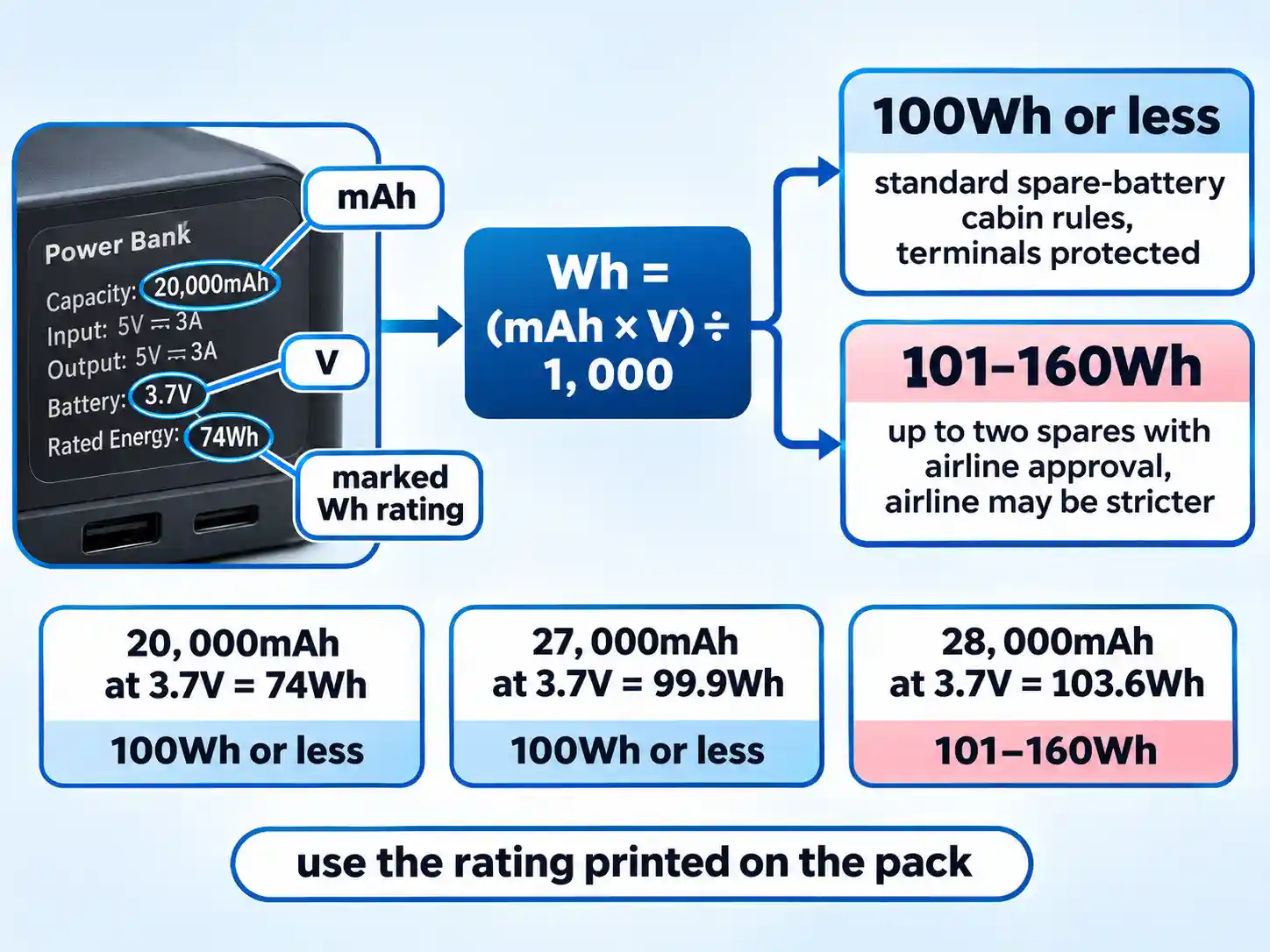
Under US FAA guidance, lithium-ion batteries are limited to 100Wh per battery. Spare packs between 101Wh and 160Wh may be carried, up to two per person, with airline approval, and many airlines apply stricter quantity and watt-hour limits regardless of what the label says.
Spares travel in the cabin. FAA guidance requires spare lithium batteries and power banks in carry-on rather than checked baggage, and IATA’s dangerous goods guidance also states that spare batteries are not allowed in checked baggage. Protect the terminals so they cannot touch metal: retail packaging, a hard case, tape over the contacts, or a snug pouch all do the job. Damaged or recalled packs that could spark or overheat do not fly.
Warning
The gate-check trap catches travelers who forget the carry-on-only rule when overhead bins run out of room. Because spare lithium batteries and portable power banks cannot travel in the cargo hold, any cabin bag tagged for a gate check or planeside valet must be emptied of loose batteries first. Pull them out of outer pockets and laptop sleeves so they stay with you in the cabin.
The 65W GaN charger and its shared power budget
Gallium nitride is a semiconductor material that switches faster and wastes less energy than silicon in the same job. Faster switching lets engineers shrink the magnetics and fit the same wattage into a smaller shell. Texas Instruments’ GaN overview cites consumer adapter size reductions of up to 50% in its reference designs. That size reduction is the payoff.
A 65W GaN brick and a 65W silicon brick with the same protocol deliver the same power, as a technical explainer on GaN chargers puts it. What actually sets the pace is the negotiated power profile and each device’s own charging curve. The material advantage shows up in your bag.
USB Power Delivery is the negotiation layer that sets that profile. The charger advertises what it can supply and the device requests only what it can accept; Revision 3.1 supports up to 240W, while earlier PD over USB-C topped out at 100W. The USB Power Delivery specification makes the point plainly: a headline wattage on the box is a ceiling, not a delivery.
Multi-port chargers divide one budget. Plug a laptop into a 65W brick and a phone into the second port, and a laptop asking for most of that total leaves very little for the phone. The allocation can also change when a second device appears, so the split you measured at home may not match the seat. Sixty-five watts is a sensible baseline for a thin laptop plus a phone; if you travel with a high-wattage laptop and run heavy work on it, pack its own brick and let the small one handle phones and tablets.
| Option | What you carry | Coverage | Cost in the bag | Watch out for |
|---|---|---|---|---|
| Universal slide-out prongs | One brick with folding pins for several socket types | Most socket standards on a multi-country trip | More bulk and more moving parts | Pins that do not lock firmly; confirm the input rating covers your destinations |
| Regional plug adapter | One small adapter per region, paired with your usual charger | One socket standard at a time | Low weight, one more loose item to lose | It changes pin shape only, never voltage |
| Fixed regional charger | A charger with one region’s pins built in | That region only | Lightest on the right trip, dead weight elsewhere | Rebuying one per destination |
Seatback audio with your own headphones
Many seatback screens still use a 3.5mm socket. A 3.5mm Bluetooth transmitter plugs into that socket and pairs with the noise-canceling headphones or earbuds you already trust, so you watch the film on your own gear instead of the airline’s.
Twelve South’s AirFly product page is a useful reference for what this class of device looks like: a 3.5mm input, Bluetooth 5.2, aptX and SBC support, and a 0.8Wh battery. That last figure matters for packing, because a device this small is not a spare power bank.
Pairing is short work. Charge the transmitter, plug it into the seat jack, put both the transmitter and your headphones into pairing mode, and connect. The transmitter remembers your headphones next time, which helps when the cabin lights go down and you are fumbling in the dark.
Codec support decides which audio path you get. aptX and SBC are the two standard options listed for this class of device, and your headphones need to support the same one. If they do not, the link falls back to the basic codec and still works.
No Bluetooth link can promise zero lag. Audio can trail the picture, and the delay shifts with the transmitter, the headphones, and radio congestion in a metal tube full of phones. Test lip-sync on the first thing you watch. If mouths move before words arrive, switch codec settings if your transmitter offers them, or fall back to the cable in your pouch.
What a Bluetooth tracker can and cannot do
A tracker tag broadcasts a Bluetooth signal. Nearby phones on the same network relay an encrypted location to the cloud, and you read that location in an app. There is no GPS receiver inside the tag, so coverage depends on other people’s devices being within range, which is why airport terminals and baggage halls tend to work well and empty apron areas do not.
Battery and toughness matter more than range claims. Apple’s AirTag specifications list more than a year of use on a user-replaceable CR2032 coin cell and IP67 water and dust resistance, which covers the puddle-in-the-overhead-bin scenario. Apple’s Find My platform also supports temporary location sharing with more than 50 partner airlines, so a baggage recovery team can get a live location without an account handover.
What that does not give you is blanket acceptance of trackers in checked bags, because that is a carrier policy question rather than a product feature. Confirm the airline’s current rule before you rely on it, and treat the tag as a recovery aid rather than a guarantee.
eSIM, hotel Wi-Fi, and a quieter hotel evening
As documented in Apple’s eSIM setup guide, an eSIM is an industry-standard digital SIM built directly into device hardware, eliminating physical cards and allowing you to store and manage multiple cellular profiles digitally. Activation typically happens through a carrier QR code, a carrier push notification, or an on-device digital transfer.
Two things have to line up before you pay for a travel plan: your phone model and your carrier. Not every device sold in every market supports eSIM, and not every carrier offers it. Check both, then install the profile before you fly so the setup happens on home Wi-Fi instead of a baggage carousel.
Savings depend on the plan you buy. An eSIM lets you add a travel data plan as a digital profile, which can keep you from swapping a physical card at the airport. Whether it costs less than your carrier’s roaming pass is a pricing question. Compare the travel plan against the daily rate you would otherwise pay before assuming the eSIM won.
Hotel and airport networks are shared infrastructure, so treat them as public. For banking, work email, or anything behind a company login, route through your phone’s hotspot or an organization-approved access method, keep the operating system and browser patched, and skip sensitive logins on networks you do not control. If you want a fuller routine for that, BlogTheTech’s guide to secure internet access while traveling abroad walks through the setup.
Hotel downtime is part of a long trip, and an evening at an online gaming table is one way to spend it. Legality, age limits, and deposit rules vary by country, so check your own jurisdiction and set a spending limit before you deposit anything. A directory such as SmartCasinoGuide’s directory of regulated platforms is a reasonable starting point for browsing operators, then confirm the license and payout terms with the relevant regulator yourself.
Where travel tech claims go wrong
- Capacity shorthand. Milliamp-hour figures get repeated as if they were a screening verdict. The watt-hours printed on the pack decide it, and voltage changes the answer.
- Speed from materials. A smaller charger is a real gain. Faster charging is a negotiated profile your device has to accept first.
- Latency promises. Any Bluetooth link can trail the picture. Test with the headphones you actually pack.
- GPS language. Trackers relay through nearby phones, so coverage is strongest where crowds are.
- Automatic roaming savings. An eSIM holds plans. The bill depends on which plan you bought.
- Directory safety claims. A listing is a starting point. Licensing and payout terms belong to the operator and its regulator, and you verify them yourself.
The recurring trade-off is redundancy against weight. Two chargers, three cables, and a spare pair of earbuds feel prudent in the bedroom and irritating by day three. Pick the roles, then let the weight test settle the arguments.
Validate the kit before you fly
Run this the night before departure, with the gear spread on the bed and the bags open. Allow time for the review, and it catches almost everything that goes wrong at a checkpoint.
- Read the battery label and note the watt-hours.Find the Wh rating on the pack. If the label only gives capacity and voltage, multiply milliamp-hours by volts and divide by 1,000.Use the voltage printed on that pack. Packs of the same nominal capacity can land on different sides of the threshold when the labeled voltage differs, and rounding matters for anything close to the line.Once you have the figure, you can see whether the pack clears the standard cabin allowance or falls into the window that needs airline approval before you fly.
- Move every spare into the cabin bag.Under FAA guidance, pull power banks and other spare lithium batteries out of checked luggage and place them in the bag that stays with you. Protect the terminals with a case, tape, a pouch, or the original packaging.Damaged or recalled packs that could spark or overheat stay home. If a cabin bag later gets gate-checked, remove the spares before you hand it over.Run your hand through the checked bag one last time before it closes. If you can feel a battery pack, it is in the wrong bag.
- Load the charger with the real devices.Plug the laptop and the phone into the multi-port charger at the same time and watch what each device reports on screen.A shared wattage budget means one device’s demand reduces what remains for the other, and the allocation can also change when a second device appears. The point of this test is to see your own split rather than trust the box.The setup is working when the laptop charges steadily and the phone still gains charge. If the laptop shows a slow-charger warning, that port is not delivering the profile the machine wants.
- Pair the headphones and watch a short clip.Connect the transmitter to your headphones, then play a short clip with visible speech on the screen you plan to use.Confirm the codec your headphones support matches what the transmitter offers, and listen for audio trailing the picture. Radio conditions in the cabin will differ from your living room, so treat this as a baseline check.If the sync is off, try another codec setting if your transmitter offers one, or pack the wired cable as your fallback for that flight.
- Install the travel data profile.Add the eSIM to your phone while you still have reliable home Wi-Fi, and confirm it appears in the SIM settings.Check that your phone model and carrier support eSIM before you buy the plan, and note which line should handle mobile data when you land.On arrival, switch the data line across and confirm a page loads before you leave the terminal. That single test saves the taxi-queue scramble.
- Register the tracker and check the airline’s rule.Add the tag to your tracker account and name it after the bag it will travel in, so the alert reads clearly if something goes missing.If the tag goes into a checked bag, look up the airline’s current policy on trackers and battery-powered devices in luggage. Airline recovery workflows exist, but acceptance is decided carrier by carrier.Open the item once to confirm it reports a location, then close the app. Location sharing is meant to be temporary and switched on only when you need it.
The charger slows to a crawl when the second device is plugged in
That is the shared budget at work. Move the laptop to the charger’s primary port, drop the phone to a lower-demand port, or accept a slower phone charge and keep the laptop steady. On a heavy work trip, the laptop’s own brick is the simpler answer.
The headphones trail the picture on the seatback screen
Switch the codec setting on the transmitter if it offers one, and make sure your headphones support the codec path you selected. If the delay persists, use the wired cable for that flight. A transmitter is a convenience item, and a cable is the reliable fallback.
The travel eSIM will not activate abroad
Confirm the phone model and carrier support the plan, and that you are connected to Wi-Fi for the install. Then follow the carrier’s activation instructions and restart the phone before contacting support.
What to leave home
- A second charger that duplicates the ports already on the 65W brick.
- Any spare pack above the window that requires airline approval.
- Single-purpose gadgets you used once and never thought about again.
- A tracker for a trip where every bag stays in the cabin with you.
- Cables and adapters for devices you decided not to pack.
- The universal adapter with loose prongs you keep meaning to replace.
Once you run through the pre-departure validation checklist above, the kit that earns its weight is the one you can explain out loud in a security line: this pack is under the 100Wh limit, this charger covers both devices, this adapter lets me use my own headphones, and this profile keeps data cheap. If you cannot finish the sentence, the item is probably weight you are carrying for a trip you are not on.

💬 Comments