Cloud computing can support digital transformation by giving businesses new ways to run, scale, secure and modernize applications and processes, but simply moving systems to the cloud is not transformation by itself. A practical roadmap starts with measurable business outcomes, builds the right organizational and technical foundation, moves or modernizes workloads deliberately, and continues with training, governance and performance measurement.
The sequence matters because cloud adoption changes more than infrastructure. It can affect application architecture, security responsibilities, operating costs, employee roles and the way technology decisions are governed across the business.
Cloud Transformation Is More Than Cloud Migration
Cloud migration describes moving applications, data or other workloads from one environment to another, such as from an on-premises data center to a public cloud. Digital transformation has a wider purpose: using technology to change or improve how a business operates, serves customers, manages information or creates value.
A company could, for example, move an aging application unchanged from its own servers to cloud-hosted virtual machines. That is a migration. It may be useful, but the business has not necessarily changed how the application works or how teams use it.
Transformation becomes clearer when technology changes are connected to measurable business outcomes. A company might modernize an application to shorten release cycles, replace fragmented software with an integrated service, automate a manual workflow, improve recovery capabilities or give teams faster access to the resources they need.
This distinction also explains why cloud transformation should not be treated as a single IT project. The Microsoft Cloud Adoption Framework separates strategy, planning, readiness, adoption, governance, security and ongoing management. AWS similarly organizes cloud-transformation capabilities across business, people, governance, platform, security and operations rather than treating migration as the entire journey.
Cloud Transformation Roadmap: 8 Steps
Use these stages as a decision sequence rather than a rigid one-time project plan. Some activities will overlap, and later findings may require an earlier decision to be revisited.
- Define business outcomes. Identify the problem you want cloud adoption to address, establish a baseline, choose measurable success indicators and assign ownership.
- Assess your current environment. Inventory applications, data, dependencies, skills, security requirements and operational constraints before deciding what should move.
- Build the operating model and cloud foundation. Define responsibilities and establish shared identity, networking, governance, logging, security and cost controls appropriate to your organization.
- Choose a strategy for each workload. Decide whether applications should be retained, retired, replaced, rehosted, replatformed or rearchitected according to business and technical requirements.
- Pilot before scaling. Move a representative workload, validate the result, record what failed or worked, and use those findings to improve subsequent migration waves.
- Modernize where the business case supports it. Replace or redesign systems when doing so solves a defined problem rather than modernizing technology merely because a newer architecture exists.
- Prepare people and processes. Assign operational responsibilities, close skills gaps, train affected users and create feedback channels for problems introduced by the change.
- Measure and optimize. Compare business and technical results with the original baseline, then continue improving security, reliability, performance and cost.
Step 1: Define Business Outcomes Before Choosing Technology
Start with the business problem, not a cloud provider or product. Moving infrastructure without an agreed objective makes it difficult to determine which workloads deserve investment or whether the project ultimately worked.
Useful objectives are specific enough to measure. Instead of stating that the company wants to “become more agile,” identify an observable result such as reducing the time needed to provision development environments, improving service-recovery targets, shortening a product-release process or removing manual steps from an important business workflow.
Microsoft’s current cloud strategy guidance on motivations, mission and objectives recommends connecting cloud adoption to strategic business objectives and measurable results rather than treating cloud adoption as an end in itself.
Assign an owner to each important outcome and record the starting position before migration begins. If the goal is faster deployment, for example, measure the current deployment time. If the goal involves reliability, establish the existing service level or recovery performance. Without a baseline, improvements can be difficult to separate from assumptions.
Technical metrics still matter, but they should connect to the business objective. Lower server utilization or faster provisioning may be useful signals; neither automatically proves that customer experience, productivity or profitability improved.
Step 2: Assess Your Current Environment and Cloud Readiness
Once the outcomes are clear, determine what the organization actually has to work with. This includes more than counting servers. Applications depend on databases, identity systems, networks, storage, integrations, employees, support processes and sometimes older software that is poorly documented.
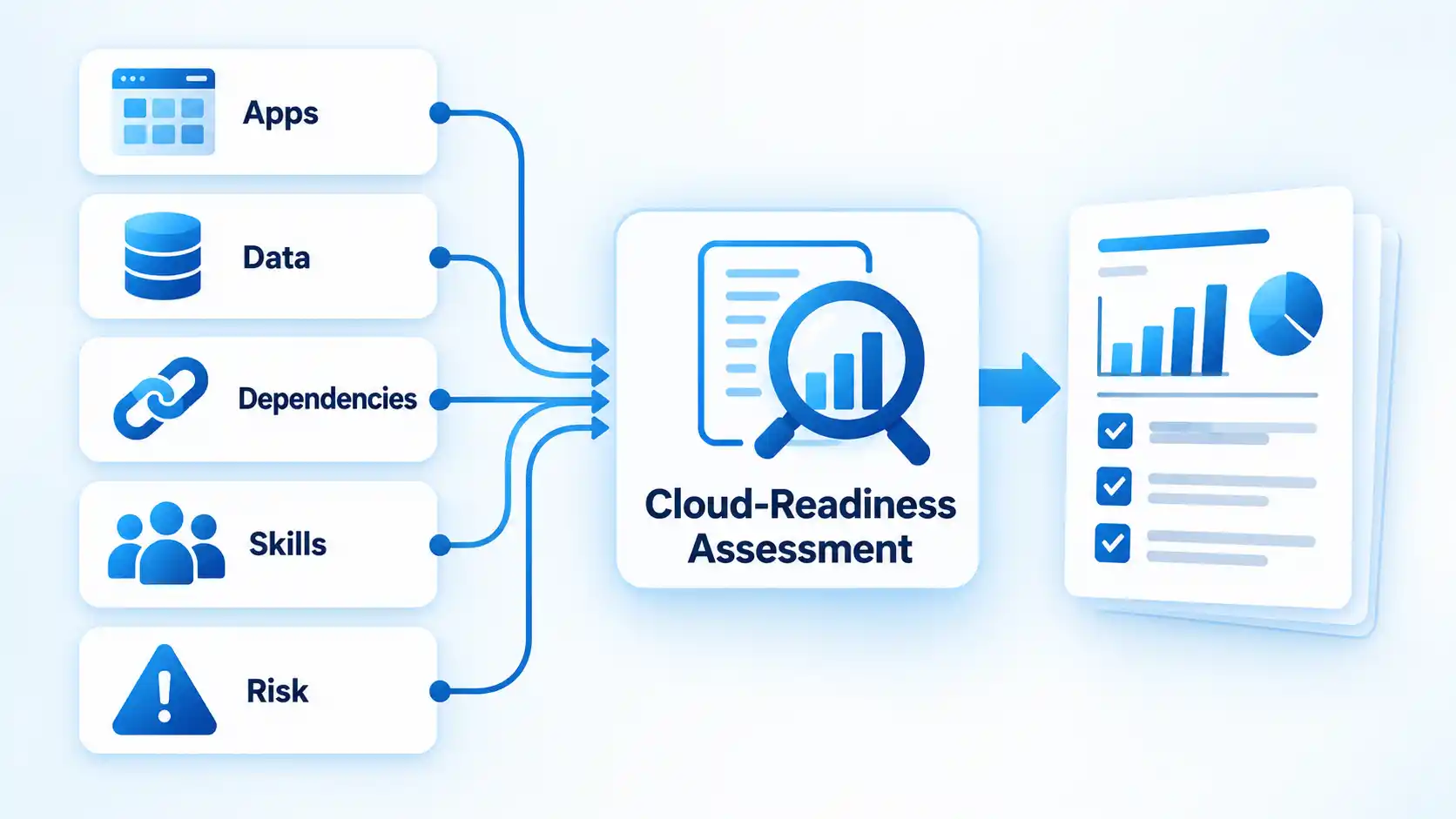
The term digital estate is often used for this collection of workloads, data, infrastructure and supporting technology. Mapping the estate helps expose dependencies that could otherwise turn a simple migration into an outage. A payroll application, for example, might rely on a database, directory service, shared file location and reporting system. Moving only the visible application could leave one of those dependencies unreachable.
Cloud readiness also includes organizational capability. The Google Cloud Adoption Framework organizes readiness around leadership, learning, scaling and security. AWS likewise groups its cloud-readiness capabilities into business, people, governance, platform, security and operations perspectives.
For each important workload, record its owner, users, dependencies, data sensitivity, recovery needs, performance requirements and known technical constraints. Also identify skills gaps. A platform that can technically host an application may still be a poor near-term destination if nobody can operate it safely.
This assessment is where assumptions should become documented constraints. An application that appears outdated may be essential to another system. A workload that looks easy to migrate may process regulated information. An apparently unused service may still run a monthly business process.
Step 3: Choose an Operating Model and Cloud Foundation
A cloud operating model defines who makes decisions, who maintains shared services, who is responsible for workloads and how teams interact after adoption. A small company may assign several responsibilities to the same people, while a large organization may separate platform, security, governance, application and finance functions.
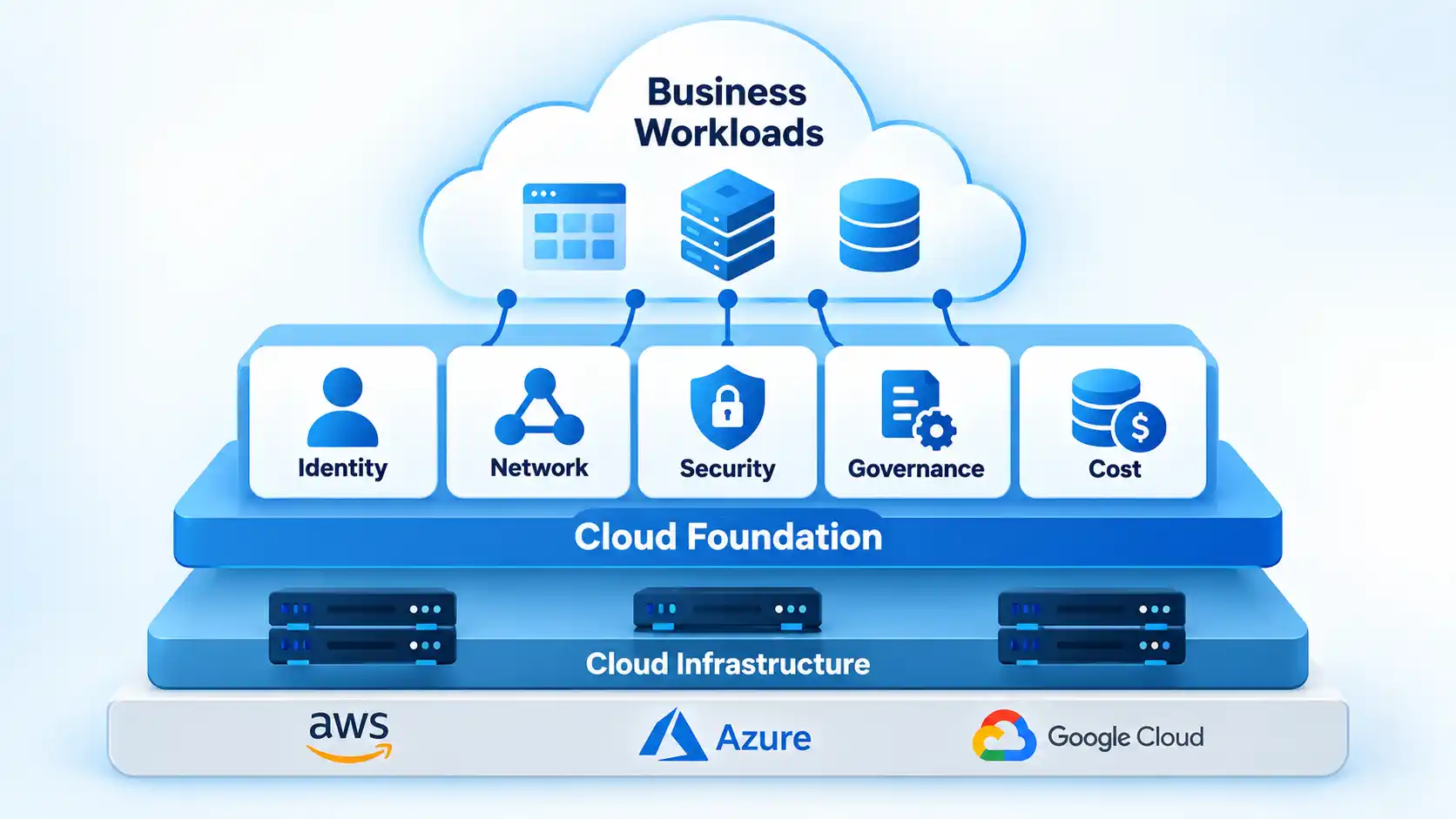
The technical counterpart is a standardized cloud foundation. Cloud providers often call an enterprise implementation of this concept a landing zone. It establishes shared decisions such as account or subscription structure, identity, network connectivity, logging, policies, access controls, monitoring and resource organization before many independent workloads are deployed.
The underlying principle matters more than the terminology. Even a smaller organization should decide who can create resources, how administrators authenticate, how data is protected, how activity is logged, how backups are handled and how spending is attributed. The implementation simply needs to match the organization’s size and risk.
Security should be designed into this foundation rather than added after migration. AWS’s Cloud Adoption Framework security-governance guidance describes security governance as a continuous responsibility that includes roles, accountability, policies, processes and oversight as business requirements and threats change.
This is also the point to document governance rules. Examples include approved regions, resource naming, access review, backup requirements, logging retention, data-handling rules and budget ownership. Guardrails work best when they make the expected path easy to follow rather than forcing each project team to rediscover organizational requirements.
Step 4: Decide What to Migrate, Modernize, Replace, Retain or Retire
Not every application should receive the same migration treatment. The right choice depends on why the workload exists, its technical condition, how difficult it is to change, its remaining business value and the risk introduced by migration.
AWS documents seven commonly used migration strategies: retire, retain, rehost, relocate, repurchase, replatform and refactor or rearchitect. The exact vocabulary varies between frameworks, but the useful question remains the same: what amount of change is justified for this workload? The AWS migration-strategy guidance also shows that approaches such as replatforming and refactoring involve progressively different levels of application change.
For a simpler planning view, businesses can group those possibilities as follows:
| Approach | Typical situation | Potential value | Main trade-off |
|---|---|---|---|
| Retain | The workload still has a valid reason to remain in its existing environment. | Avoids unnecessary change while other priorities are addressed. | The organization continues supporting the existing platform and its constraints. |
| Retire | The application is unused, duplicated or no longer provides enough business value. | Removes maintenance work and migration effort for an unnecessary system. | Dependencies and remaining users must be verified before shutdown. |
| Replace | A packaged or software-as-a-service product can perform the required business function. | May remove responsibility for maintaining a custom or aging application. | Data migration, integrations, process changes and vendor dependency still need evaluation. |
| Rehost | The application can move with minimal architectural change. | Usually limits the amount of application change required during the first migration. | Existing architectural limitations may simply move with the workload. |
| Replatform | Limited changes can make better use of managed cloud capabilities without redesigning the complete application. | Can reduce some infrastructure-management work while limiting redevelopment. | Requires more change and testing than a straightforward rehost. |
| Refactor or rearchitect | The existing design prevents the application from meeting important scalability, reliability, delivery or other requirements. | Can address architectural limitations instead of preserving them. | Usually involves greater engineering effort, testing, cost and delivery risk. |
Modern architectures such as microservices or serverless computing therefore should not be treated as automatic destinations. They solve particular problems and introduce their own operational and architectural considerations. A stable application with limited change requirements may gain little from being broken into many services.
Organizations that need more detail at this stage can compare cloud migration strategies such as rehosting, replatforming and refactoring against the workload’s business value, technical constraints and acceptable level of change.
Step 5: Run a Pilot and Migrate in Controlled Waves
A pilot tests more than whether an application starts in its new environment. It also tests the surrounding platform, security controls, deployment process, monitoring, operational responsibilities and assumptions made during planning.
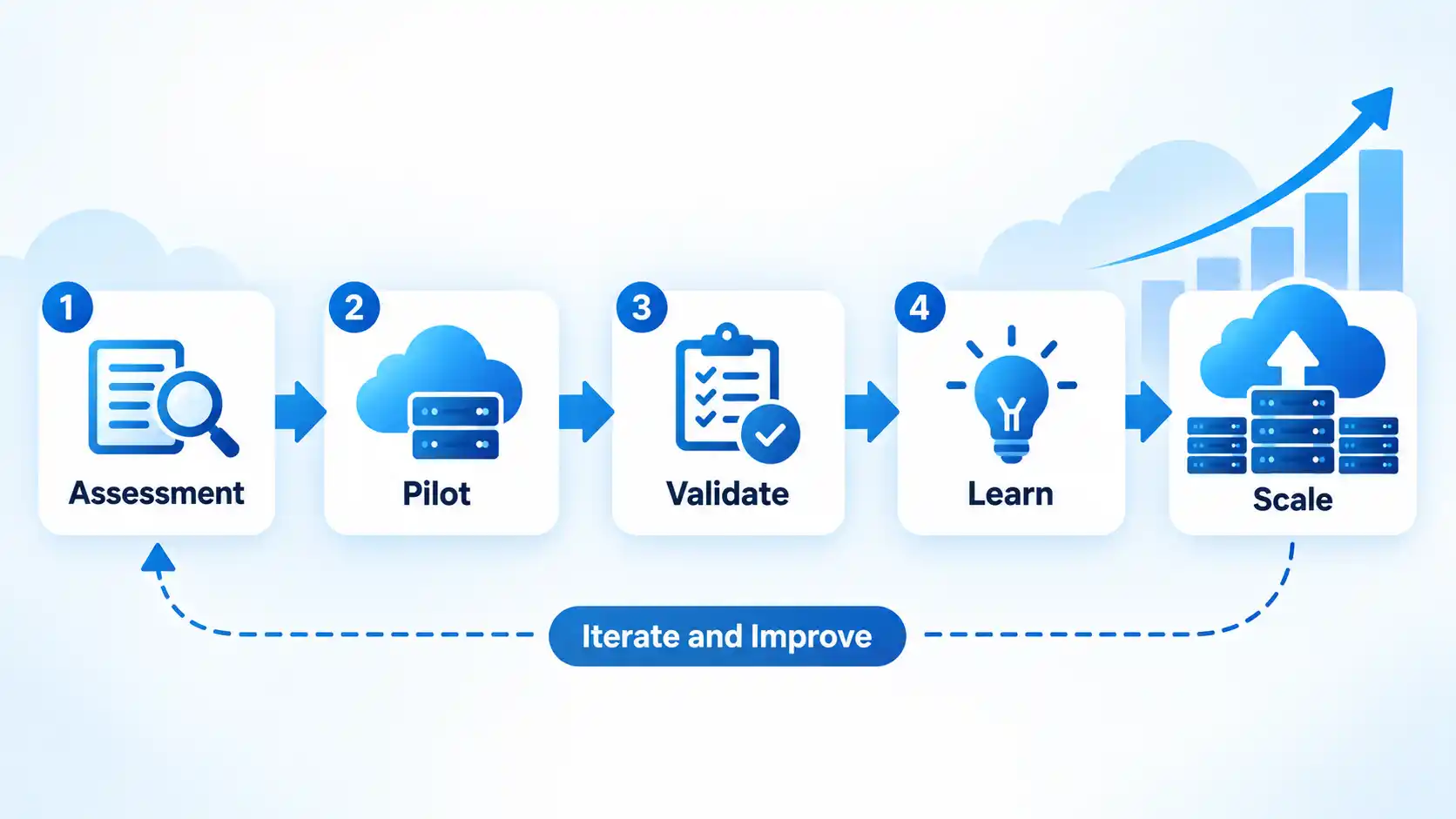
Choose a workload that is manageable but representative enough to expose real problems. The easiest application in the estate is not necessarily the best pilot if it uses none of the networking, data, identity or operational patterns that later workloads require.
Before moving it, define acceptance criteria and a rollback approach. After the migration, validate functionality, access controls, integrations, monitoring, backups, performance and operational ownership. Record unexpected dependencies and process failures before scaling the same pattern to a larger migration wave.
A phased approach also creates room to improve dependencies, rollback criteria and cloud migration planning before higher-risk workloads are moved.
Cloud-adoption frameworks also treat transformation as iterative rather than a single migration event. AWS, for example, describes its framework as a way to evaluate readiness and iteratively evolve a transformation roadmap as organizational capabilities improve.
Migration waves should therefore be informed by what earlier workloads reveal. If the pilot exposes weak access controls, insufficient monitoring or an unexpected dependency pattern, correct the shared approach before multiplying the problem across dozens of applications.
Common migration failures often originate outside the actual data-transfer process. Dependency discovery, ownership, rollback planning, security controls and user readiness can be just as consequential, which is why cloud migration failure risks should be considered before each wave rather than only after an incident.
Step 6: Modernize Business Systems Where There Is a Business Case
Cloud transformation can also involve replacing business software rather than migrating the existing application. This is particularly relevant when several disconnected systems or manual processes perform functions that could be handled by an integrated platform.
Enterprise resource planning (ERP) software is one example. ERP systems integrate business functions such as finance, inventory, procurement, manufacturing or project management around shared processes and data. Moving to a cloud ERP may therefore be part of a transformation program when the existing business-system architecture is itself the problem.
It is not, however, a universal cloud-transformation requirement. An organization whose existing ERP remains suitable may have far more valuable modernization opportunities elsewhere.
Organizations replacing fragmented finance, inventory or operational systems may also evaluate cloud ERP platforms such as Acumatica Cloud ERP, but the choice should follow the same requirements, integration, security and cost assessment as any other major business application.
The same principle applies to other software-as-a-service replacements. Replacing an application transfers some infrastructure and software-management responsibilities to the provider, but it also introduces questions about data portability, integrations, access control, service availability, customization and vendor dependency.
Step 7: Prepare People for New Roles and Ways of Working
A technically successful migration can still produce poor results if employees do not understand the new systems or if operational responsibilities remain ambiguous.
Cloud adoption changes work differently across teams. Infrastructure staff may manage fewer physical servers but take on automation, identity, governance or platform responsibilities. Application teams may gain more control over deployment. Security teams may need to embed controls earlier in development. Finance teams may encounter technology spending that varies with consumption instead of arriving mainly through periodic hardware purchases.
The AWS Cloud Adoption Framework People perspective treats culture, organizational structure, leadership, workforce capability and change management as part of cloud transformation. Google similarly identifies continuous learning as one of the foundations of cloud readiness.
Training should therefore be role-based. End users need to know how a changed business process affects their daily work. Administrators need the operational skills required by the new platform. Developers may need new deployment or observability practices. Managers need enough cost and governance visibility to make decisions rather than leaving every cloud question to technical teams.
Document responsibilities as well as technical procedures. If an alert fires after migration, somebody should know who investigates it. If access needs to be reviewed, ownership should already be clear. If spending rises unexpectedly, teams need a defined path for identifying who owns the affected resources and whether that usage is justified.
Feedback also matters during rollout. Employees often discover workflow problems that infrastructure metrics cannot show. A process may be technically available yet slower or more confusing for the people expected to use it.
Step 8: Measure Outcomes, Costs and Operational Health
Cloud transformation does not end when workloads are running in the new environment. Operations, security, reliability, performance and cost have to be managed over time.
Start with the objectives established in Step 1. If the project was intended to shorten deployment time, compare the new result with the original baseline. If the goal was better recovery capability, test whether recovery objectives are now achievable. If modernization was supposed to remove a manual process, verify that the process actually changed rather than merely moving its supporting application.
Architecture also requires continuing review. Google’s Well-Architected Framework, last reviewed on January 28, 2026, organizes guidance around security, reliability, performance, cost, operations and sustainability. These are ongoing design and operating concerns rather than automatic benefits of moving a workload to cloud infrastructure.
Cost deserves particular attention. Cloud computing changes the economics of infrastructure, but it does not guarantee a lower bill. Microsoft’s current cloud cost-efficiency guidance defines cost efficiency as actively managing and optimizing cloud-service usage, understanding associated costs and connecting spending to business value.
Verify the result
- The business KPI defined before migration can be compared with a documented baseline.
- Critical workloads meet the required availability, recovery and performance expectations.
- Workload owners and operational teams can identify and respond to important alerts.
- Security and access controls are monitored and periodically reviewed rather than assumed to remain correct.
- Cloud spending can be attributed to responsible teams, products or workloads and compared with expected value.
- Lessons from migrated workloads are being applied to later modernization and migration decisions.
Common Cloud Transformation Mistakes
Cloud programs tend to become more difficult when technology decisions move faster than the business and operating decisions around them. Several mistakes are especially worth checking for:
- Treating migration as the final outcome. Moving a workload changes its location. It does not automatically improve the process, application or customer experience that depends on it.
- Starting without measurable objectives. Without a baseline and success criteria, teams can complete large amounts of technical work without knowing whether the investment produced the intended result.
- Using the same migration strategy for every workload. Applications differ in business value, technical condition, dependencies and acceptable change.
- Delaying governance and security. Allowing each project to invent its own identity, logging, resource structure and security practices makes consistency harder as the estate grows.
- Modernizing everything at once. Deep architectural changes add engineering and testing work. Apply them where the expected value justifies that additional complexity.
- Ignoring organizational ownership. A platform without clear responsibility for operations, security, cost and application support can create gaps even when the technology itself works.
- Assuming cloud automatically reduces cost. Consumption-based infrastructure must still be monitored, attributed and optimized.
- Measuring project completion instead of outcomes. “100% migrated” describes project progress, not whether the original business problem was solved.
A Practical Cloud Transformation Roadmap at a Glance
The eight phases can be summarized by the question each phase should answer and the output it should leave behind. The sequence provides direction without implying that every organization must move through the phases only once.
| Phase | Core question | Practical output |
|---|---|---|
| 1. Outcomes | What business problem should cloud adoption help solve? | Defined objective, baseline, metric and accountable owner. |
| 2. Readiness | What systems, dependencies, constraints and capabilities exist today? | Workload inventory, dependency view and capability gaps. |
| 3. Foundation | How will the cloud environment be owned, secured and governed? | Operating responsibilities and shared platform guardrails. |
| 4. Workload decisions | What should happen to each application? | Retain, retire, replace, rehost, replatform or rearchitect decision. |
| 5. Pilot and adoption | Can the platform and operating model work under real conditions? | Validated pilot, lessons learned and migration-wave plan. |
| 6. Modernization | Where does deeper change produce enough business value? | Prioritized application or business-system modernization work. |
| 7. People | Who needs new skills, responsibilities or workflows? | Role ownership, training, documentation and feedback process. |
| 8. Optimize | Did the transformation produce the intended result? | Measured outcomes plus continuing reliability, security, performance and cost improvements. |
The choice of public, private or hybrid infrastructure can influence several of these stages, but deployment model should follow workload requirements rather than become the starting objective. Organizations weighing those environments can examine public, private and hybrid cloud models in terms of control, integration, operational responsibility and workload constraints.
A useful cloud transformation roadmap therefore connects technology decisions to business outcomes from the beginning and keeps that connection after migration is complete. Cloud services provide capabilities; the transformation comes from choosing where those capabilities solve real problems, establishing the organizational ability to operate them, and continuing to measure whether they deliver the expected value.
