There is no single global figure for launching on Amazon, and anyone selling you one is guessing.
The line that decides who survives is the last one in the budget: stock, and the cash to reorder it. Stock usually outweighs every administrative line combined, and the squeeze lands exactly when an empty shelf would hurt most. Fund the first order and nothing else, and you have bought yourself a few weeks of selling.
Quick Take
- Budget by marketplace. Amazon publishes a separate rate card per store, so a US fee figure does not transfer to the UK, German or Japanese one.
- Inventory dominates the total. Account fees, barcodes and photography are small change beside a production order.
- Your plan choice controls advertising. Sponsored Products sits on the Professional plan, so the cheaper plan can cost you the launch tool.
- Storage bills by cubic volume and rises in the peak quarter. Aged stock adds surcharges on top.
- Cash can sit in reserve before it reaches you. Plan the second order as if the first one’s money arrives late, because it often does.
What a real Amazon launch budget has to contain
A launch budget runs on three clocks. Setup costs happen once, mostly before you list. Per-sale deductions come out of every order for as long as you sell. Working capital sits inside inventory you have paid for but not yet sold, and that is the clock that runs out first.
Sort every line into one of those three before you compare totals. Mixing them lets a product look profitable per unit while the bank account drains, because a unit model only treats stock as a cost once it sells.
| Cost line | When you pay | What drives the amount | Verify it here |
|---|---|---|---|
| Selling plan | Monthly, or per item sold | Professional subscription versus Individual per-item fee; tool access | Your marketplace’s Amazon pricing page |
| Company, tax and licensing | Before you trade | National rules where you are established | Your business or tax authority |
| Product identifiers | Once, before listing | Number of variations; single GTIN versus company prefix | GS1 US pricing pages (US scope) |
| Samples and inspection | Before the bulk order | Supplier, courier, inspection provider | Supplier and inspection quotes |
| First production order | Deposit, then balance | MOQ, case pack, unit price | Signed supplier quote |
| Freight, duty, handling, delivery | At shipment | Volume, lane, HS code, delivery point | All-in forwarder quote and official tariff |
| Referral fee | Every sale | Category rate, total price paid, per-item minimum | Amazon category fee table |
| FBA fulfilment fee | Every FBA unit | Size tier, weight, dimensional weight | Amazon Revenue Calculator |
| Monthly storage | Monthly | Cubic volume held, time of year | FBA storage fee card |
| Aged or long-term storage | Monthly, once stock ages | Days held in a fulfilment centre | Inventory age report |
| Sponsored Products | Per click | Bid, daily budget, conversion rate | Campaign reporting |
| Second order | Before stock runs dry | Reorder point, lead time, MOQ | Your reorder calculation |
Every marketplace publishes its own rates, so a figure quoted for one store does not travel. And platform rates get revised on an annual cycle, so date every screenshot you save.
Admin setup: two decisions before you list
Your selling plan and your product identifiers change what you can do later. Everything else in the setup block is local paperwork.
- Professional plan: a flat monthly subscription in each marketplace, no per-item selling fee, and access to advertising, bulk listing tools and reports.
- Individual plan: no subscription and a fee on each item sold, but no Sponsored Products, which removes your main launch lever.
The plan is arithmetic plus access, and access usually decides it. If advertising is part of the launch, the choice is already made.
Identifiers are the second decision, and the pricing is public. Every variation of every product needs its own barcode, so three sizes in three colours means nine. GS1 US licenses a single GTIN for $30 with no annual renewal; a company prefix with several UPC barcodes starts at $250 plus an annual renewal fee. GS1’s barcode guidance sets out the variation count and the single-GTIN route, and the GS1 US pricing page lists the company-prefix rate. (Gs1Us)
Identifiers issued by GS1 record your company as the brand owner. Resold barcodes carry somebody else’s prefix, which is why they cost less and why they leave you with nothing to show a retailer or partner who asks who owns the product record.
Company formation, tax registration and licensing are jurisdiction-specific. Check your national business and tax authority for the rules where you trade. That is government policy rather than Amazon policy, and it varies by country.
Sourcing: samples, MOQs and inspections
Supplier quotes hide most of the real cost. Start at the ex-works unit price and build a landed cost from there: unit price, freight, duty, broker fees, payment charges and inspection.
MOQ means the smallest quantity a supplier will sell in a single order, and it varies by supplier and product. A high MOQ converts working capital into cartons months before demand proves anything. Ask for a lower first order, tiered pricing or a sample pack before you accept the number on the quote sheet.
Order samples and handle them. Weigh the unit, measure the packaged dimensions, test the packaging. Then pay for a pre-shipment inspection on the first bulk run. An inspection reduces the risk of a bad batch; it cannot guarantee a clean one.
Put photography in this block as well. On a marketplace where nobody can pick the product up, images carry the sale.
Freight and duty: compare all-in quotes, not per-kilo rates
LCL prices your shipment by volume plus fixed local fees. FCL prices a whole container. Neither is automatically cheaper, because lane rates, consolidation charges and seasonal capacity move the crossover point. Compare both on identical assumptions.
- Origin charges: export handling, documentation, pickup.
- Ocean or air freight, quoted on the same basis for both options.
- Destination handling: terminal, consolidation, devanning.
- Customs: duty for your HS code, broker fees, and any import VAT or sales tax.
- Final delivery to a 3PL, a prep centre or an Amazon fulfilment centre.
- Prep and handoff: labelling, carton rules, appointment booking.
Duty depends on your HS code and the destination country. Look it up in the official tariff before you order rather than after the container lands. A forwarder’s estimate is a planning input; the tariff schedule is the rule.
If the shipment ends as pallets moving to a 3PL or an Amazon hub, price that leg separately. A heavy goods courier can quote the final delivery on its own, which keeps the number visible instead of folded into a single forwarder figure.
What Amazon takes on every sale
Four layers come off each unit: the referral fee, the FBA fulfilment fee, monthly storage, and an ageing surcharge when stock sits too long. Optional fees stack on top, including inbound placement, removals, returns processing and low-inventory-level charges where they apply.
The referral fee is a category percentage of the total price the buyer pays, including shipping and gift wrap where you charge them, usually with a per-item minimum. Rates move. Amazon‘s UK store cut referral fees on clothing and accessories, home products, pet clothing and food, grocery and supplements in a recent update, and its Low-Price FBA rates are reduced. The UK rate card carries the current bands.
Fulfilment bills per unit by size tier and weight, using the greater of actual and dimensional weight in some marketplaces. Storage bills by cubic foot per month, with higher rates through the peak quarter. Both are per-SKU facts, so model them per product rather than per business.
| Line | How the amount is set | What it teaches |
|---|---|---|
| Sale price | Your pricing decision | The number shoppers see |
| Referral fee | Category percentage of the total price paid, with a per-item minimum | Charged on the total price paid, not just the item price |
| FBA fulfilment fee | Size tier and shipping weight | Set by size and weight, not by price |
| Monthly storage | Cubic volume held, plus the time of year | Small per unit, compounds across a slow catalogue |
| Sponsored Products | Bid, daily budget, conversion rate | Often the largest variable line in month one |
| Landed product cost | Unit price plus freight, duty and fees | Usually the biggest single line in the budget |
| Contribution before tax | What remains after the lines above | The money that funds the next order |
Read that table as a teaching device. The useful lesson sits in the lines sellers leave out: advertising can cost more than the fulfilment fee on its own, and the landed product cost usually beats both.
Launch ads: cap the test and ignore the rank myths
Sponsored Products runs as a cost-per-click auction with no setup or monthly fee. You set a bid per keyword, set a daily budget per campaign, and pay when someone clicks. It is available on the Professional plan.
The daily budget is your ceiling, and every click you receive comes out of it. Set a figure you could lose in full and still fund the next order; anything above that is a bet on the listing converting, not a budget.
Two myths need deflating. Ads do not buy organic rank: sales on a keyword can feed ranking signals, and ranking is never guaranteed. There is also no standard launch ad budget, because the right cap depends on category competition and your contribution per unit.
Run the first month as staged discovery. Check indexing, click-through and conversion first. Then mine search terms and add negatives. Then split proven terms into their own campaign. Then push budget toward whatever converted. Judge the test on advertising cost of sale against your contribution margin.
Amazon subsidises some of this. Eligible Professional sellers in select marketplaces can earn up to $1,000 in Sponsored Products credits when they launch and spend within 30 days of their first campaign; credit amounts vary by marketplace. The Sponsored Products documentation lists the current terms. Treat credits as a bonus and budget the spend.
The second-order trap
Here is the sequence that empties a launch account. You order stock. It lands. Sales start. A few weeks later you are close to a stockout, and the next order should already be with the factory. Production, inspection, freight, customs and receiving take weeks, and the upper end of your own measured lead time is the number to plan with, not the supplier’s best case.
Meanwhile the first shipment’s proceeds are still arriving, and part of them may be held. Amazon applies account-level reserves for open A-to-z claims, chargebacks, performance below benchmark, account reviews and tax withholding, and some claims take up to 14 days or longer to resolve. Amazon’s reserve documentation lists the triggers, and several can apply at once.
Warning
Amazon does not pay out on a fixed 14-day clock. Reserves, deferred transactions and claim windows all move the date, so build your calendar on the assumption that money lands later than the dashboard suggests.
Plan the second order as its own cash event with its own funding source: retained profit, a buffer you refuse to spend on ads, or deliberately slower growth. If the reorder depends on money that has not cleared, the launch has no margin for error.
Once the gate below clears, reinvesting profit into inventory is the natural next step. Until then, hold the buffer.
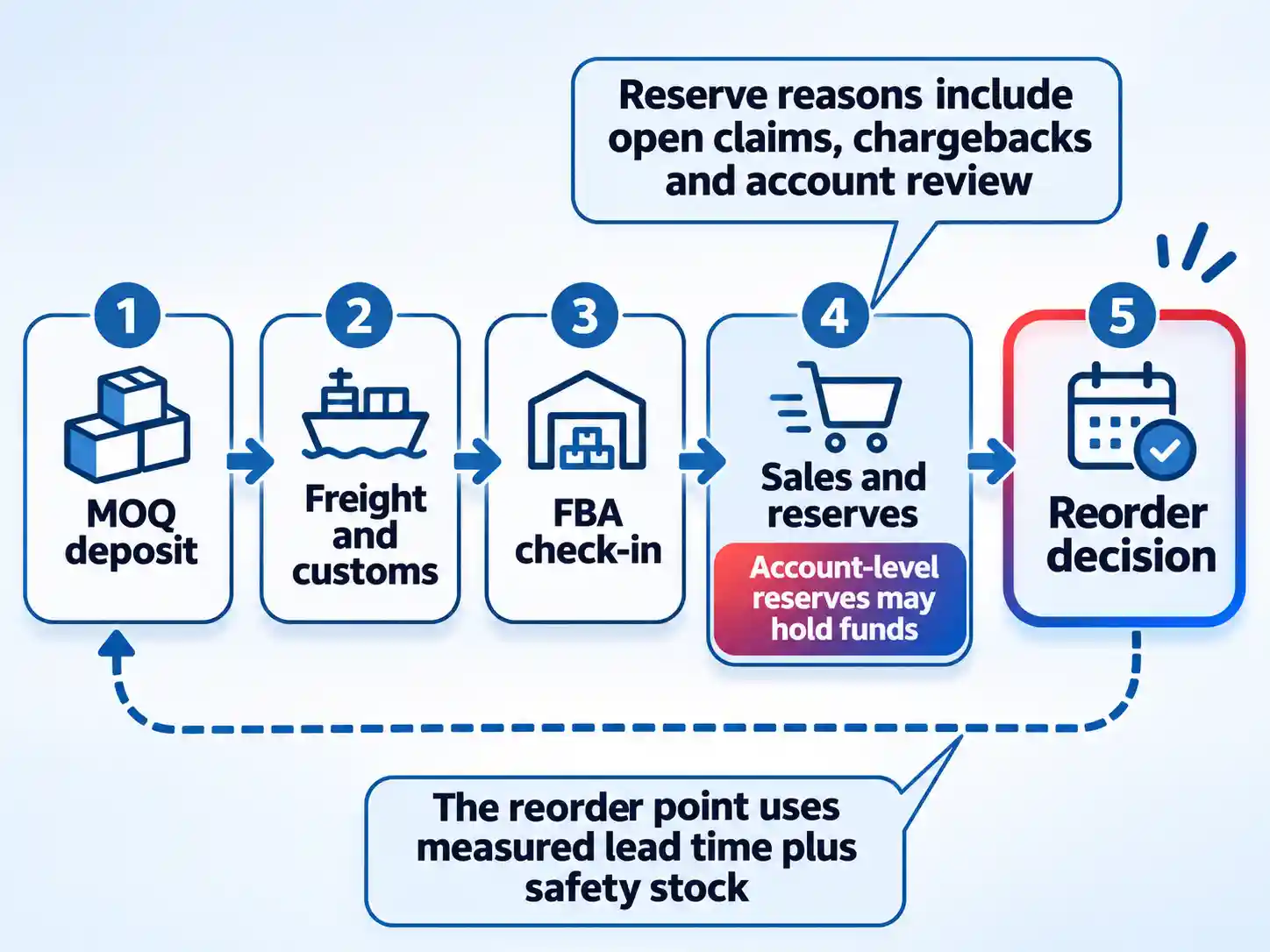
Build the 90-day cash calendar before you place the order
Six steps turn a supplier quote into a funded plan. Work in order, because each step sets an input the next one needs.
- Fix the marketplace and save its rate cards.Choose the store you will launch in and pull its current referral, fulfilment and storage cards, plus the plan fee in that marketplace’s currency.Rates are revised on an annual cycle, so record the date you checked each page. A screenshot from last year is a planning error waiting to happen.Your budget sheet should now show every fee in one currency, with a source page and a date beside it.
- Write the landed cost per unit.Take the ex-works price and add freight, duty at the rate for your HS code, broker fees, payment charges and the inspection visit, then divide by the units in the order.Do this before you compare suppliers. A quote that looks cheap at the factory gate often loses once the destination leg is priced.You should now hold one landed cost figure per unit that you can defend line by line.
- Model the fee stack and compare fulfilment methods.Enter your dimensions, weight, category and price into the Revenue Calculator, then run it twice: once for Fulfilment by Amazon and once for your own shipping.Check the Fee Preview report for stock already in a fulfilment centre. It shows what Amazon actually charges rather than what a blog table predicts.The per-unit contribution in your plan should now reconcile with the calculator output, line by line.
- Set the ad cap and the review cadence.Decide the maximum you will spend on Sponsored Products in month one, and set campaign daily budgets that cannot exceed it. Write down what result would make you stop.Then schedule the review. You are checking click-through, conversion, search terms and advertising cost of sale against your contribution margin, not against a published target.You have a working test when the campaign budget cap, the monthly cap and the review date all appear on one sheet.
- Calculate the reorder point and the second order quantity.Take average daily sales from recent data, multiply by your measured lead time, then add safety stock for the delays you have actually experienced. That total is your reorder point.For the order itself, use forecast demand across the coverage period, add safety stock, subtract your inventory position including confirmed inbound units, then round to the case pack.Compare the result with the MOQ. If the minimum is larger than the calculation, the difference is a cash decision you must fund deliberately.
- Fund the buffer and write the go/no-go date.Add a cash buffer sized to cover your longest realistic delay, and decide where it sits. It does not go into ads, and it does not go into a larger first order.Then write the date you will re-check the calendar, and the conditions that would stop the launch: a landed cost above target, an ad cap above contribution, or no funded second order.The plan is ready when the buffer, the reorder point and the stop conditions are written in the same document as the budget.
When cash or stock goes wrong
Stock will run out before the next shipment lands
Recalculate demand on current sales, then place a smaller order immediately and pay for faster freight only where the margin survives it. Cut ad spend on listings you cannot restock, because clicks you cannot convert into repeatable sales buy nothing. Recheck the safety stock assumption afterwards; the stockout is usually a lead-time error, not a demand surprise.
The MOQ has locked up your cash
Go back to the supplier with a smaller first order, tiered pricing or a case-pack split, and compare quotes from suppliers who will start lower. Where the product is already paid for, use a third-party logistics warehouse to spread storage and fulfilment rather than absorbing the whole volume at once. Renegotiate before the second order, not after it ships.
Ads are spending without converting
Pause broad discovery targeting and check the listing before adding budget: images, price, review count and stock availability all affect conversion. Look at search-term reports for clicks that were never going to buy, and add them as negatives. If conversion does not move after a listing fix, reduce spend to a maintenance level and protect the cash for stock.
Storage fees are climbing on slow stock
Run the inventory age report and identify units approaching an age surcharge. Removing or liquidating slow stock earlier is usually cheaper than waiting for it to sell. Then change the replenishment pattern: smaller, more frequent batches based on recent sales velocity keep less stock sitting in a fulfilment centre.
Funds are sitting in an account-level reserve
Open the payments statement view and read which reserve reason applies. Claims and chargebacks need responses; performance reserves need the account health dashboard; account reviews need patience and clean metrics. Respond to claim notifications quickly, then reforecast the reorder date using the reserve figure rather than the gross sales total.
The gate: five numbers before you place the MOQ
Do not send a deposit until five figures exist in writing: landed cost per unit, Amazon fee preview per unit, the ad test cap, the reorder point, and the cash buffer. Each one is checkable. Each one changes the answer if it moves.
Verify before you commit
- Landed cost per unit includes freight, duty at the correct HS code, broker fees and payment charges.
- Per-unit fees have been checked in the marketplace’s own Revenue Calculator and against the Fee Preview report.
- The month-one ad cap is smaller than the contribution you can afford to lose, and the review date is booked.
- The reorder point uses your slowest measured lead time plus safety stock, not the supplier’s estimate.
- A cash buffer exists outside the ad budget and outside the first stock order, and it is enough to fund the second order.
If a number is missing, the answer is not “order smaller”. It is “wait until the calendar shows the second order funded”. As a practical judgment, a launch with runway is often easier to sustain than a better product launched on fumes.

💬 Comments