If your Freeview picture collapsed into blocks, froze, or lost a whole group of channels within days of a mobile mast going live nearby, the likely fault is too much radio energy arriving at the tuner. Aerial systems installed before the 700 MHz and 800 MHz sell-offs were built to receive a band that stretched to around 860 MHz. Today’s Freeview transmission stops at 694 MHz, and the spectrum directly above it carries high-power 4G and 5G mobile services.
The result is an overload fault. The tuner is being asked to decode a wanted signal sitting next to something considerably stronger, and any amplifier upstream has already distorted both before either reaches the television. Break-up that appears only on the higher multiplexes, worsens during the evening mobile peak, and started without a storm or a cable being touched is the classic pattern.
A generic booster bought at the start wastes money and can deepen the break-up, because it raises the interfering mobile signal along with the picture; a pre-clearance wideband aerial can be an efficient collector of those mobile bands too.
Freeview, YouView, BT TV and TalkTalk TV received through a roof or loft aerial all follow this path. Satellite and cable feeds do not. A dish or a cable connection does not pick up this interference, so a fault there needs a different diagnosis entirely.
Quick Take
- Read strength, quality and error rate on every multiplex before changing hardware. Strong signal with collapsing quality is the overload signature.
- Check the transmitter and run a full retune first. If the channels return, you have saved yourself a job.
- Fit a passive low-pass filter specified for channels 21–48, with a cutoff at 694 MHz. An 800 MHz-only 4G filter does nothing for a 700 MHz 5G problem.
- Place that filter on the input of the first amplifier. Filters at each wall plate cannot repair distortion created upstream.
- Claim the free Restore TV route where you are responsible for your own aerial, and hand roof, mast and communal work to a qualified installer.
Before you start
Prerequisites
- A UK terrestrial service received through an aerial: Freeview, YouView, BT TV or TalkTalk TV. Cable and satellite subscriptions sit outside this fault path.
- A TV or set-top box with a signal information screen showing strength and quality per multiplex, and ideally a bit error rate reading.
- Safe physical access to the wall plate, flylead and any indoor distribution box. Nothing on the roof, and nothing on the mast.
- Your postcode and, if you know it, the transmitter your aerial points at. Both are needed for the Freeview and Restore TV checks.
- Mains power switched off at the socket before you disconnect or reconnect any coaxial lead.
How to diagnose and fix Freeview mobile interference
Work through these five stages in order. Each one produces a decision: continue, stop because the fault was something else, or hand the job to a professional.
- Read strength and quality on every multiplex. Open the tuning menu and find the signal information screen; on most sets it sits under Settings → Broadcasting, Channels or Support. Record the strength and quality figure for each multiplex, plus the error rate if your set reports one. A multiplex showing healthy strength with quality dropping away is the overload signature. Low strength paired with low quality across every multiplex points at a weak feed instead. If a single television is affected and the rest of the house is fine, check that set’s flylead, wall plate and splitter outlet before looking upstream.
- Rule out the transmitter, then check the mobile-upgrade context. Enter your postcode in the Freeview Channel Checker to see whether planned engineering work explains the break-up, and run a full auto-tune rather than an add-channels scan. If reception returns to normal, stop. If it does not, open the Restore TV online checker and diagnostic tool, enter your postcode, and see whether postcards have been issued for your area.
Use it to confirm whether mobile services have recently been upgraded near you, particularly on the 700 MHz and 800 MHz bands, since those two sit immediately above Freeview and are the ones that overload an aerial system. Sudden onset, no weather event, no one moving cables and a fault that first appeared around a mast activation all raise the likelihood. - Fit a 700/800 MHz low-pass filter at the tuner end. Choose a passive filter specified to pass 470–694 MHz (UHF channels 21–48) and reject everything above 694 MHz. What separates a modern unit from a cheap one is how sharply it does that: a steep, near-vertical cutoff immediately above channel 48, often described as a brick-wall response, so the mobile bands sitting next door to Freeview are pushed down hard without eating into the multiplexes below.
An older 800 MHz-only 4G filter leaves the 700 MHz 5G band untouched and will not solve a modern rollout problem. In a system with no amplifier, connect the filter between the aerial flylead and the TV, or better at the point where the downlead enters the house. Switch the TV off at the mains before handling leads, reconnect, switch on and retune. Stability on the higher multiplexes is the improvement to watch for. - Move the filter ahead of the first amplifier, then trim the gain. Trace the downlead. A masthead amplifier sits on the mast below the aerial; a distribution amplifier sits in the loft and feeds the room outlets. The filter belongs on that amplifier’s input, before any gain is applied, because an overloaded amplifier distorts the signal and no downstream filter can undo distortion that has already been created. Filters fitted at each wall plate achieve nothing when the loft box is clipping.
If the amplifier has a gain control that the manufacturer documents as user-adjustable, turn that pot down a few steps, retune, and watch the quality readings on the affected multiplexes. Backing off the gain lowers the wanted picture and the unwanted mobile signal together, so the aim is to bring the amplifier’s input back below the level where it clips, not to strip out gain you still need; if quality falls as you turn the control down, you have gone past the sweet spot and should return to the previous setting.
Never open a sealed unit and never climb the mast. Where gain is set internally or the hardware is up on the mast, book an installer. - Claim Restore TV support or escalate to an installer. Where you own or are responsible for the aerial and mobile interference looks likely, Restore TV can supply an approved filter free of charge and advise on retuning; the Freeview support line on 0808 13 13 800 can point you to the scheme.
Escalate to a qualified aerial technician for communal IRS systems, headend distribution, roof or mast access, damaged or waterlogged cabling, or any fault that survives a correctly placed filter. Ask about CAI membership and collect more than one quote before work begins.
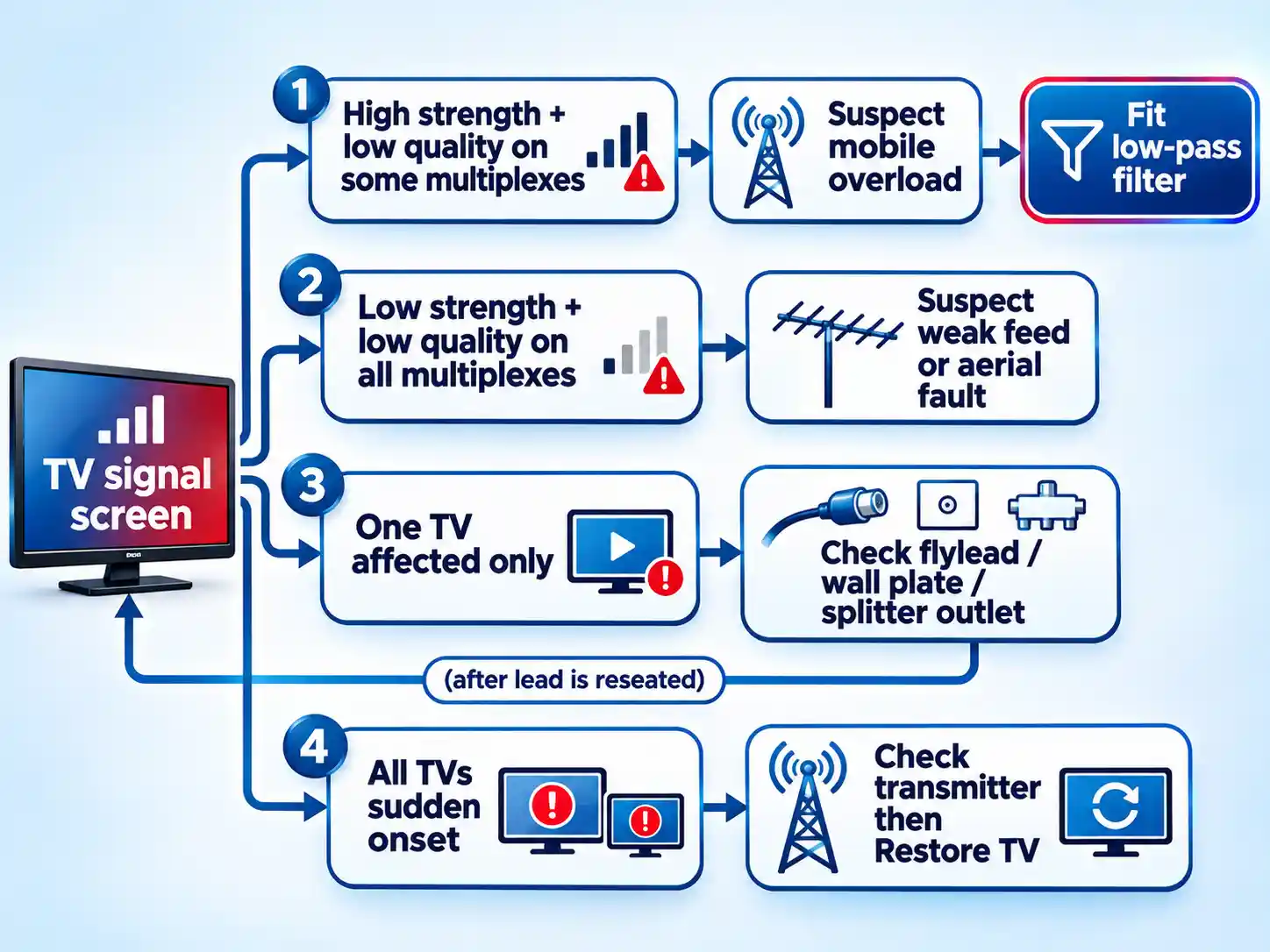
What your TV’s readings are telling you
Four common faults produce overlapping symptoms, and only one of them responds to a filter. The distinguishing evidence is the combination of strength, quality, multiplex pattern and timing, not any single number on the screen.
| Signature | Strength reading | Quality reading | Multiplex pattern | Timing | First action |
|---|---|---|---|---|---|
| Mobile-band overload | Healthy or high | Collapses on affected multiplexes | Often the higher-frequency multiplexes only; can affect all if an amplifier is clipping | Sudden onset, worse in the evening mobile peak | Fit a 694 MHz low-pass filter before the first amplifier |
| Weak signal or feed loss | Low across the board | Low across the board | All multiplexes degraded together | Gradual, or after storm damage | Inspect aerial and cabling; do not add gain blindly |
| Local lead or splitter outlet fault | Normal on other TVs, poor on one | Poor on the affected set only | Variable, often intermittent when the lead is moved | Follows a new TV, moved furniture or a reconnected plug | Reseat or replace the flylead and the wall plate connection |
| Transmitter work or frequency change | Normal before and after | Normal once retuned | Channels missing in blocks, then restored | Correlates with published engineering work | Run a full retune and re-check the Channel Checker |
One extra clue is worth checking before the tables above settle it: if a signal screen reports a bit error rate, a set that shows strong strength but a climbing error rate is not short of signal. It is being fed something it cannot decode cleanly, and the error rate will usually be worst on the multiplexes nearest the top of the TV band.
Choosing the right filter and placing it correctly
Filter choice comes down to two questions: does the cutoff sit above channel 48, and is the device passive? A low-pass filter passes everything below its cutoff and blocks what sits above it. Both a 700 MHz and an 800 MHz mobile service sit above the current Freeview band, so the filter has to reject from 694 MHz upward rather than from 800 MHz.
| Characteristic | 800 MHz-only 4G filter | 700/800 MHz 5G-ready low-pass filter |
|---|---|---|
| Passband | Freeview band up to channel 48 | Freeview band up to channel 48 (470–694 MHz) |
| Rejection starts above | Around the 800 MHz band | 694 MHz, with a steep cutoff straight above channel 48 |
| Blocks 800 MHz 4G | Yes | Yes |
| Blocks 700 MHz 5G | No. The band falls inside its passband | Yes |
| Right choice when | Fault dates from the 2013-era 800 MHz rollout | Fault dates from a recent mast activation or 5G switch-on |
| Main risk | Appears to work but leaves the newer interference untouched | Choosing an amplified or poorly specified unit instead of a passive one with a genuine 694 MHz cutoff |
Placement matters more than brand. A filter at the TV end handles direct tuner overload in a single-set installation, and that covers many domestic cases. It cannot help once an amplifier upstream has already been driven into distortion, because the damage happened before the filter in the chain. A reputable filter’s published specification should state rejection above 694 MHz and a sensible in-band insertion loss, but treat any single vendor’s numbers as that vendor’s own description rather than a promise about every unit on sale.
| System type | Filter position | Safe to do yourself? | What happens if you fit it at the TV end only |
|---|---|---|---|
| Single TV, no amplifier | Between the aerial flylead and the TV, ideally at the cable entry point | Yes, with the power off | Works. This is the correct position |
| Masthead amplifier on the mast | Between the aerial and the amplifier input | No, it requires mast access | Amplifier stays overloaded; break-up continues on every channel |
| Loft distribution amplifier feeding rooms | On the amplifier’s input, before the split | Yes, if the loft is safely and easily accessible | Every room still receives distorted signal |
| Communal IRS or headend | At the headend, before the first amplifier in the shared chain | No, it is building infrastructure | Nothing changes; the fault is outside your flat |
Warning
Do not add a booster to cure break-up you suspect is mobile interference. An unfiltered amplifier raises the mobile signal along with the picture and pushes the system further into overload. Where an old amplifier is in circuit and no longer needed, Freeview’s own guidance is to try removing it and see whether reception improves. If you are unsure which box in the loft is the amplifier, stop and call someone who fits them.
Verify the result
- Quality readings on the previously affected multiplexes hold steady through an evening peak, with no blockiness or audio dropouts.
- A full retune completes and finds the expected channel count for your transmitter, with the higher-frequency multiplexes present.
- Every room fed from the same system shows the same improvement, confirming the fix sits ahead of the split rather than at one outlet.
- No new dropouts appear when a mobile handset is used close to the television; if they do, check the flylead and connectors before blaming the filter.
When the fix does not take
The picture still breaks up after fitting a filter at the TV
The filter is almost certainly downstream of the problem. If the house has a loft distribution amplifier or a masthead unit, the overload is happening on that input and no filter after it can help. Move the filter to the amplifier input, or back the gain control off if the manufacturer documents it as user-adjustable. If the amplifier is on the mast, that is installer work.
An older 800 MHz 4G filter made no difference
That filter is designed for the older 800 MHz band, so the 700 MHz 5G band passes straight through. Replace it with a 5G-ready unit specified to pass channels 21–48 and reject above 694 MHz, then retune.
Reception got worse after fitting the filter
Disconnect the filter, reconnect the original lead and retune to confirm you are back where you started. A worsening picture usually means a poor-quality filter with excessive in-band loss, a badly seated F-connector, or a fault that was never mobile interference in the first place. If the fault predates the filter and returns unchanged, recheck the transmitter and the aerial before buying anything else.
Every room lost signal at the same moment
That pattern points at shared hardware: the aerial, the masthead amplifier, the distribution amplifier or its power supply. Check whether the amplifier’s indicator lamp is lit. A failed power supply on a loft unit will take out every outlet at once and is cheap to replace, but confirm the diagnosis before buying parts.
Only one television is affected
Start at that set. Reseat or replace the flylead, check the wall plate for a loose or corroded connector, and swap the set onto another outlet to see whether the fault follows the television or stays with the socket. A splitter outlet can also be the culprit. Mobile interference generally affects the whole aerial system, so a single-set fault usually has a local cause.
There was already a booster in the system
An amplifier installed years ago to compensate for a weak analogue signal is often unnecessary now, and can be the component pushing the tuner into overload. Try removing it and retuning, or fit the filter ahead of it. Freeview treats amplifiers and splitters as common causes of reception trouble for exactly this reason.
The order that saves money
Diagnosis comes before hardware every time.
Keep the work safe and the diagnosis clean. For any work you do book, get more than one quote and ask about CAI membership. And if a change makes reception worse, reverse it: reconnect the original leads, remove the new part and retune, so you are never troubleshooting two variables at once.
If the free Restore TV route applies to your property, use it before spending anything. A correctly specified filter costs very little on its own, but a filter in the wrong place in the chain is money spent and a fault still present. The placement rule is the whole job.

💬 Comments