Choose a gaming headset by checking your platform and connection first, then comfort, sound, and microphone quality. Features such as spatial audio, RGB lighting, or unusually large drivers matter much less if the headset does not work properly with the device and connection method you actually use.
Quick Take
- Confirm compatibility with your exact PC or console and the connection method you want to use.
- For wireless gaming, distinguish a dedicated USB wireless connection from ordinary Bluetooth.
- Choose a headset you can wear comfortably for the length of your normal gaming sessions.
- Judge sound and microphone performance by what you need to hear and communicate, not by one specification or marketing label.
Start With Your Platform and Connection
A headset can be excellent and still be the wrong purchase if the version you buy does not support your console or the connection method you plan to use. Check compatibility before comparing sound features.
Do not rely only on wording such as “multi-platform.” Look at the exact model or variant, the ports on your gaming device, and whether audio and microphone functions both work through the connection you intend to use. A headset may support several systems without offering identical features on all of them.
For example, Microsoft’s wired Xbox Stereo Headset connects through the Xbox Wireless Controller’s 3.5 mm audio jack. That tells you something specific about that model’s connection route rather than proving that every USB or wireless gaming headset will work the same way on Xbox.
PlayStation provides another example of why the connection method matters. The PULSE Elite uses an included PlayStation Link USB adapter for PS5, PC, and Mac, while compatible mobile devices can connect over Bluetooth. Those connection methods support different device combinations, so the word “wireless” alone does not tell you how the headset will connect to each system.
Nintendo Switch adds another limitation worth checking. The console supports Bluetooth audio, but Bluetooth microphone input is not supported. A Bluetooth headset can therefore play game audio without giving you the microphone behavior you may expect for voice chat.
Before adding a headset to your cart, answer three questions: Which device will you use most often? How will the headset connect to it? Will both listening and microphone functions work through that exact connection?
Choose Wired, 2.4GHz Wireless, or Bluetooth
“Wired versus wireless” is useful as a starting point, but modern gaming headsets have more than two practical connection choices. A headset may use a 3.5 mm cable, USB cable, dedicated wireless USB transmitter, Bluetooth, or a combination of these.
Dedicated gaming wireless commonly uses a USB dongle or adapter rather than ordinary Bluetooth. Many current gaming models use these dedicated links to achieve low latency, meaning there is little delay between an event on screen and the sound reaching your ears. Low-latency connectivity is a major gaming-headset evaluation factor, but the result still depends on the exact headset and platform.
Bluetooth behaves differently. It is convenient for phones, tablets, and other compatible devices, but latency and feature support can vary. Nintendo, for example, warns that Bluetooth audio on Switch can experience latency or noise during gameplay, so Bluetooth should not be treated as interchangeable with a headset’s dedicated gaming-wireless link.
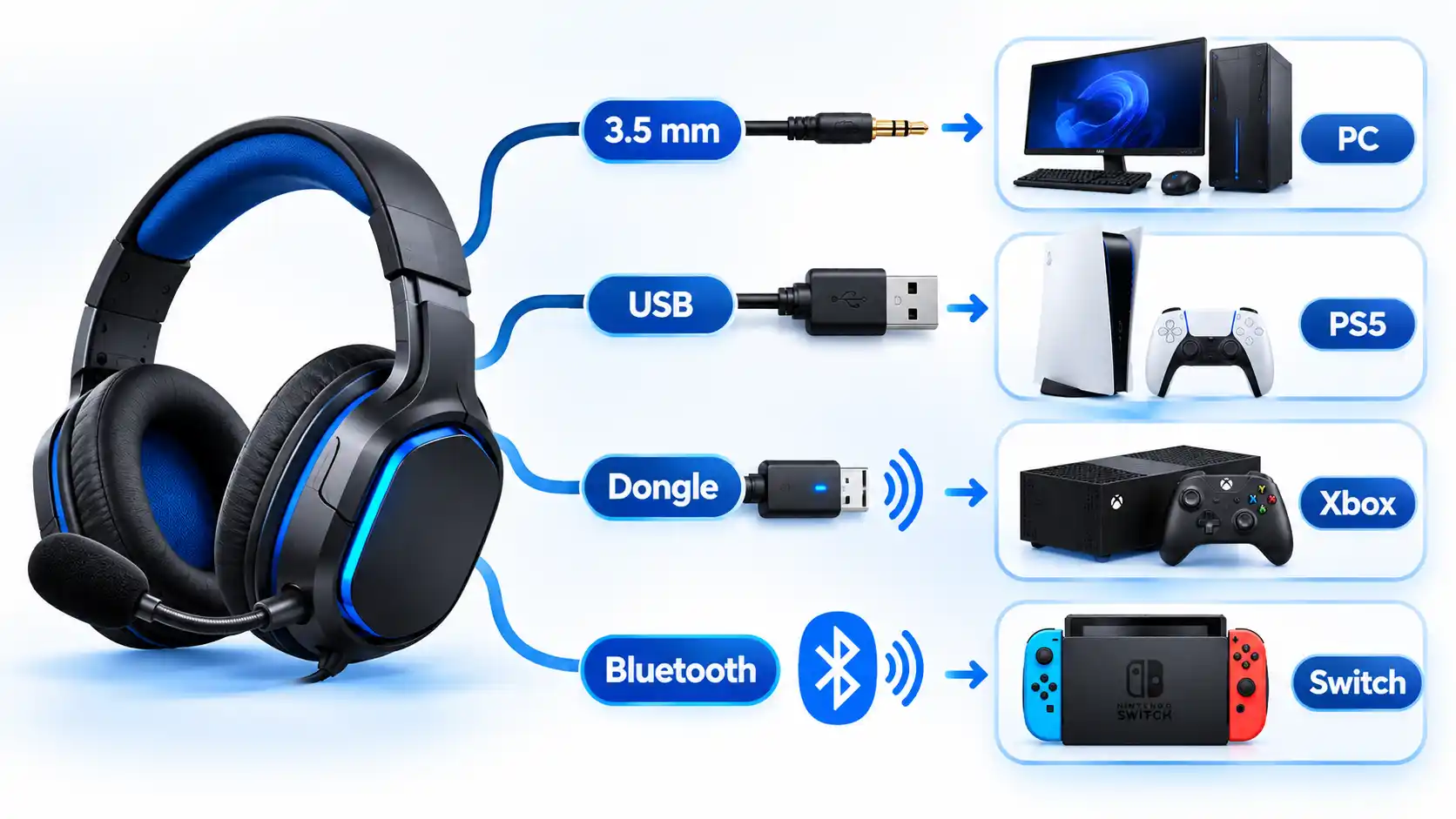
| Feature | 3.5 mm wired | USB wired | Dedicated wireless | Bluetooth |
|---|---|---|---|---|
| Typical connection | Headphone jack on a controller, console, PC, or other compatible device | USB port on a supported PC or console | USB transmitter, dongle, or platform-specific wireless system | Bluetooth radio built into compatible devices |
| Charging | Usually not required for basic audio | Usually not required for basic audio | Usually required | Usually required |
| Gaming latency | Normally not a practical concern from the cable connection itself | Depends on the headset and platform | Can be very low on well-designed gaming models | Varies by device, headset, and implementation |
| Main advantage | Simple connection with no wireless battery to manage | Digital connection with model-dependent controls or software features | Cable-free gaming with a connection designed for the headset | Convenient connection to phones, tablets, and other Bluetooth devices |
| Main check before buying | Correct jack and microphone support | USB compatibility with your platform | Exact console or device compatibility of the transmitter | Audio, microphone, and latency behavior on your target device |
A wired model is a sensible choice if you value simplicity and do not mind a cable. Dedicated wireless is attractive when you want freedom of movement without depending on Bluetooth for the game connection. Bluetooth becomes especially useful when you also want the headset to connect to a phone or tablet.
Some models combine connection methods. For example, a headset may use a dedicated gaming link for a console or PC and Bluetooth for a phone. The right choice therefore depends on the devices you own and the functions you need rather than on whether “wired” or “wireless” is automatically superior.
For a deeper look at battery, cables, movement, and other wired and wireless gaming-headset trade-offs, compare the two connection styles around your own setup rather than choosing only from the label.
Check Comfort Before Chasing Specs
A headset that sounds impressive for ten minutes can still be a poor choice if you want to remove it halfway through every long session. Comfort deserves attention before smaller specification differences.
Start with the parts that physically touch or press against you. The headband should distribute pressure without creating a sore spot on top of your head. The earcups should have enough space for your ears, while the pads should feel suitable for your room temperature and normal session length.
Clamp force is the pressure that holds the headset against the sides of your head. Too little can make a headset feel unstable, while too much may become uncomfortable. There is no universal ideal because head size, glasses, ear shape, padding, and personal preference all affect fit.
Weight is useful context, but it is not a comfort score by itself. A heavier headset with a well-shaped headband may feel better than a lighter one that concentrates pressure in the wrong place. Current gaming-headset testing evaluates comfort alongside latency, sound, and microphone performance rather than deriving comfort from one specification.
If you cannot try the headset before buying, look for measurements and reviews that discuss fit, clamp, pad size, heat, and weight distribution. A reasonable return policy can also matter because fit is difficult to predict from a specification sheet.
Decide What Sound Quality You Actually Need
Good gaming sound is not simply “more bass” or the largest driver number on the box. What matters is whether the headset reproduces the parts of a game’s audio that are important to you.
For competitive multiplayer games, positional information can be important. Imaging describes how precisely a headset places sounds from left to right and at positions between them. Clear imaging can make footsteps, movement, gunfire, or other directional cues easier to locate when the game itself provides useful positional audio.
For story-driven or cinematic games, you may care more about balanced dialogue, music, environmental effects, and convincing low-frequency impact. A heavily boosted bass response can sound exciting, but too much bass may cover quieter details. There is no single tuning that every player will prefer.
Spatial audio uses processing to create the impression that sounds occupy different positions around you rather than coming only from the left and right earcups. Support may come from the console, operating system, game, headset software, or a combination of them. A headset therefore does not need a large “surround” label on its box to work with platform-level spatial-audio systems.
For example, Microsoft’s Xbox Stereo Headset supports Windows Sonic, Dolby Atmos, and DTS Headphone:X. Dolby Atmos and DTS may require additional purchases, apps, or supported hardware, so the presence of a spatial-audio logo still does not tell you the complete cost or setup.
Driver size also deserves perspective. The driver is the small speaker inside each earcup. Its diameter is only one part of the design and cannot tell you by itself whether the finished headset has accurate positioning, balanced tuning, or sound that you will enjoy.
When possible, compare independent measurements or listening evaluations of the exact model instead of choosing from driver size, frequency-range claims, or surround branding alone.
Check the Microphone and Chat Controls
If you regularly play multiplayer games, the microphone may matter almost as much as the speakers. Your teammates need to understand you without struggling through muffled speech, excessive background noise, or constantly changing volume.
A boom microphone places the mic closer to your mouth and lets you adjust its position. Some headsets use detachable or retractable booms, while others use built-in microphones. The physical design does not guarantee recording quality, so check evaluations of the exact headset rather than assuming that a large microphone automatically sounds better.
Also look at how you mute yourself. A dedicated mute button, flip-to-mute boom, or clear mute indicator can be easier to use during a game than opening a software menu. Volume controls should be easy to identify by touch if you often adjust them while playing.
Noise rejection describes how well the microphone system reduces unwanted sounds around your voice. It is different from active noise cancellation for what you hear through the earcups. A product can perform well at one and poorly at the other.
If voice chat is essential, confirm microphone support through the exact connection you plan to use. The Nintendo Switch Bluetooth limitation is a good example: Bluetooth audio playback does not mean Bluetooth microphone input is available. That distinction is more important than an impressive microphone specification that your platform cannot use through the selected connection.
Compare Open-Back and Closed-Back Designs
Gaming headsets are available in both closed-back and open-back designs. An open-back earcup has vents or a grille behind the driver rather than a sealed rear enclosure. A closed-back earcup uses a solid rear shell that contains more of the sound inside the cup.
Open-back headphones generally let more game audio escape into the room and allow more outside sound to reach your ears. They can also create a more open sense of space. Closed-back models usually provide better passive isolation and keep more sound contained, although performance still varies by model. Open and closed designs have different leakage and isolation tendencies, so neither design is automatically better for everyone.
If you play alone in a quiet room and do not mind other people hearing some of your audio, an open-back model may be worth considering. If you share a room, have background noise around you, or use a microphone that could pick up leaking game audio, a closed-back headset is usually the safer starting point.
Do not confuse a closed-back design with active noise cancellation. Closed earcups can reduce outside sound simply through their physical seal. Active noise cancellation, usually shortened to ANC, uses microphones and electronic processing to reduce certain external sounds. A closed gaming headset can have ANC, but it does not need ANC to provide some passive isolation.
Look at Battery Life, Build Quality, and Replaceable Parts
Once compatibility, comfort, audio, and microphone needs are satisfied, consider what living with the headset will be like over time.
For wireless models, compare battery life with your normal routine rather than looking only for the largest advertised number. A headset that comfortably covers several of your usual sessions may be more useful than one with a larger battery but poorer fit or compatibility. Also check whether you can continue using it while charging and which cable or dock it requires.
Battery claims can vary with volume, wireless mode, lighting, simultaneous connections, and other features, so treat the manufacturer’s figure as a stated operating estimate rather than a promise of identical real-world results. If independent battery testing exists for the exact model, it can give you another point of comparison.
Build quality matters most at the parts that move or receive repeated stress. Look at the hinges, headband adjustment mechanism, earcup joints, cable entry points, and microphone arm. Premium-looking materials alone do not prove that a headset will last longer.
Replaceable ear pads, removable cables, or a detachable microphone can make some types of wear easier to deal with. For a wireless headset, battery replacement may be much more difficult, so warranty terms and repair options deserve attention if you expect to keep the headset for several years.
Price should come after these requirements rather than before all of them. Set a spending limit, but compare what you actually receive at that price. Paying more can add wireless systems, software controls, different materials, or extra connectivity, but a higher price does not guarantee that those additions are useful for your setup.
Use a Final Pre-Purchase Checklist
Before buying, check the exact product page and model name rather than relying on a family name or a review of a different variant. Gaming-headset families can have separate platform versions, so two products with almost identical names may not offer the same compatibility.
Verify the result
- Exact model: Confirm the full model or variant you are buying, especially when several platform editions share a similar name.
- Main platform: Verify support for the PC, PlayStation, Xbox, Nintendo system, or other device you actually use.
- Connection method: Confirm whether you will use 3.5 mm, USB, a dedicated wireless adapter, Bluetooth, or another supported connection.
- Microphone support: Check that voice input works through that exact platform and connection, not merely that the headset contains a microphone.
- Ports and adapters: Make sure your device has the required port and that any necessary dongle or adapter is included or available.
- Comfort: Consider headband pressure, earcup space, pad material, glasses, headset weight, and your usual session length.
- Sound priorities: Decide whether directional cues, dialogue, music, bass impact, isolation, or an open presentation matters most to you.
- Wireless ownership: If the headset is wireless, check battery expectations, charging method, and whether wired use is available when the battery is low.
- Controls: Confirm that volume and microphone-mute controls are practical for how you play.
- Long-term ownership: Look at the warranty, return policy, replaceable wear parts, and the construction of hinges and adjustment points.
Stop and check the manufacturer’s support information if any essential compatibility detail is unclear. A less feature-heavy headset that works reliably with your devices, fits comfortably, and handles the audio and chat functions you need is usually a better choice than one with impressive specifications you cannot fully use.

💬 Comments