If human-written content is flagged as AI, do not immediately rewrite it to chase a lower score. Preserve the exact document and detector result, collect genuine records of how the work was created, check the rule that applies, and ask for a human review based on the full evidence.
An AI detector can be useful as a signal, but a result by itself does not record who actually wrote a document. The safest response is therefore evidence-first rather than score-first.
What an AI Flag Actually Means
An AI detector looks at patterns in text and estimates whether those patterns resemble generated writing. A false positive happens when human-written text is classified as AI-generated.
Do not assume that a percentage means the same thing across different detectors. For example, Turnitin says its current AI Writing Report does not show a numerical percentage for results from 1% to 19% because that range has a higher incidence of false positives. Instead, those results are shown as *%. For displayed results of 20% or more, its percentage refers to qualifying text that the system identifies as likely AI-generated or likely AI-generated and then modified with an AI paraphrasing tool.
That matters because a detector percentage should not automatically be read as “the percentage of this document that a machine wrote.” The meaning depends on the particular detector and how it defines its result, so even a high score still needs context.
When deciding whether content was written by AI, a detector result is only one signal. Draft history, source records, factual accuracy, the writing process, and other evidence can provide information the detector cannot see.
AI detector accuracy depends on the specific tool, text, language, and testing conditions rather than one universal accuracy figure.
Before You Respond: Preserve the Original Record
Before changing the disputed document, preserve what actually existed when it was flagged. If you rewrite the only copy first, you may make it harder for a reviewer to compare the detector result with your drafts and editing history.
Prerequisites
- Keep the exact version of the document that was submitted or scanned.
- Save or screenshot the detector report, including the visible score, highlighted passages, detector name, and date when available.
- Preserve existing drafts, outlines, notes, source records, comments, and relevant correspondence.
- If you need to edit the document later, work from a copy rather than overwriting the only preserved version.
If you cannot see the detector report yourself, ask the reviewer which text was flagged and what result they received. Knowing what was actually assessed is more useful than arguing against a percentage you have not seen.
How to Build an Authorship Evidence Pack
Version history is useful, but it is only one part of the record. A stronger response combines several genuine pieces of evidence that show how the document developed.
Check Google Docs version history
On a computer, open the Google document and click Last edit, the Version history control near the top right. Choose an earlier version in the panel to inspect changes and, where available, who updated the file.
Google notes that you need edit permission to browse earlier versions. It also warns that revisions may occasionally be merged, so an incomplete revision trail does not necessarily mean earlier editing never occurred.
If an earlier state is important, you can make a copy of that version instead of replacing the current document. This lets you keep both states available for comparison.
Check Word or Microsoft 365 version history
For a Word file stored in OneDrive or SharePoint in Microsoft 365, open the file, select the file title, and choose Version history. You can then select an earlier version and open it separately for comparison.
Microsoft makes an important limitation explicit: Microsoft 365 Version History works for files stored in OneDrive or SharePoint. A document that existed only as a local file should not be expected to have the same Microsoft 365 cloud revision trail.
The distinction between Google Docs and Word version history matters when you are trying to reconstruct how a file changed over time.
Add drafts, notes, sources and prior work
Do not stop at revision history. Earlier drafts, outlines, research notes, saved source material, comments from collaborators, emails about the work, and earlier writing on similar subjects may all help a reviewer understand the process behind the final document.
In academic disputes, for example, Cornell recommends looking beyond initial suspicions and considering tangible evidence. Relevant evidence can include outlines, drafts, prior discussions, previous submitted work, and whether the student can explain the submission. The exact standard will differ outside education, but the broader point is useful: several consistent pieces of evidence are more informative than a detector score alone.
No single item below should automatically be treated as conclusive proof.
| Evidence | What it can show | Important limitation |
|---|---|---|
| Detector report | What one detector classified and which passages it highlighted. | It does not directly establish who authored the text. |
| Version history | How a document changed across saved versions and, where available, who edited it. | History may be incomplete, merged, unavailable, or dependent on where the file was stored. |
| Earlier drafts | How wording, structure, examples, and arguments developed. | A draft alone does not prove who created every part of it. |
| Notes and outlines | The planning and reasoning that preceded the finished document. | Many writers do not keep complete planning records. |
| Sources and citation notes | How research material connects to the finished work. | They support the research trail, not authorship by themselves. |
| Prior comparable writing | Whether the document is consistent with the writer’s established knowledge or style. | People naturally change style across topics, audiences, editors, and assignments. |
| Process explanation | Whether the writer can explain source choices, revisions, examples, and conclusions. | It should be assessed with the rest of the evidence rather than treated as a standalone test. |
How to Respond to the Flag
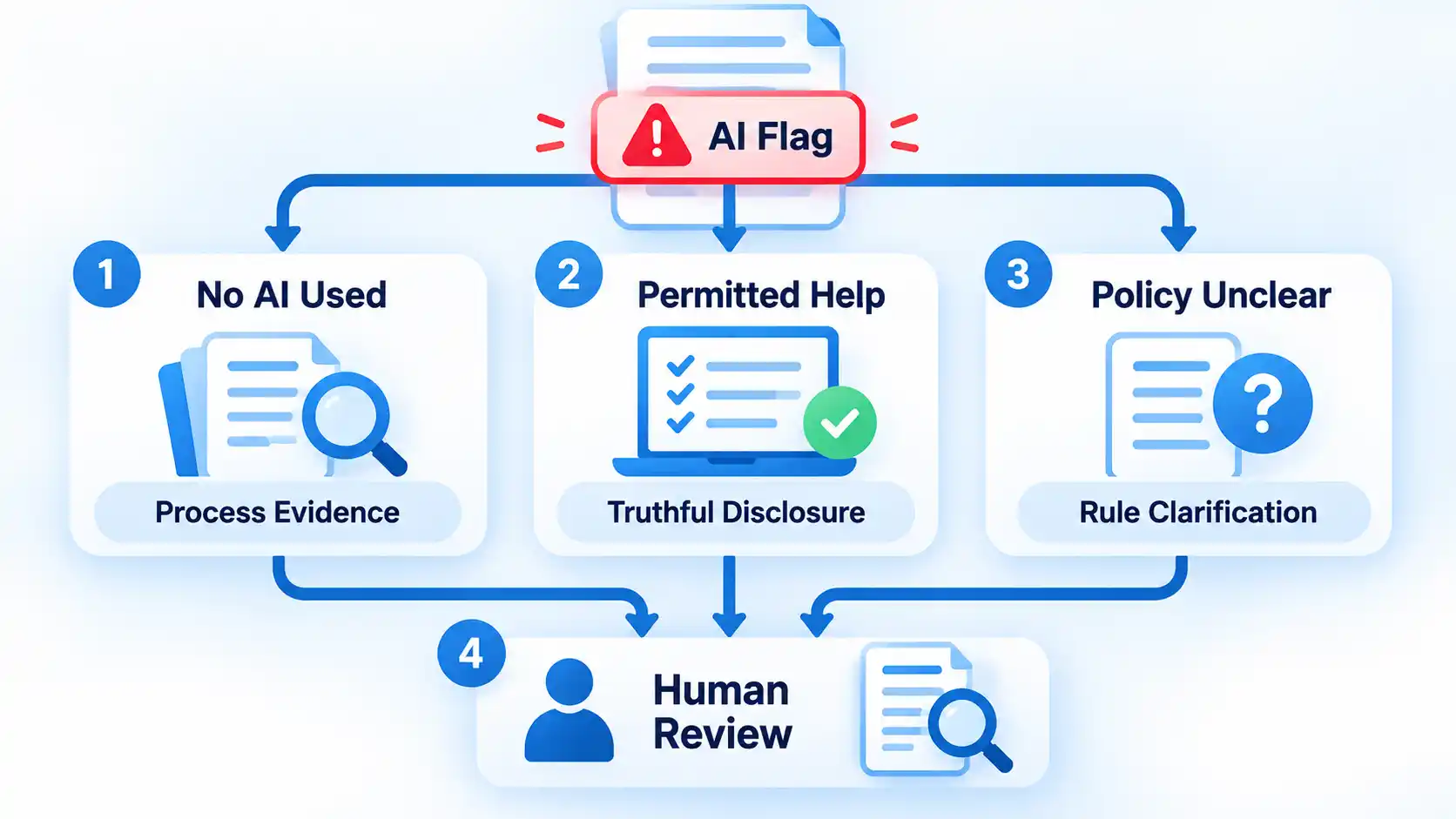
Your response should separate two questions: what did the detector report, and what does the available evidence say about how the document was produced? Work through the issue in order instead of rewriting the document simply to change a score.
- Identify exactly what was flagged. Ask for the detector name, the result, the text that was assessed, and any highlighted passages. If two scans are being compared, check whether they assessed the same text and used the same detector model or settings where that information is available.
- Check the rule that actually applies. Read the assignment instructions, school policy, employer rule, client brief, publisher policy, or other relevant requirement. Separate a detector result from the question of whether any writing or editing assistance was allowed.
- State what assistance you actually used. If you wrote the disputed content without generative AI, say so plainly. If you used permitted grammar, translation, rewriting, or AI assistance, describe it accurately rather than making a broader denial that is not true.
- Provide the strongest relevant process evidence. Share the preserved document, useful version history, earlier drafts, notes, sources, comments, or other records that help show how the work developed. Use evidence that genuinely exists rather than trying to manufacture a perfect-looking trail after the dispute.
- Ask for human review. Request that the reviewer consider the document, the detector result, the applicable rule, and your process evidence together. A review should address the specific concern rather than assume the software output settles the question automatically.
- Use the formal escalation route if needed. If the first decision remains disputed, follow the appeal, academic-integrity, editorial, human-resources, client, or other review process that governs the situation. Requirements differ, so use the procedure that actually applies to your case.
If you did not use generative AI
Keep the response simple and evidence-based. State that the disputed writing was produced by you, explain the basic process you followed, and provide the records that best support that account.
You do not need to prove that every sentence looks unlike machine-generated prose. The goal is to give the reviewer better evidence than a style-based classification alone.
If you used permitted editing, translation or AI assistance
“Human-written” does not always mean “produced without any software assistance.” A person may write the original material and later use spelling, grammar, translation, rewriting, or generative features.
The important question is whether the actual assistance complied with the rule governing the work. If the policy permitted a tool or required disclosure, state what you used and provide the required disclosure. Do not turn a legitimate detector dispute into an inaccurate claim that no automated assistance was involved.
If the policy is unclear
Ask which rule is being applied and which kind of assistance the reviewer believes violated it. A detector result and a policy violation are separate questions.
This is particularly important in education because rules can vary by instructor and assignment. Cornell’s current guidance says generative-AI rules may be set on an assignment-by-assignment basis and advises students to ask when the policy or tool classification is unclear. Other organizations may define acceptable assistance differently.
The procedure has reached a useful stop point when the responsible reviewer has the exact disputed material, the applicable rule, your truthful description of any assistance, and the relevant process evidence. A particular detector percentage is not the stop condition.
What to Do If You Have No Version History
No version history does not automatically mean you have no evidence. A document may have been written offline, imported from another application, saved as separate local files, copied between systems, or created somewhere that does not preserve a detailed revision trail.
When revision history is missing, other ways to show how a document was written can include:
- earlier local copies of the file;
- handwritten or digital outlines;
- research notes and saved source material;
- citation-manager records;
- emails or messages discussing the work;
- comments from editors, teachers, colleagues, or collaborators;
- earlier writing on the same subject; and
- your ability to explain why particular sources, examples, arguments, or revisions were used.
Even detector vendors acknowledge this limitation. Originality.ai’s current review guidance says that absence of document history is not proof of AI use and recommends using other evidence when history is unavailable.
File dates and metadata can add context, but they should not be presented as unquestionable proof. Files can be copied, exported, restored, or moved between devices and services. Use metadata as one supporting clue alongside stronger process records.
What Not to Do After a Flag
A disputed detector result can make it tempting to keep changing the text until a different tool gives the answer you want. That approach solves the wrong problem.
- Do not fabricate drafts, notes, timestamps, or screenshots. False evidence creates a separate credibility problem and can be more damaging than the original detector dispute.
- Do not delete the disputed version. Keep the material that was actually assessed before creating revised copies.
- Do not treat a second detector as automatic proof. Different systems can produce different results, so disagreement adds uncertainty rather than establishing authorship.
- Do not repeatedly rewrite legitimate prose solely to lower a score. Rewriting changes the evidence and may also make the prose less natural.
- Do not hide assistance that was actually used. If editing, translation, paraphrasing, or generative tools were involved, describe them accurately and compare that use with the applicable rule.
- Do not assume a detector percentage is a plagiarism percentage. AI detection and source-matching or plagiarism systems answer different questions.
- Do not upload confidential work everywhere just to collect more scores. Before sending sensitive academic, client, employer, or unpublished material to another service, check whether you are authorized to share it and how that service handles submitted content.
A controlled rescan can help investigate an inconsistent result, but it should compare like with like. When possible, use the same text, detection model, language settings, and citation treatment. A different result under different conditions does not automatically invalidate the first scan.
How to Protect Future Work
The simplest protection is to keep ordinary records while you work instead of trying to reconstruct them only after a dispute. You do not need an elaborate surveillance system. A normal revision trail, retained drafts, research notes, and accurate disclosure records are usually more useful.
For important work, consider drafting in a system that preserves revision history, keeping meaningful intermediate copies, and retaining the notes and sources that shaped the document. Google Docs also lets you name important versions, which can make major milestones easier to find and helps prevent those named versions from being merged.
If a school, employer, client, or publisher permits some use of AI, translation, grammar, or rewriting tools but requires disclosure, keep a simple record of what was used and for what purpose. That is easier than trying to remember the exact workflow months later.
Verify the result
- Important documents are being created or stored somewhere that retains useful revision history when feasible.
- Meaningful drafts, outlines, and research notes are not all discarded when the final copy is completed.
- Source and citation records are kept with high-stakes research or publishing work.
- Any AI, translation, rewriting, or editing assistance that must be disclosed is recorded accurately.
- You could explain how the document developed without depending on an AI detector to validate your authorship.
The aim is not to make human writing “pass” every detector. It is to keep enough genuine context that an important authorship question can be reviewed using more than one automated score.

💬 Comments