No single edit pushes a page to the top of Google. What raises a page’s ranking potential is the order in which you remove doubts: can Google reach and index the URL, does the content deserve to rank, is one address clearly the real page, does the page feel usable, and does anything on it cross a spam line? Start with the first question, because if the page is not indexed, copy edits cannot help.
Everything below applies to Google web search results. Paid ads and social feeds run on their own rules, so treat this as a Google-specific playbook rather than a general internet marketing plan.
Warning
Google does not guarantee rankings. Its own guidance says following best practices makes a site more likely to appear in search results, and that a change may surface in a few hours or take several months, so wait a few weeks before judging any of it. Read Google’s SEO starter guide.
Quick Take
- Diagnose first: use a
site:query and URL Inspection to separate “not indexed” from “indexed but not ranking.” - Then work in order: make the content useful, give it one clear address, improve page experience, and remove spam-risk practices.
- Recheck indexing, allow a fair review window, and iterate one cluster at a time. Spam-risk shortcuts can lower visibility or remove a site from results.
Before You Start: Prerequisites and Baseline
This workflow assumes a few things are true. If they are not, spend your first hour fixing that instead of rewriting headlines.
Prerequisites
- You can check whether the URL is indexed, using a
site:search or the URL Inspection tool. - Google can fetch the same CSS, JavaScript, and other resources an ordinary browser loads when it renders the page.
- You can edit the page content, its template, or its URL structure, or you can ask the person who can.
- You have Search Console access, or a realistic route to it, for URL Inspection and the reporting tools used later.
- You accept a review window measured in weeks, not days.
Before changing anything, write down four things: the URL, the query you expect it to serve, today’s date, and what the page currently does. That note is what makes Step 7 possible later. The distinction that saves the most wasted work sits right at the start: “not indexed” and “indexed but not ranking” are different problems with different fixes, and most beginners treat them as one.
The Seven-Step Process for Improving Ranking Potential
Work through these in order. If a step uncovers a blocking problem, fix that and re-run the check before moving on.
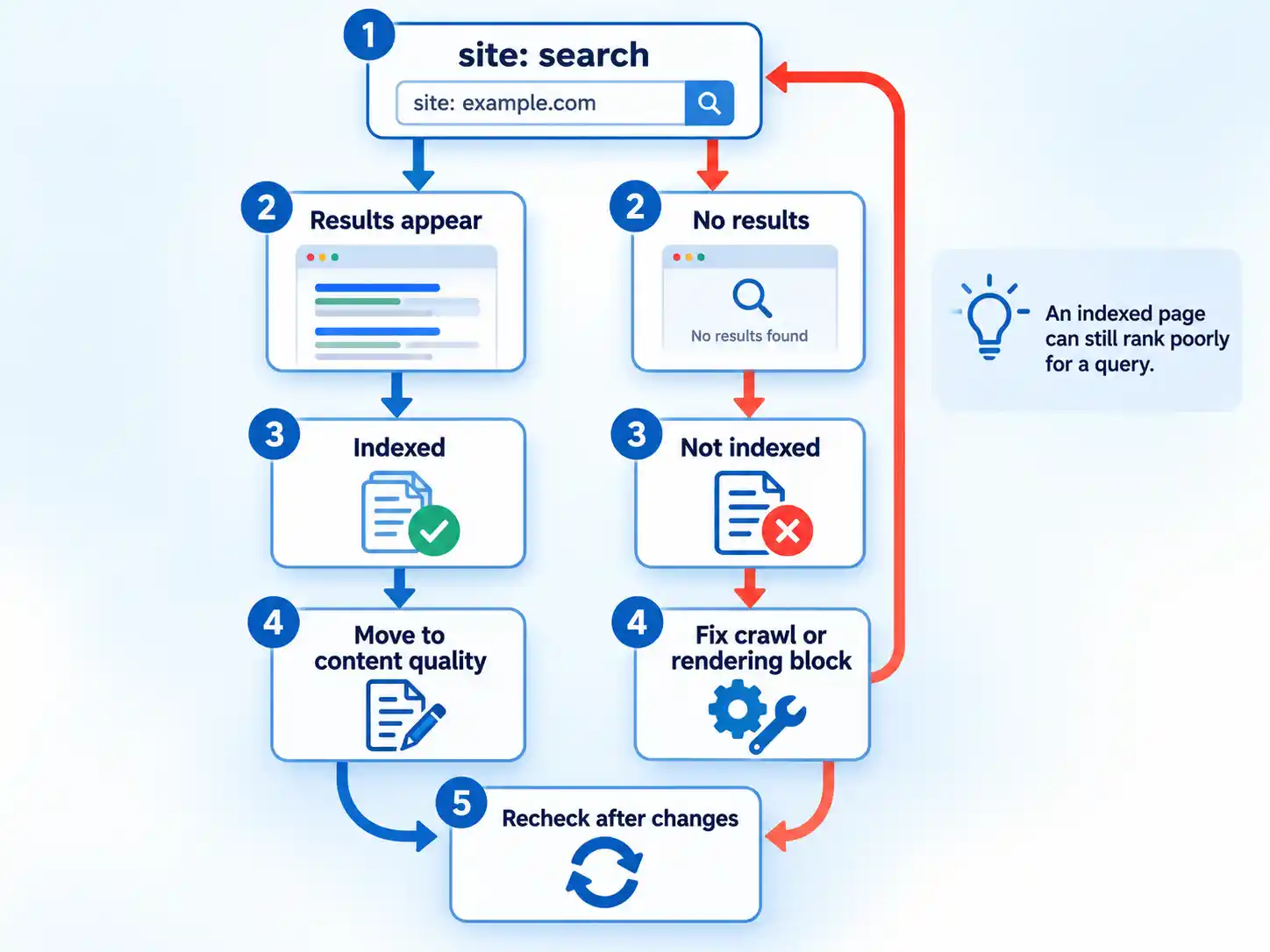
- Confirm the page is indexed and crawlable. Search
site:yourdomain.com/your-pagein Google. Results pointing at the page mean it is in the index, and the next useful question is whether the content deserves to rank. No results mean the page cannot appear yet, and rewriting the copy will not change that. Google’s SEO starter guide walks through the technical requirements and URL Inspection workflow; open URL Inspection in Search Console to see how Google renders the page. Google should see what an average visitor sees. If the CSS or JavaScript that builds the page is blocked or hidden from crawlers, Google may not understand the content. If your pages swap content by visitor location, confirm you are satisfied with what the crawler sees from its own location.

If you want the underlying mechanics, our explainer on how Google ranks web pages, images, and videos covers crawling, indexing, and serving. - Make the content useful and trustworthy. Google’s automated ranking systems are built to prioritize helpful, reliable information created to benefit people, and its guidance on helpful content is a usable self-test.Does the page show first-hand experience or real depth? Is it written for a defined audience? Does it add something beyond a summary of what already ranks? Would a reader leave satisfied instead of searching again?Watch for the search-engine-first patterns Google lists as warning signs: writing to a word count, refreshing dates without substantive changes, producing volume across topics you have no expertise in, summarizing other sources without adding value, and promising an answer to a question that has no answer yet.
The same documentation describes the mix of factors behind experience, expertise, authoritativeness, and trustworthiness, with trust weighted most heavily. Treat that as qualities to demonstrate. There is no single E-E-A-T ranking factor or score.Decision rule: if Step 1 showed an access or rendering problem, fix that before editing a single paragraph.
- Organize URLs and site structure. Words in a URL can show up as breadcrumbs in search results, so
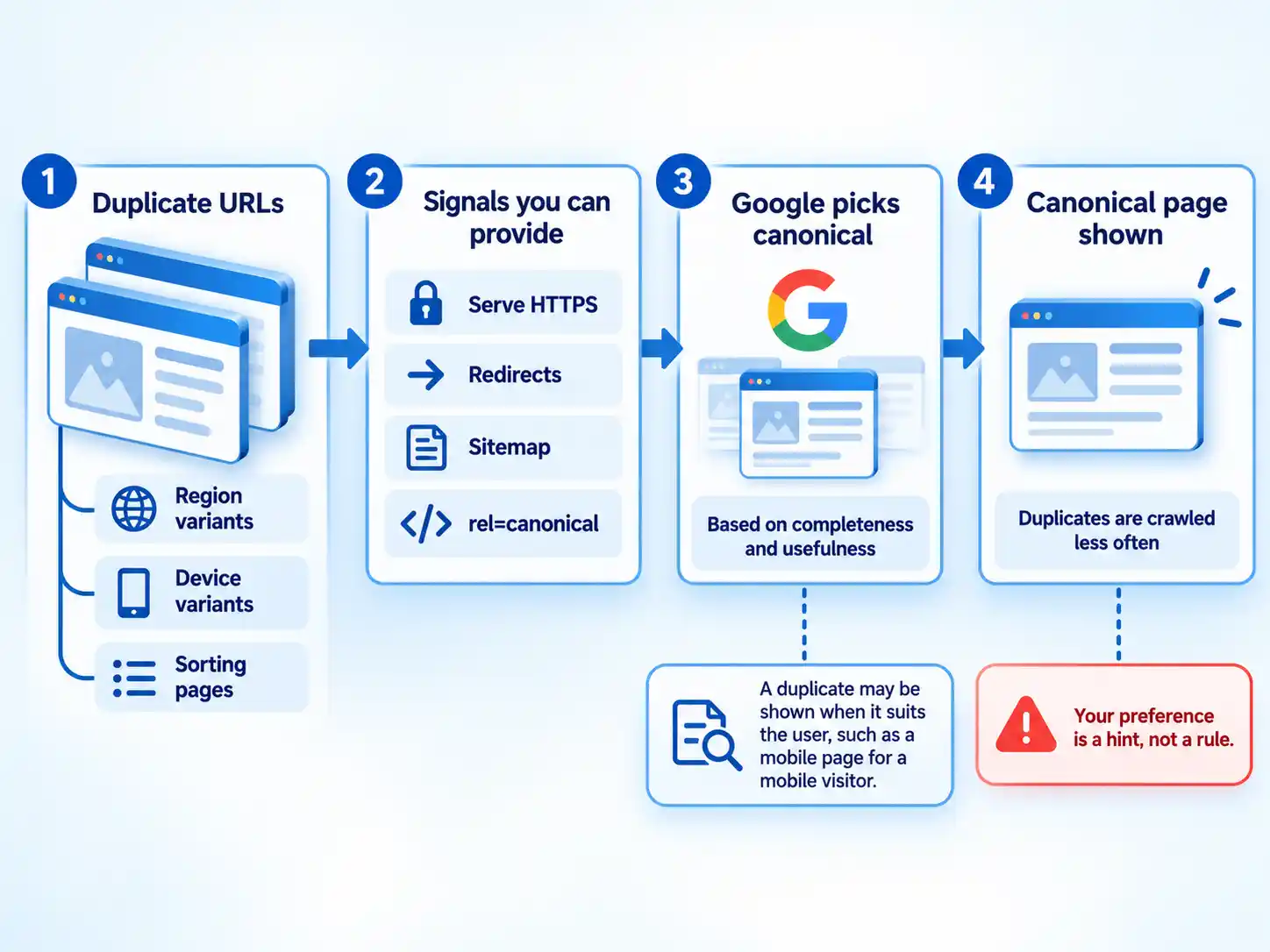
/pets/cats.htmltells a reader more than/2/6772. Google’s SEO starter guide also notes that grouping topically similar pages into directories can help Google learn how often content in each directory changes and crawl accordingly, especially on larger sites.Then hunt for the same content reachable at more than one address. Duplicate content is common and is not a spam-policy violation on its own, but it splits crawl attention and leaves visitors unsure which page is the real one. You do not need to rebuild a working site for this. Search engines generally understand your pages as they stand, so treat reorganization as a long-term improvement and avoid an emergency rebuild. - Point duplicate URLs at one preferred version. Canonicalization is how Google groups similar pages and picks the one that looks most complete and useful, then crawls the duplicates less often to save effort. You can influence that pick with four signals: serve the page over HTTPS, redirect non-preferred URLs, include the URL in a sitemap, and add a
rel="canonical"annotation. Google calls this a preference rather than a rule and may still choose a different page. Expect the occasional surprise, too: a mobile duplicate can be shown to a mobile searcher even when the desktop page is the canonical.
- Improve page experience Page experience covers more than load speed, and Google’s own self-assessment list is short enough to run in an afternoon.
Page experience self-assessment Check Question to answer yes Where to look Core Web Vitals Do the pages have good Core Web Vitals? Search Console Core Web Vitals report, Chrome Lighthouse HTTPS Are pages served securely? Search Console HTTPS report Mobile display Does content display well on mobile devices? Chrome Lighthouse mobile checks Ads Does the page avoid an excessive amount of ads that distract from or interfere with the main content? CrUX ad metrics (experimental) Interstitials Do pages avoid intrusive interstitials? Google’s page experience guidance on intrusive interstitials Main content clarity Can visitors easily tell the main content from everything else on the page? Google’s page experience guidance on distinguishing main content There is no single page-experience signal. Core Web Vitals are used by Google’s ranking systems; the other aspects on that list do not directly help a page rank, though they make a site more satisfying to use, which is the direction the systems reward.
Info
Good Core Web Vitals scores do not guarantee top positions. Google also warns that chasing a perfect score purely for SEO may not be the best use of your time.
For the interface side of these fixes, these web design tips for an ideal website cover layout, mobile reading, and the habits that keep interstitials out of the way.
- Remove spam-risk practices In Google’s usage, spam means techniques that deceive users or manipulate Search systems. Violations can rank lower or not appear at all, and Google detects them through automated systems plus, where needed, human review that can produce a manual action.Audit against the list in Google’s spam policies: cloaking (showing search engines different content than visitors), doorway pages built to funnel traffic toward similar queries, buying expired domains to host low-value content, hacked pages and injected content, hidden text or links, and keyword stuffing. Two clarifications save people from over-correcting. Tabs, accordions, tooltips, and screen-reader-only text are legitimate design patterns, not hidden text. And if you bring in help, a link-building agency should be able to show you exactly which pages it intends to place links on and why they are relevant. A bulk package you cannot audit is not worth the risk.
Warning
Ranking suppression and manual actions apply across Google web search results, including Google’s own properties. Remove the practice, keep it removed, and expect reassessment to take time. No process restores a ranking on demand.
- Verify, wait, and recover Run the
site:query again and reopen URL Inspection. Check the Search Console HTTPS report and Core Web Vitals report, and use Chrome Lighthouse plus CrUX ad metrics when ads are part of the page. Then wait a few weeks before drawing conclusions, as Google’s SEO starter guide advises; it warns that changes can reach search results at very different speeds and that not every change produces a noticeable effect. A technically clean page can still lose to better content for a given query, which is the honest ceiling of this work.Symptom → check → next step Symptom What to check Next step No results for the site: query Technical requirements, robots directives, and how URL Inspection renders the page Fix crawl or rendering access, then recheck after a fair review window Indexed, but no impressions for the target query Whether the primary content actually matches that query and how competing pages cover it Treat it as a relevance and depth problem; indexing is already working Google shows a different URL than your canonical Whether HTTPS, redirects, the sitemap, and rel="canonical"all point the same wayConsolidate the signals and accept that Google may still choose differently Visibility dropped after a change Recent template, redirect, or content edits, and any manual action reporting Revert anything that broke access; remove policy-violating practices and wait Then iterate. Pick the next cluster of issues, change it, and restart the clock. One cluster at a time keeps the comparison meaningful.
Verify the result
- A
site:query returns the page you are working on. - URL Inspection renders the same content a browser shows, with no blocked CSS or JavaScript.
- HTTPS, redirects, the sitemap, and any
rel="canonical"annotation all point at the same preferred URL. - Every question in the page experience self-assessment answers yes.
- No cloaking, doorway pages, hidden text or link abuse, keyword stuffing, or other spam-risk practice remains on the page.
- Your baseline note now has a change date and a review date on it.
When It Still Does Not Move
The URL is reported as indexed, but it never shows for the query I care about
Indexing and ranking are separate gates. Being in the index means Google can consider the page; it does not mean Google rates it above the pages already covering that topic. Compare your page against the ones currently appearing: if they answer the query more directly or with more depth, no technical fix moves you. Improve the substance, then give it weeks.
Google keeps displaying a URL I did not select as canonical
Start by checking that your signals agree with each other. A page can serve HTTPS while redirects point elsewhere, or carry a canonical annotation that contradicts the sitemap. Google weighs completeness and usefulness when it picks a representative page, so a thin variant may keep winning. Consolidating the signals is the fix; forcing the outcome is not available.
Visibility fell and there is a manual action against the site
A manual action means human review confirmed a policy violation. Identify the practice, remove it, and keep it off the site. Then expect reassessment to take time. This guide teaches the practices that keep you clear of policy problems; it does not offer a removal procedure or a recovery promise.
Conclusion: Ranking Potential Is a Ceiling
Ranking potential is a ceiling, not a switch. If access and indexing are clean and the page still loses, the competing pages answer the query more directly or with more depth; that is a content problem, not a technical one. Treat that ceiling honestly. Improve the answer rather than hunting for a shortcut that forces the outcome. For the mechanics underneath, start with how Google ranks web pages, images, and videos.

💬 Comments