The fastest way to waste a redesign budget is to spend it on the surface. A new palette, a heavier typeface, and a looped hero video can make a site look current while the expensive problems stay exactly where they were: menus a screen reader cannot follow, a pricing link nobody finds, a primary action buried three sections down.
Quality web design addresses those problems. It is the set of decisions that determine whether a page can be perceived, understood, navigated, and acted on by the people who arrive at it, including people on a mid-range phone, on a slow connection, on a keyboard, or on a screen reader. Trust and conversion readiness are outcomes this work can support. Neither is something a vendor can hand over along with a new homepage.
Quick Take
Judge a page on three fronts: whether its structure is accessible to assistive technology, whether its content is readable and navigable at a glance, and whether the primary action is obvious and measurable. Visual polish supports all three and substitutes for none of them. Design choices can make a next step easier to see and easier to take; they cannot guarantee sales, rankings, or revenue.
What Quality Web Design Means
Web design covers the layer a visitor actually meets: layout, typography, color, imagery, information hierarchy, and the look and feel of everything on the screen. Web development builds what makes that layer work: server logic, data, integrations, security. One team often handles both, and plenty of sites are competently built and badly designed, or attractive and functionally broken.
That split is conventional, and it earns its keep. Design decides what a page asks of a visitor; development decides whether the system behind it can answer (Shopify’s web design primer). Confusing the two produces the familiar mismatch: a beautiful prototype nobody can ship, or a sturdy build nobody wants to use.
Info
Working definition: quality web design is the balance of visual hierarchy, readability, navigation, consistency, performance, responsiveness, and accessibility, applied to a specific audience and a specific task. Notice what that list leaves out: color palettes and hero imagery. Those elements support the seven properties; they do not define them.
The principles themselves are not mysterious: simplicity, consistency, navigation, readability, load time, and form following function (Wix’s design overview). None of them is exotic. Holding all of them at once, on a deadline, while a content team keeps adding pages, is the hard part.
| Dimension | Web design | Web development |
|---|---|---|
| Primary output | Layout, hierarchy, type, color, imagery, and the interaction patterns a visitor sees or uses | Working functionality behind the interface: server logic, data, integrations, authentication |
| Core question | Can the right visitor find what they need and finish the task the page exists for? | Does the system behave correctly, securely, and at the expected scale? |
| Typical failure | A polished page with a confusing menu, a buried primary action, or unreadable body text | A site that renders correctly but is insecure, unstable under load, or missing the integrations the design assumes |
| Who owns it | Designers, content leads, UX researchers, accessibility specialists | Engineers, platform specialists, operations, security |
Trust and Perceived Credibility
Visitors form fast judgments about whether a business looks competent, and those judgments rest on execution details they would never list out loud: whether the header stays put as they scroll, whether the body text is legible at arm’s length, whether the same button style shows up on every page or changes shape three clicks in.
The mechanism is consistency. When color, type, spacing, and component behavior repeat predictably, a visitor spends less effort working out what kind of organization they are dealing with. Clutter, slow loads, outdated visuals, and branding that shifts from page to page raise quiet doubts; clean, responsive execution settles them. What that execution cannot do is manufacture confidence. A consistent, legible, responsive site removes a common reason for doubt. It does not turn a weak offer into a strong one.
Consistency is also cheaper than novelty. A small design system of two typefaces, a fixed spacing scale, and three button states is easier to hold together across fifty pages than an ambitious visual concept that only survives on the homepage. When a site feels untrustworthy, look for a broken pattern before you look for an ugly one.
Usability: Helping People Scan, Navigate, and Act
People do not read web pages in order. Nielsen Norman Group’s eyetracking research on the F-shaped pattern describes it as a default that appears when three conditions line up: text with little or no formatting, a user trying to be efficient, and a user who is not committed enough to read every word. The result is a page where the first lines and the first few words of each line collect most of the attention, while large amounts of content on the right side and further down get skipped entirely.
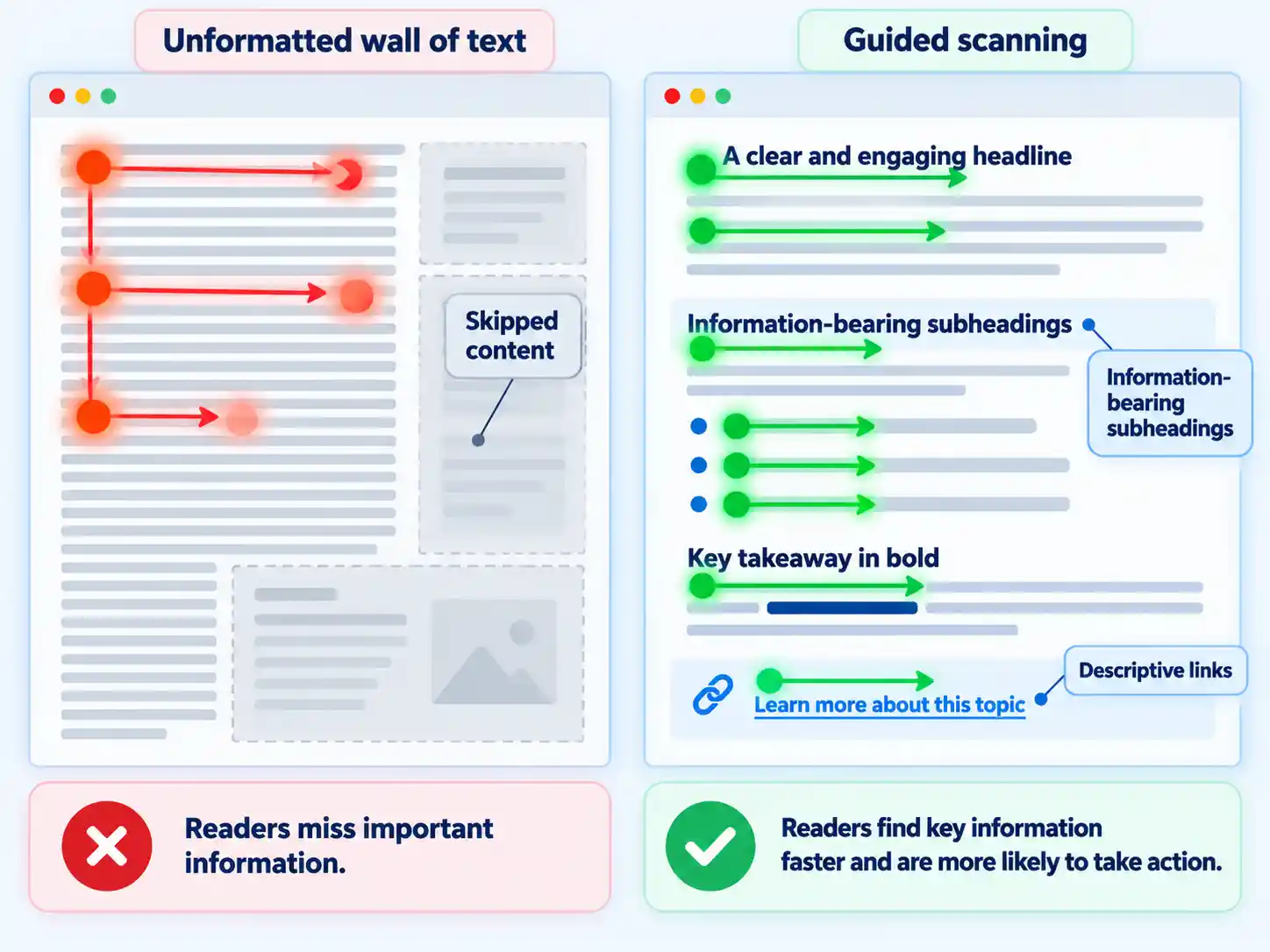
The pattern is a symptom of missing cues. NN/g is explicit that F-scanning is neither the only scanning pattern nor always the dominant one, and that headings, subheadings, bullets, bold phrases, and descriptive links reduce its negative effects. A visitor who lands on a page about pricing will scan subheadings like “Per seat” and “Overage” before reading a single sentence of body copy. Headings written as labels (“Overview,” “Details,” “More”) waste the strongest scanning cue on the page.
The same logic governs navigation. Familiar menu positions, labels that name destinations, and a short path from landing page to task all reduce effort. Responsive behavior belongs here too: a layout that reflows badly on a phone turns a two-tap task into a scroll-and-guess exercise.
Layout heuristics worth a second look
- Body text stays legible at arm’s length on a phone held in one hand.
- Links inside paragraphs are distinguishable without relying on color alone.
- Tap targets sit far enough apart that a thumb hits the intended one.
- The same action uses the same button style everywhere on the site.
- Long pages offer a route back to the top or straight to the primary action.
Accessibility Is Part of Quality
Web accessibility means websites, tools, and technologies are designed and developed so that people with disabilities can use them, and badly designed sites create barriers that exclude people (W3C Web Accessibility Initiative).
Accessibility benefits reach well past the disability framing. The same design decisions serve people on small screens and unusual input modes, older users with changing abilities, people with temporary injuries, people in bright sunlight or a noisy room, and people on slow or expensive connections. If you need implementation detail rather than policy framing, the guide on how to make your website more accessible walks through the practical work.
Three basics carry most of the weight on a typical marketing or commerce page. Images need equivalent alternative text so the information survives when the image does not. Every function reachable with a mouse needs a keyboard path, because many people, including older users with limited fine motor control, rely on speech input or keyboard navigation. Audio and video need text transcripts or captions for people who are deaf or hard of hearing.
Warning
Automated accessibility tools catch a useful subset of problems and cannot confirm conformance on their own. W3C’s accessibility introduction is clear that knowledgeable human evaluation is required. Evaluate early, while fixes are still cheap; retrofitting accessibility into a finished build costs more than designing it in. Legal obligations also vary widely by jurisdiction and sector: accessibility is required by law in many situations, and WCAG 2.2 is published as ISO/IEC 40500, but a generic article cannot tell you which rules apply to your organization. Check your own jurisdiction.
Page Experience and SEO Are Related, Not Identical
Design is not a single ranking lever. Core ranking systems look to reward content that provides a good page experience, and site owners should not optimize one or two aspects in isolation. There is no single page-experience signal. Core Web Vitals are used by the ranking systems; other page-experience aspects do not directly help a site rank higher, though they can make a site more satisfying to use (page-experience guidance).
The boundary matters just as much. Good Core Web Vitals scores do not guarantee top rankings. Relevance can outweigh sub-par page experience, and evaluation is generally page-specific even where some site-wide assessments exist. Treat the scores as one input, not a formula (page-experience documentation).
| Topic | What the documentation says | What it does not establish |
|---|---|---|
| Core Web Vitals | They are used by Google’s ranking systems, and good values are recommended | That a perfect score guarantees a top position |
| Secure serving | Pages should be served over HTTPS as part of an overall good experience | That HTTPS alone outranks a more relevant page |
| Mobile display | Content should display well on mobile devices | That mobile display is a standalone ranking switch |
| Ads and interstitials | Excessive distracting ads and intrusive interstitials are named among the things a good page experience avoids | That any single pop-up triggers a penalty |
| Single signal | Google states plainly that there is no single page-experience signal | A formula you can optimize and stop thinking about |
| Relevance priority | Search seeks the most relevant content even when page experience is sub-par | That page experience is irrelevant to visibility |
| Evaluation scope | Generally page-specific, with some site-wide assessments | That a site-wide average describes every page |
Conversion Readiness: Clear Next Steps, Not Guarantees
Conversion readiness is a page-quality property: the page presents one clear next step, makes it visible at the moment of decision, and removes the friction that sits between intent and completion. Hierarchy does most of the work. If a page offers a primary action, a newsletter signup, three related products, a chat widget, and a cookie banner all competing at the same visual weight, the visitor has to choose before they can act, and many will choose to leave.
Clear navigation, visually distinct calls to action, and fast load times are conversion fundamentals. The harder discipline is measurement: test with real users, read bounce and conversion data, and use analytics or heatmaps to judge whether a design is actually working (Wix’s design overview). Then connect each design change to a metric you can name, such as conversion rate, average order value, engagement, or retention, and compare the result against a before snapshot rather than a memory of how the page used to feel.
| What you are seeing | What it usually points to | What to test first |
|---|---|---|
| Visitors read, scroll, and leave without clicking | Hierarchy is hiding the next step | One primary action visible before the first scroll on mobile; demote competing links |
| Clicks on the button, few completed forms | Friction inside the form or unclear expectations | Remove unjustified fields, state what happens after submission, show errors inline |
| Mobile drop-off far higher than desktop | A layout or load problem on small screens | Test on a mid-range handset over a normal connection before rewriting the copy |
| Strong traffic, weak action rate | The page does not match the promise that brought the visitor | Rewrite the headline to state the outcome in the visitor’s words, then retest |
| A design change shipped with no measurement | No baseline exists to compare against | Capture analytics and user feedback before the next change, not after |
Warning
Design can make a next step easier to find and easier to complete. It cannot create demand for something people do not want, and it cannot guarantee a conversion lift or a revenue figure. Conversion data moves for reasons outside the design layer: pricing, seasonality, traffic mix, campaign quality. Treat any promised uplift as a hypothesis to be tested on your own traffic.
When to bring in help
A small team can often define the user task, name the pages that matter, and still lack the capacity to rebuild navigation, fix accessibility defects, and instrument measurement in the same quarter. At that point the decision is between using a web design agency, hiring in-house, or training the existing team on a narrower scope. Whichever route you take, hand over the audit described below instead of a mood board. A team given a prioritized list of user-facing problems will scope the work more accurately than a team given a color preference.
Common Misconceptions and Limitations
Most bad redesign decisions come from a small set of beliefs that sound reasonable in a meeting and collapse under inspection.
| Misconception | What holds up instead |
|---|---|
| “Good design means good-looking design” | A polished page can still be slow, unreadable at phone width, and impossible to operate with a keyboard. Polish is one input among seven. |
| “Everyone scans in an F pattern, so crowd content to the left” | F-scanning appears when formatting gives no cues. Subheadings, bullets, bold phrases, and descriptive links change the pattern. |
| “Page experience is a ranking switch” | There is no single page-experience signal. Core Web Vitals are used by ranking systems, relevance can outweigh poor page experience, and scores do not guarantee position. |
| “Accessibility is optional polish for later” | It is part of quality, it is required by law in many situations, and it is cheapest when designed in from the start. |
| “A redesign will raise conversion” | Direction can be tested on your own traffic. Commercial claims describe possibilities, not causal outcomes for your site. |
| “Fast is enough” | Speed supports usability. A fast page that hides its primary action is still a page nobody acts on. |
Run a Seven-Step Quality Audit on Any Page
Pick one page that carries commercial weight, a product page, a pricing page, or a primary landing page, and work through the checks in order. Structural problems come first because fixing them changes what the later steps reveal.
- Name the single task the page exists to support. Write it as one sentence with a named audience and device, for example: “A first-time buyer on a phone finds the annual price and starts a trial.” Every later judgment is measured against that sentence, and any element that does not serve it becomes a candidate for removal.
- Check the accessible structure before touching the visuals. Confirm that headings run in a logical order, images carry useful alternative text, media has transcripts or captions, and every interactive element can be reached and operated with the keyboard alone. Run the page through an automated checker, then verify by hand. Tooling flags a subset and cannot confirm conformance by itself.
- Read the page the way a scanner would. Cover everything below the first two paragraphs and ask whether the purpose is still clear. Then read only the subheadings in sequence; if they do not form a rough outline of the argument, rewrite them to carry information instead of labels.
- Walk the navigation on a real phone. Reach the target page from the homepage in as few taps as the site structure allows, then get back out again. Check that the menu opens predictably, that no element traps the scroll, and that the text stays legible without pinching.
- Inspect page experience as one layer, not a score. Review Core Web Vitals, confirm the page is served over HTTPS, verify it displays properly on mobile, and check for distracting ads or intrusive interstitials. Record the results per page rather than as a site-wide average, since assessment is generally page-specific.
- Confirm the primary action is visible and unambiguous. The main call to action should appear before the first scroll on mobile, use wording that describes the outcome, and face less competition than any secondary link. Type the form out yourself and count the fields you would abandon.
- Capture a baseline before you change anything. Pull conversion rate, engagement, and bounce data for the page, run a short test with real users, and note what each participant tried to do first. Without a before snapshot, a later comparison proves nothing.
Verify the audit result
- A single written sentence defines the page task, audience, and device.
- The page can be completed end to end with the keyboard alone, with a visible focus indicator at every stop.
- Reading only the subheadings produces a coherent outline of the page.
- The primary action is visible on a phone without scrolling, and it is the most prominent interactive element above the fold.
- A dated baseline of analytics and user-testing notes exists before the next design change ships.
Where to Spend the Next Design Dollar
When a redesign gets approved, the budget usually flows toward the visible layer first because it is the easiest to demonstrate in a presentation. Reverse that order. Fix the structure, the reading experience, and the path to the primary action before anyone opens a color picker, then measure what changed.
The organizations that get this right treat design as an ongoing maintenance discipline rather than a one-time event: they review accessibility with every release, keep navigation consistent as pages multiply, and check the analytics baseline before signing off on a change. That approach will not let anyone promise a ranking improvement or a revenue lift, and it should not try to. It will produce pages that more people can find their way around and finish what they came to do, which is the part of the outcome design actually controls.
If you take one action from this article, make it the accessibility pass in step two of the audit. It is the check most often skipped, the one with the clearest legal exposure, and the one that most reliably improves the experience for everyone else who arrives at the page.

💬 Comments