Most law firms lose search visibility for boring reasons. Their practice-area pages are thin, their internal links are JavaScript buttons Google can’t follow, their mobile site hides the intake form behind a tap, and nobody has looked at page speed since the site launched. None of that requires a secret tactic to fix. It requires doing the documented fundamentals in order and giving them time to work.
Google’s own SEO Starter Guide is blunt about this: “There are no secrets here that’ll automatically rank your site first in Google (sorry!).” That sentence should be printed on every legal-marketing proposal. What follows is the practical version: what SEO actually is, how Google finds and shows your pages, what to fix first, and where aggressive firms get themselves penalized.
Quick Take
Law-firm SEO is technical hygiene plus people-first content, executed patiently. Make every practice-area page crawlable, mobile-friendly, fast, and useful to someone deciding whether to call. Skip the guaranteed-ranking pitches and the cloaking tricks, because Google’s spam policies can quietly bury a site that violates them.
What SEO Actually Means
Search engine optimization is the work of helping search engines understand your content and helping people find your site and decide whether to visit it. That’s Google’s own framing, and it’s worth sitting with because it puts two audiences in the same sentence: the crawler and the client.
For a law firm, that dual audience has a specific shape. The crawler needs to understand that a page is about, say, contested wills in a particular state. The client needs to read that page and conclude this firm handles their situation. A page that satisfies only one of those is doing half the job. Keyword-stuffed pages that read like they were written for a robot fail the second test. Beautifully written pages buried behind unlinked navigation fail the first.
Info
Appearing in Google’s organic results costs no money. Google states plainly that “it doesn’t cost any money to appear in Google Search results, no matter what anyone tries to tell you.” Paid ads are a separate system with separate rules.
How Google Finds and Shows Your Pages
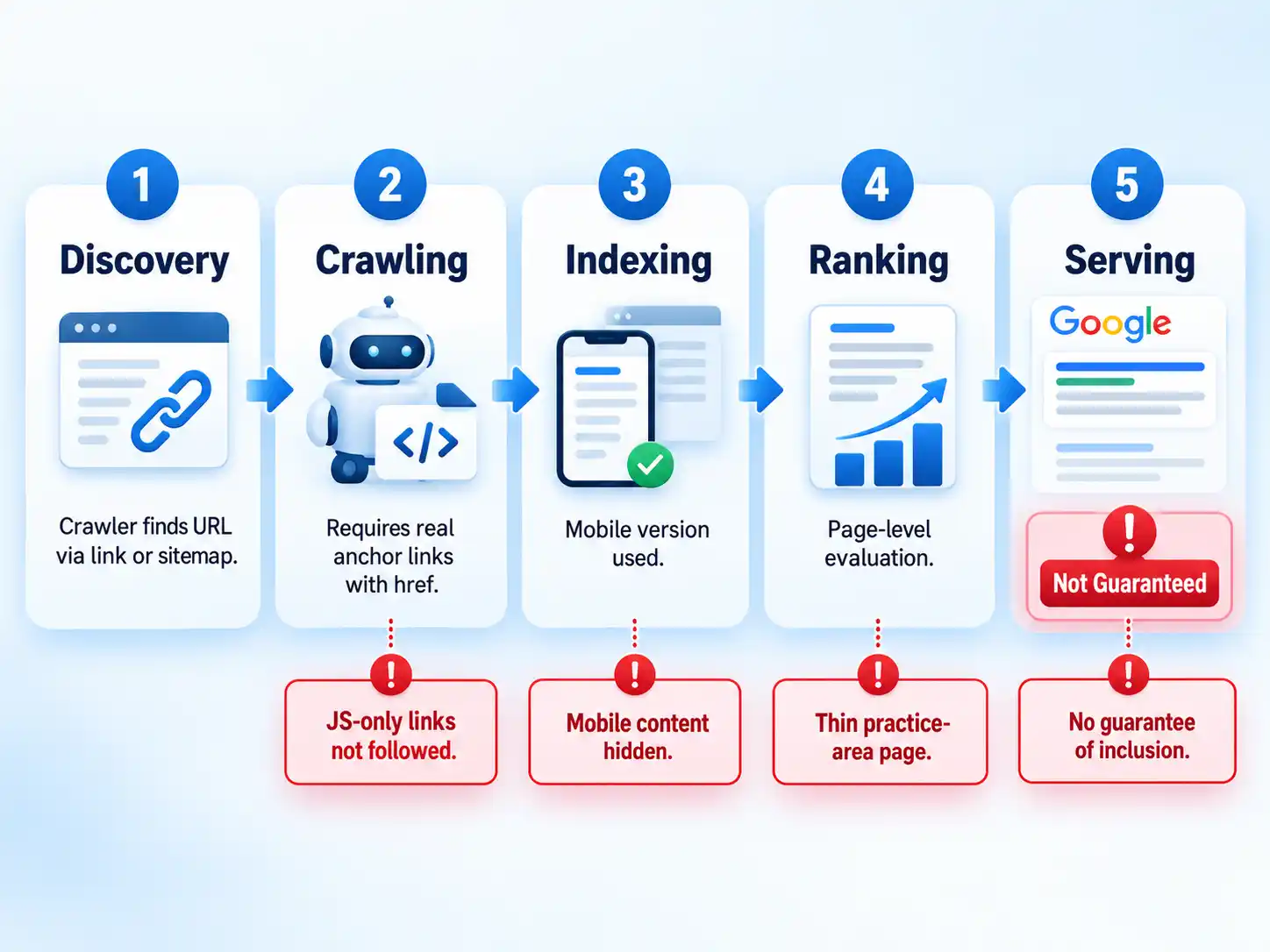
Google runs automated programs called crawlers that explore the web constantly, looking for pages to add to its index. For most sites, you don’t have to submit anything. The vast majority of pages in Google’s results are found and added automatically as crawling happens. The process has a rough sequence worth understanding, because each stage is a place a law firm’s site can fall out.
- Discovery. A crawler finds a URL, usually by following a link from another page or from a sitemap.
- Crawling. The crawler fetches the page. If your internal links aren’t real links, the crawler may never reach the page at all.
- Indexing. Google analyzes the content and stores it. Google uses the mobile version of a page for indexing and ranking, which is why mobile-first matters so much.
- Ranking. Automated ranking systems evaluate individual pages against a query using many signals.
- Serving. The page appears in results, if it’s eligible and relevant. Nothing here is guaranteed.
That last point deserves emphasis. Google’s Search Essentials state that meeting every technical requirement and best practice still doesn’t mean Google will crawl, index, or serve a page. Compliance improves your odds. It doesn’t buy you a slot.
Setting Realistic Expectations
Here’s the part most legal-marketing content skips. Google says changes can take effect in a few hours or several months, and that you should generally wait a few weeks before judging whether your work helped. Not all changes produce a noticeable impact at all.
Ranking also works at the page level. Google’s ranking systems guide notes that strong site-wide signals don’t mean every page on the site will rank well. A firm with an excellent homepage and a neglected “construction accidents” page should expect the homepage to carry the site and the neglected page to sit quietly. Fixing that means fixing the page, not the domain.
Warning
No agency, tool, or consultant can guarantee a ranking position in Google’s organic results. Google explicitly states there is no guarantee any particular site will be indexed, and that following best practices only makes appearing more likely. Treat guaranteed-position promises as a disqualifying red flag.
Get a law firm site into shape for Google Search
Work these in order. Each step builds on the one before it, and skipping ahead usually means redoing work later.
- Make every important link a real link. Google can generally only crawl a link if it’s an anchor element with an href attribute. Audit your practice-area navigation, related-practice links, and footer menus for JavaScript-only click handlers. Checkpoint: every page you care about is reachable by clicking ordinary links from the homepage.
- Confirm the mobile version carries the same content. Google indexes and ranks using the mobile version of your pages. Responsive design is Google’s recommended configuration because content and metadata stay identical across devices. Checkpoint: the mobile page shows the same practice-area text, headings, and contact details as desktop.
- Keep robots directives consistent across versions. If your mobile template carries a different robots meta tag than desktop, especially noindex or nofollow, Google may fail to crawl and index the page. Checkpoint: mobile and desktop robots meta tags match.
- Stop hiding primary content behind interaction. Google won’t load content that requires a swipe, click, or tap to appear. Accordion-style practice-area descriptions that only render on tap are a common offender. Checkpoint: the main body of each practice-area page is visible on load.
- Write descriptive anchor text. Link text tells both people and Google what the destination page is about. “Click here” tells them nothing; “our contested probate practice” tells them everything. Resist cramming keywords into link text. Checkpoint: no internal link reads “learn more” or “click here.”
- Use the words clients actually type. Google recommends using words people would use to search for your content, placed in prominent spots like the title, main heading, alt text, and link text. Checkpoint: each practice-area page’s title and H1 name the case type in plain language.
- Give the site time, then measure. Wait a few weeks before assessing whether a change helped, and expect some changes to take months to surface. Checkpoint: you have a dated record of what changed and a scheduled review date.
Verify the result
- Every practice-area page is reachable by clicking ordinary links from the homepage.
- Mobile and desktop versions show the same primary content and the same robots directives.
- No internal link uses generic anchor text like “click here” or “read more.”
- Each practice-area page’s title and main heading name the case type in client language.
Technical Hygiene for Law Firm Sites
Technical SEO for a law firm isn’t exotic. It’s a short list of things that are either right or wrong, and most of them are checkable in an afternoon.
Core Web Vitals
Core Web Vitals measure real-world loading performance, interactivity, and visual stability. Google recommends striving for specific thresholds, and notes that good Core Web Vitals align with what its core ranking systems seek to reward.
| Metric | What it measures | Target |
|---|---|---|
| Largest Contentful Paint (LCP) | Loading performance | Within the first 2.5 seconds of the page starting to load, per Google’s Core Web Vitals guidance |
| Interaction to Next Paint (INP) | Responsiveness | Less than 200 milliseconds |
| Cumulative Layout Shift (CLS) | Visual stability | Less than 0.1 |
For law firms, the usual culprits are heavy hero videos, third-party chat widgets that load before the main content, and late-loading fonts that shove the headline around. A slow intake page is doubly costly: it hurts the experience and it’s the page where a prospective client decides whether to call.
Structured data
Structured data is a standardized format that gives Google explicit clues about what a page contains. It can enable richer, more engaging search results, and Google’s documentation cites named case studies: Rotten Tomatoes reported a 25% higher click-through rate on pages with structured data, and Nestlé measured an 82% higher click-through rate on rich-result pages. Those are vendor-reported figures from specific sites, not a promise for your practice. Treat structured data as a clarity improvement with possible display benefits, not a ranking lever.
HTTPS
Google has used HTTPS as a ranking signal since 2014, when it described the signal as “very lightweight” and affecting fewer than 1% of global queries. Use HTTPS because clients expect a secure connection and browsers warn loudly without one. Don’t treat it as a competitive advantage. It’s table stakes, and it has been for a decade.
Our practice-area pages aren’t showing up in Google at all
Start with crawlability. If the links to those pages are JavaScript buttons rather than anchor elements with href attributes, Google may never find them. Second, check the mobile template’s robots meta tag, since a stray noindex on mobile can block indexing even when desktop is clean. Third, confirm the page content isn’t hidden behind a tap-to-expand interaction.
We made changes weeks ago and rankings haven’t moved
Google notes that changes can take hours to months to reflect, and recommends waiting a few weeks before assessing impact. It also notes that not every change produces a noticeable result. Check whether the specific page you changed is the page you’re measuring. Ranking operates at the page level, so site-wide improvements won’t necessarily lift a weak page.
Traffic dropped sharply and we don’t know why
Audit for spam-policy violations before assuming an algorithm change. Cloaking, which means showing different content to search engines than to users, is a common cause of manual actions, and hacked sites frequently use cloaking to hide injected content from owners. Review any recent template, redirect, or third-party script changes.
Content That Earns Visibility
Google’s ranking systems are designed to prioritize helpful, reliable information created to benefit people, rather than content created to manipulate rankings. That’s the standard, and it’s a useful one for law firms because it maps onto how good legal writing already works.
Google publishes a self-assessment list for creators. The questions that matter most for a practice-area page:
- Does the page provide original information, analysis, or a substantial description of the topic, or is it a rewrite of three competitor pages?
- Does the main heading give a descriptive, helpful summary without exaggerating?
- Would you bookmark this page, share it with a friend, or recommend it to someone in that situation?
- Does the content present information in a way that makes you trust it, with clear sourcing, visible expertise, and background about the firm?
- Does the page provide substantial value compared with the other results for that search?
Applied to a law firm, that means a page on contested wills should explain what contested means, who typically has standing, what the process looks like, and what a reader should gather before calling. It should not be a 300-word summary that ends in a contact form. The firms that win this comparison are usually the ones willing to answer the awkward questions: cost ranges, timelines, what happens if you lose.
What Gets Firms in Trouble
Google defines spam as techniques used to deceive users or manipulate search systems into featuring content prominently. Violations can result in lower rankings or complete omission from results, and Google detects them through automated systems and, where needed, human review that can produce a manual action.
Cloaking is the risk most relevant to aggressive legal marketing. It means presenting different content to users and search engines with the intent to manipulate rankings and mislead people. Google’s examples include showing a page about travel destinations to search engines while showing discount-drug content to users, or inserting keywords only when the requesting agent is a search engine. A law firm variant: a landing page that reads as a neutral legal-information resource to a crawler but converts to a hard-sell intake funnel for human visitors.
Danger
Spam-policy violations can rank a page lower or remove it from results entirely, and Google may issue manual actions. If a vendor proposes serving different content to search engines than to visitors, or hiding keywords in page code, that’s cloaking. Walk away.
One clarification worth knowing: legitimate paywalls and content gating aren’t cloaking, provided Google can see the full content the same way an authorized human visitor would. The line is deception, not access control.
Putting It Together
The firms that build durable search visibility treat this as maintenance, not a campaign. They keep practice-area pages crawlable and mobile-consistent, they write pages that answer real client questions, they watch page speed on intake pages, and they leave the manipulative tactics alone. Then they wait, measure, and iterate.
If you’re starting from scratch, the ordered steps above are the whole first quarter of work. If you’re auditing an existing site, run the same steps as a checklist and expect the link and mobile findings to be the most revealing. For a deeper walkthrough of the broader discipline, see our beginner’s guide to law firm SEO, and if you’re deciding how search fits alongside your other channels, our overview of digital marketing strategies for law firms puts it in context.
The honest bottom line: SEO for law firms rewards patience and punishes shortcuts. There is no trick that gets a practice-area page to the top of Google next week. There is a documented set of fundamentals that, done consistently, makes it more likely your pages get found, and that’s a better deal than any guarantee.
Key Takeaways
- SEO means helping search engines understand your content and helping people decide to visit, and both audiences matter on every practice-area page.
- Google indexes and ranks the mobile version of your pages, so mobile content parity and consistent robots directives are non-negotiable.
- Links must be real anchor elements with href attributes; JavaScript-only navigation can leave entire practice areas invisible.
- No one can guarantee a ranking, and changes can take weeks or months to show, so build review dates into your plan.
- Cloaking and similar manipulation can lower rankings or remove pages entirely; treat those tactics as disqualifying.

💬 Comments