Both a proxy and a VPN can change the public IP address a website sees when your traffic is routed through them. The bigger difference is that a VPN adds its own encrypted tunnel for traffic sent through the VPN, while a proxy is primarily an intermediary for selected traffic and does not by itself provide the same tunnel protection.
Quick Take
Use a proxy when you mainly need selective routing for a browser, application, protocol, or testing workflow. Use a VPN when you need an encrypted tunnel for traffic covered by the VPN connection. Neither tool makes you anonymous, and neither should be judged only by whether it changes your visible IP address.
Proxy vs VPN at a Glance
The easiest way to compare a proxy and a virtual private network (VPN) is to separate three questions: where your traffic goes, what encrypts it, and which traffic is covered. The table shows the typical differences without assuming that every proxy or VPN uses the same configuration.
Proxy vs VPN comparison
| Feature | Proxy | VPN |
|---|---|---|
| Changes destination-facing IP | Yes, for traffic sent through the proxy | Yes, for traffic sent through the VPN endpoint |
| Encryption supplied by the tool | Proxying itself does not automatically add a VPN-style encrypted tunnel | Protects traffic between the VPN client and VPN endpoint when that traffic is routed through the tunnel |
| Typical traffic scope | Often application-, browser-, or protocol-specific | Often broader at the operating-system or network-routing level |
| Can route only selected traffic | Yes; selective use is common | Yes; split tunneling can deliberately exclude some traffic |
| Works with HTTPS | Yes; HTTPS can remain encrypted through a proxy tunnel | Yes; HTTPS can protect the application-to-website connection in addition to the VPN tunnel |
| Local network or ISP visibility | Depends on the proxy type, application encryption, protocol, and route | For tunneled traffic, the local network can see the VPN connection and endpoint but not the application traffic inside the encrypted tunnel |
| DNS handling | Depends on the application, proxy type, and configuration | Can route DNS through the VPN, but split-DNS and split-tunnel configurations can treat queries differently |
| Primary trust point | The proxy operator for traffic routed through that proxy | The VPN operator or organization controlling the VPN endpoint |
| Typical use | Selective routing, filtering, caching, testing, and application-specific network paths | Encrypted remote access, broader client traffic protection, and protected routing across untrusted networks |
There is no universal winner in every row. A VPN provides a tunnel-encryption layer that a conventional proxy does not, while a proxy can be the more direct tool when only one application or workflow needs different routing.
What a Proxy Actually Does
A proxy server sits between a client and another server. Instead of connecting directly to a website or service, your application sends selected traffic to the proxy, and the proxy makes the onward connection.
A simple path looks like this:
Application → proxy → destination
The destination normally receives the connection from the proxy rather than directly from the client. This is why a forward proxy can change the public source IP visible to a website for traffic that actually passes through it.
That does not mean traffic passing through a proxy is necessarily unencrypted. HTTP defines the CONNECT method for establishing a tunnel through a proxy. RFC 9110 explains that a CONNECT tunnel can carry a virtual connection that is then secured with Transport Layer Security (TLS).
For example, when a browser opens an HTTPS website through an HTTP proxy, it can establish a CONNECT tunnel through the proxy and then negotiate TLS with the website. The proxy supplies the route, while HTTPS supplies application-level encryption for that browser-to-website connection.
A proxy can also perform jobs that have little to do with personal privacy, including filtering requests, caching eligible responses, enforcing network policy, or routing one application differently from another.
What a VPN Actually Does
A VPN creates a protected network path between a VPN client and a VPN endpoint. Traffic selected for that route is encapsulated and protected according to the VPN protocol before it crosses the network between those endpoints.
A simplified path is:
Device or selected traffic → encrypted VPN tunnel → VPN endpoint → destination
Internet Protocol Security (IPsec) is one family of technologies used to build VPNs. RFC 4301 defines the IPsec security architecture, which supports security services at the IP layer through protocols, algorithms, keys, and policies selected for a particular deployment.
The important boundary is the VPN endpoint. The VPN tunnel protects the path between the client and that endpoint. After traffic leaves the VPN endpoint toward its final destination, protection for that part of the connection depends on other protocols. HTTPS, for example, can continue protecting a browser-to-website session independently of the VPN.
A VPN therefore does not replace HTTPS. The two protections operate across different boundaries.
How Traffic Flows Through Each
The routing difference becomes easier to understand when both paths are placed side by side.
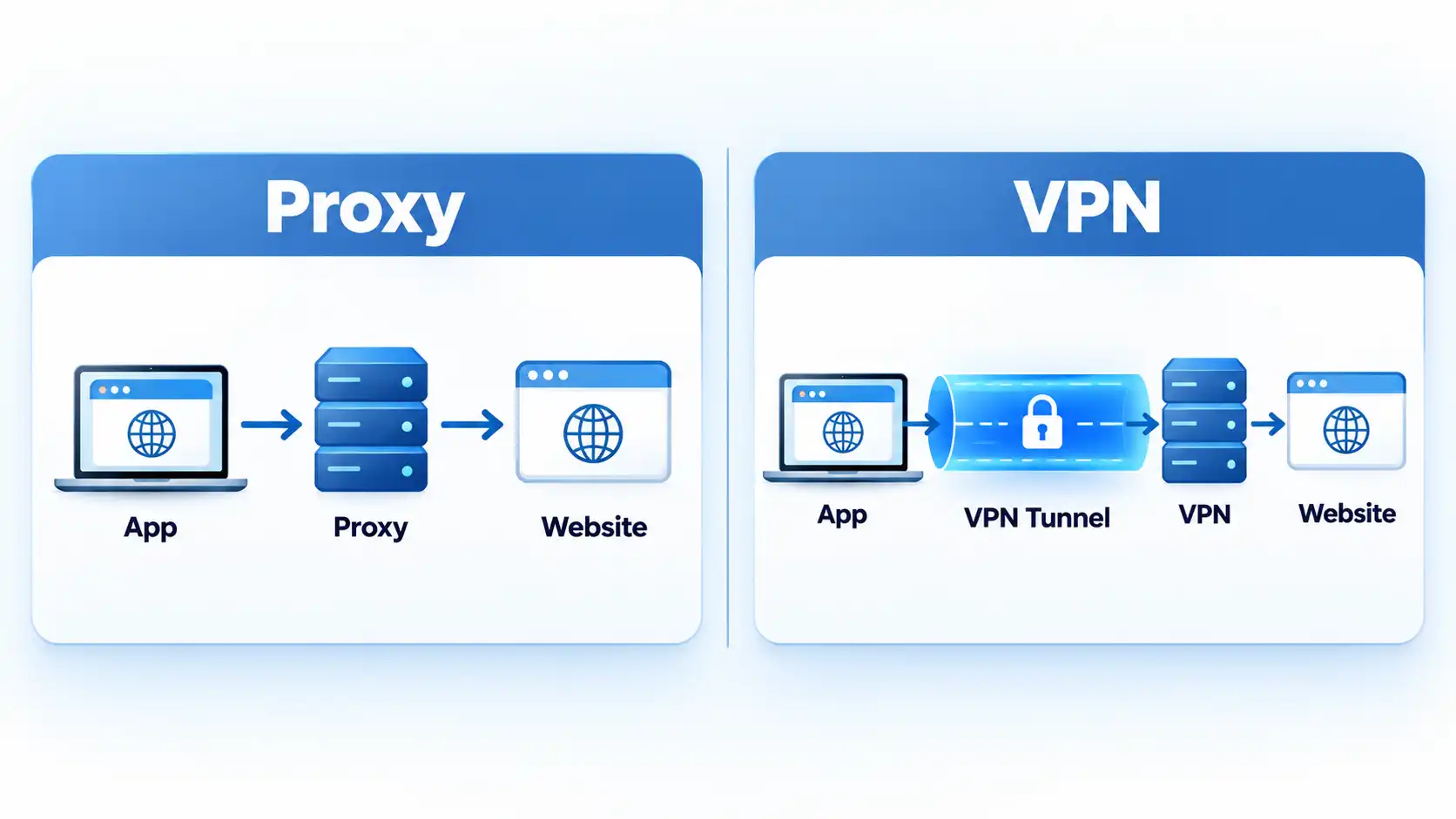
With a proxy
An application sends traffic to the proxy because that application, operating system, or network has been configured to use it. Other applications can continue connecting normally if they are not covered by the same proxy configuration.
For example, a browser can use a proxy while another desktop application continues over the normal network route. The actual behavior depends on the application and system settings.
With a VPN
A VPN often affects routing at a broader network level. Traffic selected by the VPN routing policy enters the tunnel before reaching the VPN endpoint.
That still does not mean every VPN configuration carries every packet. Microsoft distinguishes split-tunnel and force-tunnel VPN routing. With split tunneling, specified routes use the VPN while other traffic uses the physical interface. Force tunneling instead makes the VPN the default path, subject to more-specific routing rules.
Which One Changes Your IP?
Both can change the public IP address that a destination sees.
If a browser connects through a forward proxy, the website normally receives its connection from the proxy endpoint rather than directly from the browser’s original network. If internet traffic goes through a VPN, destinations normally receive their connection from the VPN endpoint instead.
The important qualification is which traffic uses that route. If one application bypasses a proxy, its connection does not gain the proxy’s exit IP. Likewise, traffic excluded from a split-tunnel VPN continues over its non-VPN route.
Changing the visible source IP also does not erase other identifiers. Signing in to an account, keeping the same cookies, or exposing recognizable browser and application signals can still let a destination associate activity with you.
Which One Encrypts Your Traffic?
A VPN is specifically designed to create a protected tunnel between the VPN client and endpoint for traffic routed through that connection. A proxy is primarily a forwarding mechanism, so proxy use alone should not be treated as equivalent to VPN tunnel encryption.
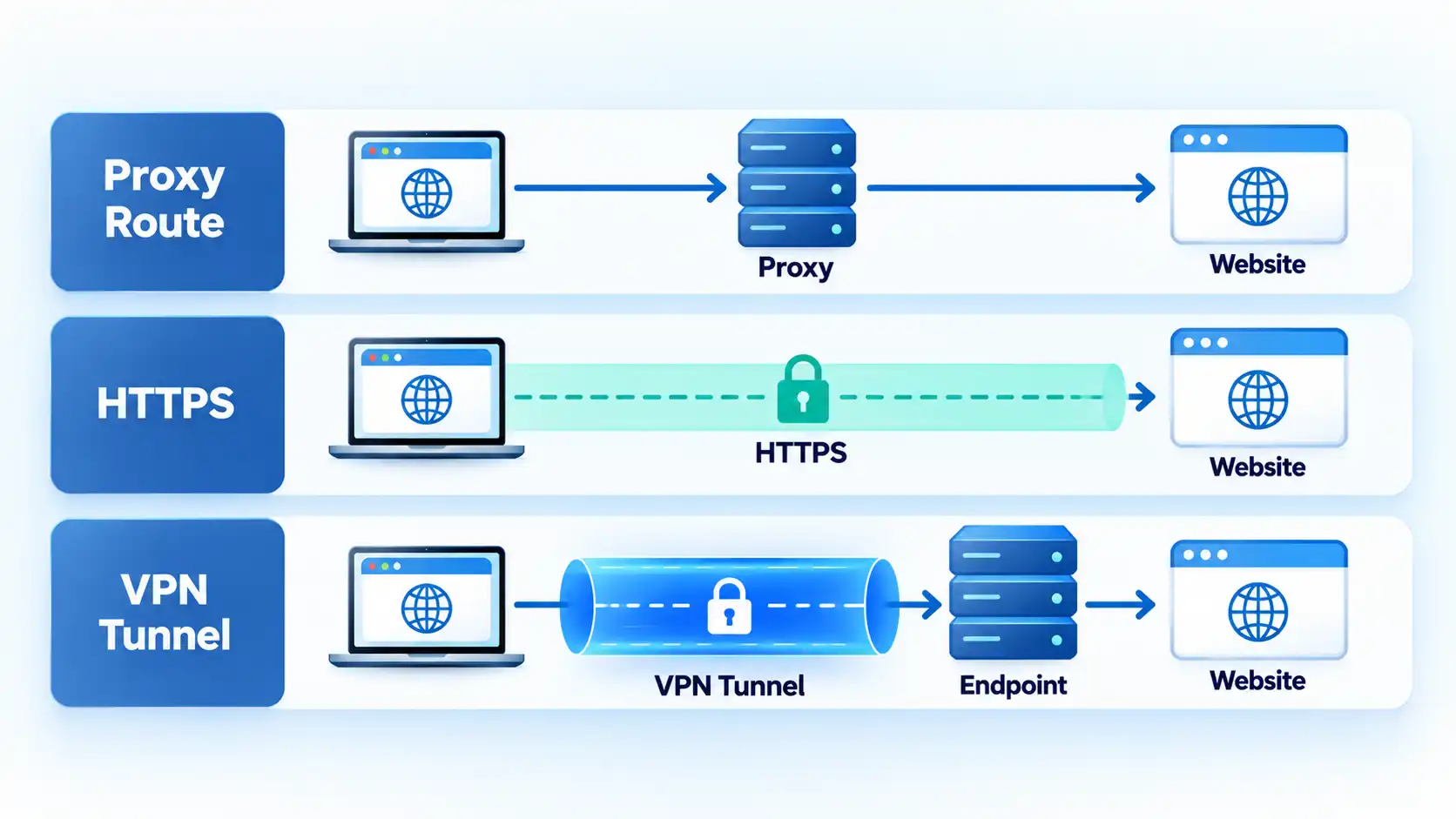
Proxy routing and HTTPS encryption are different
Suppose you visit an HTTPS website through an HTTP proxy. The proxy can establish the route, while TLS protects the browser-to-website connection through that route. RFC 9110 explicitly describes CONNECT tunnels as virtual connections that can then be secured using TLS.
The accurate distinction is therefore not simply “proxies do not encrypt.” A conventional proxy does not inherently add the same client-to-VPN-endpoint encryption layer that a VPN tunnel provides.
VPN encryption has an endpoint too
VPN encryption also has a boundary. It protects traffic across the VPN tunnel between the client and VPN endpoint. Beyond that endpoint, the final application connection relies on its own protocols.
If a website uses HTTPS, that HTTPS connection can continue from the browser to the website while the traffic also travels inside a VPN tunnel for part of its route. The two protection layers can exist at the same time.
Because VPN and HTTPS protect different parts of a connection , using one does not make the other redundant.
What Can Your ISP, Wi-Fi Network and Websites See?
Different observers sit at different points in the route, so “who can see my traffic?” has no single answer.
Your local Wi-Fi network
For traffic routed through a properly functioning VPN tunnel, the local network sees communication with the VPN endpoint and connection metadata such as timing and data volume, while the application traffic inside the tunnel is encrypted.
A VPN can therefore be one layer of staying safe on public Wi-Fi, alongside verifying the network, keeping devices updated, using HTTPS, and protecting accounts. A VPN does not prevent phishing, remove malware already on a device, or prove that a hotspot is legitimate.
Your internet service provider
For tunneled VPN traffic, the internet service provider (ISP) can see the connection to the VPN endpoint but cannot inspect the application contents inside the encrypted tunnel in the same way it could inspect unencrypted direct traffic. Metadata and name-resolution behavior still depend on the configuration.
With a conventional proxy, ISP visibility depends more heavily on where the proxy sits, how the application connects to it, and whether the underlying application connection is protected by a protocol such as HTTPS.
The website you visit
A website can see the proxy or VPN exit address for traffic delivered through that intermediary. It can also see information you intentionally provide, including account details, and can use cookies or other browser signals to recognize sessions.
This is why changing an IP address and becoming anonymous are not the same thing.
DNS queries
The Domain Name System (DNS) converts names such as example.com into network addresses. DNS routing can differ from ordinary application traffic, especially when a VPN uses split routing.
RFC 8598 documents split-DNS behavior for IKEv2 VPNs, where selected domains can use DNS servers reachable through the VPN while other queries continue through the client’s normal DNS service. It also describes configurations that send DNS through the IPsec connection.
A blanket statement such as “a VPN always sends every DNS query through the tunnel” is therefore too broad.
Coverage: One App vs More of the Device
Proxies are often useful when only one application or traffic type needs a different route. VPNs are commonly used when broader network traffic should travel through a protected tunnel.
Warning
Do not assume that connecting a VPN automatically puts every connection on the device inside the tunnel. Split-tunnel configurations deliberately send only selected destinations or applications through the VPN, while other traffic continues over the normal network.
Microsoft’s Windows VPN documentation makes this distinction explicit: a split-tunnel configuration sends specified routes over the VPN and leaves other traffic on the physical interface, while force tunneling makes the VPN the default route unless a more-specific route says otherwise.
Windows also supports application-triggered and application-specific VPN configuration, which is another reason “proxy equals one app, VPN equals every app” is too simplistic. The useful distinction is that proxies are commonly used for selective application or protocol forwarding, while VPN technology provides network-level tunneling whose actual scope is controlled by routing policy.
The mechanics of split tunneling matter whenever you need to know which traffic is actually protected by the VPN route.
Proxy vs VPN for Common Situations
Using public Wi-Fi
A VPN can add an encrypted tunnel between your device and VPN endpoint across an untrusted local network. HTTPS still matters because it independently protects individual website connections beyond the VPN endpoint.
A proxy can change the route and destination-facing IP for configured traffic, but proxying alone should not be treated as a replacement for VPN tunnel protection when that tunnel is the security requirement.
Routing one browser or application
A proxy can be more direct when only one browser, application, or protocol needs a different network path. There may be no useful reason to change the routing of unrelated device traffic when the task is narrowly scoped.
Remote access to an organization
A VPN is designed for cases where an authenticated client needs protected network access to remote resources. Enterprise deployments can use force-tunnel, split-tunnel, or more granular application-specific policies depending on the environment.
Testing a website from another network path
A proxy can be practical for authorized quality assurance, location testing, or application-level routing when VPN tunnel protection for the rest of the device is unnecessary.
Trying to become anonymous
Neither tool is sufficient by itself. Both introduce an intermediary into the network path, while accounts, cookies, browser characteristics, application identifiers, and the intermediary operator can still matter.
A comparison of proxy, VPN, and Tor needs to separate routing, encryption, relay structure, trust, and anonymity rather than treating all three as interchangeable IP-masking tools.
Understanding what a VPN actually protects also helps separate connection privacy from device security and anonymity.
Which Should You Use?
Proxy
Avoid this if: your main requirement is a VPN-style encrypted tunnel for broader traffic across an untrusted local network.
Main trade-off: a proxy can provide precise routing control without tunneling unrelated traffic, but proxying alone does not provide the same encrypted client-to-endpoint protection as a VPN.
VPN
Avoid this if: only one narrow application workflow needs different routing and a broader VPN route provides no useful benefit.
Main trade-off: the VPN adds tunnel protection but also introduces another intermediary and trust relationship, and its real coverage depends on routing and DNS configuration.
If a VPN is the appropriate technology, deciding between a free vs paid VPN is a separate question involving provider trust, usage limits, server access, device allowances, and features.
Bottom Line
Both a proxy and a VPN can change the public IP address seen by a destination for traffic routed through them. A VPN additionally provides a protected tunnel between the client and VPN endpoint for covered traffic, while a proxy is primarily a forwarding intermediary and can still carry separately encrypted traffic such as HTTPS.
Neither technology guarantees anonymity, and neither should be described without checking which traffic actually uses it. The right choice depends on whether you need selective routing, tunnel encryption, broader network coverage, or a specific combination of those functions.

💬 Comments