A proxy server is an intermediary that receives a request from your device, sends that request to another server on your behalf, and passes the response back to you. A proxy can change the IP address a destination sees, but using one does not automatically encrypt all your traffic or make you anonymous.
Quick Take
Think of a proxy as a controlled middle point in a network connection. It can route, filter, cache, or redirect traffic, but its privacy and security properties depend on the proxy type, protocol, configuration, and who operates it.
What Is a Proxy Server?
A proxy server sits between one side of a network connection and another. In the most familiar arrangement, called a forward proxy, your browser or application connects to the proxy first. The proxy then communicates with the destination website or service for you.
For example, suppose your laptop wants a page from example.com. Without a proxy, the request normally travels from your device through your network and internet provider toward the website. With a forward proxy configured, your application sends the request to the proxy server instead. The proxy makes the onward connection and returns the result.
This intermediary role is also how Cloudflare distinguishes forward and reverse proxy servers: a forward proxy sits in front of clients, while a reverse proxy sits in front of servers.
One practical consequence is that the destination normally communicates with the proxy endpoint rather than opening the connection directly to your device. That can change the source IP address visible to the destination. It does not, by itself, erase cookies, account logins, browser characteristics, or other ways a service may recognize you.
How a Proxy Server Works
At a simple level, proxying changes the route that a request follows.
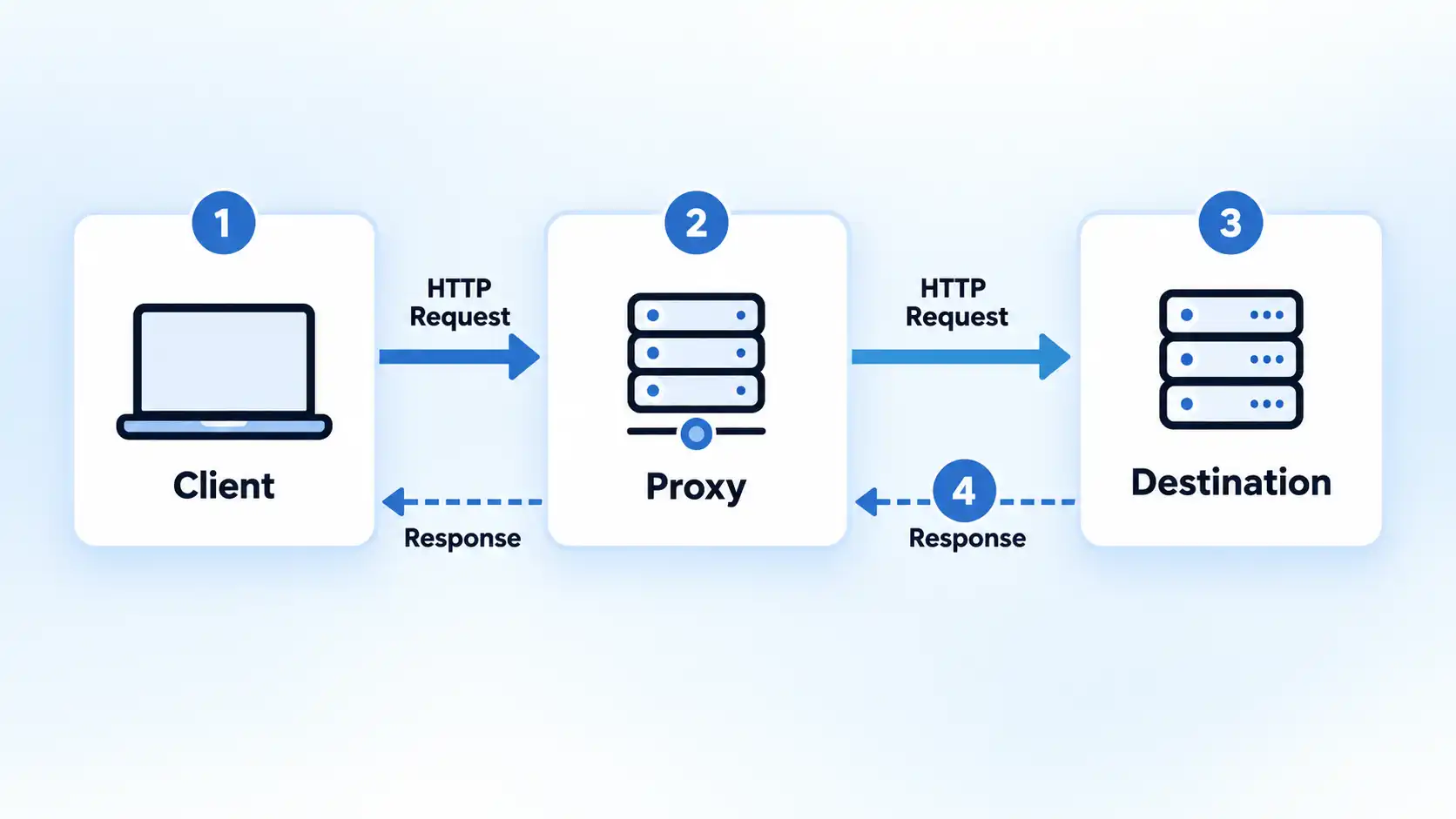
- Your browser or application connects to the configured proxy.
- The proxy receives the request and applies any configured rules, such as access controls, authentication, destination filtering, or routing.
- The proxy creates or reuses an onward connection to the requested destination.
- The destination sends its response to the proxy.
- The proxy returns the response to your application.
The exact mechanics vary by protocol. With HTTP, for example, a proxy may handle ordinary web requests directly. For encrypted HTTPS connections, HTTP also defines the CONNECT method. According to RFC 9110’s definition of HTTP CONNECT, a successful CONNECT request establishes a tunnel through which data can be forwarded in both directions. That virtual connection can then be secured using Transport Layer Security (TLS).
That distinction matters. The proxy provides the route, while TLS can provide encryption between the relevant endpoints. Saying that a proxy simply “encrypts your internet” therefore combines two separate functions.
A proxy may also cache content. If several clients request the same eligible resource and the proxy already has a valid cached copy, it may be able to respond without fetching the resource again. In managed networks, proxies can additionally enforce rules about which destinations users can reach.
Forward Proxy vs Reverse Proxy
The word proxy often refers to a forward proxy, but reverse proxies are also fundamental to web infrastructure. The difference is which side the intermediary represents.
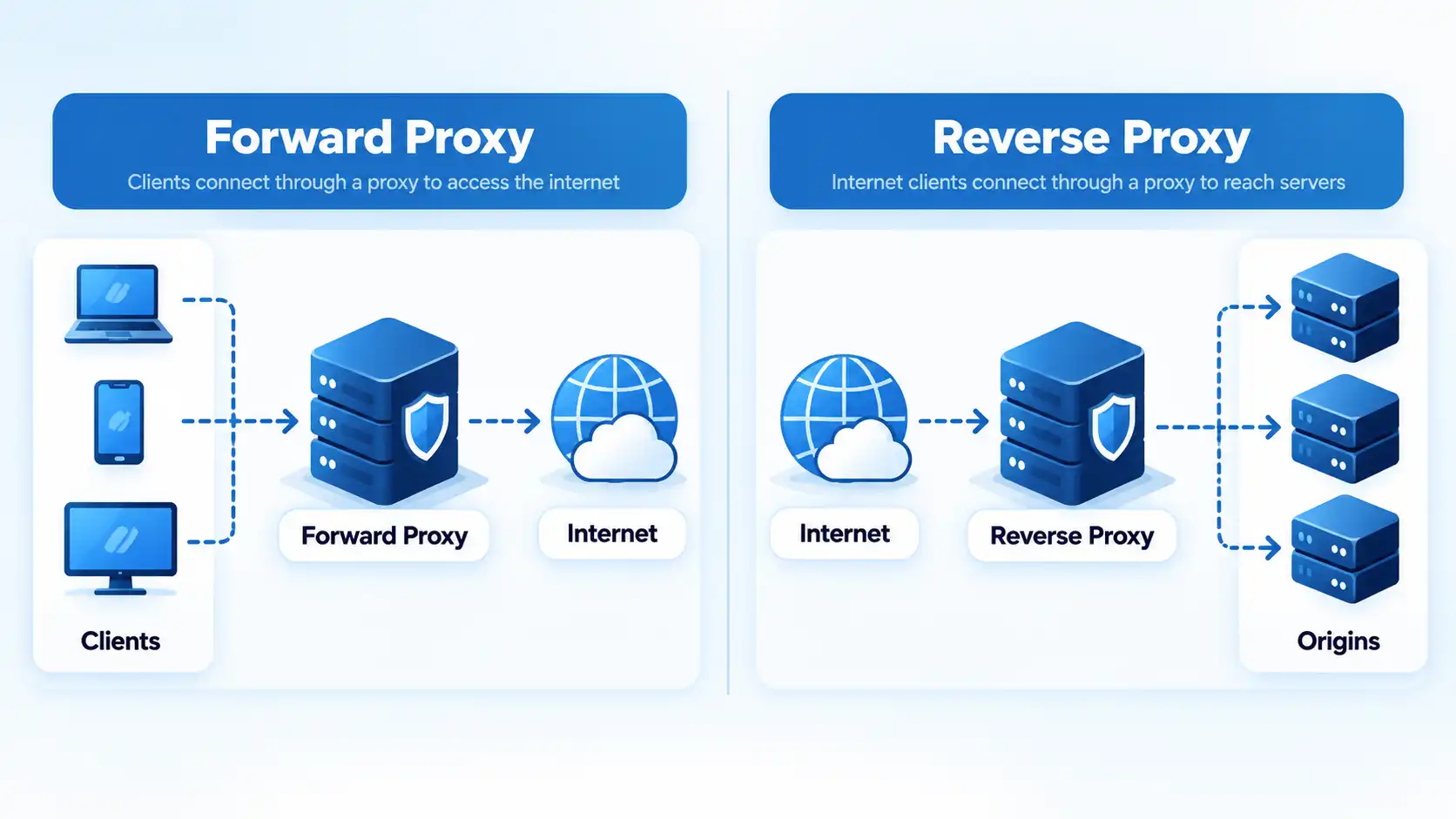
Forward proxy
A forward proxy represents clients. Your browser, application, school network, office network, or automated system sends selected traffic through it before reaching external destinations.
Typical jobs include applying browsing policies, changing the apparent source IP address, controlling outbound access, caching resources, and routing particular applications through a chosen network path.
Reverse proxy
A reverse proxy represents one or more servers. Users connect to the reverse proxy first, and it decides how to handle or forward each request to the origin infrastructure behind it.
Reverse proxies can perform functions such as load distribution, caching, TLS handling, origin-server protection, and routing requests among application servers.
A simple mental model is:
- Forward proxy: manages or intermediates connections on behalf of clients.
- Reverse proxy: manages or intermediates connections on behalf of servers.
Common Types of Proxy Servers
Proxy terminology becomes confusing because different labels describe different characteristics. HTTP and SOCKS describe protocols or connection behavior, while residential and datacenter describe where an exit IP address comes from. Static and rotating describe whether that exit address remains stable. Technical references likewise describe proxy categories as overlapping classifications rather than one flat taxonomy.
The table separates those concepts so you can see what each label is actually describing.
| Proxy category | What it describes | Typical use | Important limitation |
|---|---|---|---|
| HTTP / web proxy | Web-oriented proxying using HTTP mechanisms | Browser and application web traffic, filtering, caching, controlled outbound access | Its existence does not mean every connection is automatically encrypted |
| SOCKS5 proxy | A general proxy protocol supporting TCP connections and UDP relay | Applications that need more protocol flexibility than an HTTP-only proxy | Security depends on the authentication and encapsulation methods actually used |
| Transparent proxy | A deployment in which traffic can be intercepted or redirected without each client manually specifying the proxy | Managed networks, filtering, policy enforcement, caching | It is not primarily designed to conceal activity from the network operator |
| Datacenter proxy | An exit IP associated with hosting or datacenter infrastructure | Testing, network operations, public-web collection, and workloads needing hosted IP addresses | Destinations may identify the address as datacenter infrastructure |
| Residential proxy | An exit IP associated with a consumer internet connection | Location-sensitive testing and other legitimate workflows requiring that network profile | Consent, sourcing, trust, and provider practices require careful evaluation |
| Static or rotating proxy | Whether an exit IP stays consistent or changes according to session or rotation rules | Static for persistence; rotating for workflows that require addresses from a pool | Changing addresses does not add encryption or other protocol-level security by itself |
HTTP and HTTPS proxying
An HTTP proxy understands web-oriented HTTP traffic. For HTTPS destinations, a common arrangement is to create a tunnel using HTTP CONNECT and then run TLS through that tunnel. This is why the term HTTPS proxy needs context: it should not be interpreted as a blanket promise that the proxy itself encrypts every part of every connection.
SOCKS5
SOCKS5 is more general than an HTTP-only proxy. RFC 1928 defines SOCKS version 5 with CONNECT and UDP ASSOCIATE commands, IPv4, domain-name and IPv6 address types, and negotiated authentication methods.
The specification also makes an important security point: SOCKS traversal security depends heavily on the authentication and encapsulation methods selected. SOCKS5 should therefore not be described as inherently encrypting all application data.
Datacenter and residential proxies
These labels describe the source or network classification of the exit address rather than a different transport protocol. A datacenter proxy uses IP space associated with hosted infrastructure, while a residential proxy uses addresses associated with consumer internet connections.
When purchasing one, choosing a datacenter proxy provider involves factors such as network origin, address allocation, protocol compatibility, location requirements, and the workload you intend to run.
A comparison of residential vs datacenter proxies should consider both network origin and operational requirements rather than assuming one category is universally better.
Static and rotating proxies
A static proxy keeps the same exit address for an extended period, while a rotating arrangement can change the exit address according to a provider’s request, session, or time-based rotation rules.
Some services keep an endpoint stable, while a rotating proxy setup can assign different exit addresses from a pool according to its configured rotation or session rules. Rotation changes address allocation; it does not change the fundamental security guarantees of the underlying proxy protocol.
What Proxy Servers Are Used For
Proxy servers are useful because an intermediary can make decisions that would be harder to enforce separately on every destination connection. Their legitimate uses include network management, application routing, filtering, caching, and controlled testing.
Network access control and filtering
An organization can route outbound traffic through a managed proxy and apply rules centrally. For example, a workplace can restrict particular destination categories, require authentication, or log network access according to its policies.
Caching
A proxy can cache eligible content and serve a stored response when appropriate. This can reduce repeated upstream requests and improve performance for resources that are safe and useful to cache.
Testing location-dependent services
Developers, publishers, and quality-assurance teams may need to verify how a service behaves when traffic originates from different locations or network types. A proxy can provide a controlled route for legitimate testing.
Separating clients from destinations
Because the destination receives its connection from the proxy, the client’s direct network address is not necessarily exposed to that destination. This can reduce direct IP exposure, although it should not be confused with complete anonymity.
Application-specific routing
One application can sometimes be configured to use a proxy while another continues using the normal network connection. That narrower scope can be useful when only one workflow requires special routing.
Benefits and Limitations of Proxy Servers
A proxy is useful when you need an intermediary with a specific job. The same design that creates useful control also introduces another system that you must configure, operate, or trust.
Potential benefits
- Central control: organizations can enforce outbound network policies at a shared point.
- Traffic routing: selected connections can leave through a designated network endpoint.
- Source-IP substitution: destinations can see the proxy’s connection rather than a direct client connection in common forward-proxy arrangements.
- Caching: repeated eligible requests can sometimes be served from cached data.
- Application flexibility: some applications can use a proxy independently of the rest of the device.
Important limitations
- The proxy operator becomes part of the trust chain. Traffic passes through infrastructure controlled by somebody else unless you operate the proxy yourself.
- Proxying is not synonymous with encryption. Encryption depends on the protocols, endpoints, and configuration involved.
- An IP address is only one identifier. Accounts, cookies, device characteristics, and other application-layer information may still identify or correlate activity.
- Applications behave differently. Some inherit operating-system proxy settings, while others use separate settings or do not support the same proxy methods.
- A bad configuration can break connectivity. Incorrect hostnames, ports, authentication details, bypass rules, or proxy auto-configuration settings can prevent an application from reaching its destination.
Does a Proxy Make You Anonymous or Secure?
Not automatically. Three separate questions are often compressed into the word privacy: what IP address a destination sees, whether traffic is encrypted in transit, and whether a website can recognize you through application-level information.
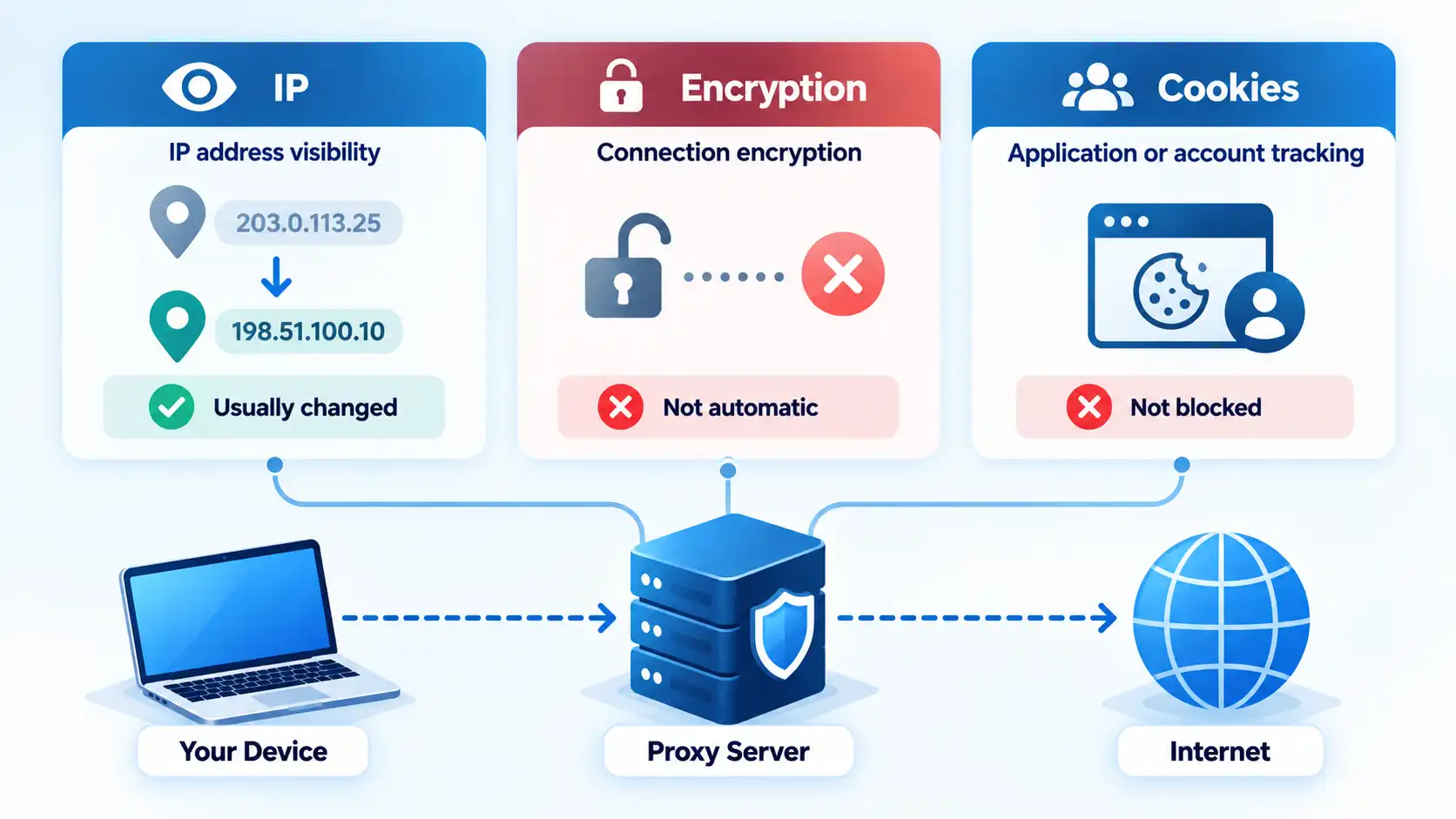
Warning
Changing the IP address a website sees does not automatically encrypt your traffic or make you anonymous. You still need to consider TLS, the proxy operator, account logins, cookies, browser characteristics, and which applications are actually using the proxy.
IP address visibility
A forward proxy can make the proxy’s address visible to the destination instead of the client’s direct address. That is useful when source-address separation is the goal.
Encryption
Encryption is a different property. HTTPS can protect a browser’s connection to a website even when a proxy is involved. HTTP CONNECT provides a standardized way to establish a bidirectional tunnel through a proxy, and RFC 9110 notes that this virtual connection can then be secured with TLS.
A proxy can also be deployed in an environment where traffic is intentionally inspected. The exact security boundary therefore depends on who controls the proxy, how the connection is configured, and where encryption begins and ends.
Website and account tracking
If you sign in to an account, the service can associate activity with that account regardless of whether its connection arrives from a proxy. Cookies, browser storage, and other browser signals can also continue to provide continuity between visits.
For that reason, proxy and anonymous should not be treated as synonyms.
Proxy vs VPN: What Is the Difference?
A proxy and a virtual private network (VPN) can both act as intermediaries, but they are normally used at different layers and provide different protection boundaries. AWS’s technical comparison of proxies and VPNs distinguishes proxy routing from the encrypted tunnel provided by a VPN connection.
Proxy vs VPN at a glance
| Feature | Proxy | VPN |
|---|---|---|
| Traffic scope | Often application- or protocol-specific | Commonly covers traffic routed through the VPN client or operating-system VPN interface |
| Destination-facing IP | Can replace the client’s direct source IP with the proxy endpoint | Destinations generally see the VPN server’s public endpoint |
| Encryption | Depends on the application protocol and proxy configuration | Creates an encrypted tunnel between the VPN client and VPN endpoint |
| Configuration model | May be configured per application, protocol, or operating system | Usually uses a VPN client or operating-system VPN connection |
| Common use | Routing, filtering, caching, testing, and network policy | Encrypted remote access and broader client-side traffic protection |
| Main limitation | Should not be assumed to encrypt all traffic | The VPN operator becomes part of the trust relationship, and application-level tracking can still occur |
A VPN’s encrypted tunnel also has limits, so understanding what a VPN is and what it actually protects helps separate encrypted transport from broader anonymity claims.
For a direct technical decision, proxy vs VPN should be compared by traffic scope, encryption boundary, application coverage, and trust model rather than simply by whether both can change the public IP address seen by a destination.
How to Use a Proxy Without Breaking Your Connection
You do not need to memorize a browser-specific click path to understand safe proxy configuration. The important part is knowing where the setting applies and having the correct server information before changing anything.
- Get the proxy hostname or IP address, port, authentication method, and any required proxy auto-configuration (PAC) URL from the administrator or service you trust.
- Determine whether the application uses its own proxy settings or inherits the operating system’s settings.
- Record the existing configuration before making changes.
- Enter the proxy details only in the appropriate application or system network settings.
- Test ordinary web access and the specific application that needs the proxy.
- If connectivity fails, restore the original settings before changing multiple unrelated network options.
Firefox, for example, currently supports no proxy, automatic detection, system proxy settings, manual proxy configuration, and automatic PAC configuration. Mozilla documents these options in its current Firefox proxy connection settings.
Operating systems expose similar controls. Apple’s current macOS proxy settings include automatic discovery, PAC configuration, HTTP, HTTPS, and SOCKS options. Microsoft documents automatic detection, setup scripts, and manual server configuration for Windows 10 and Windows 11 proxy settings.
Because interfaces change, proxy configuration on Windows, macOS, and Firefox should be checked against current version-specific settings rather than memorized as a permanent click path.
When a Proxy Is the Right Tool
A proxy is a good fit when the requirement is explicit traffic routing, filtering, centralized network policy, caching, application-specific connectivity, controlled testing, or separation between a client and a destination endpoint.
It is a weaker fit when the requirement is simply “make me anonymous” or “secure everything.” Those goals involve more than substituting one network address for another. Encryption, endpoint security, browser behavior, account identity, and trust in the intermediary all remain part of the picture.
The most useful way to think about a proxy is therefore not as an invisibility service, but as a programmable middle point in a network connection. Once you know what that middle point is supposed to do, choosing an appropriate proxy type and deciding whether you need a VPN or another security control becomes much clearer.

💬 Comments