Your business needs stronger cybersecurity when basic protections or visibility are missing, such as reliable backups, timely security updates, multifactor authentication, controlled access, vendor oversight, monitoring, or an incident-response plan. A previous breach or growing dependence on sensitive data, cloud services, and remote access makes those gaps more consequential.
Quick Take
Do not judge cybersecurity readiness by whether antivirus software is installed. Look for operational evidence: can you restore critical data, patch exposed systems, control who has access, see suspicious activity, manage vendor connections, and respond when something goes wrong?
What These Cybersecurity Warning Signs Actually Mean
A cybersecurity warning sign does not necessarily mean an attack is underway. It is an observable weakness showing that cyber risk is being managed incompletely, informally, or without enough evidence that important controls work.
That distinction matters because cybersecurity is broader than installing security software. The NIST Cybersecurity Framework 2.0 resources for small businesses organize cybersecurity risk management around six functions: Govern, Identify, Protect, Detect, Respond, and Recover. Together, they cover how an organization manages cybersecurity risk, understands its exposure, applies safeguards, detects possible compromises, handles incidents, and restores affected operations.
A company can therefore have firewalls, endpoint protection, and cloud security features while still having serious gaps. It might not know which accounts have administrator access, whether backups can actually be restored, which vendors can reach sensitive systems, or who takes charge when suspicious activity appears. The following signs focus on those practical gaps rather than treating cybersecurity as a single product.
11 Signs Your Business Needs Stronger Cybersecurity
1. You Do Not Have Reliable, Tested Backups
Having a backup is not enough if nobody knows whether it contains the right data or whether it can be restored when the original systems are unavailable. A business should know what information is critical, how frequently it is copied, where the copies are stored, who can access them, and how recovery is tested.
Ransomware shows why this distinction matters. If malware can reach production files and backups that remain accessible through the same environment, both may become unavailable. CISA’s ransomware guidance recommends offline, encrypted backups of critical data and regular testing of their availability and integrity.
Testing does not have to begin with a full disaster simulation. Start with several critical files, databases, or systems and confirm that the organization can restore them into a usable state. Also check whether recovery depends on one employee, one credential, one storage provider, or equipment kept in the same physical location as the production systems.
Common operational problems are covered in more detail in these company data backup mistakes. A more advanced recovery program should also document recovery priorities and dependencies rather than treating every file as equally urgent.
For higher-risk environments, testing backup restoration after ransomware should include clean recovery locations, credential separation, and checks that restored systems do not reintroduce the original compromise.
2. Your Software and Devices Are Frequently Behind on Security Updates
Security patches often correct vulnerabilities that have already been identified. If business systems remain unpatched for long periods, attackers have more time to use known weaknesses against exposed applications, network equipment, servers, laptops, and other devices.
This is particularly important for internet-facing infrastructure. Verizon’s 2025 Data Breach Investigations Report found that exploitation of vulnerabilities accounted for 20% of initial access in the breaches analyzed, after increasing 34% from the previous report. Verizon also highlighted perimeter devices and virtual private network infrastructure as important targets in this pattern.
A small business does not need to install every update blindly the moment it appears. Critical infrastructure may require compatibility testing, maintenance windows, or rollback planning. The warning sign is that nobody knows what needs patching, which vulnerabilities matter most, or how long important systems have been waiting for security fixes.
At minimum, maintain an inventory of supported operating systems, applications, network appliances, and cloud services. Assign responsibility for updates, prioritize vulnerabilities affecting exposed or high-value systems, and replace software that no longer receives security support.
3. You Store Sensitive Customer or Employee Data Without Clear Controls
The more sensitive information a business keeps, the more important it becomes to know where that information is stored, why it is retained, and who can reach it.
Sensitive data can spread farther than expected. Customer records may exist inside a customer relationship management platform, exported spreadsheets, employee laptops, email attachments, accounting tools, support systems, cloud drives, and backups. If nobody maintains an inventory, security teams may protect the main application while overlooking copies elsewhere.
The Federal Trade Commission’s guidance on protecting personal information recommends taking stock of sensitive information, retaining only what the business needs, limiting access according to job requirements, protecting retained information, disposing of unnecessary records securely, and planning for incidents.
This is where the principle of least privilege becomes useful. Least privilege means giving a person or system only the access required for its legitimate task. For example, a marketing employee who needs customer names and email addresses may not need access to payroll records or full payment information.
Specific legal requirements vary according to jurisdiction, industry, contracts, and the type of information involved. The warning sign is not merely that sensitive information exists. It is that the organization cannot explain where that information lives, why it is retained, or who can access it.
4. Vendors and Service Providers Can Reach Your Data or Systems, but You Do Not Assess Their Risk
Cybersecurity does not stop at systems directly operated by your employees. Cloud platforms, payroll companies, software providers, managed IT firms, contractors, payment services, and support vendors may hold data or receive trusted access to business resources.
CISA identifies supplier visibility and information and communications technology supply-chain risk management as important issues for small and medium-sized businesses. Its SMB supply-chain risk guidance discusses assessing and managing risks associated with technology suppliers, products, and services.
The risk is not theoretical. Verizon reported that third-party involvement appeared in 30% of the breaches analyzed for its 2025 DBIR, approximately double the previous report’s share. That figure describes Verizon’s dataset rather than every breach globally, but it illustrates why trusted business relationships deserve direct security review.
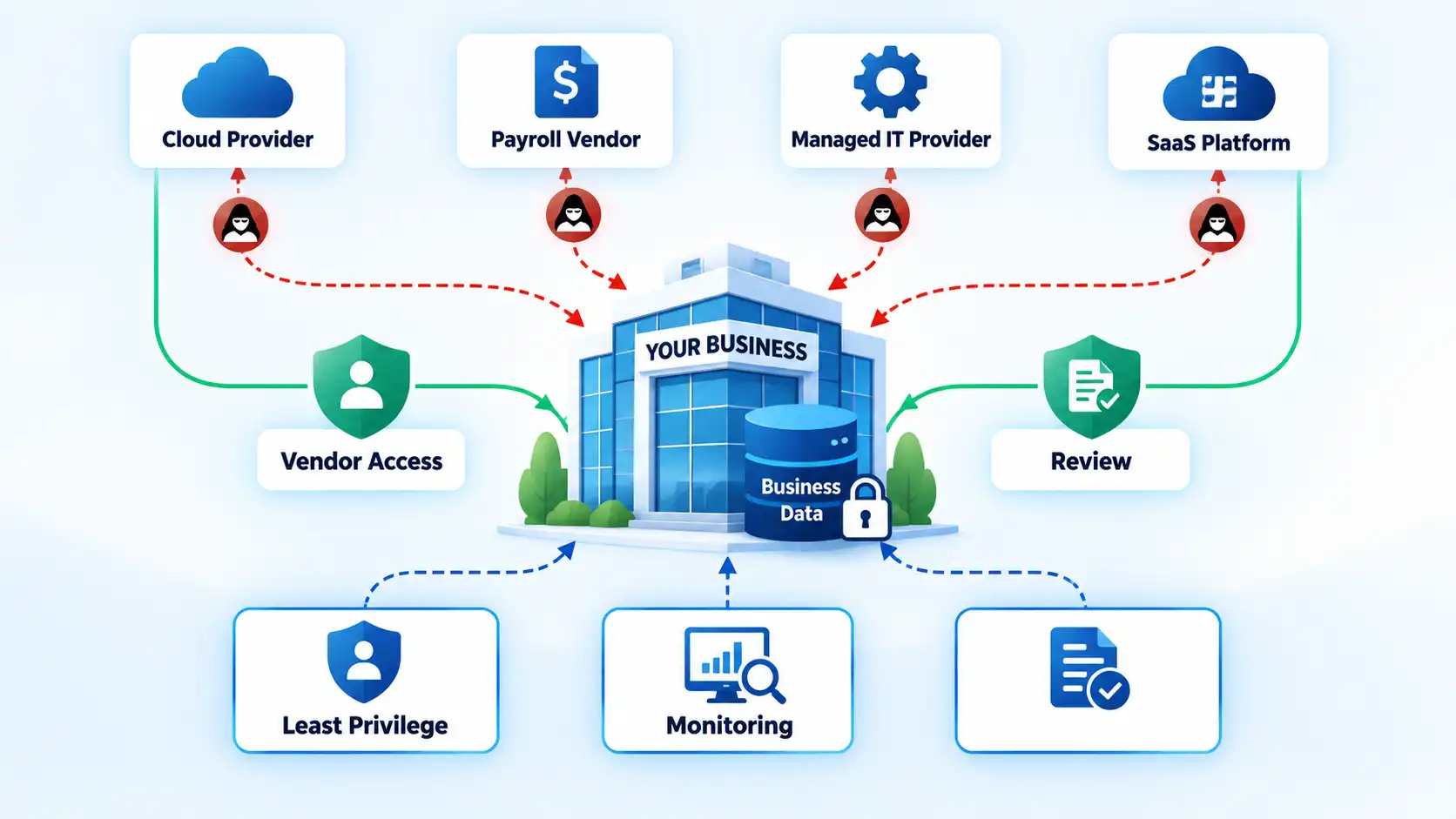
Start by identifying which vendors can access sensitive data, production systems, administrator consoles, remote-management tools, or company credentials. Then determine whether that access is still required, whether privileges can be narrowed, how accounts are removed when contracts end, and how the provider will communicate a security incident that affects your organization.
Businesses that also review cyber-insurance or digital-risk arrangements may consider cybersecurity alongside vendor exposure and other third-party risks during those discussions.
5. Employees Lack Clear Security Rules and Practical Training
Employees cannot follow security procedures that have never been defined or practiced. A company may tell staff to “be careful online” while giving them no clear method for reporting a suspicious email, handling sensitive files, using personal devices, requesting access, or responding when a laptop is lost.
The FTC’s small-business cybersecurity guidance recommends staff training, clear security policies, secure remote-access practices, and procedures for devices that connect to business systems. Training should connect directly to what employees actually encounter rather than relying on occasional generic presentations.
A practical policy should cover strong unique passwords or an approved password manager, phishing reporting, sensitive-data handling, account sharing, removable media where relevant, software installation, remote work, and employee offboarding. When an employee leaves, accounts and access rights should be removed according to a defined process rather than waiting for someone to remember later.
Personal devices also require a deliberate policy. A blanket ban is not always necessary or practical, but unmanaged personal devices should not receive the same access as controlled business equipment by default. If bring-your-own-device access is permitted, define what information and systems those devices can reach and what security requirements apply.
6. Important Accounts Still Depend on Passwords Alone
A password is one authentication factor. Multifactor authentication, commonly shortened to MFA, requires another type of proof before access is granted, such as a security key, authentication application, or another approved verification method.
If administrator accounts, business email, remote access, file storage, financial systems, or other important services still rely only on passwords, identity security deserves attention. Passwords can be reused, phished, guessed, stolen by malware, or exposed through a compromise elsewhere.
CISA advises businesses to require MFA wherever possible, including systems such as email, file storage, and remote access, with priority for administrative accounts and people handling sensitive data. CISA also notes that MFA methods vary in their resistance to phishing.
The immediate objective is not to enable MFA randomly on a few applications. Identify the accounts whose compromise would create the largest impact, protect privileged and remote-access accounts first, and then expand coverage systematically. Also maintain recovery procedures so employees do not bypass MFA because replacing a lost authentication device is too difficult.
7. No One Clearly Owns Cybersecurity Risk
A small business does not necessarily need a full-time chief information security officer or dedicated security department. It does need clear accountability.
If responsibility is vague, important work tends to fall between roles. Management may assume the IT provider handles cybersecurity strategy, while the IT provider assumes management decides risk priorities. The result can be missed vendor reviews, forgotten accounts, inconsistent patching, untested recovery plans, or security tools that have no clear owner after deployment.
The Govern function in NIST’s CSF 2.0 Small Business Quick-Start Guide covers cybersecurity risk-management strategy, expectations, policy, roles, and communication at the organizational level. That does not mean one person must perform every technical task. It means responsibility and decision authority need to be clear.
For a smaller organization, ownership may sit with a business leader working alongside an internal IT employee or external provider. A larger business may distribute responsibilities across security, IT, legal, privacy, operations, and executive leadership. What matters is that the organization can answer basic questions such as who approves privileged access, who reviews security incidents, who manages vendor risk, and who decides how an unresolved vulnerability will be handled.
8. Access Is Trusted Mainly Because Someone Is “Inside” the Network
Traditional network designs often treated users or devices inside the company network as more trustworthy than anything outside it. Remote work, cloud applications, contractors, personally owned devices, and compromised internal accounts make that assumption less useful on its own.
NIST Special Publication 800-207 defines zero trust around removing implicit trust based solely on network location or asset ownership. Authentication and authorization are evaluated before access to enterprise resources, with attention focused on users, devices, assets, and resources rather than merely the network segment they occupy.
This does not mean asking every employee to complete several verification challenges before opening every file. Zero trust is an architectural approach, not a single product or a requirement to make ordinary work unnecessarily difficult.
In practice, start by reducing excessive privileges, protecting administrative accounts, verifying users and devices appropriately, separating sensitive resources, and limiting access according to legitimate business need. A user connected through an approved virtual private network should not automatically receive broad access merely because the connection originates from a trusted network path.
Businesses with distributed teams should also account for authentication, managed devices, cloud access, and connectivity when securing a remote workforce.
9. You Cannot Clearly See Your Devices, Accounts, Data Flows, or Suspicious Activity
A company cannot reliably protect resources it does not know exist. It also cannot investigate suspicious activity effectively if important systems produce no usable record of what happened.
Asset visibility starts with knowing which laptops, servers, mobile devices, cloud services, SaaS applications, administrator accounts, service accounts, network equipment, integrations, and important data repositories the organization depends on. This inventory does not need to be perfect on day one, but unexplained devices, abandoned accounts, forgotten cloud subscriptions, and undocumented administrative access create blind spots.
Logging addresses a different part of the problem. CISA describes logging as recording activity on business systems and monitoring as examining that activity for anomalies or unauthorized behavior. Its logging and monitoring guidance for SMBs recommends deciding what activity matters, enabling appropriate logs across systems and services, centralizing logs where practical, monitoring higher-risk events, and protecting useful records.
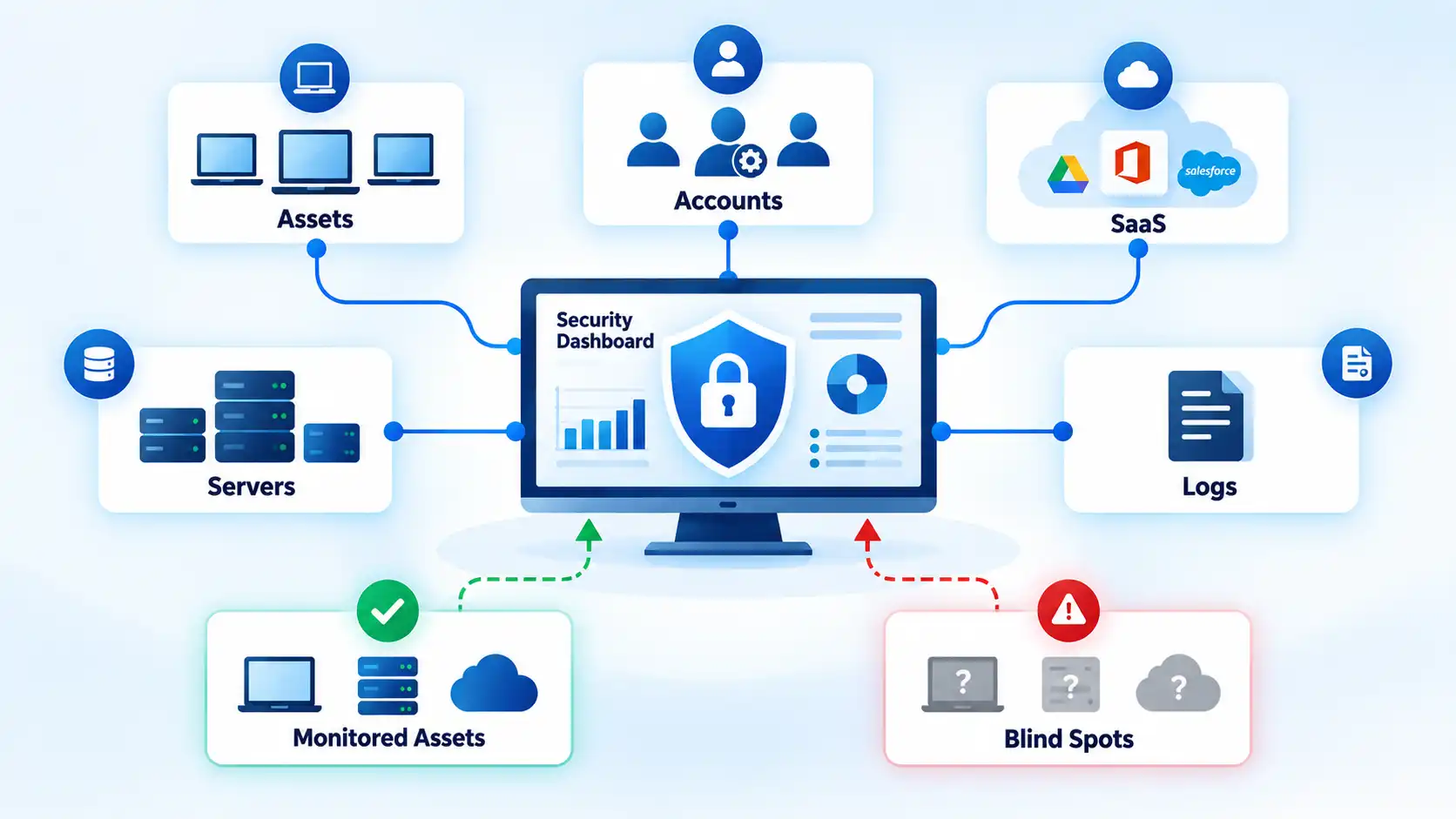
A useful test is whether the business can answer straightforward questions without days of investigation. Which accounts have administrator privileges? Which cloud applications contain customer information? Which laptops still connect to company systems? What vendor accounts remain active? Was an unusual administrator login recorded last weekend?
Visibility does not require buying one product that claims to see everything. Begin with an accurate inventory and useful logs from the systems that matter most.
10. You Have Already Had a Breach, Ransomware Event, or Serious Security Near Miss
A previous security incident does not automatically prove that the organization had no cybersecurity program. Even organizations with mature controls can experience compromises. It does provide evidence that assumptions and safeguards need to be reassessed.
Examples include ransomware, a compromised business email account, stolen credentials, malware spreading between devices, an exposed cloud database, unauthorized administrator access, or a supplier incident that reaches internal systems. A serious near miss can also reveal that existing controls almost failed.
The right question after an incident is not simply, “What tool should we buy?” Determine what happened, how initial access occurred, which accounts and systems were affected, why existing safeguards did not prevent or detect the activity sooner, and whether similar exposure remains elsewhere.
Corrective work might include changing credentials, removing unnecessary accounts, patching vulnerable infrastructure, narrowing permissions, improving monitoring, reviewing vendor access, rebuilding affected systems, or revising employee procedures. Lessons from one incident should also feed back into the organization’s wider security program rather than becoming an isolated emergency fix.
11. You Do Not Have a Tested Incident-Response and Recovery Plan
Backups solve only part of the recovery problem. During a real incident, people also need to know who makes decisions, who investigates, which systems should be isolated, which services must be restored first, how useful evidence is preserved, how business operations continue, and who needs to be informed.
The difference becomes obvious when something happens outside normal working hours. Imagine that a privileged administrator account begins behaving suspiciously on a Friday evening. One employee wants to disable it immediately, another worries that doing so will interrupt a critical service, and nobody knows who has authority to make the decision. That confusion is itself a security gap.
The FTC’s current small-business cybersecurity guidance advises businesses to establish incident-response, disaster-recovery, and business-continuity plans before an incident and test them regularly. NIST likewise treats Respond and Recover as distinct functions within the Cybersecurity Framework.
An incident-response plan should identify key roles, decision authority, internal and external contacts, containment priorities, communication routes, critical systems, and recovery dependencies. Testing can begin with a tabletop exercise in which the responsible people work through a realistic scenario and identify missing contacts, unclear responsibilities, inaccessible documentation, or conflicting procedures.
Businesses should also understand the difference between incident response, disaster recovery, and business continuity. The three disciplines overlap, but they answer different operational questions during and after disruption.
What to Do If Several of These Signs Apply
Do not respond by buying eleven different cybersecurity products. Start by understanding which systems, data, accounts, and business processes matter most, then reduce the gaps that could create the largest operational or information-security impact.
A practical order of work is:
- Identify critical systems and data. Know which services the business cannot operate without, where sensitive information resides, which accounts have elevated access, and which vendors can reach those resources.
- Close foundational protection gaps. Prioritize unsupported software, important patches, MFA, excessive privileges, employee procedures, reliable backups, and exposed remote-access paths.
- Improve visibility. Build a useful asset inventory, enable appropriate logging, review administrator activity, and make suspicious events easier to investigate.
- Review external dependencies. Identify vendor and contractor access, remove connections that are no longer needed, and establish expectations for security incidents and account offboarding.
- Prepare for failure. Define incident-response and recovery responsibilities, test backup restoration, and exercise the plans before a real disruption forces the team to improvise.
When priorities are unclear, a small business cybersecurity risk assessment can turn a long list of possible controls into a smaller set of actions based on business impact, exposure, and available resources.
The goal is not to reach a point where cybersecurity work is “finished.” Reassess as the company adds employees, cloud services, remote access, suppliers, customer data, and new technology. NIST’s CSF 2.0 is deliberately flexible so organizations can prioritize cybersecurity outcomes according to their own mission, resources, and risks rather than applying identical controls everywhere.
Conclusion
Cybersecurity readiness is easier to judge through operational evidence than through a list of installed tools. A business should know what it depends on, control who can access important resources, maintain and patch those resources, detect suspicious activity, manage third-party access, recover critical data, and know what to do when an incident occurs.
One weak area does not automatically mean the organization is insecure. Several unmanaged gaps, however, are a strong reason to conduct a structured risk review and address the risks that could create the greatest business impact first.

💬 Comments