Technology is changing online gaming by making games more visually detailed, connecting players across devices, and introducing new ways to play through cloud streaming, artificial intelligence, and immersive controls. These advances can make games more accessible and engaging, but their benefits depend on the game, your hardware, and your internet connection.
The changes go beyond better-looking characters or larger game worlds. Some technologies improve how games run, others help players communicate, and others change how people interact with the game itself. Understanding these differences makes it easier to see what newer gaming technology can actually offer.
How Better Graphics Change the Look of Games
Modern games can display more detailed environments, realistic lighting, and smoother-looking character animations than many older titles. These improvements can help players recognize objects, follow action, and understand what is happening in complex scenes.
Much of this work is handled by the graphics processing unit (GPU), the part of a computer or console that helps create the images displayed on the screen. Rendering is the process of turning a game’s objects, lighting, textures, and camera position into those images.
One important development is ray tracing, a rendering method that calculates how light interacts with virtual surfaces. It can improve reflections, shadows, and lighting in games that support it. Other techniques allow developers to display detailed environments more efficiently. For example, Unreal Engine 5 introduced virtualized geometry and dynamic lighting technologies designed to handle complex visual scenes.
Better graphics are not always the most important improvement during online play. Increasing visual detail can place more demand on the GPU, potentially reducing the frame rate, or number of images shown each second. A game may look impressive but feel less responsive if the device struggles to render it smoothly.
There is also a difference between graphical performance and network performance. A powerful GPU can help your device display a game smoothly, but it cannot prevent delayed information from reaching an online game server.
How Faster Networks Improve Multiplayer Gaming
In an online multiplayer game, players need to see a sufficiently consistent version of the same action. When one player moves, fires, or collects an item, the game must communicate relevant information to other connected players.
Many multiplayer games use a server, which is a computer responsible for coordinating the shared game session. Players’ devices, often called clients, send information about their actions and receive updates about other players and the game world.
This exchange is known as game-state synchronization. The game state includes information such as character positions, scores, and objects that have changed. In Unreal Engine’s client-server architecture, the server maintains the authoritative game state and sends relevant updates to connected players.
In this type of multiplayer game, the server normally sends gameplay information rather than a finished video of the action. Each player’s device uses those updates to display its own view of the game. This is different from cloud gaming, where a remote computer renders the images and streams them to the player’s screen.
The speed and consistency of these exchanges affect how responsive online games feel. Three network conditions are especially relevant:
- Latency: The delay between sending information and receiving a response. High latency can make actions appear late.
- Jitter: Changes in delay from one network update to another. Unstable timing can make movement appear inconsistent.
- Packet loss: Information that fails to reach its destination. Depending on how a game handles it, missing data may cause interruptions or visible corrections.
Some games use techniques such as prediction and interpolation to reduce the visible effects of network delay. Prediction estimates an action’s likely result before confirmation arrives, while interpolation helps display movement smoothly between received updates. These techniques cannot eliminate every connection problem. Developers can use network tests that simulate lag and packet loss to identify problems that may not appear under ideal conditions.
A faster internet plan does not automatically mean better multiplayer performance. A stable connection, reasonable latency to the game server, and a well-designed networking system may matter more than having additional download speed once the game’s bandwidth needs are met.
How Cloud Gaming Works Without Powerful Local Hardware
Cloud gaming allows a game to run on a remote computer instead of relying on your device to perform all the game’s processing. Your screen receives a video stream of the game while your controller or keyboard sends commands back over the internet.
This changes the hardware needed to access demanding games. A supported laptop, phone, television, or handheld device may be able to display a game that would otherwise require a more powerful local GPU.
Cloud gaming works through a continuing exchange of information:
- Your device sends controller, keyboard, or touch input to the cloud gaming server.
- The remote computer processes the game and renders the next frames.
- The service compresses the resulting images and audio for transmission.
- Your device receives and displays the stream while new inputs continue to travel back to the server.
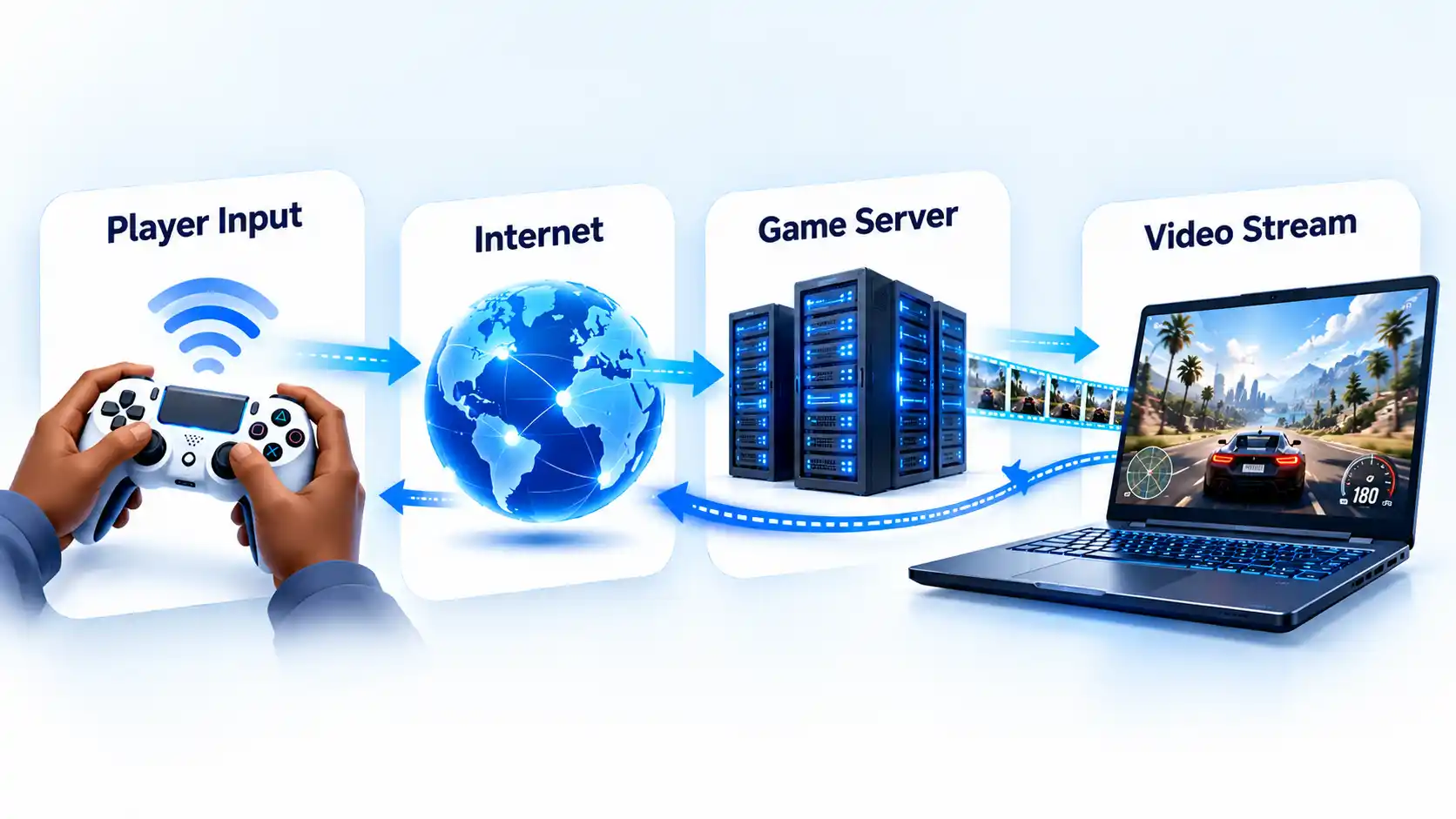
The main advantage is that the remote service provides much of the processing power. However, the game still depends on reliable communication between your device and the server. A connection problem can reduce picture quality, introduce input delay, or interrupt the session.
Requirements vary by service and streaming quality. For example, NVIDIA’s GeForce NOW system requirements specify different internet speeds for different streaming resolutions and frame rates. NVIDIA also lists latency requirements, supported devices, and features restricted to particular membership tiers.
Cloud access does not necessarily mean every game is available, every controller works, or every device receives the same streaming quality. Game availability, subscriptions, regional access, and hardware support can all affect the experience.
Cloud gaming is therefore particularly useful when a supported device cannot run a game locally but has a suitable connection to a compatible streaming service. For players with unreliable internet access or a preference for predictable local performance, installing and running a game on their own hardware may remain the better fit.
How Mobile and Cross-Platform Gaming Expand Access
Smartphones have made gaming available to people who do not own a dedicated console or gaming computer. Improvements in mobile processors, screens, graphics hardware, and wireless connectivity have also enabled more complex games on portable devices.
Mobile gaming is not limited to simplified versions of computer games. Some titles are built specifically for touchscreen controls, while others support controllers or provide versions for several devices. Mobile platforms also allow games to reach players through app stores and device-specific distribution systems.
Another development is cross-platform gaming, which describes games and services that operate across different types of hardware. However, several terms that sound similar refer to different capabilities:
- Cross-play: Players on different supported platforms can participate in the same multiplayer sessions.
- Cross-progression: Supported progress or saved data can carry over when a player changes platforms.
- Cross-entitlement: A purchase or access right extends to another supported platform under a particular program.
These features are independent. A game may support cross-play without allowing progress to transfer between all platforms. Microsoft’s Xbox Play Anywhere program, for example, provides purchase and progress benefits for participating games. It does not mean every Xbox game supports cross-play.
For players, the benefit is greater flexibility. You may be able to continue a supported game on another device or join friends who use different hardware. Before relying on that flexibility, check the specific game’s supported platforms, account requirements, multiplayer features, and save-transfer rules.
How AI Changes Game Characters and Experiences
Artificial intelligence (AI) in games covers several methods that allow software to select actions, respond to changing conditions, or generate content. Not every system described as AI uses the same technology.
A common example is a non-player character (NPC), such as an opponent, teammate, or shopkeeper controlled by the game rather than another human player. Many NPCs use predefined rules and behavior systems. An enemy may patrol an area, investigate a sound, or attack when a player enters a particular zone.
These systems can create believable behavior without generating new dialogue or learning independently from each player. Their actions may still be carefully designed and limited by the developer.
AI-related techniques also appear in other parts of gaming. Matchmaking systems can use information about players to help form multiplayer sessions. Procedural generation, which creates content through programmed rules, can produce different environments, layouts, or encounters. Neither method automatically requires modern generative AI.
Generative AI is a category of technology that can produce text, images, audio, or other content from learned patterns. In gaming, potential applications include more flexible character conversations and tools that assist developers with creating content.
Google Cloud has described generative AI applications in video games, including possibilities for more responsive game worlds. These are examples of vendor-described capabilities and development directions, not evidence that most released games already support unrestricted, AI-generated interactions.
Generating content during gameplay also brings challenges. Developers need to consider consistency, processing costs, inappropriate responses, and how generated behavior fits the game’s rules. The useful question is not whether a game advertises AI, but what the system actually changes about its characters, content, or player interactions.
How Virtual and Augmented Reality Change Interaction
Virtual reality (VR) places players inside a computer-generated environment, usually through a headset. Instead of viewing a game only through a fixed monitor, a player can look around by moving their head and may interact using tracked controllers.
Augmented reality (AR) works differently. It adds digital content to a view of the physical world, often through a phone camera or a compatible headset. In an AR game, a virtual object may appear on a real table or floor while the device tracks its position.
These technologies change the way players understand and control virtual spaces. VR can make looking, reaching, and turning part of gameplay. AR can use the player’s surroundings as part of the activity.
For AR experiences to work convincingly, devices need to estimate movement and understand parts of their environment. Google’s AR design guidance covers how digital experiences can be placed and maintained within physical surroundings.
Immersive technology also introduces practical requirements. VR games may need suitable headsets, controllers, sufficient play space, and compatible computing hardware. The equipment needed for VR gaming depends partly on whether a headset operates independently or connects to another device.
Neither VR nor AR automatically makes a game more enjoyable or accessible. Wearing a headset may be uncomfortable for some players, and motion-heavy experiences can cause discomfort. Online multiplayer features also depend on the individual title, not simply on the presence of immersive hardware.
VR and AR are different ways of interacting with games, but conventional screens and controllers remain suitable for many gaming experiences. Their value depends on whether the game makes meaningful use of the different interaction methods.
How Accessibility Technology Helps More People Play
Gaming accessibility means designing games, hardware, and settings so more people can use them despite differences in movement, vision, hearing, or other abilities. A feature that seems optional to one player may determine whether another player can participate at all.
For someone who has difficulty holding a conventional controller, alternative input hardware or customizable button assignments may make a game easier to operate. Other players may depend on captions, readable menus, or important sound information presented visually.
Accessibility features can include:
- Button remapping: Changing which button performs a particular action to suit the player’s needs.
- Adaptive controllers: Hardware designed to work with different switches, buttons, or input arrangements.
- Captions and subtitles: Text that communicates speech or important audio information when supported by the game.
- Visual adjustments: Options such as text size, contrast, and alternatives to color-only information.
- Gameplay assistance: Features such as adjustable difficulty or input assistance when the game provides them.
Microsoft provides examples of Xbox accessibility hardware and platform settings, including adaptive controllers, button remapping, and visual or communication options. Features available at the console level should not be confused with settings that individual game developers must implement.
Good accessibility also depends on implementation. In-game captions need to convey relevant information clearly, menus need to be usable, and controls should remain practical during gameplay. The Xbox Accessibility Guidelines cover design considerations developers can use to address such barriers.
No single accessibility setting works for everyone. A game that supports an adaptive controller may still contain difficult-to-read menus, while a game with subtitles may lack suitable input customization. Hardware compatibility and in-game options must be considered together.
Technology has not removed every barrier to gaming. It has provided more ways for developers and platforms to support different methods of receiving information, issuing commands, and participating in games. Checking the features of an individual game remains important before assuming it will meet a player’s needs.
How Online Communities and Live Games Keep Players Connected
Online gaming has also changed from an activity centered only on individual matches into a way for people to maintain shared spaces and ongoing communities.
Players can form groups, communicate through voice or text, share achievements, and take part in multiplayer events. Some games provide tools for creating levels or other content that players can experience together.
These features do not all belong to social media. A game’s own matchmaking, friends system, shared world, or group activities may provide community functions without requiring players to use a separate social platform.
Streaming services such as Twitch and YouTube add another kind of participation. Viewers can watch gameplay, follow creators, and discuss games even when they are not playing them directly. That is different from the technology that synchronizes players inside an active multiplayer match.
Another important development is the live-service model. In a live-service game, developers continue supporting the title after release through updates and online activities. Depending on the game, this may include changes to gameplay, new content, or community events.
Ongoing updates can give players reasons to return, but they also change what long-term participation requires. A game may depend on continued server operation, account access, or updates that alter familiar features. When a title depends heavily on online services, its long-term availability is partly controlled by the operator.
Creator participation and changing player engagement are among the developments examined in BCG’s Video Gaming Report 2026. These industry trends help explain why connected gaming now involves more than purchasing a title and completing its original content.
What These Changes Mean for Players
The most valuable gaming technology depends on what is limiting your experience.
If a game struggles to maintain a smooth frame rate, graphics settings and local hardware may matter more than access to new visual effects. If other players appear to jump between positions during a match, connection stability and server latency deserve attention before graphical upgrades.
Cloud gaming becomes attractive when supported games and reliable streaming can reduce the need for powerful local hardware. Cross-platform features matter when you want to play with friends or continue progress on another device. Accessibility options are essential when standard controls or presentation methods create barriers.
Newer technology is not automatically better for every game or every player. Start with the experience you want, then check whether the technology addresses that need and whether your device, game, and connection support it. That is a more useful way to judge gaming advances than choosing whichever feature sounds the most futuristic.

💬 Comments