NordVPN is the strongest all-round choice in this evidence-based comparison, while Proton VPN stands out for open-source transparency, Surfshark for unlimited devices, ExpressVPN for mature infrastructure, and Mullvad for simple privacy-focused billing. The right VPN still depends on what you need to protect, how many devices you use, and how much subscription commitment you are willing to accept.
This ranking is based on documented protocols, privacy policies, independent assurance work, software transparency, device limits, platform support, and prices verified on September 8, 2026. It is not based on first-hand speed or streaming tests, so performance claims from providers or other publications are not presented as our own measurements.
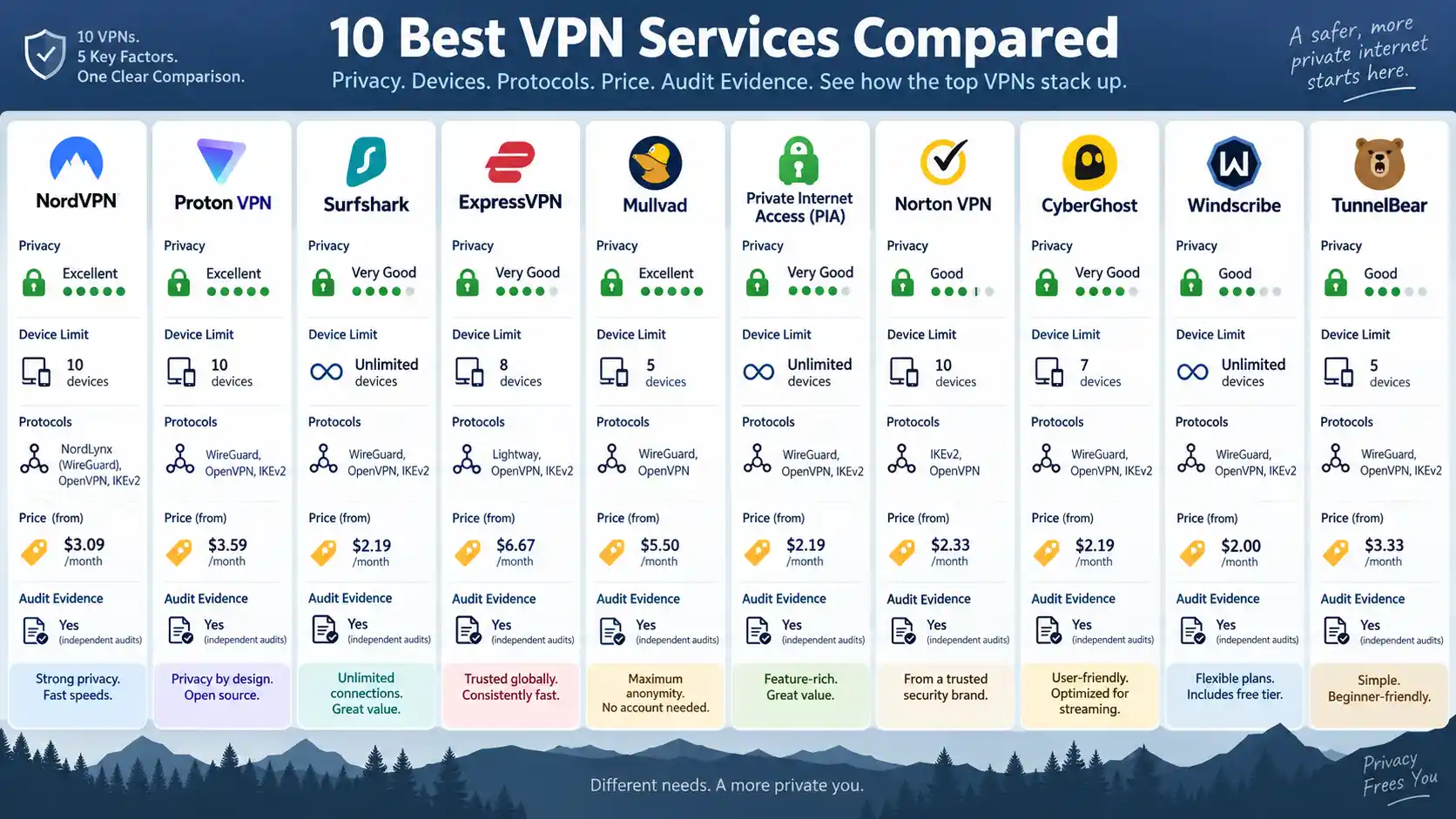
Quick Take: The 10 Best VPN Services
The table below is designed to answer two questions quickly: what each VPN is particularly well suited to, and what trade-off comes with that choice. Promotional prices are shown only where the vendor exposed a concrete current amount during verification.
| Rank | VPN | Best for | Simultaneous connections | Verified pricing snapshot | Main limitation |
|---|---|---|---|---|---|
| 1 | NordVPN | Best overall documented balance | 10 | From $3.49/month on the verified long-term offer; $94.23 initial charge for 27 months | Best promotional rate requires a long commitment |
| 2 | Proton VPN | Open-source transparency and privacy | 1 free; up to 10 on VPN Plus | Free plan verified; paid price omitted because the live pricing page returned unresolved placeholder values during verification | Important features differ between free and paid tiers |
| 3 | Surfshark | Households with many devices | Unlimited | $2.49/month equivalent; $67.23 for the first 27 months on Starter | Low headline rate depends on prepaying a long term |
| 4 | ExpressVPN | Straightforward deployment and mature infrastructure | 10 on Basic | $2.99/month equivalent; $83.72 for the first 28 months on Basic | Renewal cost rises after the introductory term |
| 5 | Mullvad | Minimal-account privacy and simple pricing | 5 | €5/month | Five-device ceiling is lower than many competitors |
| 6 | Private Internet Access | Open-source clients and configuration control | Unlimited | $11.95 monthly; $47.88 for one year; longer promotions can reduce the effective monthly cost | Many settings may be unnecessary for casual users |
| 7 | Norton VPN | Security-suite integration | 5 on Standard | $39.99 for the first year on the verified five-device Standard offer; $79.99 renewal price | Some extras belong to wider Norton security bundles rather than the VPN itself |
| 8 | CyberGhost | Broad consumer server coverage | 7 | $2.19/month equivalent; $56.94 for the verified 26-month introductory term | Seven-device limit trails unlimited-device competitors |
| 9 | Windscribe | Advanced traffic controls | Unlimited personal devices | $9 monthly or $69 yearly for Pro; Build A Plan starts at $3/month under current rules | Flexible configuration creates more decisions for beginners |
| 10 | TunnelBear | Beginners and light free use | Unlimited | Free plan includes 2 GB; Unlimited starts from $3.33/month | 2 GB free allowance is restrictive for sustained use |
The ranking should not be read as a universal scorecard. A technically inclined user who values open-source software may reasonably prefer Proton VPN or Mullvad over the number-one choice, while a household with many devices may find Surfshark, PIA, Windscribe, or TunnelBear more practical.
How We Selected and Ranked These VPNs
A virtual private network, or VPN, creates an encrypted path between your device and a VPN server. Traffic then leaves through that server rather than directly through your normal internet connection. NIST’s IPsec VPN guidance documents the underlying principle of protecting communications across untrusted networks.
A VPN is therefore not simply an IP-address changer. It is a security and trust arrangement. You are reducing what the local network or internet service provider can observe about traffic inside the VPN tunnel, while placing additional trust in the VPN service operating the other end.
For a sponsored introductory resource addressing what is VPN?, Surfshark publishes a separate beginner-oriented explanation. That commercial resource is not used as evidence for the rankings in this article.
Privacy and Logging Evidence
A no-logs policy generally means the provider says it does not retain records capable of reconstructing your browsing or VPN activity. That does not necessarily mean the company stores no information at all. An account may still require an email address, payment record, support history, or temporary operational data.
The Federal Trade Commission has warned consumers that using a VPN transfers significant trust to the VPN provider and does not make a person completely anonymous. Its VPN app guidance recommends examining permissions, encryption practices, privacy policies, and how providers use or share information.
Independent audits can improve confidence, but their scope matters. An audit may examine a no-logging process, source code, server configuration, payment system, or mobile application. Passing one assessment does not prove that every component will remain secure forever. Recency and scope matter more than the word “audited” by itself.
Protocols and Infrastructure
A VPN protocol defines how the encrypted tunnel is established and how traffic moves through it. WireGuard is a modern protocol used by many services in this list. OpenVPN remains widely supported and useful where compatibility or manual configuration matters. Some vendors also build proprietary protocols, such as ExpressVPN’s Lightway or NordVPN’s WireGuard-derived NordLynx.
A kill switch is another practical feature. It is designed to block internet traffic if the VPN tunnel fails, reducing the chance that an application silently falls back to the normal network connection. Split tunneling does the opposite selectively: it lets chosen applications or destinations bypass the VPN while other traffic remains tunneled.
Multi-hop routes traffic through more than one VPN server. It can make correlation more difficult in some threat models but normally adds extra routing distance and complexity. It is useful for specific privacy requirements, not something every user needs enabled all day.
Pricing and Subscription Terms
Headline VPN prices require careful reading. A rate advertised as “$2.49 per month” may not mean the provider charges $2.49 each month. It can represent the effective monthly cost of a subscription paid 24 months or more in advance.
For that reason, this comparison considers the upfront commitment and renewal behavior as well as the monthly equivalent. A slightly more expensive monthly VPN can be financially preferable if you only need the service for a short trip or project.
Top 10 VPN Services
1. NordVPN: Best Overall
NordVPN takes the first position because its documented feature set covers the needs of a broad consumer audience without depending on one unusual specialty. It supports major desktop and mobile platforms, permits 10 simultaneous connections, provides kill-switch functionality, and offers NordLynx alongside other protocol options.
NordLynx is NordVPN’s implementation built around WireGuard. That gives users a modern tunneling option while retaining the provider’s own connection architecture. Other features include split tunneling on supported platforms, specialty servers, and multi-hop through Double VPN.
The privacy case is stronger than a policy page alone. NordVPN says its logging practices have been subjected to six independent examinations, including a Deloitte Lithuania assurance engagement performed in late 2025. Its current no-log documentation describes the audit history and distinguishes activity logs from account information retained to operate the service.
The verified long-term Basic offer was $3.49 per month equivalent, with $94.23 charged for the first 27 months. That is attractive only if the commitment suits you. Compare the total payment and renewal terms rather than assuming $3.49 will remain the permanent monthly bill.
Choose NordVPN if: you want a broadly capable VPN without prioritizing a niche requirement such as unlimited connections or fully open-source client software.
Consider something else if: source-code transparency or month-to-month price simplicity matters more than the broad feature mix.
2. Proton VPN: Best for Open-Source Transparency
Proton VPN is the strongest alternative when transparency and inspectable applications are high priorities. Its VPN apps are open source, and the company publishes security and no-logs audit information rather than relying only on policy statements.
Paid VPN Plus accounts support up to 10 simultaneous devices and include features such as Secure Core, Proton’s multi-hop architecture that routes traffic through selected hardened locations before it reaches the final VPN server. WireGuard and OpenVPN are available, along with kill-switch functionality and platform-specific advanced controls.
Proton has also established a recurring no-logs assessment program. Its published external audit record is especially relevant for readers who prefer continuing verification rather than a single historical assessment.
The free tier is a significant differentiator. As verified during this review, Proton Free offers one simultaneous device, no advertising, and no data cap. Paid pricing is intentionally not quoted here because Proton’s live pricing page returned unresolved placeholder values during this research pass. Inventing a dollar figure would be less useful than telling readers to verify the live checkout price.
Choose Proton VPN if: open-source apps, published audit work, and a credible no-cost entry point matter more than obtaining the lowest long-term promotional price.
Consider something else if: you need unlimited simultaneous connections across a large household.
3. Surfshark: Best for Unlimited Devices
Surfshark makes the strongest case for users who own many devices or want one subscription to cover a large personal collection of phones, laptops, tablets, and televisions. Its plans allow unlimited simultaneous device connections.
The service supports WireGuard and OpenVPN and includes split tunneling through its Bypasser feature. Dynamic MultiHop lets users select two VPN locations for multi-hop routing instead of relying only on preset pairs. Surfshark also documents RAM-only server infrastructure, meaning active server state is designed to operate from volatile memory rather than conventional persistent storage.
Surfshark says its no-activity-logs implementation has undergone independent Deloitte assurance work, including an assessment in 2025. Some detailed assurance material requires account access, so the existence and stated scope of that work should not be confused with a public source-code audit anyone can inspect anonymously.
Surfshark Starter was verified at $2.49 per month equivalent, but that figure required $67.23 upfront for the first 27 months. Taxes may vary by location. The key buying decision is therefore not whether $2.49 sounds inexpensive but whether you want to commit for more than two years.
Choose Surfshark if: you have more devices than a conventional five- or ten-device VPN plan comfortably supports.
Consider something else if: you prefer short commitments or want the greatest possible amount of publicly inspectable software and assurance material.
4. ExpressVPN: Best for Straightforward Deployment
ExpressVPN remains a strong option for users who want a mature cross-platform service with relatively straightforward configuration. Its infrastructure is differentiated by TrustedServer, a RAM-only architecture designed to reload the server software stack from a defined image rather than depend on long-lived data stored on conventional server drives.
ExpressVPN also develops Lightway, its own VPN protocol, alongside support for other protocol choices. The practical benefit is not that a proprietary protocol is automatically better, but that the provider controls the protocol’s integration with its applications and can tune connection behavior across supported platforms.
Plan structure matters more than it did in older reviews. The current Basic plan permits 10 simultaneous devices. At verification, its 28-month introductory term cost $83.72, equivalent to $2.99 per month, after which it was set to renew at $99.95 annually. Advanced increased the device allowance to 12 and bundled additional tools.
Choose ExpressVPN if: you value a polished multi-platform service and want clearly documented server architecture without managing many advanced controls.
Consider something else if: the introductory-to-renewal price change is uncomfortable or you want unlimited devices.
5. Mullvad: Best for Minimal-Account Privacy
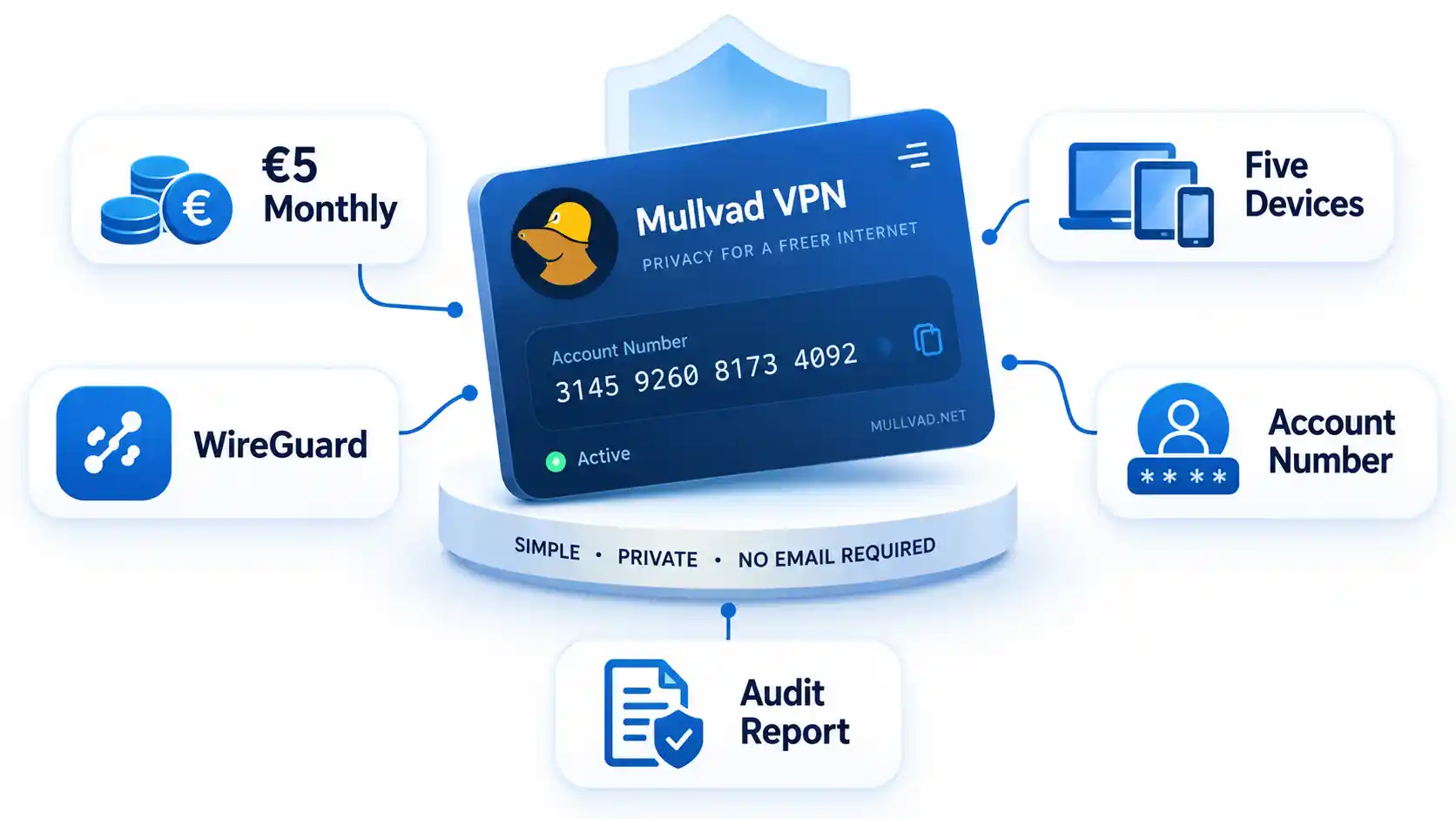
Mullvad takes an unusually simple approach to both accounts and pricing. Instead of requiring the conventional email-based identity used by many subscription services, it centers accounts on a generated account number. Its price remains €5 per month rather than falling dramatically when you prepay multiple years.
That model removes one of the most common VPN pricing traps. A person needing three months can pay for three months without deciding whether to prepay two or three years to reach the advertised “best” rate.
Mullvad uses WireGuard extensively and supports manual configuration for users who prefer to manage tunnels outside the standard application. The trade-off is a five-device account limit, which looks restrictive beside Surfshark, PIA, Windscribe, and TunnelBear.
Mullvad also commissions focused technical assessments. In late 2025, X41 D-Sec examined its account and payment services, including authentication, device provisioning, payment handling, and WireGuard-key distribution. The published account-system audit demonstrates why audit scope is worth reading rather than simply counting how many audits a vendor mentions.
Choose Mullvad if: you value simple monthly pricing, a minimal account model, and focused privacy engineering.
Consider something else if: you need more than five simultaneous devices or want a service designed heavily around entertainment-oriented extras.
6. Private Internet Access: Best for Configurable Open-Source Clients
Private Internet Access, commonly shortened to PIA, fits readers who want more control over VPN behavior without giving up mainstream desktop and mobile applications. Its client software is open source, and manual WireGuard and OpenVPN configurations are supported.
All current PIA subscriptions allow unlimited simultaneous connections. That makes it more flexible than older PIA comparisons that may still cite a fixed device ceiling. For practitioners, manual connection scripts and protocol configuration also make it useful on Linux systems and non-standard deployments.
The current one-month plan is $11.95. The annual plan is $47.88, while the verified promotional three-year plan was advertised at an effective $2.03 per month with three extra months and an $79 three-year renewal term. Promotions can change, so the practical comparison is the checkout total and future billing interval.
Open-source client software is useful transparency, but it has a boundary. Inspecting an application does not independently prove how every production server is configured at every moment. Client transparency should therefore be considered alongside logging policy, infrastructure design, and external assurance.
Choose PIA if: unlimited connections, WireGuard/OpenVPN flexibility, and inspectable client code matter.
Consider something else if: you want a highly simplified interface with few configuration decisions.
7. Norton VPN: Best for Security-Suite Integration
Norton VPN makes the most sense for readers who are already considering a broader endpoint-security package. It is less compelling as a specialist privacy product than Proton VPN or Mullvad, but integration with Norton’s larger security ecosystem gives it a different use case.
The VPN supports protocols including WireGuard, OpenVPN, and Norton’s Mimic protocol, although availability varies by operating system. Features include a kill switch, IP rotation, Double VPN, and ad blocking on supported configurations.
The verified five-device Norton VPN Standard offer cost $39.99 for the first year and was listed to renew at $79.99 annually. Higher tiers can add broader scam, malware, password, backup, and identity-related functions. Those extras should not be confused with VPN tunneling capabilities when comparing the service with dedicated VPN providers.
Choose Norton VPN if: you want VPN coverage within a wider Norton security setup and would rather manage fewer separate security subscriptions.
Consider something else if: your main buying criteria are open-source applications, minimal account data, or specialist VPN configuration.
8. CyberGhost: Best for Broad Consumer Server Coverage
CyberGhost is a conventional consumer VPN with support for up to seven simultaneous devices and major protocols including WireGuard, OpenVPN, and Internet Key Exchange version 2, usually abbreviated IKEv2.
The company emphasizes a large international server footprint, but exact server totals varied between current official pages during research. For that reason, this article does not present one changing number as a stable benchmark. Geographic availability is more useful to verify at the moment you need a particular country or city.
CyberGhost’s long-term offer was verified at $2.19 per month equivalent, with $56.94 billed for the first 26 months. The checkout stated that the subscription would then renew at $56.94 annually. Its monthly plan was substantially more expensive at $12.99.
CyberGhost also publishes recurring transparency information covering legal and rights-holder requests. Its Q2 2026 report provides a useful example of operational transparency that is different from a code or no-logs audit.
Choose CyberGhost if: broad location availability and a conventional consumer interface are more important than unlimited connections.
Consider something else if: seven simultaneous devices are insufficient.
9. Windscribe: Best for Advanced Traffic Controls
Windscribe is particularly interesting for practitioners who want control over how traffic is routed and filtered. Its desktop applications support WireGuard, OpenVPN, IKEv2, Stealth, and WStunnel options, alongside split tunneling and local-network controls.
Its R.O.B.E.R.T. system performs server-side Domain Name System, or DNS, filtering. DNS is the system that translates names such as example.com into network addresses. Blocking a domain at this layer can prevent selected advertising, tracking, or unwanted destinations from resolving while you use the service.
Windscribe allows unlimited connections for a user’s personal devices. That wording matters. Unlimited devices does not mean an account is intended to be distributed freely among unrelated people.
Windscribe Pro was verified at $9 monthly or $69 annually. Its Build A Plan system starts at $3 per month under the current structure and allows users to pay for selected locations plus specified extras rather than purchasing the full network.
Choose Windscribe if: configurable protocols, DNS-level rules, and personal-device flexibility are more valuable than an aggressively simplified interface.
Consider something else if: you want a product that makes most networking choices automatically.
10. TunnelBear: Best for Beginners
TunnelBear earns the final position because it offers an approachable entry point without requiring payment to understand how the service behaves. Its free tier provides 2 GB of secure browsing, while paid Unlimited plans remove that data restriction.
The paid tier permits unlimited devices and includes location selection, split tunneling, premium servers, city-level selection, and priority support. TunnelBear supports modern protocol options including WireGuard along with OpenVPN and IKEv2 where supported.
The 2 GB free allowance is enough to evaluate the application or cover occasional light activity, but it is not a realistic replacement for an always-on VPN if you regularly watch video, download large files, or move significant work data.
TunnelBear also has a long-running practice of commissioning security assessments. Because the company’s own 2025 wording around the exact audit-year count is inconsistent, this article deliberately avoids turning that history into a precise numerical claim.
The Unlimited plan currently starts from $3.33 per month, depending on term.
Choose TunnelBear if: you want an uncomplicated first VPN experience or a small free allowance for occasional use.
Consider something else if: you need a generous free data allowance or practitioner-level network controls.
VPN Comparison Matrix: Which Service Fits Which User?
The ranking becomes more useful when you compare services by the constraint that matters to you. A single user with five devices and a household with twenty devices should not necessarily reach the same conclusion.
| Requirement | Strong candidates | Why |
|---|---|---|
| Broad all-round use | NordVPN, Proton VPN, Surfshark | Strong combinations of mainstream platform support, modern protocols, and privacy controls |
| Unlimited personal devices | Surfshark, PIA, Windscribe, TunnelBear | No conventional simultaneous-device ceiling under current plan rules |
| Open-source client transparency | Proton VPN, PIA, Mullvad | Client code or substantial client components can be inspected publicly |
| Simple monthly commitment | Mullvad | Flat €5 monthly pricing without a multi-year discount structure |
| Free ongoing use | Proton VPN, Windscribe, TunnelBear | Each maintains a no-cost tier, with materially different data and server restrictions |
| Advanced configuration | PIA, Windscribe, Mullvad | Manual configuration and greater protocol or traffic-control flexibility |
| Security-suite integration | Norton VPN | VPN can be purchased within a broader endpoint-security ecosystem |
| Low device count with privacy-first billing | Mullvad | Minimal account model and straightforward monthly price outweigh the five-device limit for some users |
If price is the main constraint, do not compare only monthly equivalents. Compare what leaves your bank account today, how long that payment commits you, and what the service costs when it renews.
What a VPN Protects and What It Does Not
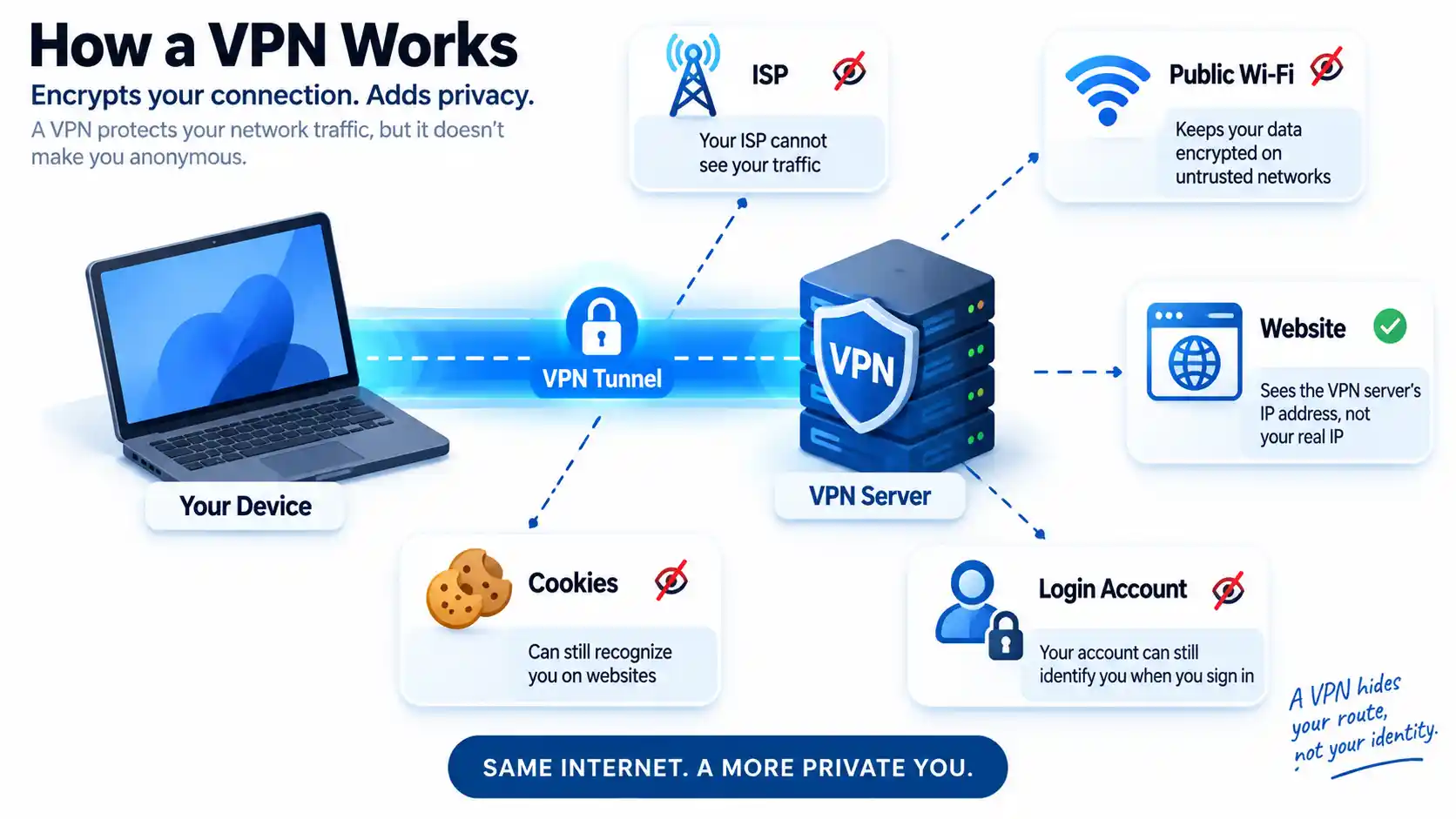
A VPN protects the network path between your device and the VPN server. This is particularly useful on networks you do not control because local observers cannot simply read traffic inside the encrypted tunnel. Websites also generally see the VPN server’s public Internet Protocol address rather than the public address assigned directly to your connection.
That does not make you invisible.
If you sign in to an account, the service can still know who you are because you authenticated. Cookies can still recognize a browser. Browser fingerprinting can combine device and software characteristics. Malware already running on a computer is not removed merely because the network traffic is tunneled through a VPN.
For example, suppose you connect to a VPN and then sign in to Google. The website may see a VPN exit address, but your account login still tells Google which account is being used. The VPN has changed the network route, not erased your identity inside the application.
A VPN also does not substitute for normal public-network hygiene. Before using an airport, hotel, or cafe connection, confirm the network name, disable unnecessary auto-join behavior, keep your software updated, and use multi-factor authentication on important accounts. BlogTheTech’s public Wi-Fi safety guide covers those device-level precautions in more detail.
There is another trust boundary to understand. Without a VPN, your internet service provider is directly involved in routing your connection. With a commercial VPN, encrypted traffic first travels to the VPN operator. That is why logging policies, business practices, audits, and infrastructure architecture matter. A VPN moves part of the trust relationship rather than eliminating the need for trust.
How to Choose the Right VPN
Use the following sequence instead of beginning with whichever provider advertises the largest discount.
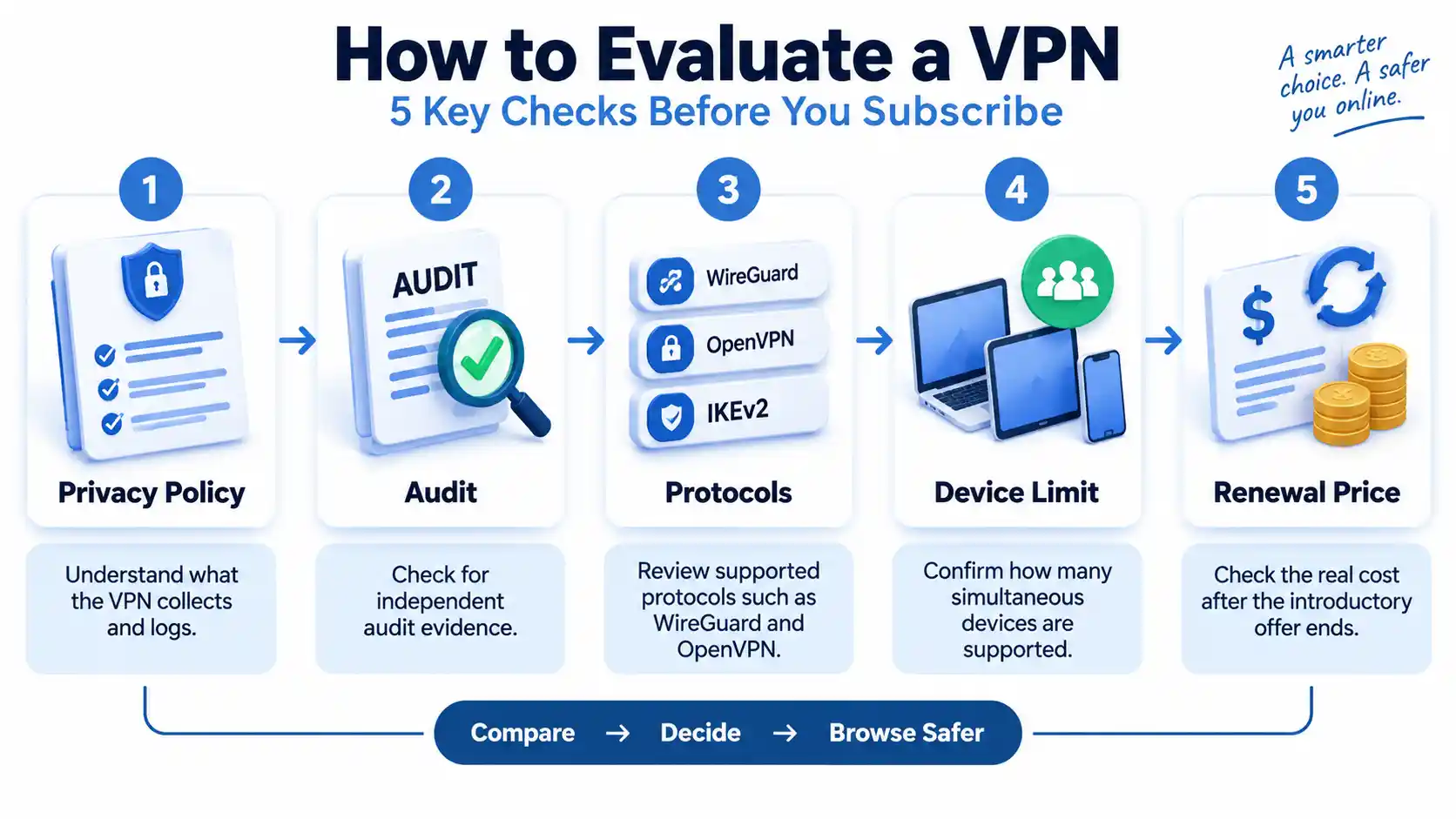
- Define what you are protecting against. Public Wi-Fi exposure, routine ISP privacy, restrictive networks, remote work, and high-risk privacy needs are different threat models.
- Check every platform you actually use. A strong Windows application is of limited value if your household primarily uses Linux, Apple TV, Android TV, or routers.
- Read the logging language precisely. Look for what is not retained, what account information is collected, and whether the claim has undergone outside examination.
- Check protocol support. WireGuard is a useful modern default for many deployments, while OpenVPN and other options can remain valuable for compatibility or restrictive networks.
- Count simultaneous devices. A five-device limit may be irrelevant to one person and immediately disqualifying to a large household.
- Calculate the real subscription commitment. Multiply out the actual charge rather than comparing promotional monthly equivalents alone.
- Check the renewal line. A heavily discounted multi-year plan may renew annually at a much higher effective rate.
- Confirm specialist requirements separately. Split tunneling, multi-hop, manual WireGuard configuration, router support, dedicated IP addresses, and port forwarding are not uniformly available.
A family with fifteen active devices should give more weight to Surfshark, PIA, Windscribe, or TunnelBear than to Mullvad’s five-device limit. A privacy-focused developer may instead value Proton VPN’s open-source applications or Mullvad’s minimal account structure more highly than raw device count.
If your only requirement is avoiding payment, use a dedicated comparison of best free VPN services rather than assuming that every free plan has the same data, location, or privacy restrictions.
If your main problem is a dramatic connection slowdown after tunneling, that belongs in a separate diagnostic workflow covering server distance, protocol choice, packet size, local congestion, and device limits.
Finally, consumer VPN services should not be confused with corporate remote-access systems. An employer’s VPN may provide access to internal applications, enforce authentication policies, and route traffic into a managed company network. That is a different architecture and purchasing decision.
Key Takeaways
- NordVPN is the strongest general-purpose choice in this evidence-based ranking, but it is not automatically the best VPN for every user.
- Proton VPN stands out when open-source applications, recurring external assessments, and a meaningful free tier matter.
- Surfshark is particularly practical for users with many devices because it does not impose a conventional simultaneous-device cap.
- Mullvad’s €5 monthly price is easier to evaluate than multi-year promotional pricing because there is no unusually low headline rate tied to a long prepayment.
- PIA and Windscribe deserve extra attention from practitioners who want manual configuration or more control over traffic behavior.
- Always distinguish an independently examined claim from a vendor statement and read what an audit actually covered.
- Compare total upfront payment and renewal terms, not only the advertised monthly equivalent.
- A VPN encrypts a network path and changes where some trust sits. It does not erase cookies, authenticated accounts, browser fingerprints, malware, or every other source of identification.
Frequently Asked Questions
Is it better to pay monthly or buy a two-year VPN plan?
A long plan usually lowers the advertised monthly equivalent, but it also locks in more money before you know how well the service fits your devices and networks. Monthly billing costs more per month but gives you more flexibility. Compare the total first payment, cancellation terms, and renewal price before deciding.
Does a VPN hide activity from my employer on a work computer?
Not necessarily. A VPN can encrypt network traffic, but an employer-controlled computer may have endpoint monitoring, security software, browser management, certificates, logging agents, or administrative controls installed directly on the device. Those tools can operate before traffic enters the VPN tunnel. Do not assume a personal VPN overrides monitoring on employer-owned equipment.
Can my bank reject a connection because I use a VPN?
It can happen. Banks and other fraud-sensitive services evaluate factors such as IP reputation, location changes, device signals, and unusual login behavior. A VPN exit address can therefore trigger additional verification or a temporary connection challenge. If that happens, disconnecting the VPN or using a consistent nearby server may help, but follow the bank’s security instructions rather than attempting to defeat fraud controls.
Should I leave my VPN on all the time?
For routine privacy, leaving it connected can reduce the chance that you forget to enable it on an unfamiliar network. There are exceptions. Local printers, smart-home devices, corporate resources, banking systems, multiplayer games, or websites with aggressive VPN filtering may work differently while tunneling. Split tunneling can solve some of these cases without disabling the VPN for every application.
Is WireGuard always better than OpenVPN?
No. WireGuard is modern and comparatively compact, which makes it an attractive default for many consumer VPN applications. OpenVPN remains mature, widely deployable, and useful in configurations where compatibility or particular transport options matter. Actual performance also depends on the provider, server, operating system, network path, and configuration rather than the protocol name alone.
Does a VPN protect DNS requests?
A properly configured VPN can route Domain Name System requests through DNS infrastructure selected by the VPN provider instead of sending them directly to the local network or default internet provider. This reduces one common form of information leakage. A DNS leak occurs when name-resolution requests escape the intended VPN path. Reputable VPN applications normally include controls intended to prevent this, but implementation still matters.
Which is better, NordVPN or Proton VPN?
NordVPN is the broader all-round recommendation in this ranking, while Proton VPN has the stronger transparency proposition for users who prioritize open-source applications and publicly described recurring audit work. The choice becomes easier when you compare those priorities directly rather than treating rank alone as decisive. A dedicated NordVPN vs Proton VPN comparison can examine the distinction in greater depth.

💬 Comments