Spoofing means falsifying or imitating an identity, while phishing is deception designed to make you reveal information, send money, open malicious content, or take another unsafe action. Smishing and vishing are phishing variants delivered through text messages and voice communication respectively.
Quick Take
- Spoofing: Makes a sender, caller, website, or other source appear to be someone or something it is not.
- Phishing: Uses deceptive communication to persuade a target to reveal information or take an attacker-desired action.
- Smishing: Phishing delivered through SMS or MMS text messages.
- Vishing: Phishing delivered through phone calls, voice messages, or other voice communication.
- The terms can overlap. A single attack can spoof an identity, send a smishing message, continue through a vishing call, and direct the victim to a phishing website.
Spoofing vs Phishing vs Smishing vs Vishing at a Glance
The four terms are closely related, but they do not describe four mutually exclusive attack categories. Spoofing primarily describes false identity or source information, while phishing describes the deception itself. Smishing and vishing narrow phishing by communication channel.
Four Threats Compared
| Feature | Spoofing | Phishing | Smishing | Vishing |
|---|---|---|---|---|
| Core meaning | Falsifying or imitating an identity or source | Deceiving someone into revealing information or taking an unsafe action | Phishing through SMS or MMS text messages | Phishing through voice communication |
| Typical channel | Email, caller ID, websites, domains, and other communications | Commonly email or websites, although phishing spans multiple channels | SMS or MMS text messaging | Phone calls, voice messages, voicemail, or Voice over Internet Protocol |
| Primary function | Make a source look trusted or different from its real identity | Persuade a target to disclose information, approve access, open malicious content, or send money | Carry a phishing attempt through text messaging | Carry a phishing attempt through voice communication |
| Impersonation | Central to the technique | Common, but phishing is defined by deceptive solicitation rather than one specific spoofing method | Commonly impersonates a trusted person or organization | Commonly impersonates a trusted person or organization |
| Typical example | A scammer makes a bank’s real number appear on caller ID | An email directs you to a fake account login page | A text claims you owe an unpaid toll and provides a payment link | A caller claims your bank account is at risk and pressures you to act |
| Immediate response | Verify the identity separately | Avoid the supplied link or contact route until verified | Do not reply, click, or pay until verified | End the suspicious call and contact the organization independently |
The most important difference is therefore not simply email versus text versus phone. Spoofing describes how identity can be falsified, while phishing describes how a person is manipulated. Smishing and vishing identify two channels through which that manipulation can occur.
The Key Relationship: Spoofing Is a Technique, While Smishing and Vishing Are Channels of Phishing
The Federal Bureau of Investigation defines spoofing as disguising information such as an email address, sender name, phone number, or website URL so communication appears to come from a trusted source. The same FBI guidance explains that phishing schemes often use spoofing techniques to make their bait more convincing.
That gives the terms different jobs. Spoofing answers a question about identity: what source is being imitated or falsified? Phishing answers a question about deception: what is the attacker trying to persuade the victim to do?
Smishing and vishing narrow the discussion further by describing the delivery channel. The FBI identifies smishing as phishing through SMS text messages and vishing as phishing through phone calls, voice email, or Voice over Internet Protocol communications.
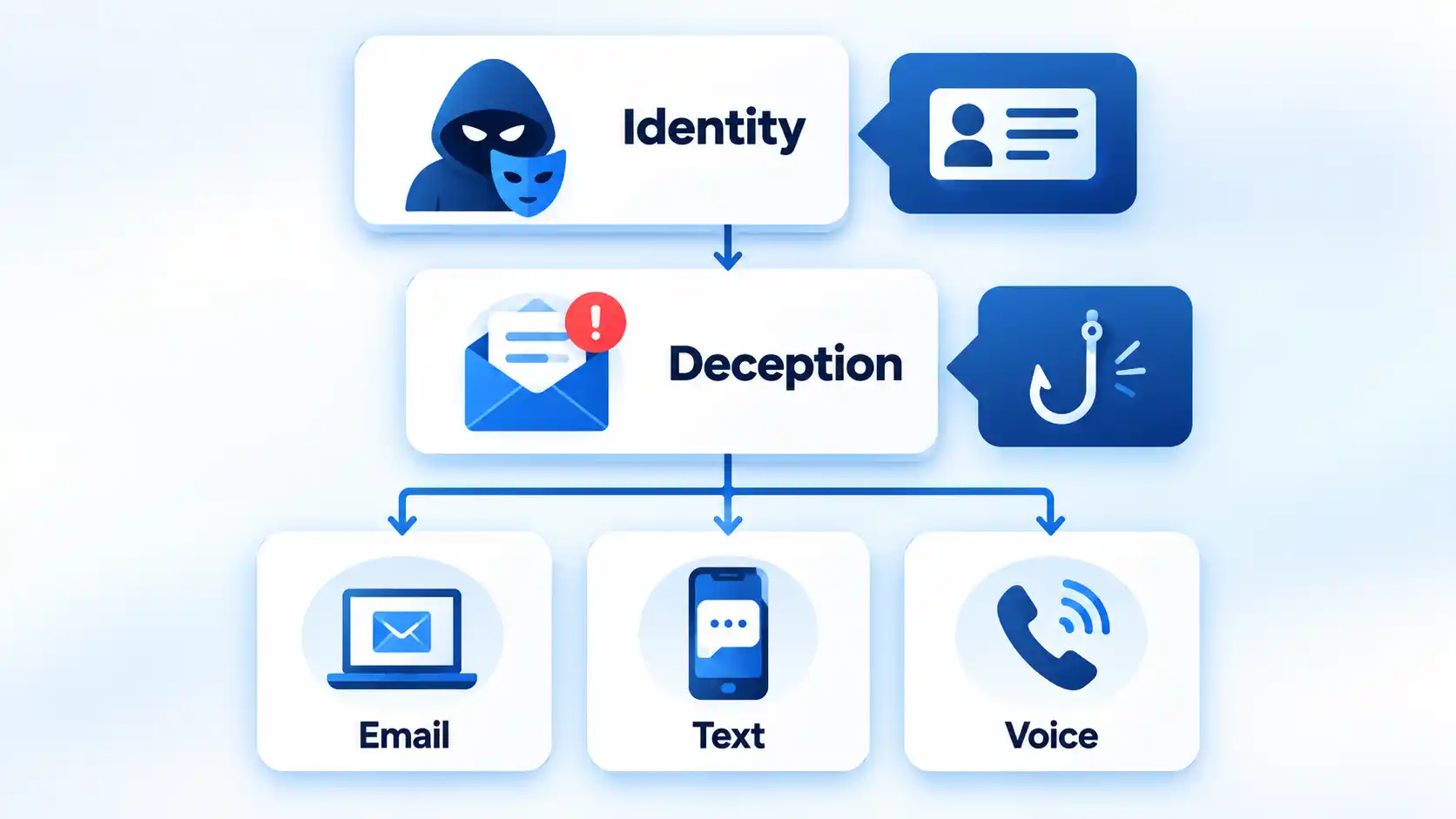
These categories can therefore overlap. Imagine an attacker who pretends to be your bank. The attacker could spoof the bank’s telephone number, send you a fraudulent text message, call you after you respond, and then direct you to a fake login page. The same campaign could involve spoofing, smishing, vishing, and phishing without contradiction.
This relationship also explains why treating all four terms as interchangeable can cause confusion. Phishing belongs to the broader category of phishing and social engineering, while spoofing can also describe forms of impersonation outside a phishing scenario.
What Is Spoofing?
Spoofing is the act of making an identity, source, or piece of identifying information appear to be something it is not. In communications-related attacks, the false information might be a caller-ID number, email sender name, email address, domain, or website URL.
For example, your phone might display the genuine customer-service number of your bank even though the call came from an attacker. The Federal Trade Commission warns that scammers can make any name or number appear on caller ID. The displayed number is therefore not proof of who is actually speaking.
Email and web spoofing can work in similar ways. An attacker may create a look-alike domain, alter a character in an address, or design a fake website to resemble a trusted service. In September 2025, the FBI warned that criminals were creating spoofed versions of the Internet Crime Complaint Center website by altering characteristics of the legitimate domain.
This article uses “spoofing” mainly in the communications and social-engineering sense. The technical term is broader. NIST’s cybersecurity glossary includes several spoofing definitions, including impersonating an authorized user and manipulating data or signals. The exact meaning therefore depends on technical context.
A compromised legitimate account is another important edge case. If an attacker sends a malicious message from a real employee’s hijacked mailbox, the visible account may be genuine even though the person controlling it is not. That differs from simply forging visible sender information, but both situations can make fraudulent communication appear trustworthy.
What Is Phishing?
Phishing is a social-engineering attack that tries to persuade someone to disclose sensitive information or perform an action that benefits the attacker. NIST’s phishing glossary includes definitions centered on fraudulent solicitation, deceptive electronic communication, and attempts to trick people into revealing sensitive information.
A phishing message might ask you to:
- enter a password on a fake login page;
- provide banking or card details;
- open a malicious attachment;
- approve an unexpected login or multifactor authentication request;
- send money or change payment instructions; or
- provide confidential personal or business information.
For example, an email could claim that your bank account has been locked and instruct you to sign in immediately. The link leads to a page designed to resemble the bank’s real website. The spoofed branding or URL helps establish trust, while the phishing element is the attempt to manipulate you into entering credentials.
The word “phishing” is often associated with email because email is a common delivery route. However, the broader phishing family is not limited to one channel. The FBI explicitly describes smishing and vishing as variations that use similar deception through text and voice communication.
What Is Smishing?
Smishing is phishing conducted through text messaging. The name combines SMS, or Short Message Service, with phishing. The FBI defines smishing as malicious targeting through SMS or Multimedia Messaging Service text messages.
A smishing message might claim to be:
- a bank fraud alert;
- a package-delivery problem;
- an unpaid toll or fee;
- a job opportunity;
- a message from a government agency; or
- a person who supposedly contacted the wrong number.
The objective is not always an immediate malicious download. A scammer may first want you to reply, establish a conversation, move to another messaging platform, or trust a later request. FTC guidance on scam and phishing text messages documents fake account alerts, package notices, malicious links, and attempts to steal passwords, account numbers, and other personal information.
A May 2025 FBI warning documented attackers sending text messages while impersonating senior U.S. officials, then attempting to establish rapport or move targets to another communication platform. The FBI described the text-messaging stage as smishing.
The channel is what makes the phishing attempt smishing. A fake bank alert sent by email is not smishing merely because the underlying story is identical to one used in a fraudulent text.
What Is Vishing?
Vishing is voice-based phishing. The term combines voice with phishing. The FBI’s general phishing guidance includes phone calls, voice email, and Voice over Internet Protocol (VoIP) calls as vishing channels.
A typical vishing attack might involve someone claiming to be from a bank, government agency, technical-support department, employer, or other trusted organization. The caller may create urgency by saying money is disappearing from an account, taxes are overdue, a computer is compromised, or an immediate security check is required.
The attacker may then ask for a password, banking information, security code, payment, remote computer access, or another action. The FTC warns that scammers use false identities, urgency, and other stories to obtain money or personal information through fraudulent phone calls.
Artificial intelligence can make this form of impersonation more convincing. In May 2025, the FBI documented AI-generated voice messages used in vishing campaigns impersonating senior U.S. officials. A December 2025 update reported that malicious actors continued using text and AI-generated voice messages in the campaign.
Voice cloning does not create a separate fifth category alongside phishing, smishing, and vishing. It is a technique that can strengthen a vishing attack by making an impersonated voice more believable.
How the Same Scam Can Use All Four Techniques
Consider a bank-impersonation campaign. It could begin when an attacker sends a text claiming that a suspicious payment has appeared on your account. The text contains the bank’s name and asks you to confirm whether you recognize the transaction.
That first contact is smishing because the phishing attempt arrived through a text message. If the sender information, branding, or website is deliberately made to imitate the bank, spoofing is also involved.
The attacker might then call you from a number that appears to match the bank’s real customer-service line. That false caller ID is another form of spoofing, while the spoken attempt to make you reveal a verification code or move money is vishing.
Finally, the caller might direct you to a fake bank website where you are asked to enter your username and password. The broader attempt to manipulate you into surrendering those credentials is phishing.
Trying to label the entire campaign with only one of the four terms loses useful information. A security team may need to know both the attacker’s social-engineering objective and the separate channels and impersonation techniques used to carry it out.
Warning Signs That Apply Across All Four
The delivery channel changes, but many social-engineering warning signs remain similar. None of these signs proves fraud by itself, but several appearing together should make you slow down and verify the request independently.
- Unexpected urgency: You are told to act immediately before you have time to verify the story.
- Threats or fear: The sender or caller claims your account, money, job, benefits, or legal status is at immediate risk.
- Requests for passwords or security codes: Someone asks for credentials, one-time codes, or approval of an unexpected authentication request.
- Unusual payment instructions: You are told to send cryptocurrency, gift cards, wire transfers, or money to a new destination.
- Suspicious links or domains: A web address resembles a legitimate service but uses altered spelling, extra words, or a different domain.
- Pressure to stay within the attacker’s communication path: The person discourages you from hanging up, checking an official app, contacting a colleague, or verifying the request elsewhere.
- A sudden request to move platforms: A text, email, or voice message asks you to continue the conversation on another messaging service.
- Identity details that cannot be independently confirmed: The message looks familiar, but the claimed sender cannot verify the request through a trusted channel you already know.
Legitimate messages can sometimes be urgent, contain links, or arrive from unfamiliar numbers. The safer decision is therefore based on independent verification rather than one visual clue or one warning sign.
What to Do When You Receive a Suspected Spoofing or Phishing Message
You do not need to identify the exact attack category before protecting yourself. Use the same verification-first sequence when an unexpected call, email, or text asks for money, credentials, sensitive information, or another consequential action.
- Stop interacting. Do not click the link, open the attachment, send money, disclose a password or security code, install software, or approve a login while the request is still unverified.
- Identify who the message claims to represent. Determine whether the sender says they are a bank, employer, government agency, delivery company, family member, colleague, or another trusted party.
- Avoid the contact route supplied by the suspicious message. Do not use a phone number, reply address, login link, or website supplied by the potential attacker as proof that the communication is genuine.
- Verify through an independent channel. Open the organization’s official app, manually enter a website you already trust, use a known phone number, or contact the person through a saved conversation or another established channel. The FBI recommends independently identifying contact information when verifying suspicious communications.
- Block or report the contact when appropriate. Use your email provider, carrier, messaging service, or relevant fraud-reporting channel after you determine that the communication is fraudulent or sufficiently suspicious.
If you have already clicked, sent money, disclosed credentials, or granted device access, the problem has moved beyond identifying the attack type. The appropriate recovery depends on what the attacker obtained. The practical steps for dealing with spoofed calls and emails after contact include protecting affected accounts, contacting payment providers where necessary, checking exposed devices, and preserving useful evidence.
The Difference That Matters Most
The easiest way to keep the four terms straight is to ask different questions. Spoofing asks which identity or source is being falsified. Phishing asks what deception is being used to make the target act. Smishing and vishing identify text and voice as the channels carrying that phishing attempt.
Because those dimensions can overlap, one scam can legitimately fit more than one label. Understanding the relationship is more useful than forcing every attack into a single category.

💬 Comments