Urban VPN gives you unusually easy access to a free VPN on Windows and in supported browsers, but the trade-off is more complicated than the price suggests. Its current privacy disclosures, inconsistent feature information, and mixed independent test results make it a poor fit if strong privacy assurance is your main reason for using a VPN.
Quick Take
Urban VPN can make sense for casual, non-sensitive location changing when free access matters more than strong privacy evidence. It is harder to recommend for privacy-focused use because its policy permits substantial browsing-data processing, its own pages disagree on some Premium terms and platform features, and recent independent testing found inconsistent performance and protection.
Urban VPN at a Glance
Urban VPN’s strongest appeal is simple: you can use its Windows app and browser extensions without paying, while Android also has a limited free option. That is more generous than many VPN services that reserve most functionality for subscribers.
The problem is that a VPN should be judged by more than how quickly you can connect. Your traffic is deliberately routed through infrastructure operated by the VPN provider, so its privacy practices, connection protection, and clarity about what the software does deserve as much attention as server count or price.
Pros
- Free Windows and browser-extension access without a normal subscription requirement.
- Android has a free option, although it has tighter limits.
- Premium supports multiple devices and adds dedicated servers and additional locations.
- Urban documents features such as WireGuard, Double VPN, and a kill switch on supported products.
Cons
- The current privacy policy allows substantial browsing and activity data processing for analytics and market-intelligence purposes.
- Urban’s official pages currently disagree about its money-back guarantee.
- Its kill-switch and some platform-availability documentation is not fully consistent.
- Recent third-party testing found large speed differences, streaming failures, a DNS leak on one server, and unprotected traffic in a disconnect test.
That combination makes Urban VPN difficult to classify as simply good or bad. It offers genuine convenience, but the more sensitive your browsing is, the more important its limitations become.
How We Evaluated Urban VPN
This is a research-based review. Blog The Tech did not install Urban VPN, run original speed tests, attempt streaming access, or perform leak testing for this article.
This distinction matters because a provider page can confirm what Urban claims to offer, but it cannot independently prove that a feature works reliably in every situation. Independent testing can add useful evidence, but one test environment still cannot establish universal performance.
What Urban VPN Offers for Free
“Free Urban VPN” does not mean one identical product on every device. Urban’s free-service page says the browser extension and Windows app can be used without bandwidth limits and gives Android users a 100 MB daily free allowance. Its separate Premium comparison also distinguishes free and paid access by platform.
A browser extension and a full VPN app are not interchangeable. A browser extension operates within the browser, while a full-device VPN application can protect traffic from other applications when the operating system routes that traffic through the VPN.
| Feature | Free | Premium |
|---|---|---|
| Windows | Free app available; Urban describes Windows access as free and unlimited | Current pricing markets Premium service, but Urban’s separate Premium comparison still labels Windows as “Coming soon” in one platform table |
| Browser extensions | Free Chrome, Edge, and Firefox options | Premium is not required for basic browser-extension access |
| Android | Free option with restricted access; Urban’s free-service page states a 100 MB daily allowance | More locations and Premium server access |
| iOS | Urban’s current pages conflict: its free-service page says iOS is Premium-only, while another product page advertises a free iOS product | Premium iOS service is documented |
| Devices | Depends on the individual free product | Up to 8 devices under the current Premium offer |
| Server access | Smaller or platform-dependent selection | Dedicated Premium servers and a larger location pool |
Urban’s own pages do not always use the same server and country totals either. Current pages variously describe 87 or 89 countries and different server counts. Treat those figures as changeable product information rather than a permanent specification.
The iOS and Windows conflicts are more consequential than a server-count mismatch because they can affect whether the product you expect to buy is actually available on your device. Check the current app-store or checkout offer for your platform before paying.
Privacy and Data Collection: The Main Concern
A VPN can hide your normal public IP address from the websites you visit, but it also introduces a new party into the connection path. That makes the provider’s data practices especially important.
Urban VPN’s privacy policy updated September 4, 2026 says Browsing and Activity Data can include URL referrers, visited URLs, ad interactions, and search-result information. The policy says this information is cleaned on the device before being sent to Urban’s servers to remove or filter identifying information.
Urban says the data is used to provide the service and analyze traffic and engagement. It also says de-identified, filtered, anonymized, and aggregated browsing data may be used and disclosed for market-intelligence or analytics purposes, with consent where applicable law requires it.
That distinction matters. It would be inaccurate to reduce the policy to the claim that Urban simply records every named user’s full browsing history. It would also be inaccurate to describe the service as collecting no meaningful browsing information.
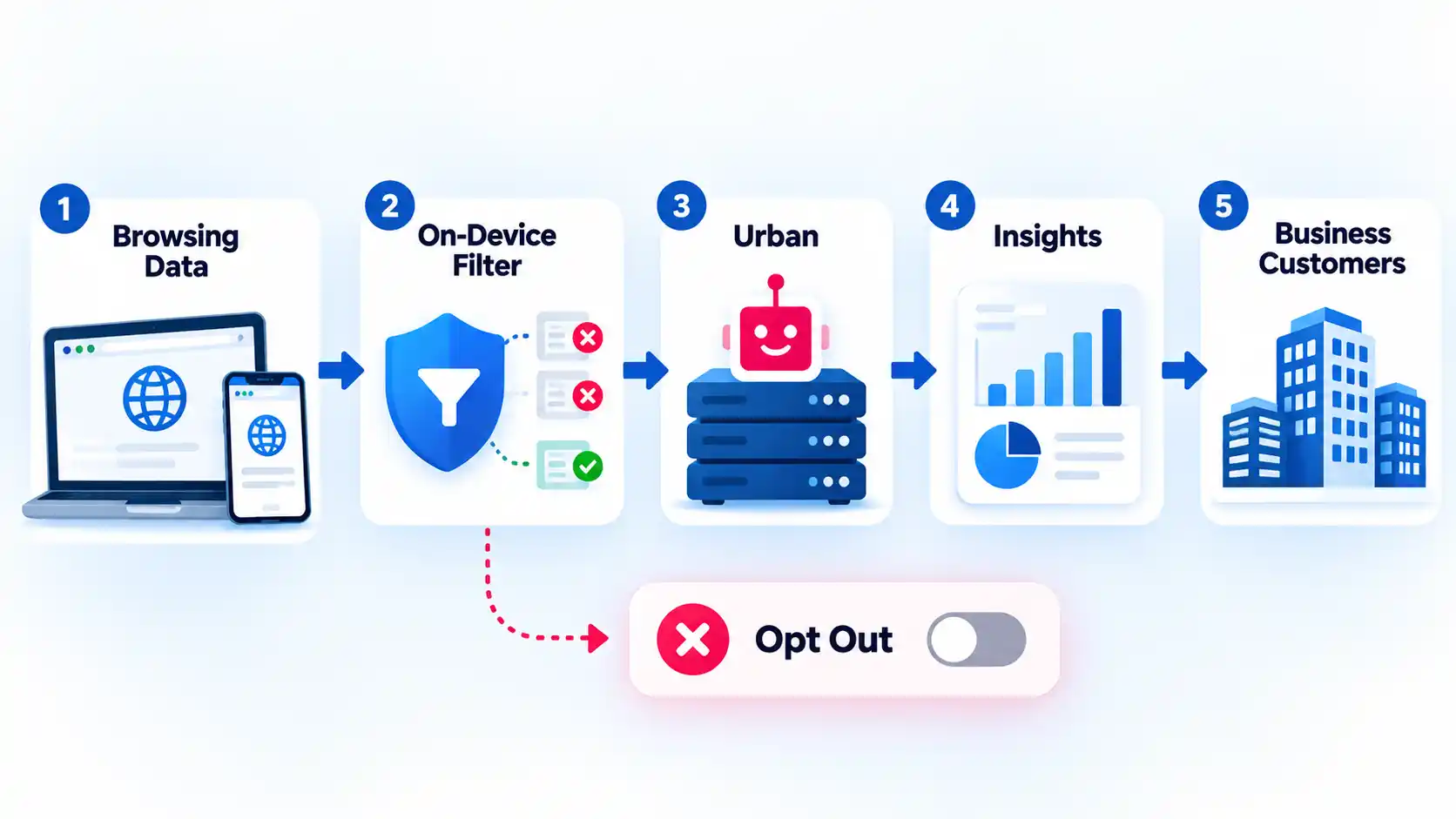
The commercial-use provisions go further. Urban says its parent company is a data broker and that marketing insights and behavior segments are sold largely from aggregated, non-identifying browsing data. The policy also says raw Personal Information may in some cases be disclosed to affiliates or the parent company for aggregation, anonymization, and de-identification.
Under its California disclosures, Urban says an insight sold with a unique identifier can qualify as a “sale” under the California Consumer Privacy Act definition. Its broader U.S. disclosures also say categories that may be sold include identifiers, commercial information, internet or network activity, profiles and inferences, and sensitive data as defined under applicable state laws.
Urban provides opt-out routes through product settings, an email request, and its “Do Not Sell or Share My Personal Information” link. The policy also says Global Privacy Control signals can be used for some browser or device opt-outs.
The browser extension deserves its own attention. The Chrome Web Store disclosure lists location, web history, and website content among the data the extension handles. Its optional Advanced VPN Protection description says visited URLs, ad interactions, clickstream data, IP addresses, and related web activity are sent to Urban’s servers for security analysis.
Urban’s terminology also makes a blanket “no logs” description hard to defend. Its own published VPN logs glossary states that UrbanVPN keeps logs for statistical analysis and periodically deletes them.
For a privacy-focused user, the practical question is not whether Urban can legally call some information aggregated or de-identified. It is whether you are comfortable routing your browsing through a service whose documented model includes this level of browsing-derived analytics and commercial data use. Choosing a VPN for privacy requires looking at the provider’s data practices, independent assurance, software transparency, and retention rules together rather than trusting one “no logs” phrase.
Security Features and Platform Gaps
Urban advertises modern security features, but their availability matters more than their names. A feature that exists on Android, for example, does not automatically protect a Windows session.
The current Premium pricing page advertises WireGuard, AES-256 encryption, Double VPN, and a kill switch. WireGuard is a VPN protocol, meaning a set of rules that controls how the encrypted VPN connection is created and maintained. A kill switch serves a different job: it blocks ordinary internet traffic if the VPN connection unexpectedly drops.
Urban’s current kill-switch feature page says the feature is available on mobile and that desktop support is “coming soon.” Its FAQ, however, describes a kill switch more generally and says it can be enabled or disabled from the settings menu. Because those statements do not fully align, verify the control in the specific app and version you intend to use instead of assuming universal availability.
Recent independent testing gives that limitation a practical consequence. In a September 2026 test, Gizmodo reported unprotected traffic after the free Windows VPN connection was interrupted in a cable-pull test. The same review reported a DNS leak on one tested U.S. server.
A DNS leak happens when the requests used to translate website names into network addresses travel outside the expected VPN path. That can reveal information about the sites being requested even when the main browser connection appears to use the VPN.
One test does not prove that every Urban VPN server or app version will leak. It does show why a feature list should not replace verification. Testing a VPN for DNS, IPv6, and WebRTC leaks can reveal whether traffic is escaping the protected route on your actual device and network.
Performance and Streaming: What Independent Tests Found
VPN speed is highly dependent on the server, protocol, distance, local connection, congestion, and device. That makes a single headline speed number a weak way to judge any VPN.
Gizmodo’s September 2026 testing illustrates that variation clearly. Its LinkX test on one U.K. server measured 185.11 Mbps, while another U.K. test using the default Auto setting measured only 1.12 Mbps. Those figures belong to Gizmodo’s test setup, not to Blog The Tech, but the large difference is useful evidence that Urban’s performance can vary sharply by connection method and server.
Streaming results were also mixed. The same test reported that five of eight tested streaming services blocked Urban VPN, while some services remained accessible. That makes Urban a risky choice if reliable streaming access is your main reason for subscribing.
It is better to interpret those results as evidence of inconsistency than as a permanent list of services that will or will not work. Streaming platforms regularly change their VPN-detection systems, while VPN providers change server addresses and routing.
The performance evidence therefore does not justify calling Urban universally slow. It does justify caution about assuming that a fast result on one protocol, server, or marketing page will carry over to your connection.
Urban VPN Premium: Pricing, Features, and Conflicting Terms
Premium changes Urban VPN mainly by adding more server access, multi-device use, dedicated Premium infrastructure, and additional features. It does not automatically resolve the privacy questions discussed earlier.
At the October 8, 2026 research point, Urban’s official pricing page advertised a one-month plan at $12.99, a six-month plan billed at $41.88, and a one-year plan billed at $59.40. Prices can change, so those figures should be treated as a dated snapshot rather than permanent rates.
The same page advertises up to eight devices, WireGuard, AES-256 encryption, Double VPN, a kill switch, and dedicated Premium servers. Urban’s separate Premium page describes a larger paid server pool and support for up to eight devices.
Urban’s Windows documentation is not fully aligned. The pricing page markets Premium alongside Windows-focused offers, while the separate Premium comparison page still marks Windows as “Coming soon” in one platform table even though surrounding text also refers to Windows. If Windows Premium is the reason you are paying, verify that the paid option and required features are available in your current Windows app before purchase.
If you are deciding whether to upgrade, compare the type of VPN client you actually need as well as the server list. Paying for more locations is not useful if your main need is protection for traffic outside the browser and you are only using an extension.
More broadly, what paying for a VPN actually changes usually includes capacity, server choice, support, simultaneous devices, or extra controls. A subscription by itself does not prove stronger privacy or better security.
Urban’s official refund information currently conflicts. Its pricing page advertises a 30-day money-back guarantee, while both its FAQ and Premium comparison say Premium does not currently offer a money-back guarantee. Verify the terms shown at checkout before paying and do not assume a refund is available.
The contradiction is not a minor wording difference. Refund eligibility can directly affect whether you are comfortable trying a long-term plan. Until Urban publishes consistent terms across its current pages, the terms attached to the exact purchase route deserve more weight than a general marketing statement elsewhere on the site.
Who Urban VPN Suits and Who Should Avoid It
Urban VPN is easiest to justify when your expectations are modest. Someone who wants occasional, non-sensitive IP-location changing on a Windows PC or supported browser may value the free access enough to accept its documented data practices and feature limitations.
It is a much weaker fit when the VPN itself is part of your privacy strategy. Consider another provider if any of the following are priorities:
- You want a provider with stronger public independent assurance around logging practices.
- You do not want browsing-derived information used for market-intelligence or analytics purposes.
- You need clearly documented kill-switch protection on your exact desktop platform.
- You need predictable streaming performance across several services.
- You want product, platform, pricing, and refund documentation that agrees across the provider’s current pages.
There is also a middle ground. You might decide that Urban is acceptable for low-risk browsing but not for work accounts, sensitive research, financial activity, confidential communication, or situations where VPN failure would create a serious privacy consequence.
That is a fit decision, not a claim that the service is malicious. Urban publishes substantial detail about its data practices and opt-out controls. The concern is whether those practices align with the reason you want a VPN in the first place.
Better Alternatives to Urban VPN
If privacy evidence matters more to you than unrestricted free access on Windows, compare providers that publish stronger assurance, clearer free-tier limits, or more narrowly defined data practices.
A comparison of safer free VPN options covers Proton VPN Free, Windscribe Free, hide.me, PrivadoVPN Free, and TunnelBear Free by factors such as data caps, registration requirements, device limits, server access, and privacy evidence.
For example, a free plan with a smaller server pool can still be the better choice if the provider publishes recurring independent audits or has a clearer policy about browsing destinations. Server count is useful only after the trust question is answered.
Bottom Line
Urban VPN’s free Windows and browser access is genuinely attractive, but free availability should not be the deciding factor when privacy is the reason you want a VPN. Its current privacy disclosures allow meaningful browsing-derived data processing, recent independent testing found protection and performance problems in specific test conditions, and Urban’s own pages still disagree about important details such as refunds, platform availability, and desktop kill-switch support.
If you only need occasional, low-risk location changing and understand those trade-offs, the free service may be sufficient. If you expect the VPN provider itself to minimize data collection, offer stronger independent assurance, and document security protections consistently across platforms, choose a provider that meets those requirements before sending your traffic through it.
Our Verdict
Urban VPN is a cautious fit for casual users who prioritize free access and convenience over strong privacy assurance. Privacy-focused users should look elsewhere, while anyone considering Premium should verify the exact platform features and refund terms before purchase because Urban’s current official pages do not fully agree.

💬 Comments