PDFBear is a broad browser-based PDF toolkit that covers common jobs such as converting, merging, splitting, compressing, signing, and organizing files without installing desktop software. Its standard tools can be useful for occasional PDF work, but the free-plan limits, cloud file handling, Premium-only AI features, and a few unclear product details are worth understanding before you upload important documents or pay.
This is a research-based review, not a hands-on performance test. The verdict therefore focuses on what PDFBear currently offers, what its published policies say, where those policies create practical trade-offs, and which claims cannot be independently confirmed from the available evidence.
Quick Take
PDFBear makes sense if you want a convenient browser toolkit for routine PDF work and your files fit its current limits. Look more carefully before using it for sensitive documents, large automated workloads, or AI-heavy work, because files are processed online, AI features can involve third-party providers, and Premium AI use is still subject to fair-use limits.
Is PDFBear Worth Using?
PDFBear is worth considering for occasional browser-based PDF work because its standard toolset covers many everyday tasks without requiring a paid subscription. The current free plan includes standard conversion, merge, split, compression, and signing tools, with files up to 50 MB.
The main question is not whether PDFBear has enough tools. It does. The more useful question is whether its operating model fits the documents you handle.
If you mainly need to convert a Word document, combine a few PDFs, compress an attachment, rotate pages, or sign a document from a browser, the free tier may cover the job. A registered free account currently supports unlimited conversions with up to 30 pages or images per conversion, while guests are limited to five conversions per day with up to 10 pages or images each.
Premium becomes more relevant when you need optical character recognition (OCR), AI document tools, larger page batches, priority processing, or longer file availability. OCR is the technology that turns text inside scanned pages into searchable and selectable text.
The biggest caution is privacy rather than basic functionality. PDFBear is an online service, so documents are uploaded for processing instead of remaining entirely on your computer. That does not automatically make the service unsuitable, but it matters if the file contains information you would normally avoid sending to a third-party cloud service.
How This PDFBear Review Was Researched
That distinction matters because feature availability does not prove quality. A service can offer PDF-to-Word conversion without that establishing how accurately it reproduces a difficult document. Likewise, PDFBear advertises priority processing for Premium users, but that does not provide an independent benchmark for how much faster it is.
Independent review evidence is also limited. G2 currently shows six PDFBear reviews with a 2.4 out of 5 average. Six reviews can surface individual experiences, but the sample is too small to support a broad conclusion about reliability, support quality, or typical user satisfaction.
What PDFBear Can Do
PDFBear is more than a single converter. Its current tool catalog covers conversion, organization, optimization, editing, signing, security, OCR, and AI-assisted document work.
The standard tools include familiar jobs such as converting Word, Excel, PowerPoint, images, and other formats to PDF; converting PDFs back to common formats; merging and splitting documents; compressing files; rotating or organizing pages; signing PDFs; filling forms; and applying basic document-security tools. PDFBear says these standard tools are available without Premium.
The service also includes more specialized tools such as OCR, Chat with PDF, summarization, translation, and a PDF question generator. These are materially different from a normal file conversion because some depend on artificial intelligence and are reserved for Premium accounts.
That separation is useful when deciding whether you actually need a subscription. Someone who occasionally merges invoices and converts Office files has a very different workload from someone extracting text from hundreds of scanned pages or asking an AI system to summarize long reports.
PDFBear operates through a web browser, so its core tools do not require desktop installation. That cross-device convenience is one of the service’s clearer strengths, especially when you move between computers or only need a PDF tool occasionally.
PDFBear Free vs Premium: Limits and Pricing
The free plan handles routine PDF work, while Premium mainly raises processing allowances and unlocks OCR, AI features, batch processing, priority service, and an ad-free experience. The distinction is easier to understand when the limits are placed side by side.
| Feature | Free | Premium |
|---|---|---|
| Standard PDF tools | Included | Included |
| Maximum file size | 50 MB | 50 MB |
| Guest use | 5 conversions per day, up to 10 pages or images each | Not applicable after upgrading |
| Registered-account conversions | Unlimited conversions, up to 30 pages or images each | Unlimited tasks, up to 200 pages or images per conversion |
| OCR | Not included | Included, subject to applicable fair-use limits |
| AI document tools | Not included | Included, subject to fair-use limits |
| Batch processing | Not included | Included |
| File retention | 30 days after last activity | While subscribed, then 30 days after the subscription ends |
| Priority processing | No | Yes |
| Current price | $0 | $13.99 monthly or $99.99 yearly; the yearly plan is shown as $8.33 per month |
PDFBear currently offers a 7-day Premium trial and a $99.99 yearly plan. Its FAQ also lists a $13.99 monthly option. Prices and promotional terms can change, so check the checkout page before subscribing.
There is an important qualification behind the word “unlimited.” Standard Premium tasks may have no daily conversion limit, but PDFBear’s AI features remain subject to fair-use controls. The Terms describe per-file page limits, a monthly AI allowance, a maximum upload size of 50 MB per file, and restrictions on automated or unusually high-volume processing.
Premium is therefore better understood as a higher-capacity individual plan than an unrestricted bulk-processing service. If your workflow is automated, shared across many people, or processes unusually large numbers of documents, a normal Premium account should not be assumed to cover it.
PDFBear’s official documentation currently conflicts regarding watermarks on free conversions. Its pricing page lists watermark-free PDF output as a Premium-only feature, and its developer documentation states that free conversions receive a small “PDFBEAR.COM – Free Ver.” badge. Conversely, its FAQ states converted files carry no watermark. If clean, unbranded output is essential for client-facing documents, portfolios, or resumes, run a sample test on the exact tool before relying on the free tier.
Because those first-party statements conflict, do not assume one rule applies uniformly to every free website workflow. Testing your specific file path beforehand prevents unexpected formatting revisions when submitting time-sensitive files.
How PDFBear Handles Your Files and Privacy
Uploading a PDF to an online converter means the document leaves your device for processing. For routine files that may be an acceptable trade-off for convenience, but sensitive documents deserve a closer look at storage, deletion, sharing, and AI processing.
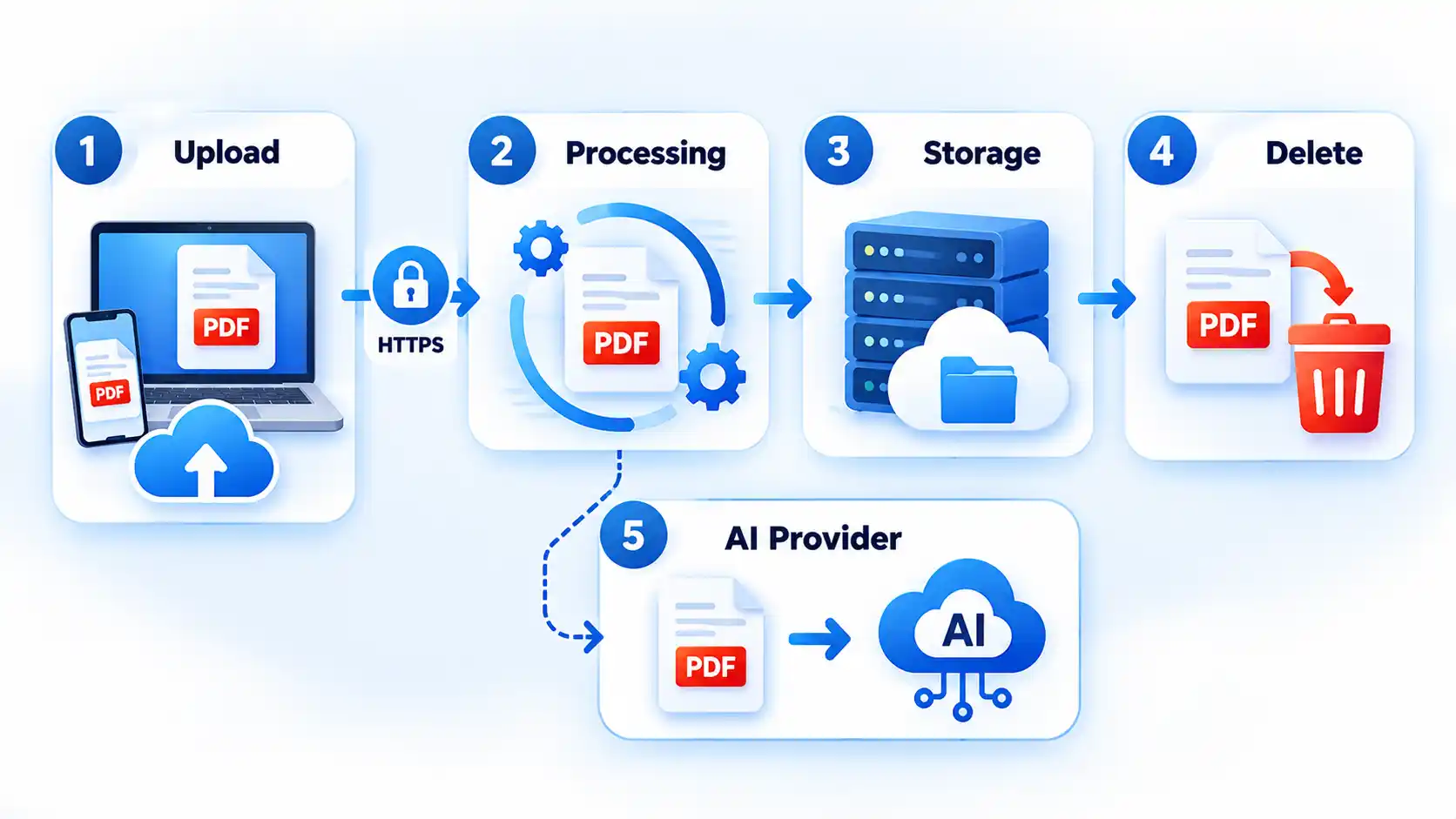
Files are transferred through encrypted HTTPS connections while moving between your device and PDFBear. HTTPS protects data in transit, but it is not the same as an independent guarantee that no security incident can occur.
For a free account, a file is removed 30 days after its last activity. Downloading the file or opening its share link counts as activity and resets that timer. Premium files remain available while the subscription is active and are removed 30 days after the subscription ends.
Signed-in users can also delete files manually from the file manager. PDFBear’s Privacy Policy states that uploaded and converted files may be stored on S3-compatible infrastructure such as Wasabi or Amazon Web Services.
Sharing creates another consideration. A shared page is configured so search engines should not index it, but anyone who has the share link can view the file until it is deleted. A no-index setting reduces search-engine discovery; it does not restrict access to one named recipient.
AI tools add another data path. When you use Chat with PDF, summarization, translation, the question generator, or other AI-assisted functions, relevant file content or text may be sent to a third-party AI provider to generate the result. Ordinary conversion should not be described as the same process simply because AI tools are available elsewhere on the service.
If a document contains confidential business information, identity documents, medical information, financial records, private legal material, or another category your organization restricts from external AI services, that distinction matters. Follow the applicable data policy rather than assuming an online AI feature is suitable because the underlying website uses HTTPS.
PDFBear states that human review is not part of its normal automated document-processing workflow. That is a provider statement about its operating practice, not an independent security certification, so it should not be treated as proof that every possible privacy or security risk has been eliminated.
Where PDFBear Falls Short
The first limitation is structural: PDFBear is primarily an online workflow. If your requirement is that a confidential document never leave your own computer, a remote processing service is the wrong model regardless of how convenient its interface may be.
The 50 MB per-file ceiling can also become restrictive with high-resolution scans, image-heavy reports, design files, or long archives. Premium raises the number of pages or images allowed in a conversion, but the current Terms still cap an uploaded file at 50 MB.
Premium’s AI tools also come with limits behind the headline feature list. OCR, Chat with PDF, summarization, translation, and the question generator are included with Premium, but AI usage has monthly and per-file fair-use controls. Heavy AI users should not interpret Premium as unlimited automated document analysis.
There is also no basis for promising flawless output. PDFBear’s Terms state that conversions and AI outputs are not guaranteed to be error-free and advise users to keep backups of important files. That matters most for complex tables, uncommon fonts, scanned text, forms, and intricate layouts, where a converted result should be checked before you rely on it or discard the original.
Free-output watermarking remains unclear because PDFBear’s own current pages disagree. If an unbranded PDF is essential to your workflow, confirm the result with the specific free tool before relying on it repeatedly.
Independent review evidence is too limited for a strong reliability verdict. G2 currently lists only six PDFBear reviews. That is enough to justify reading individual complaints or praise before subscribing, but not enough to establish how the service performs for most users.
PDFBear Alternatives
The most useful alternative depends on why PDFBear does not fit. Replacing it with another cloud converter does not solve much if your actual concern is keeping documents off third-party servers.
If your main task is Merge PDF, compare free PDF merger tools by processing location, free-use restrictions, offline support, and document controls. That comparison is more useful than paying for a broad PDF suite when combining files is the only job you regularly perform.
If you still want another browser-based conversion and editing service, CocoDoc PDF Converter is another option to evaluate. The important comparison is not simply which site has more tools. Check the current free limits, processing model, privacy policy, pricing, and the exact functions you need before moving a sensitive or repeated workflow.
For documents that must stay local, prioritize an offline desktop application or a browser-local tool whose processing genuinely occurs on your own device. Dedicated desktop software such as PDFgear or open-source editors like LibreOffice Draw process files entirely on local hardware without sending document bytes across the network. Choosing a true offline tool or a client-side WebAssembly processor changes the privacy model far more meaningfully than switching between two competing cloud converters.
Who Should and Shouldn’t Use PDFBear
PDFBear is a reasonable fit for people who occasionally need common PDF tasks from a browser and do not want to install dedicated desktop software. The free account is especially relevant when your files stay below 50 MB and your conversions fit within the current 30-page or image allowance.
Premium makes more sense when OCR, AI document tools, batches of up to 200 pages or images, priority processing, or longer file availability are part of your regular work. Even then, the AI fair-use policy should be checked if you expect unusually heavy use.
PDFBear is a weaker fit if you require local-only processing, routinely work with files above 50 MB, need independently benchmarked conversion accuracy, or plan to automate high-volume PDF processing through a normal consumer Premium account.
It also deserves extra scrutiny when the documents are highly sensitive. The service publishes information about HTTPS, retention, deletion, storage providers, and AI subprocessors, which gives you useful policy details to evaluate. Those disclosures still do not remove the basic fact that an online workflow transfers document data to external infrastructure.
If your decision comes down to privacy, start with the data rather than the tool list: identify what the document contains, whether external processing is permitted, whether an AI feature is involved, and how soon you need the result removed. That will usually tell you more than a long feature comparison.
Verdict
Our Verdict
PDFBear is most convincing as a convenient browser toolkit for ordinary PDF jobs rather than as an unrestricted professional document-processing platform. Its free standard tools, 50 MB file allowance, and registered-account conversion limits should cover many occasional tasks, while Premium adds OCR, AI, batch, and priority features. The decision changes when privacy, local-only processing, very large files, or heavy AI usage matters: documents are processed through online infrastructure, AI features can involve third-party providers, and Premium AI use remains subject to fair-use limits. Use PDFBear when its convenience and published controls fit the sensitivity and size of your files; choose a local or more specialized workflow when they do not.

💬 Comments