You can activate your Wisely card through the myWisely app or mywisely.com by selecting Activate Card and following the prompts. You can also activate by phone, while ADP separately confirms activateWisely.com as an official activation route for Wisely Pay members.
Before You Activate Your Wisely Card
Activation is usually short, but having the right card and information in front of you can prevent avoidable delays. Wisely has different card programs, including Wisely Pay, Wisely Direct, and Wisely Cash, and the Member Services number you use depends on the card type.
Warning
Use the myWisely app, mywisely.com, an activation destination linked by Wisely or ADP, or the phone number printed on your card. Do not enter card or identity details into a website simply because its name looks similar to Wisely.
Prerequisites
- Have the physical Wisely card available so you can provide any card information the current activation flow requests.
- Have your identifying information available in case Wisely asks you to confirm it during activation.
- Be ready to create a PIN, or Personal Identification Number, for the card.
- If you plan to activate by phone, check the small print on the back of the card to determine whether it is Wisely Pay, Wisely Direct, or Wisely Cash.
Wisely advises cardholders not to use personal information as their PIN. Its current activation instructions also confirm that activation includes setting a PIN. If you need phone support, Wisely says you can identify your card type from the small print on the lower half of the back of the card, as shown in its Member Services information.
How to Activate Your Wisely Card Online or in the App
According to Wisely’s current activation guidance, the main process is to log into the myWisely app or mywisely.com, select Activate Card, and follow the instructions. Wisely’s general guidance does not publish one universal sequence of form fields, so follow the prompts displayed for your card rather than relying on an older screenshot or fixed field list.
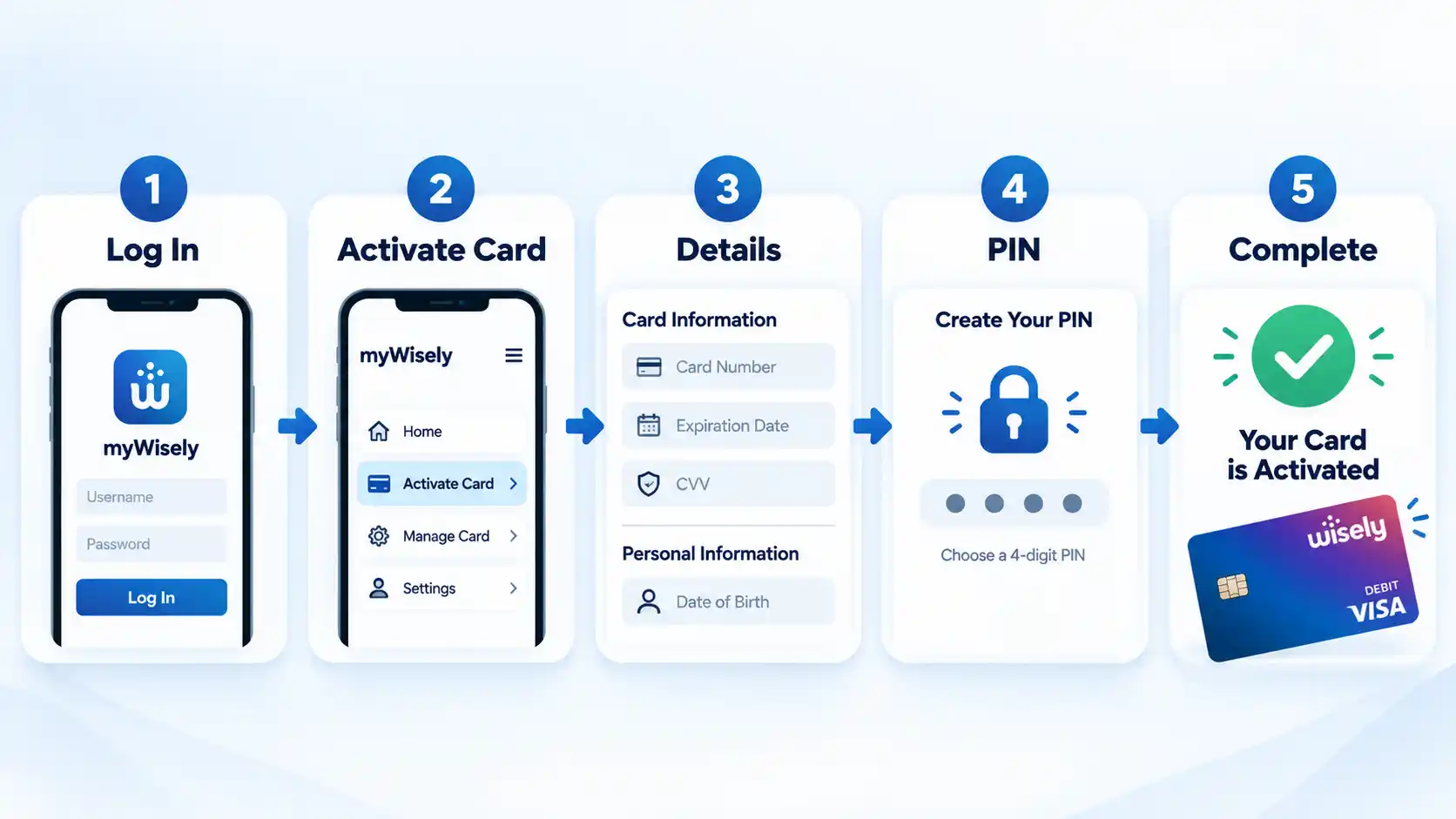
- Log into myWisely. Open the myWisely app or go to mywisely.com and log into your account.
- Select Activate Card. Click or tap Activate Card to start the current activation flow.
- Follow the displayed instructions. Enter the card, account, identity, or contact information the current activation flow requests. The exact fields can vary, so use the prompts on the official Wisely screen.
- Set your PIN. Create the PIN required for the card. Wisely advises against using personal information as your PIN.
- Complete activation. Finish the remaining prompts and confirm that the activation process reports successful completion.
If you have a Wisely Pay card, ADP also confirms activateWisely.com as an official Wisely Pay activation route. ADP also lists phone activation as an alternative for Wisely Pay members.
How to Activate a Wisely Card by Phone
Phone activation is an official alternative if you cannot or do not want to complete the web or app process. The important first step is identifying your card type so you use the correct Member Services number.
- Identify your Wisely card type. Check the small print on the lower half of the back of the card to determine whether you have Wisely Pay, Wisely Direct, or Wisely Cash.
- Call the matching Member Services number. Use the official number for your card type in the table below. If support information is printed directly on your physical card, you can also use that information.
- Follow the activation instructions. Provide the information requested through the official phone process and complete activation, including PIN setup.
Wisely currently lists the following Member Services numbers for its three card programs:
| Card type | Member Services number | How to identify it |
|---|---|---|
| Wisely Pay | 1-866-313-6901 | Check the small print on the lower half of the back of the card for the program name. |
| Wisely Direct | 1-866-313-9029 | Check the small print on the lower half of the back of the card for the program name. |
| Wisely Cash | 1-877-431-5860 | Check the small print on the lower half of the back of the card for the program name. |
How to Know Your Wisely Card Is Activated
The strongest confirmation is the activation flow itself reporting that the process has been completed. Do not assume that one later payment decline automatically means activation failed because a transaction can fail for other reasons, such as an insufficient available balance or a merchant or account restriction.
Verify the result
- The official activation flow reports successful completion rather than continuing to ask you to activate the card.
- You completed the PIN-setting step required as part of card activation.
If activation appears complete but the card still cannot be used as expected, treat the failed transaction as a separate problem instead of repeatedly trying to activate the card. Available balance, merchant acceptance, fees, account restrictions, and identity-verification requirements are different issues from whether activation itself completed.
What to Do if Your Wisely Card Will Not Activate
Activation problems are easier to troubleshoot when you separate website or account-access trouble from problems with the physical card, PIN, card type, or identity information. Work from the simplest checks toward Member Services rather than repeatedly submitting sensitive information.
The activation website or page does not look right
Return to the myWisely app, mywisely.com, or an activation link supplied by Wisely or ADP. Do not enter card details into a look-alike domain merely because its name contains “Wisely.” If the official route remains unavailable, use the Member Services number on the back of the card.
You cannot sign in to myWisely
Treat login trouble separately from card activation. Wisely’s account-recovery instructions direct users to choose Forgot Username or Password? from the login screen. A structured Wisely activation troubleshooting process starts by separating account-access errors from card-specific activation failures.
You are unsure which Member Services number to call
Look at the small print on the lower half of the back of the card for the Wisely Pay, Wisely Direct, or Wisely Cash program name, then use the corresponding number in the table above. If there is any uncertainty, use the support information printed directly on your physical card.
You forgot or need to change your PIN
If you forgot your PIN, Wisely says to call Customer Service using the phone number on the back of your card. Its current forgotten-PIN instructions provide that escalation route. Wisely separately allows an existing PIN to be changed through Card Settings in the myWisely app.
You are activating a secondary card
A secondary cardholder can activate through the myWisely app, mywisely.com, or by phone. Wisely says the secondary cardholder uses their own personal information, such as their Social Security number, during activation. Follow the current secondary-cardholder activation instructions rather than assuming the primary cardholder’s information should be entered.
The card is activated but Wisely still asks you to verify your identity
This does not necessarily mean activation failed. Activation and additional identity verification can be separate processes. Check the card type and the feature you are trying to use, then follow Wisely’s identity-verification instructions or call the number on the back of the card.
Activation and Identity Verification Are Not the Same Thing
Activating a Wisely card prepares the card for use and includes setting its PIN. Identity verification is a separate process that can affect access to particular account features.
According to Wisely’s current identity-verification information, Wisely Pay or Wisely Cash cardholders may need to verify their identity before accessing certain features or loading funds from sources other than the company through which they received the card. Wisely says Wisely Direct cardholders have already been identity-verified.
In practice, that means a card can complete activation while another feature still asks for identity confirmation. Electronic verification of identity is the broader process of using digital information or technologies to confirm that someone is who they claim to be; Wisely’s own documentation determines which verification requirements apply to its card programs.
The exact Wisely identity verification requirements depend on the card program and feature involved, so successful card activation should not be treated as proof that every optional account feature is already enabled.
What You Can Do After Activation
Once activation is complete, you can use the card according to the network and terms that apply to your Wisely program. Wisely says its cards can be used on the phone, online, and at stores where the applicable Visa debit or Debit Mastercard network is accepted.
Wisely describes its product as a prepaid debit card rather than a regular deposit-account debit card. Its prepaid-versus-regular-debit explanation says Wisely uses a prepaid balance, while a regular debit card is normally tied to a deposit-based account. Because the funding model, fees, and available features can differ, prepaid card and debit card differences should be evaluated separately rather than treating the terms as interchangeable.
ATM access should not be described as universally free. Wisely explains that a surcharge-free ATM does not impose the ATM owner’s additional surcharge, but other transaction fees can still apply. Wisely also says the number of fee-free ATM transactions may be limited, so check the Cardholder Agreement and List of Fees for your particular card.
Rewards are conditional as well. Wisely’s current rewards program includes eligible promotions available through myWisely, including cash back on qualifying eGift cards. That does not mean every ordinary purchase automatically earns cash back.
Conclusion
For most cardholders, the direct activation route is the myWisely app or mywisely.com: log in, select Activate Card, follow the current prompts, and set your PIN. Phone activation is also available for Wisely Pay, Wisely Direct, and Wisely Cash, with a different Member Services number for each card type.
If activation does not work, verify the card type and official activation route before entering the same information repeatedly. The support information printed on the physical card is the safest escalation point when an online activation flow remains unresolved.

great sir beneficial article thanks for sharing.