Most of the AI you meet in consumer products is narrow. It ranks a page, recommends a video, bids on an ad, warns a driver, flags a transaction, or adjusts a lesson. Sometimes it learns from data; sometimes it is ordinary automation wearing a smart label. The practical question is always the same: what job is this system doing, what happens when it is wrong, and how do you reach a person when the stakes rise?
Quick Take
- Rules follow fixed logic; machine learning learns patterns from data; generative chat produces text or media from prompts.
- Search ranking and video recommendations are automated, but they are not general-purpose chatbots.
- Ad bidding and ad personalization are separate systems, so changing one setting does not change the other.
- Driver assistance can warn or intervene, but the driver stays responsible.
- A bank alert or support bot starts a review; it does not settle a dispute by itself.
Rules, machine learning, and generative chat are different tools
AI is the broad field. Machine learning is the subset that learns patterns from data. Generative chat produces text or media from prompts. Automation is broader than both: it includes technology that monitors and controls production and delivery, including fixed rules that never learn.
A practical filter: does the system infer an output from data? A machine-based system that infers predictions, content, recommendations, or decisions counts as AI in the broad policy sense. Trustworthy use also needs transparency, human oversight, robustness, accountability, and a way to challenge outputs.
A crypto wallet, VR headset, AR filter, or electric motor may be advanced, but none becomes AI by default. The question is whether the system infers an output from data or just follows a fixed rule.
| Type | What it does | Everyday example | What it cannot do alone |
|---|---|---|---|
| Rule-based automation | Follows fixed logic written by a person | A thermostat that turns on at a set temperature | Adapt to a new pattern unless someone changes the rule |
| Machine learning | Learns patterns from data to predict, rank, classify, or recommend | Search ranking, video recommendations, ad bid optimization, transaction scoring | Ensure accuracy, explain every signal, or handle every edge case |
| Generative chat | Produces text or media in response to a prompt | A chatbot that drafts an answer or summarizes a document | Verify its own facts or replace human judgment on high-stakes decisions |
Six everyday surfaces, compared by job and failure mode
The useful comparison is not the badge on the product page. It is the job the system performs, the data it uses, the human role that remains, and the failure mode you need to watch.
| Surface | Observable job | Adaptive behavior | Human role | Failure mode | Control to check |
|---|---|---|---|---|---|
| Search | Find and rank pages for a query | Automated ranking and some language-matching AI; not a general chat model | Evaluate important claims and choose sources | Wrong, thin, or manipulated results; not every signal is disclosed | Use authoritative sources; report harmful results |
| Video | Recommend videos and live content | Uses viewing behavior, subscriptions, feedback, and surveys | Choose what to watch and manage history | Engagement signals can influence what surfaces | Pause, edit, or delete search and watch history |
| Ads | Auction ad space and personalize ads | Smart Bidding optimizes bids; personalization uses activity data | Check the advertiser and the offer | An ad does not establish product quality; personalization can feel intrusive | My Ad Center or platform equivalent; turn off personalization; delete activity |
| Cars | Warn or intervene in limited driving tasks | Sensors and control software assist the driver | Stay engaged, monitor, and take over | System limits and driver overtrust | Owner’s manual; keep hands ready; do not treat as self-driving |
| Banking | Flag suspicious transactions and answer support questions | ML transaction scoring; chatbots handle some service requests | Resolve disputes and escalate | False alerts; a chatbot can block human support | Official app or phone; ask for a human; use the error-correction channel |
| Learning | Adjust practice and assess progress | Adaptive sequencing and automated feedback | Teacher or parent oversight | Over-reliance, poor fit, and privacy risk | Privacy settings; teacher review; use as a supplement |
Search results: ranking is not a truth check
Search results are produced by automated ranking systems that weigh many signals. Some of those systems use AI to understand language and match pages to a query; that is narrower than a general chat assistant. Sponsored results are ads, and organic ranking is separate: the platform says it does not accept payment to crawl more often or rank a page higher.
What it does well: it surfaces relevant pages quickly. What it cannot do: disclose every signal, guarantee that a page is accurate, or replace your judgment on money, health, or safety. Results can vary by location, language, and device.
Video and live discovery: recommendations follow behavior
Recommendations use viewing behavior, likes and dislikes, subscriptions, feedback, and surveys. They are designed to predict what you may watch, not to decide what is true. You can pause, edit, or delete search and watch history.
Recommendations are not an editorial judgment. They can surface high-quality content, and the platform can elevate quality sources for some topics, but engagement signals still shape what appears. Creators must also disclose realistic altered or synthetic media, including content made with generative AI, and labels can appear on the video or in its description.
Real-time score updates or fixed support queues on live entertainment and sports platforms are ordinary automation unless a provider documents that a model learns from data to rank or decide. Without public technical documentation, an interface alone does not show which parts use machine learning and which follow fixed rules.
What it does well: it finds content you might watch. What it cannot do: ensure quality, neutrality, or that a recommendation is in your interest. What to check: pause or delete history, use content settings, and check labels on synthetic media.
Separately from video recommendations, sportsbook apps are a commercial betting category with real financial risk. Check platform terms and local eligibility rules before using one, and stop and seek local support if betting stops being entertainment. For a look at a user-facing sportsbook layout, see BetBind’s Bet365 sportsbook review.
Ads and shopping: bidding and personalization are separate systems
Ad auctions and ad personalization are different machines. Smart Bidding uses AI to optimize bids for conversions or conversion value in each auction. Conversion tracking is required, and the platform recommends enough conversion data before judging performance. That is platform guidance, not a performance promise.
Personalization is separate from bidding. On Google, My Ad Center lets you customize ads, reduce sensitive-topic ads, turn off personalization, and delete activity data. The platform says it does not sell personal information and does not personalize ads for known minors.
Shopping carousels and feeds can mix recommendations with paid placements. Treat a sponsored tile as an ad, check the advertiser, and remember that relevance is not the same as quality.
What it does well: it makes ads more relevant and automates bid decisions. What it cannot do: establish that the advertised product is good, promise a return, or make personalization harmless. What to check: open My Ad Center or the platform equivalent, turn off personalization if you want, and verify the advertiser.
Cars and driver assistance: sensors assist, drivers stay responsible
Driver assistance is a sensor-and-software layer that can warn or intervene. Automatic emergency braking, lane departure warning, adaptive cruise control, lane centering, and lane keeping do specific jobs. They can help avoid or reduce the severity of some crashes. The driver remains responsible.
In the US, NHTSA says Level 3–5 technologies are not available on today’s vehicles for consumer purchase, and even the highest consumer-available automation requires the driver’s full engagement and undivided attention. IIHS says truly driverless cars are not for sale yet and Level 2 partial automation cannot replace the driver.
Warning
Do not treat lane centering or adaptive cruise control as self-driving. Keep your eyes on the road, your hands ready, and your attention on the task. Read the owner’s manual for the conditions in which the system may not work.
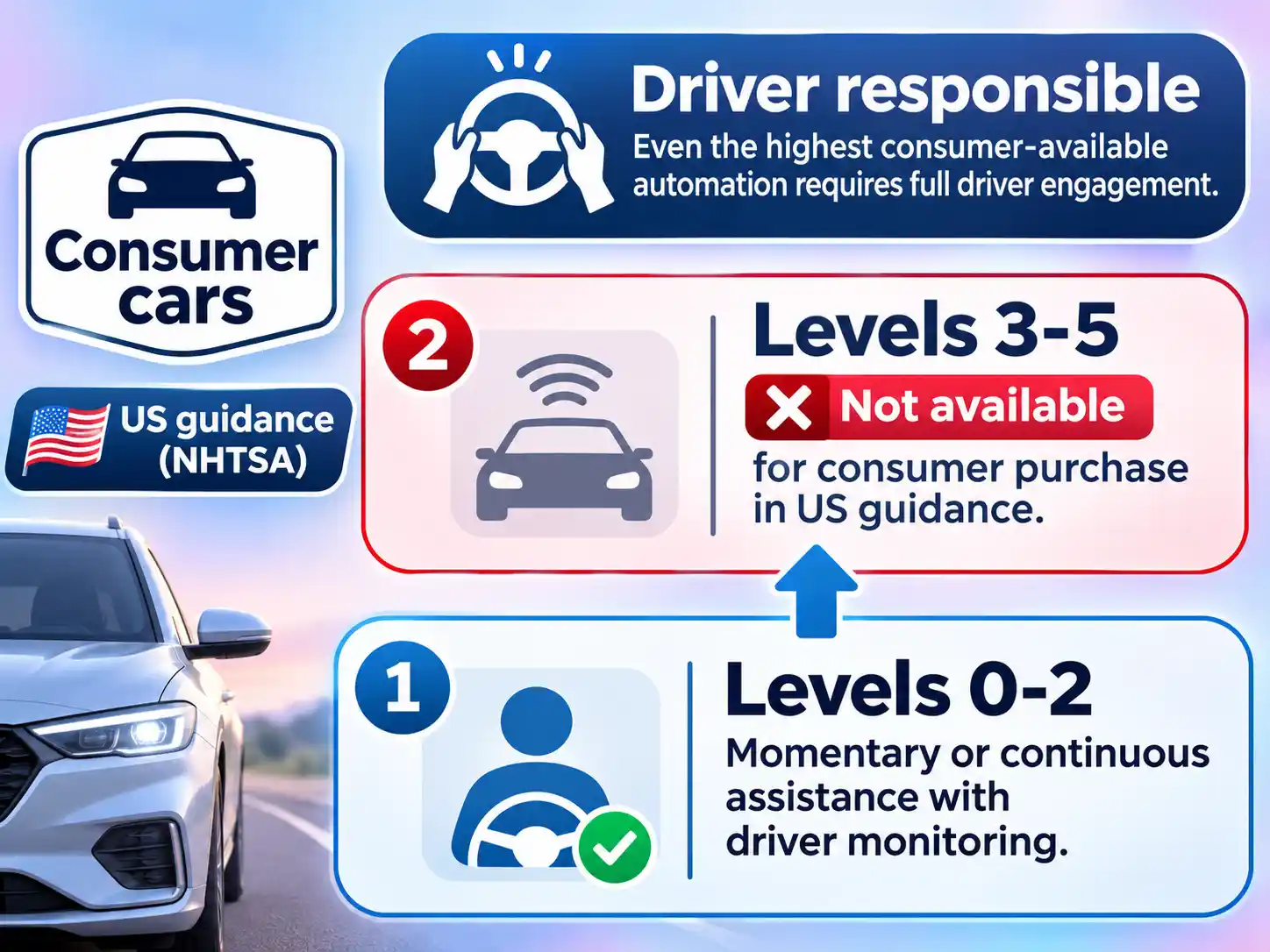
What it does well: it can help avoid or reduce the severity of some crashes. What it cannot do: replace the driver, handle every road condition, or ensure safety. What to check: the owner’s manual, the window sticker, and the system’s stated limits.
Banking alerts and support: fraud models flag, humans resolve
Banks use automation and, in some cases, machine learning. A cloud vendor describes ML as helping banks review large transaction volumes for suspicious activity in real time. That is a vendor use case, not an independent accuracy benchmark. It does not mean every alert is right or every bank uses the same model.
Support is the other half. In the US, a CFPB report says deficient chatbots that prevent access to live human support can lead to law violations, diminished service, and other harms. That does not mean every chatbot fails. It means human access is the safeguard to check.
In the US, Regulation E covers electronic fund and remittance transfers, including error-correction procedures; it is not an AI rule.
What it does well: it flags patterns and handles routine questions. What it cannot do: establish fraud, resolve a disputed charge without human review, or ensure that a chatbot understands your case. What to check: use the official app or phone number, ask for a human when money is at stake, and use the bank’s error-correction channel.
Learning tools: adaptive practice still needs a teacher
Learning tools can adjust practice and assessment. For example, Duolingo’s research index lists work on spaced repetition and adaptive language tests across its 500 million-plus learners, though a company research page does not establish that one tool outperforms another. UNESCO’s education guidance describes opportunities such as personalized tutoring and lesson planning, and warns about over-reliance, ethics, and loss of human agency. A dashboard is not proof of mastery.
What it does well: it adjusts practice and keeps learners moving. What it cannot do: ensure mastery, replace a teacher for high-stakes decisions, or establish superiority. What to check: privacy settings, teacher or parent oversight, and whether the tool explains why it changed the lesson.
Three traps that make AI look smarter than it is
- The badge trap: “AI-powered” is a marketing label. It does not tell you what the system does, what data it uses, or how often it is wrong.
- The automation blur: A fixed rule and a learned model can look the same on screen. Ask whether the system adapts from data or follows a script.
- The single-answer trap: A confident answer still needs a source. Check the date, the failure mode, and the human fallback.
Automation bias is the tendency to favor an automated recommendation even when the system errs. The practical counter is a habit: ask for documentation, a limitation statement, and a human path for decisions that affect money, safety, or rights.
Checkpoints before trusting any AI-powered product
Run these checks before you let an AI feature make a decision that matters. You do not need to understand the model; you need to understand the job, the data, the failure mode, and the escape hatch.
- Name the job the system is doing.Write down the observable task: ranking a page, recommending a video, bidding on an ad, warning a driver, flagging a transaction, or adjusting a lesson.A ranking tool is not a chatbot. A bidding tool is not an editor. Naming the job keeps you from expecting a narrow tool to do a general task.You should be able to state the job in one sentence. If you cannot, the product page is selling a category, not a capability.
- Check whether it learns from data or follows fixed rules.Look for documentation that says what data the system uses and whether it adapts after deployment.A fixed rule changes only when someone edits it. A machine-learning model changes as it is trained or updated. Generative chat produces new text or media from a prompt.The documentation should name the input data and the output. If it only says “AI-powered,” you have a label, not an explanation.
- Find the human fallback.Look for a support path, an escalation button, an override, or a person who can review the decision.A simple test: when the automated path fails, can you reach a live human? If not, treat the system as a convenience, not a decision-maker.
- Open the control that limits the system.For recommendations, pause or delete history. For ads, open My Ad Center or the platform equivalent and turn off personalization if you want. For a car, read the owner’s manual and keep the driver-assistance limits in view.Controls are platform-specific. Check the product you are using, then change the setting if it matters to you.
- Test with a low-stakes case, then escalate when the stakes rise.Ask the system a question you can verify. Search for a fact you know. Check why an ad appeared. Try a practice lesson you can grade yourself.If the output is wrong in a low-stakes test, do not trust it with money, safety, or legal rights. Use a human channel instead.Escalate when the system blocks a human, when the output affects your finances or safety, or when you cannot challenge the result.
Platform policies are not statutes and do not replace the product’s documentation or your own check. Check the local rule, the platform setting, and the owner’s manual that apply to your situation.

💬 Comments