Appointment scheduling software lets customers or staff reserve available time through a booking page connected to calendars, availability rules, and automated notifications. Its main benefits are less manual scheduling work, better control over booking conflicts, easier appointment changes, and a more convenient way for customers to book.
Quick Take: What Appointment Scheduling Software Does
Appointment scheduling software turns a business’s availability rules into bookable time slots. Instead of exchanging calls or messages to find a suitable time, a customer can open a booking page, choose an available service and time, enter the required information, and receive a confirmation.
Behind that simple booking flow, the software may check connected calendars, staff schedules, service duration, buffer time, booking limits, and other rules before showing a slot. Modern systems can also handle reminders, cancellations, rescheduling, payments, waitlists, rooms, equipment, and reporting. Those additional functions vary significantly by platform and subscription level.
- Booking page: Displays the services and appointment times a customer can currently book.
- Availability rules: Control working hours, service duration, lead time, booking windows, buffers, and exceptions.
- Calendar synchronization: Uses calendar availability to help prevent conflicting times from being offered.
- Appointment communication: Sends confirmations, reminders, change notices, or cancellation notices where supported.
- Operational controls: May coordinate staff, locations, rooms, equipment, payments, forms, and reporting.
A booking page is also another customer-facing digital touchpoint. When it is easy to use and consistent with the rest of a website, it can support a broader digital customer experience without requiring staff to handle every routine scheduling interaction manually.
How Appointment Scheduling Software Works
The basic process is straightforward: the business defines what may be booked, the system determines when it is available, and the customer selects from the valid choices. The important work happens in the rules that determine which choices are actually valid.
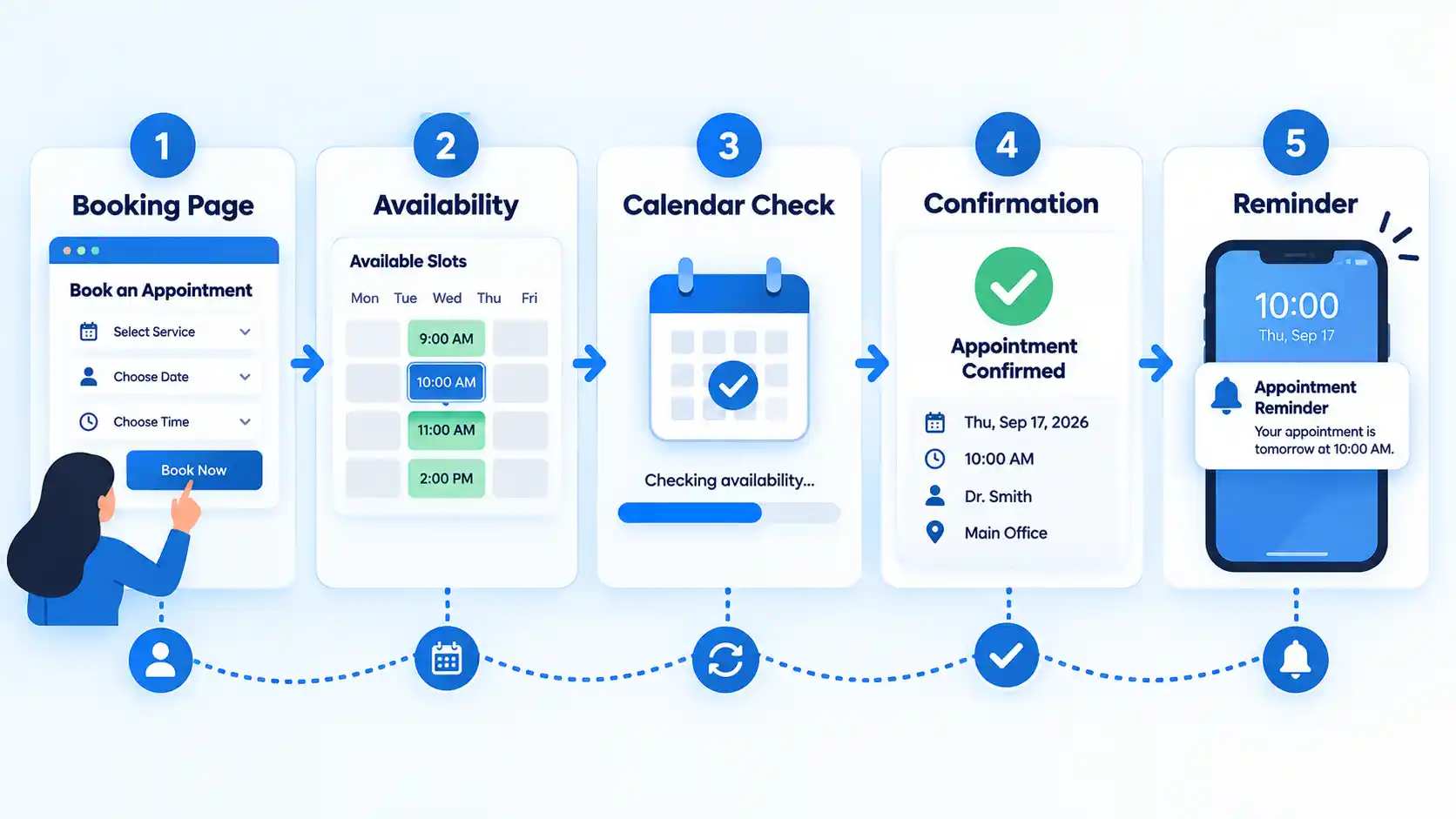
- The business defines a service. This usually includes the service name, appointment duration, location or meeting method, and the people who can provide it.
- Availability rules create possible time slots. Working hours, minimum booking notice, how far ahead customers may book, date exceptions, and buffer periods can all affect the resulting schedule.
- Calendars and other constraints remove unavailable slots. A connected calendar may mark a period as busy, while a staff schedule, room, chair, or other resource can impose another restriction.
- The customer chooses an available appointment. The booking form collects the information required to create the reservation. Depending on the system, this may include contact details, answers to intake questions, or payment.
- The booking is recorded and confirmed. The appointment is added to the appropriate calendar or scheduling database and the relevant participants receive a confirmation.
- Later events trigger follow-up actions. The system may send reminders, accept a rescheduling request, release a cancelled slot, update a waitlist, or notify staff of a change.
Google’s appointment schedule documentation, for example, shows controls for appointment duration, scheduling windows, adjusted availability, buffer time, maximum bookings per day, calendar conflict checking, booking forms, reminders, and optional payments. Microsoft similarly documents scheduling policies for appointment intervals, minimum lead time, maximum advance booking, and change notifications.
The practical limitation is important: scheduling software can only act on the availability information and rules it has. If a staff member keeps appointments in an unconnected calendar, time off is not recorded, or availability rules are wrong, the booking page may still expose unsuitable slots. For businesses using several calendars, understanding how to prevent double bookings across multiple calendars is therefore as much a configuration issue as a software feature.
Main Benefits of Appointment Scheduling Software
Customers Can Book Without Waiting for Business Hours
A public booking page can accept appointment requests whenever it is available online. Customers do not have to wait for someone to answer a phone call or respond to an email before seeing which times are open.
Customer-facing booking pages are a common part of Appointment scheduling software (sponsored link), allowing people to choose from the time slots a business has made available. The operational advantage comes from self-service rather than from the specific vendor: routine availability checking can happen without requiring a member of staff to participate in every booking.
For a business building its online presence, an accessible booking route can also turn website visits into a direct next action rather than forcing potential customers to switch to another communication channel.
Routine Scheduling Administration Can Be Reduced
Manual scheduling creates small tasks around every appointment: checking a diary, offering times, waiting for a reply, entering the appointment, confirming it, changing it when necessary, and reminding the customer. Scheduling software can automate several of these steps.
The benefit is not that staff stop managing schedules altogether. Someone still needs to maintain services, working hours, time off, booking policies, and exceptions. The software is most useful when it removes repetitive transactions while leaving unusual cases available for human handling.
Availability Rules Can Reduce Booking Conflicts
Conflict checking prevents a booking page from offering time that is already marked as unavailable in a calendar the system has been configured to check. Google’s documentation, for example, explains that busy periods on selected calendars are removed from bookable availability.
Rules can go further than basic calendar conflicts. A business may need 15 minutes to clean a room after an appointment, an hour of preparation before a consultation, or one day of notice before a field technician can visit. Microsoft documents scheduling policy controls such as time increments, minimum lead time, maximum advance booking, and notifications. Buffer and lead-time settings help represent the time around an appointment that is operationally unavailable even though no customer meeting appears on the calendar.
Reminders Can Help With Missed Appointments
Automated reminders can prompt customers to confirm, cancel, reschedule, or prepare for an upcoming appointment. Businesses that rely heavily on confirmations may also evaluate dedicated appointment reminders software (sponsored link) alongside broader scheduling platforms.
It would be inaccurate to say that reminders eliminate no-shows. Evidence from healthcare provides a useful indication of their potential effect but should not be generalized into a guarantee for every industry. A Cochrane systematic review of eight randomized controlled trials involving 6,615 participants found low- to moderate-quality evidence that mobile text reminders improved attendance at healthcare appointments compared with no reminder. Results can differ by audience, message timing, channel, service type, and the reason an appointment would otherwise be missed.
Customers Can Reschedule or Cancel More Easily
Self-service changes can remove another round of calls or messages. They can also return an unwanted time slot to availability earlier, giving the business more opportunity to fill it.
This requires sensible rules. Allowing unrestricted last-minute cancellation may create operational gaps, while an overly strict policy can make legitimate changes difficult. The scheduler should enforce the actual cancellation window rather than relying only on text explaining the policy.
Staff and Resources Can Be Coordinated
A business may need more than an open hour on a calendar. A salon appointment can require a particular stylist and chair. A consultation can require a specialist and room. A training session may need an instructor, venue, and equipment.
Systems that support resource scheduling can make the resource part of the availability calculation. Square, for example, documents the ability to assign rooms, stations, or chairs to services, along with staff schedules and multi-location booking, in its appointments feature overview.
Scheduling Data Can Improve Operational Visibility
Appointment histories can reveal when demand is highest, which services receive the most bookings, how heavily staff or locations are utilized, and when cancellations tend to occur. Some systems combine this with customer, payment, or sales data.
The value depends on what the software actually records and reports. A simple calendar scheduler may provide only appointment history, while a larger business platform may connect booking, payments, customers, and staff metrics. Reporting should therefore be evaluated as a specific capability rather than assumed to be included.
Revenue May Benefit, but It Is Not Guaranteed
Scheduling software can remove friction from booking, make unused availability easier to discover, support deposits, and reduce some administrative workload. Those mechanisms may contribute to better capacity use or revenue in a particular business.
Software alone does not create demand, however. Revenue still depends on factors such as customer demand, pricing, capacity, conversion, attendance, staffing, and operating costs. Claims that appointment scheduling software automatically increases revenue should be treated cautiously.
Key Features to Look For
The best feature set depends on how appointments work in the business. A solo consultant may need little more than calendar synchronization, time-zone handling, and video-meeting links. A salon may need staff, rooms, deposits, and waitlists. A clinic may place much greater weight on privacy controls and how customer information is collected.
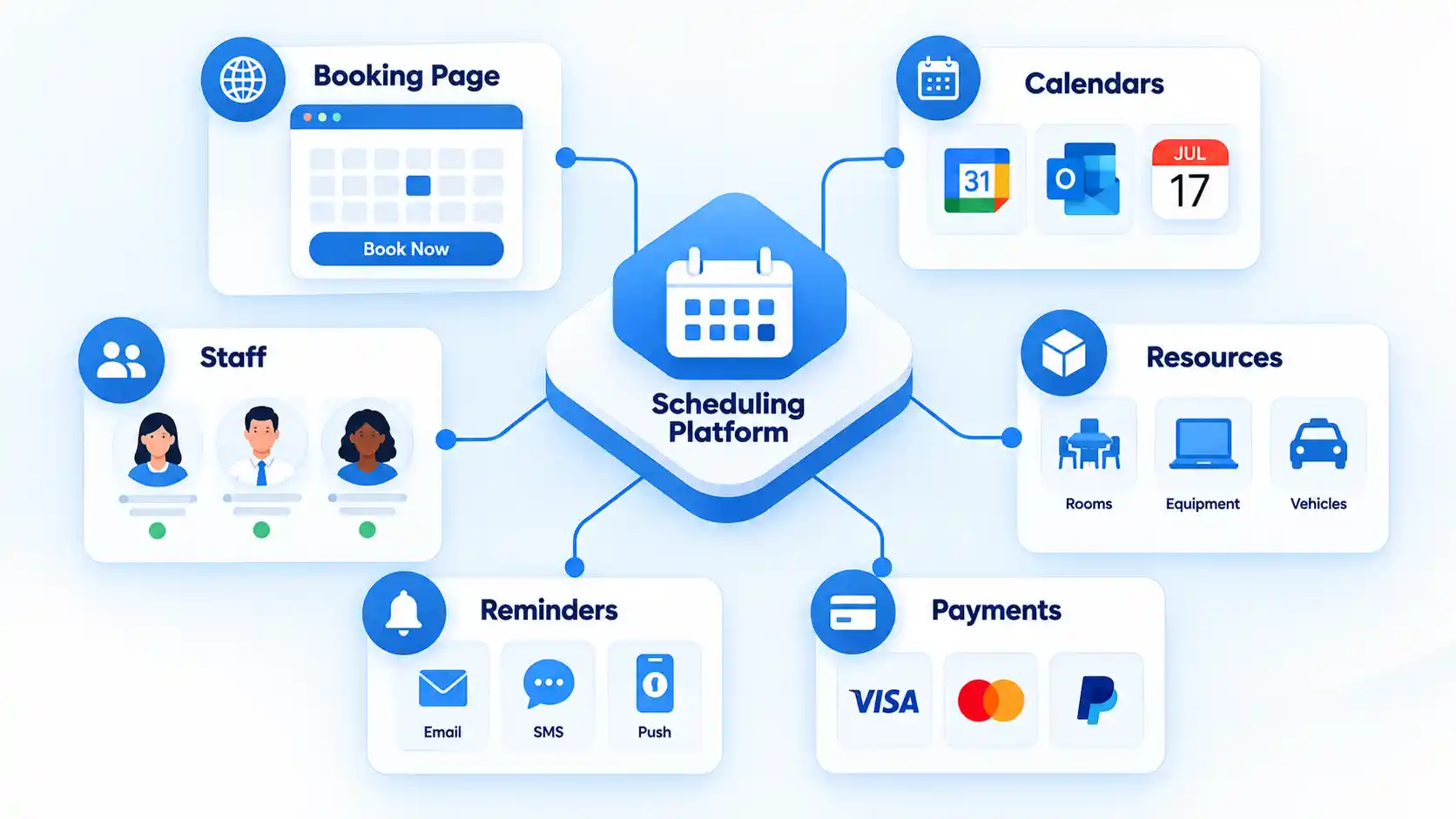
The table below separates common capabilities by the operational problem they solve and highlights an important limitation for each one.
| Feature | What It Controls | Especially Useful For | Important Limitation |
|---|---|---|---|
| Online booking page | Lets customers view and select available appointments | Most appointment-based businesses | A confusing or lengthy booking flow can still cause abandonment |
| Calendar synchronization | Checks external busy periods or adds appointments to connected calendars | Anyone already using Google Calendar, Outlook, or similar calendars | Unconnected or incorrectly configured calendars can still cause conflicts |
| Staff scheduling | Combines service availability with employee working hours and assignments | Salons, clinics, agencies, service teams, and other multi-provider businesses | Staff hours and time off must remain accurate |
| Resource scheduling | Reserves rooms, chairs, stations, equipment, or other limited resources | Businesses where a service depends on a physical resource | Not every scheduling product supports resource-level constraints |
| Buffer time | Blocks preparation, travel, cleanup, or recovery time around appointments | Field services, consultations, healthcare, salons, and equipment-based services | Larger buffers reduce the number of appointments that fit into a day |
| Booking windows and lead time | Controls how soon and how far in advance appointments can be made or changed | Businesses that need preparation time or capacity planning | Overly restrictive settings may hide times that could legitimately be booked |
| Confirmations and reminders | Sends appointment information before or after booking | Services where forgotten appointments create significant disruption | Email, SMS, customization, and reminder counts can depend on product, region, or plan |
| Self-service cancellation and rescheduling | Lets customers change existing bookings within policy limits | High-volume appointment businesses | The allowed change window needs to match the actual cancellation policy |
| Time-zone handling | Displays appointment times appropriately across regions | Remote consultations, interviews, coaching, and international teams | Business, staff, and customer time-zone behavior differs between platforms |
| Payments and deposits | Collects prepayment, deposits, cards on file, or eligible cancellation charges | Paid appointments and businesses exposed to costly late cancellations | Payment features, fees, processors, and regional availability vary |
| Booking forms | Collects contact details and service-specific information before the appointment | Consultations and services that need preparation information | Unnecessary fields add friction and may increase privacy exposure |
| Waitlist | Records demand when a preferred time is unavailable and may help refill cancellations | High-demand services | Automation rules and notification behavior vary significantly |
| Reporting | Summarizes appointments, utilization, cancellations, customers, or related sales data | Teams, multi-location businesses, and managers planning capacity | Available metrics differ widely between products and plans |
| Integrations or API access | Passes scheduling data to other business systems | Businesses connecting CRM, marketing, workflow, or custom applications | Every integration creates another dependency and potential data flow to review |
For remote appointments, time zones deserve particular attention. Microsoft’s Bookings documentation explains that its self-service page can display appointment slots in an end user’s time zone, while business settings remain tied to the business time zone. This is a good example of why a feature label alone is not enough. Buyers need to understand exactly how the feature behaves.
Core Scheduling Features vs Optional Business Features
Long feature lists can make products difficult to compare because basic scheduling functions are mixed with capabilities belonging to payment, customer relationship management, marketing, or point-of-sale systems.
For most appointment-based use cases, the core scheduling layer consists of:
- service duration and availability rules;
- a customer-facing booking flow;
- calendar or availability conflict checking;
- booking confirmations;
- appointment modification or cancellation controls; and
- basic administration of upcoming and past appointments.
Features such as integrated payments, cards on file, customer profiles, advanced analytics, waitlists, class scheduling, resource management, automated marketing, point-of-sale integration, and application programming interface (API) access may be valuable, but they solve additional business problems rather than defining appointment scheduling itself.
This distinction also explains the difference between a simple calendar booking feature and a broader scheduling platform. A detailed comparison of appointment scheduling software vs calendar apps starts with whether you need only shareable availability or a complete operational workflow around staff, customers, resources, payments, and policies.
Risks, Limits, and Common Failure Points
Scheduling software can automate a flawed process just as efficiently as a well-designed one. Configuration, integrations, data handling, and customer experience therefore matter as much as the feature checklist.
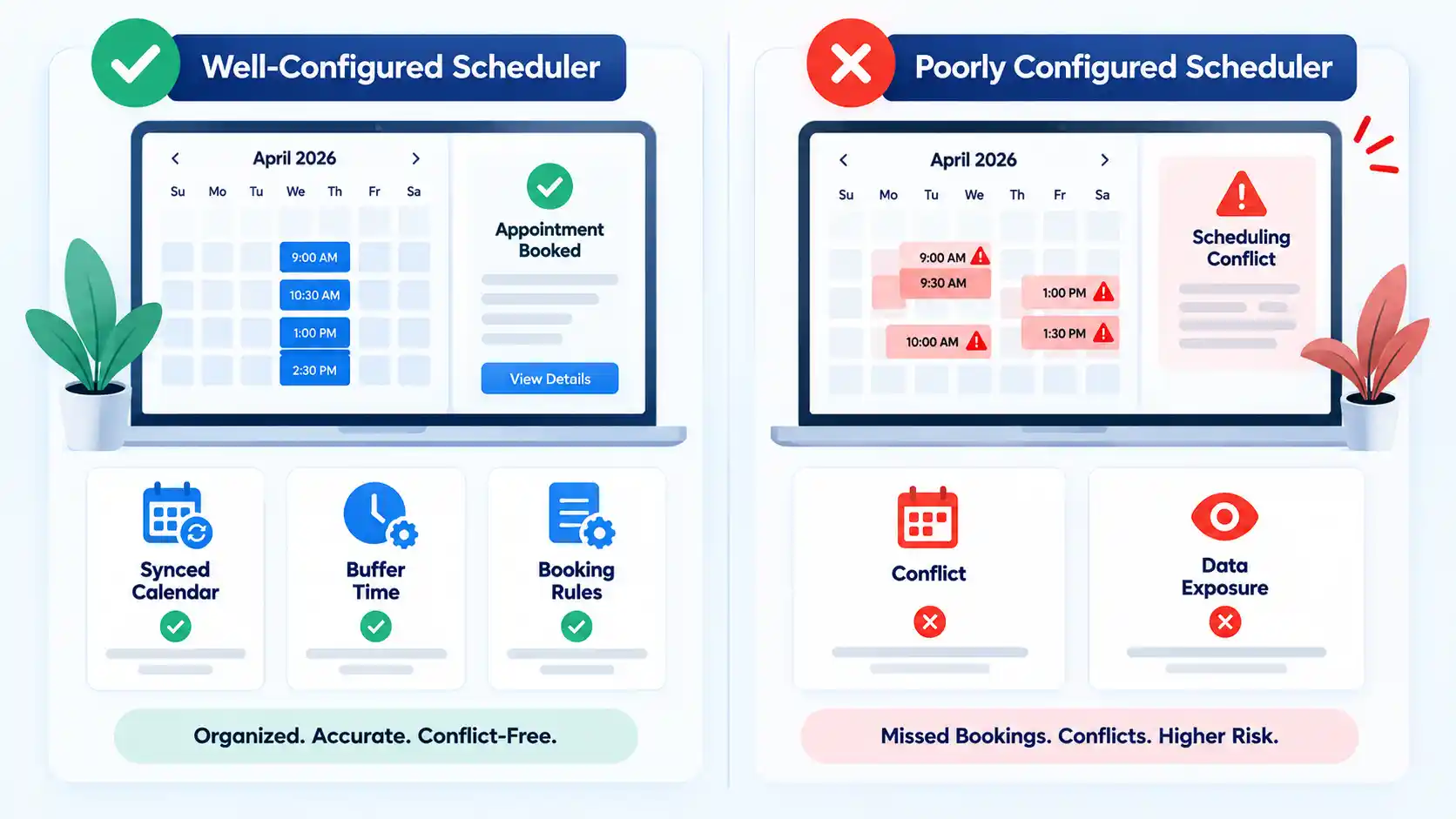
Incorrect Availability Can Expose the Wrong Slots
A booking page may appear accurate while relying on incomplete information. Common causes include an unconnected personal calendar, forgotten staff leave, missing resource restrictions, an incorrect time zone, or a scheduling window that does not match the service’s operational needs.
A useful implementation test is to create sample events in every calendar that should block availability and confirm that those periods disappear from the customer-facing page.
Automation Does Not Eliminate No-Shows
Reminders address only some reasons people miss appointments. A customer may still encounter illness, transportation problems, scheduling conflicts, changed priorities, or messages that are never delivered or noticed. Treat reminders as one attendance-management control rather than a guarantee.
Too Many Booking Fields Can Create Friction
Collect information because it is needed to schedule or prepare for the appointment, not simply because the form permits another field. Longer forms add effort for customers and create more information for the organization to store and protect.
This becomes particularly important in regulated healthcare environments. U.S. Department of Health and Human Services HIPAA tracking guidance explains that appointment-related information collected or disclosed through tracking technologies can constitute protected health information in certain circumstances. A healthcare organization therefore needs to examine the booking page, tracking technologies, data recipients, contracts, and security obligations rather than assuming that any general-purpose scheduler is suitable for protected information.
Features Can Be Restricted by Plan or Geography
A vendor may advertise SMS reminders, multiple calendars, payment collection, advanced notifications, resource management, or additional booking pages while reserving some of those functions for particular subscriptions or regions. Compare the exact plan being purchased, not only the product’s overall feature page.
Integrations Introduce Dependencies
An integration can make scheduling far more useful by connecting calendars, customer systems, video meetings, payments, automation tools, or internal software. It also creates another place where authentication can expire, synchronization can fail, permissions can be excessive, or data can move outside the scheduling platform.
Critical workflows should therefore have a recovery path. Staff should know how to recognize a synchronization problem, find the authoritative appointment record, and temporarily manage bookings if an external service becomes unavailable.
How to Choose Appointment Scheduling Software
Start with the appointment workflow rather than with a vendor comparison page. A short list of required operational behaviors makes it easier to distinguish useful capabilities from attractive extras.
- Map the appointment type. Decide whether bookings are one-to-one appointments, group classes, consultations, site visits, interviews, or another format.
- Identify every availability constraint. List the staff, calendars, locations, rooms, equipment, preparation periods, travel time, and daily limits that can make a slot unavailable.
- Define the customer booking rules. Decide how far ahead customers may book, the minimum notice required, whether staff may be selected, and what information must be collected.
- Choose communication requirements. Determine whether email is sufficient or whether SMS, confirmation requests, preparation instructions, and change notifications are necessary.
- Decide whether payment belongs in the booking flow. If deposits, prepayment, cards on file, or cancellation fees are necessary, verify the payment processor, transaction fees, refund workflow, and regional support.
- Check time-zone behavior. Remote or international services should test what the customer sees, what staff see, and which time zone controls business rules.
- Review privacy and security requirements. Identify what personal information is collected, who receives it through integrations, what permissions staff have, and whether sector-specific obligations apply.
- Verify the exact subscription. Confirm limits on staff, calendars, locations, booking pages, reminders, resources, integrations, and reporting before buying.
- Test the complete customer journey. Make a test booking from another device, read every message, reschedule it, cancel it, and verify that calendars and availability update correctly.
A useful way to understand the underlying architecture is to follow how online booking systems work from the public booking page through rule evaluation, calendar updates, notifications, and downstream integrations. This exposes failures that a simple feature checklist can miss.
Different business models naturally produce different priorities:
- Solo consultant: Calendar conflict checking, buffers, time zones, video conferencing, reminders, and a simple booking page may cover most requirements.
- Salon or spa: Staff selection, rooms or chairs, service duration, deposits, cancellation policies, waitlists, and multi-location controls can matter more.
- Healthcare organization: Staff scheduling may be important, but privacy, security, access controls, integrations, and data collection need additional scrutiny.
- Remote team: Multiple calendars, automatic meeting links, time-zone conversion, and configurable booking windows may take priority.
Key Takeaways
- Appointment scheduling software converts availability rules into customer-bookable time slots and manages the resulting appointments.
- Its most practical benefits are self-service booking, less routine administrative work, better conflict control, easier appointment changes, and automated communication.
- Calendar synchronization helps only when every relevant source of unavailable time is connected and correctly configured.
- Reminders can improve attendance in some settings, but they do not eliminate no-shows.
- Payments, resource management, waitlists, advanced reporting, SMS, and integrations are valuable in some workflows but should not be assumed to exist in every product or plan.
- The best buying process starts with staff, resource, policy, privacy, and customer-flow requirements before comparing vendors.
Frequently Asked Questions
Can appointment scheduling software work with more than one staff member?
Yes, many business-focused scheduling systems support multiple bookable staff members. They may combine each person’s working hours, service assignments, existing appointments, and time off before displaying availability. Some also let customers choose a particular provider. Check whether multi-staff scheduling is included in the plan you are considering and how permissions work when several employees manage the same calendar.
Does appointment scheduling software prevent double bookings automatically?
It can prevent many booking conflicts, but only within the calendars, staff schedules, resources, and rules it is configured to check. If an employee uses another unconnected calendar or a room is reserved outside the scheduling system, the software may not know that the time is unavailable. Conflict prevention therefore depends on both the feature and its configuration.
Can customers book appointments in different time zones?
Many scheduling systems support time-zone-aware booking, which is especially useful for remote meetings. The exact behavior varies. Some display slots in the customer’s local time while maintaining business rules in the organization’s time zone. Test this before launch if customers and staff regularly book across regions.
Do I need appointment scheduling software if I already use Google Calendar or Outlook?
Not necessarily. If you only need to manage your own calendar, a standard calendar application may be enough. Scheduling functionality becomes more useful when other people need to book themselves, when several availability rules must be evaluated, or when you need reminders, intake fields, staff assignment, resources, payments, waitlists, or other booking-specific workflows.
Can appointment scheduling software collect deposits or cancellation fees?
Some platforms can collect full payment or a deposit during booking, store an authorized payment method, or apply eligible cancellation or no-show charges according to a disclosed policy. These functions depend on the platform, payment processor, subscription, customer authorization, and region. Review processing fees and the actual cancellation workflow before relying on the feature.
What information should I avoid collecting on an appointment booking form?
A practical rule is to avoid collecting personal information that is not necessary to schedule or prepare for the service. Extra fields create more customer effort and more data for the business to protect. Organizations handling regulated or sensitive information should also review their legal, security, retention, and vendor-management obligations before adding those fields to a booking page.
