InterMIND makes the most sense for teams that regularly hold meetings across language barriers and want translation to continue through voice, chat, documents, and the post-meeting record. Its multilingual-first design is distinctive, but it does not automatically make InterMIND a better choice than Microsoft Teams, Google Meet, or Zoom for every organization.
Quick Take
InterMIND is strongest when multilingual communication is a recurring part of the work rather than an occasional meeting requirement. Its current plans combine live translation with meetings, chat, recaps, and team collaboration, but buyers should weigh translation limits, internet dependence, existing software commitments, and the company’s current security-certification position before switching.
How We Evaluated InterMIND
That distinction matters because a supported feature is not the same thing as a proven user experience. For example, InterMIND can document the number of languages or meeting limits it offers, but those specifications alone cannot establish that translation will be equally accurate for every accent, technical field, connection, or language pair.
What InterMIND Is Now
For teams that regularly meet across language boundaries, InterMIND combines video meetings with multilingual communication. Its current service covers live translated speech, chat, shared notes, and a multilingual meeting record, while document translation extends the workflow to uploaded files on paid plans.
InterMIND currently supports 23 languages for live voice, chat, and notes inside the product. Document translation uses a separate pipeline and supports 30 target languages on paid plans. The company deliberately separates those figures because the same language coverage does not apply to every part of the service.
A meeting can also continue beyond the call itself. InterMIND keeps chat and meeting history available to signed-in members, provides AI-generated recaps, and lets each participant read supported content in their selected language. Guests can join an ad-hoc meeting from a link without creating an account, although the host must admit them and post-meeting history is reserved for signed-in members.
The old idea that InterMIND is strictly browser-only is no longer accurate. The web version remains available without installation, while optional Windows, macOS, Android, and iOS apps are also available. The native apps mainly add functions around the meeting window, including background operation and system notifications.
How InterMIND Handles Multilingual Meetings
In an ordinary translated meeting, everyone does not have to switch to one shared language. Each participant can choose the language they want to hear or read while other people continue speaking in their own languages.
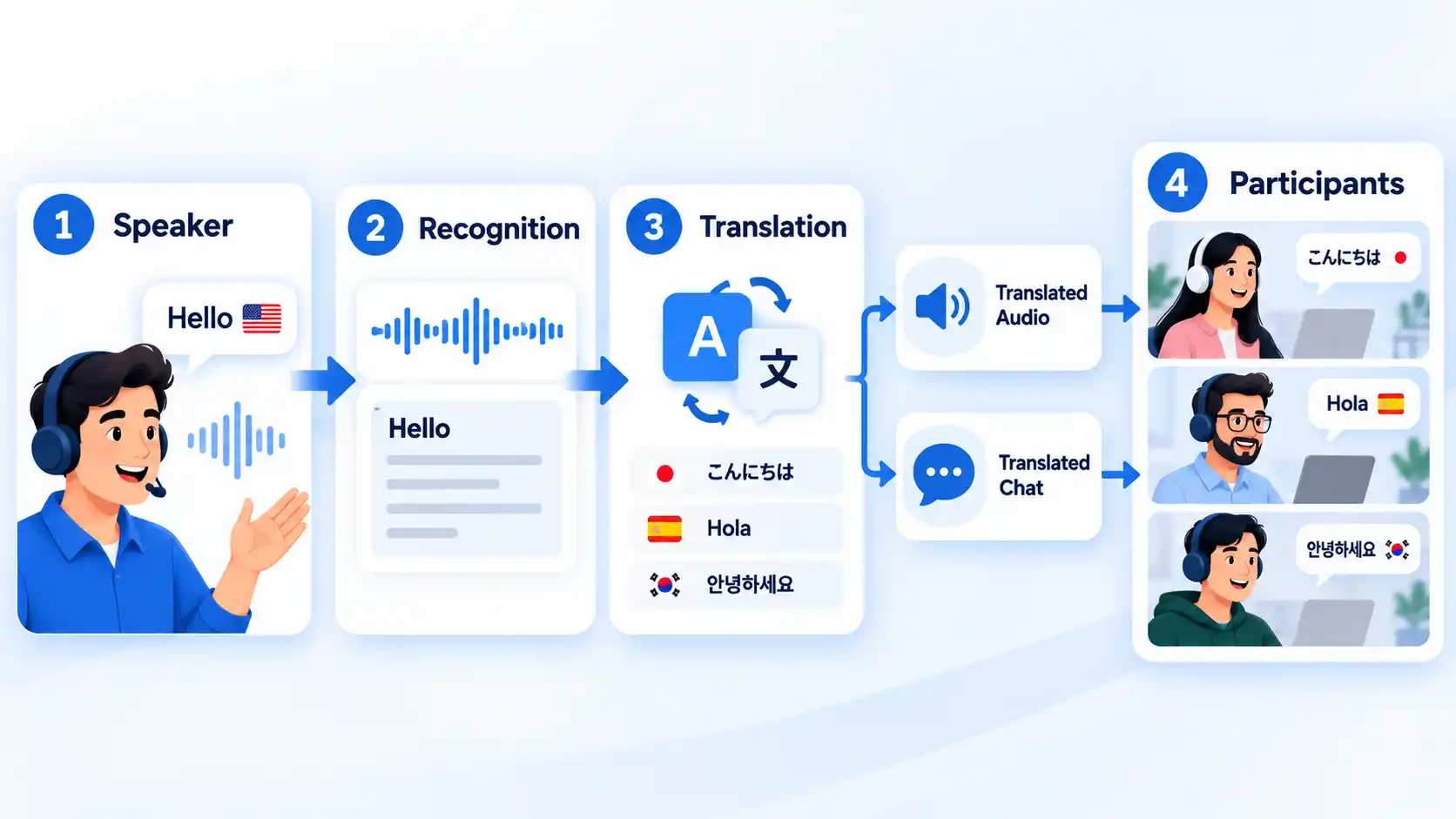
The practical quality of AI speech translation in video meetings depends on several stages working together. The system first has to recognize what was said, translate the meaning, generate the output, and deliver it quickly enough for the conversation to continue. An error or delay at any stage can affect what the listener ultimately hears.
InterMIND publishes an automated benchmark for this pipeline. Its October 2026 results report a Q4 median of 91/100 for chat translation and 93/100 for voice translation. The company’s voice score covers speech recognition and translation together rather than translation text alone.
Those numbers should be read as vendor-produced evidence, not as an independent accuracy rating. The benchmark uses a defined automated test method and reports individual language-pair results, which gives readers more detail than one unsupported accuracy percentage. Real meetings can still contain names, accents, interruptions, specialist terminology, and poor audio that a benchmark may not reproduce.
That caution is consistent with independent user reports. Some G2 reviewers describe useful real-time multilingual communication while also reporting occasional problems with technical terminology, lag, or unstable connections. Those reviews are individual experiences, so they should not be treated as a measured failure rate for the service as a whole.
InterMIND Strengths and Limitations
InterMIND’s main advantage is not simply that it can translate a sentence. Its product design keeps translation attached to several parts of the same conversation. Someone can hear translated speech during the call, read translated chat, and later return to the meeting record without necessarily switching back to the original meeting language.
Pros
- Live voice and chat translation are central meeting functions rather than a separate manual workflow.
- Participants can use different supported languages within the same meeting instead of forcing everyone onto one shared language.
- Guests can join an ad-hoc meeting through a browser link without first creating an InterMIND account.
- Translated collaboration continues into chat, notes, documents, and meeting recaps.
- Web, desktop, and mobile access give teams several ways to join and continue conversations.
Cons
- AI translation can still misunderstand technical terms, names, accents, or complex discussion.
- Real-time meetings remain sensitive to connection quality because audio and translation must arrive quickly enough to keep the conversation moving.
- The free tier has meaningful limits on translation time, translated text, meeting length, storage, and participant capacity.
- Teams that rarely hold multilingual meetings may gain little from moving away from a platform they already use.
- InterMIND does not currently hold ISO 27001 or SOC 2 certification.
Weak connectivity deserves particular attention because it can look like a translation problem even when the underlying issue is delayed or incomplete audio. If translated speech becomes slow or inconsistent, troubleshooting live meeting translation should separate network quality, microphone input, and language-specific translation behavior before blaming one component.
InterMIND Pricing and Plan Limits
InterMIND has four current tiers: Basic, Pro, Business, and Enterprise. The main decision is not simply whether you want to pay. Translation allowances, participant capacity, storage, document translation, and administrative controls change significantly between plans.
InterMIND Pro
$10 per active member/month, billed yearly
The table below focuses on the limits most likely to change whether a plan is usable for a team. Prices and quotas are current as of October 6, 2026 and may change.
| Plan | Price | Translation allowance | Meeting limits | Team and admin fit |
|---|---|---|---|---|
| Basic | Free | 2 hours of real-time meeting translation and 10,000 translated text words per rolling 30 days; no document translation | 50 participants; 60-minute meetings | 1 team member; 1 GB storage |
| Pro | $10 per active member/month, billed yearly | 25 hours of real-time meeting translation per rolling 30 days; unlimited text translation; 10 document translations | 100 participants; unlimited meeting duration | Unlimited team members; 30 GB storage; audit logs; 99.5% uptime SLA |
| Business | $30 per active member/month, billed yearly | Unlimited meeting and text translation; 30 document translations | 300 participants; unlimited meeting duration | 1 TB storage; OIDC SSO; live chat and video support; 99.5% uptime SLA |
| Enterprise | Custom organization quote | Unlimited meeting and text translation; 100 document translations | 1,500 participants; unlimited meeting duration | 5 TB storage; DPA and custom contract options; 99.5% uptime SLA |
The current plan limits make Basic suitable for trying the service, but its two-hour rolling translation allowance and 60-minute meeting ceiling can become restrictive for regular multilingual work. Pro raises the meeting-translation allowance to 25 hours and removes the meeting-duration limit, while Business is the first listed tier with unlimited real-time meeting translation and single sign-on.
Pro and Business are priced by active member rather than simply by every person invited to the team. InterMIND says each renewal counts members who performed qualifying activity during the previous 28 days, while outside meeting participants do not become paid team members merely by joining a call. Enterprise uses a custom organization quote instead.
The practical cost therefore depends on both usage and team activity. A team that holds one translated client meeting a month may fit comfortably inside Basic or Pro, while a company that uses translated meetings every day may reach the Business tier primarily because of translation volume rather than participant count.
Privacy, Security, and Data Handling
For business meetings, the relevant privacy question is where the conversation is processed, what is stored afterward, and which outside providers receive the data. InterMIND’s current Trust Center gives specific answers to those questions, although the disclosures remain statements made by the service itself.
InterMIND says its runtime infrastructure spans EU locations in France, Germany, and Ireland. The Trust Center lists providers and regions for the web application, real-time chat, meeting media, translation, database, file storage, email, analytics, and error monitoring.
Live meeting media, speech recognition, and voice translation run on InterMIND’s own translation infrastructure hosted through OVH in France and Germany. Document translation goes to DeepL in Germany. For post-meeting summaries and other AI tasks, an organization can use Azure OpenAI in the EU Data Zone by default or select Vertex AI’s EU endpoint or Amazon Bedrock in Frankfurt. InterMIND says those AI calls run in its own provider tenants without training on customer data.
The Trust Center also states that ordinary live meeting audio is not stored. Speech persists as text in transcripts, while translated audio is streamed to participants rather than written to disk. If a host deliberately records a meeting, the resulting recording remains in private storage until the related artifacts or account are deleted.
Transcripts, chat, and documents do not automatically expire. They remain until they are deleted. That can be convenient for long-term meeting history, but organizations with strict retention rules should decide who is responsible for deletion and how long records should remain available.
Certification is another important boundary. InterMIND explicitly states that it does not currently hold ISO 27001 or SOC 2. It publishes a CSA STAR Level 1 self-assessment and reports Cyber Essentials certification, but it also says Cyber Essentials covers baseline organizational controls and is not a substitute for ISO 27001 or SOC 2.
For routine commercial meetings, those disclosures may provide enough information for an initial assessment. Organizations handling regulated, highly confidential, or contract-sensitive material should still review the Data Processing Agreement, subprocessor list, retention requirements, identity controls, and their own compliance obligations before approval.
How InterMIND Differs From Teams, Meet, and Zoom
Live translation is no longer something that only specialist meeting products can offer. Microsoft Teams, Google Meet, and Zoom now provide translation functions too. The more useful comparison is therefore how translation fits into each product and what conditions apply.
| Feature | InterMIND | Microsoft Teams | Google Meet | Zoom |
|---|---|---|---|---|
| Live translated speech | Core meeting function across 23 supported product languages | Interpreter provides speech-to-speech translation in supported languages | Speech Translation provides translated audio between English and supported partner languages | Voice Translator converts translated captions into spoken audio |
| Current access condition | Available by plan, with rolling translation limits on Basic and Pro | Interpreter requires Microsoft Copilot; translated captions and multilingual recognition can also be available through Teams Premium | Requires an eligible Google AI or Workspace plan | Voice Translator requires an eligible account plus the Live Translation add-on or ZoomMate |
| Notable limit | Translation allowances vary by plan; AI translation can still misread specialist language | Interpreter audio is not included in recordings, and translated transcripts have post-meeting limitations | Speech Translation has a 90-minute limit per meeting and is not available in recordings or live streams | Voice translation quality can vary by language pair, audio quality, and speaking clarity |
| Product emphasis | Multilingual meetings, chat, documents, and recaps are designed as one workflow | Translation sits inside the larger Microsoft 365 and Teams collaboration environment | Translation is one capability inside the broader Google Meet and Workspace environment | Translation extends Zoom’s wider meetings and collaboration platform |
Microsoft’s Interpreter agent provides real-time speech-to-speech interpretation and can let participants hear translated speech using a simulated version of the speaker’s voice. Microsoft also notes limitations: interpreted audio is not captured in meeting recordings, translated transcripts are primarily available during the meeting, and names or technical terms may be interpreted incorrectly.
Google Meet’s Speech Translation is available on eligible Google AI and Workspace plans. As of October 2026, it translates between English and French, German, Hindi, Italian, Portuguese, or Spanish, has a 90-minute translation limit per meeting, and is not available in live streams or recordings.
Zoom has translated-caption support and also offers Voice Translator for spoken translated output. That voice feature requires an eligible Zoom account plus the Live Translation add-on or ZoomMate, and Zoom warns that translation quality can vary with the language pair, audio quality, and speaking clarity.
For an organization already deeply invested in Microsoft 365, Google Workspace, or Zoom, those built-in options can reduce the reason to adopt another meeting platform. A more focused InterMIND vs Microsoft Teams comparison becomes useful when multilingual communication is important enough that translation workflow, language support, licensing, recaps, and existing Microsoft infrastructure need to be weighed directly.
Who InterMIND Is Best Suited To
InterMIND is easiest to justify when language barriers are a repeated operational problem rather than an occasional inconvenience. A sales team speaking with overseas clients every day, a distributed organization whose staff routinely work in several languages, or a project group that needs translated conversations and records can use more of the product’s design than a team that holds one international call every few months.
It is harder to justify a switch when most meetings already happen comfortably in one language or when an organization is strongly standardized on Teams, Google Workspace, or Zoom and their existing translation options are sufficient. Changing meeting platforms adds training, identity management, integration, record-retention, and support questions even when the new feature itself looks useful.
Before rolling it out broadly, apply the same questions to ask before committing to new software to workflow fit, integrations, security responsibilities, total cost, adoption, and the difficulty of leaving later. A translation advantage can be meaningful without outweighing every switching cost.
Our Verdict
InterMIND is a credible fit for organizations where multilingual meetings are frequent enough to justify making translation part of the whole collaboration workflow. Its combination of translated speech, chat, documents, recaps, and persistent meeting history is more consequential than any single language-count claim. Teams with occasional translation needs, strong existing commitments to Microsoft, Google, or Zoom, or procurement requirements for ISO 27001 or SOC 2 should compare those constraints carefully before switching. Because this is a research-based assessment rather than hands-on testing, the strongest conclusion is about product fit and documented trade-offs, not measured call quality or translation superiority.

💬 Comments