A virtual phone number is a cloud-based telephone line that relies on internet routing rather than a physical SIM card or traditional copper landline infrastructure. By decoupling identity from dedicated hardware, virtual phone numbers allow organizations to make and receive calls, manage SMS, and route communications across softphones, desktop applications, and mobile devices from anywhere in the world.
Quick Take
Virtual phone numbers eliminate the rigid hardware requirements and high overhead of legacy Private Branch Exchange (PBX) systems. By routing Voice over Internet Protocol (VoIP) traffic through cloud servers, businesses gain remote work mobility, advanced call automation, enhanced identity privacy, and multi-region local presence without buying secondary mobile handsets or installing physical wiring. For modern teams, virtual lines deliver enterprise-grade call routing at a fraction of traditional telecom costs.
How Virtual Phone Numbers Work in Practice
Unlike traditional Plain Old Telephone Service (POTS) or standard mobile lines tied to a specific phone jack or SIM card, virtual numbers operate in the cloud. When a caller dials a virtual number, the call reaches a cloud PBX platform. The service then executes preset routing rules to forward the incoming Session Initiation Protocol (SIP) signal to your preferred destination: a softphone app on a laptop, an iOS or Android app, an IP desktop phone, or an existing mobile cellular line.
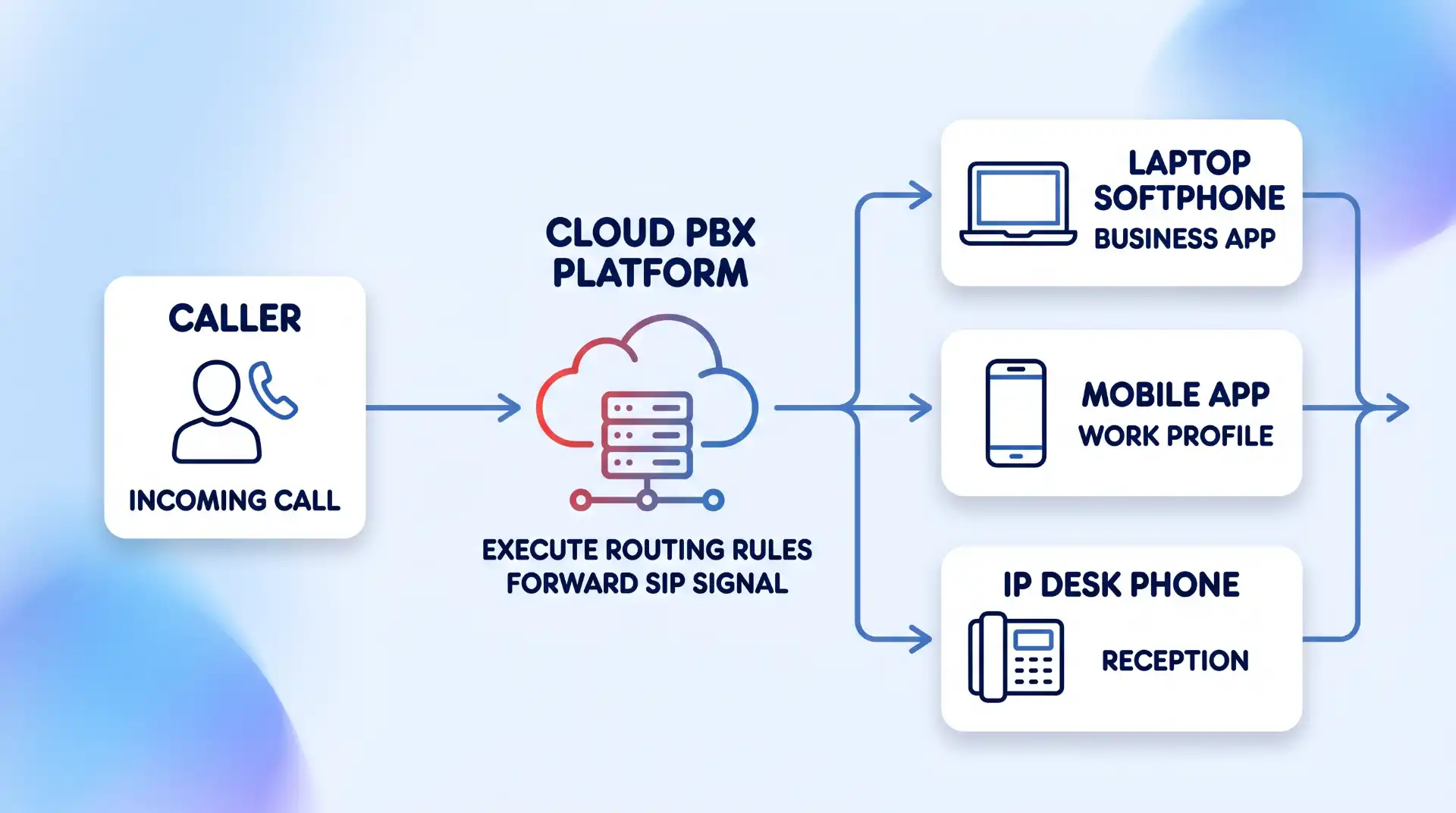
For outgoing calls, the softphone application transmits speech packets over your internet connection. The provider’s media gateway bridges the digital voice stream onto the Public Switched Telephone Network (PSTN), displaying your business virtual number on the recipient’s caller ID regardless of where you are physically located.
| Feature Category | Traditional Landline / POTS | Virtual Phone System (VoIP) |
|---|---|---|
| Hardware Dependence | Requires physical copper wiring, wall jacks, and dedicated desk phones. | Runs on existing smartphones, laptops, tablets, or IP desk phones. |
| Geographic Binding | Tied strictly to a physical street address or rate center. | Completely location-independent; accessible anywhere with internet. |
| Scaling Capacity | Requires physical line installation and technician visits to add lines. | Instantly provisions new numbers and extensions via a web portal. |
| Feature Integration | Limited to basic voicemail, caller ID, and simple call waiting. | Includes auto-attendants, call recording, CRM integration, and analytics. |
7 Key Benefits of Having Virtual Phone Numbers
1. Physical Independence and Multi-Device Flexibility
The primary operational advantage of a virtual line is device independence. Team members do not need to sit next to an office desk phone to receive client calls. A single virtual number can ring simultaneously or sequentially across multiple endpoints, including desktop softphones, web browsers, and personal mobile phones.
This setup is ideal for hybrid and remote teams. Employees can handle business calls from their personal smartphones without exposing their personal cell numbers to clients. When outbound calls are placed through the business softphone application, the outgoing caller ID displays the company’s virtual line, preserving employee privacy and maintaining a consistent corporate identity.
2. Substantial Overhead and Hardware Cost Reduction
Deploying a traditional business phone system requires significant capital expenditure, including physical PBX hardware servers, desk handsets, dedicated copper cabling, and expensive installation fees. Ongoing maintenance and IT management fees further inflate the total cost of ownership.
Virtual phone systems shift telecom expenses from capital expenditures to predictable operational costs. Because software runs on existing hardware, initial equipment costs drop dramatically. Small businesses and startups can launch an enterprise-capable phone setup using laptops and mobile devices they already own. According to telecom industry analysis on virtual phone system benefits, organizations switching from legacy landlines frequently lower monthly communication bills while gaining access to advanced software features.
3. Local, Toll-Free, and International Market Presence
Establishing trust in new markets often depends on local familiarity. Prospective clients are significantly less likely to answer calls coming from unfamiliar out-of-state area codes. Virtual phone systems allow businesses to instantly purchase local numbers in specific target area codes, regardless of where the company’s physical headquarters resides.
For organizations operating across multiple regions or overseas markets, virtual numbers make expanding international coverage straightforward. Rather than opening physical branch offices, companies can set up regional phone numbers that route straight to a centralized support or sales team. Platforms like Telnum.net provide quick access to international virtual numbers and DID lines across dozens of countries, enabling growing businesses to build a credible global footprint with minimal overhead.
4. Guaranteed Number Portability and Carrier Flexibility
Locking your organization into a single legacy telecom carrier creates operational vulnerability. If service quality degrades or pricing becomes uncompetitive, transitioning traditional phone lines can involve downtime and carrier friction.
Virtual numbers operate under clear regulatory standards for mobility. Under Federal Communications Commission rules regarding VoIP number porting guidelines, businesses retain legal ownership of their phone numbers and have the right to port existing lines between service providers without losing their phone numbers, provided the number remains within the same rate center. This portability ensures that your published business contact numbers remain permanent assets even if you choose to learn how to switch virtual phone providers down the road.
5. Native Call Analytics, Recording, and Data Tracking
Analyzing call performance on legacy landlines requires specialized hardware attachments or third-party monitoring services. Because virtual phone calls originate and terminate as digital data packets, logging and evaluating communication metrics is built directly into cloud platforms.
Administrators can track call volume trends, peak usage hours, average handle times, missed call ratios, and call origins from a centralized web dashboard. Digital call recording can be toggled on with a single setting, storing audio files securely in the cloud for quality assurance, compliance auditing, and employee onboarding. This analytics capability makes it easier for sales managers to evaluate pitch effectiveness and for support teams to optimize staff scheduling during busy hours.
6. Enterprise Security, Encryption, and Spam Mitigation
Unencrypted analog phone lines are susceptible to wiretapping and physical tampering at distribution points. Modern virtual phone platforms operate over secured IP networks protected by robust encryption protocols.
VoIP providers protect signaling data using Transport Layer Security (TLS), while audio streams are encrypted using Secure Real-time Transport Protocol (SRTP). This prevents packet sniffing and unauthorized interception on public or corporate networks. Furthermore, cloud carriers are integrated into modern spam-prevention frameworks. To mitigate robocalls and caller ID spoofing, providers comply with FCC standards for STIR/SHAKEN call authentication, which cryptographically verifies outgoing caller identity to ensure higher call delivery rates to customers. Combining these measures with data protection strategies for businesses ensures secure communications across remote teams.
7. Intelligent Call Automation and CRM Workflow Integration
Virtual phone lines do more than simply route voice calls; they integrate directly into software workflows. Cloud PBX platforms feature built-in Auto-Attendants (Interactive Voice Response or IVR) that route incoming callers to specific departments, queue systems, or voicemail boxes based on simple keypad selections.
Moreover, virtual phone systems integrate natively with major Customer Relationship Management (CRM) tools like Salesforce, HubSpot, and Zoho. When a customer dials in, screen-pop integrations automatically pull up the customer’s account file before the representative answers the line. Call logs, voicemails, and audio recordings sync automatically to client records, eliminating tedious manual entry and ensuring sales and support records stay up to date. To compare operational capabilities, review our analysis of top virtual phone number providers to find the right integrations for your tech stack.
Where Virtual Phone Numbers Have Limits (and How to Handle Them)
While virtual phone numbers offer substantial advantages over legacy hardware, they are not without trade-offs. Understanding these technical and operational constraints allows organizations to implement effective workarounds before going live.
- Dependency on Internet Quality: Voice quality directly reflects network stability. High network latency, packet loss, or jitter will cause audio dropouts, echo, or delayed sound. Mitigation: Configure Quality of Service (QoS) settings on your router to prioritize SIP traffic, and ensure sufficient upload bandwidth (budget at least 100 kbps per concurrent uncompressed call).
- SMS Short-Code and 2FA Restrictions: Many banks, financial institutions, and security services restrict automated Two-Factor Authentication (2FA) short-code SMS messages from being delivered to virtual or VoIP numbers to prevent fraud. Mitigation: Use dedicated authentication apps (such as Google Authenticator or YubiKey) for account security rather than relying on SMS verification for virtual numbers. Explore options like temporary phone numbers for privacy when managing online sign-ups.
- E911 Emergency Location Binding: Traditional landlines automatically transmit physical street addresses to emergency dispatchers. Because virtual numbers are location-independent, dialing 911 from a softphone can route dispatchers to an outdated physical location if settings are not maintained. Mitigation: Regularly update your Dynamic E911 address settings inside your virtual phone admin portal whenever employees change physical work locations.
- STIR/SHAKEN Attestation Levels: If your virtual provider does not hold direct carrier peering relationships, your outgoing calls may receive lower STIR/SHAKEN attestation scores (B or C level), causing receiving networks to flag your business calls as “Scam Likely.” Mitigation: Choose established cloud carriers that provide full A-level attestation for your business caller ID.
Implementation & Setup Checklist
Deploying a virtual business phone system involves a few straightforward steps. Follow this verification sequence to prepare your network and hardware before rolling out virtual lines to your workforce.
- Audit Network Bandwidth: Run a network stability test to check packet loss (should be 0%), jitter (under 30ms), and ping latency (under 150ms). Review our VoIP hardware setup guide to configure router settings properly.
- Select Number Type: Decide whether your team requires local area codes, toll-free numbers (800/888), or international DIDs.
- Execute Porting or Provisioning: Submit a Letter of Authorization (LOA) along with a recent bill copy if porting existing numbers, or select new numbers directly within the carrier dashboard.
- Configure Routing Rules & IVR: Set up business hours, ring groups, auto-attendant menus, call queues, and after-hours voicemail-to-email forwarding.
- Configure E911 Emergency Addresses: Input accurate physical location details for all team members using IP desk phones or softphone apps.
- Test Mobile and Desktop Softphones: Conduct trial calls to verify inbound menu routing, outbound caller ID display, audio clarity, and CRM logging.
Key Takeaways
- Virtual phone numbers disconnect business communication from physical hardware, enabling softphone routing across mobile devices, computers, and IP phones worldwide.
- Organizations cut telecom overhead by eliminating physical PBX servers, dedicated desk phones, and costly copper wiring installations.
- Features such as local caller ID, automated auto-attendants, CRM integrations, and central call analytics improve both operational efficiency and customer trust.
- Network stability, QoS bandwidth management, E911 address registration, and 2FA short-code limitations must be addressed during initial deployment.
Frequently Asked Questions
Can I keep my existing phone numbers when moving to a virtual phone system?
Yes. Under FCC rules, businesses have the legal right to port existing landline, wireless, or VoIP numbers to a new virtual provider. To complete the transfer without service interruption, submit a Letter of Authorization (LOA) and a copy of your current telephone bill to your new cloud carrier.
Do virtual phone numbers consume a lot of internet bandwidth?
No. Virtual voice calls consume very modest amounts of data. Standard uncompressed VoIP calls (using the G.711 codec) use approximately 85 to 100 kbps of upload and download bandwidth per active call. Compressed codecs like G.729 reduce bandwidth usage to around 30 kbps per call line.
Can virtual phone numbers send and receive SMS text messages?
Yes. Most business virtual phone platforms support SMS and MMS text messaging directly through their desktop and mobile applications. However, business mass text messaging requires registering your organization’s 10-Digit Long Code (10DLC) with cellular carriers to ensure high message delivery rates and prevent carrier spam filtering.
What happens if my internet connection goes out during a business call?
Cloud PBX platforms include automatic call failover rules. If your primary office internet connection drops, the cloud server automatically redirects incoming calls to secondary mobile cellular numbers, backup landlines, or centralized voicemail boxes so clients never receive a dead signal.

💬 Comments