Crawl budget is the total number of pages Googlebot can and wants to crawl on your website within a specific time period. Optimizing your crawl budget ensures search engines discover, render, and index your most important pages quickly without overloading your web server.
Quick Take: What Crawl Budget Means for Your Site
Search engines do not have infinite time to scan every page on the internet. Google assigns a crawling limit to every website based on server speed and overall site popularity. If your site has fewer than a few thousand pages, Googlebot usually crawls all your content without trouble. However, large websites, online stores, and news sites must manage their crawl resources carefully. When you eliminate technical errors and low-value URLs, search bots spend their time on pages that generate organic traffic and revenue.
How Crawl Budget Works: Crawl Limit vs. Crawl Demand
According to the official Google developer documentation, crawl budget is not a single calculation. It is the combination of two distinct factors: how much your server can handle, and how much Google actually wants to crawl your content.
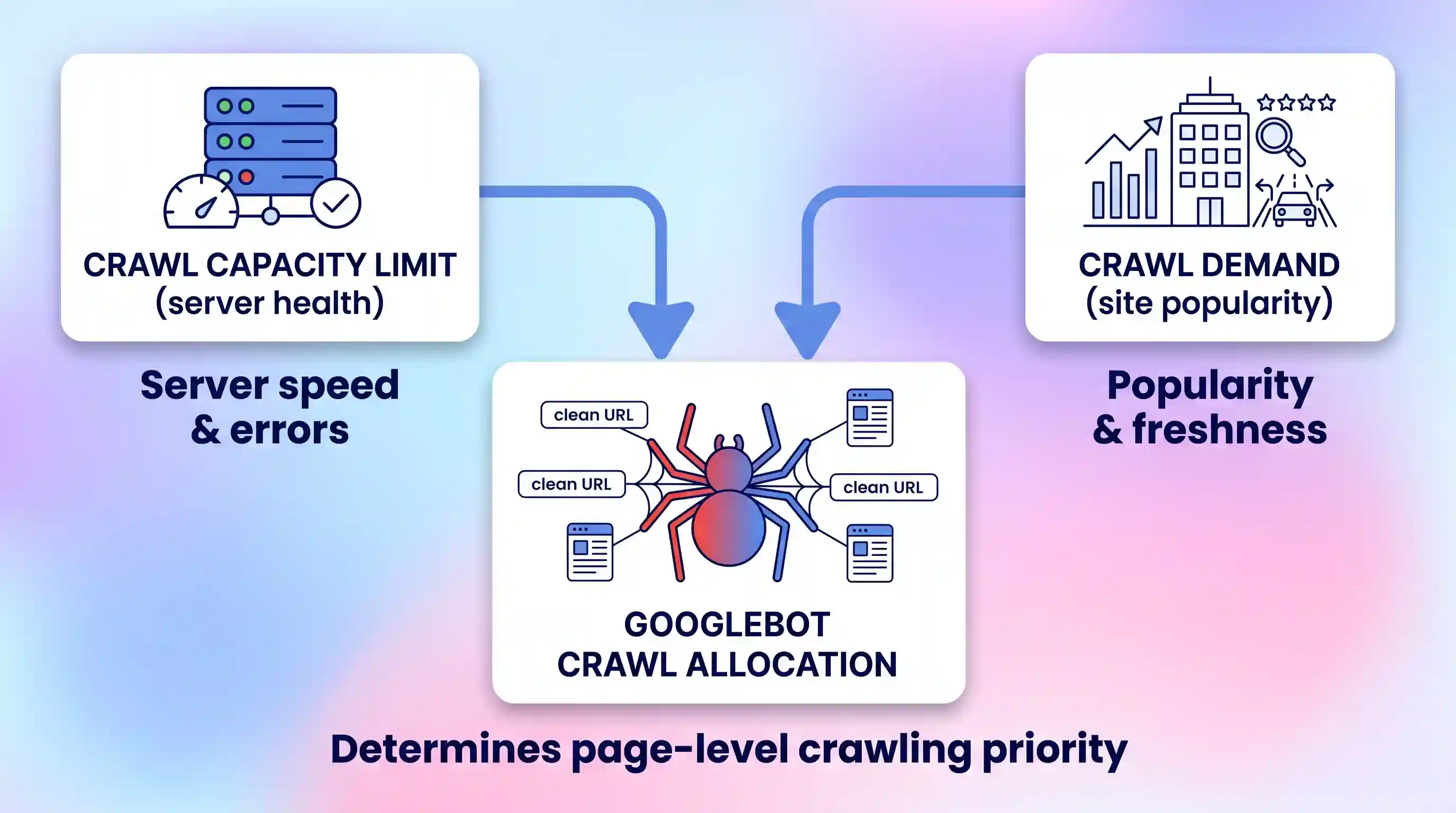
1. Crawl Capacity Limit (Server Capability)
Googlebot aims to crawl your website as fast as possible without crashing your host. The crawl capacity limit represents the maximum simultaneous connections your server can support. If your server responds quickly and remains stable, Googlebot raises this limit to fetch more pages. If your server slows down or returns 5xx server errors, Googlebot immediately slows down its crawl rate to protect your user experience.
2. Crawl Demand (Search Engine Interest)
Crawl demand represents how much interest Google has in re-crawling your pages. Search engines do not treat all URLs equally. Pages with strong backlink profiles, popular content, and frequent updates experience high crawl demand. In contrast, stale pages that rarely change or receive traffic experience low demand. As noted on the Google Search Central blog, crawl rate is not a direct ranking factor, but high demand ensures new content appears in search results much faster.
Do You Need to Optimize Your Crawl Budget?
Not every site owner needs to spend hours managing crawler resources. If your website is small, simple, and loads quickly, Google handles discovery automatically. You only need dedicated crawl optimization when technical bottlenecks prevent indexing.
Use the comparison table below to determine if crawl budget optimization applies to your website:
| Website Type | Page Count | Crawl Budget Priority | Primary Focus |
|---|---|---|---|
| Small Business or Portfolio | Under 1,000 pages | Low | Publishing quality content and building basic links. |
| Standard Content Blog | 1,000 to 10,000 pages | Moderate | Fixing broken links and submitting clean XML sitemaps. |
| Large E-Commerce Store | 10,000 to 500,000+ pages | High | Controlling faceted navigation and parameter URLs. |
| Publishing & News Portals | Daily dynamic publishing | Critical | Server latency, rapid indexing, and live feed updates. |
If you run a large site, performing a routine technical SEO audit helps uncover where search bots waste precious crawl cycles.
8 Proven Strategies to Optimize Your Website Crawl Budget
Follow these eight actionable steps to eliminate crawler waste, protect server resources, and speed up page indexing.
1. Speed Up Server Response Time
Server speed forms the foundation of your crawl rate. When Googlebot requests a page, it waits for the initial server response. If your Time to First Byte (TTFB) takes several seconds, the bot crawls fewer total pages before moving on. According to a crawl efficiency guide, keeping your server TTFB under 200 milliseconds lets crawlers process page queues smoothly.
To improve your server response:
- Enable full-page server caching at the host level.
- Deploy a Content Delivery Network (CDN) to serve static assets from edge servers.
- Optimize heavy database queries that slow down dynamic page rendering.
- Follow a comprehensive Core Web Vitals checklist to compress large images and scripts.
2. Block Low-Value and Duplicate URLs in robots.txt
Your robots.txt file tells web crawlers which paths they must not access. If search bots spend hours crawling internal search results or test environments, your real content gets neglected. Disallow non-essential directories directly in your root configuration file.
Here is an example of standard disallow rules in a robots.txt file:
User-agent: Googlebot
Disallow: /search/
Disallow: /cart/
Disallow: /checkout/
Disallow: /admin/
Disallow: /*?sort=*Blocking useless parameter paths preserves server bandwidth for valuable landing pages.
3. Eliminate 4xx and 5xx Crawl Errors
Dead links and server crashes actively drain crawler resources. When Googlebot encounters a 404 “Page Not Found” error, it wastes an HTTP request on a dead end. Worse, when it hits repeated 500 or 503 server errors, it assumes your server cannot handle traffic and reduces its crawl limit.
Make a habit of fixing broken links across your site. Update outdated internal links to point directly to live pages, and return a clean 410 “Gone” status for pages that are permanently deleted.
4. Fix Redirect Chains and Loops
A redirect chain occurs when URL A redirects to URL B, which then redirects to URL C. Every hop in that chain forces Googlebot to make an extra server request. If a chain contains too many hops, Googlebot abandons the path entirely without indexing the final destination page.
Audit your redirects regularly. Update your internal links so they point straight to the final destination URL. Apply strict 301 redirect rules to ensure every moved page resolves in a single hop.
5. Maintain a Clean XML Sitemap
An XML sitemap serves as a clean roadmap for search engines. Googlebot uses your sitemap to discover new articles and understand which pages you consider primary. Bloated sitemaps containing redirected URLs, 404 errors, or blocked pages confuse search bots.
To keep your sitemap healthy:
- Include only indexable, canonical URLs that return a 200 OK status.
- Exclude all 301 redirects, 404 errors, and pages marked with noindex tags.
- Update the
<lastmod>timestamp only when you make substantive content edits. - Follow standard XML sitemap setup practices by submitting your map to Google Search Console.
6. Strengthen Internal Links to Key Pages
Search engines discover new pages by following links across your site. When a page has no internal links pointing to it, it becomes an orphan page. Googlebot rarely finds orphan pages unless they appear in a sitemap, and it crawls them infrequently.
Build a clear internal link structure that connects category hubs to individual articles. Use descriptive anchor text so search bots understand the topical context of each linked page.
7. Manage Faceted Navigation and URL Parameters
Faceted navigation lets shoppers filter products by color, size, price, and brand. However, combining multiple filters can generate millions of unique URL combinations for the exact same products. As shown in enterprise crawl research, uncontrolled filter parameters are the single largest source of wasted crawler bandwidth on e-commerce sites.
To control faceted URL bloat:
- Use canonical tags to point filtered variations back to the clean category URL.
- Block sorting parameters (such as
?sort=price_asc) inside yourrobots.txtfile. - Use AJAX or client-side filtering for non-essential filter combinations so they do not produce separate URLs.
8. Ensure Clean HTML and Efficient Script Rendering
Googlebot can execute client-side JavaScript, but rendering complex scripts requires extra computational power. When a page relies entirely on heavy client-side JavaScript, Googlebot must queue the page for a two-stage rendering process. This delays indexing for days or weeks.
Whenever possible, deliver server-side rendered (SSR) or static HTML for your core text and navigation. If your site runs on modern web frameworks, implement modern JavaScript SEO strategies to ensure search bots read your content on the initial crawl.
How to Check Your Crawl Health in Google Search Console
You can monitor how Googlebot interacts with your site using the built-in Crawl Stats report in Google Search Console. Open your domain property, click Settings in the left sidebar, and select Crawl stats.
According to the official Google Search Console crawl stats guide, this report tracks three critical indicators over a rolling 90-day window:
- Total crawl requests: A sudden drop may indicate server connectivity issues or accidental robots.txt blocking.
- Average response time: Spikes in response time mean your server is struggling to handle requests quickly.
- Crawl requests by response: Shows the exact percentage of 200 OK responses versus 301 redirects, 404 errors, and 500 server crashes.
Common Crawl Budget Misconceptions to Avoid
Many site owners waste time on optimizations that do not actually improve crawling. Avoid these three common pitfalls:
- Adding a noindex tag to save crawl budget: Googlebot must crawl a page to read its meta tags. Adding a noindex tag does not stop Googlebot from requesting the page. If you want to prevent Googlebot from crawling a URL, block it in
robots.txtinstead. - Adding crawl-delay directives for Googlebot: The
crawl-delaydirective is non-standard. Googlebot completely ignores crawl-delay lines inrobots.txtfiles. Use Google Search Console settings if you need to limit crawling during traffic peaks. - Expecting instant ranking jumps: Optimizing your crawl budget is a maintenance task, not a direct ranking boost. It allows search engines to find and index your pages faster, but page quality and relevance determine final rankings.
Key Takeaways for Managing Crawl Budget
- Crawl budget optimization is essential for websites with more than 10,000 URLs or complex faceted navigation.
- A fast server response time (TTFB under 200ms) directly encourages Googlebot to crawl more pages.
- Use
robots.txtto block search filters, admin portals, and internal search result pages. - Fix redirect chains and remove broken 404 links to prevent wasted crawl requests.
- Audit your Crawl Stats report in Google Search Console monthly to catch server latency spikes early.
Frequently Asked Questions About Crawl Budget
Is crawl budget a direct Google ranking factor?
No. Google does not use crawl frequency or crawl budget as a direct ranking signal. Crawl optimization ensures your content is found and indexed quickly. Once indexed, your content ranks based on relevance, quality, and user satisfaction.
Why does a noindex meta tag fail to save crawl budget?
A search bot cannot read page code without downloading the file first. When you place a noindex tag on a page, Googlebot must spend crawl resources fetching that URL before it discovers the directive. Blocking the URL path in your robots.txt file prevents the bot from making the HTTP request entirely.
Does Googlebot obey the crawl-delay directive in robots.txt?
No. Googlebot ignores the crawl-delay directive. While other search engines like Bing or Yandex may support it, Google uses automated server load detection to set crawl rates. If Googlebot overloads your server, you can request a lower crawl rate in Google Search Console settings.
How long does it take for Google to adjust its crawl rate after site speed fixes?
Googlebot adjusts its crawl capacity gradually. After you improve server response times and resolve 5xx errors, Googlebot typically increases its crawl requests over several days or weeks as it confirms your server stability.

💬 Comments