A ninth-grader drilling quadratic equations, a nurse collecting continuing-education credits, and a training manager migrating forty compliance modules onto a new system are all learning online in 2026. They need three different products, and the market sells all three under one label.
Sort that market by the job each tool performs and the shortlist collapses fast. Everything below reflects each provider’s own published description as checked on 31 October 2026. Catalogs, trials and AI features shift quickly, so re-verify anything you are about to pay for.
Quick Take
- Khan Academy: free, mastery-based practice for school subjects, and a strong zero-cost option for students, parents and teachers.
- Coursera: the pick when a named university or employer needs to appear on the certificate.
- Codecademy: browser-based coding, data and security practice, with certification prep and live bootcamps under a single subscription.
- Twinkl: a teacher-created resource library for classrooms and home education, and not a credential pathway.
- isEazy: AI-assisted course authoring paired with an LMS, for universities and training centres that want a managed platform.
- LearnPress: a free, open-source WordPress LMS for teams that want to own the site, the data and the maintenance burden.
What Counts as an Educational Platform?
An educational platform is a digital environment built to manage, organise and deliver teaching and learning online: creating courses, sharing resources, running assessments and tracking progress from a single space. That working definition is deliberately broad, because the category stretches from a nonprofit practice site used by a twelve-year-old to an enterprise system that a university’s registrar logs into.
A ranked “top ten” list flattens that spread into a false contest. Six categories drive platform choice, and they barely overlap in audience:
- Learning management systems (LMS). Software that delivers courses, enrols students, tracks progress and issues certificates. Institutions buy these; individual learners rarely choose one directly.
- Course marketplaces and university partners. A catalog assembled from universities, companies or independent instructors that you browse and enrol in. The credential is the product.
- Subscription and free learning sites. Broad library access, either at no cost or for a monthly or annual fee.
- Teacher and parent resource libraries. Downloadable lesson materials, worksheets, planning tools and assessment aids, organised by curriculum and age band.
- Authoring tools. Software for building e-learning content, increasingly with AI drafting, which may or may not include delivery and tracking.
- Self-hosted and open-source LMS software. You install the code on your own server, own the content and student data, and handle hosting, updates and backups yourself.
Getting the category right settles most of the decision before you compare a single feature. A school that needs lesson material for Tuesday and a professional who needs a recognised certificate are not shopping in the same aisle.
Comparison at a Glance
| Platform | Type | Primary user | Learning mechanism | Access and credential signal | Main trade-off |
|---|---|---|---|---|---|
| Khan Academy | Free nonprofit practice platform | Students, parents, teachers | Standards-aligned practice, immediate feedback, mastery tracking | Free for learners and teachers; not presented as a professional certificate | Excellent practice; no professional certificate |
| Coursera | Course marketplace with university and company partners | Career changers, professionals, employers | Courses, Specializations, Professional Certificates, online degrees | Subscription with a 7-day trial and free previews; certificates and degrees generally paid | Cost climbs with credential level; recognition depends on the specific employer or accreditor |
| Codecademy | Interactive coding and career-skills platform | Beginners, upskillers, development teams | Browser-based lessons, career paths, certification prep, live bootcamps and workshops | One subscription covering bootcamps, workshops and Pro; pricing sits off the homepage | Technical scope only; prep is not the certification itself |
| Twinkl | Teacher and parent resource library | Teachers, home educators, schools | Downloadable teacher-created resources, learner logins, CPD | Membership access; not a degree or professional-credential pathway | Coverage varies by region and age band; check the membership tier |
| isEazy | AI authoring tool plus all-in-one LMS | Universities, training centres, L&D teams | AI-assisted course creation, gamified activities, managed delivery and tracking | Institutional purchase; pricing not published on the comparison page | Procurement, pilot and accessibility testing required |
| LearnPress | Self-hosted, open-source WordPress LMS | Teachers, schools, businesses running WordPress | Courses, lessons and quizzes inside WordPress; add-ons for payments, certificates and more | Free core plugin and paid add-ons, plus hosting; certificates via add-on | You own everything, including the maintenance |
| Sources: Khan Academy, Coursera, Codecademy, Twinkl, isEazy, and LearnPress. | |||||
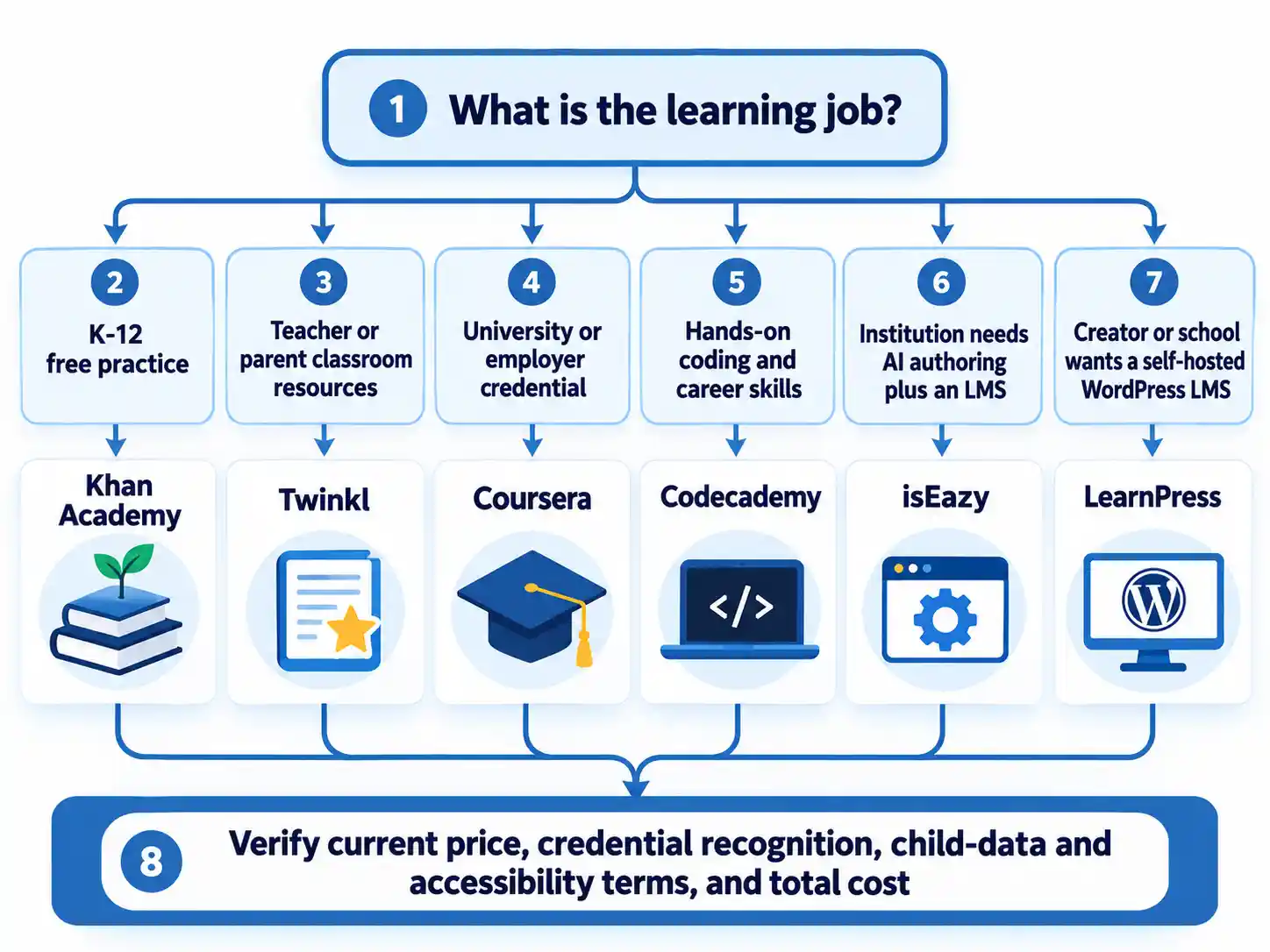
How Each Platform Works and Where It Fits
Khan Academy: free practice for school subjects
Khan Academy states that it is always free for students, teachers and families, and it reports more than 180 million registered users and more than 63 billion minutes of learning on its own homepage. What a learner actually receives is standards-aligned practice with immediate feedback, a mastery model where each skill builds on the last, and teacher insights showing what students need next.
Best fit: a student catching up or moving ahead, a parent supervising homework, a teacher assigning differentiated practice to a mixed-ability class. The design centres on repeated practice with immediate feedback, so it suits learners who will work through short exercises.
Trade-off: Khan Academy’s progress reports are not a professional credential, and the outcome statements on its homepage are the organisation’s own reporting. Treat those figures as useful context rather than independent proof that the same gain will appear in your cohort.
Coursera: credentials with a university or employer attached
Coursera says it works with 350+ universities and companies and offers 10,000+ courses with a subscription, and it advertises a 7-day free trial alongside free previews and some free courses that come without a certificate. Graded work, certificates and degrees generally require payment, and the catalog runs from employer-issued Professional Certificates through to accredited online bachelor’s and master’s degrees. Coursera for Business offers a Teams plan with per-user pricing for small teams and an Enterprise tier with custom pricing for large organisations.
Best fit: a career changer who needs a recognisable institution printed on the certificate, or a learning team buying a curated catalog instead of commissioning one.
Trade-off: the bill scales with ambition, because a single certificate, an annual subscription and a master’s degree sit in three different budget brackets. The issuing institution matters more than the platform brand, so confirm recognition with the specific employer, accreditor or licensing body before you enrol. Financial aid is available for some programs; check eligibility before assuming the sticker price applies.
Codecademy: hands-on technical skills, learned by typing
Codecademy presents interactive, hands-on learning in the browser across AI, data, coding, cybersecurity and related fields. The homepage lists career paths, certification prep for exams from AWS, Microsoft, CompTIA and ISC2, and live bootcamps and workshops, with bootcamps, workshops and Codecademy Pro all presented as available through one subscription.
Best fit: a beginner who needs hands-on repetition instead of lectures, or a development team buying one shared upskilling platform across technical and adjacent roles.
Trade-off: the technical focus is narrow by design, and pricing is not displayed on the homepage, so confirm the current rate and what the subscription covers before committing. Certification prep prepares you for an exam; the credential itself comes from the vendor that owns the exam.
For high-school and college students who want a structured programming curriculum instead of an open subscription library, Codegym’s programming-learning initiative is a useful next comparison point.
Twinkl: the teacher’s resource shelf
Twinkl advertises access to over 1,000,000 teacher-created resources, organised by age band and curriculum across multiple regions, with learner logins for tracking progress, CPD courses, a parent hub and round-the-clock support. This is a production tool for people who teach: lesson materials, phonics schemes, decodable readers and classroom resources, ready to adapt.
Best fit: a primary or secondary teacher who needs a vetted starting point rather than a blank page, a home-educating parent, or a school buying a staff-wide membership.
Trade-off: Twinkl’s page presents classroom resources rather than degree or professional-credential programs, and the volume advertised does not by itself indicate fit. Curriculum alignment differs by region, so check that the resources match your national or state framework and that the membership tier you buy covers the staff and year groups you actually run.
isEazy: AI authoring plus an LMS for institutions
isEazy presents two things that institutions usually source separately: an AI-assisted authoring tool and an all-in-one LMS. Its comparison page describes AI course creation through a system it calls Brain, automatic support for accessibility guidelines, gamified activities and a power-skills course catalog, aimed at universities, business schools, vocational training centres and corporate academies.
Best fit: a learning and development team or academic unit that needs to build its own courses quickly, then deliver and track them inside one managed system.
Trade-off: this is the most institution-first option here, and pricing is not published on the page that describes it, so budget for a sales conversation and a procurement cycle. The AI and best-in-market language comes from the company describing its own product, and the accessibility support is a claim worth testing against your organisation’s requirements during a pilot before you sign anything.
LearnPress: a WordPress LMS you own and maintain
LearnPress is a free, open-source LMS plugin from ThimPress that runs inside WordPress. The core plugin covers courses, lessons, quizzes and basic student management; paid add-ons extend it with WooCommerce and Stripe payments, certificates, assignments, course reviews, content drip and co-instructors. Because it is open source, you own the content, the student data and the domain, and the companion Eduma theme supplies ready-made layouts on top.
Best fit: a teacher, school or business already running WordPress that wants to own the platform outright instead of renting one.
Trade-off: hosting, updates and backups become your responsibility, and the add-ons that make the platform competitive carry their own costs. Budget for maintenance hours as a line item. The free core is the cheapest part of the project, never the total.
How to Choose Without Overpaying or Overtrusting
The field can narrow before you open a pricing page. Work the steps in order; each one removes a category of mismatch before you spend time on features. Gather the four inputs below first, because they make every later step faster to apply.
Prerequisites
- A named learner or group, such as a Year 8 maths class, a 40-person sales team or one career changer, rather than “our people” or “students generally”.
- A specific outcome with a deadline: pass an exam in May, hold a recognised credential by Q3, launch a first course by a target date.
- A realistic 12-month budget covering subscription or licence, add-ons, hosting, credential fees and staff hours.
- For institutional purchases, a named data-protection and accessibility contact who can review the provider’s terms.
- Write the learning job as one sentence. Name who is learning, what they must be able to do, and by when. If you cannot produce a deadline or a testable outcome, the platform decision can safely wait another month.
- Match the category before you compare features. A credential requirement rules out practice sites and resource libraries immediately. A classroom-resource requirement rules out course marketplaces. Cross-category comparisons waste time and produce poor decisions.
- Test the credential against a named verifier. Ask the specific employer, admissions office or licensing body whether it recognises the certificate you are considering. The platform’s own recognition claims do not settle the question. Ask who issues the certificate and request a sample so you can see the name printed on it.
- Price the full 12-month stack. Add the subscription or licence, required add-ons, hosting, credential fees and the internal staff hours needed to run the thing. Compare that total across options instead of treating a free core as the whole cost.
- Exercise the free path before paying. Use the free tier, the trial period or the first-module preview to confirm that the interface, content depth and language suit the learner. Check where the free version stops: certificate issuance, grading, storage, seats and add-on modules are the usual cut-off points.
- Pilot with a real cohort, then decide. For any institutional purchase, measure completion and support requests against your current setup rather than against the vendor’s dashboard. If the pilot does not beat what you already have, the business case has not been made.
Verify the result
- You can state the learning job in one sentence with a learner, an outcome and a deadline.
- The platform category matches that job, and you can name the category out loud.
- A named employer, school or accreditor has confirmed it recognises the credential you are paying for.
- The 12-month total cost is written down, including add-ons, hosting, credential fees and staff time.
- Child-data, accessibility and procurement terms have been reviewed wherever minors or an institution are involved.
- Current pricing and trial terms were re-checked on the provider’s own page within the last few days.
Two platforms both fit and the budget covers only one
Identify the binding constraint. If the outcome requires a recognised credential, buy the credential and treat everything else as supplementary. If the outcome is classroom delivery or internal training, buy the platform that removes more production work from your current process. Where credentials are not in play, ownership of content and student data is the tiebreaker: a managed system is faster to start, while a self-hosted one may reduce recurring licence fees but adds maintenance.
The free tier looks like it covers everything we need
Map exactly where it stops. Certificate issuance, automated grading, storage, seat counts and multi-instructor access are the usual paid boundaries. Test the paid trigger during the free period rather than discovering it later.
The certificate exists, but the employer has not heard of it
Recognition is granted by the receiving institution. The platform that delivers the course cannot grant it. Verify with that specific employer, school or licensing body before enrolling, and ask for a sample certificate so the issuing organisation is visible. A certificate from a named university or a well-known employer carries different weight from a generic platform completion record.
Warning
Prices, trial terms and catalogs change without notice, so confirm current terms on the provider’s own page before you commit budget. Certificates do not guarantee recognition, and any platform serving children needs a data-protection and consent review that fits the school, the parent and the jurisdiction. Where a company advertises its own product as the best in a comparison, ask for a demonstration against your requirements instead of accepting the ranking.
What the Six-Way Comparison Leaves You With
The decision usually settles once you name what the outcome has to prove. A named issuer on a certificate makes Coursera the starting point and turns everything else into a supporting tool. A classroom that has to run next week makes Twinkl the starting point, because ready-made lesson material saves production hours that no credential can replace. A skill that has to become muscle memory makes Codecademy the starting point. An institution that builds its own courses and tracks its own learners needs authoring and delivery in one contract, which is where isEazy sits. A WordPress site the team already maintains makes LearnPress the cheapest route to ownership, provided the maintenance hours are real. Khan Academy sits slightly apart: it costs nothing, it fits school practice well, and it deliberately stops short of a professional credential.
Two mistakes account for most wasted budget. The first is buying a credential when the need was practice, or buying practice when the need was a credential. The second is treating a free core or a free tier as the whole cost, when add-ons, hosting, seats, certificate issuance and staff hours are where the bill actually lands.
Match the evidence your outcome requires, then confirm three things on the provider’s own pages before money changes hands: the current price including add-ons and hosting, whether the specific employer, school or accreditor recognises the credential, and the child-data and accessibility terms if minors or an institution are involved.
If you are still weighing options after working through the checklist above, SkillUpNow is another site to review before you commit a budget.
Key Takeaways
- Platform categories behave differently. An LMS, a marketplace, a resource library, a coding platform and an authoring tool are not substitutes for one another.
- Free access is a real advantage for practice and resources, but it does not supply a professional credential. Price the outcome you actually need.
- Self-hosted options such as LearnPress trade licence fees for maintenance responsibilities, so budget staff time as a first-class line item.
- Recognition is decided by the employer, school or accreditor receiving the certificate, so verify with them rather than relying on the platform.
- Re-verify prices, trial terms, child-data handling and accessibility claims on the provider’s own pages before you sign or subscribe.

💬 Comments