Neither setup is better for everyone. A gaming headset is usually simpler because your headphones and microphone are combined in one device, while headphones with a separate mic give you more freedom to choose, position, replace, and upgrade each part independently.
Quick Take
- Choose a gaming headset if you want one device for game audio and voice chat with minimal desk clutter.
- Choose headphones and a separate microphone if you already own good headphones, care more about microphone control, or want to upgrade the two parts independently.
- Do not assume either setup automatically sounds better. Individual headphones, headsets, microphones, room conditions, and placement matter more than the category name.
- Console compatibility, desk space, background noise, and the equipment you already own can change the better choice for you.
Gaming Headset vs Headphones + Mic at a Glance
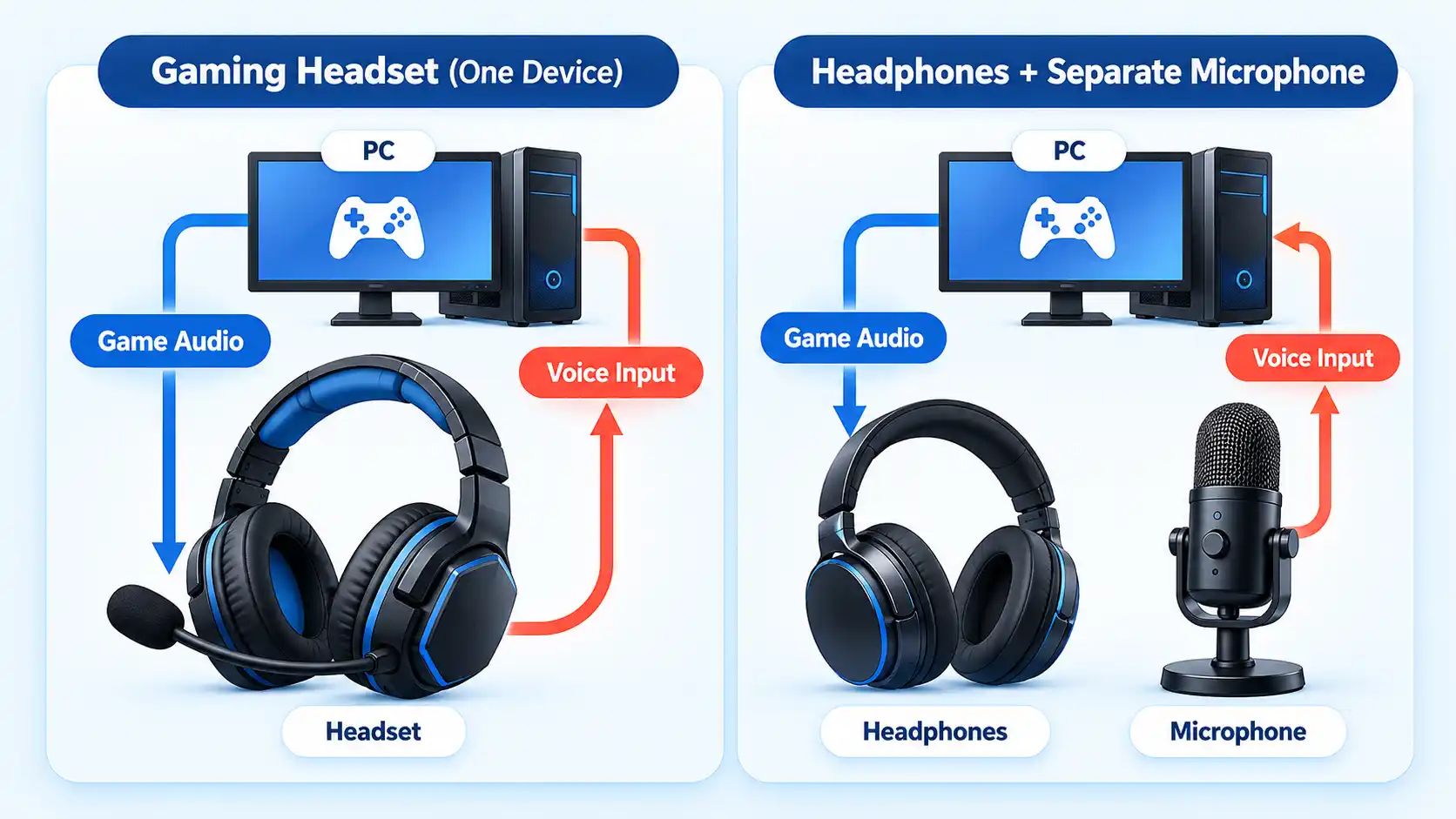
The easiest way to understand the difference is to compare one integrated device with a modular setup. A gaming headset combines listening and voice chat in the same wearable product. With regular headphones and a separate microphone, those jobs are handled by different devices.
The table shows the main trade-offs. It does not declare a universal winner because actual sound and microphone quality depend on the individual products.
| Feature | Gaming headset | Headphones + separate mic |
|---|---|---|
| Basic arrangement | Headphones and microphone in one wearable device | Separate listening and microphone devices |
| Setup complexity | Usually simpler, with fewer separate parts to position | May require a mic stand or arm, extra cable or USB port, and separate input settings |
| Mic position | Boom usually stays close to your mouth as your head moves | You can choose the microphone and position it independently |
| Platform convenience | Can be convenient when the exact headset supports your console or PC setup | Depends on whether the platform supports the headphone output and microphone input you want to use |
| Upgrades | You normally replace or upgrade the combined headset as one main product | Headphones and microphone can usually be upgraded independently |
| Streaming and recording control | Varies widely by headset and software | A standalone mic can offer separate gain, monitoring, mounting, and routing options depending on the model |
If your priority is easy multiplayer chat, the integrated design has an obvious advantage. If you want to build your audio setup around equipment you already own or change one part without replacing the other, the modular approach becomes more attractive.
The Real Difference Is Integration vs Modularity
A gaming headset is an integrated system. The earcups handle game audio, while an attached or built-in microphone handles your voice. Many models also put mute, volume, wireless, or chat controls on the headset itself.
The main benefit is that the pieces are designed to work as one product. You put on the headset, position the boom if it has one, and use the supported connection for your PC or console. There is less hardware on your desk, and the microphone usually moves with your head.
Headphones with a separate microphone are modular. You choose the listening device and microphone independently. The microphone might sit on a desktop stand, attach to a boom arm, or use another mount. It may also have its own USB connection, headphone-monitoring jack, gain control, or audio software.
For example, Elgato’s Wave:3 MK.2 provides USB-C connectivity, desktop or boom-arm mounting, direct headphone monitoring, and gain and monitor-mix controls. Those features show the kind of independent control a standalone mic can provide, but they are not requirements for every separate-microphone setup.
Modularity also changes what happens later. If you become unhappy with the microphone but still like your headphones, you can replace only the mic. With a headset, the microphone and headphones are part of the same main product, although some models do have detachable microphones or replaceable cables.
Neither structure guarantees quality. Integration is mainly about convenience and coordination between parts. Modularity is mainly about independent choice and flexibility.
Sound Quality: Neither Setup Wins by Category
It is tempting to assume that ordinary headphones must sound better because they are designed primarily for listening. That is too broad. Modern gaming headsets range from inexpensive models to products with carefully tuned sound, low-latency wireless links, equalization controls, and strong positional performance.
Current independent testing evaluates gaming headsets across separate factors such as sound reproduction, latency, comfort, platform compatibility, and microphone performance rather than treating the product category as a sound-quality verdict. It also recognizes that someone who already owns a standalone microphone or prioritizes audio fidelity may prefer conventional audiophile headphones. Those differences are evaluated at the individual-model level.
The same principle applies to normal headphones. A pair made for music is not automatically ideal for every game. Tuning affects the balance between bass, midrange, and treble. Imaging describes how clearly a pair of headphones places sounds at different positions around you. Both can affect how useful the headphones feel for gaming.
A good gaming headset can therefore outperform mediocre regular headphones, while a strong pair of conventional headphones can outperform a weak headset. Compare actual model performance instead of buying from the category name alone.
If the integrated route makes more sense for your setup, focus on what to look for in a gaming headset, including compatibility, comfort, connection type, microphone behavior, and sound priorities.
Microphone Quality: Position Matters as Much as the Format
A separate microphone does not automatically make your voice clearer. One of the most important factors is where the microphone sits in relation to your mouth and the surrounding room.
A headset boom has a simple advantage: it normally stays close to your mouth even when you turn your head. That can make voice level more consistent during gaming. Some current gaming headsets also achieve clear and understandable speech in independent microphone testing, so an integrated mic should not be dismissed simply because it belongs to a headset. Microphone performance varies substantially between headset models.
A standalone microphone gives you more freedom, but you have to use that freedom well. As the microphone moves farther from your mouth, reflected room sound can become stronger relative to your direct voice and make speech harder to understand. Moving the microphone closer can improve the direct-to-reflected sound balance, although background noise can still reduce intelligibility.
This is why an expensive desktop microphone sitting far across a desk can produce worse chat audio than a modest boom microphone kept close to the speaker. The reverse can also happen. A well-positioned standalone microphone in a suitable room can give you more control over voice capture than many headset microphones.
Some standalone microphones add controls that are useful beyond ordinary voice chat. Gain is the microphone’s input level. Monitoring means listening to the microphone signal while you use it, often through headphones. Certain USB microphones also provide software routing, allowing different audio sources to be mixed or sent to different outputs. These are product-dependent features rather than guarantees of the category.
Streaming and recording can make those controls more valuable because your microphone becomes part of a wider audio setup rather than only a way to speak with teammates. If gaming is also part of a microphone setup for streaming, microphone position, monitoring, routing, lighting, camera placement, and the rest of the desk setup can all affect the equipment you choose.
Room conditions still matter. A separate microphone is not automatically better in a noisy bedroom, and a headset boom is not automatically better at rejecting every background sound. Pickup pattern, processing, microphone distance, noise level, and the individual model all influence the result.
Setup, Platform Compatibility, and Desk Space
Your gaming location can decide the comparison before audio quality does. A player sitting on a sofa with a console has different practical needs from someone using a permanent PC desk with a microphone arm, audio software, and several USB ports.
A gaming headset can reduce the number of separate devices you have to connect and position. That is especially useful when you want to sit away from a desk or avoid a microphone stand between you and the screen.
A separate microphone usually needs somewhere to go. A desktop stand takes surface space. A boom arm needs a mounting point. A USB microphone needs an available compatible port, while some other microphone setups can involve an audio interface or adapters. None of those additions is inherently difficult, but they make the setup less compact.
Platform compatibility also deserves attention. Do not assume that because headphones work with a console, a separate USB microphone will work through that same console in the way you expect. Likewise, a gaming headset may have different versions or connection modes for PC, PlayStation, Xbox, or other devices.
For console use, verify the exact headset or microphone against the platform before purchasing. For PC use, make sure the operating system and applications can select the headphones as the output device and the standalone microphone as the input device when they are separate.
Background noise can override the apparent benefits of either architecture. If the room is noisy, getting the microphone close to your mouth and controlling unwanted sound may matter more than whether the mic is attached to the headset or sitting on a stand.
Cost and Upgradeability
Do not compare the price of one headset with the price of headphones alone. The fair comparison is the cost of the complete setup you need.
A gaming headset can cover listening and voice chat with one purchase. Depending on the model, that purchase may also include a wireless transmitter, controls, software features, or platform-specific connectivity. This can make the initial setup simple, but it does not mean gaming headsets are always cheaper.
A modular setup may start with two products instead of one. If you choose a standalone microphone, you may also need a stand, boom arm, cable, available USB connection, audio interface, or adapter depending on the microphone and computer setup. Many USB microphones need only the included stand and cable, so those extras should not be treated as universal requirements.
The calculation changes if you already own one of the components. If you already have headphones you like, buying only a suitable microphone may make more sense than replacing the headphones with a complete headset. The same applies if you already own a good microphone and only need better headphones.
Modularity also changes future spending. With separate components, you can usually replace the microphone without replacing the headphones, or upgrade the headphones while keeping the microphone. An integrated headset gives you fewer separate purchasing decisions, but a problem with one part may influence whether you keep or replace the complete device depending on its design and repair options.
Durability cannot be predicted from the architecture alone. A well-built gaming headset may outlast a poor modular setup, and replaceable parts vary by product. Compare warranties, detachable cables, replaceable pads, microphone mounting, battery serviceability for wireless equipment, and the parts most likely to wear.
Which Setup Should You Choose?
Gaming headset
Avoid this if: you already own headphones you like and would mainly be replacing them to gain a microphone.
Main trade-off: simpler integration in exchange for less independence between the listening and microphone sides of the setup.
Headphones + separate mic
Avoid this if: your desk space, console setup, available ports, or preferred gaming position makes separate hardware awkward.
Main trade-off: greater component choice and upgrade flexibility in exchange for additional hardware and setup decisions.
Either setup can work
Avoid this if: you are treating the category label as a substitute for checking the individual headphones, headset, or microphone.
Main trade-off: the deciding factors shift from device category to the quality, compatibility, room conditions, and equipment you already own.

💬 Comments