Document accessibility means creating files so people can understand, navigate, and use their content even when they rely on screen readers, keyboards, magnification, or other assistive technology. For businesses, the practical goal is to build accessibility into the source document and then check the finished file before it reaches customers, employees, applicants, or other readers.
Quick Take
Start accessibility in the editable source rather than waiting to repair the final PDF. Use real headings and lists, meaningful alternative text, simple tables, descriptive links, and the correct document language, then verify the exported file with both automated checks and human review. Legal requirements vary by jurisdiction and organization, so accessibility standards should not be treated as one universal law for every business.
What Document Accessibility Means
An accessible document is one whose information and controls remain usable when a reader cannot rely on the visual layout alone. A PDF may look perfectly organized on a monitor while still being difficult for someone using a screen reader if its headings, lists, tables, images, or reading sequence are not represented correctly in the file.
A screen reader is software that presents digital content through speech or a compatible Braille display. For it to interpret a document properly, the file needs meaningful structure behind its appearance. In PDFs, this commonly involves structural tags that identify content such as headings, lists, and tables.
Consider a two-column report. A sighted reader may naturally read down the first column and then move to the second. If the file’s underlying reading order jumps between the columns, a screen reader may present the sentences in a confusing sequence. The words are all present, but the document is still difficult to understand.
Accessibility therefore involves more than using a large font or adding an image description. It includes structure, reading order, meaningful alternatives for visual information, usable links and forms, sufficient contrast, and navigation that does not depend entirely on a mouse or on seeing where something appears on the page.
Why Document Accessibility Matters for Businesses
Documents often carry information that people need to make decisions or complete tasks. A business might use PDFs or Word files for application forms, product instructions, account information, reports, policies, invoices, training materials, or job information. If those files are difficult to use with assistive technology, the barrier can prevent someone from completing the underlying task.
The potential audience is substantial. The World Health Organization estimates that about 1.3 billion people, or roughly 16% of the world’s population, experience significant disability. Disability affects people in different ways. A person may need a screen reader because of blindness, keyboard access because using a mouse is difficult, strong contrast because of low vision, captions for audio, or a simpler document structure because dense layouts are hard to follow.
Accessible documents can also make routine business information easier to work with beyond disability-specific situations. Clear headings improve scanning. Descriptive links tell readers where a link leads. Well-structured tables are easier to understand. Plain language can reduce confusion for people reading quickly, using a small screen, or working in a language they do not use every day.
The strongest reason to improve accessibility is therefore not a promised search-ranking boost. It is that important information should remain usable by the people who need it. Search visibility may depend on many separate factors, and document accessibility should not be presented as a guaranteed SEO advantage.
Which Accessibility Rules and Standards May Apply
There is no single document-accessibility law that applies to every business in every country in the same way. The relevant duties can depend on where the organization operates, what kind of organization it is, which service it provides, and how the document is used. Businesses with a material compliance question should check the rules that apply to their situation rather than treating a general accessibility checklist as legal advice.
In the United States, Title III of the Americans with Disabilities Act applies to businesses that are open to the public, also called public accommodations. The U.S. Department of Justice states that Title III requires these businesses to provide full and equal enjoyment of their goods and services to people with disabilities and applies that position to goods and services offered to the public online. The guidance does not establish one identical technical rule for every private company or every digital document.
In the European Union, the European Accessibility Act has applied since June 28, 2025 to specified products and services rather than every product, document, and business activity. Covered areas include electronic communications, consumer banking, e-books, e-commerce, certain transport services, and specified consumer technology. The legislation also contains scope limits and exemptions, including an exemption for microenterprises providing services.
Canada also has more than one accessibility context. Current federal digital-accessibility requirements cover federally regulated public organizations and specified private-sector organizations, with requirements varying by organization type and size. The current rules include accessibility requirements for new and updated digital documents on non-employee-facing web pages and mobile applications for organizations within scope. Small federally regulated private-sector organizations with an average of 99 or fewer employees are exempt from the Phase 1 digital-accessibility requirements.
Technical standards and guidance are related to these laws, but they are not interchangeable with them. The Web Content Accessibility Guidelines, usually shortened to WCAG, were developed for web content. The World Wide Web Consortium also publishes WCAG2ICT, which explains how WCAG concepts can be considered for non-web documents and software. WCAG2ICT is informative guidance rather than a standard that sets requirements.
For a business, the useful approach is to separate two questions: What accessibility practices make this document usable? and What legal or contractual requirements apply to this organization and document? The answers often overlap, but they are not automatically the same.
How to Make Business Documents Accessible From the Start
Accessibility is usually easier to manage before a document becomes a final PDF. Start with the editable source, such as the original Word document, presentation, or publishing file, and preserve that structure during export.
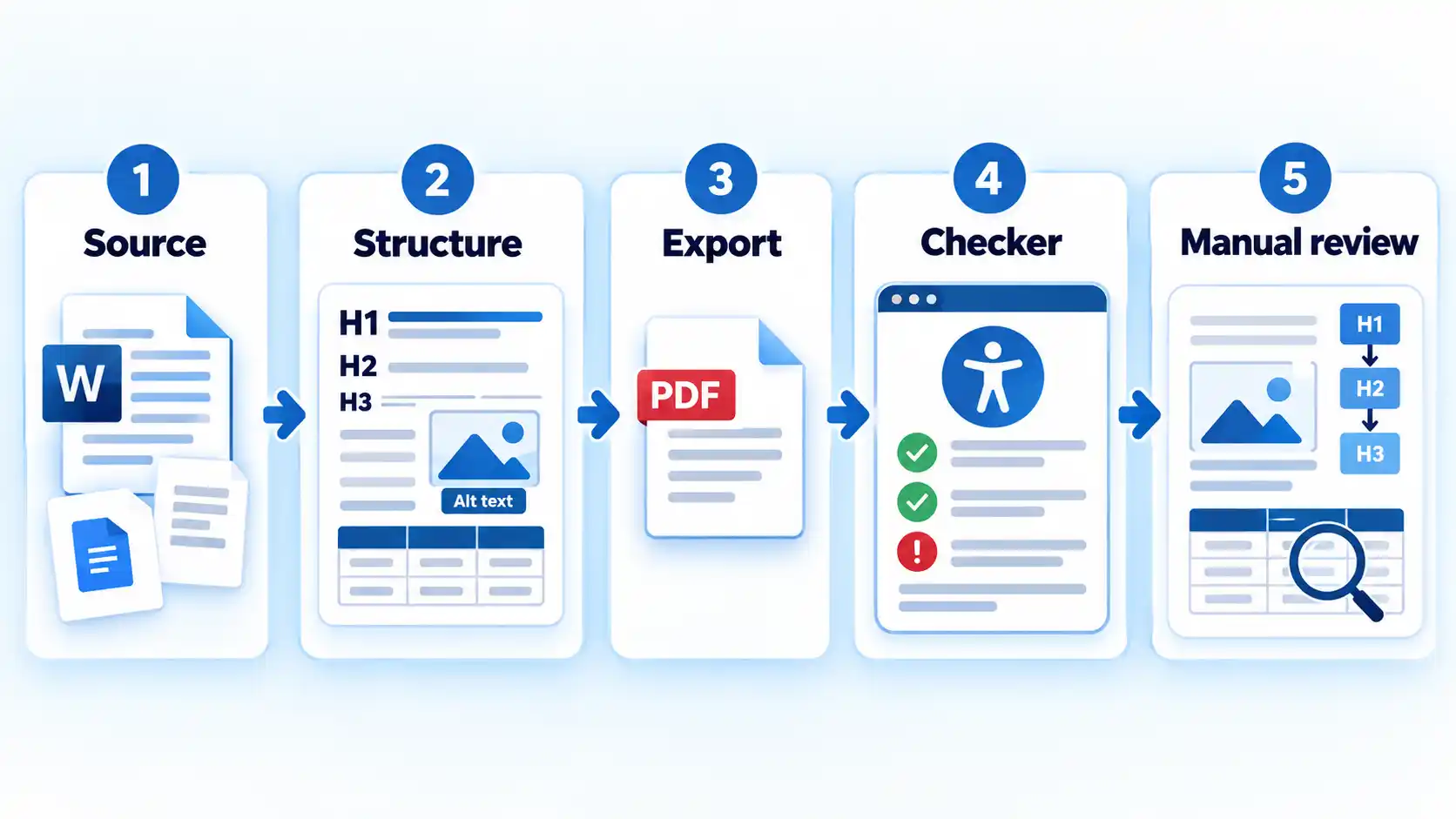
- Choose the right publishing format. Decide whether the information needs to be a downloadable document. If the content is mainly intended to be read online, accessible HTML may be easier to adapt across screen sizes and assistive technologies. If a PDF is necessary for printing, formal distribution, a fixed record, or another real requirement, continue with an accessible source document.
- Use built-in structure instead of visual imitation. Apply real heading styles, list tools, and other structural features in the authoring program. Do not create a heading only by making normal text larger and bold, or create a list by typing decorative symbols manually. In Word, built-in heading styles and logical heading order help assistive technology understand and navigate the document.
- Describe meaningful visuals. Add alternative text, usually called alt text, when an image communicates information that a reader needs. Alt text should explain the useful purpose or information in the visual rather than merely announce that an image exists. Decorative visuals that add no information should be marked appropriately when the authoring tool supports that option.
- Keep tables simple and identify headers. Use tables for data rather than for page layout. Add proper header rows or columns and avoid unnecessary merged, split, nested, or empty cells when a simpler structure can communicate the same information. Complex tables may require more careful checking after export.
- Write links that make sense on their own. Link the words that describe the destination or action instead of repeatedly using vague text such as “click here” or “read more.” This helps people who navigate from one link to another without reading every surrounding sentence.
- Set useful document information. Make sure the document has the correct primary language and a descriptive title when the format supports those properties. In a PDF, specifying the primary language and document title gives compatible assistive technology useful information about how the file should be presented and identified.
- Export without throwing away the structure. Use an export method intended to preserve accessibility information instead of flattening the document into images. After export, do not assume the PDF inherited everything correctly. Scanned or image-only PDFs may need optical character recognition, usually called OCR, before their visible text can be processed as text and the file can be properly structured.
- Remediate existing files when necessary. Older PDFs may need repair rather than recreation. For organizations dealing with an existing backlog, PDF remediation software can be part of that repair process, but the finished files still need accessibility checks and appropriate manual review.
How to Verify a PDF Before Publishing
An accessibility checker is useful, but a clean automated report is not proof that every reader can use the document. Some problems require human judgment because software cannot reliably decide whether the content makes sense when it is presented in a different way.
In Acrobat Pro, automated checks can identify many document-level problems, but logical reading order and table structure still require manual review. A technically present tag can still represent the wrong sequence or relationship, which is why the final review needs to look beyond whether the checker reports a pass.
Verify the result
- Run the accessibility checker available in the PDF tool and investigate relevant failures or warnings rather than treating the score alone as the result.
- Check that headings, paragraphs, lists, and other content are tagged with the correct structural role.
- Review the reading order so the content still makes sense when it is read sequentially rather than viewed as a page layout.
- Inspect tables manually to confirm headers and cell relationships remain understandable after export.
- Review alternative text for meaningful images and confirm that decorative content does not create unnecessary noise.
- For interactive PDFs, check that links and form controls have useful names and that keyboard navigation follows a sensible order.
The stop condition should be based on the document itself, not simply on a green checker result. Resolve relevant automated failures, inspect the elements that require human judgment, and correct any problem that would make the content or task difficult to understand before publishing the file.
When HTML Is Better Than a PDF
One way to reduce document-accessibility problems is to avoid creating a PDF when the information does not need to be a PDF. For content intended mainly for online reading, well-built HTML can adapt more easily to different screen sizes, text settings, browsers, and assistive technologies.
That does not mean HTML is automatically accessible. A poorly structured web page can have many of the same problems as a poorly structured document. The advantage is that HTML is often a better starting format for information that belongs on the web and needs to respond to different user settings.
U.S. federal accessibility guidance tells agencies to prioritize HTML and use PDFs only when necessary. UK government publishing guidance likewise recommends providing an HTML version where possible and using accessible structure when downloadable documents are needed.
A PDF may still be appropriate when readers need a stable printable file, an official record, a form designed for a defined document workflow, or a downloadable version that must preserve a particular presentation. The key question is not whether PDF is good or bad. It is whether the chosen format fits the reader’s task and can be made appropriately accessible.
Make Accessibility Part of the Publishing Workflow
Accessibility is harder to maintain when it depends on one person remembering to repair documents immediately before publication. A more reliable process begins with accessible templates and source files, gives authors clear responsibilities, and includes verification before the document is released.
For example, a team that regularly publishes reports can create a Word template with approved heading styles, accessible color choices, and predictable table formats. Authors can add appropriate alt text while they still understand the purpose of each image. The publishing step can then include an accessibility check and a manual review of the exported PDF.
Revisions need the same attention. Replacing an image, changing a table, inserting a new heading, or exporting the source document again can introduce problems into a file that previously passed review. Accessibility checks should therefore be tied to the version being published rather than treated as a one-time certification that follows the document forever.
For businesses, the practical objective is straightforward: choose a suitable format, create meaningful structure at the source, preserve it during export, and verify the result before people depend on the document. That approach improves access without relying on exaggerated claims about universal legal requirements, automatic compliance, or guaranteed business results.



💬 Comments