Mobile vs PC: Which Betting Platform Should You Choose?
Mobile is usually the better betting interface when portability and quick interactions matter, while a PC is usually better when you need more screen space, several information sources, or detailed account review. Neither platform is inherently safer or faster, so the better choice depends on the task, connection, operator implementation, and security controls rather than the device alone.
It also helps to separate three things that are often grouped together: a native mobile app installed on your phone, a betting website opened in a mobile browser, and the desktop version of that website. They may provide access to the same account, but their interfaces, permissions, update mechanisms, and practical limitations can differ.
Quick Take: Mobile vs PC Betting
- Choose mobile for portability: it is better suited to checking an account, following an event, or completing a short task when you are away from a desk and betting is permitted in your location.
- Choose PC for information-heavy work: a larger display makes it easier to keep several markets, statistics pages, account screens, or research tabs visible at once.
- Do not assume PC is automatically faster: live-betting delays can originate from broadcasts, networks, operator systems, pricing feeds, or market suspension rather than your device.
- Do not assume an app is automatically safer: app authenticity, local storage, permissions, network communication, authentication, and software updates all matter.
- Verify the operator before comparing interfaces: licensing, account controls, authentication options, and clear rules are more important than whether the final interface runs on a phone or computer.
- Using both can be reasonable: one device may be better for research while another is more practical for later account access.
What Actually Changes Between Mobile and PC?
The biggest repeatable differences are usually physical workspace, portability, input method, and how the software interacts with the operating system. The underlying betting service is operator-specific, so a phone should not be treated as one kind of betting engine and a desktop as another.
Mobile Browser vs Native Betting App
A mobile browser runs the betting website inside software such as Chrome, Safari, or Firefox. A native app is software installed on the operating system and distributed through an app store or another approved channel.
That distinction matters technically. A native app can interact more directly with operating-system functions such as notifications, biometric authentication, device storage, and application permissions. It also has its own software-update lifecycle. A mobile website relies more heavily on the browser and web session.
The OWASP mobile security standard separates mobile-app security into areas such as storage, cryptography, authentication, network communication, platform interaction, code quality, resilience, and privacy. That is a useful reminder that installing an app does not by itself establish that the app is secure.
For example, an operator’s native application might support push notifications and biometric unlocking while its mobile website does not. Another operator could expose nearly identical functionality through both interfaces. Feature parity is therefore something to check with the operator rather than assume from the device category.
Desktop Web Platform
PC betting normally means opening an operator’s website in a desktop browser. Its most obvious advantage is workspace. A larger monitor can keep a fixture list, market details, statistics, and another research source visible without repeatedly switching screens.
This becomes useful when comparing several markets or checking account information carefully. It does not mean the desktop browser automatically receives prices, settles bets, or communicates with the bookmaker faster.
Desktop systems also have their own security failure points. Shared computers, outdated browsers, malicious browser extensions, saved passwords, and sessions left logged in can all undermine an otherwise secure service.
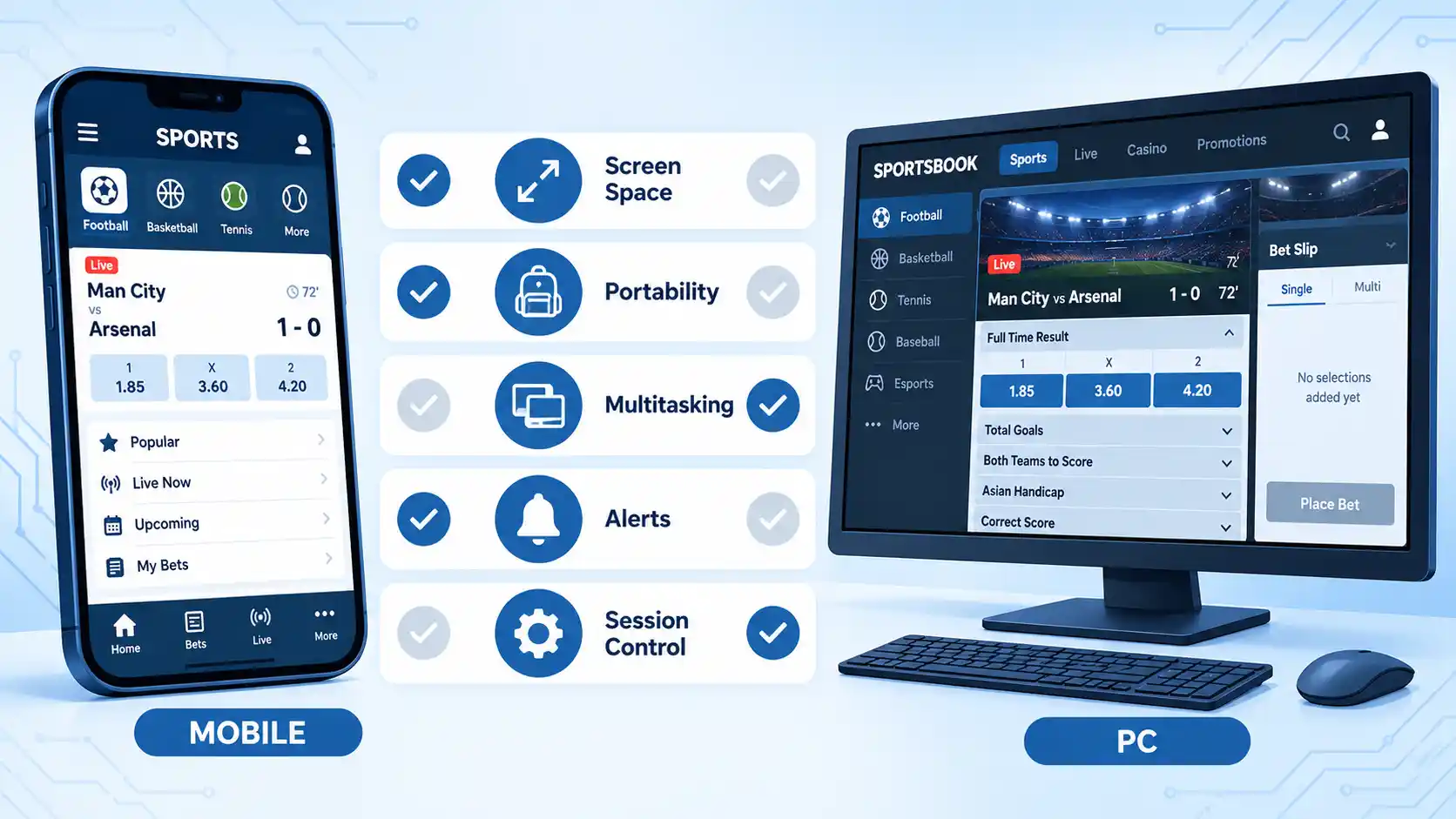
Mobile vs PC Betting: Side-by-Side Comparison
The table below focuses on characteristics that can reasonably differ between the two interfaces. It avoids treating operator-specific features such as payment methods or promotions as universal properties of either device.
| Factor | Mobile | PC/Desktop |
|---|---|---|
| Portability | High. Suitable for use away from a fixed workstation where betting is legally permitted and connectivity is available. | Lower for a desktop computer, although laptops remain portable within practical limits. |
| Visible workspace | Restricted by the smaller display, even when the interface is well optimized. | More room for markets, account data, statistics, and multiple browser tabs. |
| Multitasking | Possible, but frequent app or tab switching can interrupt the workflow. | Usually easier because several windows or panels can remain visible together. |
| Notifications | Native apps can integrate with mobile operating-system notifications when supported. | Depends on the website, browser, operating system, and notification settings. |
| Research workflow | Practical for quick lookups and individual markets. | Better suited to workflows involving several sources or dense information. |
| Live betting | Convenient during an event, but upstream feeds and broadcasts can still be delayed. | Larger workspace can make information easier to inspect, but it cannot eliminate upstream delay. |
| Security | Depends on the app or browser, device condition, authentication, network security, and operator controls. | Depends on the browser, computer condition, authentication, session management, and operator controls. |
| Payments and account tools | Availability and usability depend on the operator, jurisdiction, and chosen mobile interface. | Availability and usability depend on the operator and jurisdiction rather than desktop computing itself. |
| Feature parity | May differ between native app and mobile website. | May expose additional information on screen, but actual product functionality remains operator-dependent. |
For most users, the clearest distinction is therefore ergonomic. Mobile optimizes access and portability. Desktop provides more visual context. Neither description establishes which operator offers better odds, payments, account controls, or security.
Performance and Live Betting: Why “PC Is Faster” Is Too Simple
The legacy idea that PC betting is inherently much faster than mobile confuses several separate parts of the system. What feels like “speed” can be produced by the device, internet connection, sportsbook interface, operator servers, external data feeds, video stream, or the process that accepts and reprices a wager.
A modern phone on a strong connection can render a simple betting interface quickly. A powerful PC can still experience delays if the connection is congested or the operator’s service is slow. Conversely, a low-powered or overloaded mobile device may struggle with a graphics-heavy interface even when the bookmaker’s servers are responding normally.
Live betting adds another layer. The UK Gambling Commission’s in-play betting standard specifically requires customers to be warned that live television or other broadcasts can be delayed and that other parties may have more up-to-date information.
Consider a football match shown on television. Your PC might display the sportsbook page immediately after receiving an update, but the television pictures beside it could still be behind the event feed used by the bookmaker. Changing from a phone to a faster desktop computer cannot remove that upstream broadcast delay.
A market may also be suspended or its price may change before a bet is accepted. That should not automatically be interpreted as poor device performance. The operator may be processing new event information or updating the market.
A useful practitioner distinction is therefore between interface responsiveness, which is how quickly the screen reacts, and wager-processing latency, which includes the wider path between your device and the systems accepting the bet.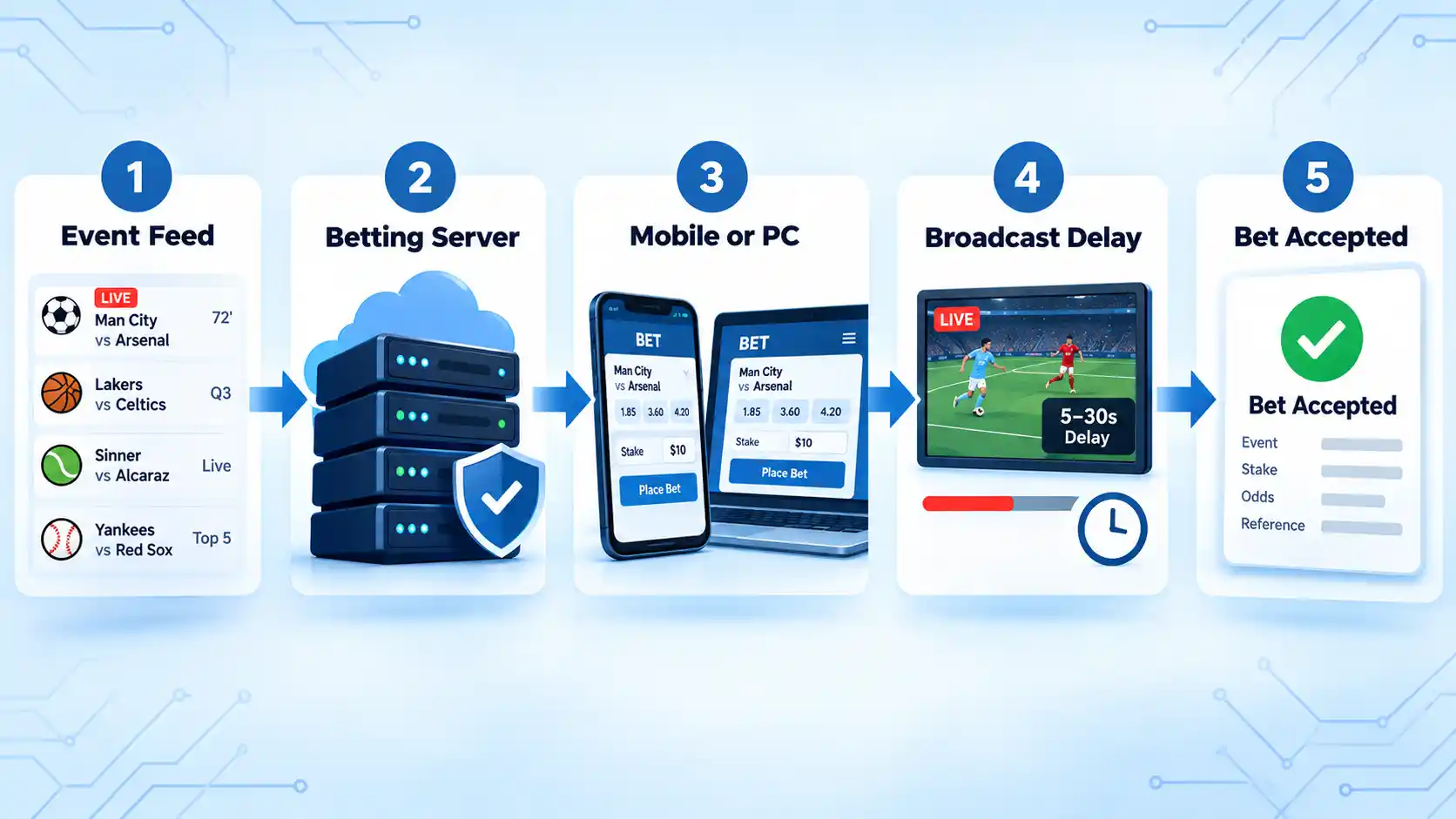
Security: Is Mobile or Desktop Betting Safer?
Neither device class is automatically safer. Security is a chain of controls involving the operator, account authentication, network connection, software, device condition, and your handling of the session.
What the Operator Must Protect
In Great Britain, licensed remote operators are subject to remote gambling security requirements covering critical systems. These include systems that handle authentication data, account balances and payment details, systems that store the current state of a customer’s gamble, points that communicate with critical systems, and networks carrying sensitive customer information.
Those requirements illustrate why judging security only by whether a webpage shows HTTPS is incomplete. Encryption in transit is important, but authentication, access control, application security, internal systems, and session management also matter.
Mobile-Specific Considerations
A native betting app introduces software that lives directly on the phone. Relevant questions include whether the app came from the operator’s genuine distribution channel, whether the phone and app receive updates, how the app handles sensitive local information, and what permissions it requests.
Secure network communication matters as well. OWASP’s network communication guidance emphasizes protecting the confidentiality and integrity of transmitted data through secure encrypted channels.
Physical loss is another mobile-specific concern. A phone that is unlocked or poorly protected can expose authenticated apps and stored information. Screen locking, current software, and appropriate authentication remain important even when the operator’s infrastructure is well protected.
Desktop-Specific Considerations
Desktop risks often come from the environment around the browser. A shared PC may retain a login session. A malicious extension can access browser content. Phishing can direct a user to a convincing lookalike domain. Malware or an outdated browser can weaken the security of an otherwise legitimate betting site.
A private computer with current software and sensible account controls may therefore be safer than a compromised phone, while a well-maintained phone may be safer than an unmanaged shared PC. The device label alone cannot answer the question.
Account Security Matters More Than the Device Contest
Authentication is the process used to establish that the person logging in controls the account credentials or other authenticators. Multi-factor authentication (MFA) requires evidence from more than one authentication factor rather than relying on a password alone.
The current NIST authentication guidance, although written for digital identity systems rather than gambling regulation, illustrates the security principle: stronger assurance levels require stronger authentication, and its Authentication Assurance Level 2 requires two distinct factors and a phishing-resistant authentication option.
A betting operator may not implement the NIST model or offer the same authentication methods, so it should not be presented as an operator requirement. The practical lesson is simpler: prefer strong, unique authentication and enable additional account protection when the operator provides it.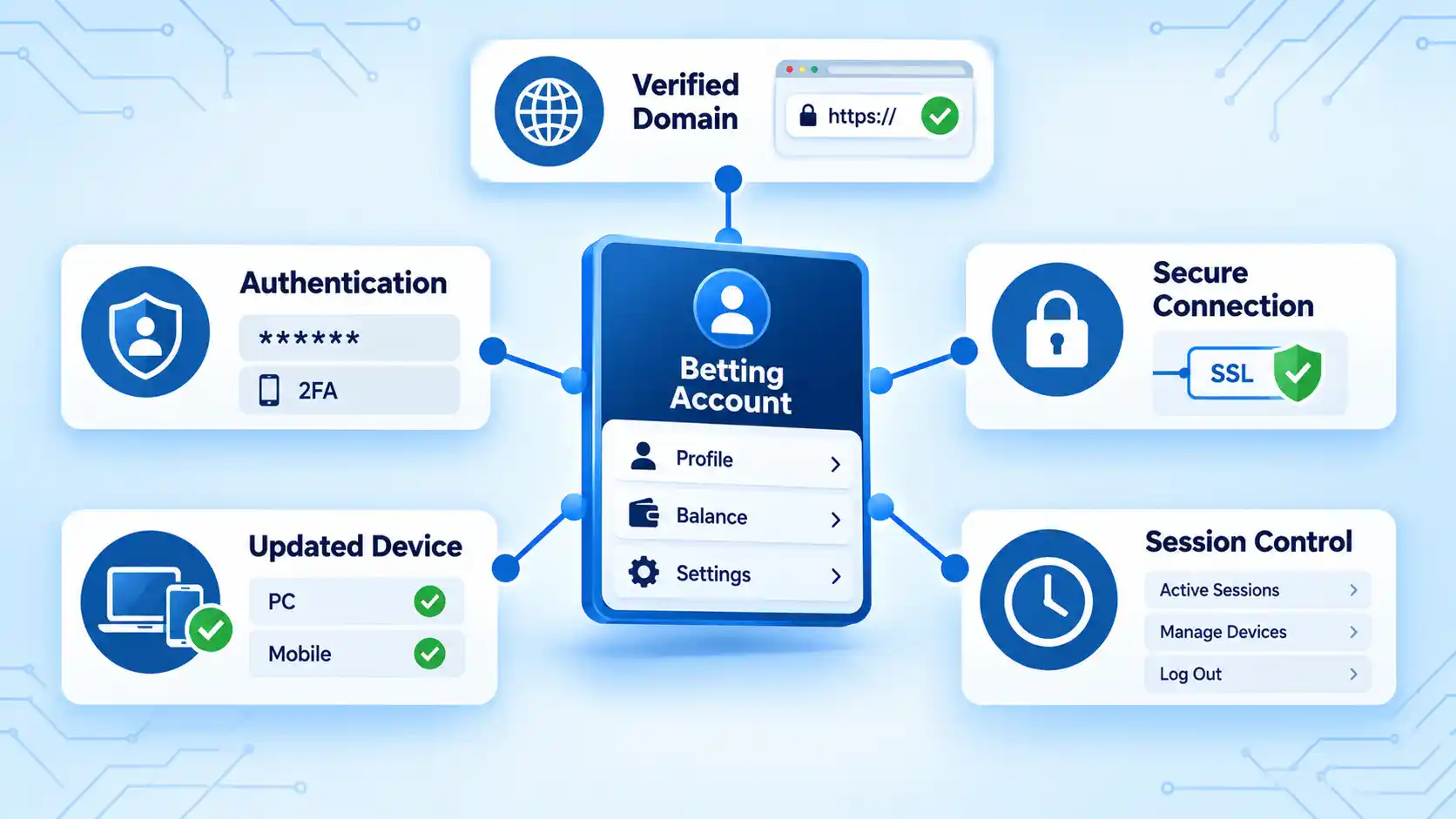
Features, Bonuses and Payments: Check the Operator, Not the Device Category
Bonuses, supported payment methods, withdrawal options, bet builders, live streams, cash-out functions, and account tools are operator-specific. It is therefore misleading to say that PC users always receive more payment methods or that mobile users automatically receive better promotions.
Some campaigns can impose eligibility rules involving region, account status, qualifying bets, payment method, or other conditions. Lists of free bets also illustrate how promotional terms can vary substantially between offers. The existence of those promotions does not establish a general mobile-versus-PC advantage.
The same caution applies when a brand exposes different product areas. A user may encounter a separate Betway casino lobby, for example, but the presence of a particular product page does not prove that its mobile and desktop interfaces have identical features or that either interface is technically superior.
Instead of choosing a device based on assumed bonuses or payments, check the actual terms and account interface available in your jurisdiction. If a feature matters, verify it on the operator’s current platform before relying on it.
Check the Operator Before Choosing the Device
Device selection should come after operator verification. A polished mobile app or responsive desktop site is not evidence that a betting business is licensed in your jurisdiction.
Regulatory systems vary by country and region. In Great Britain, for example, businesses serving consumers remotely must hold the appropriate Gambling Commission licence, and the Commission maintains a searchable public licensing register. The same process should not be assumed elsewhere; use the regulator responsible for the jurisdiction in which you are betting.
- Identify the relevant regulator. Determine which gambling authority has jurisdiction over the service offered to you.
- Verify the operator and domain. Compare the business name and website against the regulator’s official records where a public register exists.
- Review security controls. Look for appropriate authentication options, a correctly spelled domain, current software, and clear account procedures.
- Check account-management tools. Confirm that financial limits and other controls are accessible before focusing on interface convenience.
- Compare the actual interfaces. Only then decide whether the operator’s mobile app, mobile site, or desktop site best fits your workflow.
For Great Britain specifically, the current financial limits standard requires gambling systems to provide customers with accessible facilities to set their own financial limits. Requirements vary between jurisdictions, so this should be treated as a regulatory example rather than a worldwide rule.
For a broader view of how regulation, payments, security, identity systems, and platform infrastructure interact, see our guide to online casino technology trends. Our overview of technology in sports betting provides additional background on the shift from physical to online and mobile interfaces.
Which Should You Choose?
The practical answer depends on what you are trying to accomplish at that moment rather than which device category wins an overall ranking.
Choose Mobile When…
- You need access away from a fixed workstation and betting is permitted where you are located.
- You are completing a short task such as checking a settled wager or reviewing one market.
- Mobile notifications are useful and the operator’s app supports them appropriately.
- You do not need several research sources visible simultaneously.
- The mobile interface exposes the account and security controls you actually use.
Mobile’s advantage is therefore convenience of access, not guaranteed speed or superior betting functionality.
Choose PC When…
- You want several markets or information sources visible together.
- You are comparing statistics or researching multiple events before making a decision.
- You need to inspect transaction histories, account settings, rules, or dense tables carefully.
- You prefer a keyboard, mouse, and larger display for complex navigation.
- Your desktop environment is private, updated, and appropriately secured.
The desktop advantage is primarily workspace and information density. It does not guarantee lower network latency, better odds, wider payment support, or stronger operator security.
Use Both When the Workflow Benefits From It
For many users, there is no reason to force a permanent mobile-versus-PC choice. A desktop can be useful for detailed research or account management, while a verified mobile client may be more practical for later account access.
For example, you might review account settings and several event statistics on a desktop, then later check the account from your phone. Whether concurrent or repeated logins are permitted, and whether additional verification is triggered when devices change, depends on the operator’s rules and security system.
The more useful question is therefore: Which interface makes this particular task easier without weakening verification, security, or account control?
Key Takeaways
- Mobile is usually strongest for portability and quick access; PC is strongest for visible workspace and research-heavy tasks.
- A native mobile app and a mobile betting website are technically different interfaces and should not be treated as interchangeable.
- PC is not inherently faster. Device performance is only one part of a chain that includes networks, operator systems, data feeds, market processing, and broadcast delay.
- Neither mobile nor desktop is inherently safer. Account authentication, software integrity, device condition, operator controls, and correct-domain verification matter more.
- Promotions, payment methods, live-stream features, and account tools vary by operator and jurisdiction rather than following a universal mobile-versus-desktop rule.
- Verify the operator and relevant licence before deciding which interface is more convenient.
- Using both interfaces can be sensible when different tasks benefit from different screen sizes and levels of portability.
Frequently Asked Questions
Does a betting app use more battery than the mobile website?
It can, but there is no universal rule. Battery use depends on screen time, video streaming, background activity, notifications, location services, network conditions, and how efficiently the app or browser is implemented. A streaming-heavy mobile website can consume more power than a simple native app, while an app performing frequent background activity can consume more than a basic webpage.
Can I use the same betting account on my phone and computer?
Many online services are designed to let an account be accessed from more than one supported client, but the exact rule is operator-specific. Some systems may request extra verification when a new device, browser, or location is detected, and operators may restrict simultaneous sessions. Check the account terms rather than assuming unrestricted multi-device access.
Why does a live bet sometimes change before I confirm it?
Live markets can move as new event information reaches the operator. A market may be repriced or temporarily suspended while the underlying event state is updated. Broadcasts can also lag behind the information available to the betting system, so what you see on television is not necessarily the most current event state.
Is public Wi-Fi safe for logging into a betting account?
A correctly implemented encrypted connection protects data in transit, but public Wi-Fi does not remove risks such as phishing, fake access points, compromised devices, or stolen account credentials. Verify the domain or genuine app, keep the device updated, use strong account authentication, and avoid treating the network itself as proof that the session is safe.







💬 Comments