E-commerce businesses need tools that help customers discover products, manage stock and orders, create content, support buyers, measure performance, and process payments safely. That does not mean every store needs 11 separate subscriptions: your e-commerce platform may already provide several of these capabilities.
The practical goal is to build a tool stack around the work your store actually performs. A small single-channel shop might handle inventory, reviews, payments, and basic analytics inside its commerce platform, while a retailer selling through several marketplaces and warehouses may need specialized systems that keep data synchronized.
How to choose your e-commerce tool stack
Before adding software, identify the business process you are trying to improve. A useful tool should solve a clear problem, such as keeping stock accurate across locations, routing support requests, automating post-purchase email, or measuring where customers leave the checkout process.
Integration matters as much as features. If your inventory system, storefront, shipping software, and analytics platform all maintain conflicting versions of an order or product record, adding more software can create more work rather than less. Check whether a prospective tool connects reliably with your commerce platform and any systems that need the same customer, product, inventory, or order data.
Also look for overlap. You may not need a separate inventory application if your existing platform already provides adequate stock tracking for one location. Specialized software becomes more useful as requirements become more complex, such as selling through multiple channels, managing several warehouses, handling a large support queue, or coordinating more advanced marketing automation.
The table below maps the 11 capabilities to the jobs they perform. The examples are illustrative rather than rankings, and the right combination depends on your platform and operating model.
| Tool category | Main job | Features to prioritize | Example tools |
|---|---|---|---|
| SEO | Improve search visibility and diagnose organic search performance | Query data, technical audits, keyword research, rank monitoring | Google Search Console, Semrush, Ahrefs |
| Product research | Inform product and market decisions | Demand indicators, keyword data, competition and marketplace research | Jungle Scout, Helium 10, Viral Launch |
| Inventory management | Track stock and availability | SKU tracking, locations, stock alerts, replenishment data | Shopify inventory tools, Zoho Inventory |
| Merchandising | Organize and present products to shoppers | Site search, collections, recommendations, promotional rules | Klevu, Searchspring |
| Content creation | Create product and marketing content | Image, video, publishing, and collaboration tools | Canva, WordPress |
| Shipping and fulfillment | Move orders from purchase to dispatch | Labels, routing, carrier rules, tracking, fulfillment connections | ShipStation, ShipBob |
| Customer support | Organize and resolve customer requests | Ticketing, channel routing, customer context, self-service | Zendesk |
| Email marketing and automation | Run campaigns and lifecycle messaging | Segmentation, event triggers, flows, reporting | Klaviyo, Mailchimp, Brevo |
| Ratings and reviews | Collect and display customer feedback | Review requests, moderation, product association, display controls | Platform-native or specialist review apps |
| Analytics | Measure shopping behavior and business outcomes | E-commerce events, funnels, acquisition data, reporting | Google Analytics |
| Payments and fraud prevention | Accept payments and manage transaction risk | Payment processing, risk signals, rules, review workflows | Payment processors and compatible fraud-management systems |
1. Search engine optimization tools
Search engine optimization (SEO) helps search engines discover, understand, and present your store’s pages to people searching for relevant products. For an e-commerce site, this can involve product and category pages, internal linking, site structure, product data, technical crawlability, and content that answers shoppers’ questions.
Google explains in its e-commerce search documentation that sharing a site’s e-commerce data and structure can make its content easier for Google to find and parse. Product structured data and Merchant Center feeds can also provide Google with explicit product information.
Start with measurement before buying a large SEO suite. Google Search Console’s Performance report provides clicks, impressions, click-through rate, average position, and dimensions such as queries and pages. That makes it useful for seeing which searches expose your store and which pages may need attention.
Specialist platforms such as Semrush and Ahrefs can extend the workflow with keyword research, backlink analysis, competitive research, rank monitoring, and technical auditing. These tools provide data for making SEO decisions; they do not guarantee rankings.
2. Product research tools
Product research tools help you investigate demand, competition, search behavior, marketplace activity, and other signals before deciding what to sell or expand.
Marketplace-focused platforms such as Jungle Scout, Helium 10, and Viral Launch are examples of tools built around marketplace research. Depending on the platform and plan, available research functions can vary, so verify the current feature set against the marketplace and workflow you actually use.
Treat research signals as decision inputs rather than profit predictions. A product that appears attractive in marketplace research can still perform poorly for your business because of supplier costs, shipping expenses, advertising costs, returns, pricing, seasonality, or weak demand from your particular audience.
The same limitation applies when moving between channels. Marketplace data can help you investigate a product opportunity, but it does not automatically predict demand on an independent direct-to-consumer store.
3. Inventory management software
Inventory management software tracks what you have available to sell and where that stock is located. The need becomes more important as you add products, sales channels, warehouses, retail locations, dropshipping suppliers, or third-party fulfillment services.
A stock keeping unit (SKU) is an identifier used to distinguish a product or variant in your inventory. A useful inventory system should keep SKU quantities and inventory states accurate enough that the storefront, purchasing team, and fulfillment operation are working from consistent information.
For example, Shopify’s inventory-management documentation describes the inventory cycle from receiving and storage through sales and restocking. Shopify also notes that historical sales and inventory information can support restocking and planning.
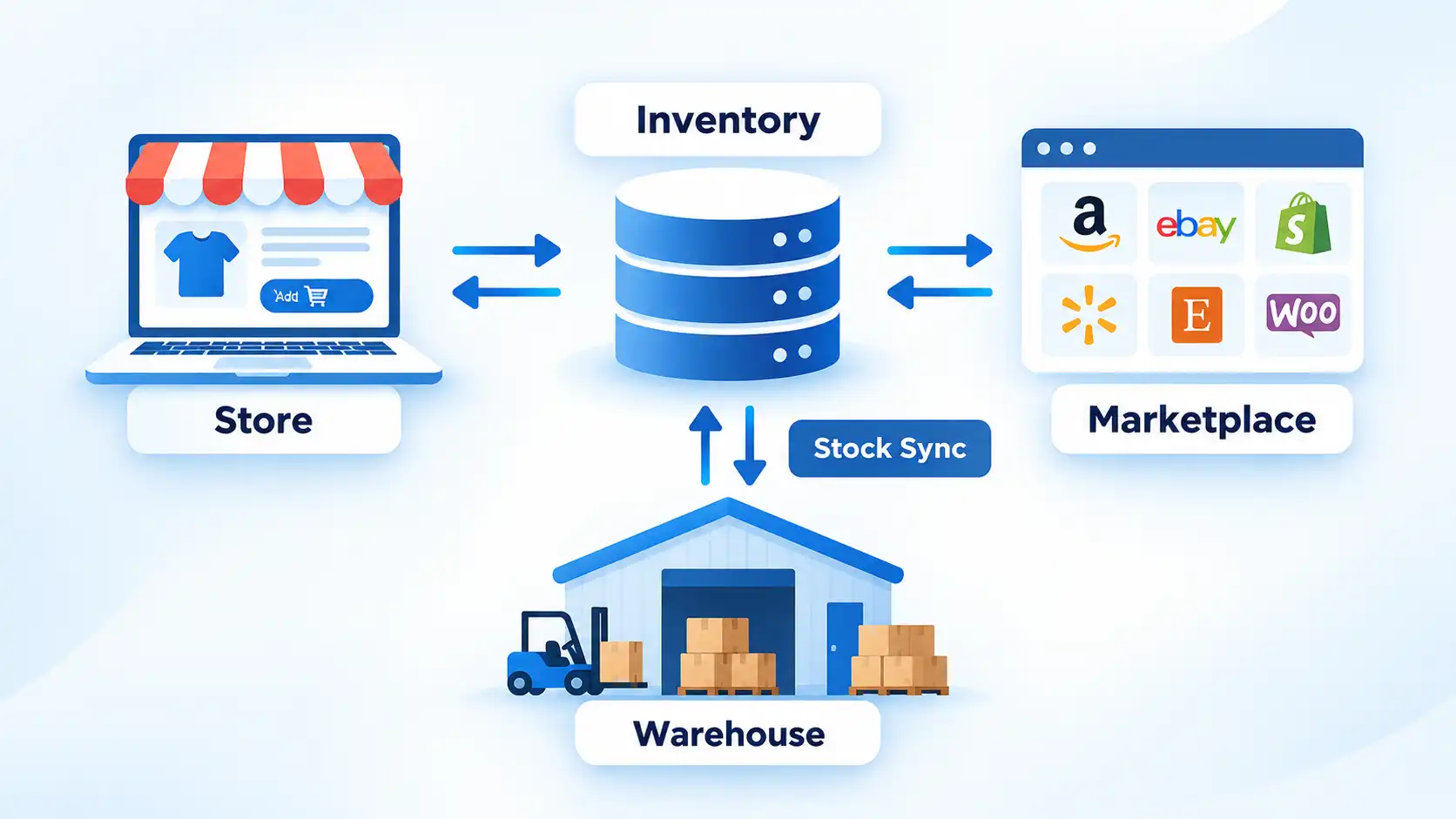
Multi-location selling adds another layer. If the same SKU is available through a website, a marketplace, and more than one fulfillment location, delayed or incorrect stock updates can cause one channel to offer inventory that another channel has already sold.
This is why the system of record matters. Decide which platform owns the authoritative inventory quantity and how other systems receive updates. Accurate inventory and fulfillment data can also affect marketing operations when campaigns depend on current product availability.
4. E-commerce merchandising tools
Digital merchandising is the work of deciding how products are organized and presented so shoppers can find relevant items. Depending on the store, this can include category organization, internal search, product recommendations, collections, promotional rules, sorting, and the presentation of offers.
Tools such as Klevu and Searchspring specialize in parts of this workflow, particularly product discovery and search. Before adding specialist merchandising software, check what your commerce platform already supports and identify the limitation you actually need to solve.
Pricing policies can also create specialized workflows. A store that deliberately offers price matching, for example, may need a consistent way to receive and review requests. For WooCommerce stores using that policy, a WooCommerce price-match plugin is one way to structure the request process rather than relying entirely on unstructured messages.
Merchandising can also be used to create better experiences for customer journeys by making relevant products easier to locate and compare. However, merchandising software cannot compensate for unclear product information, weak pricing, poor availability, or products that do not fit customer needs.
5. Content creation tools
E-commerce content includes more than blog posts. Product photography, comparison pages, buying guides, demonstrations, short videos, social posts, diagrams, FAQs, and educational articles can all help shoppers understand what a product is and whether it suits their needs.
A design platform such as Canva can handle many routine graphics, while a content management system such as WordPress can manage longer editorial content. Your commerce platform may also provide built-in page, media, and blogging tools, so a separate publishing system is not automatically necessary.
The content format should follow the customer’s question. A complicated product may benefit from a demonstration or buying guide, while a visually distinctive product may need stronger photography. Different e-commerce content formats can be adapted to the product and stage of the buying journey.
Avoid adding tools simply because they can generate more content. A smaller library of accurate product information and genuinely useful buying material is easier to maintain than a large collection of repetitive pages.
6. Shipping and fulfillment software
Once a customer places an order for a physical product, the business still has to turn that order into a shipment. Shipping and fulfillment software helps connect orders with warehouses, carriers, labels, tracking information, and fulfillment providers.
Automation becomes particularly useful when order volume creates repetitive decisions. ShipStation documents that its shipping automation features can perform tasks such as selecting shipping services and package types, assigning warehouse locations, applying tags, splitting qualifying orders, and sending orders to connected fulfillment providers. Some functions have account, plan, or regional requirements.
A practical example is routing an eligible order to a warehouse according to configured rules, then applying an appropriate shipping service. Automation reduces repetitive decisions, but its behavior still depends on the rules, integrations, inventory data, and features available to the account.
Shipping software does not replace the physical fulfillment operation. Poor stock accuracy, packaging mistakes, warehouse delays, or incorrect customer addresses can still cause failures after an order enters the system. The software should connect those operations rather than being treated as a substitute for them.
7. Customer support tools
Customer support software gives your team a structured place to receive, assign, track, and resolve customer questions. That is especially useful when requests arrive through several channels instead of one shared email inbox.
A help desk typically turns incoming requests into tickets that can be assigned and tracked. More advanced systems can add customer history, automation, self-service content, routing, service-level rules, and multiple communication channels.
For example, Zendesk’s omnichannel routing documentation says eligible email, messaging, and call tickets can be routed according to agent availability and capacity. Additional routing criteria and capabilities depend on the plan and configuration.
For an e-commerce operation, integration with order data can be as important as the ticketing interface. An agent who can see the relevant order, shipment status, and customer history may be able to investigate a problem without moving between several disconnected systems.
A live-chat widget alone therefore does not create a complete support workflow. Consider how requests are assigned, what context agents receive, what happens outside business hours, and how unresolved cases are tracked.
8. Email marketing and automation tools
E-commerce businesses can use email tools for campaigns and for messages triggered by customer actions. The second use is where integration with the commerce platform becomes particularly important.
An event-triggered flow starts when a defined event occurs. Klaviyo’s metric-triggered flow documentation, for example, lists Started Checkout, Placed Order, and Viewed Product as events that can trigger workflows such as abandoned-cart, post-purchase, and browse-abandonment flows. Available metrics depend on the integration and account data.
Tools such as Klaviyo, Mailchimp, and Brevo offer different combinations of campaigns, segmentation, automation, templates, reporting, and integrations. Evaluate them against the customer and order events your store can reliably send, rather than choosing solely by the number of available templates.
For retailers building a broader program, email marketing automation can connect messages to different stages of the customer relationship. Poor source data or delayed integrations, however, can cause an automation to target the wrong person or arrive at the wrong time.
If business-to-business prospecting is also part of your operation, ContactOut is a separate contact-finding and prospecting utility rather than a replacement for an e-commerce lifecycle email platform.
US businesses also need to consider legal requirements for commercial email. The Federal Trade Commission’s CAN-SPAM guidance covers requirements including accurate header information, non-deceptive subject lines, identifying commercial messages as advertisements, including a valid physical postal address, providing an opt-out mechanism, and honoring qualifying opt-out requests. Transactional or relationship messages are treated differently under the Act, and requirements in other jurisdictions can differ.
9. Ratings and reviews tools
Ratings and reviews tools collect customer feedback and associate it with products, services, or the business. Depending on your platform, this capability may already be built in or may require a specialist application.
Useful features can include automated review requests, product association, moderation controls, media uploads, display options, and integrations that connect a request to a purchase. The objective is to make genuine customer feedback available to prospective buyers, not to manufacture a particular rating.
A common workflow is to send a review request after an order has had enough time to arrive. The resulting review can then be associated with the purchased product, subject to the store’s moderation policy and applicable rules.
Warning
Do not use review software to create fake or false feedback, and do not make incentives conditional on a review expressing a particular positive or negative sentiment. In the United States, the FTC’s Consumer Reviews and Testimonials Rule addresses these and other deceptive review practices.
The FTC’s Consumer Reviews and Testimonials Rule guidance explains issues involving fake or false reviews, incentives, insider relationships, review suppression, and required disclosures. The rule went into effect on October 21, 2024.
This makes review management more than a design decision. Stores need a process for requesting, displaying, moderating, and responding to feedback without turning moderation into manipulation.
10. Analytics tools
Analytics software helps you measure what people do in your store so that decisions are based on observed behavior rather than assumptions. Useful measurements can include acquisition, product views, cart activity, checkout activity, purchases, refunds, and other events relevant to your business.
An event is a recorded user interaction or system occurrence. In Google Analytics 4 (GA4), an e-commerce implementation can send events for actions such as viewing an item, adding or removing an item from a cart, beginning checkout, purchasing, and receiving a refund. Google’s e-commerce measurement documentation explains how these events are implemented.
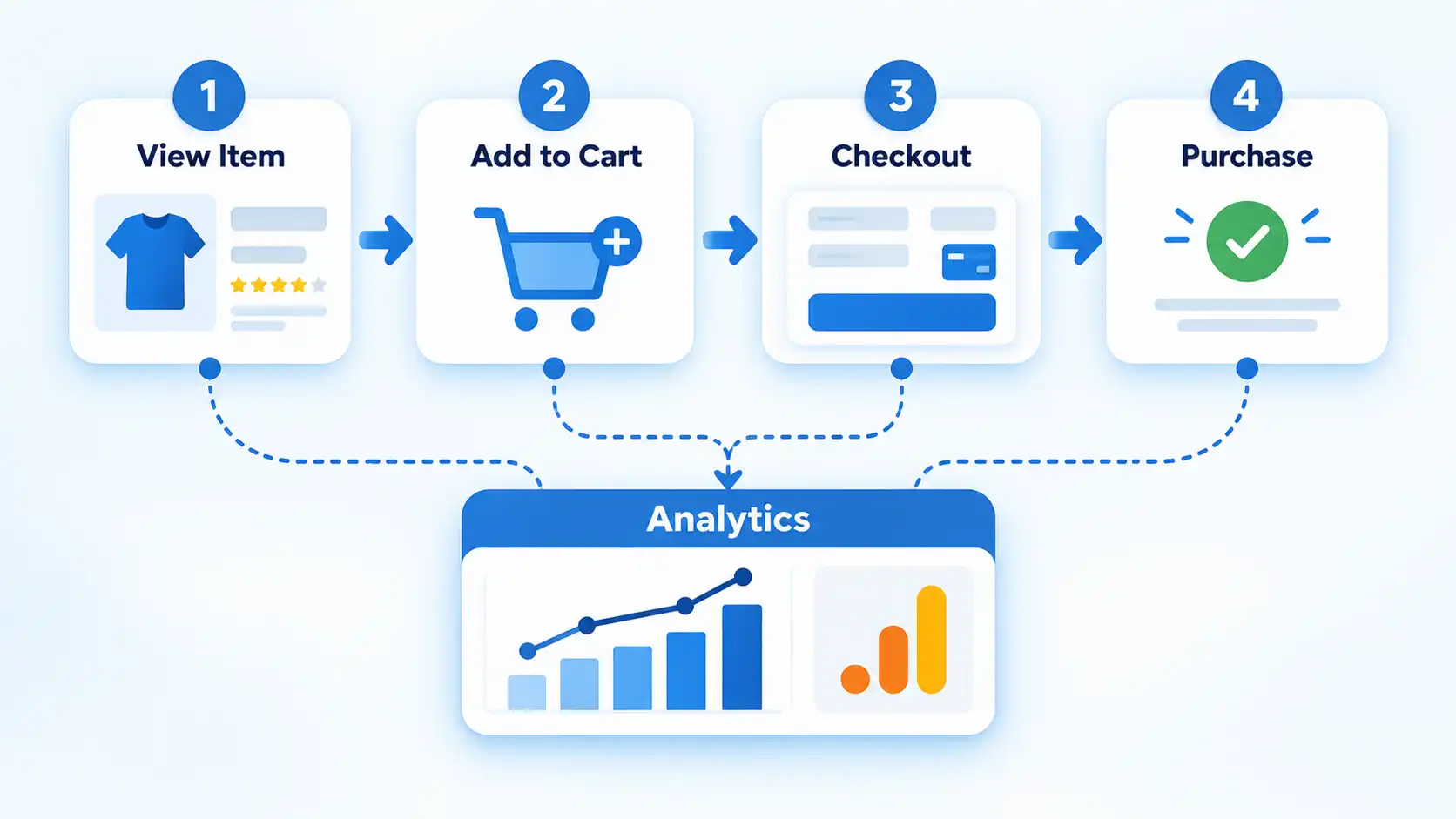
The important word is implementation. Installing an analytics product does not guarantee that every e-commerce interaction is being measured correctly. The corresponding e-commerce events and parameters need to be implemented for the interactions you intend to measure.
For example, if your store records purchases but fails to send reliable add-to-cart or checkout events, the resulting funnel cannot accurately show where shoppers leave those intermediate stages. Before acting on a dashboard, verify that the underlying events fire at the correct stage and contain the data you expect.
Analytics tools can show what happened, but the numbers still require interpretation. A drop in conversion rate might reflect a checkout problem, different traffic quality, product availability, seasonality, pricing, or another change. Treat the dashboard as evidence to investigate rather than an automatic explanation.
11. Payment and fraud-prevention tools
Payment and fraud-prevention tools cover two closely related but distinct jobs: accepting a customer’s payment and assessing whether a transaction presents unusual risk.
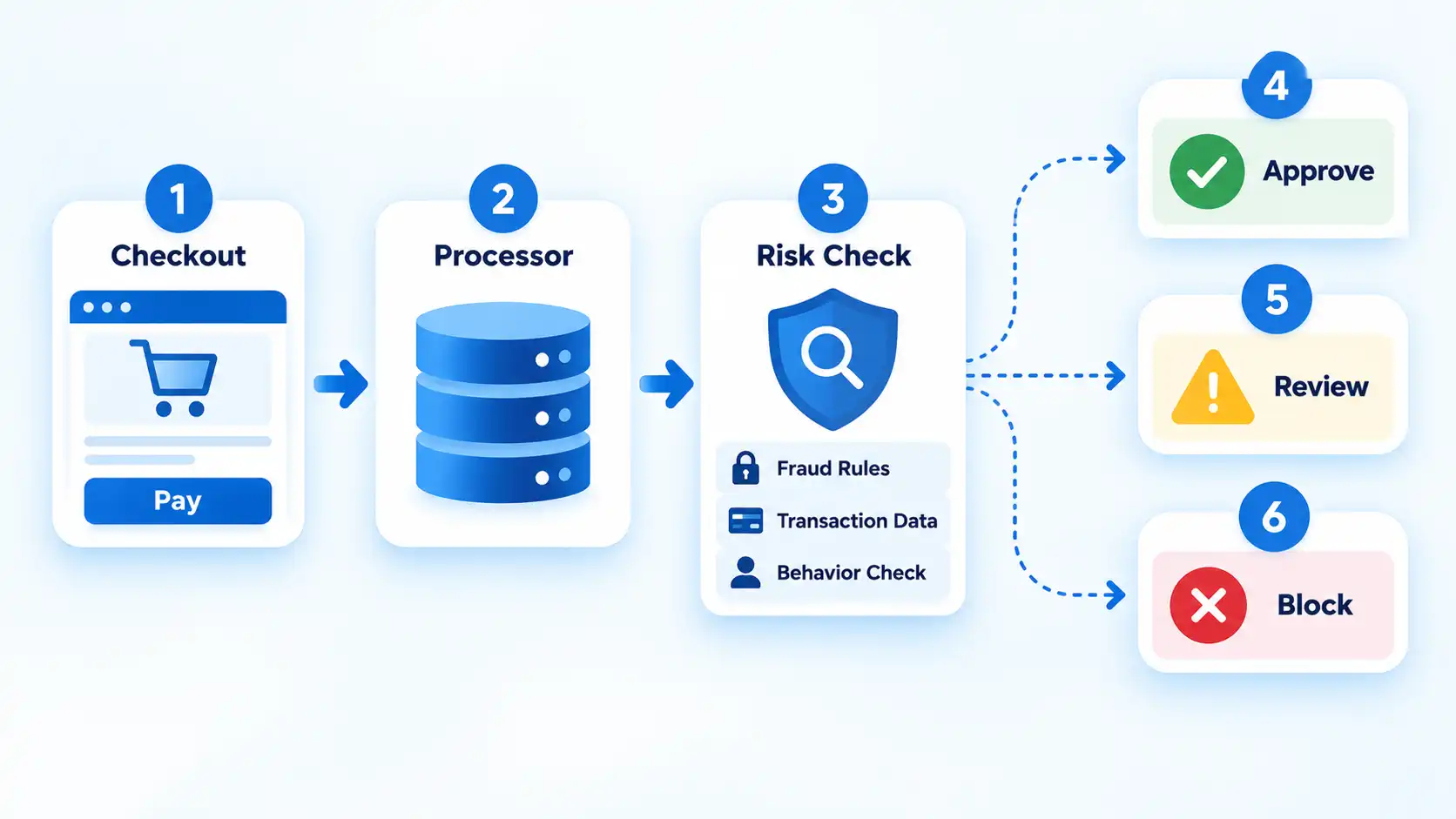
A payment processor or integrated payment service handles parts of the transaction flow supported by the store. A fraud-management layer can evaluate signals around a payment and apply controls such as allowing or blocking a payment, requesting additional authentication, or sending a suspicious transaction for manual review.
For example, Stripe documents that Radar evaluates transaction risk and provides fraud-management controls. Its documentation describes real-time risk evaluation, manual review, lists, and customizable rules that can allow, block, review, or request 3D Secure authentication. Those capabilities illustrate what a fraud-management system can do; they do not establish that one configuration is appropriate for every merchant.
Payment security also carries responsibilities that should not be reduced to installing a plugin. The Payment Card Industry Data Security Standard (PCI DSS) provides baseline technical and operational requirements designed to protect payment account data. PCI SSC identifies merchants, processors, acquirers, issuers, service providers, and other entities that store, process, or transmit cardholder data or can affect the security of the cardholder data environment among the standard’s intended audience.
Outsourcing payment processing can reduce which PCI DSS requirements apply directly to a merchant’s own environment, but it does not automatically eliminate the merchant’s responsibilities. PCI SSC states that merchants using third-party processing remain responsible for matters such as ensuring relevant providers are PCI DSS compliant for the services offered and understanding shared responsibilities.
Fraud controls also involve trade-offs. Aggressive rules may stop suspicious transactions but can also interrupt legitimate purchases. The useful goal is a payment workflow in which risk controls, authentication, manual review, and operational procedures fit the store’s actual transaction profile.
Build around workflows, not the number of apps
The most useful e-commerce stack is not the one with the largest number of subscriptions. It is the one that gives each important workflow a clear system and keeps information moving accurately between those systems.
Start with what your commerce platform already handles. Then look for gaps that create operational problems: stock becoming inaccurate between channels, orders requiring repetitive shipping decisions, support cases losing customer context, lifecycle emails using stale data, analytics missing checkout events, or payment-risk decisions requiring better controls.
As the business grows, specialized software can make sense because a workflow has outgrown the platform’s built-in features. Until that point, adding another application can introduce extra cost, duplicated data, integration maintenance, and another system your team has to learn.
The 11 categories above are therefore better treated as a capability map than a shopping list. Cover the functions your store genuinely needs, connect them carefully, and add specialist tools when the complexity of the work justifies them.

💬 Comments