An MSP cutover that starts with an agent push and a redirected ticket queue usually spends its first quarter on cleanup: a server nobody will claim, a firewall only the outgoing vendor can log into, a backup job that has been failing quietly since spring, and staff who keep emailing the old help desk. Every one of those failures is decided before deployment. That is why pre-deployment deserves gates with stop conditions instead of a handover meeting and a shared spreadsheet.
Each gate asks for evidence a second person can check. When a gate fails, cutover pauses, the gap gets an owner and a date, and the gate is re-tested. That discipline decides whether your provider starts stabilizing the environment in week one or starts by billing you to discover what exists.
Quick Take
- Five gates, in order: asset and shadow-IT map → credential and identity governance → scope, RACI, SLA and escalation → security and disaster-recovery audit → change management and employee rollout.
- Three recurring stop conditions: a business-critical asset with no owner, privileged access that is not vaulted and tested, and backups or support channels that have never been exercised.
- Pass test: every gate produces evidence a reviewer who was not involved can check without asking a question.
- End state: named owners per system and per task, tested access, documented gaps with remediation owners, and a support channel employees have already used successfully.
Before You Start: Collect Seven Inputs
Discovery stalls when the client side is not ready to answer questions. Assemble these seven inputs before the first working session; they become the raw material for every gate that follows.
Prerequisites
- Stakeholder contacts with decision authority, including an executive sponsor who can settle ownership disputes.
- Vendor and contract list covering internet, telecom, cloud, security tooling, line-of-business applications and any current IT provider.
- Whatever inventory already exists, clearly labelled as unverified: spreadsheets, monitoring exports, purchase records, nothing treated as complete.
- Compliance obligations that shape configuration and evidence, such as the standards named in your contracts or industry requirements.
- Known issues and recurring incidents, including the workarounds people use when the proper process fails.
- Access to critical administration consoles: cloud and email administration, DNS management, firewalls and switches, backup platforms, ISP portals.
- Draft scope and service expectations: coverage hours, response targets, escalation expectations, and the duties that will stay in-house.
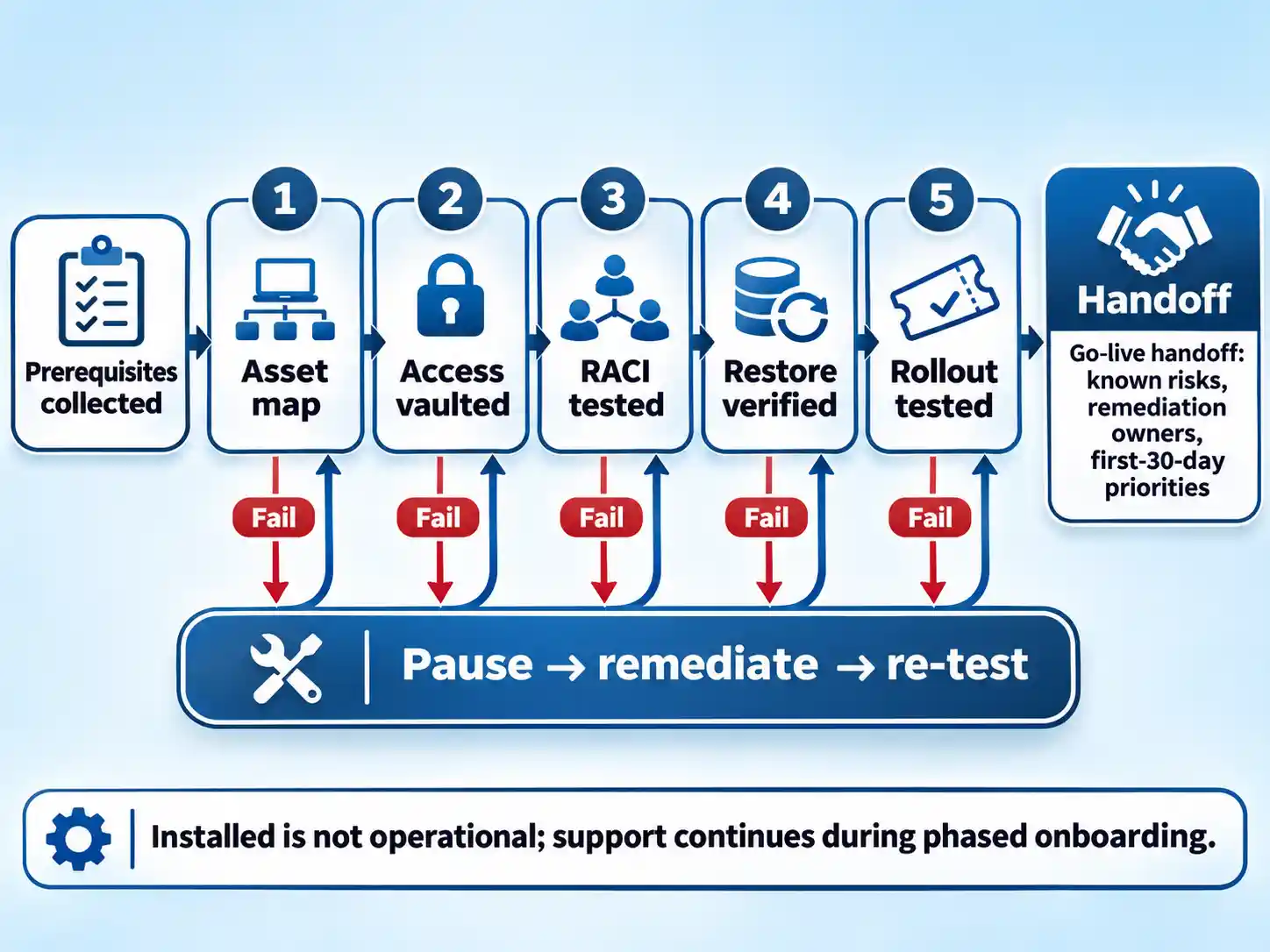
Run the Five Pre-Deployment Gates in Sequence
Work the gates in order. Visibility comes before control, control comes before accountability, accountability comes before verification, and verification comes before any broad employee announcement. Skipping ahead means re-testing work you already paid for.
- Map every asset and shadow-IT account before an agent lands.Build one reconciled inventory covering endpoints and servers, installed software and SaaS subscriptions, firewalls, switches and wireless, cloud tenants, line-of-business applications, administrative accounts, and every vendor with a support contract. Attach a business owner and a criticality rating to each line rather than a bare hostname.Device lists are the easy half; ownership is the hard half. A spreadsheet with hundreds of rows and no named owner looks like progress and behaves like a liability, and an agent installed on a machine nobody claims produces a monitoring blind spot dressed up as coverage. Pull the environment from at least two directions, then reconcile the differences in writing: switch port tables, DHCP leases, endpoint protection consoles, single sign-on application lists, and SaaS renewals in the expense system. Estates spread across several providers need the same discipline extended outward, so How to Prepare for a Multi-Cloud Environment is a sensible follow-on read for cloud-heavy inventories.
The gate passes when every inventoried asset carries an owner and a criticality rating, unknown items carry a named investigator and a due date, and unsupported or end-of-life systems are flagged for tracking rather than quietly absorbed into the fleet.
Asset and shadow-IT discovery areas Discovery area What to record Reconciliation check Endpoints and servers Hostname, operating system and support status, assigned user and department Compare against DHCP leases and the endpoint protection console Software and SaaS Installed applications, subscriptions, licence owner, renewal date and payment method Cross-check the SSO application list against card or expense records Network infrastructure Firewall rules, switch ports, wireless networks, ISP circuits, VPN configuration Match switch port tables to the device list Identity and admin accounts Directory accounts, privileged roles, shared logins, service accounts Reconcile privilege lists against current staff and vendor rosters Vendors and contracts Support providers, contract scope, renewal dates, named contacts Confirm each contract has an internal owner and an end date Undocumented systems Tools someone uses but IT has never supported, including departmental SaaS Ask department leads directly; compare against the approved tool list - Reclaim privileged access into an encrypted vault and enforce MFA.Collect and vault every credential the environment depends on: cloud and email administration consoles, DNS zone management, firewalls and switches, backup platforms, ISP and vendor portals, and SaaS administration consoles. Move them into an encrypted password manager with individual accounts, then remove standing access held by former administrators, the outgoing provider, and vendors who were handed a login and never asked to return it.Two patterns recur. The first is a shared admin login whose password three people know and nobody rotates. The second is access that exists on paper but has never been exercised: the vault entry looks correct until an engineer needs it in the middle of the night and discovers the session times out against a stale tenant. Enforce multi-factor authentication on every critical administration account, apply least privilege from the moment an account is created, and test the emergency path while the old provider is still available to help.
The gate passes when each vault entry maps to a system in the asset map, every privileged account reports MFA as enforced, a break-glass account has been signed into and documented, and any remaining third-party access carries an expiry date and a named internal sponsor.
Credential classes and vault verification before cutover Credential class Typical systems Verification before go-live Cloud and email administration Tenant administration console, mail filtering, collaboration administration Vaulted under a named individual account with MFA enforced DNS and domain administration The console and account that control DNS records and domain settings Written record of who can change records, confirmed with a test record Network devices Firewall, core switch, wireless controller Vaulted credential signs in successfully and the configuration is backed up Backup platforms Backup console, storage and retention settings Access confirmed and deletion authority identified in writing Vendor and ISP portals Circuit portal, software vendor support portals Standing vendor access removed or given a documented expiry date Break-glass accounts Emergency administration account held offline Sign-in tested, location documented, owner recorded - Write down scope, RACI, SLA and the emergency path, then test the path.Put the operating agreement in plain language before cutover: what is included, what is excluded, who patches what, who owns backup monitoring and restore testing, how tickets are triaged, the response window for each severity, the after-hours escalation route, and who can authorize an emergency change. Assign exactly one accountable name per task, with responsible, consulted and informed roles sitting underneath it.RACI is the artifact that makes co-managed IT workable. A matrix whose rows have no single accountable owner produces dropped work; a matrix with no tested escalation route is paperwork with a logo on it. Co-managed IT still requires exactly one accountable party per task, even when three people contribute to the outcome. Where internal IT keeps account administration and the provider owns patching, the matrix has to say so by task, not by slogan.
A second reader from outside both organizations can catch duties that each side quietly assumed the other owned. Multi-site organizations sometimes bring in advisory teams such as Dataprise.com for that review, or regional practices such as IT Consulting Los Angeles CA for complex West Coast hubs. The gate passes when a simulated after-hours incident reaches the accountable person inside the agreed window and the ticket record shows who acknowledged it and when.
Example co-managed RACI boundaries Task Internal IT MSP Single accountable owner Endpoint patching Approves maintenance windows and business exceptions Executes patching and reports compliance Named IT manager Backup monitoring and restore testing Confirms recovery priorities per system Runs restores and supplies the evidence Named MSP service owner User account creation and removal Approves access and notifies of departures Provisions and deprovisions accounts Named IT manager Security alert triage Receives escalations and approves changes Monitors the queue and investigates Named MSP security lead Vendor and contract management Owns relationships and renewals Advises on technical fit and dependencies Named operations director Executive reporting and quarterly review Reviews service performance against targets Produces service and incident reporting Named operations director - Audit security and disaster recovery, and prove a restore.Verify that controls exist and work: multi-factor authentication coverage across administrative and high-risk users, endpoint protection coverage measured against the asset map, patch status, unsupported systems, alert routing into a queue somebody actually watches, backup schedules and success rates, retention settings, and the documented recovery procedure.The decisive test is a restore. Choose a real but non-critical system, restore it to an isolated location, and have the business owner confirm the data is complete and current enough for the stated recovery point. While you have the console open, ask two questions that rarely appear on a checklist: who can delete a backup, and are any copies held somewhere the production credentials cannot reach? A documented schedule without a validated restore is an assumption with a calendar attached. Compliance obligations belong in the same pass. Map what you must satisfy against what the environment can currently evidence, and record every gap with an owner.
The gate passes when each control has evidence attached, one restore has been validated by a business owner, alert routing has been tested end to end, and every unfixed gap is a named risk with an owner and a target date.
Warning
Do not assume a cloud backup is immutable or beyond reach. Ask for the retention policy, deletion authority and any isolated copy in writing, and keep the item on the gap register until someone demonstrates it rather than describes it.
Security and recovery readiness checks Check Evidence to request Pass condition MFA coverage Enrolment report for administrative and high-risk accounts No administrative account remains unenrolled Endpoint protection Console coverage list compared with the asset map Covered devices match the inventory and exceptions are logged Patching and support status Patch compliance report and a list of end-of-life systems Unsupported systems tracked with an owner and a plan Alert routing Test alert delivered to the monitored queue A named responder acknowledges the test Backup jobs Schedule, success rate, retention settings, last failure No unexplained failures inside the review window Restore test Restored system validated by the business owner Data complete and current to the stated recovery point Deletion authority and isolation Written answer on who can delete backups and which copies survive tenant compromise Answer documented, with unresolved gaps carrying an owner Compliance gaps Mapping against the applicable compliance obligations Each gap has an owner and a target date - Announce the change, train the channels, and test adoption.Prepare employees for what they will actually experience: a new place to send problems, more prompts when they sign in, and a different response rhythm. Publish the ticket channels, the severity definitions, the emergency contact and the approval authority. Have an executive send the kickoff message, then repeat it through team leads before cutover, because a single announcement reads as optional.Change programs fail for predictable reasons: no strategic plan, a plan too rigid to absorb feedback, thin communication, resistance nobody identified, and a strategy that fights the culture. The countermeasures are unglamorous: listen for objections in the first week, adjust the rollout sequence, and brief team leads before the general announcement. Roll out by site or department so the first group’s problems get fixed before the second group meets them, and keep the old support path running while the new one is still proving itself.
The gate passes when a non-IT employee has submitted a test ticket through the published channel, the ticket was acknowledged inside the agreed window, and you can name the objections raised in week one and the change you made in response.
- Kickoff message from the executive sponsor, naming the go-live date, the new channel and what changes for staff.
- One-page quick reference showing how to raise a ticket, what counts as urgent, and who to call after hours.
- Escalation card for team leads listing severity definitions, response windows and the emergency route.
- Week-one feedback check with a named owner who logs objections and publishes what changed.
Go/No-Go: The Cutover Decision Table
Read this table with the whole team present and record the decision. A gate that cannot produce its evidence is a pause, regardless of how much work sits behind it.
| Gate | Evidence required | Stop condition | Recovery action |
|---|---|---|---|
| 1. Asset and shadow-IT map | Owned inventory reconciled against network, endpoint and SaaS sources | A business-critical system has no owner | Assign an investigator, set a date, and keep the system on the risk register until closed |
| 2. Credential and identity governance | Vault export list, MFA report, break-glass test record | A critical console has no recoverable credential, or shared admin logins remain in use | Escalate to the account owner or vendor, rotate credentials, re-test before moving on |
| 3. Scope, RACI, SLA and escalation | Signed scope, RACI matrix, record of a simulated escalation | A task has no accountable owner, or the emergency path was never exercised | Reopen the negotiation, name the owner, re-run the simulated escalation |
| 4. Security and disaster-recovery audit | Control evidence, restore test record, gap register | A restore failed, or backups are recoverable only in theory | Pause cutover, remediate or document the exposure, restore again before go-live |
| 5. Change management and rollout | Published support channels, test ticket record, objection log | No employee has successfully used the new channel | Delay the announcement, fix routing, run a second test ticket with a different department |
Verify the result
- Every asset in the inventory has a named owner and a criticality rating.
- Unknown and undocumented systems carry an investigator and a target date.
- Every privileged credential in the vault maps to a system, and MFA is enforced on all critical administration accounts.
- The break-glass account has been signed into and its location is documented.
- Each RACI row names one accountable person, and a simulated after-hours escalation reached them inside the agreed window.
- A real restore has been completed and validated by the business owner of that system.
- Alerts route to a monitored queue that acknowledged a test notification.
- A non-IT employee’s test ticket was acknowledged inside the published response window.
- Known risks, open remediation items and first-30-day priorities are written down with named owners.
Troubleshooting: When a Gate Fails
The restore test fails or finishes with missing data
A green job-success dashboard describes completed transfers rather than recoverable systems, so it proves very little. Fix the immediate cause, identify the last known-good recovery point for that system, and restore again with the business owner validating the data. If a business-critical system has no valid restore at all, escalate it as an inherited risk in writing and set its remediation ahead of broad agent deployment. You cannot hand over recovery responsibility for something that cannot yet be recovered.
A critical console has no recoverable credential
The credential is usually held by the outgoing provider, a former administrator or a vendor who was given permanent access. Request an access transfer in writing with a deadline, use the vendor’s supported account-recovery process where one exists, rotate the credential the moment you receive it, and log the delay as a named risk with an owner. Do not install agents on systems you cannot administer, because every one of them becomes a support case your provider cannot close.
Nobody will accept ownership of a system
Ownership ambiguity between departments halts gate one and quietly reappears at every later stage. Assign a temporary accountable owner at director level, set a firm decision date, and keep the item on the register until someone formally accepts it. A system without an owner has no authority for change approval, no budget line and no recovery priority, which makes it the first thing to fail under pressure.
Tickets vanish or route to the wrong queue after cutover
This usually means routing was only tested with IT’s own accounts, which tend to carry permissions and group memberships that ordinary staff do not. Ask two non-IT employees to submit tickets through each published channel, then inspect triage, priority assignment, acknowledgement timing and the queue for orphaned items. Confirm the after-hours path separately, since it often follows a different route than the business-hours one.
Staff keep using the old help desk or emailing individuals
Familiarity beats instruction, so expect a drift period. Have leadership restate the channel, set an auto-reply on the old mailbox that redirects to the new one for a defined period, and give team leads a short script for the questions they will field. Track ticket volume by department during week one; a team with near-zero tickets either has no problems or has not adopted the channel, and the second option is far more likely.
Handoff Into Steady-State Support
Cutover closes the discovery phase and opens steady-state delivery, so finish the pre-deployment work with a handoff pack the operations team can use without re-interviewing anyone: the known risks inherited from the previous setup, the open remediation items with owners and dates, the finalized support contacts and escalation routes, the priorities for the opening weeks, and the reporting cadence your leadership will hold the provider to during quarterly reviews.
The verdict worth carrying into the signing meeting is simple. An MSP can only manage what it can see, support what it can access, and be accountable for what somebody has named. Prove those three things across five gates before agents go live, and the first quarter of the contract buys stabilization instead of archaeology.

💬 Comments